containerd/containerd
GitHub: containerd/containerd
CNCF 毕业级项目,工业级标准容器运行时,管理容器完整生命周期并为 Kubernetes 提供原生 CRI 支持。
Stars: 20840 | Forks: 3972


[](https://pkg.go.dev/github.com/containerd/containerd/v2)
[](https://github.com/containerd/containerd/actions?query=workflow%3ACI+event%3Amerge_group)
[](https://github.com/containerd/containerd/actions?query=workflow%3ANightly)
[](https://goreportcard.com/report/github.com/containerd/containerd/v2)
[](https://bestpractices.coreinfrastructure.org/projects/1271)
[](https://scorecard.dev/viewer/?uri=github.com/containerd/containerd)
[](https://github.com/containerd/containerd/actions/workflows/links.yml)
containerd 是一个工业级的标准容器 runtime,强调简单性、健壮性和可移植性。它作为 Linux 和 Windows 的守护进程(daemon)使用,可以管理其主机系统的完整容器生命周期:镜像传输和存储、容器执行和监督、底层存储和网络附件等。
containerd 是 CNCF 的成员,拥有[“毕业”](https://landscape.cncf.io/?selected=containerd)地位。
containerd 旨在嵌入到更大的系统中,而不是直接供开发者或最终用户使用。
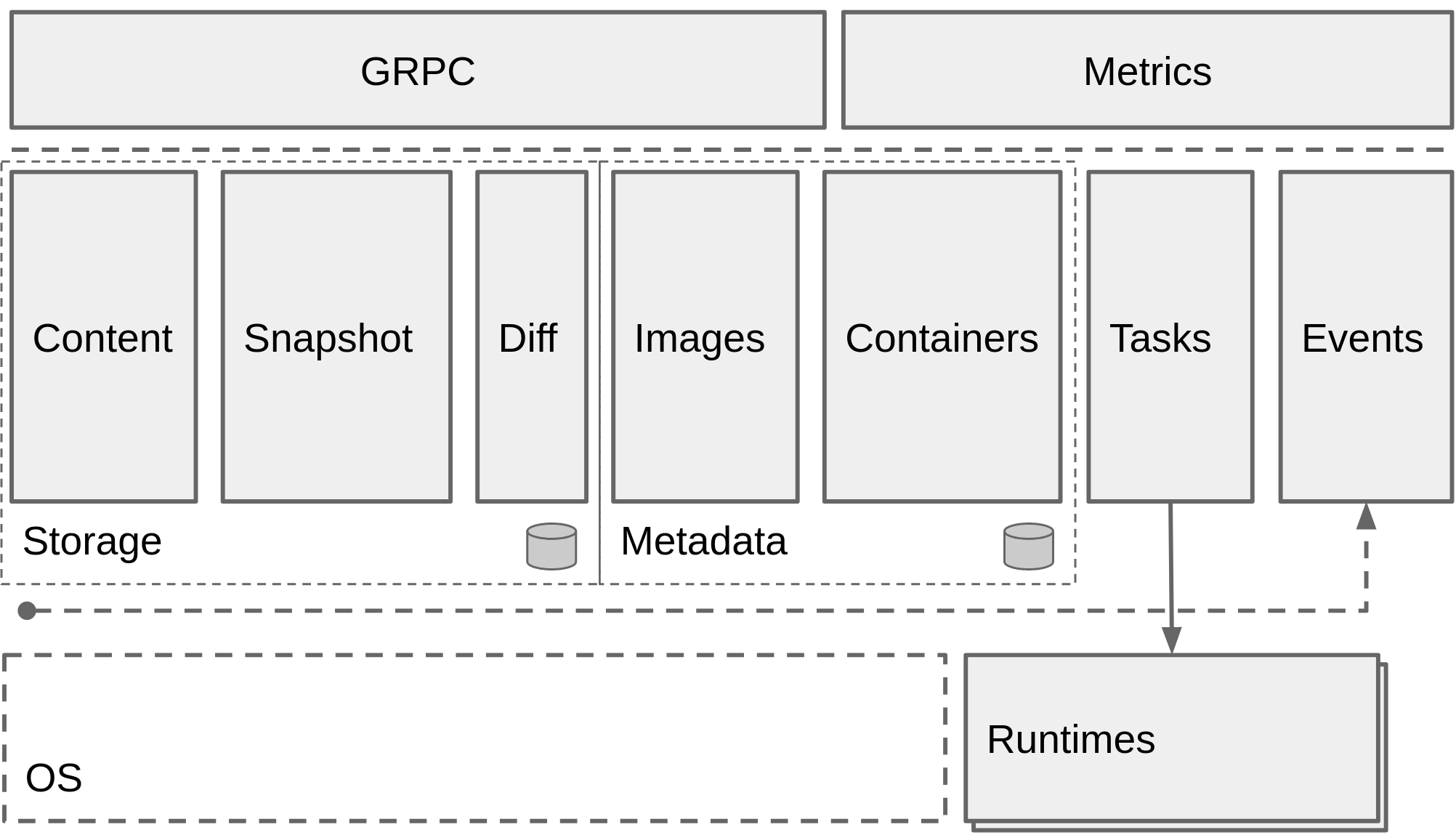
## 公告
### containerd v2.0 现已发布!
请参阅 [`docs/containerd-2.0.md`](docs/containerd-2.0.md)。
### 正在招募
我们是一个大型且包容的 OSS(开源软件)项目,欢迎任何形式和种类的帮助:
* 需要文档方面的帮助,以使产品更易于使用和扩展。
* 我们需要 OSS 社区外联/组织方面的帮助来传播消息;管理
并创建消息传递和教育内容;以及协助处理社交媒体、社区论坛/群组和 Google Groups。
* 我们诚邀新的[安全顾问](https://github.com/containerd/project/blob/main/GOVERNANCE.md#security-advisors)加入团队。
* 正在创建新的子项目,包括核心和非核心项目,这些项目需要额外的开发帮助。
* 每个 [containerd 项目](https://github.com/containerd)都有一列目前正在处理或需要帮助解决的问题。
- 如果该问题尚未分配给某人或最近没有进展,而您又感兴趣,请咨询。
- 如果您有兴趣从较小/初级的问题开始,请查找带有 `exp/beginner` 标签的问题,例如 [containerd/containerd 初级问题](https://github.com/containerd/containerd/issues?q=is%3Aissue+is%3Aopen+label%3Aexp%2Fbeginner)。
## 入门指南
请参阅我们在 [containerd.io](https://containerd.io) 上的文档:
* [面向运维和管理员](docs/ops.md)
* [命名空间](docs/namespaces.md)
* [客户端选项](docs/client-opts.md)
要开始为 containerd 做贡献,请参阅 [CONTRIBUTING](CONTRIBUTING.md)。
如果您有兴趣试用 containerd,请参阅 [入门指南](docs/getting-started.md) 中的示例。
## 每日构建 (Nightly builds)
可在[此处](https://github.com/containerd/containerd/actions?query=workflow%3ANightly)下载每日构建版本。
二进制文件每晚从 `main` 分支为 `Linux` 和 `Windows` 生成。
请注意:每日构建可能包含严重错误,不建议用于生产环境,且不提供支持。
## Kubernetes (k8s) CI 仪表板组
[containerd 的 k8s CI 仪表板组](https://testgrid.k8s.io/containerd)包含针对 main 分支和多个 containerd 发布分支运行时
Kubernetes 健康状况的测试结果。
- [containerd-periodics](https://testgrid.k8s.io/containerd-periodic)
## 运行时要求
containerd 的运行时要求非常低。大多数与 Linux 和 Windows 容器功能集的交互是通过 [runc](https://github.com/opencontainers/runc) 和/或
特定于操作系统的库(例如 Microsoft 的 [hcsshim](https://github.com/Microsoft/hcsshim))处理的。
当前所需的 `runc` 版本在 [RUNC.md](docs/RUNC.md) 中有描述。
containerd 核心代码和快照器使用的特定功能在 Linux 上需要最低版本的内核。
考虑到发行版内核版本控制的已知说明,Linux 的合理起点是最低 4.x 内核版本。
默认使用的 overlay 文件系统快照器使用了在 4.x 内核系列中最终确定的功能。如果您选择使用 btrfs,在内核版本上可能有更大的灵活性(建议最低为 3.18),但需要在您的 Linux 发行版上安装 btrfs 内核模块和 btrfs 工具。
要使用 Linux 检查点和恢复功能,您需要在系统上安装 `criu`。更多详情请参阅 [Checkpoint and Restore](#checkpoint-and-restore)。
面向开发者的构建要求列在 [BUILDING](BUILDING.md) 中。
## 支持的 Registry
任何符合 [OCI Distribution Specification](https://github.com/opencontainers/distribution-spec) 的 registry 均被 containerd 支持。
有关配置 registry,请参阅 [registry 主机配置文档](docs/hosts.md)
## 功能特性
有关 containerd 核心概念及其支持的功能的详细概述,
请参阅 [FEATURES.MD](./docs/features.md) 文档。
### 发布版本和 API 稳定性
有关 containerd 组件的版本控制和稳定性的详情,
请参阅 [RELEASES.md](RELEASES.md)。
所有官方版本的可下载 64 位 Intel/AMD 二进制文件均可在我们的
[发布页面](https://github.com/containerd/containerd/releases)上找到。
对于其他架构和发行版支持,您会发现许多 Linux 发行版打包了自己的 containerd 并在多个架构上提供,
例如 [Canonical 的 Ubuntu 打包](https://launchpad.net/ubuntu/bionic/+package/containerd)。
#### 启用命令自动补全
从 containerd 1.4 开始,已启用用于自动创建 bash 和 zsh 自动补全数据的 urfave 客户端功能。例如,要在 bash shell 中使用自动补全功能,请将 autocomplete/ctr 文件 source 到您的 `.bashrc` 中,或者像这样手动操作:
```
$ source ./contrib/autocomplete/ctr
```
#### `ctr` 自动补全在 bash 和 zsh 中的分发
对于 bash,将 `contrib/autocomplete/ctr` 脚本复制到
`/etc/bash_completion.d/` 并将其重命名为 `ctr`。同时也提供 `zsh_autocomplete`
文件,zsh 用户可以类似地使用它。
如果您没有将自动补全文件放置在用户 shell 环境自动加载的位置,
请向用户提供文档说明如何将此文件 source 到他们的 shell 中。
### CRI
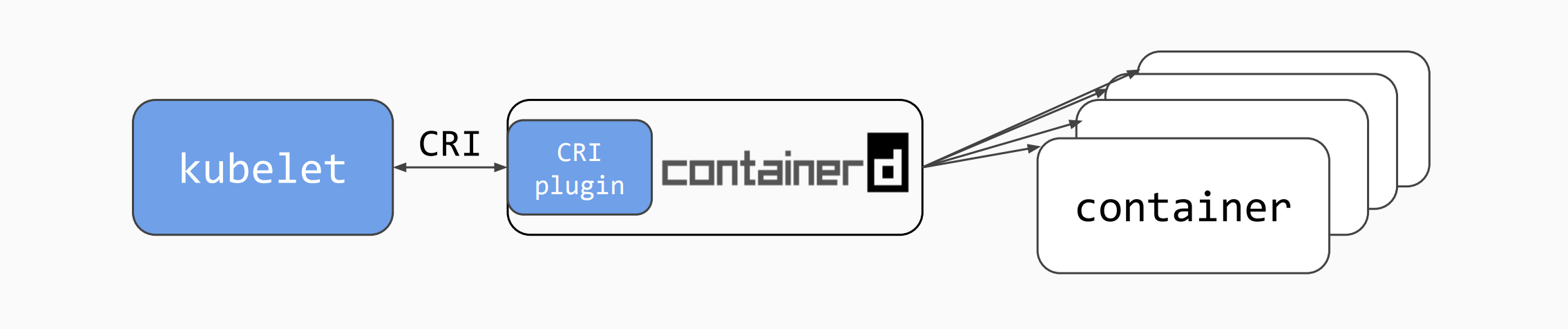
`cri` 是 Kubernetes [容器运行时接口 (CRI)](https://github.com/kubernetes/cri-api/blob/master/pkg/apis/runtime/v1/api.proto) 的 [containerd](https://containerd.io/) 插件实现。通过它,您可以将 containerd 用作 Kubernetes 集群的容器运行时。
#### CRI 状态
`cri` 是 containerd 的原生插件。自 containerd 1.1 起,cri 插件内置于发布二进制文件中并默认启用。
`cri` 插件已达到 GA(正式发布)状态,这代表它:
* 功能完整
* 适用于 Kubernetes 1.10 及更高版本
* 通过所有 [CRI 验证测试](https://github.com/kubernetes/community/blob/master/contributors/devel/sig-node/cri-validation.md)。
* 通过所有 [节点 e2e 测试](https://github.com/kubernetes/community/blob/master/contributors/devel/sig-node/e2e-node-tests.md)。
* 通过所有 [e2e 测试](https://github.com/kubernetes/community/blob/master/contributors/devel/sig-testing/e2e-tests.md)。
请在 containerd k8s [测试仪表板](https://testgrid.k8s.io/containerd)上查看结果
#### 验证您的 `cri` 设置
Kubernetes 孵化器项目 [cri-tools](https://github.com/kubernetes-sigs/cri-tools) 包含用于测试 CRI 实现的程序。更重要的是,cri-tools 包含程序 `critest`,用于运行 [CRI 验证测试](https://github.com/kubernetes/community/blob/master/contributors/devel/sig-node/cri-validation.md)。
#### CRI 指南
* [使用 Ansible 和 Kubeadm 安装](contrib/ansible/README.md)
* [面向非 Ansible 用户,使用发布包和 Kubeadm 执行自定义安装](docs/getting-started.md)
* [CRI 插件测试指南](./docs/cri/testing.md)
* [使用 `crictl` 调试 Pod、容器和镜像](./docs/cri/crictl.md)
* [配置 `cri` 插件](./docs/cri/config.md)
* [配置 containerd](https://github.com/containerd/containerd/blob/main/docs/man/containerd-config.8.md)
### 交流
对于异步通信和长期讨论,请在 GitHub 仓库上使用 issues 和 pull requests。
这将是讨论设计和实现的最佳场所。
对于同步通信,请在云原生计算基金会 (CNCF) 的 Slack —— `cloud-native.slack.com` 上的 `#containerd` 和 `#containerd-dev` Slack 频道中找到我们。欢迎大家加入并聊天。[获取 CNCF Slack 邀请](https://slack.cncf.io)。
参加我们在 Zoom 上主持的下一次社区会议。时间表发布在 [CNCF 日历](https://www.cncf.io/calendar/)上(搜索“containerd”进行过滤)。
### 安全审计
containerd 项目的安全审计托管在我们的网站上。请参阅 [containerd.io 的安全页面](https://containerd.io/security/)了解更多信息。
### 报告安全问题
请遵循 [containerd/project](https://github.com/containerd/project/blob/main/SECURITY.md#reporting-a-vulnerability) 上的说明
## 许可证
containerd 代码库在 [Apache 2.0 许可证](LICENSE)下发布。
README.md 文件和“docs”文件夹中的文件根据
Creative Commons Attribution 4.0 International License 获得许可。您可以获取
标题为 CC-BY-4.0 的许可证副本,网址为 http://creativecommons.org/licenses/by/4.0/。
## 项目详情
**containerd** 是更广泛的 containerd GitHub 组织中的主要开源项目。
但是,仓库中的所有项目都有共同的维护、治理和贡献
指南,这些指南存储在一个 `project` 仓库中,供所有 containerd 项目通用。
请找到所有这些核心项目文档,包括:
* [项目治理](https://github.com/containerd/project/blob/main/GOVERNANCE.md),
* [维护者](https://github.com/containerd/project/blob/main/MAINTAINERS),
* 和[贡献指南](https://github.com/containerd/project/blob/main/CONTRIBUTING.md)
信息位于我们的 [`containerd/project`](https://github.com/containerd/project) 仓库中。
## 采用
有兴趣看看谁在使用 containerd 吗?您是否在项目中使用 containerd?
请通过 pull request 将您自己添加到我们的 [ADOPTERS.md](./ADOPTERS.md) 文件中。
标签:CNCF, DNS解析, Docker, EVTX分析, EVTX分析, Go语言, NIDS, OCI标准, Python工具, web渗透, 基础设施, 守护进程, 安全防御评估, 容器化, 容器生命周期管理, 容器编排, 容器运行时, 开源项目, 日志审计, 服务端, 程序破解, 系统底层, 虚拟化, 镜像管理