rathole-org/rathole
GitHub: rathole-org/rathole
一个用 Rust 编写的高性能 NAT 穿透反向代理,用于将内网服务安全地暴露到公网。
Stars: 13780 | Forks: 784
# rathole

[](https://github.com/rapiz1/rathole/stargazers)
[](https://github.com/rapiz1/rathole/releases)

[](https://github.com/rapiz1/rathole/releases)
[](https://hub.docker.com/r/rapiz1/rathole)
[](https://gitter.im/rapiz1/rathole?utm_source=badge&utm_medium=badge&utm_campaign=pr-badge&utm_content=badge)
[English](README.md) | [简体中文](README-zh.md)
一个用 Rust 编写的安全、稳定且高性能的 NAT 穿透反向代理
rathole,就像 [frp](https://github.com/fatedier/frp) 和 [ngrok](https://github.com/inconshreveable/ngrok) 一样,可以通过一台拥有公网 IP 的服务器,将 NAT 后设备上的服务暴露到互联网上。
- [rathole](#rathole)
- [功能特性](#features)
- [快速入门](#quickstart)
- [配置](#configuration)
- [日志](#logging)
- [调优](#tuning)
- [性能测试](#benchmark)
- [规划](#planning)
## 功能特性
- **高性能** 相比 frp,rathole 能实现高得多的吞吐量,在处理大量连接时也更加稳定。请参阅 [Benchmark](#benchmark)
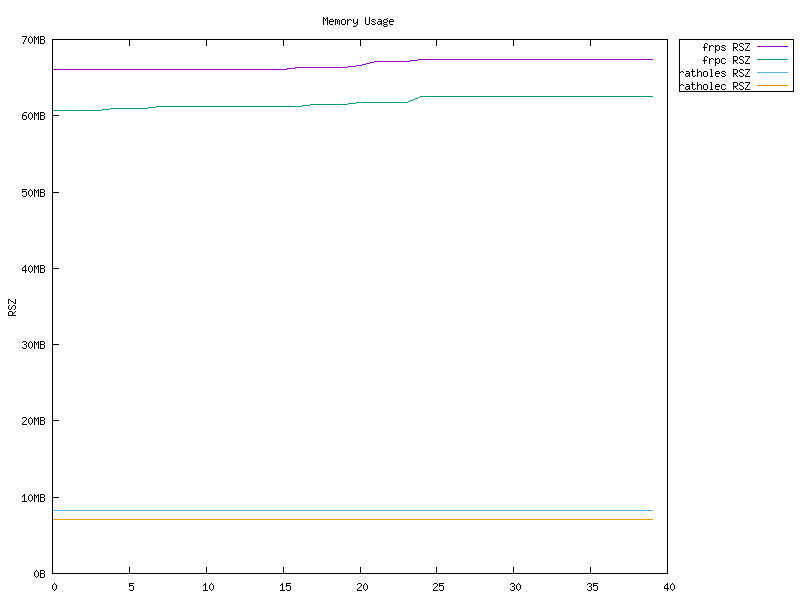
- **低资源占用** 相比同类工具,内存消耗要少得多。请参阅 [Benchmark](#benchmark)。[二进制文件可以](docs/build-guide.md) **小至 ~500KiB**,以适应路由器等嵌入式设备的限制。
- **安全性** 服务的 token 是强制且按服务区分的。服务器和客户端负责各自的配置。借助可选的 Noise Protocol,可以轻松配置加密。无需创建自签名证书!同时也支持 TLS。
- **热重载** 可以通过热重载配置文件来动态添加或移除服务。HTTP API 正在开发中。
## 快速入门
你可以从 [release](https://github.com/rapiz1/rathole/releases) 页面获取功能完整的 `rathole`。或者针对其他平台以及为了最小化二进制文件[从源码构建](docs/build-guide.md)。同时也提供 [Docker 镜像](https://hub.docker.com/r/rapiz1/rathole)。
`rathole` 的使用方法与 frp 非常相似。如果你有使用后者的经验,那么配置对你来说非常容易。唯一的区别是服务的配置被拆分到了客户端和服务器端,并且 token 是必须的。
要使用 `rathole`,你需要一台拥有公网 IP 的服务器,以及一台位于 NAT 后、有一些需要暴露到互联网的服务的设备。
假设你家里有一台位于 NAT 后的 NAS,并且想将其 ssh 服务暴露到互联网:
1. 在拥有公网 IP 的服务器上
使用以下内容创建 `server.toml`,并根据你的需求进行调整。
```
# server.toml
[server]
bind_addr = "0.0.0.0:2333" # `2333` specifies the port that rathole listens for clients
[server.services.my_nas_ssh]
token = "use_a_secret_that_only_you_know" # Token that is used to authenticate the client for the service. Change to an arbitrary value.
bind_addr = "0.0.0.0:5202" # `5202` specifies the port that exposes `my_nas_ssh` to the Internet
```
然后运行:
```
./rathole server.toml
```
2. 在位于 NAT 后的主机(你的 NAS)上
使用以下内容创建 `client.toml`,并根据你的需求进行调整。
```
# client.toml
[client]
remote_addr = "myserver.com:2333" # The address of the server. The port must be the same with the port in `server.bind_addr`
[client.services.my_nas_ssh]
token = "use_a_secret_that_only_you_know" # Must be the same with the server to pass the validation
local_addr = "127.0.0.1:22" # The address of the service that needs to be forwarded
```
然后运行:
```
./rathole client.toml
```
3. 现在,客户端将尝试连接到服务器 `myserver.com` 的 `2333` 端口,所有发往 `myserver.com:5202` 的流量都会被转发到客户端的 `22` 端口。
所以你可以通过 `ssh myserver.com:5202` 来 SSH 到你的 NAS。
要在 Linux 上以后台服务的方式运行 `rathole`,请查看 [systemd 示例](./examples/systemd)。
## 配置
如果配置文件中只存在 `[server]` 和 `[client]` 中的一个区块(如 [快速入门](#quickstart) 中的示例),`rathole` 可以根据配置文件的内容自动决定运行在服务器模式还是客户端模式。
但是,`[client]` 和 `[server]` 区块也可以放在一个文件中。然后在服务器端运行 `rathole --server config.toml`,在客户端运行 `rathole --client config.toml`,以显式告知 `rathole` 运行模式。
在查看完整的配置规范之前,建议先浏览 [配置示例](./examples),以对配置格式有个大致的了解。
有关加密和 `transport` 区块的更多详情,请参阅 [Transport](./docs/transport.md)。
以下是完整的配置规范:
```
[client]
remote_addr = "example.com:2333" # Necessary. The address of the server
default_token = "default_token_if_not_specify" # Optional. The default token of services, if they don't define their own ones
heartbeat_timeout = 40 # Optional. Set to 0 to disable the application-layer heartbeat test. The value must be greater than `server.heartbeat_interval`. Default: 40 seconds
retry_interval = 1 # Optional. The interval between retry to connect to the server. Default: 1 second
[client.transport] # The whole block is optional. Specify which transport to use
type = "tcp" # Optional. Possible values: ["tcp", "tls", "noise"]. Default: "tcp"
[client.transport.tcp] # Optional. Also affects `noise` and `tls`
proxy = "socks5://user:passwd@127.0.0.1:1080" # Optional. The proxy used to connect to the server. `http` and `socks5` is supported.
nodelay = true # Optional. Determine whether to enable TCP_NODELAY, if applicable, to improve the latency but decrease the bandwidth. Default: true
keepalive_secs = 20 # Optional. Specify `tcp_keepalive_time` in `tcp(7)`, if applicable. Default: 20 seconds
keepalive_interval = 8 # Optional. Specify `tcp_keepalive_intvl` in `tcp(7)`, if applicable. Default: 8 seconds
[client.transport.tls] # Necessary if `type` is "tls"
trusted_root = "ca.pem" # Necessary. The certificate of CA that signed the server's certificate
hostname = "example.com" # Optional. The hostname that the client uses to validate the certificate. If not set, fallback to `client.remote_addr`
[client.transport.noise] # Noise protocol. See `docs/transport.md` for further explanation
pattern = "Noise_NK_25519_ChaChaPoly_BLAKE2s" # Optional. Default value as shown
local_private_key = "key_encoded_in_base64" # Optional
remote_public_key = "key_encoded_in_base64" # Optional
[client.transport.websocket] # Necessary if `type` is "websocket"
tls = true # If `true` then it will use settings in `client.transport.tls`
[client.services.service1] # A service that needs forwarding. The name `service1` can change arbitrarily, as long as identical to the name in the server's configuration
type = "tcp" # Optional. The protocol that needs forwarding. Possible values: ["tcp", "udp"]. Default: "tcp"
token = "whatever" # Necessary if `client.default_token` not set
local_addr = "127.0.0.1:1081" # Necessary. The address of the service that needs to be forwarded
nodelay = true # Optional. Override the `client.transport.nodelay` per service
retry_interval = 1 # Optional. The interval between retry to connect to the server. Default: inherits the global config
[client.services.service2] # Multiple services can be defined
local_addr = "127.0.0.1:1082"
[server]
bind_addr = "0.0.0.0:2333" # Necessary. The address that the server listens for clients. Generally only the port needs to be change.
default_token = "default_token_if_not_specify" # Optional
heartbeat_interval = 30 # Optional. The interval between two application-layer heartbeat. Set to 0 to disable sending heartbeat. Default: 30 seconds
[server.transport] # Same as `[client.transport]`
type = "tcp"
[server.transport.tcp] # Same as the client
nodelay = true
keepalive_secs = 20
keepalive_interval = 8
[server.transport.tls] # Necessary if `type` is "tls"
pkcs12 = "identify.pfx" # Necessary. pkcs12 file of server's certificate and private key
pkcs12_password = "password" # Necessary. Password of the pkcs12 file
[server.transport.noise] # Same as `[client.transport.noise]`
pattern = "Noise_NK_25519_ChaChaPoly_BLAKE2s"
local_private_key = "key_encoded_in_base64"
remote_public_key = "key_encoded_in_base64"
[server.transport.websocket] # Necessary if `type` is "websocket"
tls = true # If `true` then it will use settings in `server.transport.tls`
[server.services.service1] # The service name must be identical to the client side
type = "tcp" # Optional. Same as the client `[client.services.X.type]
token = "whatever" # Necessary if `server.default_token` not set
bind_addr = "0.0.0.0:8081" # Necessary. The address of the service is exposed at. Generally only the port needs to be change.
nodelay = true # Optional. Same as the client
[server.services.service2]
bind_addr = "0.0.0.1:8082"
```
### 日志
`rathole` 与许多其他 Rust 程序一样,使用环境变量来控制日志级别。可用的级别包括 `info`、`warn`、`error`、`debug`、`trace`。
```
RUST_LOG=error ./rathole config.toml
```
将仅以 `error` 级别运行 `rathole`。
如果未设置 `RUST_LOG`,默认的日志级别为 `info`。
### 调优
从 v0.4.7 版本起,rathole 默认启用 TCP_NODELAY,这应该有利于降低延迟和改善 rdp、Minecraft 服务器等交互式应用的体验。但是,这会略微降低带宽。
如果带宽更重要,可以通过设置 `nodelay = false` 来禁用 TCP_NODELAY。
## 性能测试
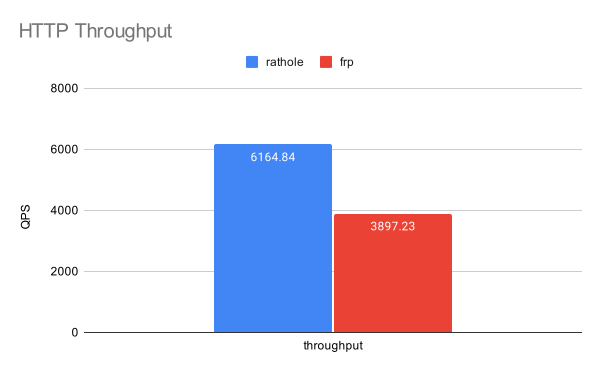
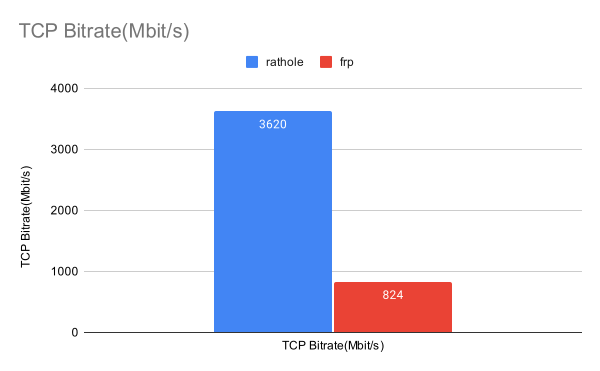
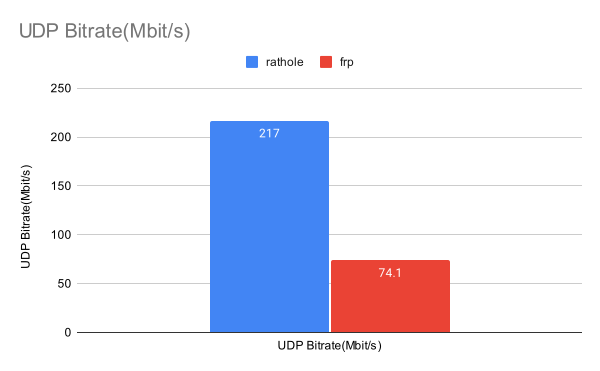
rathole 的延迟与 [frp](https://github.com/fatedier/frp) 相似,但可以处理更多的连接,提供更大的带宽,且内存占用更低。
有关更多详情,请参阅单独的页面 [Benchmark](./docs/benchmark.md)。
**不过,不要据此认为 `rathole` 能神奇地将你转发的服务速度提升好几倍。** 该基准测试是在本地回环网络上进行的,反映了任务受 CPU 限制时的性能表现。如果网络不是瓶颈,用户可以获得显著的提升。遗憾的是,这对许多用户来说并不现实。在这种情况下,主要的好处是更低的资源消耗,而带宽和延迟可能不会有显著改善。
## 规划
- [ ] 用于配置的 HTTP API
[不在范围内](./docs/out-of-scope.md) 列出了不计划实现的功能及其原因。
标签:Docker, frp 替代, IP 地址批量处理, JSONLines, LangChain, NAT 穿透, ngrok 替代, Rust, TCP/UDP 代理, 二进制发布, 低资源消耗, 内网穿透, 反向代理, 可视化界面, 安全防御评估, 嵌入式设备, 底层编程, 开源工具, 端口转发, 网络安全, 网络流量审计, 网络隧道, 请求拦截, 轻量级, 边界穿透, 远程访问, 通知系统, 隐私保护, 零信任