Yamato-Security/hayabusa-rules
GitHub: Yamato-Security/hayabusa-rules
专注于 Windows 事件日志检测的精选 Sigma 规则库,通过去抽象化字段和优化逻辑降低误报,主要用于 Hayabusa 和 Velociraptor 的威胁狩猎与取证分析。
Stars: 219 | Forks: 29

[
English ] | [
日本語]
# 关于 Hayabusa-Rules
这是一个包含精选 sigma 规则的存储库,用于检测 Windows 事件日志中的攻击。
它主要用于 [Hayabusa](https://github.com/Yamato-Security/hayabusa) 检测规则和配置文件,以及 [Velociraptor](https://github.com/Velocidex/velociraptor) 的内置 sigma 检测。
与 [上游 sigma 存储库](https://github.com/SigmaHQ/sigma) 相比,使用此存储库的优势在于我们仅包含大多数支持 sigma 的工具应该能够解析的规则。
我们还通过向规则添加必要的 `Channel`、`EventID` 等字段来对 `logsource` 字段进行去抽象化,以便更容易理解规则正在过滤的内容,更重要的是减少误报。
我们还使用转换后的字段名称和值创建新规则,针对 `process_creation` 规则和基于 `registry` 的规则,以便 sigma 规则不仅在 Sysmon 日志上检测,而且在内置 Windows 日志上也能检测。
# 配套项目
* [EnableWindowsLogSettings](https://github.com/Yamato-Security/EnableWindowsLogSettings) - 用于正确启用 Windows 事件日志的文档和脚本。
* [Hayabusa](https://github.com/Yamato-Security/hayabusa) - 基于 sigma 的 Windows 事件日志威胁狩猎和快速取证时间线生成器。
* [Hayabusa Encoded Rules](https://github.com/Yamato-Security/hayabusa-encoded-rules) - 与此存储库相同,但规则和配置文件存储在一个文件中并进行 XOR 处理,以防止防病毒软件产生误报。
* [Hayabusa EVTX](https://github.com/Yamato-Security/hayabusa-evtx) - `evtx` crate 的一个维护更积极的分支。
* [Hayabusa Sample EVTXs](https://github.com/Yamato-Security/hayabusa-sample-evtx) - 用于测试 Hayabusa/Sigma 检测规则的示例 evtx 文件。
* [Presentations](https://github.com/Yamato-Security/Presentations) - 我们举办的关于工具和资源的演讲演示文稿。
* [Sigma to Hayabusa Converter](https://github.com/Yamato-Security/sigma-to-hayabusa-converter) - 将基于上游 Windows 事件日志的 Sigma 规则整理为更易于使用的形式。
* [Takajo](https://github.com/Yamato-Security/takajo) - Hayabusa 结果分析器。
* [WELA (Windows Event Log Analyzer)](https://github.com/Yamato-Security/WELA) - 用 PowerShell 编写的 Windows 事件日志分析器。(已弃用并被 Takajo 取代。)
# 目录
- [关于 Hayabusa-Rules](#about-hayabusa-rules)
- [配套项目](#companion-projects)
- [目录](#table-of-contents)
- [关于创建规则文件](#about-creating-rule-files)
- [规则文件格式](#rule-file-format)
- [缩写](#abbreviations)
- [Detection 字段](#detection-field)
- [Selection 基础](#selection-fundamentals)
- [如何编写 AND 和 OR 逻辑](#how-to-write-and-and-or-logic)
- [Eventkeys](#eventkeys)
- [Eventkey 别名](#eventkey-aliases)
- [注意:未定义的 Eventkey 别名](#caution-undefined-eventkey-aliases)
- [如何在条件中使用 XML 属性](#how-to-use-xml-attributes-in-conditions)
- [grep 搜索](#grep-search)
- [EventData](#eventdata)
- [EventData 中的异常模式](#abnormal-patterns-in-eventdata)
- [输出具有相同名称的多个字段名称的字段数据](#outputting-field-data-from-multiple-field-names-with-the-same-name)
- [字段修饰符](#field-modifiers)
- [支持的 Sigma 字段修饰符](#supported-sigma-field-modifiers)
- [已弃用的字段修饰符](#deprecated-field-modifiers)
- [Expand 字段修饰符](#expand-field-modifiers)
- [通配符](#wildcards)
- [null 关键字](#null-keyword)
- [condition](#condition)
- [not 逻辑](#not-logic)
- [Sigma correlations](#sigma-correlations)
- [事件计数规则](#event-count-rules)
- [事件计数规则示例:](#event-count-rule-example)
- [事件计数关联规则:](#event-count-correlation-rule)
- [登录失败 - 密码错误规则:](#failed-logon---incorrect-password-rule)
- [已弃用的 `count` 规则示例:](#deprecated-count-rule-example)
- [事件计数规则输出:](#event-count-rule-output)
- [值计数规则](#value-count-rules)
- [值计数规则示例:](#value-count-rule-example)
- [值计数关联规则:](#value-count-correlation-rule)
- [值计数登录失败(不存在用户)规则:](#value-count-logon-failure-non-existant-user-rule)
- [已弃用的 `count` 修饰符规则:](#deprecated-count-modifier-rule)
- [值计数规则输出:](#value-count-rule-output)
- [时间邻近规则](#temporal-proximity-rules)
- [时间邻近规则示例:](#temporal-proximity-rule-example)
- [时间邻近关联规则:](#temporal-proximity-correlation-rule)
- [有序时间邻近规则](#ordered-temporal-proximity-rules)
- [有序时间邻近规则示例:](#ordered-temporal-proximity-rule-example)
- [有序时间邻近关联规则:](#ordered-temporal-proximity-correlation-rule)
- [关于关联规则的说明](#notes-on-correlation-rules)
- [已弃用的功能](#deprecated-features)
- [已弃用的特殊关键字](#deprecated-special-keywords)
- [regexes 和 allowlist 关键字示例文件](#regexes-and-allowlist-keyword-sample-files)
- [已弃用的聚合条件 (`count` 规则)](#deprecated-aggregation-conditions-count-rules)
- [基础](#basics)
- [聚合条件的四种模式](#four-patterns-for-aggregation-conditions)
- [模式 1 示例](#pattern-1-example)
- [模式 2 示例](#pattern-2-example)
- [模式 3 示例](#pattern-3-example)
- [模式 4 示例](#pattern-4-example)
- [计数规则输出](#count-rule-output)
- [规则创建建议](#rule-creation-advice)
- [与其这样](#instead-of)
- [请这样做](#please-do-this)
- [与其这样](#instead-of-1)
- [请这样做](#please-do-this-1)
- [将 Sigma 规则转换为 Hayabusa 格式](#converting-sigma-rules-to-hayabusa-format)
- [Twitter](#twitter)
# 关于创建规则文件
Hayabusa 检测规则以 [YAML](https://en.wikipedia.org/wiki/YAML) 格式编写,文件扩展名为 `.yml`。(`.yaml` 文件将被忽略。)
它们是 sigma 规则的一个子集,但也包含一些增加的功能。
我们正在努力使它们尽可能接近 sigma 规则,以便轻松地将 Hayabusa 规则转换回 sigma 以回馈社区。
Hayabusa 规则不仅可以组合简单的字符串匹配,还可以组合正则表达式、`AND`、`OR` 和其他条件来表达复杂的检测规则。
在本节中,我们将解释如何编写 Hayabusa 检测规则。
## 规则文件格式
示例:
```
#Author section
author: Zach Mathis
date: 2022-03-22
modified: 2022-04-17
#Alert section
title: Possible Timestomping
details: 'Path: %TargetFilename% ¦ Process: %Image% ¦ User: %User% ¦ CreationTime: %CreationUtcTime% ¦ PreviousTime: %PreviousCreationUtcTime% ¦ PID: %PID% ¦ PGUID: %ProcessGuid%'
description: |
The Change File Creation Time Event is registered when a file creation time is explicitly modified by a process.
This event helps tracking the real creation time of a file.
Attackers may change the file creation time of a backdoor to make it look like it was installed with the operating system.
Note that many processes legitimately change the creation time of a file; it does not necessarily indicate malicious activity.
#Rule section
id: f03e34c4-6432-4a30-9ae2-76ae6329399a
level: low
status: stable
logsource:
product: windows
service: sysmon
definition: Sysmon needs to be installed and configured.
detection:
selection_basic:
Channel: Microsoft-Windows-Sysmon/Operational
EventID: 2
condition: selection_basic
falsepositives:
- unknown
tags:
- t1070.006
- attack.defense-evasion
references:
- https://docs.microsoft.com/en-us/sysinternals/downloads/sysmon
- https://attack.mitre.org/techniques/T1070/006/
ruletype: Hayabusa
#Sample XML Event
sample-message: |
File creation time changed:
RuleName: technique_id=T1099,technique_name=Timestomp
UtcTime: 2022-04-12 22:52:00.688
ProcessGuid: {43199d79-0290-6256-3704-000000001400}
ProcessId: 9752
Image: C:\TMP\mim.exe
TargetFilename: C:\Users\IEUser\AppData\Local\Temp\Quest Software\PowerGUI\51f5c69c-5d16-47e1-9864-038c8510d919\mk.ps1
CreationUtcTime: 2016-05-16 09:13:50.950
PreviousCreationUtcTime: 2022-04-12 22:52:00.563
User: ZACH-LOG-TEST\IEUser
sample-evtx: |
2
5
4
2
0
0x8000000000000000
8946
Microsoft-Windows-Sysmon/Operational
Zach-log-test
technique_id=T1099,technique_name=Timestomp
2022-04-12 22:52:00.688
{43199d79-0290-6256-3704-000000001400}
9752
C:\TMP\mim.exe
C:\Users\IEUser\AppData\Local\Temp\Quest Software\PowerGUI\51f5c69c-5d16-47e1-9864-038c8510d919\mk.ps1
2016-05-16 09:13:50.950
2022-04-12 22:52:00.563
ZACH-LOG-TEST\IEUser
```
- **author [必需]**:作者姓名。
- **date [必需]**:规则创建日期。
- **modified** [可选]:规则更新日期。
- **title [必需]**:规则文件标题。这也将是显示的警报名称,因此越简洁越好。(不应超过 85 个字符。)
- **details** [可选]:显示的警报详细信息。请输出 Windows 事件日志中任何对分析有用的字段。字段用 `" ¦ "` 分隔。字段占位符用 `%` 括起(例如:`%MemberName%`),需要在 `rules/config/eventkey_alias.txt` 中定义。(下文将解释。)
- **description** [可选]:规则描述。这不会显示,因此可以写得长而详细。
- **id [必需]**:随机生成的版本 4 UUID,用于唯一标识规则。您可以在 [此处](https://www.uuidgenerator.net/version4) 生成一个。
- **level [必需]**:基于 [sigma 定义](https://github.com/SigmaHQ/sigma/wiki/Specification) 的严重性级别。请写入以下之一:`informational`、`low`、`medium`、`high`、`critical`
- **status[必需]**:基于 [sigma 定义](https://github.com/SigmaHQ/sigma/wiki/Specification) 的状态。请写入以下之一:`deprecated`、`experimental`、`test`、`stable`。
- **logsource [必需]**:虽然 Hayabusa 目前实际上不使用此项,但为了与 sigma 规则兼容,我们以与 sigma 相同的方式定义 logsource。
- **detection [必需]**:检测逻辑位于此处。(下文将解释。)
- **falsepositives [必需]**:误报的可能性。例如:`system administrator`、`normal user usage`、`normal system usage`、`legacy application`、`security team`、`none`。如果未知,请写入 `unknown`。
- **tags** [可选]:如果该技术是 [LOLBINS/LOLBAS](https://lolbas-project.github.io/) 技术,请添加 `lolbas` 标签。如果警报可以映射到 [MITRE ATT&CK](https://attack.mitre.org/) 框架中的技术,请添加战术 ID(例如:`attack.t1098`)以及以下任何适用的战术:
- `attack.reconnaissance` -> Reconnaissance (Recon)
- `attack.resource-development` -> Resource Development (ResDev)
- `attack.initial-access` -> Initial Access (InitAccess)
- `attack.execution` -> Execution (Exec)
- `attack.persistence` -> Persistence (Persis)
- `attack.privilege-escalation` -> Privilege Escalation (PrivEsc)
- `attack.defense-evasion` -> Defense Evasion (Evas)
- `attack.credential-access` -> Credential Access (CredAccess)
- `attack.discovery` -> Discovery (Disc)
- `attack.lateral-movement` -> Lateral Movement (LatMov)
- `attack.collection` -> Collection (Collect)
- `attack.command-and-control` -> Command and Control (C2)
- `attack.exfiltration` -> Exfiltration (Exfil)
- `attack.impact` -> Impact (Impact)
- **references** [可选]:任何参考链接。
- **ruletype [必需]**:Hayabusa 规则为 `Hayabusa`。从 sigma Windows 规则自动转换的规则将为 `Sigma`。
- **sample-message [必需]**:从现在开始,我们要求规则作者为其规则包含示例消息。这是 Windows 事件查看器显示的渲染消息。
- **sample-evtx [required]**:从现在开始,我们要求规则作者为其规则包含示例 XML 事件。
# 缩写
为了使输出尽可能简洁,规则中使用了以下缩写:
- `Acct` -> Account
- `Addr` -> Address
- `Auth` -> Authentication
- `Cli` -> Client
- `Chan` -> Channel
- `Cmd` -> Command
- `Cnt` -> Count
- `Comp` -> Computer
- `Conn` -> Connection/Connected
- `Creds` -> Credentials
- `Crit` -> Critical
- `Disconn` -> Disconnection/Disconnected
- `Dir` -> Directory
- `Drv` -> Driver
- `Dst` -> Destination
- `EID` -> Event ID
- `Err` -> Error
- `Exec` -> Execution
- `FP` -> False Positive
- `FW` -> Firewall
- `GTW` -> Gateway
- `Grp` -> Group
- `Img` -> Image
- `Inj` -> Injection
- `Krb` -> Kerberos
- `LID` -> Logon ID
- `Med` -> Medium
- `Net` -> Network
- `Obj` -> Object
- `Op` -> Operational/Operation
- `Proto` -> Protocol
- `PW` -> Password
- `Reconn` -> Reconnection
- `Req` -> Request
- `Rsp` -> Response
- `Sess` -> Session
- `Sig` -> Signature
- `Susp` -> Suspicious
- `Src` -> Source
- `Svc` -> Service
- `Svr` -> Server
- `Temp` -> Temporary
- `Term` -> Termination/Terminated
- `Tkt` -> Ticket
- `Tgt` -> Target
- `Unkwn` -> Unknown
- `Usr` -> User
- `Perm` -> Permament
- `Pkg` -> Package
- `Priv` -> Privilege
- `Proc` -> Process
- `PID` -> Process ID
- `PGUID` -> Process GUID (Global Unique ID)
- `Ver` -> Version
# Detection 字段
## Selection 基础
首先,将解释如何创建选择规则的基础知识。
### 如何编写 AND 和 OR 逻辑
要编写 AND 逻辑,我们使用嵌套字典。
下面的检测规则定义了**两个条件**都必须为真,规则才能匹配。
- EventID 必须完全是 `7040`。
- **AND**
- Channel 必须完全是 `System`。
```
detection:
selection:
Event.System.EventID: 7040
Event.System.Channel: System
condition: selection
```
要编写 OR 逻辑,我们使用列表(以 `-` 开头的字典)。
在下面的检测规则中,**任一**条件都会导致触发规则。
- EventID 必须完全是 `7040`。
- **OR**
- Channel 必须完全是 `System`。
```
detection:
selection:
- Event.System.EventID: 7040
- Event.System.Channel: System
condition: selection
```
我们还可以组合 `AND` 和 `OR` 逻辑,如下所示。
在这种情况下,当以下两个条件都为真时,规则匹配。
EventID 完全是 `7040` **或** `7041`。
- **AND**
- Channel 完全是 `System`。
```
detection:
selection:
Event.System.EventID:
- 7040
- 7041
Event.System.Channel: System
condition: selection
```
### Eventkeys
以下是格式化为原始 XML 的 Windows 事件日志摘录。
上面规则文件示例中的 `Event.System.Channel` 字段引用了原始 XML 标签:`
System`
嵌套的 XML 标签由点(`.`)分隔的标签名称替换。
在 Hayabusa 规则中,这些用点连接在一起的字段字符串被称为 `eventkeys`。
```
7040
System
Background Intelligent Transfer Service
auto start
```
#### Eventkey 别名
带有许多 `.` 分隔的长 eventkeys 很常见,因此 Hayabusa 将使用别名使其更易于使用。别名在 `rules/config/eventkey_alias.txt` 文件中定义。此文件是由 `alias` 和 `event_key` 映射组成的 CSV 文件。您可以如下所示使用别名重写上面的规则,使规则更易于阅读。
```
detection:
selection:
Channel: System
EventID: 7040
condition: selection
```
#### 注意:未定义的 Eventkey 别名
并非所有 eventkey 别名都在 `rules/config/eventkey_alias.txt` 中定义。如果您在 `details`(`Alert details`)消息中没有获得正确的数据,而是获得 `n/a`(不可用),或者如果您的检测逻辑中的选择无法正常工作,那么您可能需要使用新别名更新 `rules/config/eventkey_alias.txt`。
### 如何在条件中使用 XML 属性
XML 元素可能通过向元素添加空格来设置属性。例如,下面的 `Provider Name` 中的 `Name` 是 `Provider` 元素的 XML 属性。
```
4672
607469
Security
```
要在 eventkey 中指定 XML 属性,请使用格式 `{eventkey}_attributes.{attribute_name}`。例如,要在规则文件中指定 `Provider` 元素的 `Name` 属性,它看起来像这样:
```
detection:
selection:
Channel: Security
EventID: 4672
Event.System.Provider_attributes.Name: 'Microsoft-Windows-Security-Auditing'
condition: selection
```
### grep 搜索
Hayabusa 可以通过不指定任何 eventkeys 在 Windows 事件日志文件中执行 grep 搜索。
要进行 grep 搜索,请指定如下所示的检测。在这种情况下,如果 Windows 事件日志中包含字符串 `mimikatz` 或 `metasploit`,它将匹配。也可以指定通配符。
```
detection:
selection:
- mimikatz
- metasploit
```
### EventData
Windows 事件日志分为两部分:写入基本数据(事件 ID、时间戳、记录 ID、日志名称(Channel))的 `System` 部分,以及根据事件 ID 写入任意数据的 `EventData` 或 `UserData` 部分。
经常出现的一个问题是 `EventData` 中嵌套的字段名称都称为 `Data`,因此目前描述的 eventkeys 无法区分 `SubjectUserSid` 和 `SubjectUserName`。
```
5379
607469
Security
S-1-1-11-1111111111-111111111-1111111111-1111
hayabusa
DESKTOP-HAYABUSA
0x11111111
```
为了解决这个问题,您可以指定在 `Data Name` 中分配的值。例如,如果您想在规则条件中使用 EventData 中的 `SubjectUserName` 和 `SubjectDomainName`,您可以如下描述:
```
detection:
selection:
Channel: System
EventID: 7040
Event.EventData.SubjectUserName: hayabusa
Event.EventData.SubjectDomainName: DESKTOP-HAYBUSA
condition: selection
```
### EventData 中的异常模式
`EventData` 中嵌套的某些标签没有 `Name` 属性。
```
5379
Security
Available
None
NewEngineState=Available PreviousEngineState=None (...)
```
要检测像上面那样的事件日志,您可以指定一个名为 `Data` 的 eventkey。
在这种情况下,只要任何嵌套的 `Data` 标签等于 `None`,条件就会匹配。
```
detection:
selection:
Channel: Security
EventID: 5379
Data: None
condition: selection
```
#### 输出具有相同名称的多个字段名称的字段数据
某些事件会将其数据保存到像前面的示例那样都称为 `Data` 的字段名称中。
如果您在 `details:` 中指定 `%Data%`,则所有数据将以数组形式输出。
例如:
`["rundll32.exe","6.1.7600.16385","4a5bc637","KERNELBASE.dll","6.1.7601.23392","56eb2fb9","c0000005"]`
如果您只想输出第一个 `Data` 字段数据,您可以在 `details:` 警报字符串中指定 `%Data[1]%`,只会输出 `rundll32.exe`。
## 字段修饰符
可以将管道符与 eventkeys 一起使用,如下所示用于匹配字符串。
我们目前描述的所有条件都使用精确匹配,但通过使用字段修饰符,您可以描述更灵活的检测规则。
在下面的示例中,如果 `Data` 的值包含字符串 `EngineVersion=2`,它将匹配条件。
```
detection:
selection:
Channel: 'Windows PowerShell'
EventID: 400
Data|contains: 'EngineVersion=2'
condition: selection
```
字符串匹配不区分大小写。但是,只要使用 `|re` 或 `|equalsfield`,它们就会变为区分大小写。
### 支持的 Sigma 字段修饰符
Hayabusa 目前是唯一完全支持所有 Sigma 规范的开源工具。
您可以在 https://github.com/Yamato-Security/hayabusa-rules/blob/main/doc/SupportedSigmaFieldModifiers.md 查看所有支持的字段修饰符的当前状态以及这些修饰符在 Sigma 和 Hayabusa 规则中使用的次数。
每次 Sigma 或 Hayabusa 规则更新时,此文档都会动态更新。
- `'|all':`:此字段修饰符与上述修饰符不同,因为它不应用于某个字段,而是应用于所有字段。
在此示例中,字符串 `Keyword-1` 和 `Keyword-2` 都需要存在,但可以存在于任何字段中的任何位置:
detection:
keywords:
'|all':
- 'Keyword-1'
- 'Keyword-2'
condition: keywords
- `|base64offset|contains`:数据将根据其在编码字符串中的位置以三种不同的方式编码为 base64。此修饰符将字符串编码为所有三种变体,并检查该字符串是否编码在 base64 字符串中的某处。
- `|cased`:使搜索区分大小写。
- `|cidr`:检查字段值是否匹配 IPv4 或 IPv6 CIDR 表示法。(例如:`192.0.2.0/24`)
- `|contains`:检查字段值是否包含特定字符串。
- `|contains|all`:检查数据中是否包含多个单词。
- `|contains|all|windash`:与 `|contains|windash` 相同,但所有关键字都需要存在。
- `|contains|cased`:检查字段值是否包含特定区分大小写的字符串。
- `|contains|expand`:检查字段值是否包含 `/config/expand/` 内的 `expand` 配置文件中的字符串。
- `|contains|windash`:将按原样检查字符串,并将第一个 `-` 字符转换为 `/`、`–`(短破折号)、`—`(长破折号)和 `―`(水平条)字符排列。
- `|endswith`:检查字段值是否以特定字符串结尾。
- `|endswith|cased`:检查字段值是否以特定区分大小写的字符串结尾。
- `|endswith|windash`:检查字符串末尾并执行破折号的变体。
- `|exists`:检查字段是否存在。
- `|expand`:检查字段值是否等于 `/config/expand/` 内的 `expand` 配置文件中的字符串。
- `|fieldref`:检查两个字段中的值是否相同。如果要检查两个字段是否不同,可以在 `condition` 中使用 `not`。
- `|fieldref|contains`:检查一个字段的值是否包含在另一个字段中。
- `|fieldref|endswith`:检查左侧字段是否以右侧字段的字符串结尾。可以使用 `condition` 中的 `not` 来检查它们是否不同。
- `|fieldref|startswith`:检查左侧字段是否以右侧字段的字符串开头。可以使用 `condition` 中的 `not` 来检查它们是否不同。
- `|gt`:检查字段值是否大于某个数字。
- `|gte`:检查字段值是否大于或等于某个数字。
- `|lt`:检查字段值是否小于某个数字。
- `|lte`:检查字段值是否小于或等于某个数字。
- `|re`:使用区分大小写的正则表达式。(我们使用的是 regex crate,请查阅
的文档以了解如何编写支持的正则表达式。)
- `|re|i`:(不敏感)使用不区分大小写的正则表达式。
- `|re|m`:(多行)跨多行匹配。`^` / `$` 匹配行首/行尾。
- `|re|s`:(单行)点(`.`)匹配所有字符,包括换行符。
- `|startswith`:检查字段值是否以特定字符串开头。
- `|startswith|cased`:检查字段值是否以特定区分大小写的字符串开头。
- `|utf16|base64offset|contains`:检查 base64 字符串中是否编码了某个 UTF-16 字符串。
- `|utf16be|base64offset|contains`:检查 base64 字符串中是否编码了某个 UTF-16 大端序字符串。
- `|utf16le|base64offset|contains`:检查 base64 字符串中是否编码了某个 UTF-16 小端序字符串。
- `|wide|base64offset|contains`:`utf16le|base64offset|contains` 的别名,检查 UTF-16 小端序字符串。
### 已弃用的字段修饰符
以下修饰符现已弃用,并由更符合 sigma 规范的修饰符取代。
- `|equalsfield`:现在被 `|fieldref` 取代。
- `|endswithfield`:现在被 `|fieldref|endswith` 取代。
### Expand 字段修饰符
`expand` 字段修饰符的独特之处在于,它们是唯一需要事先配置才能使用的字段修饰符。
例如,它们使用诸如 `%DC-MACHINE-NAME%` 之类的占位符,并需要一个名为 `/config/expand/DC-MACHINE-NAME.txt` 的配置文件,其中包含所有可能的 DC 计算机名称。
有关如何配置此项的更详细说明,请参见[此处](https://github.com/Yamato-Security/hayabusa?tab=readme-ov-file#expand-list-command)。
## 通配符
可以在 eventkeys 中使用通配符。在下面的示例中,如果 `ProcessCommandLine` 以字符串 "malware" 开头,则规则匹配。
其规范基本上与 sigma 规则通配符相同,因此不区分大小写。
```
detection:
selection:
Channel: Security
EventID: 4688
ProcessCommandLine: malware*
condition: selection
```
可以使用以下两个通配符。
- `*`:匹配零个或多个字符的任何字符串。(内部转换为正则表达式 `.*`)
- `?`:匹配任何单个字符。(内部转换为正则表达式 `.`)
关于转义通配符:
- 通配符(`*` 和 `?`)可以使用反斜杠转义:`\*`、`\?`。
- 如果要在通配符之前使用反斜杠,请写入 `\\*` 或 `\\?`。
- 如果单独使用反斜杠,则不需要转义。
## null 关键字
`null` 关键字可用于检查字段是否存在。
```
detection:
selection:
EventID: 4688
ProcessCommandLine: null
condition: selection
```
注意:这与 `ProcessCommandLine: ''` 不同,后者检查字段的值是否为空。
## 条件
使用我们上面解释的符号,您可以表达 `AND` 和 `OR` 逻辑,但如果您试图定义复杂的逻辑,将会令人困惑。
当您想制定更复杂的规则时,应该使用 `condition` 关键字,如下所示。
```
detection:
SELECTION_1:
EventID: 3
SELECTION_2:
Initiated: 'true'
SELECTION_3:
DestinationPort:
- '4444'
- '666'
SELECTION_4:
Image: '*\Program Files*'
SELECTION_5:
DestinationIp:
- 10.*
- 192.168.*
- 172.16.*
- 127.*
SELECTION_6:
DestinationIsIpv6: 'false'
condition: (SELECTION_1 and (SELECTION_2 and SELECTION_3) and not ((SELECTION_4 or (SELECTION_5 and SELECTION_6))))
```
以下表达式可用于 `condition`。
- `{expression1} and {expression2}`:同时需要 {expression1} 和 {expression2}
- `{expression1} or {expression2}`:需要 {expression1} 或 {expression2}
- `not {expression}`:反转 {expression} 的逻辑
- `( {expression} )`:设置 {expression} 的优先级。它遵循与数学中相同的优先级逻辑。
在上面的示例中,使用了诸如 `SELECTION_1`、`SELECTION_2` 等选择名称,但只要它们仅包含以下字符,就可以任意命名:`a-z A-Z 0-9 _`
## not 逻辑
许多规则会导致误报,因此非常常见的是有一个用于搜索签名的选择,以及一个用于不警报误报的过滤选择。
例如:
```
detection:
selection:
Channel: Security
EventID: 4673
filter:
- ProcessName: C:\Windows\System32\net.exe
- ProcessName: C:\Windows\System32\lsass.exe
- ProcessName: C:\Windows\System32\audiodg.exe
- ProcessName: C:\Windows\System32\svchost.exe
- ProcessName: C:\Windows\System32\mmc.exe
- ProcessName: C:\Windows\System32\net.exe
- ProcessName: C:\Windows\explorer.exe
- ProcessName: C:\Windows\System32\SettingSyncHost.exe
- ProcessName: C:\Windows\System32\sdiagnhost.exe
- ProcessName|startswith: C:\Program Files
- SubjectUserName: LOCAL SERVICE
condition: selection and not filter
```
# Sigma correlations
我们已经实现了[此处](https://github.com/SigmaHQ/sigma-specification/blob/version_2/specification/sigma-correlation-rules-specification.md)定义的所有 Sigma 2.0.0 版本关联。
支持的关联:
- 事件计数 (`event_count`)
- 值计数 (`value_count`)
- 时间邻近 (`temporal`)
- 有序时间邻近 (`temporal_ordered`)
2025 年 9 月 12 日在 Sigma 2.1.0 版本中发布的新的“metrics”关联规则(`value_sum`、`value_avg`、`value_percentile`)目前不受支持。
## 事件计数规则
这些规则计算某些事件,如果这些事件在时间范围内发生次数过多或不足,则会发出警报。
在特定时间段内检测许多事件的常见示例是检测密码猜测攻击、密码喷洒攻击和拒绝服务攻击。
您也可以使用这些规则来检测日志源可靠性问题,例如当某些事件低于某个阈值时。
### 事件计数规则示例:
以下示例使用两个规则来检测密码猜测攻击。
当引用的规则在 5 分钟内匹配 5 次或更多次,并且这些事件的 `IpAddress` 字段相同时,将会发出警报。
### 事件计数关联规则:
```
title: PW Guessing
id: 23179f25-6fce-4827-bae1-b219deaf563e
correlation:
type: event_count
rules:
- 5b0b75dc-9190-4047-b9a8-14164cee8a31
group-by:
- IpAddress
timespan: 5m
condition:
gte: 5
```
### 登录失败 - 密码错误规则:
```
title: Failed Logon - Incorrect Password
id: 5b0b75dc-9190-4047-b9a8-14164cee8a31
logsource:
product: windows
service: security
detection:
selection:
Channel: Security
EventID: 4625
SubStatus: "0xc000006a" #Wrong password
filter:
IpAddress: "-"
condition: selection and not filter
```
### 已弃用的 `count` 规则示例:
上面的关联和引用规则提供与以下使用旧 `count` 修饰符的规则相同的结果:
```
title: PW Guessing
logsource:
product: windows
service: security
detection:
selection:
Channel: Security
EventID: 4625
SubStatus: "0xc000006a" #Wrong password
filter:
IpAddress: "-"
condition: selection and not filter | count() by IpAddress >= 5
timeframe: 5m
```
### 事件计数规则输出:
规则将创建以下输出:
```
% ./hayabusa csv-timeline -d ../hayabusa-sample-evtx -r password-guessing-sample.yml -w
%
Timestamp · RuleTitle · Level · Computer · Channel · EventID · RecordID · Details · ExtraFieldInfo
2016-09-20 01:50:06.513 +09:00 · PW Guessing · med · DESKTOP-M5SN04R · Sec · 4625 · - · Count: 3558 ¦ IpAddress: 192.168.198.149 · -
```
## 值计数规则
这些规则计算时间范围内具有**不同**给定字段值的相同事件。
示例:
- 单个源 IP 地址尝试连接到许多不同目标 IP 地址和/或端口的网络扫描。
- 单个源未能通过许多不同用户进行身份验证的密码喷洒攻击。
- 检测像 BloodHound 这样在短时间内枚举许多高权限 AD 组的工具。
### 值计数规则示例:
以下规则检测攻击者何时尝试猜测用户名。
也就是说,当**相同**的源 IP 地址(`IpAddress`)在 5 分钟内无法登录超过 3 个**不同**的用户名(`TargetUserName`)时。
### 值计数关联规则:
```
title: User Guessing
id: 0ae09af3-f30f-47c2-a31c-83e0b918eeee
correlation:
type: value_count
rules:
- b2c74582-0d44-49fe-8faa-014dcdafee62
group-by:
- IpAddress
timespan: 5m
condition:
gt: 3
field: TargetUserName
```
### 值计数登录失败(不存在用户)规则:
```
title: Failed Logon - Non-Existant User
id: b2c74582-0d44-49fe-8faa-014dcdafee62
logsource:
product: windows
service: security
detection:
selection:
Channel: Security
EventID: 4625
SubStatus: "0xc0000064" #Username does not exist
condition: selection
```
### 已弃用的 `count` 修饰符规则:
上面的关联和引用规则提供与以下使用旧 `count` 修饰符的规则相同的结果:
```
title: User Guessing
logsource:
product: windows
service: security
detection:
selection:
Channel: Security
EventID: 4625
SubStatus: "0xc0000064" #Username does not exist
condition: selection | count(TargetUserName) by IpAddress > 3
timeframe: 5m
```
### 值计数规则输出:
上面的规则将创建以下输出:
```
2018-08-23 23:24:22.523 +09:00 · User Guessing · med · dmz-ftp · Sec · 4625 · - · Count: 4 ¦ TargetUserName: ninja-labs/root/test@ninja-labs.com/sarutobi ¦ IpAddress: - ¦ LogonType: 8 ¦ TargetDomainName: ¦ ProcessName: C:\\Windows\\System32\\svchost.exe ¦ LogonProcessName: Advapi ¦ WorkstationName: DMZ-FTP · -
2018-08-28 08:03:13.770 +09:00 · User Guessing · med · dmz-ftp · Sec · 4625 · - · Count: 4 ¦ TargetUserName: root/sarutobi@ninja-labs.com/sarutobi/administrator@ninja-labs.com ¦ IpAddress: - ¦ LogonType: 8 ¦ TargetDomainName: ¦ ProcessName: C:\\Windows\\System32\\svchost.exe ¦ LogonProcessName: Advapi ¦ WorkstationName: DMZ-FTP · -
2018-09-01 12:51:58.346 +09:00 · User Guessing · med · dmz-ftp · Sec · 4625 · - · Count: 4 ¦ TargetUserName: root/admin@ninja-labs.com/admin/administrator@ninja-labs.com ¦ IpAddress: - ¦ LogonType: 8 ¦ TargetDomainName: ¦ ProcessName: C:\\Windows\\System32\\svchost.exe ¦ LogonProcessName: Advapi ¦ WorkstationName: DMZ-FTP · -
2018-09-02 03:55:13.007 +09:00 · User Guessing · med · dmz-ftp · Sec · 4625 · - · Count: 4 ¦ TargetUserName: root/admin@ninja-labs.com/administrator@ninja-labs.com/admin ¦ IpAddress: - ¦ LogonType: 8 ¦ TargetDomainName: ¦ ProcessName: C:\\Windows\\System32\\svchost.exe ¦ LogonProcessName: Advapi ¦ WorkstationName: DMZ-FTP · -
```
## 时间邻近规则
由 rule 字段引用的规则定义的所有事件必须在 timespan 定义的时间范围内发生。
在 `group-by` 中定义的字段值必须全部具有相同的值(例如:相同的主机、用户等)。
### 时间邻近规则示例:
示例:在三个 Sigma 规则中定义的侦察命令由同一用户在 5 分钟内在系统上以任意顺序调用。
### 时间邻近关联规则:
```
correlation:
type: temporal
rules:
- recon_cmd_a
- recon_cmd_b
- recon_cmd_c
group-by:
- Computer
- User
timespan: 5m
```
## 有序时间邻近规则
`temporal_ordered` 关联类型的行为类似于 `temporal`,但另外要求事件以 `rules` 属性中提供的顺序出现。
### 有序时间邻近规则示例:
示例:如上定义的许多失败登录,随后是同一用户帐户在 1 小时内的成功登录:
### 有序时间邻近关联规则:
```
correlation:
type: temporal_ordered
rules:
- many_failed_logins
- successful_login
group-by:
- User
timespan: 1h
```
## 关于关联规则的说明
1. 您应该将所有关联和引用规则包含在一个文件中,并用 YAML 分隔符 `---` 分隔它们。
2. 默认情况下,引用的关联规则不会被输出。如果您想查看引用规则的输出,则需要在 `correlation` 下添加 `generate: true`。这在创建关联规则时打开和检查非常有用。
示例:
correlation:
generate: true
3. 为了使事情更容易理解,您可以在引用规则时使用别名代替规则 ID。
4. 您可以引用多个规则。
5. 您可以在 `group-by` 中使用多个字段。如果这样做,则这些字段中的所有值都需要相同,否则您将不会收到警报。大多数情况下,您将编写使用 `group-by` 过滤某些字段的规则以减少误报,但是,可以省略 `group-by` 以创建更通用的规则。
6. 关联规则的时间戳将是攻击的最开始,因此您应该检查之后的事件以确认它是否是误报。
# 已弃用的功能
已弃用的特殊关键字和 `count` 聚合在 Hayabusa 中仍受支持,但将来不会在规则中使用。
## 已弃用的特殊关键字
目前,可以指定以下特殊关键字:
- `value`:按字符串匹配(也可以指定通配符和管道)。
- `min_length`:当字符数大于或等于指定数字时匹配。
- `regexes`:如果在此字段中指定的文件中的正则表达式之一匹配,则匹配。
- `allowlist`:如果在此字段中指定的文件中的正则表达式列表中找到任何匹配项,则将跳过规则。
在下面的示例中,如果满足以下条件,则规则将匹配:
- `ServiceName` 称为 `malicious-service` 或包含 `./rules/config/regex/detectlist_suspicous_services.txt` 中的正则表达式。
- `ImagePath` 至少有 1000 个字符。
- `ImagePath` 在 `allowlist` 中没有任何匹配项。
```
detection:
selection:
Channel: System
EventID: 7045
ServiceName:
- value: malicious-service
- regexes: ./rules/config/regex/detectlist_suspicous_services.txt
ImagePath:
min_length: 1000
allowlist: ./rules/config/regex/allowlist_legitimate_services.txt
condition: selection
```
### regexes 和 allowlist 关键字示例文件
Hayabusa 有两个内置的正则表达式文件,用于 `./rules/hayabusa/default/alerts/System/7045_CreateOrModiftySystemProcess-WindowsService_MaliciousServiceInstalled.yml` 文件:
- `./rules/config/regex/detectlist_suspicous_services.txt`:检测可疑服务名称
- `./rules/config/regex/allowlist_legitimate_services.txt`:允许合法服务
可以编辑 `regexes` 和 `allowlist` 中定义的文件,以更改引用它们的所有规则的行为,而无需更改任何规则文件本身。
您也可以使用您创建的不同检测列表和允许列表文本文件。
## 已弃用的聚合条件 (`count` 规则)
这在 Hayabusa 中仍受支持,但将来会被 Sigma correlation 规则取代。
### 基础
上面描述的 `condition` 关键字不仅实现 `AND` 和 `OR` 逻辑,而且能够计数或“聚合”事件。
此函数称为“聚合条件”,通过将条件与管道连接来指定。
在下面的密码喷洒检测示例中,使用条件表达式来确定在 5 分钟的时间范围内是否来自一个源 `IpAddress` 有 5 个或更多个 `TargetUserName` 值。
```
detection:
selection:
Channel: Security
EventID: 4648
condition: selection | count(TargetUserName) by IpAddress > 5
timeframe: 5m
```
聚合条件可以按以下格式定义:
- `count() {operator} {number}`:对于与管道之前的第一个条件匹配的日志事件,如果匹配日志的数量满足由 `{operator}` 和 `{number}` 指定的条件表达式,则条件将匹配。
`{operator}` 可以是以下之一:
- `==`:如果该值等于指定值,则视为匹配条件。
- `>=`:如果该值大于或等于指定值,则视为满足条件。
- `>`:如果该值大于指定值,则视为满足条件。
- `<=`:如果该值小于或等于指定值,则视为满足条件。
- `<`:如果该值小于指定值,则视为满足条件。
`{number}` 必须是一个数字。
`timeframe` 可以在以下内容中定义:
- `15s`:15 秒
- `30m`:30 分钟
- `12h`:12 小时
- `7d`:7 天
- `3M`:3 个月
### 聚合条件的四种模式
1. 无 count 参数或 `by` 关键字。示例:`selection | count() > 10`
2. 无 count 参数但有 `by` 关键字。示例:`selection | count() by IpAddress > 10`
3. 有 count 参数但无 `by` 关键字。示例:`selection | count(TargetUserName) > 10`
4. 同时有 count 参数和 `by` 关键字。示例:`selection | count(Users) by IpAddress > 10`
### 模式 1 示例
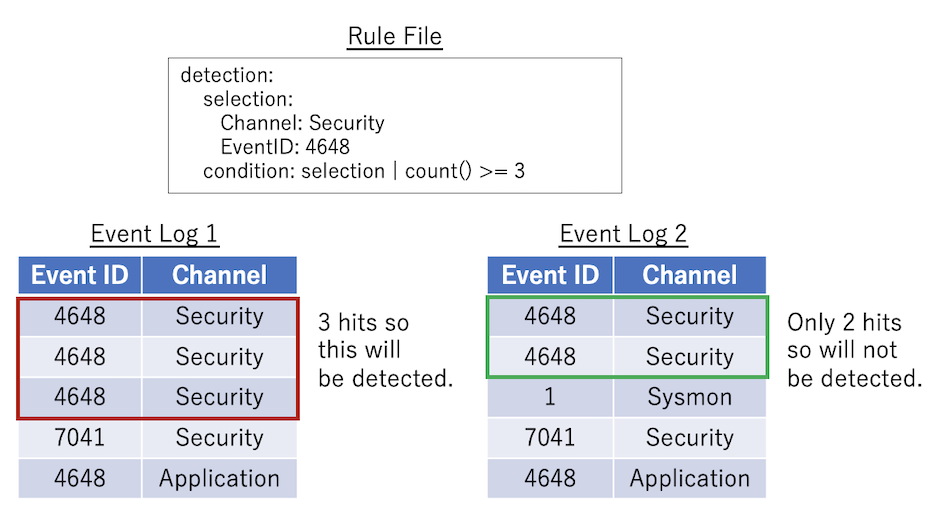
这是最基本的模式:`count() {operator} {number}`。如果 `selection` 发生 3 次或更多次,下面的规则将匹配。
### 模式 2 示例
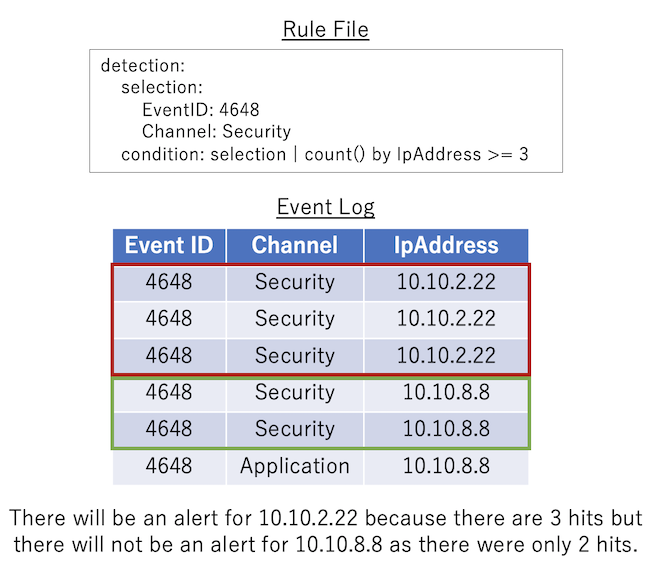
`count() by {eventkey} {operator} {number}`:将与管道之前的 `condition` 匹配的日志事件按**相同**的 `{eventkey}` 分组。如果每个分组的匹配事件数满足由 `{operator}` 和 `{number}` 指定的条件,则条件将匹配。
### 模式 3 示例
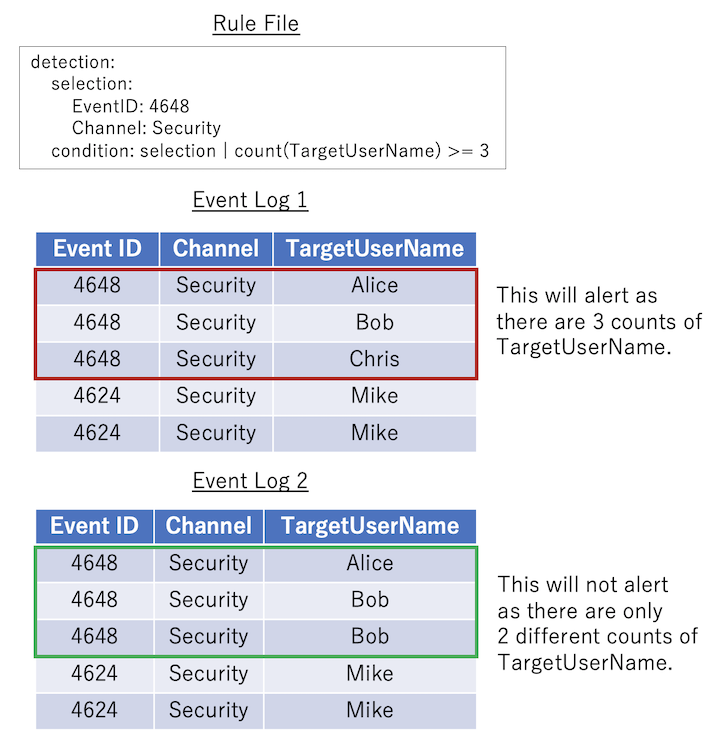
`count({eventkey}) {operator} {number}`:计算与条件管道之前的条件匹配的日志事件中存在多少个**不同**的 `{eventkey}` 值。如果该数量满足 `{operator}` 和 `{number}` 中指定的条件表达式,则视为满足条件。
### 模式 4 示例
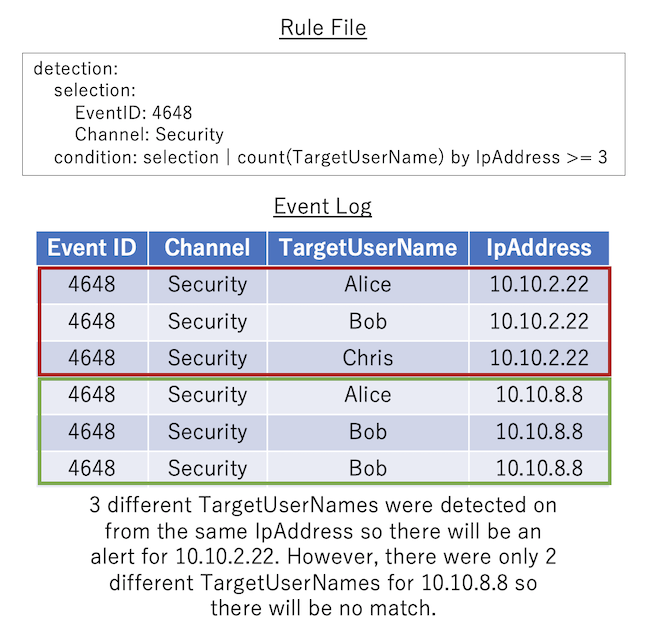
`count({eventkey_1}) by {eventkey_2} {operator} {number}`:将与条件管道之前的条件匹配的日志按**相同**的 `{eventkey_2}` 分组,并计算每个组中 `{eventkey_1}` 的**不同**值的数量。如果为每个分组计算的值满足由 `{operator}` 和 `{number}` 指定的条件表达式,则条件将匹配。
### 计数规则输出
计数规则的详细信息输出是固定的,将在 `[condition]` 中打印原始计数条件,然后在 `[result]` 中打印记录的 eventkeys。
在下面的示例中,正在被暴力破解的 `TargetUserName` 用户名列表,后跟源 `IpAddress`:
```
[condition] count(TargetUserName) by IpAddress >= 5 in timeframe [result] count:41 TargetUserName:jorchilles/jlake/cspizor/lpesce/bgalbraith/jkulikowski/baker/eskoudis/dpendolino/sarmstrong/lschifano/drook/rbowes/ebooth/melliott/econrad/sanson/dmashburn/bking/mdouglas/cragoso/psmith/bhostetler/zmathis/thessman/kperryman/cmoody/cdavis/cfleener/gsalinas/wstrzelec/jwright/edygert/ssims/jleytevidal/celgee/Administrator/mtoussain/smisenar/tbennett/bgreenwood IpAddress:10.10.2.22 timeframe:5m
```
警报的时间戳将是检测到的第一个事件的时间。
# 规则创建建议
1. **尽可能始终指定 `Channel` 或 `ProviderName` 名称以及 `EventID` 编号。** 默认情况下,只会扫描 `./rules/config/target_event_IDs.txt` 中列出的事件 ID,因此如果 EID 尚未在其中,您可能需要向此文件添加新的 `EventID` 编号。
2. **请不要在不需要时使用多个 `selection` 或 `filter` 字段以及过多的分组。** 例如:
### 与其这样
```
detection:
SELECTION_1:
Channnel: Security
SELECTION_2:
EventID: 4625
SELECTION_3:
LogonType: 3
FILTER_1:
SubStatus: "0xc0000064" #Non-existent user
FILTER_2:
SubStatus: "0xc000006a" #Wrong password
condition: SELECTION_1 and SELECTION_2 and SELECTION_3 and not (FILTER_1 or FILTER_2)
```
### 请这样做
```
detection:
selection:
Channel: Security
EventID: 4625
LogonType: 3
filter:
- SubStatus: "0xc0000064" #Non-existent user
- SubStatus: "0xc000006a" #Wrong password
condition: selection and not filter
```
3. **当您需要多个部分时,请在 `section_basic` 部分中命名包含通道和事件 ID 信息的第一部分,并在 `section_` 和 `filter_` 之后使用有意义的名称命名其他选择。此外,请编写注释以解释任何难以理解的内容。** 例如:
### 与其这样
```
detection:
Takoyaki:
Channel: Security
EventID: 4648
Naruto:
TargetUserName|endswith: "$"
IpAddress: "-"
Sushi:
SubjectUserName|endswith: "$"
TargetUserName|endswith: "$"
TargetInfo|endswith: "$"
Godzilla:
SubjectUserName|endswith: "$"
Ninja:
TargetUserName|re: "(DWM|UMFD)-([0-9]|1[0-2])$"
IpAddress: "-"
Daisuki:
- ProcessName|endswith: "powershell.exe"
- ProcessName|endswith: "WMIC.exe"
condition: Takoyaki and Daisuki and not (Naruto and not Godzilla) and not Ninja and not Sushi
```
### 请这样做
```
detection:
selection_basic:
Channel: Security
EventID: 4648
selection_TargetUserIsComputerAccount:
TargetUserName|endswith: "$"
IpAddress: "-"
filter_UsersAndTargetServerAreComputerAccounts: #Filter system noise
SubjectUserName|endswith: "$"
TargetUserName|endswith: "$"
TargetInfo|endswith: "$"
filter_SubjectUserIsComputerAccount:
SubjectUserName|endswith: "$"
filter_SystemAccounts:
TargetUserName|re: "(DWM|UMFD)-([0-9]|1[0-2])$" #Filter out default Desktop Windows Manager and User Mode Driver Framework accounts
IpAddress: "-" #Don't filter if the IP address is remote to catch attackers who created backdoor accounts that look like DWM-12, etc..
selection_SuspiciousProcess:
- ProcessName|endswith: "powershell.exe"
- ProcessName|endswith: "WMIC.exe"
condition: selection_basic and selection_SuspiciousProcess and not (selection_TargetUserIsComputerAccount
and not filter_SubjectUserIsComputerAccount) and not filter_SystemAccounts and not filter_UsersAndTargetServerAreComputerAccounts
```
# 将 Sigma 规则转换为 Hayabusa 格式
我们已创建了一个后端,用于将规则从 Sigma 转换为 Hayabusa 兼容格式,[此处](https://github.com/Yamato-Security/sigma-to-hayabusa-converter)。
# Twitter
您可以通过在 Twitter 上关注我们 [@SecurityYamato](https://twitter.com/SecurityYamato) 来接收有关 Hayabusa、规则更新、其他 Yamato Security 工具等的最新新闻。标签:AMSI绕过, DAST, EDR, Hayabusa, Sigma规则, Sysmon, Velociraptor, Windows事件日志, 威胁检测, 安全运营, 恶意软件分析, 扫描框架, 持久化检测, 用户态调试, 目标导入, 脆弱性评估, 规则集, 防御规避检测