redhat-plumbers-in-action/differential-shellcheck GitHub: redhat-plumbers-in-action/differential-shellcheck
一个在 GitHub Actions 中执行 Shell 脚本差异化语法检查的工具,聚焦变更引入的缺陷检测。
Stars: 65 | Forks: 12
Differential ShellCheck
[][market] [][linter] [][test]
 [][best-practices] [][codecov]
本仓库托管了在 GitHub Actions 中运行 Differential ShellCheck 的代码。关于拥有类似 Differential ShellCheck 的想法最早在 [@fedora-sysv/initscripts](https://github.com/fedora-sysv/initscripts) 中提出。initscripts 需要一种方法来验证拉取请求,而不会因多年使用的代码产生警告和错误。因此,Differential ShellCheck 应运而生。
## 工作原理
首先,Differential ShellCheck 会根据文件扩展名、shebang 和提供的脚本列表获取更改的 shell 脚本列表。然后,它会对这些脚本调用 [@koalaman/shellcheck](https://github.com/koalaman/shellcheck) 并存储 ShellCheck 输出以供后续使用。接着,它会从 `HEAD` 切换到提供的 `BASE` 并对相同的文件运行 ShellCheck,并将输出存储到单独的文件中。
为了评估结果,Differential ShellCheck 使用工具 `csdiff` 和 `csgrep`,它们来自 [@csutils/csdiff](https://github.com/csutils/csdiff)。首先使用 `csdiff` 获取修复和新增错误的列表/数量。然后使用 `csgrep` 以彩色方式将结果输出到控制台,并可选地作为安全警报输出到 GitHub GUI。
## 功能特性
* 基于 shebang、ShellCheck 指令、文件扩展名等的 Shell 脚本自动检测
* 支持的 Shell 解释器:`sh`、`ash`、`bash`、`dash`、`ksh` 和 `bats`
* 支持的 shebang:`#!/bin/`、`#!/usr/bin/`、`#!/usr/local/bin/`、`#!/bin/env␣`、`#!/usr/bin/env␣` 和 `#!/usr/local/bin/env␣`;例如 `#!/bin/env␣bash`
* 支持 ShellCheck 指令;例如 `# shellcheck shell=bash`
* 支持 [`emacs` 模式规范](https://www.gnu.org/software/emacs/manual/html_node/emacs/Choosing-Modes.html);例如 `# -*- sh -*-`
* 支持 [`vi/vim` 模型线规范](http://vimdoc.sourceforge.net/htmldoc/options.html#modeline);例如 `# vi: set filetype=sh`、`# vim: ft=sh`
* 支持允许特定错误代码
* 缺陷修复和新增的统计信息及其严重性
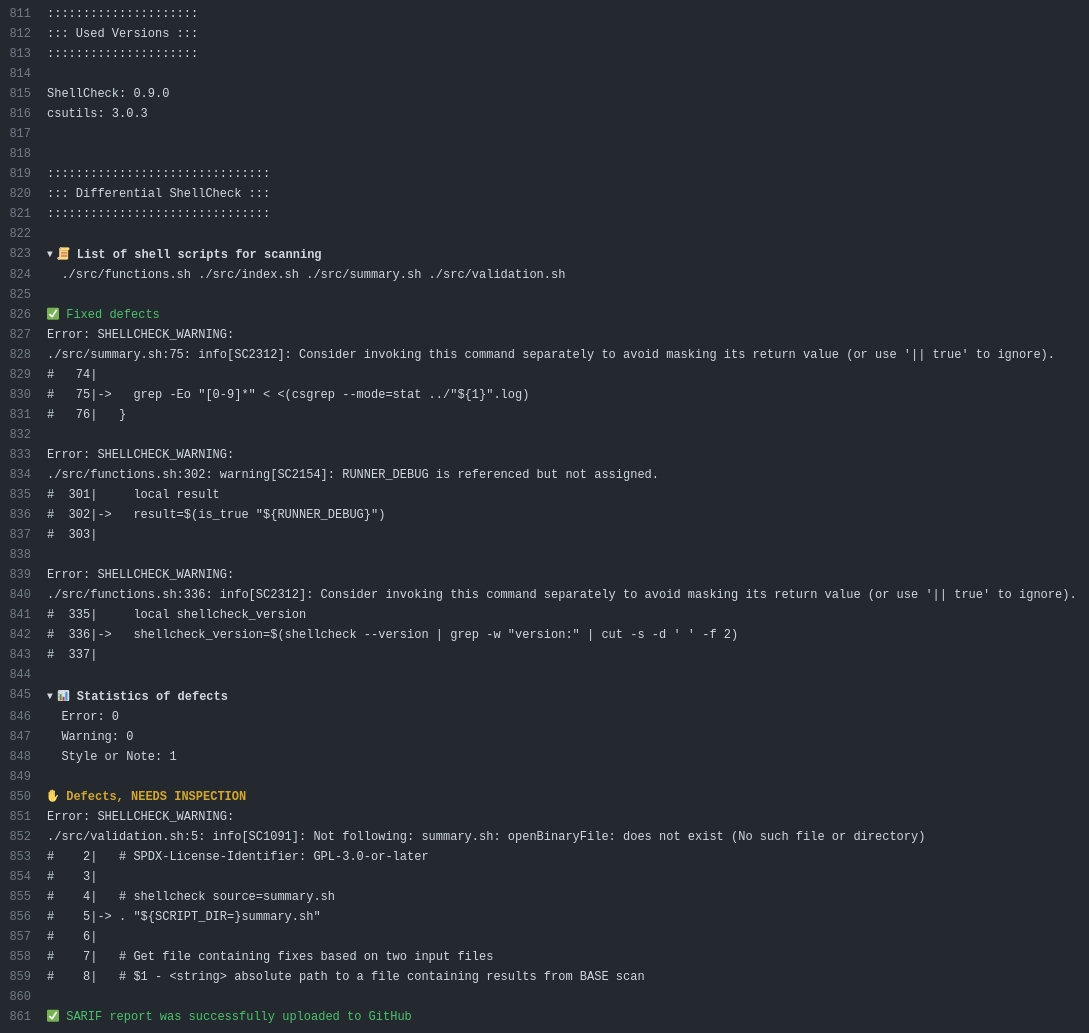
* 控制台彩色输出带表情符号
* [SARIF 支持](https://docs.github.com/en/code-security/code-scanning/integrating-with-code-scanning/sarif-support-for-code-scanning) - 在“已更改的文件”选项卡中可见,并在拉取请求上显示 [评论警报](https://github.blog/changelog/2022-06-02-users-can-view-and-comment-on-code-scanning-alerts-on-the-conversation-tab-in-a-pull-request/)
* 支持在 [debug 选项](https://github.blog/changelog/2022-05-24-github-actions-re-run-jobs-with-debug-logging/) 下以详细模式运行
* 以 [Job Summaries](https://github.blog/2022-05-09-supercharging-github-actions-with-job-summaries/) 形式显示结果 - [示例](docs/images/job-summary-light.png)
* 支持使用 [`.shellcheckrc`](https://github.com/koalaman/shellcheck/blob/master/shellcheck.1.md#rc-files) 配置 Differential ShellCheck
## 使用方法
运行 Differential ShellCheck 的示例:
```
name: Differential ShellCheck
on:
push:
branches: [ main ]
pull_request:
branches: [ main ]
permissions:
contents: read
jobs:
lint:
runs-on: ubuntu-latest
permissions:
# required for all workflows
security-events: write
# only required for workflows in private repositories
actions: read
contents: read
steps:
- name: Repository checkout
uses: actions/checkout@v4
with:
# Differential ShellCheck requires full git history
fetch-depth: 0
- id: ShellCheck
name: Differential ShellCheck
uses: redhat-plumbers-in-action/differential-shellcheck@v5
with:
token: ${{ secrets.GITHUB_TOKEN }}
- if: ${{ runner.debug == '1' && !cancelled() }}
name: Upload artifact with ShellCheck defects in SARIF format
uses: actions/upload-artifact@v4
with:
name: Differential ShellCheck SARIF
path: ${{ steps.ShellCheck.outputs.sarif }}
```
Console output example
Example of Job Summary
Example of output in Changed files tab
Example of @github-code-scanning bot review comment
### 实际使用示例
* [`rbenv/rbenv` ](https://github.com/rbenv/rbenv)
* [`Bash-it/bash-it` ](https://github.com/Bash-it/bash-it)
* [`scylladb/scylladb` ](https://github.com/scylladb/scylladb)
* [`systemd/systemd` ](https://github.com/systemd/systemd)
* [`cockpit-project/cockpit` ](https://github.com/cockpit-project/cockpit)
* [`89luca89/distrobox` ](https://github.com/89luca89/distrobox)
* 更多示例 - [这里](https://github.com/redhat-plumbers-in-action/differential-shellcheck/network/dependents?package_id=UGFja2FnZS0yOTkzNjMxNzI2)
## 配置选项
Action 当前接受以下选项:
```
# ...
- name: Differential ShellCheck
uses: redhat-plumbers-in-action/differential-shellcheck@v5
with:
triggering-event:
base:
head:
pull-request-base:
pull-request-head:
push-event-base:
push-event-head:
diff-scan:
strict-check-on-push:
external-sources:
severity:
scan-directory:
exclude-path:
include-path:
token:
# ...
```
### triggering-event
触发工作流运行的事件名称。支持的值:`merge_group`、`pull_request`、`push` 和 `manual`。
* 默认值:`${{ github.event_name }}`
* 要求:`optional`
### base
将用作差异检查基准的提交的 `SHA1`。仅当 `triggering-event` 设置为 `manual` 时使用。
* 默认值:`undefined`
* 要求:`optional`
### head
指向 `HEAD` 更改的提交的 `SHA1`。仅当 `triggering-event` 设置为 `manual` 时使用。
* 默认值:`undefined`
* 要求:`optional`
### merge-group-base
合并组的父提交的 `SHA1`。当 `triggering-event` 设置为 `merge_group` 时使用。
* 默认值:`${{ github.event.merge_group.base_sha }}`
* 要求:`optional`
### merge-group-head
合并组的提交的 `SHA1`。当 `triggering-event` 设置为 `merge_group` 时使用。
* 默认值:`${{ github.event.merge_group.head_sha }}`
* 要求:`optional`
### pull-request-base
基础分支顶端提交的 `SHA1`。当 `triggering-event` 设置为 `pull_request` 时使用。
* 默认值:`${{ github.event.pull_request.base.sha }}`
* 要求:`optional`
### pull-request-head
拉取请求中最新提交的 `SHA1`。当 `triggering-event` 设置为 `pull_request` 时使用。
* 默认值:`${{ github.event.pull_request.head.sha }}`
* 要求:`optional`
### push-event-base
推送之前最后一次提交的 `SHA1`。当 `triggering-event` 设置为 `push` 时使用。
* 默认值:`${{ github.event.before }}`
* 要求:`optional`
### push-event-head
推送之后最后一次提交的 `SHA1`。当 `triggering-event` 设置为 `push` 时使用。
* 默认值:`${{ github.event.after }}`
* 要求:`optional`
### diff-scan
输入允许请求特定类型的扫描。仅当 `triggering-event` 设置为 `manual` 时考虑输入。
基于 `triggering-event` 输入的默认扫描类型:
| `triggering-event` | 扫描类型 |
|--------------------|------------------------|
| `merge_group` | differential |
| `pull_request` | differential |
| `push` | full |
| `manual` | based on `diff-scan` input |
* 默认值:`true`
* 要求:`optional`
### strict-check-on-push
当在 `push` 事件上运行时,Differential ShellCheck 会执行完整扫描,但仅在新缺陷被添加时操作失败。启用 `strict-check-on-push` 选项后,当发现任何缺陷时操作将失败。
* 默认值:`false`
* 要求:`optional`
### external-sources
启用对源语句的跟踪,即使文件未作为输入指定。默认情况下,[ShellCheck](https://github.com/koalaman/shellcheck/blob/master/shellcheck.1.md) 仅会跟踪命令行中指定的文件(加上 `/dev/null`)。此选项允许跟踪脚本可能引入的任何文件。也可通过 `external-sources=true` 在 `.shellcheckrc` 中启用。
* 默认值:`true`
* 要求:`optional`
### severity
要报告的错误的最小严重级别。有效值按严重性顺序为:`error`、`warning`、`info` 和 `style`。
* 默认值:`style`
* 要求:`optional`
### scan-directory
要扫描的 shell脚本的相对路径列表。支持通配符。列表为多行字符串,而非 YAML 列表。
默认情况下会扫描整个仓库。此功能在只想扫描仓库子集时非常有用。
此功能与 [exclude-path](#exclude-path) 和 [include-path](#include-path) 选项完全兼容。
* 要求:`optional`
* 示例:`"build/**"`
* 多值示例:
scan-directory: |
build/**
testing
### exclude-path
从 ShellCheck 扫描中排除的相对路径列表。支持通配符。列表为多行字符串,而非 YAML 列表。
* 要求:`optional`
* 示例:`"test/{bats,beakerlib}/**"`
### include-path
将被 ShellCheck 扫描的文件路径列表。支持通配符。列表为多行字符串,而非 YAML 列表。
* 要求:`optional`
* 示例:`"src/**.{shell,custom}"`
### display-engine
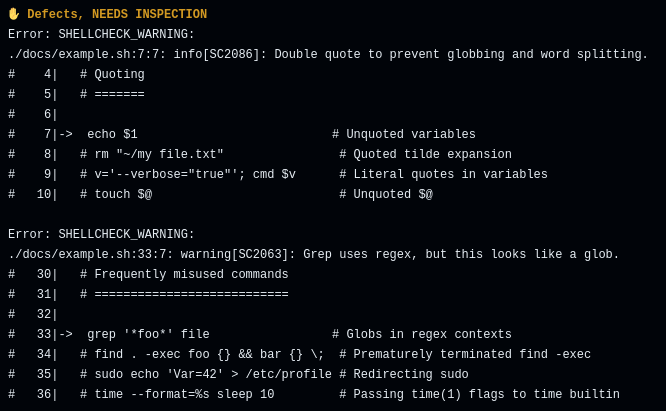
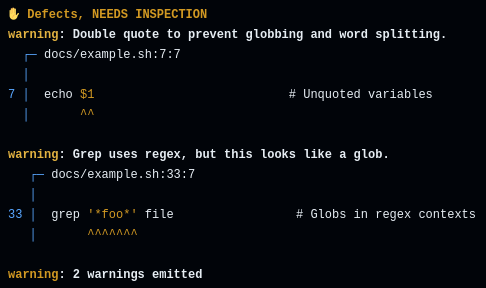
用于在控制台输出缺陷和修复的工具。当前支持 [`csgrep`](https://github.com/csutils/csdiff) 和 [`sarif-fmt`](https://github.com/psastras/sarif-rs/tree/main/sarif-fmt#readme)。
`display-engine: csgrep`
`display-engine: sarif-fmt`
* 要求:`optional`
* 默认值:`csgrep`
### token
该 token 用于以 SARIF 格式上传发现结果到 GitHub。
* 默认值:`undefined`
* 要求:`optional`
该 token 需要以下 [权限](https://docs.github.com/en/rest/code-scanning#upload-an-analysis-as-sarif-data):
* `security_events: write` - 对所有仓库必需。
* `actions: read` 和 `contents: read` - 仅对私有仓库必需。
## 输出
Differential ShellCheck 暴露了以下 [输出](https://docs.github.com/en/actions/using-jobs/defining-outputs-for-jobs)。
### `sarif`
包含检测缺陷的 SARIF 文件的相对路径。在工作流中使用 `sarif` 输出的示例:
```
- id: ShellCheck
name: Differential ShellCheck
uses: redhat-plumbers-in-action/differential-shellcheck@v5
- if: ${{ runner.debug == '1' && !cancelled() }}
name: Upload artifact with ShellCheck defects in SARIF format
uses: actions/upload-artifact@v4
with:
name: Differential ShellCheck SARIF
path: ${{ steps.ShellCheck.outputs.sarif }}
- if: ${{ !cancelled() }}
name: Upload SARIF to GitHub using github/codeql-action/upload-sarif
uses: github/codeql-action/upload-sarif@v2
with:
sarif_file: ${{ steps.ShellCheck.outputs.sarif }}
```
### `html`
包含检测缺陷的 HTML 文件的相对路径。在工作流中使用 `html` 输出的示例:
```
- id: ShellCheck
name: Differential ShellCheck
uses: redhat-plumbers-in-action/differential-shellcheck@v5
- if: ${{ !cancelled() }}
name: Upload artifact with ShellCheck defects in HTML format
uses: actions/upload-artifact@v4
with:
name: Differential ShellCheck HTML
path: ${{ steps.ShellCheck.outputs.html }}
```
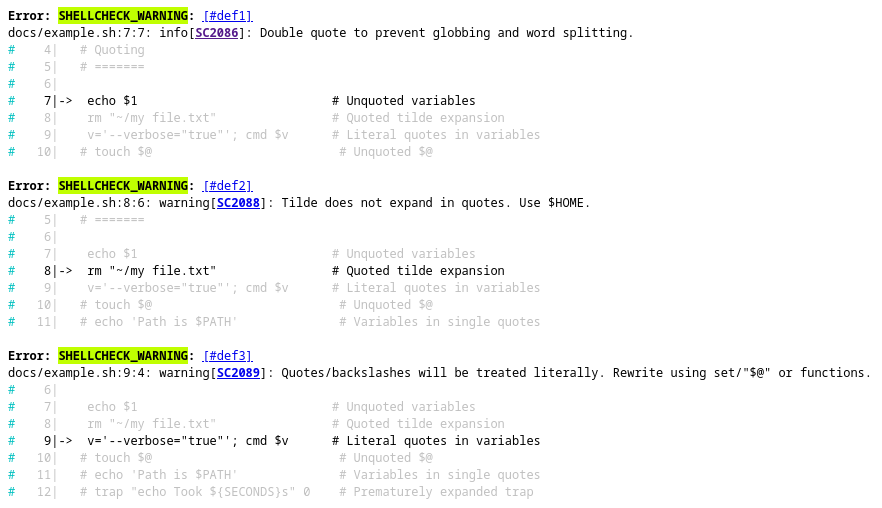
[HTML 输出示例](docs/example.xhtml):
### `shellcheck-full`
完整扫描时的 ShellCheck JSON 输出。适用于调试。
### `shellcheck-head`
HEAD 提交的 ShellCheck JSON 输出。适用于调试。
### `shellcheck-base`
BASE 提交的 ShellCheck JSON 输出。适用于调试。
## 在私有仓库中使用
Differential ShellCheck GitHub Action 可供任何用户在私有仓库中使用。但与代码扫描相关的功能仅对使用 GitHub Enterprise 的用户可用,如 [GitHub 文档](https://docs.github.com/en/code-security/code-scanning/automatically-scanning-your-code-for-vulnerabilities-and-errors/about-code-scanning) 所述:
_Code scanning is available for all public repositories on GitHub.com. Code scanning is also available for private repositories owned by organizations that use GitHub Enterprise Cloud and have a license for GitHub Advanced Security. For more information, see "[About GitHub Advanced Security](https://docs.github.com/en/get-started/learning-about-github/about-github-advanced-security)"._
## 在 Visual Studio Code 中使用
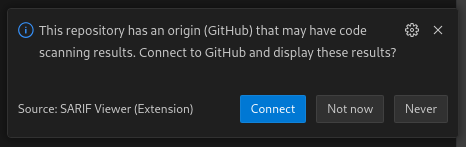
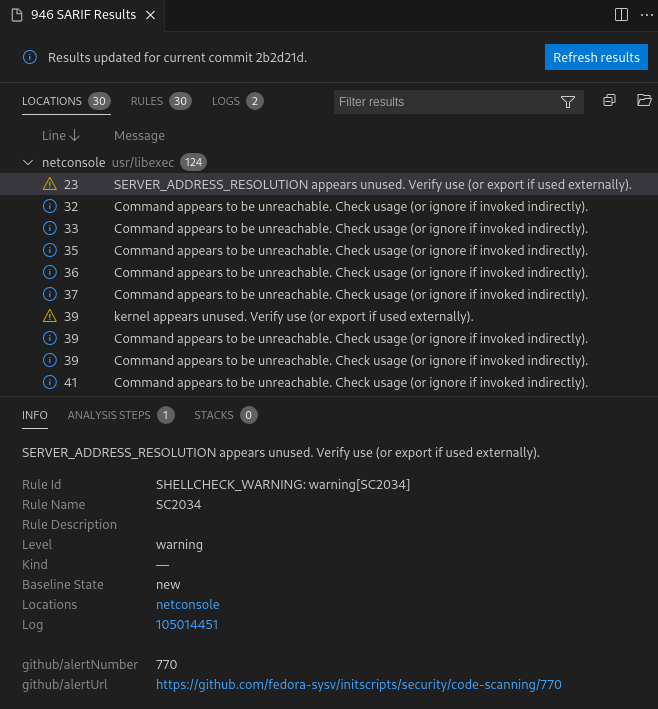
Differential ShellCheck 没有 Visual Studio Code 插件,但可以通过使用 Microsoft 提供的 [SARIF Viewer](https://marketplace.visualstudio.com/items?itemName=MS-SarifVSCode.sarif-viewer) Visual Studio Code 扩展来访问结果。安装后,需要将 GitHub 账户连接到 Visual Studio Code。然后,如果打开使用 Differential ShellCheck 的仓库,将直接在 Visual Studio Code IDE 中看到报告的缺陷。
## 限制
* 当使用 `--force` 覆盖提交且触发事件为 `push` 时,`differential-shellcheck` Action 无法正常运行。
有用文档:_[CHANGELOG](docs/CHANGELOG.md)_ | _[ARCHITECTURE](docs/ARCHITECTURE.md)_ | _[CONTRIBUTING](docs/CONTRIBUTING.md)_ | _[CODE_OF_CONDUCT](docs/CODE_OF_CONDUCT.md)_ | _[SECURITY](docs/SECURITY.md)_ | _[LICENSE](LICENSE)_
标签: CI, GitHub Action, Shell, ShellCheck, ShellLint, Shell脚本, Shell脚本分析, Shell脚本差异分析, Shell脚本扫描, Shell脚本检查, Shell脚本质量, Shell脚本质量检查, Shell脚本静态分析, Shell脚本验证, 二进制发布, 云安全监控, 代码审查, 后端服务, 差异检查, 开源工具, 脚本检测, 自动化检查, 静态分析