pointvy/pointvy
GitHub: pointvy/pointvy
Pointvy 是一个简单的 Trivy 漏洞扫描器 Web 前端,让用户无需本地安装 CLI 即可通过浏览器扫描容器镜像漏洞。
Stars: 13 | Forks: 3
[](https://api.securityscorecards.dev/projects/github.com/pointvy/pointvy) [](https://github.com/pointvy/pointvy/actions/workflows/semgrep.yml)
# Pointvy
## 为什么选择 Pointvy?
Pointvy 是一个用于执行 Trivy 扫描器的简单 Web 界面。
Pointvy 的存在是因为有时候(或经常)你需要扫描一个镜像,并且:
* 你不想或者被禁止在你的计算机上运行 Trivy。
* 或者由于企业代理的限制,你无法轻松连接到互联网。
你只需定义镜像(可选地添加一些命令选项),就能在网页上获取结果。
Pointvy 旨在基于 Knative 的容器 Serverless 服务上运行,例如 GCP 的 *Cloud Run* 或 Scaleway 的 *Serverless Containers*。
你也可以在常见的 Docker / Kubernetes / OpenShift 环境中运行它(无需 Knative)。
[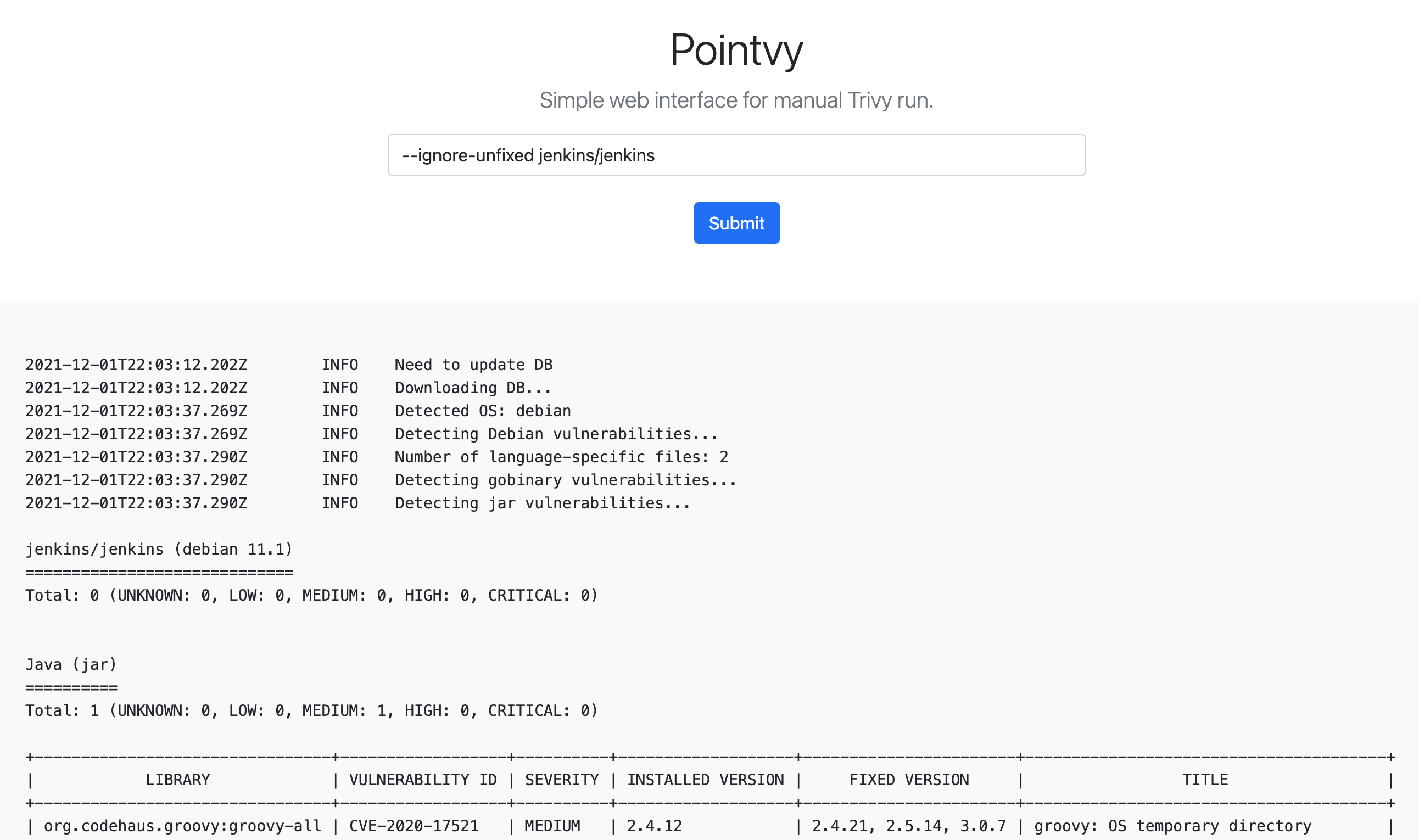](img/pointvy-screenshot.png)
## 如果符合以下情况,Pointvy 不适合你
* 你更倾向于直接在控制台中使用 Trivy。使用 [Trivy](https://aquasecurity.github.io/trivy/) 会是更好的选择。
* 你想在 Kubernetes 集群中自动化 Trivy 扫描。Trivy 的 CLI 或 CI/CD 集成会更合适。
## 前置条件
* [Docker](https://docs.docker.com/get-docker/) — 所有部署选项均需要
* [gcloud CLI](https://cloud.google.com/sdk/docs/install) — 部署到 GCP Cloud Run 时需要
* 一个已启用结算功能的 GCP 账户 — 部署到 GCP Cloud Run 时需要
* 一个 Scaleway 账户 — 部署到 Scaleway Serverless Containers 时需要
## 部署 Pointvy 🚀
有多种可用的部署选项。
### 在 GCP Cloud Run 上部署
首先,你需要一个已经启动并处于运行状态的 GCP 账户(已配置结算功能)。我们在此不再赘述。
在 Cloud Run 中运行 Pointvy 最简单的方法是使用 `gcloud` CLI 工具。
[这里是安装包含 `gcloud` 的 GCP Cloud SDK 的方法](https://cloud.google.com/sdk/docs/install)。
克隆 Pointvy 仓库,并将目录切换到新创建的文件夹。
```
git clone https://github.com/pointvy/pointvy.git
cd pointvy
```
将 `gcloud` SDK 连接到你的 GCP 账户。
```
gcloud auth login
```
设置你的项目 ID。
```
gcloud config set project [your-project-ID]
```
将项目部署到你的 GCP Cloud Run 租户中,并命名为 *pointvy*。
```
gcloud run deploy pointvy --source .
```
操作说明:
* "Specify a region"(指定区域):选择最接近你所在位置的区域可能是个不错的选择。
* "Allow unauthenticated invocations to"(允许向其发送未经身份验证的调用):设置为 "y" 可允许人们在不要求配置 GCP Cloud Identity 和 IAM 的情况下发起请求。**这只能作为一种临时的、不安全的选择。**
当部署成功后,`gcloud` 将显示暴露服务的 *Service URL*。你会得到类似于以下的内容:
```
Building using Dockerfile and deploying container to Cloud Run service [pointvy] in project [adjective-name-334110] region [europe-north1]
✓ Building and deploying... Done.
✓ Uploading sources...
✓ Building Container... Logs are available at [https://console.cloud.google.com/cloud-build/builds/9733bbcb-0000-0000-0000-df0772559fa3?project=437000000103].
✓ Creating Revision...
✓ Routing traffic...
Done.
Service [pointvy] revision [pointvy-00003-kix] has been deployed and is serving 100 percent of traffic.
Service URL: https://pointvy-7oaxxxxxxnq-lz.a.run.app
```
⚠️ 请记住,在 Cloud Run 中执行 container 以及在其 GCP Registry 中存储镜像**并不是免费的!**
根据你的配置,该服务可能会允许互联网上的任何人进行直接且未经身份验证的访问。其他人一旦知道该 URL 就可能会使用它,并可能导致你的账单费用增加。
### 在 Scaleway Serverless Containers 上部署
克隆 Pointvy 仓库,并将目录切换到新创建的文件夹。
```
git clone https://github.com/pointvy/pointvy.git
cd pointvy
```
由于 Scaleway 不提供 container 构建流水线,你必须自行构建 Pointvy container。
```
docker build . -t pointvy
```
在本地导出你之前在[凭据部分](https://console.scaleway.com/project/credentials)创建的 secret token。
```
export SCW_SECRET_TOKEN="value of your password"
```
导出你的 namespace 名称:
⚠️ 当然,请将 `[name-of-your-registry-namespace]` 替换为你之前在 Scaleway Container Registry 中创建的 namespace 的名称。
```
export NAMESPACE=[name-of-your-registry-namespace]
```
将 Docker 连接到 registry:
```
docker login rg.fr-par.scw.cloud/${NAMESPACE} -u nologin -p ${SCW_SECRET_TOKEN}
```
在本地为最近构建的 pointvy 镜像打上指向你的 registry 的标签,并将该镜像推送到你远程的 Container Registry 中。
```
docker tag pointvy:latest rg.fr-par.scw.cloud/${NAMESPACE}/pointvy:latest
docker push rg.fr-par.scw.cloud/${NAMESPACE}/pointvy:latest
```
💡 你不能将 Docker Hub 或任何其他公共 registry 作为 registry 使用,只能使用 Scaleway 内部 registry。
最后,使用[Web 控制台 > Serverless Container](https://console.scaleway.com/containers/namespaces)部署 container。
container 的 endpoint 将显示在控制台中,类似于 [https://pointvyxxxxxxxx-pointvy.functions.fnc.fr-par.scw.cloud/](https://pointvyxxxxxxxx-pointvy.functions.fnc.fr-par.scw.cloud/)。
⚠️ 与 GCP Cloud Run 一样,请记住资源的使用**不是免费的**。如果你的 endpoint 允许未经身份验证的访问,他人可能会增加你的账单费用。
### Docker
最简单的方法是直接从 Docker Hub 拉取预构建的镜像:
```
docker pull pointvy/pointvy:latest
```
或者,你可以从源码构建镜像。克隆仓库并将目录切换到新创建的文件夹。
```
git clone https://github.com/pointvy/pointvy.git
cd pointvy
```
构建镜像并将其命名为 *pointvy*。(不要忘记命令中的点。)
```
docker build . -t pointvy
```
运行镜像并将其绑定到 `8080` 端口。
```
docker run --rm -p 8080:8080 -e PORT=8080 pointvy
```
💡 如果你想更改绑定端口(你通过该端口访问服务),需要修改的是第一个 `8080`。
⚠️ **必须保留完整的 `-p 8080:8080 -e PORT=8080` 表达式,否则 gunicorn 服务器将无法绑定到正确的 TCP 端口和/或无法在正确的端口上暴露。**
如果你在本地运行,应该可以通过 [http://localhost:8080](http://localhost:8080) 访问该界面;如果你在远程服务器上运行,则取决于你的配置。
请记住,container 需要直接的互联网访问权限,以便下载漏洞数据库。
## 使用说明
Pointvy 的查询字段不仅可以只填镜像名称(例如 `alpine:3.12.1`),还可以接受与在命令行模式下使用时相同的[Trivy 提供的命令和选项](https://aquasecurity.github.io/trivy/latest/vulnerability/examples/filter/)。
你不需要在查询的开头写上 `trivy`。直接从选项或镜像描述开始即可。
以下是一些实用的选项:
|命令/选项|说明|
|:---|:---|
|`-s HIGH,CRITICAL`|仅显示高危和严重级别的漏洞。|
|`--ignore-unfixed`| 忽略那些未被发行版修复的漏洞。(要求更新一个容易受到未修复漏洞影响的镜像可能会带来问题。) |
|`--format (table\|json\|template)`| 定义输出格式。 |
|`-h`| 显示帮助页面。|
## 示例
测试加上和不加上 `--ignore-unfixed` 选项进行扫描,以查看区别:
```
--ignore-unfixed mariadb
```
`-s` 用于按 *severity*(严重程度)进行过滤(另外,使用 `latest` 标签通常是个坏主意,特别是对于官方 Python 镜像而言)
```
-s HIGH,CRITICAL python:latest
```
仅扫描库包中的漏洞:
```
--vuln-type library jenkins/jenkins
```
## 许可证
Pointvy 采用 [Apache License 2.0](LICENSE) 授权。
## 免责声明
Pointvy 是一个使用 Trivy 的开源项目,但**不**附属于、受资助于或与 Aqua Security 有关联。
标签:Docker, Web前端, 加密, 子域名突变, 安全监控, 安全防御评估, 漏洞扫描器, 请求拦截, 逆向工具