TheOnlyZac/sly1
GitHub: TheOnlyZac/sly1
该项目是对 PS2 平台经典游戏《Sly Cooper and the Thievius Raccoonus》的完全匹配反编译工程,通过逆向工程还原游戏引擎源代码并生成与原版字节一致的可执行文件。
Stars: 230 | Forks: 40
# 🦝 Sly Cooper and the Thievius Raccoonus
[][build-url] [][engine-url] [][splice-url] [][decompdev-url] [][contributors-url] [][discord-url] [][docs-url] [][wiki-url]
[ ][docs-url]
这是一个正在进行中的、针对 PlayStation 2 平台的 [*Sly Cooper and the Thievius Raccoonus*](https://en.wikipedia.org/wiki/Sly_Cooper_and_the_Thievius_Raccoonus) 的逆向工程反编译项目。它构建的是该游戏的 NTSC-U 版本,即 `SCUS_971.98`(SHA1: `57dc305d`)。
我们的目标是将游戏引擎完全反编译为匹配的源代码。此代码库**不**包含任何游戏文件中的资产或原始代码;您需要拥有自己的游戏副本才能构建和运行它。
代码文档托管在 [theonlyzac.github.io/sly1](https://theonlyzac.github.io/sly1)。有关游戏内部系统和机制的更多信息,请查看 [SlyMods Wiki][wiki-url]。
[](#-快速开始)
[](#%EF%B8%8F-手动设置)
[](#-运行游戏)
[](#-项目结构)
[](#-常见问题)
[](#-贡献者)
[](#-star-历史)
[](https://discord.gg/2GSXcEzPJA)
## ⚡ 快速开始
您可以在基于 Debian 的系统(如 Ubuntu 或 WSL)上使用快速开始脚本快速设置项目。请按照以下三个步骤开始操作:
### 1. 克隆代码库
```
git clone https://github.com/theonlyzac/sly1
cd sly1
```
### 2. 运行快速开始脚本
运行 `scripts` 目录下的 `quickstart.sh` 脚本。它可能会要求您输入密码以安装依赖项。
您有两个选项可以自动提取原始游戏可执行文件:
- 方法 1: 将 NTSC-U Sly 1 游戏 ISO 复制到 `disc` 目录中,然后运行:
./scripts/quickstart.sh
- 方法 2: 指定 ISO 的路径:
./scripts/quickstart.sh /path/to/GameBackup.iso
否则,只需手动将游戏光盘中的 `SCUS_971.98` 文件复制到 `disc` 目录即可。
### 3. 构建项目
```
./scripts/build.sh
```
如果构建成功,您将看到以下内容:
```
out/SCUS_971.98: OK
```
如果您遇到任何问题,或者更喜欢手动设置项目,请按照以下说明操作。运行游戏的说明也在下方提供。
## ⚙️ 手动设置
该项目可以在 Linux(或使用 WSL 的 Windows)上构建。请按照以下说明设置构建环境。
### 1. 克隆代码库
将代码库克隆到您的本地机器:
```
git clone https://github.com/TheOnlyZac/sly1
cd sly1
```
### 2. 提取游戏的 ELF 文件
要构建项目,您需要从自己合法获得的游戏副本中提取原始的 ELF 文件。将光盘挂载到您的 PC 上,并将光盘中的 `SCUS_971.98` 文件复制到本项目的 `disc` 目录中。
### 3. 设置 Python 环境
安装 Python 3.9 或更高版本、pip 和 venv:
```
sudo apt install python3 python3-pip python3-venv
```
为项目创建一个 Python 环境:
```
python3 -m venv env
```
激活环境:
```
source env/bin/activate
```
然后安装所需的 Python 包:
```
pip3 install -U -r requirements.txt
```
### 4. 设置构建环境
安装 32 位 MIPS 汇编器和 Wine:
```
sudo dpkg --add-architecture i386
sudo apt update
sudo apt install binutils-mips-linux-gnu wine32
```
安装 Ninja 构建系统:
```
sudo apt install ninja-build
```
使用提供的脚本设置编译器:
```
./scripts/setup_prodg_linux.sh
```
### 5. 配置并构建项目
运行配置脚本并使用 ninja 进行构建:
```
python3 configure.py
ninja
```
默认行为是使用 Splat 拆分二进制文件,构建目标文件(将拆分出的汇编代码插入到不匹配的函数中),链接匹配的可执行文件,并确认构建出的可执行文件的校验和与原始文件匹配。
您可以通过向 `configure.py` 传递以下任意参数来更改其行为:
* `--clean` - 删除任何现有的构建文件并配置项目。
* `--clean-only` - 删除任何现有的构建文件,但**不**配置项目。
* `--skip-checksum` - 跳过校验和验证步骤。如果您打算故意更改代码,则这是必要的,但请注意生成的 elf 可能无法启动。
* `--objects` - 构建用于与 objdiff 匹配的目标文件,并生成一个 objdiff 配置文件。输出两组目标文件:`obj/target` 和 `obj/current`(后者会随着您编辑源代码由 objdiff 自动更新)。
## 🎮 运行游戏
运行编译出的可执行文件需要 [PCSX2 2.0](https://pcsx2.net/)。您必须拥有自己的原始游戏副本以及来自您自己 PS2 的 BIOS。它们不包含在此代码库中,我们也无法为您提供。
一旦您拥有了这些,并且构建了可执行文件 `SCUS_971.98`,您就可以使用以下三种方法之一来运行它:
### 方法 1:自动运行脚本
`scripts` 目录中的 `run.sh` 脚本将在 PCSX2 模拟器中运行最后一次成功构建的版本。它会按顺序自动检测通过包管理器、Flatpak、AppImage 或 XDG 桌面条目安装的 PCSX2,并使用在 `disc` 目录中找到的第一个 ISO 来加载资产。
或者,您也可以指定要使用的 ISO 文件:
```
./scripts/run.sh /path/to/GameBackup.iso
```
为了能检测到 PCSX2 AppImage,必须将其放置在 `tools` 目录中,或者通过 AppImage 管理工具将其“安装”。
### 方法 2:从 PCSX2 命令行运行
要从命令行在 PCSX2 中启动该 elf,请使用以下命令:
```
pcsx2 -elf "./out/SCUS_971.98" "/path/to/GameBackup.iso"
```
* 如果没有自动找到,请将 `pcsx2` 替换为您的 PCSX2 可执行文件的路径:
* AppImage: 使用 `.appimage` 文件的路径。
* Flatpak: 使用 `flatpak override --user net.pcsx2.PCSX2 --filesystem=home` 授予 PCSX2 访问您主目录的权限,或使用 `--filesystem=/path/to/files` 访问特定目录。然后使用 `flatpak run net.pcsx2.PCSX2` 作为可执行文件。ELF 和 ISO 文件的相对路径将不起作用,只能使用完整的系统路径。
* Windows: 使用 `pcsx2.exe` 的路径。
* `-elf` 参数指定了您从本项目构建的 `SCUS_971.98` 的路径。如有必要,请替换示例路径。模拟器将使用此 ELF 来启动游戏。
* 最后一个参数是您的游戏 ISO 的路径。请将示例路径替换为您自己的游戏光盘备份的路径。这是模拟器加载资产的地方。
### 方法 3:从 PCSX2 图形界面运行
1. 在您的 PCSX2 游戏文件夹中,创建一个名为 `SCUS_971.98.elf` 的别名(Linux)或符号链接(Windows),指向由此项目构建的 `out/SCUS_971.98` 文件。
* 注意:别名/符号链接必须指向 `out/SCUS_971.98`,而不是 `out/SCUS_971.98.elf`。
2. 该别名/符号链接将在 PCSX2 中被识别为一个游戏。右键点击它,然后点击 `Properties... > Disc Path > Browse` 并选择您游戏备份的 ISO。
3. 点击“Close”并像往常一样启动游戏。
您只需创建一次别名/符号链接,它会在您每次构建项目时自动更新。
## 📁 项目结构
项目文件被分类到以下目录中。其中许多目录都有自己的 readme,提供了有关其包含内容的更多信息。
* `include` - 游戏引擎的头文件。
* `src` - 反编译的源代码。
* 游戏引擎的所有代码都在 `src/P2` 中。
* 游戏脚本引擎的代码在 `src/P2/splice` 中。
* `config` - Splat(二进制拆分工具)的配置文件。
* `scripts` - 用于设置构建环境的实用脚本。
* `docs` - 文档和贡献说明。
* `tools` - 用于函数匹配的实用工具。
* `reference` - 函数和数据结构的参考文件。
当您构建可执行文件时,将创建以下目录。
* `asm` - 从 elf 反汇编出的汇编代码。
* `assets`- 从 elf 中提取的二进制数据。
* `obj` - 编译后的目标文件。
* `out` - 编译后的可执行文件。
## ❓ 常见问题
### 什么是反编译?
当开发者制作游戏时,他们会编写源代码,并将其编译为可以在 PS2 上运行的汇编代码。反编译涉及对汇编代码进行逆向工程,以生成新的、能够编译成相同汇编代码的原创代码。这个过程使我们得到了与源代码相似且行为相同的源代码(尽管不一定完全相同),这有助于我们了解程序员在制作游戏时的思路。
### 你们是如何反编译代码的?
我们使用一个名为 [Splat](https://github.com/ethteck/splat/) 的工具将二进制文件拆分为代表每个独立函数的汇编文件。然后,我们通过编写能够编译成相同汇编代码的 C++ 代码来重新实现每个函数和数据结构。我们不会将原始游戏二进制文件中的任何代码复制到反编译项目中。
### 以前有人做过这种事吗?
还有很多其他的反编译项目,但这是针对 PS2 的最早的项目之一。我们的灵感来源包括针对 N64 的 [Super Mario 64 decomp](https://github.com/n64decomp/sm64) 和针对 Wii U 的 [Breath of the Wild decomp](https://github.com/zeldaret/botw)(后者在范围上与本项目更相似)。此外还有一个名为 [OpenGOAL](https://github.com/open-goal/jak-project) 的 Jak & Daxter 反编译/PC 移植项目,尽管该游戏 98% 使用的是 GOAL 语言,而不是 C/C++。
### 这是一个完全匹配的反编译吗?
是的。这是第一个针对 PS2 平台并利用函数匹配的 PS2 反编译项目,当时甚至还不具备生成字节匹配的可执行文件的条件。自 2024 年 7 月起,我们就已经构建出了匹配的 elf。我们的最终目标是匹配 100% 的游戏函数。
### 什么是 Splice?
Splice 是游戏的脚本引擎;它通过执行存储在关卡文件中的脚本来处理脚本事件、动画过场动画和守卫生成等内容。Splice 的代码是游戏引擎代码中一个独特的子集,这就是为什么它有自己的文件夹和进度百分比的原因。
### 我能帮上什么忙?
如果您想做出贡献,请查看 [CONTRIBUTING.md](/docs/CONTRIBUTING.md) 并随时[加入我们的 Discord 服务器](https://discord.gg/2GSXcEzPJA)!
## 🩵 贡献者
感谢每一位抽出时间使这个项目成为可能的志愿者!
][docs-url]
这是一个正在进行中的、针对 PlayStation 2 平台的 [*Sly Cooper and the Thievius Raccoonus*](https://en.wikipedia.org/wiki/Sly_Cooper_and_the_Thievius_Raccoonus) 的逆向工程反编译项目。它构建的是该游戏的 NTSC-U 版本,即 `SCUS_971.98`(SHA1: `57dc305d`)。
我们的目标是将游戏引擎完全反编译为匹配的源代码。此代码库**不**包含任何游戏文件中的资产或原始代码;您需要拥有自己的游戏副本才能构建和运行它。
代码文档托管在 [theonlyzac.github.io/sly1](https://theonlyzac.github.io/sly1)。有关游戏内部系统和机制的更多信息,请查看 [SlyMods Wiki][wiki-url]。
[](#-快速开始)
[](#%EF%B8%8F-手动设置)
[](#-运行游戏)
[](#-项目结构)
[](#-常见问题)
[](#-贡献者)
[](#-star-历史)
[](https://discord.gg/2GSXcEzPJA)
## ⚡ 快速开始
您可以在基于 Debian 的系统(如 Ubuntu 或 WSL)上使用快速开始脚本快速设置项目。请按照以下三个步骤开始操作:
### 1. 克隆代码库
```
git clone https://github.com/theonlyzac/sly1
cd sly1
```
### 2. 运行快速开始脚本
运行 `scripts` 目录下的 `quickstart.sh` 脚本。它可能会要求您输入密码以安装依赖项。
您有两个选项可以自动提取原始游戏可执行文件:
- 方法 1: 将 NTSC-U Sly 1 游戏 ISO 复制到 `disc` 目录中,然后运行:
./scripts/quickstart.sh
- 方法 2: 指定 ISO 的路径:
./scripts/quickstart.sh /path/to/GameBackup.iso
否则,只需手动将游戏光盘中的 `SCUS_971.98` 文件复制到 `disc` 目录即可。
### 3. 构建项目
```
./scripts/build.sh
```
如果构建成功,您将看到以下内容:
```
out/SCUS_971.98: OK
```
如果您遇到任何问题,或者更喜欢手动设置项目,请按照以下说明操作。运行游戏的说明也在下方提供。
## ⚙️ 手动设置
该项目可以在 Linux(或使用 WSL 的 Windows)上构建。请按照以下说明设置构建环境。
### 1. 克隆代码库
将代码库克隆到您的本地机器:
```
git clone https://github.com/TheOnlyZac/sly1
cd sly1
```
### 2. 提取游戏的 ELF 文件
要构建项目,您需要从自己合法获得的游戏副本中提取原始的 ELF 文件。将光盘挂载到您的 PC 上,并将光盘中的 `SCUS_971.98` 文件复制到本项目的 `disc` 目录中。
### 3. 设置 Python 环境
安装 Python 3.9 或更高版本、pip 和 venv:
```
sudo apt install python3 python3-pip python3-venv
```
为项目创建一个 Python 环境:
```
python3 -m venv env
```
激活环境:
```
source env/bin/activate
```
然后安装所需的 Python 包:
```
pip3 install -U -r requirements.txt
```
### 4. 设置构建环境
安装 32 位 MIPS 汇编器和 Wine:
```
sudo dpkg --add-architecture i386
sudo apt update
sudo apt install binutils-mips-linux-gnu wine32
```
安装 Ninja 构建系统:
```
sudo apt install ninja-build
```
使用提供的脚本设置编译器:
```
./scripts/setup_prodg_linux.sh
```
### 5. 配置并构建项目
运行配置脚本并使用 ninja 进行构建:
```
python3 configure.py
ninja
```
默认行为是使用 Splat 拆分二进制文件,构建目标文件(将拆分出的汇编代码插入到不匹配的函数中),链接匹配的可执行文件,并确认构建出的可执行文件的校验和与原始文件匹配。
您可以通过向 `configure.py` 传递以下任意参数来更改其行为:
* `--clean` - 删除任何现有的构建文件并配置项目。
* `--clean-only` - 删除任何现有的构建文件,但**不**配置项目。
* `--skip-checksum` - 跳过校验和验证步骤。如果您打算故意更改代码,则这是必要的,但请注意生成的 elf 可能无法启动。
* `--objects` - 构建用于与 objdiff 匹配的目标文件,并生成一个 objdiff 配置文件。输出两组目标文件:`obj/target` 和 `obj/current`(后者会随着您编辑源代码由 objdiff 自动更新)。
## 🎮 运行游戏
运行编译出的可执行文件需要 [PCSX2 2.0](https://pcsx2.net/)。您必须拥有自己的原始游戏副本以及来自您自己 PS2 的 BIOS。它们不包含在此代码库中,我们也无法为您提供。
一旦您拥有了这些,并且构建了可执行文件 `SCUS_971.98`,您就可以使用以下三种方法之一来运行它:
### 方法 1:自动运行脚本
`scripts` 目录中的 `run.sh` 脚本将在 PCSX2 模拟器中运行最后一次成功构建的版本。它会按顺序自动检测通过包管理器、Flatpak、AppImage 或 XDG 桌面条目安装的 PCSX2,并使用在 `disc` 目录中找到的第一个 ISO 来加载资产。
或者,您也可以指定要使用的 ISO 文件:
```
./scripts/run.sh /path/to/GameBackup.iso
```
为了能检测到 PCSX2 AppImage,必须将其放置在 `tools` 目录中,或者通过 AppImage 管理工具将其“安装”。
### 方法 2:从 PCSX2 命令行运行
要从命令行在 PCSX2 中启动该 elf,请使用以下命令:
```
pcsx2 -elf "./out/SCUS_971.98" "/path/to/GameBackup.iso"
```
* 如果没有自动找到,请将 `pcsx2` 替换为您的 PCSX2 可执行文件的路径:
* AppImage: 使用 `.appimage` 文件的路径。
* Flatpak: 使用 `flatpak override --user net.pcsx2.PCSX2 --filesystem=home` 授予 PCSX2 访问您主目录的权限,或使用 `--filesystem=/path/to/files` 访问特定目录。然后使用 `flatpak run net.pcsx2.PCSX2` 作为可执行文件。ELF 和 ISO 文件的相对路径将不起作用,只能使用完整的系统路径。
* Windows: 使用 `pcsx2.exe` 的路径。
* `-elf` 参数指定了您从本项目构建的 `SCUS_971.98` 的路径。如有必要,请替换示例路径。模拟器将使用此 ELF 来启动游戏。
* 最后一个参数是您的游戏 ISO 的路径。请将示例路径替换为您自己的游戏光盘备份的路径。这是模拟器加载资产的地方。
### 方法 3:从 PCSX2 图形界面运行
1. 在您的 PCSX2 游戏文件夹中,创建一个名为 `SCUS_971.98.elf` 的别名(Linux)或符号链接(Windows),指向由此项目构建的 `out/SCUS_971.98` 文件。
* 注意:别名/符号链接必须指向 `out/SCUS_971.98`,而不是 `out/SCUS_971.98.elf`。
2. 该别名/符号链接将在 PCSX2 中被识别为一个游戏。右键点击它,然后点击 `Properties... > Disc Path > Browse` 并选择您游戏备份的 ISO。
3. 点击“Close”并像往常一样启动游戏。
您只需创建一次别名/符号链接,它会在您每次构建项目时自动更新。
## 📁 项目结构
项目文件被分类到以下目录中。其中许多目录都有自己的 readme,提供了有关其包含内容的更多信息。
* `include` - 游戏引擎的头文件。
* `src` - 反编译的源代码。
* 游戏引擎的所有代码都在 `src/P2` 中。
* 游戏脚本引擎的代码在 `src/P2/splice` 中。
* `config` - Splat(二进制拆分工具)的配置文件。
* `scripts` - 用于设置构建环境的实用脚本。
* `docs` - 文档和贡献说明。
* `tools` - 用于函数匹配的实用工具。
* `reference` - 函数和数据结构的参考文件。
当您构建可执行文件时,将创建以下目录。
* `asm` - 从 elf 反汇编出的汇编代码。
* `assets`- 从 elf 中提取的二进制数据。
* `obj` - 编译后的目标文件。
* `out` - 编译后的可执行文件。
## ❓ 常见问题
### 什么是反编译?
当开发者制作游戏时,他们会编写源代码,并将其编译为可以在 PS2 上运行的汇编代码。反编译涉及对汇编代码进行逆向工程,以生成新的、能够编译成相同汇编代码的原创代码。这个过程使我们得到了与源代码相似且行为相同的源代码(尽管不一定完全相同),这有助于我们了解程序员在制作游戏时的思路。
### 你们是如何反编译代码的?
我们使用一个名为 [Splat](https://github.com/ethteck/splat/) 的工具将二进制文件拆分为代表每个独立函数的汇编文件。然后,我们通过编写能够编译成相同汇编代码的 C++ 代码来重新实现每个函数和数据结构。我们不会将原始游戏二进制文件中的任何代码复制到反编译项目中。
### 以前有人做过这种事吗?
还有很多其他的反编译项目,但这是针对 PS2 的最早的项目之一。我们的灵感来源包括针对 N64 的 [Super Mario 64 decomp](https://github.com/n64decomp/sm64) 和针对 Wii U 的 [Breath of the Wild decomp](https://github.com/zeldaret/botw)(后者在范围上与本项目更相似)。此外还有一个名为 [OpenGOAL](https://github.com/open-goal/jak-project) 的 Jak & Daxter 反编译/PC 移植项目,尽管该游戏 98% 使用的是 GOAL 语言,而不是 C/C++。
### 这是一个完全匹配的反编译吗?
是的。这是第一个针对 PS2 平台并利用函数匹配的 PS2 反编译项目,当时甚至还不具备生成字节匹配的可执行文件的条件。自 2024 年 7 月起,我们就已经构建出了匹配的 elf。我们的最终目标是匹配 100% 的游戏函数。
### 什么是 Splice?
Splice 是游戏的脚本引擎;它通过执行存储在关卡文件中的脚本来处理脚本事件、动画过场动画和守卫生成等内容。Splice 的代码是游戏引擎代码中一个独特的子集,这就是为什么它有自己的文件夹和进度百分比的原因。
### 我能帮上什么忙?
如果您想做出贡献,请查看 [CONTRIBUTING.md](/docs/CONTRIBUTING.md) 并随时[加入我们的 Discord 服务器](https://discord.gg/2GSXcEzPJA)!
## 🩵 贡献者
感谢每一位抽出时间使这个项目成为可能的志愿者!
 由 [contrib.rocks](https://contrib.rocks) 制作。
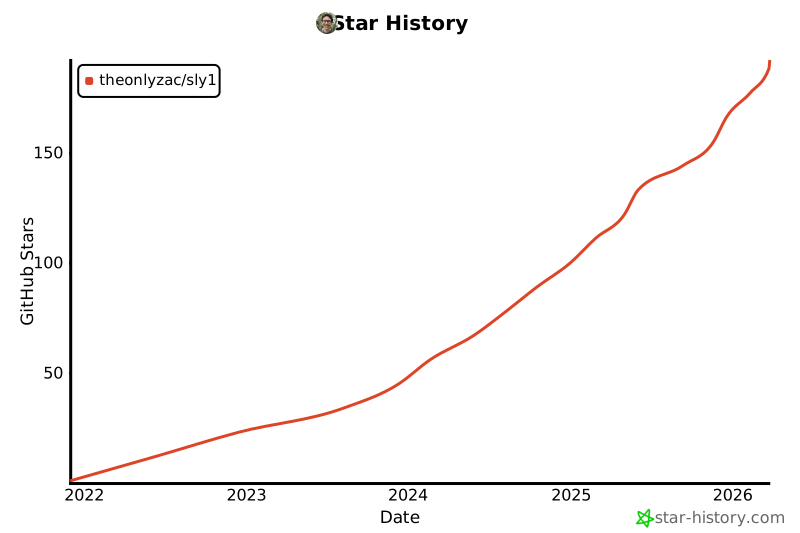
## ⭐ Star 历史
由 [contrib.rocks](https://contrib.rocks) 制作。
## ⭐ Star 历史
][docs-url]
这是一个正在进行中的、针对 PlayStation 2 平台的 [*Sly Cooper and the Thievius Raccoonus*](https://en.wikipedia.org/wiki/Sly_Cooper_and_the_Thievius_Raccoonus) 的逆向工程反编译项目。它构建的是该游戏的 NTSC-U 版本,即 `SCUS_971.98`(SHA1: `57dc305d`)。
我们的目标是将游戏引擎完全反编译为匹配的源代码。此代码库**不**包含任何游戏文件中的资产或原始代码;您需要拥有自己的游戏副本才能构建和运行它。
代码文档托管在 [theonlyzac.github.io/sly1](https://theonlyzac.github.io/sly1)。有关游戏内部系统和机制的更多信息,请查看 [SlyMods Wiki][wiki-url]。
[](#-快速开始)
[](#%EF%B8%8F-手动设置)
[](#-运行游戏)
[](#-项目结构)
[](#-常见问题)
[](#-贡献者)
[](#-star-历史)
[](https://discord.gg/2GSXcEzPJA)
## ⚡ 快速开始
您可以在基于 Debian 的系统(如 Ubuntu 或 WSL)上使用快速开始脚本快速设置项目。请按照以下三个步骤开始操作:
### 1. 克隆代码库
```
git clone https://github.com/theonlyzac/sly1
cd sly1
```
### 2. 运行快速开始脚本
运行 `scripts` 目录下的 `quickstart.sh` 脚本。它可能会要求您输入密码以安装依赖项。
您有两个选项可以自动提取原始游戏可执行文件:
- 方法 1: 将 NTSC-U Sly 1 游戏 ISO 复制到 `disc` 目录中,然后运行:
./scripts/quickstart.sh
- 方法 2: 指定 ISO 的路径:
./scripts/quickstart.sh /path/to/GameBackup.iso
否则,只需手动将游戏光盘中的 `SCUS_971.98` 文件复制到 `disc` 目录即可。
### 3. 构建项目
```
./scripts/build.sh
```
如果构建成功,您将看到以下内容:
```
out/SCUS_971.98: OK
```
如果您遇到任何问题,或者更喜欢手动设置项目,请按照以下说明操作。运行游戏的说明也在下方提供。
## ⚙️ 手动设置
该项目可以在 Linux(或使用 WSL 的 Windows)上构建。请按照以下说明设置构建环境。
### 1. 克隆代码库
将代码库克隆到您的本地机器:
```
git clone https://github.com/TheOnlyZac/sly1
cd sly1
```
### 2. 提取游戏的 ELF 文件
要构建项目,您需要从自己合法获得的游戏副本中提取原始的 ELF 文件。将光盘挂载到您的 PC 上,并将光盘中的 `SCUS_971.98` 文件复制到本项目的 `disc` 目录中。
### 3. 设置 Python 环境
安装 Python 3.9 或更高版本、pip 和 venv:
```
sudo apt install python3 python3-pip python3-venv
```
为项目创建一个 Python 环境:
```
python3 -m venv env
```
激活环境:
```
source env/bin/activate
```
然后安装所需的 Python 包:
```
pip3 install -U -r requirements.txt
```
### 4. 设置构建环境
安装 32 位 MIPS 汇编器和 Wine:
```
sudo dpkg --add-architecture i386
sudo apt update
sudo apt install binutils-mips-linux-gnu wine32
```
安装 Ninja 构建系统:
```
sudo apt install ninja-build
```
使用提供的脚本设置编译器:
```
./scripts/setup_prodg_linux.sh
```
### 5. 配置并构建项目
运行配置脚本并使用 ninja 进行构建:
```
python3 configure.py
ninja
```
默认行为是使用 Splat 拆分二进制文件,构建目标文件(将拆分出的汇编代码插入到不匹配的函数中),链接匹配的可执行文件,并确认构建出的可执行文件的校验和与原始文件匹配。
您可以通过向 `configure.py` 传递以下任意参数来更改其行为:
* `--clean` - 删除任何现有的构建文件并配置项目。
* `--clean-only` - 删除任何现有的构建文件,但**不**配置项目。
* `--skip-checksum` - 跳过校验和验证步骤。如果您打算故意更改代码,则这是必要的,但请注意生成的 elf 可能无法启动。
* `--objects` - 构建用于与 objdiff 匹配的目标文件,并生成一个 objdiff 配置文件。输出两组目标文件:`obj/target` 和 `obj/current`(后者会随着您编辑源代码由 objdiff 自动更新)。
## 🎮 运行游戏
运行编译出的可执行文件需要 [PCSX2 2.0](https://pcsx2.net/)。您必须拥有自己的原始游戏副本以及来自您自己 PS2 的 BIOS。它们不包含在此代码库中,我们也无法为您提供。
一旦您拥有了这些,并且构建了可执行文件 `SCUS_971.98`,您就可以使用以下三种方法之一来运行它:
### 方法 1:自动运行脚本
`scripts` 目录中的 `run.sh` 脚本将在 PCSX2 模拟器中运行最后一次成功构建的版本。它会按顺序自动检测通过包管理器、Flatpak、AppImage 或 XDG 桌面条目安装的 PCSX2,并使用在 `disc` 目录中找到的第一个 ISO 来加载资产。
或者,您也可以指定要使用的 ISO 文件:
```
./scripts/run.sh /path/to/GameBackup.iso
```
为了能检测到 PCSX2 AppImage,必须将其放置在 `tools` 目录中,或者通过 AppImage 管理工具将其“安装”。
### 方法 2:从 PCSX2 命令行运行
要从命令行在 PCSX2 中启动该 elf,请使用以下命令:
```
pcsx2 -elf "./out/SCUS_971.98" "/path/to/GameBackup.iso"
```
* 如果没有自动找到,请将 `pcsx2` 替换为您的 PCSX2 可执行文件的路径:
* AppImage: 使用 `.appimage` 文件的路径。
* Flatpak: 使用 `flatpak override --user net.pcsx2.PCSX2 --filesystem=home` 授予 PCSX2 访问您主目录的权限,或使用 `--filesystem=/path/to/files` 访问特定目录。然后使用 `flatpak run net.pcsx2.PCSX2` 作为可执行文件。ELF 和 ISO 文件的相对路径将不起作用,只能使用完整的系统路径。
* Windows: 使用 `pcsx2.exe` 的路径。
* `-elf` 参数指定了您从本项目构建的 `SCUS_971.98` 的路径。如有必要,请替换示例路径。模拟器将使用此 ELF 来启动游戏。
* 最后一个参数是您的游戏 ISO 的路径。请将示例路径替换为您自己的游戏光盘备份的路径。这是模拟器加载资产的地方。
### 方法 3:从 PCSX2 图形界面运行
1. 在您的 PCSX2 游戏文件夹中,创建一个名为 `SCUS_971.98.elf` 的别名(Linux)或符号链接(Windows),指向由此项目构建的 `out/SCUS_971.98` 文件。
* 注意:别名/符号链接必须指向 `out/SCUS_971.98`,而不是 `out/SCUS_971.98.elf`。
2. 该别名/符号链接将在 PCSX2 中被识别为一个游戏。右键点击它,然后点击 `Properties... > Disc Path > Browse` 并选择您游戏备份的 ISO。
3. 点击“Close”并像往常一样启动游戏。
您只需创建一次别名/符号链接,它会在您每次构建项目时自动更新。
## 📁 项目结构
项目文件被分类到以下目录中。其中许多目录都有自己的 readme,提供了有关其包含内容的更多信息。
* `include` - 游戏引擎的头文件。
* `src` - 反编译的源代码。
* 游戏引擎的所有代码都在 `src/P2` 中。
* 游戏脚本引擎的代码在 `src/P2/splice` 中。
* `config` - Splat(二进制拆分工具)的配置文件。
* `scripts` - 用于设置构建环境的实用脚本。
* `docs` - 文档和贡献说明。
* `tools` - 用于函数匹配的实用工具。
* `reference` - 函数和数据结构的参考文件。
当您构建可执行文件时,将创建以下目录。
* `asm` - 从 elf 反汇编出的汇编代码。
* `assets`- 从 elf 中提取的二进制数据。
* `obj` - 编译后的目标文件。
* `out` - 编译后的可执行文件。
## ❓ 常见问题
### 什么是反编译?
当开发者制作游戏时,他们会编写源代码,并将其编译为可以在 PS2 上运行的汇编代码。反编译涉及对汇编代码进行逆向工程,以生成新的、能够编译成相同汇编代码的原创代码。这个过程使我们得到了与源代码相似且行为相同的源代码(尽管不一定完全相同),这有助于我们了解程序员在制作游戏时的思路。
### 你们是如何反编译代码的?
我们使用一个名为 [Splat](https://github.com/ethteck/splat/) 的工具将二进制文件拆分为代表每个独立函数的汇编文件。然后,我们通过编写能够编译成相同汇编代码的 C++ 代码来重新实现每个函数和数据结构。我们不会将原始游戏二进制文件中的任何代码复制到反编译项目中。
### 以前有人做过这种事吗?
还有很多其他的反编译项目,但这是针对 PS2 的最早的项目之一。我们的灵感来源包括针对 N64 的 [Super Mario 64 decomp](https://github.com/n64decomp/sm64) 和针对 Wii U 的 [Breath of the Wild decomp](https://github.com/zeldaret/botw)(后者在范围上与本项目更相似)。此外还有一个名为 [OpenGOAL](https://github.com/open-goal/jak-project) 的 Jak & Daxter 反编译/PC 移植项目,尽管该游戏 98% 使用的是 GOAL 语言,而不是 C/C++。
### 这是一个完全匹配的反编译吗?
是的。这是第一个针对 PS2 平台并利用函数匹配的 PS2 反编译项目,当时甚至还不具备生成字节匹配的可执行文件的条件。自 2024 年 7 月起,我们就已经构建出了匹配的 elf。我们的最终目标是匹配 100% 的游戏函数。
### 什么是 Splice?
Splice 是游戏的脚本引擎;它通过执行存储在关卡文件中的脚本来处理脚本事件、动画过场动画和守卫生成等内容。Splice 的代码是游戏引擎代码中一个独特的子集,这就是为什么它有自己的文件夹和进度百分比的原因。
### 我能帮上什么忙?
如果您想做出贡献,请查看 [CONTRIBUTING.md](/docs/CONTRIBUTING.md) 并随时[加入我们的 Discord 服务器](https://discord.gg/2GSXcEzPJA)!
## 🩵 贡献者
感谢每一位抽出时间使这个项目成为可能的志愿者!
标签:C/C++, PS2, URL提取, 事务性I/O, 云资产清单, 反编译, 游戏, 逆向工具, 逆向工程