cve-search/cve-search
GitHub: cve-search/cve-search
cve-search是一款本地化的CVE漏洞搜索工具。
Stars: 2625 | Forks: 621
# CVE 搜索
[](https://gitter.im/cve-search/cve-search?utm_source=badge&utm_medium=badge&utm_campaign=pr-badge&utm_content=badge)




cve-search 是一个工具,可以将 CVE(通用漏洞和暴露)和
CPE(通用平台枚举)导入 MongoDB,以方便搜索
和 CVE 的处理。
该软件的主要目标是避免直接和公开地查询
公共 CVE 数据库。本地查询通常更快,并且您可以通过互联网
限制您的敏感查询。
cve-search 包含一个后端来存储漏洞和相关信息,
一个直观的 Web 界面用于搜索和管理漏洞,
一系列查询系统的工具和一个 Web API 界面。
cve-search 被许多组织使用。CIRCL 的 [公共 CVE 服务](https://cve.circl.lu/)
也由 cve-search 支持,但它们已被 [Vulnerability-Lookup](https://www.vulnerability-lookup.org/)
所取代。
本文件提供了有关如何开始使用 cve-search 的基本信息。有关更多信息,
请参阅此项目 **_/doc_** 文件夹中的文档。
## 入门
查看 [文档](https://cve-search.github.io/cve-search/) 以开始使用
## 使用方法
您可以使用 search.py 搜索数据库。
```
usage: search.py [-h] [-p P [P ...]] [--only-if-vulnerable] [--strict_vendor_product] [--lax] [-f F] [-c C] [-o O]
[-l] [-n] [-r] [-a] [-v V] [-s S] [-t T] [-i I]
Search for vulnerabilities in the National Vulnerability DB. Data from https://nvd.nist.gov/.
options:
-h, --help show this help message and exit
-p P [P ...] P = search one or more products, e.g. o:microsoft:windows_7 or o:cisco:ios:12.1 or
o:microsoft:windows_7 o:cisco:ios:12.1. Add --only-if-vulnerable if only vulnerabilities that
directly affect the product are wanted.
--only-if-vulnerable With this option, "-p" will only return vulnerabilities directly assigned to the product. I.e.
it will not consider "windows_7" if it is only mentioned as affected OS in an adobe:reader
vulnerability.
--strict_vendor_product
With this option, a strict vendor product search is executed. The values in "-p" should be
formatted as vendor:product, e.g. microsoft:windows_7
--lax Strict search for software version is disabled. Likely gives false positives for earlier
versions that were not yet vulnerable. Note that version comparison for non-numeric values
is done with simplifications.
-f F F = free text search in vulnerability summary
-c C search one or more CVE-ID
-o O O = output format [csv|html|json|xml|cveid]
-l sort in descending mode
-n lookup complete cpe (Common Platform Enumeration) name for vulnerable configuration
-r lookup ranking of vulnerable configuration
-a Lookup CAPEC for related CWE weaknesses
-v V vendor name to lookup in reference URLs
-s S search in summary text
-t T search in last n day (published)
-T T search in last n day (modified)
-i I Limit output to n elements (default: unlimited)
```
示例:
```
./bin/search.py -p cisco:ios:12.4
./bin/search.py -p cisco:ios:12.4 -o json
./bin/search.py -f nagios -n
./bin/search.py -p microsoft:windows_7 -o html
```
如果您想搜索所有 WebEx 漏洞,并仅打印供应商的官方参考。
```
./bin/search.py -p webex: -o csv -v "cisco"
```
您还可以导出特定 CVE ID 的 JSON。
```
./bin/search.py -c CVE-2010-3333 -o json
```
或者以 RSS 或 Atom 格式导出最后 2 个 CVE 条目。
```
./bin/dump_last.py -f atom -l 2
```
或者您可以使用 [Web 界面](#web-interface) 或 [Web API](#web-api-interface).
## 排名数据库的使用
有一个排名数据库允许根据其通用平台枚举名称对软件漏洞进行排名。
排名可以是您组织内的组织或部门或对您有意义的任何名称。
例如,您可以添加一个部分 CPE 名称,如 "sap:netweaver",这对您的会计部门
非常重要。
```
./sbin/db_ranking.py -c "sap:netweaver" -g "accounting" -r 3
```
然后您可以查找特定 CVE-ID 的排名(-r 选项):
```
./bin/search.py -c CVE-2012-4341 -r -n
```
## 高级使用
由于 cve-search 基于一系列工具,因此它可以与标准 Unix 工具一起使用。如果您想知道哪些顶级供应商使用 "未知" 术语
来描述他们的漏洞:
```
python3 bin/search_fulltext.py -q unknown -f \
| jq -c '. | .vulnerable_configuration[0]' \
| cut -f5 -d: | sort | uniq -c | sort -nr | head -10
1500 oracle
381 sun
372 hp
232 google
208 ibm
126 mozilla
103 microsoft
100 adobe
78 apple
68 linux
```
您可以根据其 CPE 名称比较某些产品的 CVSS(通用漏洞评分系统)值。例如,比较 oracle:java 与 sun:jre,
并使用 R 对其 CVSS 值进行一些统计分析:
```
python3 bin/search.py -p oracle:java -o json \
| jq -r '.cvss' | Rscript -e 'summary(as.numeric(read.table(file("stdin"))[,1]))'
Min. 1st Qu. Median Mean 3rd Qu. Max.
1.800 5.350 9.300 7.832 10.000 10.000
```
```
python3 bin/search.py -p sun:jre -o json \
| jq -r '.cvss' | Rscript -e 'summary(as.numeric(read.table(file("stdin"))[,1]))'
Min. 1st Qu. Median Mean 3rd Qu. Max.
0.000 5.000 7.500 7.333 10.000 10.000
```
## 全文索引
如果您想索引当前 MongoDB 集合中的所有 CVE:
```
./sbin/db_fulltext.py -l 0
```
然后查询全文索引(获取匹配的 CVE-ID 列表):
```
./bin/search_fulltext.py -q NFS -q Linux
```
或者查询全文索引并输出每个 CVE-ID 的 JSON 对象:
```
./bin/search_fulltext.py -q NFS -q Linux -f
```
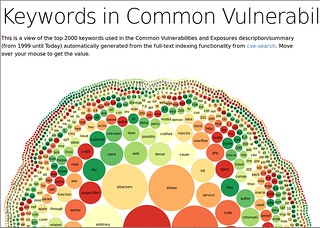
### 全文可视化
全文索引器可用于生成 CVE 条目中最常见关键词的 JSON 数据。它使用 [NLTK](https://www.nltk.org/) 对单词进行词元化(转换为基本形式)并过滤掉常见的英语停用词。
运行脚本以生成 JSON:
```
./bin/search_fulltext.py -g -s > cve.json
```
生成的 `cve.json` 包含一个扁平的层次结构:
```
{
"name": "cve-search",
"children": [
{"name": "vulnerability", "size": 4855},
{"name": "allow", "size": 2544},
{"name": "file", "size": 2240},
...
]
}
```
该脚本 **不会创建可视化**,但 `cve.json` 可以用作可视化工具的源数据,例如 D3-hierarchy
[包](https://d3js.org/d3-hierarchy/pack) 图或词云生成器。
## Web 界面
Web 界面提供了一种直观的方式来浏览最新的 CVE 条目并查找有关特定 CVE 的详细信息。
有关配置和部署 Web 界面作为 **SystemD 服务** 或 **uWSGI 应用程序** 的全面说明可在
[WebGUI 文档](https://cve-search.github.io/cve-search/webgui/webgui.html).
为了快速启动 Web 界面进行测试,请运行:
```
python3 ./web/index.py
```
启动后,打开您的浏览器并导航到 `http://127.0.0.1:5000/`.
## Web API 界面
Web 界面包括一个最小的 JSON API,用于通过 ID、供应商或产品获取 CVE。
[cve.circl.lu](https://cve.circl.lu/) 的公共 API 已用 [Vulnerability-Lookup](https://www.vulnerability-lookup.org/)
取代 cve-search,但 [API](https://cve.circl.lu/api/) 仍然基本向后兼容。
列出已知供应商的 JSON
```
curl "http://127.0.0.1:5000/api/browse/"
```
以 JSON 格式导出特定供应商的产品
```
curl "http://127.0.0.1:5000/api/browse/zyxel"
{
"product": [
"n300_netusb_nbg-419n",
"n300_netusb_nbg-419n_firmware",
"p-660h-61",
"p-660h-63",
"p-660h-67",
"p-660h-d1",
"p-660h-d3",
"p-660h-t1",
"p-660h-t3",
"p-660hw",
"p-660hw_d1",
"p-660hw_d3",
"p-660hw_t3"
],
"vendor": "zyxel"
}
```
查找与供应商和产品相关的漏洞。
```
curl "http://127.0.0.1:5000/api/search/zyxel/p-660hw" | jq .
[
{
"cwe": "CWE-352",
"references": [
"http://www.exploit-db.com/exploits/33518",
"http://secunia.com/advisories/58513",
"http://packetstormsecurity.com/files/126812/Zyxel-P-660HW-T1-Cross-Site-Request-Forgery.html",
"http://osvdb.org/show/osvdb/107449"
],
"vulnerable_configuration": [
"cpe:/h:zyxel:p-660hw:_t1:v3"
],
"Published": "2014-06-16T14:55:09.713-04:00",
"id": "CVE-2014-4162",
"Modified": "2014-07-17T01:07:29.683-04:00",
"cvss": 6.8,
"summary": "Multiple cross-site request forgery (CSRF) vulnerabilities in the Zyxel P-660HW-T1 (v3) wireless router allow remote attackers to hijack the authentication of administrators for requests that change the (1) wifi password or (2) SSID via a request to Forms/WLAN_General_1."
},
{
"cwe": "CWE-20",
"references": [
"http://www.kb.cert.org/vuls/id/893726"
],
"vulnerable_configuration": [
"cpe:/h:zyxel:p-660h-63:-",
"cpe:/h:zyxel:p-660h-t1:-",
"cpe:/h:zyxel:p-660h-d3:-",
"cpe:/h:zyxel:p-660h-t3:v2",
"cpe:/h:zyxel:p-660h-t1:v2",
"cpe:/h:zyxel:p-660h-d1:-",
"cpe:/h:zyxel:p-660h-67:-",
"cpe:/h:zyxel:p-660h-61:-",
"cpe:/h:zyxel:p-660hw_t3:v2",
"cpe:/h:zyxel:p-660hw_t3:-",
"cpe:/h:zyxel:p-660hw_d3:-",
"cpe:/h:zyxel:p-660hw_d1:v2",
"cpe:/h:zyxel:p-660hw_d1:-",
"cpe:/h:zyxel:p-660hw:_t1:v2",
"cpe:/h:zyxel:p-660hw:_t1:-"
],
```
## 使用 cve-search 的软件
* [MISP 模块](http://misp.github.io/misp-modules/expansion/#cve) cve-search 与 MISP 交互
* [MISP 模块 cve-advanced](https://github.com/MISP/misp-modules/blob/master/misp_modules/modules/expansion/cve_advanced.py) 将完整的 CVE 导入为 MISP 对象
* [cve-portal](https://www.github.com/CIRCL/cve-portal) 是一个 CVE 通知门户
* [cve-search-mt](https://www.github.com/NorthernSec/cve-search-mt) 是一组 CVE-Search 管理工具
* [cve-scan](https://www.github.com/NorthernSec/cve-scan) 是一个 NMap CVE 系统扫描器
* [Mercator](https://www.github.com/dbarzin/mercator) 是一个允许映射信息系统
## Docker 版本
cve-search 的官方 Docker 版本:
[CVE-Search-Docker](https://github.com/cve-search/CVE-Search-Docker)
还有一些非官方的 cve-search Docker 版本(我们不会维护它们):
* [docker-cve-search](https://github.com/ttimasdf/docker-cve-search)
* [cve-search-docker](https://github.com/leojcollard/cve-search-docker)
## 更新日志
您可以在 [GitHub 发布](https://github.com/cve-search/cve-search/releases) 中找到更新日志([遗留更新日志](https://www.cve-search.org/Changelog.txt))。
## 许可证
cve-search 是免费软件,根据 "GNU Affero General Public License v3.0" 发布
```
Copyright (c) 2012 Wim Remes - https://github.com/wimremes/
Copyright (c) 2012-2024 Alexandre Dulaunoy - https://github.com/adulau/
Copyright (c) 2015-2019 Pieter-Jan Moreels - https://github.com/pidgeyl/
Copyright (c) 2020-2024 Paul Tikken - https://github.com/P-T-I
```
标签:CPE, CTF工具, CVE, DNS解析, MongoDB, Web界面, 安全漏洞查询, 安全漏洞管理, 安全防护, 开源项目, 数字签名, 数据库, 本地搜索, 漏洞搜索, 逆向工具