bahmutov/cypress-highlight
GitHub: bahmutov/cypress-highlight
一个 Cypress 测试辅助插件,通过高亮带有测试选择器的页面元素来帮助开发者直观检查并保障选择器规范的实施。
Stars: 22 | Forks: 1
# cypress-highlight
[][ci url] [][renovate-app] 
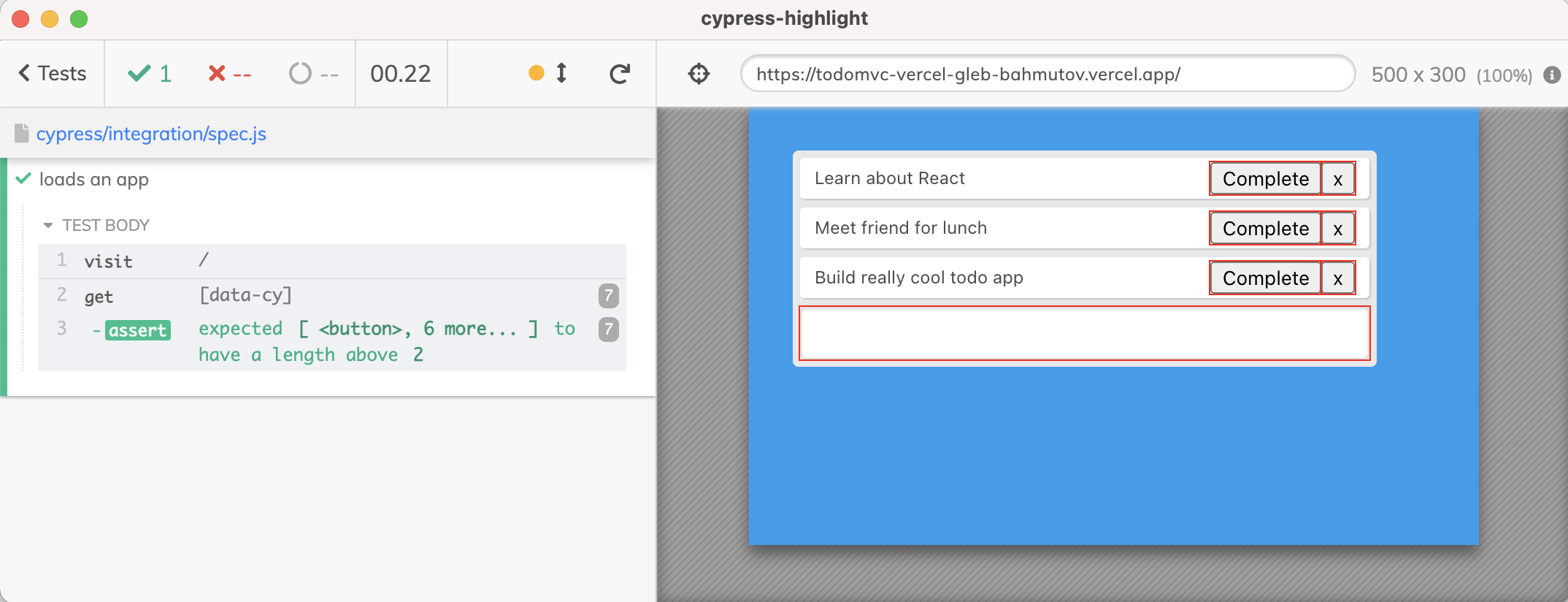
## 视频
- [为带有 data-cy 属性的元素添加红色边框](https://youtu.be/pHzroBFY5V0)
- [cypress-highlight 插件介绍](https://youtu.be/EIbSzT6QSxc)
## 安装
```
$ npm install -D cypress-highlight
# 或使用 Yarn
$ yarn add -D cypress-highlight
```
## 使用
```
import { highlight } from 'cypress-highlight'
it('loads an app', () => {
cy.visit('/')
highlight()
// you can capture a screenshot to see the elements
// with good test selectors
cy.screenshot('highlights', { capture: 'runner' })
})
```
参见 [spec.js](./cypress/integration/spec.js)
### 多个选择器
默认情况下,此模块会高亮所有带有 `data-cy` 属性的元素。你可以传入自定义的选择器列表来进行高亮。例如,要高亮所有带有 `test-id` data 属性的元素以及所有 class 名称为 `testable` 的元素,请使用
```
highlight('[data-test-id]', '.testable')
```
### 选项对象
你可以使用一个对象传入多个选项
```
// highlight all elements that have "data-cy" attribute
highlight({
selectors: '[data-cy]',
})
// highlight all elements that have "data-cy" attribute
// plus all elements with class "todo-li"
highlight({
selectors: ['[data-cy]', '.todo-li'],
})
```
#### failIfFound
你可以进行高亮,如果找到了任何匹配的元素,则使测试失败
```
highlight({
selectors: '[data-error]',
failIfFound: true,
})
```
#### failIfNotFound
如果没有找到任何匹配的元素,你可以使测试失败
```
highlight({
selectors: 'li.todo',
failIfNotFound: true,
})
```
### highlightMissingTestIds
高亮所有没有 `data-cy` 属性的按钮 / input 元素 / 锚链接。如果找到任何此类元素,默认情况下会使测试失败。
```
import { highlightMissingTestIds } from 'cypress-highlight'
// somewhere during the test
highlightMissingTestIds()
// disable throwing an error on a found element
highlightMissingTestIds(false)
```
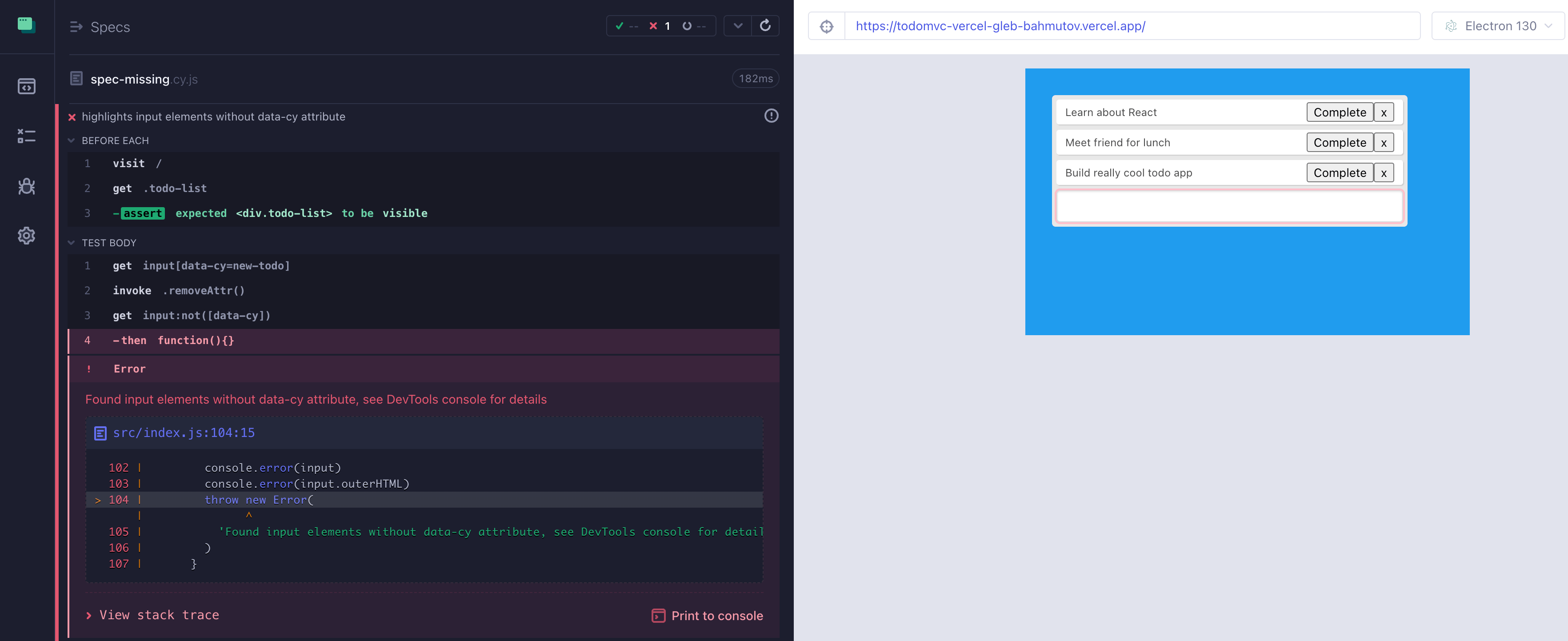
## 阅读
[Cypress 选择元素的最佳实践](https://on.cypress.io/best-practices#Selecting-Elements)
## 授权说明
作者:Gleb Bahmutov <gleb.bahmutov@gmail.com> © 2021
- [@bahmutov](https://twitter.com/bahmutov)
- [glebbahmutov.com](https://glebbahmutov.com)
- [博客](https://glebbahmutov.com/blog)
- [视频](https://www.youtube.com/glebbahmutov)
- [演示文稿](https://slides.com/bahmutov)
- [cypress.tips](https://cypress.tips)
许可证:MIT - 你可以对代码进行任何操作,但如果它无法正常工作,请不要怪我。
支持:如果你发现此模块存在任何问题,请发邮件 / 推特 /
在 Github 上 [提交 issue](https://github.com/bahmutov/cypress-highlight/issues)
## MIT 许可证
版权所有 (c) 2021 Gleb Bahmutov <gleb.bahmutov@gmail.com>
特此免费授予任何获得本软件及其相关文档
文件(以下简称“软件”)副本的人,不受限制地
处理本软件的权利,包括但不限于使用、
复制、修改、合并、发布、分发、再授权和/或销售
软件副本的权利,以及允许向其提供本软件的
人员这样做,但须符合以下
条件:
上述版权声明和本许可声明应包含在
软件的所有副本或重要部分中。
本软件按“原样”提供,不提供任何形式的保证,
无论是明示的还是暗示的,包括但不限于
适销性、特定用途的适用性和
非侵权性的保证。在任何情况下,作者或版权
持有者均不对任何索赔、损害或其他
责任负责,无论是在合同诉讼、侵权行为还是其他
行为中,由本软件或本软件的
使用或其他交易引起、
产生或与之相关。
标签:CSS注入, Cypress, UI测试, 前端开发工具, 数据可视化, 暗色界面, 自定义脚本