step-security/harden-runner
GitHub: step-security/harden-runner
专为 GitHub Actions Runner 设计的 CI/CD 安全代理,提供类似 EDR 的实时监控能力,用于检测和阻断软件供应链中的数据泄露与代码篡改威胁。
Stars: 1200 | Forks: 107

[](https://stepsecurity.io/?utm_source=github&utm_medium=organic_oss&utm_campaign=harden-runner)
[](https://api.securityscorecards.dev/projects/github.com/step-security/harden-runner)
[](https://raw.githubusercontent.com/step-security/harden-runner/main/LICENSE)
# 加固 Runner
企业笔记本电脑和生产服务器通常都有 robust 的安全监控措施,以降低风险并满足合规性要求。然而,处理云环境 secrets 等敏感信息并生成生产构建的 CI/CD runner 往往缺乏此类安全措施。这种疏忽导致了重大的供应链攻击,包括 SolarWinds 和 Codecov 泄露事件。
传统的安全监控和 EDR 解决方案由于其短暂的特性,对 CI/CD runner 并不有效。这些工具也缺乏必要的上下文来将事件与 CI/CD 环境中的特定工作流运行关联起来。
StepSecurity Harden-Runner 通过提供为 CI/CD runner 定制的安全监控来解决这一差距。这种方法将 CI/CD runner 置于与其他关键系统相同级别的安全审查之下,填补了软件供应链中的一个重大空白。
### Harden-Runner:检测到的安全事件
- [Harden-Runner 检测到 tj-actions/changed-files 漏洞利用](https://www.stepsecurity.io/blog/harden-runner-detection-tj-actions-changed-files-action-is-compromised) ([CVE-2025-30066](https://github.com/advisories/GHSA-mrrh-fwg8-r2c3))
- [Harden Runner 检测到 CNCF Backstage 仓库中的 Sha1-Hulud 供应链攻击](https://www.stepsecurity.io/blog/how-harden-runner-detected-the-sha1-hulud-supply-chain-attack-in-cncfs-backstage-repository)
- [Harden-Runner 检测到 NX Build System 漏洞利用](https://www.stepsecurity.io/blog/supply-chain-security-alert-popular-nx-build-system-package-compromised-with-data-stealing-malware)
- [Harden-Runner 实时检测到 Google 开源项目 Flank 中的 CI/CD 供应链攻击](https://www.stepsecurity.io/case-studies/flank)
- [Harden-Runner 实时检测到 Microsoft 开源项目 Azure Karpenter Provider 中的 CI/CD 供应链攻击](https://www.stepsecurity.io/case-studies/azure-karpenter-provider)
- [Harden-Runner 检测到跨多个客户对 api.ipify.org 的异常流量](https://www.stepsecurity.io/blog/harden-runner-detects-anomalous-traffic-to-api-ipify-org-across-multiple-customers)
- [Harden-Runner 检测到 GitHub 托管的 Ubuntu Runner 上意外的 Microsoft Defender 安装](https://www.stepsecurity.io/blog/how-stepsecurity-harden-runner-detected-unexpected-microsoft-defender-installation-on-github-hosted-ubuntu-runners)
- [Harden-Runner 标记了异常的出站调用,促使 Docker 文档更新](https://www.stepsecurity.io/blog/harden-runner-flags-anomalous-outbound-call-leading-to-docker-documentation-update)
### 查看实际效果
Harden-Runner 每周保护超过 **1800 万次 CI/CD 工作流运行**,保护着数千条流水线,包括 **Microsoft、Google 和 CISA** 的热门开源项目。查看顶级项目如何使用 Harden-Runner 并探索相关洞察:
➡️ [谁在使用 Harden-Runner?](https://docs.stepsecurity.io/whos-using-harden-runner)
## 快速链接
- [入门指南](#getting-started)
- [为什么选择 Harden-Runner](#why-choose-harden-runner)
- [功能和能力](#features)
- [案例研究与受信任的项目](#trusted-by-and-case-studies)
- [环境兼容性矩阵](#environment-compatibility-matrix)
- [工作原理](docs/how-it-works.md)
- [已知限制](docs/limitations.md)
- [参与讨论](#discussions)
- [官方文档](https://docs.stepsecurity.io/harden-runner)
## 简介
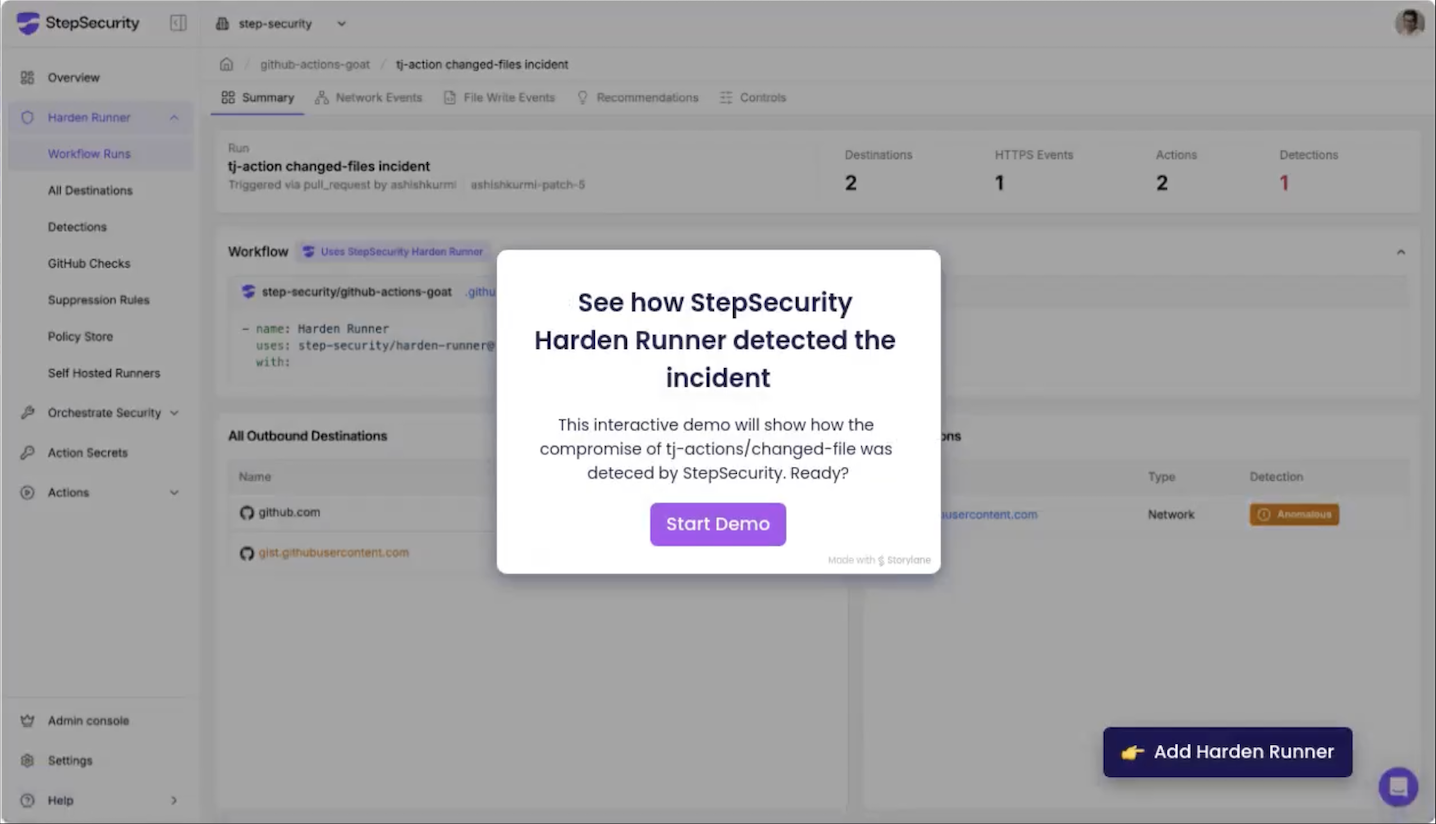
通过下面的视频了解 Harden-Runner 的工作原理,该视频展示了它如何检测 tj-actions/changed-files 漏洞利用。[在此查看交互式演示](https://app.storylane.io/share/679y2zgzljov)。
 ## 入门指南
本指南将引导您完成在 CI/CD 工作流中设置和使用 Harden-Runner 的步骤。有关更多详细信息,请参阅[官方文档](https://docs.stepsecurity.io/harden-runner)。
### **第 1 步:将 Harden-Runner 添加到您的工作流**
要集成 Harden-Runner,请按照以下步骤操作:
- 打开您的 GitHub Actions 工作流文件(例如 `.github/workflows/
## 入门指南
本指南将引导您完成在 CI/CD 工作流中设置和使用 Harden-Runner 的步骤。有关更多详细信息,请参阅[官方文档](https://docs.stepsecurity.io/harden-runner)。
### **第 1 步:将 Harden-Runner 添加到您的工作流**
要集成 Harden-Runner,请按照以下步骤操作:
- 打开您的 GitHub Actions 工作流文件(例如 `.github/workflows/点击查看完整的入门指南
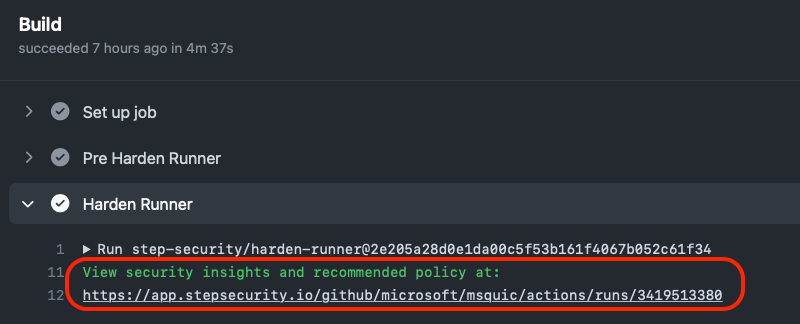
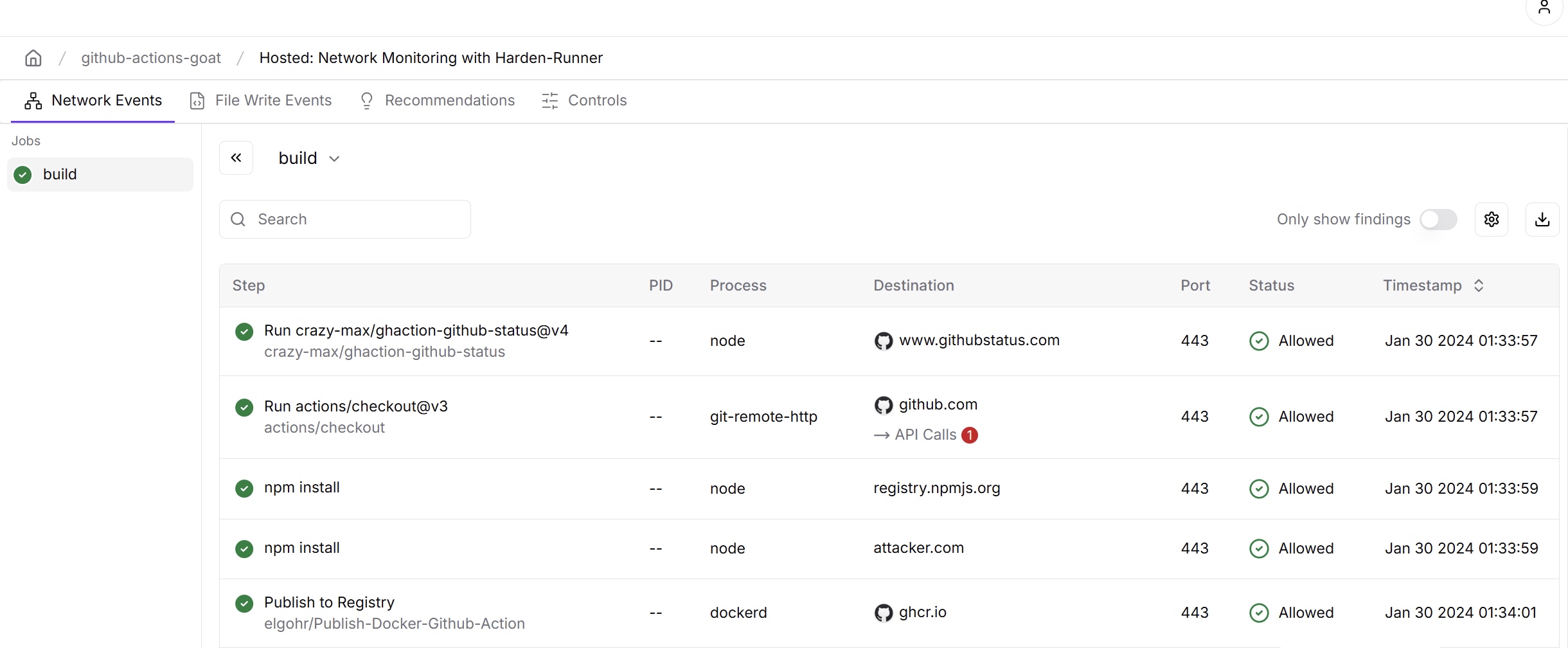
### **第 2 步:访问安全洞察** 运行您的工作流。完成后: - 查看**工作流日志**和 **job markdown 摘要**。 - 寻找指向**安全洞察和建议**的链接。
[探索](https://app.stepsecurity.io/github/cisagov/skeleton-generic/actions/runs/9947319332?jobid=27479776091&tab=network-events) | **Microsoft**
[探索](https://app.stepsecurity.io/github/microsoft/ebpf-for-windows/actions/runs/7587031851) | **Google**
[探索](https://app.stepsecurity.io/github/GoogleCloudPlatform/functions-framework-ruby/actions/runs/7576989995) | **DataDog**
[探索](https://app.stepsecurity.io/github/DataDog/stratus-red-team/actions/runs/7446169664) | **Intel**
[探索](https://app.stepsecurity.io/github/intel/cve-bin-tool/actions/runs/7590975903) | **Kubernetes**
[探索](https://app.stepsecurity.io/github/kubernetes-sigs/cluster-api-provider-azure/actions/runs/7591172950) | **Node.js**
[探索](https://app.stepsecurity.io/github/nodejs/node/actions/runs/7591405720) | **AWS**
[探索](https://app.stepsecurity.io/github/aws/aperf/actions/runs/7631366761) | ### 企业案例研究 - [Coveo 如何利用 StepSecurity 加强 GitHub Actions 安全](https://www.stepsecurity.io/case-studies/coveo) - [Hashgraph 在不影响开发速度的情况下实现全面的 CI/CD 安全](https://www.stepsecurity.io/case-studies/hashgraph) - [Chainguard 利用 StepSecurity 保护 GitHub Actions](https://www.stepsecurity.io/case-studies/chainguard) - [Kapiche 利用 Harden-Runner 保护其 GitHub Actions 软件供应链](https://www.stepsecurity.io/case-studies/kapiche) - [Arcjet 利用 Harden-Runner 增强 CI/CD 安全](https://www.stepsecurity.io/case-studies/arcjet) ## 环境兼容性矩阵 Harden-Runner 旨在各种 runner 环境中无缝工作,无论您的工作流在哪里执行,都能提供一致的安全洞察和保护。对于自托管 runner,audit mode 直接部署到 runner 基础设施,无需更改您现有的工作流。有关更多详细信息,请参阅[官方文档](https://docs.stepsecurity.io/harden-runner)。 | Environment Type | Compatibility | Audit Mode Deployment | Workflow Changes for Audit Mode | |------------------|---------------|--------------------------|-------------------| | GitHub-hosted runners | ✅ 全支持 | 将 Harden-Runner Action 添加到工作流 | 是 | | Self-hosted VM runners | ✅ 全支持 | 在 runner 镜像中包含 agent | 否 | | Self-hosted bare-metal runners | ✅ 全支持 | 将 agent 作为服务安装 | 否 | | Actions Runner Controller (ARC) | ✅ 全支持 | 作为 DaemonSet 部署 | 否 | | RunsOn Runners | ✅ 全支持 | 预集成 | 否 | ## 工作原理 想了解技术细节?请深入阅读我们的 [Harden-Runner 工作原理文档](docs/how-it-works.md),了解 Harden-Runner 的架构及其针对 GitHub 托管和自托管 runner 的集成。 ## 限制 虽然 Harden-Runner 提供了强大的功能,但也存在某些限制。请在[已知限制](docs/limitations.md)中查看完整列表。 ## 讨论 加入对话!如有问题、想法或反馈,请访问我们的[讨论页面](https://github.com/step-security/harden-runner/discussions)。 如需企业支持,请发送电子邮件至 support@stepsecurity.io。有兴趣在其他 CI/CD 平台上使用 Harden-Runner?请联系 interest@stepsecurity.io。 ## 许可证 Harden-Runner 是开源的。有关详细信息,请参阅 [LICENSE](LICENSE) 文件。
标签:Apache 2.0, CI/CD 安全, DevSecOps, DNS 解析, EDR, GitHub Actions, HTTP工具, IP 地址批量处理, StepSecurity, StruQ, x64dbg, 上游代理, 代码构建安全, 入侵检测系统, 安全代理, 安全数据湖, 实时威胁检测, 数据投毒防御, 文件完整性监控 (FIM), 文档安全, 网络出口监控, 脆弱性评估, 自动化攻击, 自动化攻击, 自动笔记, 请求响应过滤, 软件供应链安全, 运行时防护, 进程审计, 远程方法调用