step-security/secure-repo
GitHub: step-security/secure-repo
自动为 GitHub 仓库应用安全最佳实践,减小 CI/CD 供应链攻击面。
Stars: 329 | Forks: 54

[](https://stepsecurity.io/?utm_source=github&utm_medium=organic_oss&utm_campaign=secure-repo)
[](https://goreportcard.com/report/github.com/step-security/secure-repo)
[](https://codecov.io/gh/step-security/secure-repo)
[](https://api.securityscorecards.dev/projects/github.com/step-security/secure-repo)
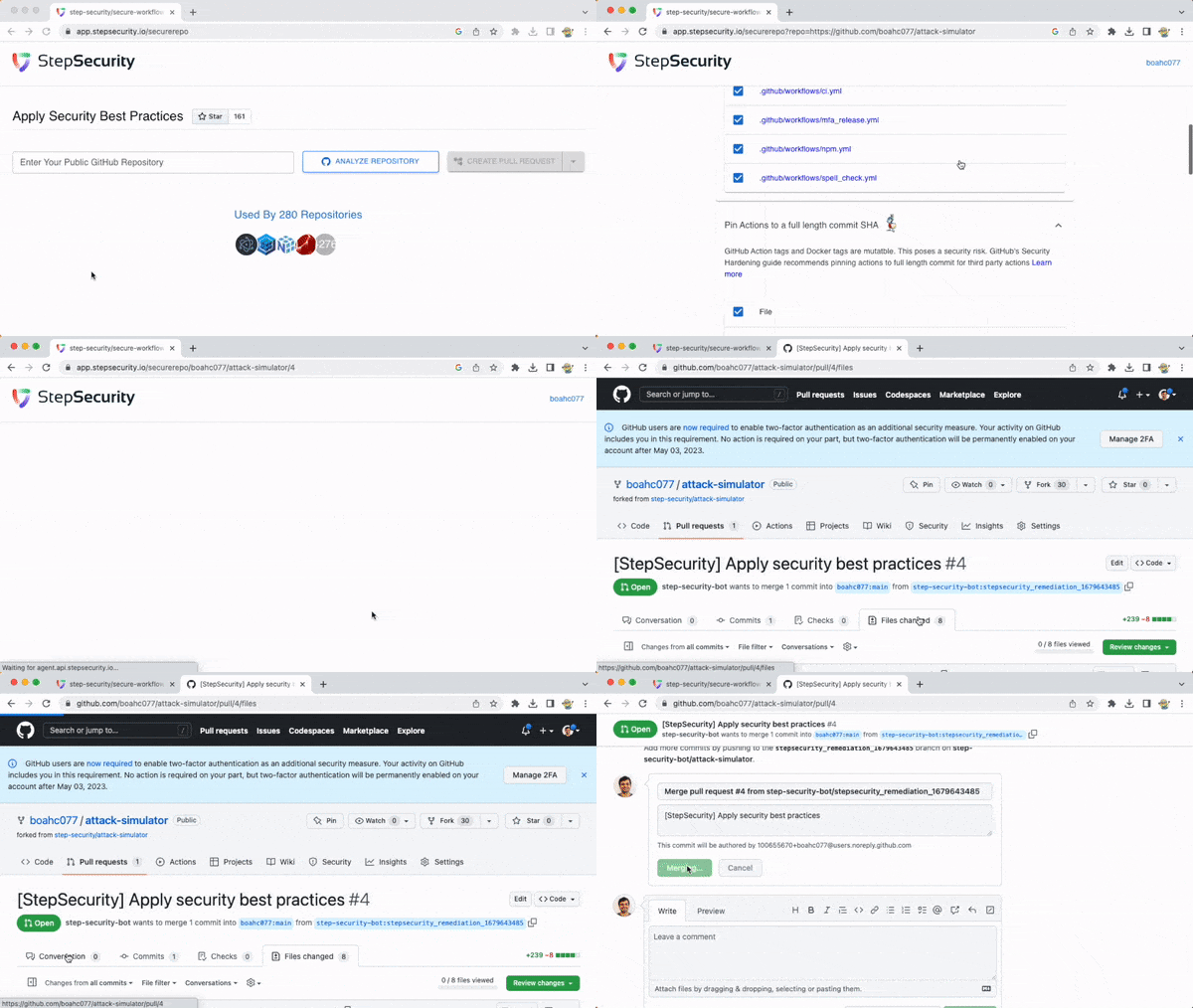
自动在 GitHub 仓库中应用安全最佳实践
## 修复目录
1. [自动设置 GITHUB_TOKEN 最小权限](#1-automatically-set-minimum-github_token-permissions)
2. [为每个任务添加 Harden-Runner GitHub Action](#2-add-harden-runner-github-action-to-each-job)
3. [将 Actions 固定到完整长度的提交 SHA](#3-pin-actions-to-a-full-length-commit-sha)
4. [在 Dockerfile 中将镜像标签固定为摘要](#4-pin-image-tags-to-digests-in-dockerfiles)
5. [添加或更新 Dependabot 配置](#5-add-or-update-dependabot-configuration)
6. [添加 CodeQL 工作流(SAST)](#6-add-codeql-workflow-sast)
7. [添加依赖项审查工作流](#7-add-dependency-review-workflow)
8. [添加 OpenSSF Scorecard 工作流](#8-add-openssf-scorecard-workflow)
### 1. 自动设置 GITHUB_TOKEN 最小权限
#### 为什么需要此操作?
- GITHUB_TOKEN 是一个自动生成的密钥,用于对 GitHub API 进行经过身份验证的调用
- 如果令牌被泄露,它可能会被滥用以危害你的环境(例如,覆盖发布或源代码)。这种泄露也会影响在你的供应链中使用你软件的每个人。
- 为了限制损害,[GitHub 建议为 GITHUB_TOKEN 设置最小权限](https://github.blog/changelog/2021-04-20-github-actions-control-permissions-for-github_token/)。
#### 修复前与修复后
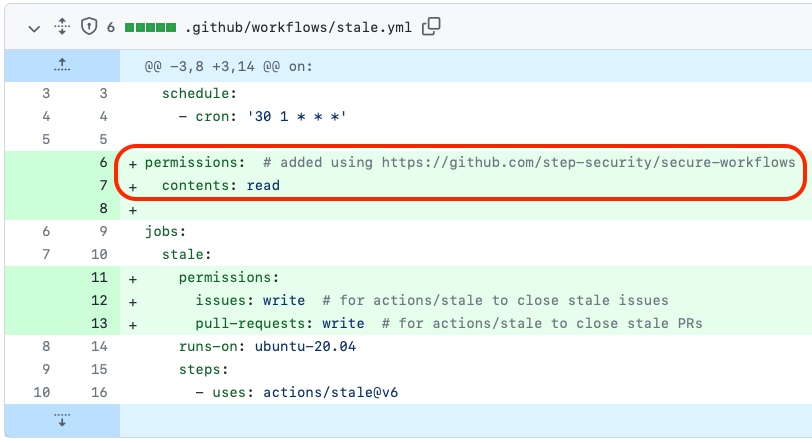
**拉取请求示例**:https://github.com/nginxinc/kubernetes-ingress/pull/3134
在此拉取请求中,GITHUB_TOKEN 的权限会自动设置为最小权限。
#### Secure-Repo 如何修复此问题?
- Secure-Repo 在 [知识库](<(https://github.com/step-security/secure-repo/tree/main/knowledge-base/actions) 中存储不同 GitHub Action 所需的权限
- 它查找你的工作流中每个 Action 所需的权限,并将它们相加以得出最终推荐值
- 如果你是某个 GitHub Action 的所有者,请[为知识库做出贡献](https://github.com/step-security/secure-repo/blob/main/knowledge-base/actions/README.md)
### 2. 为每个任务添加 Harden-Runner GitHub Action
#### 为什么需要此操作?
[Harden-Runner GitHub Action](https://github.com/step-security/harden-runner) 在 GitHub 托管的运行器上安装安全代理,以防止凭据外泄、监控构建过程并检测受损的依赖项。
#### 修复前与修复后
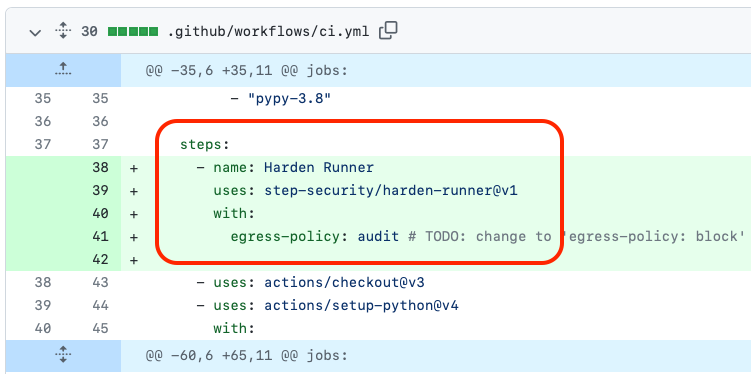
**拉取请求示例**:https://github.com/python-attrs/attrs/pull/1034
此拉取请求将 Harden Runner GitHub Action 添加到工作流文件中。
#### Secure-Repo 如何修复此问题?
Secure-Repo 更新 YAML 文件并将 [Harden-Runner GitHub Action](https://github.com/step-security/harden-runner) 添加到每个任务的第一步骤。
### 3. 将 Actions 固定到完整长度的提交 SHA
#### 为什么需要此操作?
- GitHub Action 标签和 Docker 标签是可变的,这会带来安全风险
- 如果标签发生变化,你将无法在它被使用前审查更改
- GitHub 的《GitHub Actions 的安全强化》指南[建议将第三方 Action 固定到完整长度的提交](https://docs.github.com/en/actions/security-guides/security-hardening-for-github-actions#using-third-party-actions)。
#### 修复前与修复后
修复前,你的工作流可能如下所示(使用 `v1` 和 `latest` 标签)
修复后,Secure-Repo 会将每个 Action 和 Docker 镜像固定到不可变的校验和。
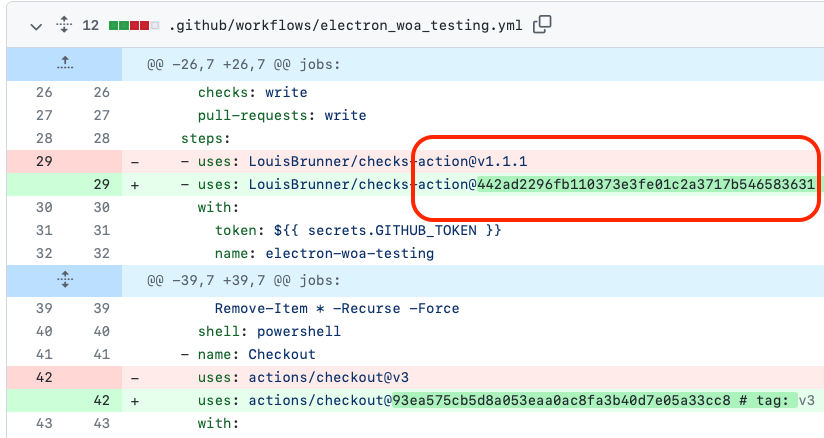
**拉取请求示例**:https://github.com/electron/electron/pull/36343
在此拉取请求中,工作流文件中的 GitHub Actions 标签会自动固定到其完整长度的提交 SHA。
#### Secure-Repo 如何修复此问题?
- Secure-Repo 自动化获取每个可变 Action 版本或 Docker 镜像标签的提交 SHA 的过程
- 它通过使用 GitHub 和 Docker 注册表 API 来实现这一点
### 4. 在 Dockerfile 中将镜像标签固定为摘要
#### 为什么需要此操作?
- Docker 标签是可变的,因此在拉取镜像时应使用摘要代替标签
- 如果标签发生变化,你将无法在它被使用前审查更改
- OpenSSF Scorecard [建议为用于构建和发布项目的 Dockerfile 固定镜像标签](https://github.com/ossf/scorecard/blob/main/docs/checks.md#pinned-dependencies)。
#### 修复前与修复后
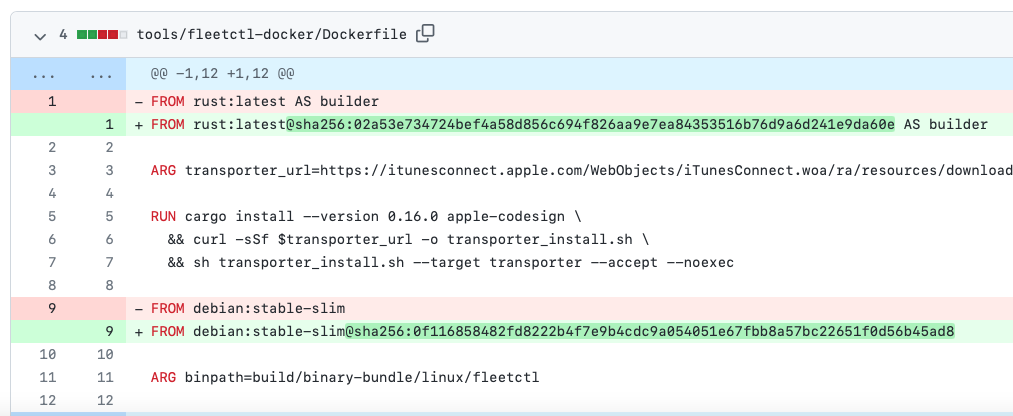
修复前,你的 Dockerfile 使用镜像标签,例如 `rust:latest`
修复后,Secure-Repo 会将每个 Docker 镜像固定到不可变的校验和,例如 `rust:latest@sha256:02a53e734724bef4a58d856c694f826aa9e7ea84353516b76d9a6d241e9da60e`。
**拉取请求示例**:https://github.com/fleetdm/fleet/pull/10205
在此拉取请求中,Dockerfile 的标签会自动固定到其校验和。
#### Secure-Repo 如何修复此问题?
- Secure-Repo 自动化获取每个 Docker 镜像标签的校验和的过程
- 它通过使用 Docker 注册表 API 来实现这一点
### 5. 添加或更新 Dependabot 配置
#### 为什么需要此操作?
- 通过在仓库中提交 `dependabot.yml` 配置文件来启用 Dependabot 版本更新
- Dependabot 确保你的仓库自动跟上其依赖的包和应用程序的最新版本
#### 修复前与修复后
修复前,你可能没有 `dependabot.yml` 文件,或者它未涵盖你的项目中使用的所有生态系统。
修复后,`dependabot.yml` 文件会被添加或更新,并包含对你的项目使用的所有软件包生态系统的配置。
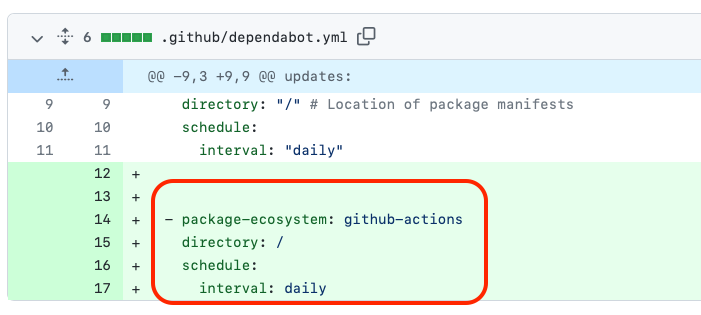
**拉取请求示例**:https://github.com/muir/libschema/pull/31
此拉取请求会更新 Dependabot 配置。
#### Secure-Repo 如何修复此问题?
Secure-Repo 更新 `dependabot.yml` 文件以添加缺失的生态系统。例如,如果 Dependabot 配置更新了 npm 包但未更新 GitHub Actions,它会更新以添加 GitHub Actions 生态系统。
### 6. 添加 CodeQL 工作流(SAST)
#### 为什么需要此操作?
- 使用静态应用程序安全测试(SAST)工具可以防止已知类别的错误被引入到代码库中
#### 修复前与修复后
修复前,你没有 CodeQL 工作流。
修复后,会向你的项目添加一个 `codeql.yml` GitHub Actions 工作流。
**拉取请求示例**:https://github.com/rubygems/rubygems.org/pull/3314
此拉取请求会将 CodeQL 添加到工作流列表中。
#### Secure-Repo 如何修复此问题?
Secure-Repo 拥有一个 [workflow-templates](https://github.com/step-security/secure-repo/tree/main/workflow-templates) 文件夹。该文件夹包含默认的 CodeQL 工作流,会在拉取请求中添加。工作流模板中的语言占位符会被替换为你 GitHub 仓库的语言。
### 7. 添加依赖项审查工作流
#### 为什么需要此操作?
- 依赖项审查工作流会扫描在拉取请求中引入的依赖项的易受攻击版本,并警告你相关的安全漏洞。
- 这能让你更好地了解拉取请求中的变更,并帮助防止漏洞被添加到你的仓库中。
#### 修复前与修复后
修复,你没有依赖项审查工作流。
修复后,会向你的项目添加一个 `depdendency-review.yml` GitHub Actions 工作流。
**拉取请求示例**:https://github.com/input-output-hk/catalyst-core/pull/286
此拉取请求会将 GitHub 的 `actions/dependency-review-action` 工作流添加到工作流列表中。
#### Secure-Repo 如何修复此问题?
Secure-Repo 拥有一个 [workflow-templates](https://github.com/step-security/secure-repo/tree/main/workflow-templates) 文件夹。该文件夹包含默认的依赖项审查工作流,会在拉取请求中添加。
### 8. 添加 OpenSSF Scorecard 工作流
#### 为什么需要此操作?
- OpenSSF Scorecard 是一个自动化工具,用于评估与软件安全相关的多项启发式检查(“检查项”),并为每项检查分配 0-10 的分数。
- 你可以使用这些分数来了解需要改进的具体领域,以加强项目的安全态势。
#### 修复前与修复后
修复前,你没有 OpenSSF Scorecard 工作流。
修复后,会向你的项目添加一个 `scorecards.yml` GitHub Actions 工作流。
**拉取请求示例**:https://github.com/microsoft/CLRInstrumentationEngine/pull/527
此拉取请求会将 OpenSSF Scorecard 添加到工作流列表中。
#### Secure-Repo 如何修复此问题?
Secure-Repo 拥有一个 [workflow-templates](https://github.com/step-security/secure-repo/tree/main/workflow-templates) 文件夹。该文件夹包含默认的 Scorecard 工作流,会在拉取请求中添加。
## 快速开始
### 托管实例:[app.stepsecurity.io/securerepo](https://app.stepsecurity.io/securerepo)
要使用拉取请求保护你的 GitHub 仓库:
- 访问 https://app.stepsecurity.io/securerepo 并输入你的公共 GitHub 仓库
- 使用你的 GitHub 账户登录(无需安装任何应用或授予 `write` 权限)
- 查看推荐并点击“创建拉取请求”。以下是一个拉取请求示例:https://github.com/electron/electron/pull/36343。
### 与 OpenSSF Scorecard 集成
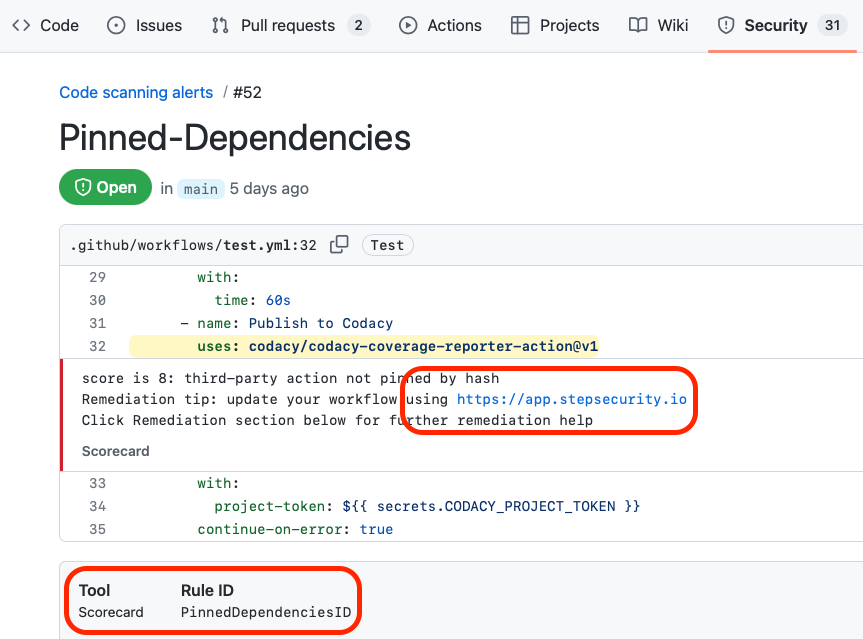
- 添加 [OpenSSF Scorecards](https://github.com/ossf/scorecard-action) 启动工作流
- 在 GitHub Code Scanning UI 中查看 Scorecard 结果
- 按照指向 https://app.stepsecurity.io 的修复提示操作
### 自我托管
要创建 Secure Workflows 的实例,请在 AWS 账户中部署 _cloudformation/ecr.yml_ 和 _cloudformation/resources.yml_ CloudFormation 模板。你可以参考 _.github/workflows/release.yml_。
## 贡献
欢迎贡献!
如果你是某个 GitHub Action 的所有者,请为你的 Action 提供有关 GITHUB_TOKEN 使用情况的信息。这将使社区能够自动计算其工作流的 GITHUB_TOKEN 最小权限。查看[贡献指南](https://github.com/step-security/secure-repo/blob/main/knowledge-base/actions/README.md)。
标签:Action 固化, CI/CD 安全, Dependabot, DevSecOps, EVTX分析, FTP漏洞扫描, GitHub Actions, Harden Runner, OpenSSF Scorecard, SAST, SEO: GitHub 安全, SEO: 仓库加固, 上游代理, 仓库加固, 依赖审查, 安全基线, 安全最佳实践, 安全编排, 教学环境, 数据投毒防御, 日志审计, 最小权限, 盲注攻击, 结构化查询, 自动化安全, 自动笔记, 镜像签名