flamusdiu/xleapp
GitHub: flamusdiu/xleapp
xLEAPP 是一个统一的数字取证 artifacts 解析框架,将多个平台专用的取证工具合并为模块化架构,支持对 iOS、macOS、Android 等系统的日志、事件和 Plist 数据进行集中解析。
Stars: 56 | Forks: 6
# xLEAPP
[](https://github.com/psf/black)
[](https://github.com/pre-commit/pre-commit)
**开发版本。请在真实案件中谨慎使用。**
日志、事件和 Plist 解析器框架 (LEAPP)
该框架是对出色工具 iLEAPP 的完全重写。有关 iLEAPP 的详细信息可以在[此博客文章](https://abrignoni.blogspot.com/2019/12/xleapp-ios-logs-events-and-properties.html)中找到。
xLEAPP 是为了将多个工具合并在一起而创建的框架。关于此次重写的更多信息,请参阅我于 2021 年在 Black Hills Info Security 的 Wild West Hackin' Fest (WWHF): Deadwood 上发表演讲([YouTube](https://www.youtube.com/watch?v=seTpCmSF0Gc))。
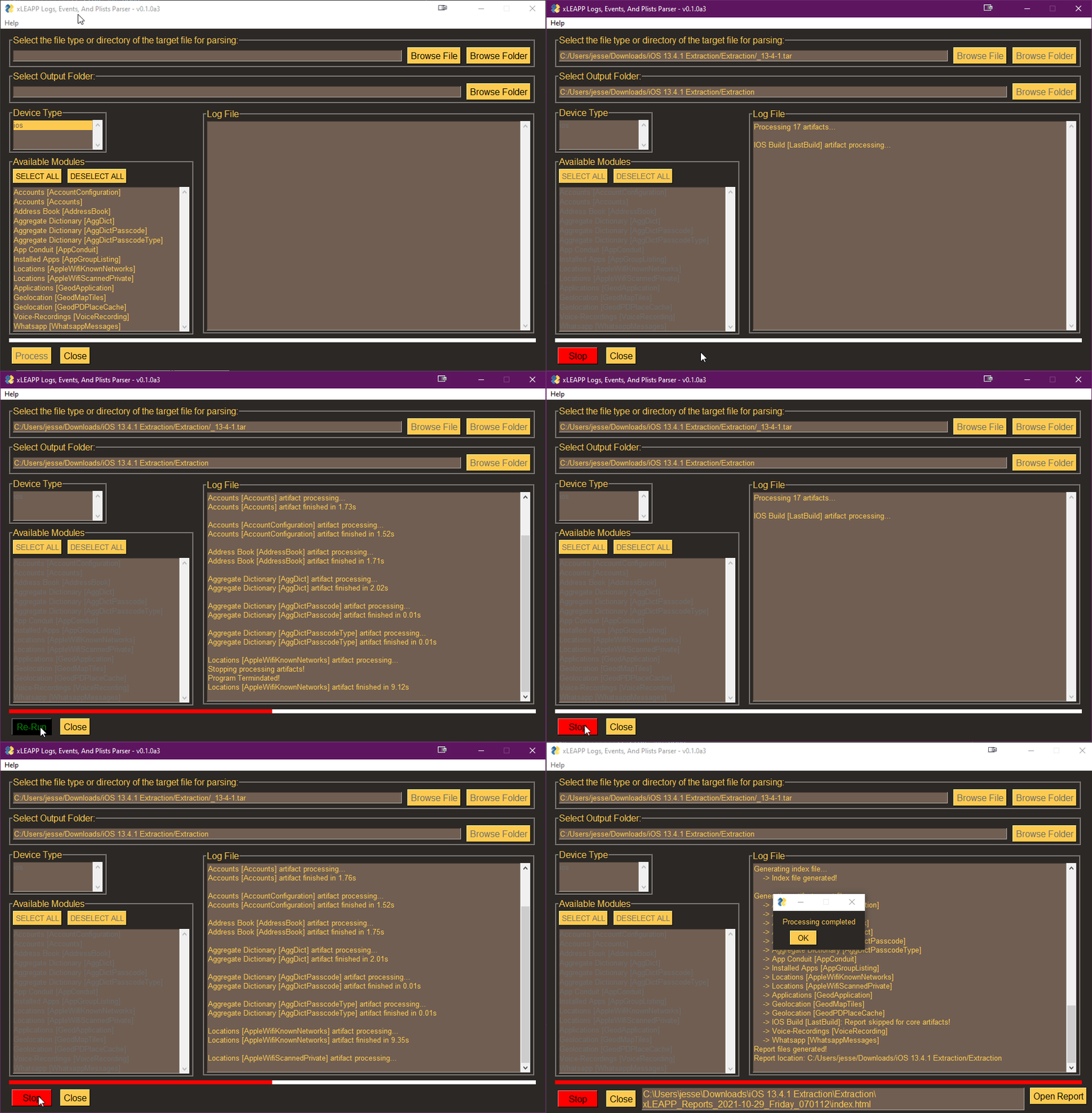 ## 功能
* 提供了一个集中且模块化的框架
* 为每个不同的受支持平台提供了一种简化的插件(artifacts)编写方式。
* 根据安装的插件,解析 iOS、macOS、Android、Chromebook、保修退货和 Windows 的 artifacts。
## 其他文档
* [Artifact 创建](docs/current/artifact-creation.md)
## 前置条件
该项目要求您安装 Python >= 3.9
## 插件
以下是需要完成的插件列表。带有“non-free”后缀的插件包使用的许可证可能与 MIT 许可证不符,因此已被分离出来。
- [X] xleapp-extensions [[Github](https://github.com/flamusdiu/xleapp-extensions)] [[PyPI](https://pypi.org/project/xleapp-extensions/)]
- [ ] xleapp-non-free-extensions [[Github](https://github.com/flamusdiu/xleapp-non-free-extensions)]
## 安装
### Windows
* Python
PS> py -3 -m pip install xleapp
PS> py -3 -m pip install xleapp-
## 功能
* 提供了一个集中且模块化的框架
* 为每个不同的受支持平台提供了一种简化的插件(artifacts)编写方式。
* 根据安装的插件,解析 iOS、macOS、Android、Chromebook、保修退货和 Windows 的 artifacts。
## 其他文档
* [Artifact 创建](docs/current/artifact-creation.md)
## 前置条件
该项目要求您安装 Python >= 3.9
## 插件
以下是需要完成的插件列表。带有“non-free”后缀的插件包使用的许可证可能与 MIT 许可证不符,因此已被分离出来。
- [X] xleapp-extensions [[Github](https://github.com/flamusdiu/xleapp-extensions)] [[PyPI](https://pypi.org/project/xleapp-extensions/)]
- [ ] xleapp-non-free-extensions [[Github](https://github.com/flamusdiu/xleapp-non-free-extensions)]
## 安装
### Windows
* Python
PS> py -3 -m pip install xleapp
PS> py -3 -m pip install xleapp-
* PIPX
PS> py -3 -m pip install pipx
PS> pipx install xleapp
PS> pipx inject xleapp xleapp-
### Linux
* Python
$ python3 -m pip install xleapp
$ python3 -m pip install xleapp-
* PIPX
$ python3 -m pip install pipx
$ pipx install xleapp
$ pipx inject xleapp xleapp-
## 从 Github 安装及开发信息
* [Windows](docs/current/windows.md)
* [Linux](docs/current/linux.md)
## VS Code 配置文件
这里有几个我一直在 VS Code 中使用的[配置文件](https://github.com/flamusdiu/xleapp-project)。
## 编译为可执行文件
**注意:**目前这个 alpha 版本可能无法使用此功能。
编译为可执行文件,这样您就可以在没有安装 Python 的系统上运行它。
要创建 xleapp.exe,请运行:
```
pyinstaller --onefile xleapp.spec
```
要创建 xleappGUI.exe,请运行:
```
pyinstaller --onefile --noconsole xleappGUI.spec
```
## 用法
### CLI
```
$ xleapp -h
usage: xleapp [-h] [-I] [-R] [-A] [-C] [-V] [-o OUTPUT_FOLDER] [-i INPUT_PATH]
[--artifacts [ARTIFACTS ...]] [-p] [-l] [--gui] [--version]
xLEAPP: Logs, Events, and Plists Parser.
optional arguments:
-h, --help show this help message and exit
-I parse ios artifacts
-R parse Warrant Returns / User Generated Archives artifacts
-A parse android artifacts
-C parse Chromebook artifacts
-V parse vehicle artifacts
-o OUTPUT_FOLDER, --output_folder OUTPUT_FOLDER
Output folder path
-i INPUT_PATH, --input_path INPUT_PATH
Path to input file/folder
--artifact [ARTIFACT ...]
Filtered list of artifacts to run. Allowed: core,
-p, --artifact_paths Text file list of artifact paths
-l, --artifact_table Text file with table of artifacts
--gui Runs xLEAPP into graphical mode
--version show program's version number and exit
```
### GUI
这还需要完善,可能无法正常运行!
```
$ xleapp --gui
```
### 帮助
```
$ xleapp.py --help
```
GUI 将在另一个窗口中打开。
## 致谢
该工具是 DFIR 社区众多人员共同努力的结晶。
本产品包含由 Sarah Edwards (Station X Labs, LLC, @iamevltwin, mac4n6.com) 和其他贡献者作为 APOLLO (Apple Pattern of Life Lazy Output'er) 的一部分开发的软件。
## 功能
* 提供了一个集中且模块化的框架
* 为每个不同的受支持平台提供了一种简化的插件(artifacts)编写方式。
* 根据安装的插件,解析 iOS、macOS、Android、Chromebook、保修退货和 Windows 的 artifacts。
## 其他文档
* [Artifact 创建](docs/current/artifact-creation.md)
## 前置条件
该项目要求您安装 Python >= 3.9
## 插件
以下是需要完成的插件列表。带有“non-free”后缀的插件包使用的许可证可能与 MIT 许可证不符,因此已被分离出来。
- [X] xleapp-extensions [[Github](https://github.com/flamusdiu/xleapp-extensions)] [[PyPI](https://pypi.org/project/xleapp-extensions/)]
- [ ] xleapp-non-free-extensions [[Github](https://github.com/flamusdiu/xleapp-non-free-extensions)]
## 安装
### Windows
* Python
PS> py -3 -m pip install xleapp
PS> py -3 -m pip install xleapp-标签:Android, DSL, iOS, Python, 基础设施安全, 多平台解析, 数字取证, 无后门, 漏洞挖掘, 自动化脚本, 自定义脚本, 逆向工具