as0ler/r2flutch
GitHub: as0ler/r2flutch
一款基于 r2frida 的 iOS 应用解密工具,自动化提取并生成 IPA。
Stars: 183 | Forks: 23
# r2flutch
又一个使用 r2frida 解密 iOS 应用的小工具。
支持 Frida 17(已在 17.9.1 上测试)
## 要求
- 已越狱的 iOS 设备
- [Frida](https://frida.re/docs/ios/#with-jailbreak) 17(已在 17.9.1 上测试)并安装在设备上(可通过 Cydia/Sileo 安装)
- 主机上已安装 [radare2](https://github.com/radareorg/radare2)
- 主机上已安装 [r2frida](https://github.com/nowsecure/r2frida)
- Python >= 3.6
- Node.js >= 20(用于 r2frida 代理插件)
## 安装
### 通过 pip 安装
```
pip install r2flutch
```
### 通过 r2pm 安装
```
r2pm -ci r2flutch
```
### 从源代码安装
```
git clone https://github.com/as0ler/r2flutch.git
cd r2flutch
./install.sh
```
`install.sh` 脚本会安装 pip 依赖,构建 r2frida 代理插件(`npm install`),并安装该包。
## 使用
### 列出已安装的应用
```
r2flutch -l
```
```
Bundle Identifier Name
----------------------------------------------------
com.aimharder.mainapp AimHarder
com.apple.AppStore App Store
com.apple.calculator Calculator
com.apple.camera Camera
com.apple.mobilesafari Safari
...
43 applications found
```
列表按 Bundle Identifier 字母顺序排序,并包含应用显示名称。执行此命令无需 SSH 连接或配置文件。
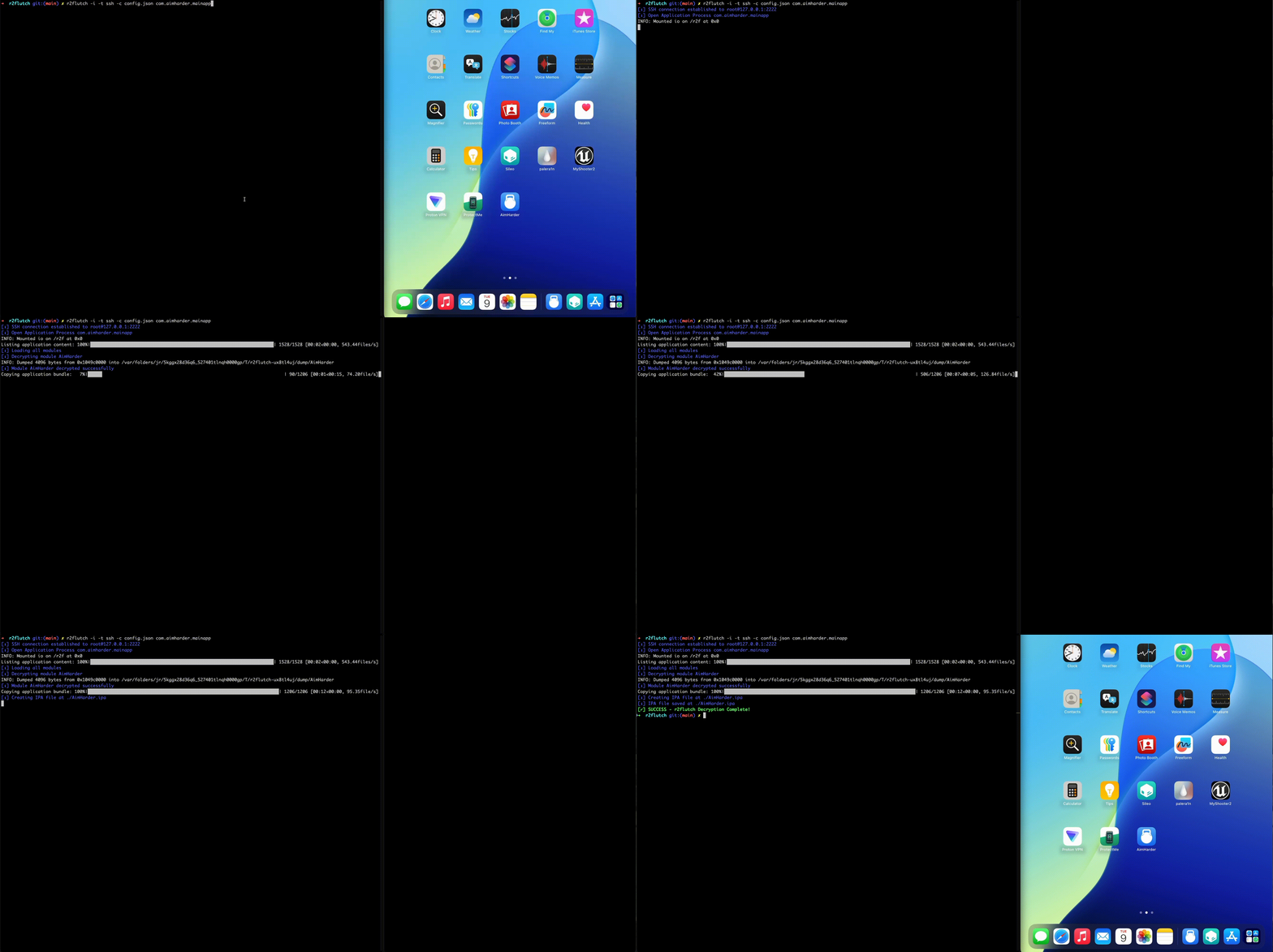
### 解密应用并生成 IPA
```
r2flutch -i com.aimharder.mainapp
```
```
[ℹ] SSH connection established to root@127.0.0.1:2222
[ℹ] Open Application Process com.aimharder.mainapp
Listing application content: 100%|███████████████| 1528/1528 [00:02<00:00, 615files/s]
[ℹ] Loading all modules
[ℹ] Decrypting module AimHarder
[ℹ] Module AimHarder decrypted successfully
Copying application bundle: 100%|████████████████| 1206/1206 [00:11<00:00, 106file/s]
[ℹ] Creating IPA file at ./AimHarder.ipa
[ℹ] IPA file saved at ./AimHarder.ipa
[✓] SUCCESS - r2flutch Decryption Complete!
```
### 仅解密二进制文件(不生成 IPA)
```
r2flutch com.aimharder.mainapp
```
解密后的二进制文件会保存到当前目录。使用 `-o` 可更改输出位置:
```
r2flutch -o /tmp/decrypted com.aimharder.mainapp
```
### 使用 Frida 传输(无需配置文件)
```
r2flutch -t frida -i com.aimharder.mainapp
```
### 调试模式
通过 `-d` 查看详细的内部信息(内存偏移、临时路径、库加载、补丁详情):
```
r2flutch -d -i com.aimharder.mainapp
```
## 文件传输方式
r2flutch 支持两种从设备下载文件的方式:
| 标志 | 传输方式 | 描述 |
|------|----------|------|
| `-t ssh` | **SSH(默认)** | 通过 SFTP 下载文件。对大型 Bundle 更快且更可靠。 |
| `-t frida` | Frida | 通过 r2frida 命令下载文件(原始行为)。 |
### SSH 传输(默认)
SSH 传输需要一个 `config.json` 文件,其中包含设备凭据:
```
{
"ssh": {
"host": "192.168.1.100",
"port": 22,
"username": "root",
"password": "alpine"
}
}
```
字段 `host`、`username` 和 `password` 为**必填项**。若省略 `port`,则默认为 `22`。
默认情况下,r2flutch 会在当前目录查找 `config.json`。使用 `-c` 可指定自定义路径:
```
r2flutch -c /path/to/config.json -i com.example.app
```
示例配置文件位于 `config.json.example`。
### Frida 传输
要使用原始的基于 Frida 的文件传输方式(无需配置文件):
```
r2flutch -t frida -i com.example.app
```
## 所有选项
```
usage: r2flutch [-h] [-d] [-o OUTPUT] [-i] [-l] [-t {ssh,frida}] [-c CONFIG] [target]
r2flutch (by Murphy)
positional arguments:
target Bundle identifier of the target app
options:
-h, --help show this help message and exit
-d, --debug Show debug messages
-o OUTPUT, --output OUTPUT Path where output files will be stored.
-i, --ipa Generate an IPA file
-l, --list List the installed apps
-t {ssh,frida}, --transport Transport for file transfer: ssh (default) or frida
-c CONFIG, --config CONFIG Path to config.json file (default: config.json)
```
## 测试
运行测试套件并生成覆盖率报告:
```
bash run_tests.sh
```
或直接使用 pytest 运行:
```
python3 -m pytest test/ -v
```
## 故障排除
### Xcode 未打开
```
error: This feature requires an iOS Developer Disk Image to be mounted;
run Xcode briefly or use ideviceimagemounter to mount one manually
```
**解决方案:** 打开 Xcode,让它识别连接的设备。
### Frida Gadget 未安装
```
error: Cannot attach: Need Gadget to attach on jailed iOS;
its default location is: ~/.cache/frida/gadget-ios.dylib
```
**解决方案:** 从
[Frida 发布页面](https://github.com/frida/frida/releases) 下载 gadget 并放置到预期路径:
```
curl -L https://github.com/frida/frida/releases/download//frida-gadget--ios-universal.dylib.gz \
-o gadget.dylib.gz
gunzip gadget.dylib.gz
mkdir -p ~/.cache/frida
mv gadget.dylib ~/.cache/frida/gadget-ios.dylib
```
### 插件编译失败(`Cannot resolve "frida-objc-bridge"`)
```
ERROR: plugin.ts:10:17: Could not resolve "frida-objc-bridge"
ERROR: r2frida-compile: Compilation failed
```
**解决方案:** 安装代理依赖:
```
cd r2flutch/agent
npm install
```
标签:Cydia, Docker支持, Frida, GNU通用公共许可证, iOS, IPA, IPA生成, MITM代理, Node.js, pip, Python, r2frida, r2pm, radare2, SEO, Sileo, SSH, 云资产清单, 代码分析, 内存分配, 凭证管理, 安装包, 工具, 应用破解, 插件, 无后门, 模块解密, 目录枚举, 移动安全, 解密, 越狱, 逆向工具, 逆向工程