anishathalye/neural-hash-collider
GitHub: anishathalye/neural-hash-collider
针对 Apple NeuralHash 感知哈希函数的对抗样本生成工具,利用梯度下降在视觉相似的图像上实现目标哈希碰撞。
Stars: 674 | Forks: 33
# NeuralHash Collider
为 Apple 的 [NeuralHash] 感知哈希函数寻找目标 [hash collisions]。
例如,从[这只
猫](https://github.com/anishathalye/neural-hash-collider/raw/assets/cat.jpg)的图片开始,
我们可以找到一张对抗性图像,它与[这篇
文章][hash collisions]中狗的
[picture](https://user-images.githubusercontent.com/1328/129860794-e7eb0132-d929-4c9d-b92e-4e4faba9e849.png)具有相同的哈希值:
```
python collide.py --image cat.jpg --target 59a34eabe31910abfb06f308
```
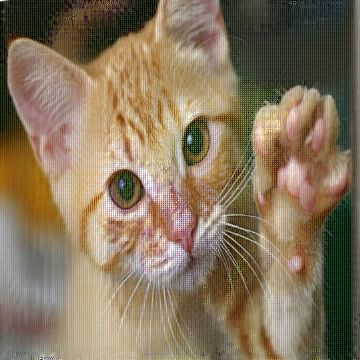 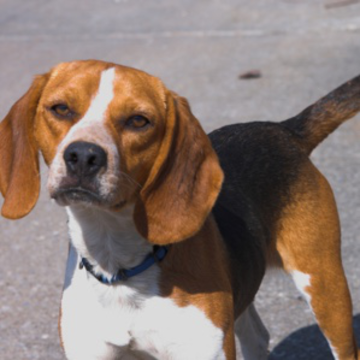
我们可以使用
[AsuharietYgvar/AppleNeuralHash2ONNX] 中的 `nnhash.py` 来确认哈希碰撞:
```
$ python nnhash.py dog.png
59a34eabe31910abfb06f308
$ python nnhash.py adv.png
59a34eabe31910abfb06f308
```
## 工作原理
NeuralHash 是一种使用神经网络的[感知哈希
函数](https://en.wikipedia.org/wiki/Perceptual_hashing)。图像被调整为 360x360,并通过神经网络生成 128 维的
特征向量。然后,使用 128x96 的“种子”矩阵将该向量投影到
R^96 空间。最后,为了生成 96 位的哈希值,会对这
96 维向量进行阈值处理:负项变为 `0` 位,
非负项变为 `1` 位。
除了阈值处理外,整个过程都是可导的,因此我们
可以使用梯度下降来寻找哈希碰撞。这是神经网络的一个
众所周知的特性,即它们容易受到[对抗
样本](https://arxiv.org/abs/1312.6199)的攻击。
我们可以定义一个损失函数来捕获图像与给定目标
哈希的接近程度:这个损失函数基本上就是如上所述的 NeuralHash 算法,
只不过将最后的“硬”阈值处理步骤调整为“软”处理(特别地,
使其可导)。具体的实现方式(激活
函数、参数等的选择)会影响收敛,因此可能需要一些
实验。选择好损失函数后,我们就可以使用标准的
方法来寻找神经网络的对抗样本:梯度下降。
### 细节
目前的实现采用交替投影风格的攻击方式,以
寻找具有目标哈希值且与原始图像相似的
对抗样本。有关完整的细节,请参见 `collide.py`。该实现使用了
两种不同的损失函数:一个用于衡量与目标哈希的距离,另
一个用于衡量扰动质量(l2 范数 + 总变分)。
我们首先针对碰撞进行优化,仅关注匹配目标哈希。
一旦找到投影,我们就在最小化扰动和
确保哈希值不改变之间交替进行。该攻击有大量
参数;运行 `python collide.py --help` 或查看代码以获取完整的
列表。调整这些参数会对收敛时间
和输出质量产生重大影响。
该实现还支持 `--blur [sigma]` 标志,它会在搜索的
每一步对扰动进行模糊处理。这可能会减慢或破坏
收敛,但在某些样本中,它有助于获得看起来
更自然、更不像故障艺术的结果。
## 示例
复现[这篇帖子](https://github.com/AsuharietYgvar/AppleNeuralHash2ONNX/issues/1#issuecomment-903094036)中的 [Lena](https://static.pigsec.cn/wp-content/uploads/repos/cas/c8/c8610c0ec6cb2499e911d44ff4b306f81ebf02da78002c2edb8fb5faa037b616.png)/[Barbara](https://static.pigsec.cn/wp-content/uploads/repos/cas/c3/c3c1dae68966ff55b6c26226110f9f62f8ac7b39746949dde4e176908d45bdae.png) 结果:
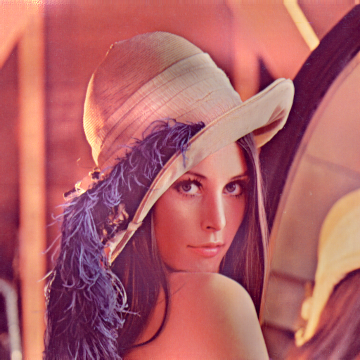
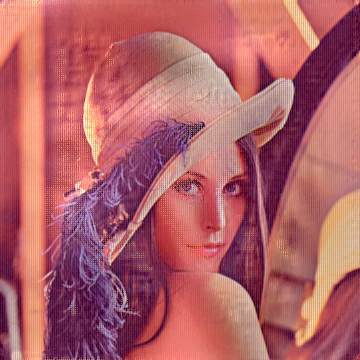
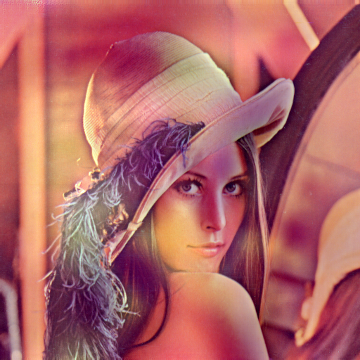
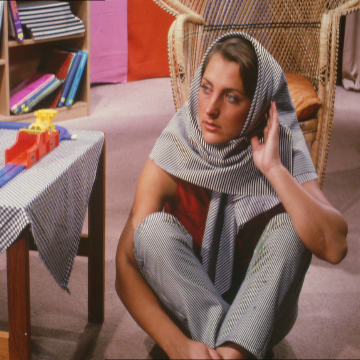 上面的第一张图像是原始的 Lena 图像。第二张是使用 `--target a426dae78cc63799d01adc32` 生成的,目的是与 Barbara 发生碰撞。第三张是使用了附加参数 `--blur 1.0` 生成的。第四张是原始的 Barbara 图像。检查它们的哈希值:
```
$ python nnhash.py lena.png
32dac883f7b91bbf45a48296
$ python nnhash.py lena-adv.png
a426dae78cc63799d01adc32
$ python nnhash.py lena-adv-blur-1.0.png
a426dae78cc63799d01adc32
$ python nnhash.py barbara.png
a426dae78cc63799d01adc32
```
复现[这篇帖子](https://github.com/anishathalye/neural-hash-collider/issues/4)中的 [Picard](https://static.pigsec.cn/wp-content/uploads/repos/cas/57/5739057f57a7c13172e4a50867c849e4ec4e803db9114ace851d0c3b5a586336.png)/[Sidious](https://static.pigsec.cn/wp-content/uploads/repos/cas/da/dac1e4fe886f535b8143b676dc5ae9e1ad6f5312ac5c8bbeb282241f2bbbefd2.png) 结果:
上面的第一张图像是原始的 Lena 图像。第二张是使用 `--target a426dae78cc63799d01adc32` 生成的,目的是与 Barbara 发生碰撞。第三张是使用了附加参数 `--blur 1.0` 生成的。第四张是原始的 Barbara 图像。检查它们的哈希值:
```
$ python nnhash.py lena.png
32dac883f7b91bbf45a48296
$ python nnhash.py lena-adv.png
a426dae78cc63799d01adc32
$ python nnhash.py lena-adv-blur-1.0.png
a426dae78cc63799d01adc32
$ python nnhash.py barbara.png
a426dae78cc63799d01adc32
```
复现[这篇帖子](https://github.com/anishathalye/neural-hash-collider/issues/4)中的 [Picard](https://static.pigsec.cn/wp-content/uploads/repos/cas/57/5739057f57a7c13172e4a50867c849e4ec4e803db9114ace851d0c3b5a586336.png)/[Sidious](https://static.pigsec.cn/wp-content/uploads/repos/cas/da/dac1e4fe886f535b8143b676dc5ae9e1ad6f5312ac5c8bbeb282241f2bbbefd2.png) 结果:
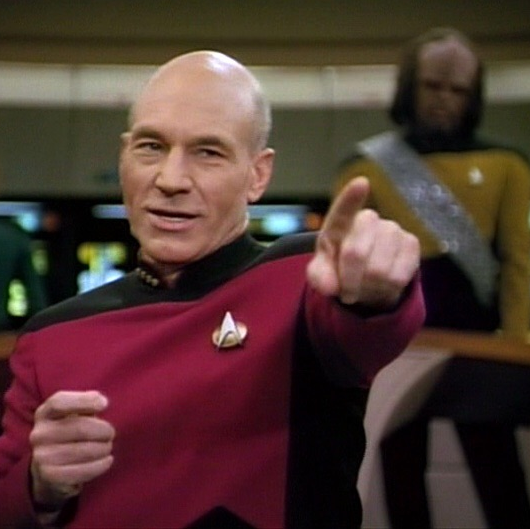
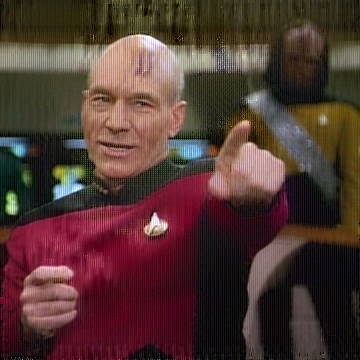
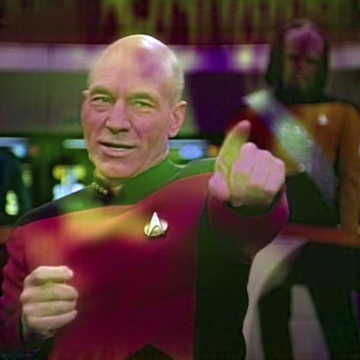
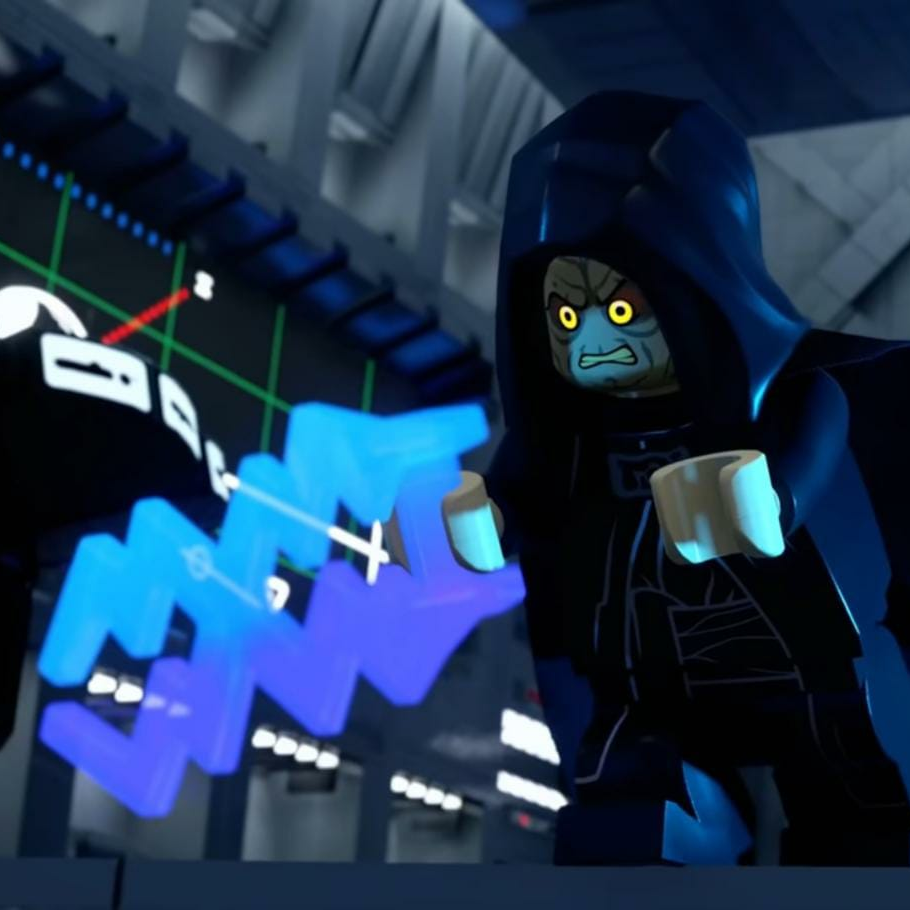 上面的第一张图像是原始的 Picard 图像。第二张是使用 `--target e34b3da852103c3c0828fbd1 --tv-weight 3e-4` 生成的,目的是与 Sidious 发生碰撞。第三张是使用了附加参数 `--blur 0.5` 生成的。第四张是原始的 Sidious 图像。检查它们的哈希值:
```
$ python nnhash.py picard.png
73fae120ad3191075efd5580
$ python nnhash.py picard-adv.png
e34b2da852103c3c0828fbd1
$ python nnhash.py picard-adv-blur-0.5.png
e34b2da852103c3c0828fbd1
$ python nnhash.py sidious.png
e34b2da852103c3c0828fbd1
```
## 前置条件
- 按照
[AsuharietYgvar/AppleNeuralHash2ONNX] 中的说明获取 Apple 的 NeuralHash 模型,并将所有
文件放在此目录中,或者提供 `--model` / `--seed` 参数
- 安装 Python 依赖项:`pip install -r requirements.txt`
## 用法
运行 `python collide.py --image [图像路径] --target [目标哈希值]` 以
生成哈希碰撞。运行 `python collide.py --help` 可查看所有
选项,包括一些你可以调整的参数,如学习率和
其他一些参数。
## 局限性
本仓库中的代码仅用于演示,也许可以作为
其他探索的起点。调整实现(损失
函数的选择、参数的选择等)可能会产生比当前代码好得多的结果。
## 引用
```
@misc{athalye2021neuralhashcollider,
author = {Anish Athalye},
title = {NeuralHash Collider},
year = {2021},
howpublished = {\url{https://github.com/anishathalye/neural-hash-collider}},
}
```
上面的第一张图像是原始的 Picard 图像。第二张是使用 `--target e34b3da852103c3c0828fbd1 --tv-weight 3e-4` 生成的,目的是与 Sidious 发生碰撞。第三张是使用了附加参数 `--blur 0.5` 生成的。第四张是原始的 Sidious 图像。检查它们的哈希值:
```
$ python nnhash.py picard.png
73fae120ad3191075efd5580
$ python nnhash.py picard-adv.png
e34b2da852103c3c0828fbd1
$ python nnhash.py picard-adv-blur-0.5.png
e34b2da852103c3c0828fbd1
$ python nnhash.py sidious.png
e34b2da852103c3c0828fbd1
```
## 前置条件
- 按照
[AsuharietYgvar/AppleNeuralHash2ONNX] 中的说明获取 Apple 的 NeuralHash 模型,并将所有
文件放在此目录中,或者提供 `--model` / `--seed` 参数
- 安装 Python 依赖项:`pip install -r requirements.txt`
## 用法
运行 `python collide.py --image [图像路径] --target [目标哈希值]` 以
生成哈希碰撞。运行 `python collide.py --help` 可查看所有
选项,包括一些你可以调整的参数,如学习率和
其他一些参数。
## 局限性
本仓库中的代码仅用于演示,也许可以作为
其他探索的起点。调整实现(损失
函数的选择、参数的选择等)可能会产生比当前代码好得多的结果。
## 引用
```
@misc{athalye2021neuralhashcollider,
author = {Anish Athalye},
title = {NeuralHash Collider},
year = {2021},
howpublished = {\url{https://github.com/anishathalye/neural-hash-collider}},
}
```
上面的第一张图像是原始的 Lena 图像。第二张是使用 `--target a426dae78cc63799d01adc32` 生成的,目的是与 Barbara 发生碰撞。第三张是使用了附加参数 `--blur 1.0` 生成的。第四张是原始的 Barbara 图像。检查它们的哈希值:
```
$ python nnhash.py lena.png
32dac883f7b91bbf45a48296
$ python nnhash.py lena-adv.png
a426dae78cc63799d01adc32
$ python nnhash.py lena-adv-blur-1.0.png
a426dae78cc63799d01adc32
$ python nnhash.py barbara.png
a426dae78cc63799d01adc32
```
复现[这篇帖子](https://github.com/anishathalye/neural-hash-collider/issues/4)中的 [Picard](https://static.pigsec.cn/wp-content/uploads/repos/cas/57/5739057f57a7c13172e4a50867c849e4ec4e803db9114ace851d0c3b5a586336.png)/[Sidious](https://static.pigsec.cn/wp-content/uploads/repos/cas/da/dac1e4fe886f535b8143b676dc5ae9e1ad6f5312ac5c8bbeb282241f2bbbefd2.png) 结果:
上面的第一张图像是原始的 Picard 图像。第二张是使用 `--target e34b3da852103c3c0828fbd1 --tv-weight 3e-4` 生成的,目的是与 Sidious 发生碰撞。第三张是使用了附加参数 `--blur 0.5` 生成的。第四张是原始的 Sidious 图像。检查它们的哈希值:
```
$ python nnhash.py picard.png
73fae120ad3191075efd5580
$ python nnhash.py picard-adv.png
e34b2da852103c3c0828fbd1
$ python nnhash.py picard-adv-blur-0.5.png
e34b2da852103c3c0828fbd1
$ python nnhash.py sidious.png
e34b2da852103c3c0828fbd1
```
## 前置条件
- 按照
[AsuharietYgvar/AppleNeuralHash2ONNX] 中的说明获取 Apple 的 NeuralHash 模型,并将所有
文件放在此目录中,或者提供 `--model` / `--seed` 参数
- 安装 Python 依赖项:`pip install -r requirements.txt`
## 用法
运行 `python collide.py --image [图像路径] --target [目标哈希值]` 以
生成哈希碰撞。运行 `python collide.py --help` 可查看所有
选项,包括一些你可以调整的参数,如学习率和
其他一些参数。
## 局限性
本仓库中的代码仅用于演示,也许可以作为
其他探索的起点。调整实现(损失
函数的选择、参数的选择等)可能会产生比当前代码好得多的结果。
## 引用
```
@misc{athalye2021neuralhashcollider,
author = {Anish Athalye},
title = {NeuralHash Collider},
year = {2021},
howpublished = {\url{https://github.com/anishathalye/neural-hash-collider}},
}
```
标签:Apex, CNCF毕业项目, 凭据扫描, 哈希碰撞, 对抗样本, 感知哈希, 机器学习, 逆向工具