kubescape/kubescape
GitHub: kubescape/kubescape
一款覆盖 Kubernetes 从开发到运行时全生命周期的开源安全平台,集配置审计、漏洞扫描、镜像修补和运行时监控于一体。
Stars: 11540 | Forks: 954
[](https://github.com/kubescape/kubescape/releases)
[](https://github.com/kubescape/kubescape/actions/workflows/02-release.yaml)
[](https://goreportcard.com/report/github.com/kubescape/kubescape)
[](https://gitpod.io/#https://github.com/kubescape/kubescape)
[](https://github.com/kubescape/kubescape/blob/master/LICENSE)
[](https://landscape.cncf.io/?item=provisioning--security-compliance--kubescape)
[](https://artifacthub.io/packages/search?repo=kubescape)
[ _从开发到运行时的全面 Kubernetes 安全_
Kubescape 是一个开源的 Kubernetes 安全平台,在整个开发和部署生命周期中提供从左到右的全面安全保障。它提供加固、态势管理和运行时安全功能,以确保 Kubernetes 环境得到强有力的保护。
Kubescape 由 [ARMO](https://www.armosec.io/?utm_source=github&utm_medium=repository) 创建,并且是 [云原生计算基金会 (CNCF) 孵化项目](https://www.cncf.io/projects/)。
## 📑 目录
- [功能特性](#-features)
- [演示](#-demo)
- [快速入门](#-quick-start)
- [安装说明](#-installation)
- [CLI 命令](#%EF%B8%8F-cli-commands)
- [使用示例](#-usage-examples)
- [架构](#%EF%B8%8F-architecture)
- [集群内 Operator](#%EF%B8%8F-in-cluster-operator)
- [集成](#-integrations)
- [社区](#-community)
- [更新日志](#changelog)
- [许可证](#license)
## ✨ 功能特性
| 功能 | 描述 |
|---------|-------------|
| 🔍 **配置错误扫描** | 根据 NSA-CISA、MITRE ATT&CK® 和 CIS Benchmarks 扫描集群、YAML 文件和 Helm charts |
| 🐳 **镜像漏洞扫描** | 使用 [Grype](https://github.com/anchore/grype) 检测容器镜像中的 CVE |
| 🩹 **镜像补丁** | 使用 [Copacetic](https://github.com/project-copacetic/copacetic) 自动修补易受攻击的镜像 |
| 🔧 **自动修复** | 自动修复 Kubernetes manifests 中的配置错误 |
| 🛡️ **准入控制** | 使用 Validating Admission Policies (VAP) 实施安全策略 |
| 📊 **运行时安全** | 通过 [Inspektor Gadget](https://github.com/inspektor-gadget) 提供基于 eBPF 的运行时监控 |
| 🤖 **AI 集成** | 用于 AI 助手集成的 MCP 服务器 |
## 🎬 演示
_从开发到运行时的全面 Kubernetes 安全_
Kubescape 是一个开源的 Kubernetes 安全平台,在整个开发和部署生命周期中提供从左到右的全面安全保障。它提供加固、态势管理和运行时安全功能,以确保 Kubernetes 环境得到强有力的保护。
Kubescape 由 [ARMO](https://www.armosec.io/?utm_source=github&utm_medium=repository) 创建,并且是 [云原生计算基金会 (CNCF) 孵化项目](https://www.cncf.io/projects/)。
## 📑 目录
- [功能特性](#-features)
- [演示](#-demo)
- [快速入门](#-quick-start)
- [安装说明](#-installation)
- [CLI 命令](#%EF%B8%8F-cli-commands)
- [使用示例](#-usage-examples)
- [架构](#%EF%B8%8F-architecture)
- [集群内 Operator](#%EF%B8%8F-in-cluster-operator)
- [集成](#-integrations)
- [社区](#-community)
- [更新日志](#changelog)
- [许可证](#license)
## ✨ 功能特性
| 功能 | 描述 |
|---------|-------------|
| 🔍 **配置错误扫描** | 根据 NSA-CISA、MITRE ATT&CK® 和 CIS Benchmarks 扫描集群、YAML 文件和 Helm charts |
| 🐳 **镜像漏洞扫描** | 使用 [Grype](https://github.com/anchore/grype) 检测容器镜像中的 CVE |
| 🩹 **镜像补丁** | 使用 [Copacetic](https://github.com/project-copacetic/copacetic) 自动修补易受攻击的镜像 |
| 🔧 **自动修复** | 自动修复 Kubernetes manifests 中的配置错误 |
| 🛡️ **准入控制** | 使用 Validating Admission Policies (VAP) 实施安全策略 |
| 📊 **运行时安全** | 通过 [Inspektor Gadget](https://github.com/inspektor-gadget) 提供基于 eBPF 的运行时监控 |
| 🤖 **AI 集成** | 用于 AI 助手集成的 MCP 服务器 |
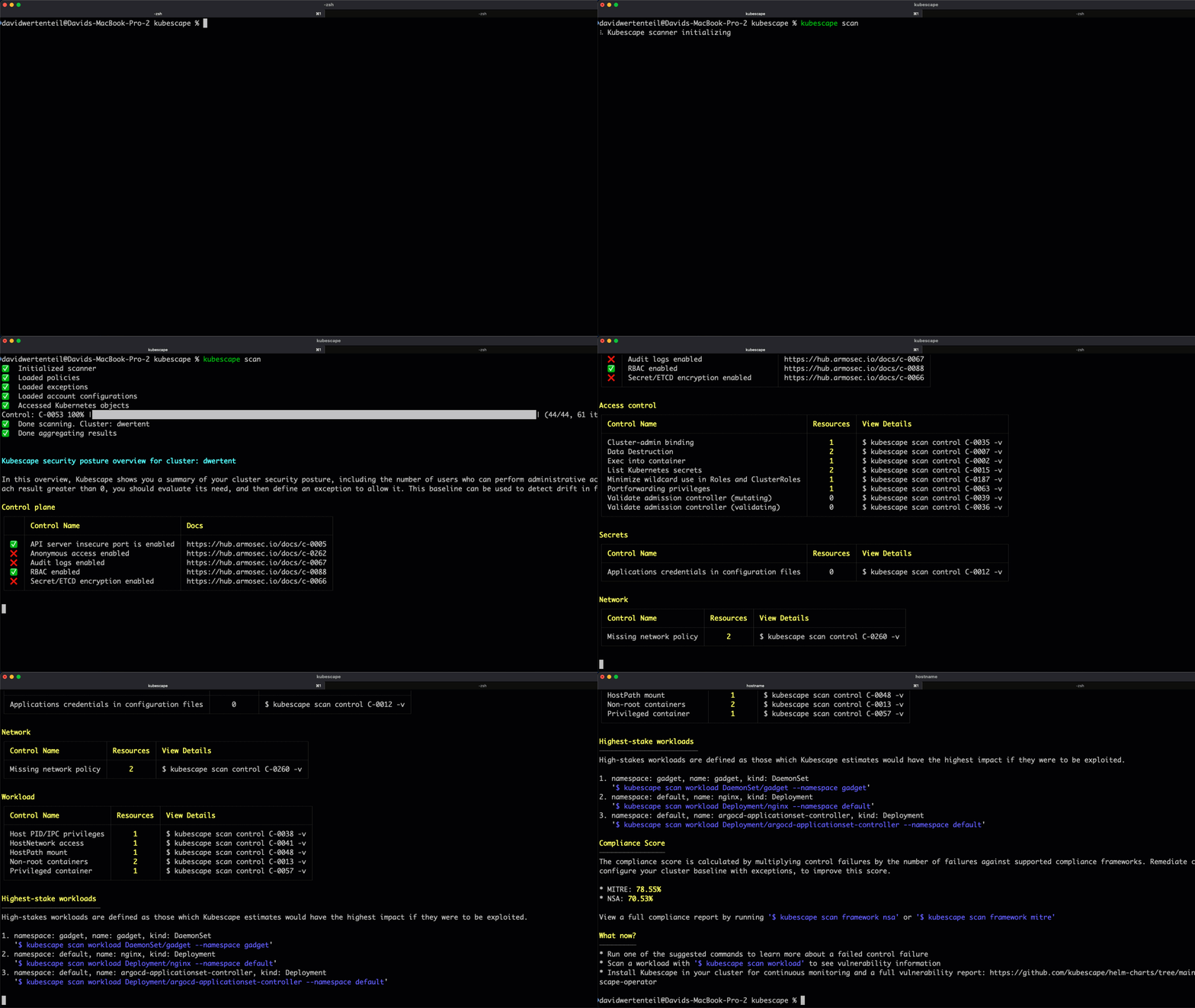
## 🎬 演示
 ## 🚀 快速入门
### 1. 安装 Kubescape
```
curl -s https://raw.githubusercontent.com/kubescape/kubescape/master/install.sh | /bin/bash
```
### 2. 运行你的第一次扫描
```
# 扫描当前集群
kubescape scan
# 扫描特定 YAML 文件或目录
kubescape scan /path/to/manifests/
# 扫描容器镜像以查找漏洞
kubescape scan image nginx:latest
```
### 3. 查看结果
Kubescape 提供详细的安全态势概览,包括:
- 控制平面安全状态
- 访问控制风险
- 工作负载配置错误
- 网络策略缺口
- 合规性分数 (MITRE, NSA)
## 📦 安装说明
### 一键安装 (Linux/macOS)
```
curl -s https://raw.githubusercontent.com/kubescape/kubescape/master/install.sh | /bin/bash
```
### 软件包管理器
| 平台 | 命令 |
|----------|---------|
| **Homebrew** | `brew install kubescape` |
| **Krew** | `kubectl krew install kubescape` |
| **Arch Linux** | `yay -S kubescape` |
| **Ubuntu** | `sudo add-apt-repository ppa:kubescape/kubescape && sudo apt install kubescape` |
| **NixOS** | `nix-shell -p kubescape` |
| **Chocolatey** | `choco install kubescape` |
| **Scoop** | `scoop install kubescape` |
### Windows (PowerShell)
```
iwr -useb https://raw.githubusercontent.com/kubescape/kubescape/master/install.ps1 | iex
```
📖 **[完整安装指南 →](docs/installation.md)**
## 🛠️ CLI 命令
Kubescape 提供了包含以下命令的综合 CLI:
| 命令 | 描述 |
|---------|-------------|
| [`kubescape scan`](#scanning) | 扫描集群、文件或镜像以查找安全问题 |
| [`kubescape scan image`](#image-scanning) | 扫描容器镜像以查找漏洞 |
| [`kubescape fix`](#auto-fix) | 自动修复 manifest 文件中的配置错误 |
| [`kubescape patch`](#image-patching) | 修补容器镜像以修复漏洞 |
| [`kubescape list`](#list-frameworks-and-controls) | 列出可用的框架和控制项 |
| [`kubescape download`](#offline-support) | 下载工件以供离线/气隙环境使用 |
| [`kubescape config`](#configuration) | 管理缓存的配置 |
| [`kubescape operator`](#operator-commands) | 与集群内的 Kubescape operator 交互 |
| [`kubescape vap`](#validating-admission-policies) | 管理 Validating Admission Policies |
| [`kubescape mcpserver`](#mcp-server) | 启动 MCP 服务器用于 AI 助手集成 |
| `kubescape completion` | 生成 shell 自动补全脚本 |
| `kubescape version` | 显示版本信息 |
## 📖 使用示例
### 扫描
#### 扫描运行中的集群
```
# 默认扫描(所有框架)
kubescape scan
# 使用特定框架扫描
kubescape scan framework nsa
kubescape scan framework mitre
kubescape scan framework cis-v1.23-t1.0.1
# 扫描特定控件
kubescape scan control C-0005 -v
```
#### 扫描文件和代码库
```
# 扫描本地 YAML 文件
kubescape scan /path/to/manifests/
# 扫描 Helm chart
kubescape scan /path/to/helm/chart/
# 扫描 Git 仓库
kubescape scan https://github.com/kubescape/kubescape
# 使用 Kustomize 扫描
kubescape scan /path/to/kustomize/directory/
```
#### 扫描选项
```
# 包含/排除命名空间
kubescape scan --include-namespaces production,staging
kubescape scan --exclude-namespaces kube-system,kube-public
# 使用替代的 kubeconfig
kubescape scan --kubeconfig /path/to/kubeconfig
# 设置合规性阈值(若低于阈值则退出码为 1)
kubescape scan --compliance-threshold 80
# 设置严重性阈值
kubescape scan --severity-threshold high
```
#### 输出格式
```
# JSON 输出
kubescape scan --format json --output results.json
# JUnit XML(用于 CI/CD)
kubescape scan --format junit --output results.xml
# SARIF(用于 GitHub Code Scanning)
kubescape scan --format sarif --output results.sarif
# HTML 报告
kubescape scan --format html --output report.html
# PDF 报告
kubescape scan --format pdf --output report.pdf
```
### 镜像扫描
```
# 扫描公共镜像
kubescape scan image nginx:1.21
# 使用详细输出扫描
kubescape scan image nginx:1.21 -v
# 扫描私有仓库镜像
kubescape scan image myregistry/myimage:tag --username user --password pass
```
#### 使用离线 Grype 数据库
```
# 启动离线 Grype-DB 服务器(使用 docker)
docker run --rm -p8080:8080 quay.io/kubescape/grype-offline-db:v6-latest
# 使用离线数据库扫描镜像:
kubescape scan image --grype-db-url http://localhost:8080/databases/ nginx:latest
```
### 自动修复
自动修复 manifest 文件中的配置错误:
```
# 首先,扫描并将结果保存为 JSON
kubescape scan /path/to/manifests --format json --output results.json
# 然后应用修复
kubescape fix results.json
# Dry run(预览更改而不应用)
kubescape fix results.json --dry-run
# 应用修复无需确认提示
kubescape fix results.json --no-confirm
```
### 镜像修补
修补容器镜像以修复操作系统级别的漏洞:
```
# 启动 buildkitd(必需)
sudo buildkitd &
# Patch 镜像
sudo kubescape patch --image docker.io/library/nginx:1.22
# 指定自定义输出 tag
sudo kubescape patch --image nginx:1.22 --tag nginx:1.22-patched
# 查看详细的漏洞报告
sudo kubescape patch --image nginx:1.22 -v
```
📖 **[完整的 Patch 命令文档 →](cmd/patch/README.md)**
### 列出框架和控制项
```
# 列出可用框架
kubescape list frameworks
# 列出所有控件
kubescape list controls
# 输出为 JSON
kubescape list controls --format json
```
### 离线支持
为气隙环境下载工件:
```
# 下载所有 artifacts
kubescape download artifacts --output /path/to/offline/dir
# 下载特定框架
kubescape download framework nsa --output /path/to/nsa.json
# 使用已下载的 artifacts 扫描
kubescape scan --use-artifacts-from /path/to/offline/dir
```
### 配置
```
# 查看当前配置
kubescape config view
# 设置账户 ID
kubescape config set accountID
## 🚀 快速入门
### 1. 安装 Kubescape
```
curl -s https://raw.githubusercontent.com/kubescape/kubescape/master/install.sh | /bin/bash
```
### 2. 运行你的第一次扫描
```
# 扫描当前集群
kubescape scan
# 扫描特定 YAML 文件或目录
kubescape scan /path/to/manifests/
# 扫描容器镜像以查找漏洞
kubescape scan image nginx:latest
```
### 3. 查看结果
Kubescape 提供详细的安全态势概览,包括:
- 控制平面安全状态
- 访问控制风险
- 工作负载配置错误
- 网络策略缺口
- 合规性分数 (MITRE, NSA)
## 📦 安装说明
### 一键安装 (Linux/macOS)
```
curl -s https://raw.githubusercontent.com/kubescape/kubescape/master/install.sh | /bin/bash
```
### 软件包管理器
| 平台 | 命令 |
|----------|---------|
| **Homebrew** | `brew install kubescape` |
| **Krew** | `kubectl krew install kubescape` |
| **Arch Linux** | `yay -S kubescape` |
| **Ubuntu** | `sudo add-apt-repository ppa:kubescape/kubescape && sudo apt install kubescape` |
| **NixOS** | `nix-shell -p kubescape` |
| **Chocolatey** | `choco install kubescape` |
| **Scoop** | `scoop install kubescape` |
### Windows (PowerShell)
```
iwr -useb https://raw.githubusercontent.com/kubescape/kubescape/master/install.ps1 | iex
```
📖 **[完整安装指南 →](docs/installation.md)**
## 🛠️ CLI 命令
Kubescape 提供了包含以下命令的综合 CLI:
| 命令 | 描述 |
|---------|-------------|
| [`kubescape scan`](#scanning) | 扫描集群、文件或镜像以查找安全问题 |
| [`kubescape scan image`](#image-scanning) | 扫描容器镜像以查找漏洞 |
| [`kubescape fix`](#auto-fix) | 自动修复 manifest 文件中的配置错误 |
| [`kubescape patch`](#image-patching) | 修补容器镜像以修复漏洞 |
| [`kubescape list`](#list-frameworks-and-controls) | 列出可用的框架和控制项 |
| [`kubescape download`](#offline-support) | 下载工件以供离线/气隙环境使用 |
| [`kubescape config`](#configuration) | 管理缓存的配置 |
| [`kubescape operator`](#operator-commands) | 与集群内的 Kubescape operator 交互 |
| [`kubescape vap`](#validating-admission-policies) | 管理 Validating Admission Policies |
| [`kubescape mcpserver`](#mcp-server) | 启动 MCP 服务器用于 AI 助手集成 |
| `kubescape completion` | 生成 shell 自动补全脚本 |
| `kubescape version` | 显示版本信息 |
## 📖 使用示例
### 扫描
#### 扫描运行中的集群
```
# 默认扫描(所有框架)
kubescape scan
# 使用特定框架扫描
kubescape scan framework nsa
kubescape scan framework mitre
kubescape scan framework cis-v1.23-t1.0.1
# 扫描特定控件
kubescape scan control C-0005 -v
```
#### 扫描文件和代码库
```
# 扫描本地 YAML 文件
kubescape scan /path/to/manifests/
# 扫描 Helm chart
kubescape scan /path/to/helm/chart/
# 扫描 Git 仓库
kubescape scan https://github.com/kubescape/kubescape
# 使用 Kustomize 扫描
kubescape scan /path/to/kustomize/directory/
```
#### 扫描选项
```
# 包含/排除命名空间
kubescape scan --include-namespaces production,staging
kubescape scan --exclude-namespaces kube-system,kube-public
# 使用替代的 kubeconfig
kubescape scan --kubeconfig /path/to/kubeconfig
# 设置合规性阈值(若低于阈值则退出码为 1)
kubescape scan --compliance-threshold 80
# 设置严重性阈值
kubescape scan --severity-threshold high
```
#### 输出格式
```
# JSON 输出
kubescape scan --format json --output results.json
# JUnit XML(用于 CI/CD)
kubescape scan --format junit --output results.xml
# SARIF(用于 GitHub Code Scanning)
kubescape scan --format sarif --output results.sarif
# HTML 报告
kubescape scan --format html --output report.html
# PDF 报告
kubescape scan --format pdf --output report.pdf
```
### 镜像扫描
```
# 扫描公共镜像
kubescape scan image nginx:1.21
# 使用详细输出扫描
kubescape scan image nginx:1.21 -v
# 扫描私有仓库镜像
kubescape scan image myregistry/myimage:tag --username user --password pass
```
#### 使用离线 Grype 数据库
```
# 启动离线 Grype-DB 服务器(使用 docker)
docker run --rm -p8080:8080 quay.io/kubescape/grype-offline-db:v6-latest
# 使用离线数据库扫描镜像:
kubescape scan image --grype-db-url http://localhost:8080/databases/ nginx:latest
```
### 自动修复
自动修复 manifest 文件中的配置错误:
```
# 首先,扫描并将结果保存为 JSON
kubescape scan /path/to/manifests --format json --output results.json
# 然后应用修复
kubescape fix results.json
# Dry run(预览更改而不应用)
kubescape fix results.json --dry-run
# 应用修复无需确认提示
kubescape fix results.json --no-confirm
```
### 镜像修补
修补容器镜像以修复操作系统级别的漏洞:
```
# 启动 buildkitd(必需)
sudo buildkitd &
# Patch 镜像
sudo kubescape patch --image docker.io/library/nginx:1.22
# 指定自定义输出 tag
sudo kubescape patch --image nginx:1.22 --tag nginx:1.22-patched
# 查看详细的漏洞报告
sudo kubescape patch --image nginx:1.22 -v
```
📖 **[完整的 Patch 命令文档 →](cmd/patch/README.md)**
### 列出框架和控制项
```
# 列出可用框架
kubescape list frameworks
# 列出所有控件
kubescape list controls
# 输出为 JSON
kubescape list controls --format json
```
### 离线支持
为气隙环境下载工件:
```
# 下载所有 artifacts
kubescape download artifacts --output /path/to/offline/dir
# 下载特定框架
kubescape download framework nsa --output /path/to/nsa.json
# 使用已下载的 artifacts 扫描
kubescape scan --use-artifacts-from /path/to/offline/dir
```
### 配置
```
# 查看当前配置
kubescape config view
# 设置账户 ID
kubescape config set accountID
# 删除缓存的配置
kubescape config delete
```
### Operator 命令
与集群内的 Kubescape operator 交互:
```
# 触发配置扫描
kubescape operator scan configurations
# 触发漏洞扫描
kubescape operator scan vulnerabilities
```
### Validating Admission Policies
管理 Kubernetes 的 Validating Admission Policies:
```
# 部署 Kubescape CEL admission policy 库
kubescape vap deploy-library | kubectl apply -f -
# 创建 policy binding
kubescape vap create-policy-binding \
--name my-policy-binding \
--policy c-0016 \
--namespace my-namespace | kubectl apply -f -
```
### MCP 服务器
启动用于 AI 助手集成的 MCP (Model Context Protocol) 服务器:
```
kubescape mcpserver
```
MCP 服务器将 Kubescape 的漏洞和配置扫描数据开放给 AI 助手,从而能够使用自然语言查询集群的安全态势。
**可用的 MCP 工具:**
- `list_vulnerability_manifests` - 发现漏洞 manifests
- `list_vulnerabilities_in_manifest` - 列出 manifest 中的 CVE
- `list_vulnerability_matches_for_cve` - 获取特定 CVE 的详细信息
- `list_configuration_security_scan_manifests` - 列出配置扫描结果
- `get_configuration_security_scan_manifest` - 获取配置扫描详细信息
## 🏗️ 架构
Kubescape 可以在两种模式下运行:
### CLI 模式
CLI 是一个独立的工具,可按需扫描集群、文件和镜像。
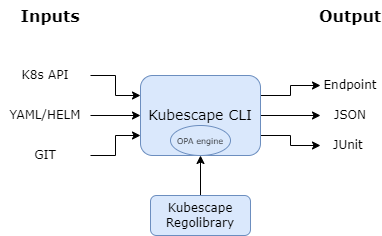 **核心组件:**
- **[Open Policy Agent (OPA)](https://github.com/open-policy-agent/opa)** - 策略评估引擎
- **[Regolibrary](https://github.com/kubescape/regolibrary)** - 安全控制库
- **[Grype](https://github.com/anchore/grype)** - 镜像漏洞扫描
- **[Copacetic](https://github.com/project-copacetic/copacetic)** - 镜像修补
### Operator 模式 (集群内)
要进行持续监控,请通过 Helm 部署 Kubescape operator。
**核心组件:**
- **[Open Policy Agent (OPA)](https://github.com/open-policy-agent/opa)** - 策略评估引擎
- **[Regolibrary](https://github.com/kubescape/regolibrary)** - 安全控制库
- **[Grype](https://github.com/anchore/grype)** - 镜像漏洞扫描
- **[Copacetic](https://github.com/project-copacetic/copacetic)** - 镜像修补
### Operator 模式 (集群内)
要进行持续监控,请通过 Helm 部署 Kubescape operator。
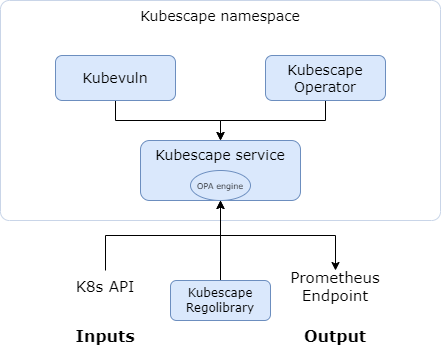 **附加功能:**
- 持续配置扫描
- 镜像漏洞扫描
- 基于 eBPF 的运行时分析
- 网络策略生成
📖 **[完整架构文档 →](docs/architecture.md)**
## ☸️ 集群内 Operator
Kubescape operator 在您的集群中提供持续的安全监控:
```
# 添加 Kubescape Helm 仓库
helm repo add kubescape https://kubescape.github.io/helm-charts/
# 安装 operator
helm upgrade --install kubescape kubescape/kubescape-operator \
--namespace kubescape \
--create-namespace
```
**Operator 功能:**
- 🔄 持续的配置错误扫描
- 🐳 为所有工作负载进行镜像漏洞扫描
- 🔍 运行时威胁检测(基于 eBPF)
- 🌐 网络策略生成
- 📈 Prometheus 指标集成
📖 **[Operator 安装指南 →](https://kubescape.io/docs/operator/)**
## 🔌 集成
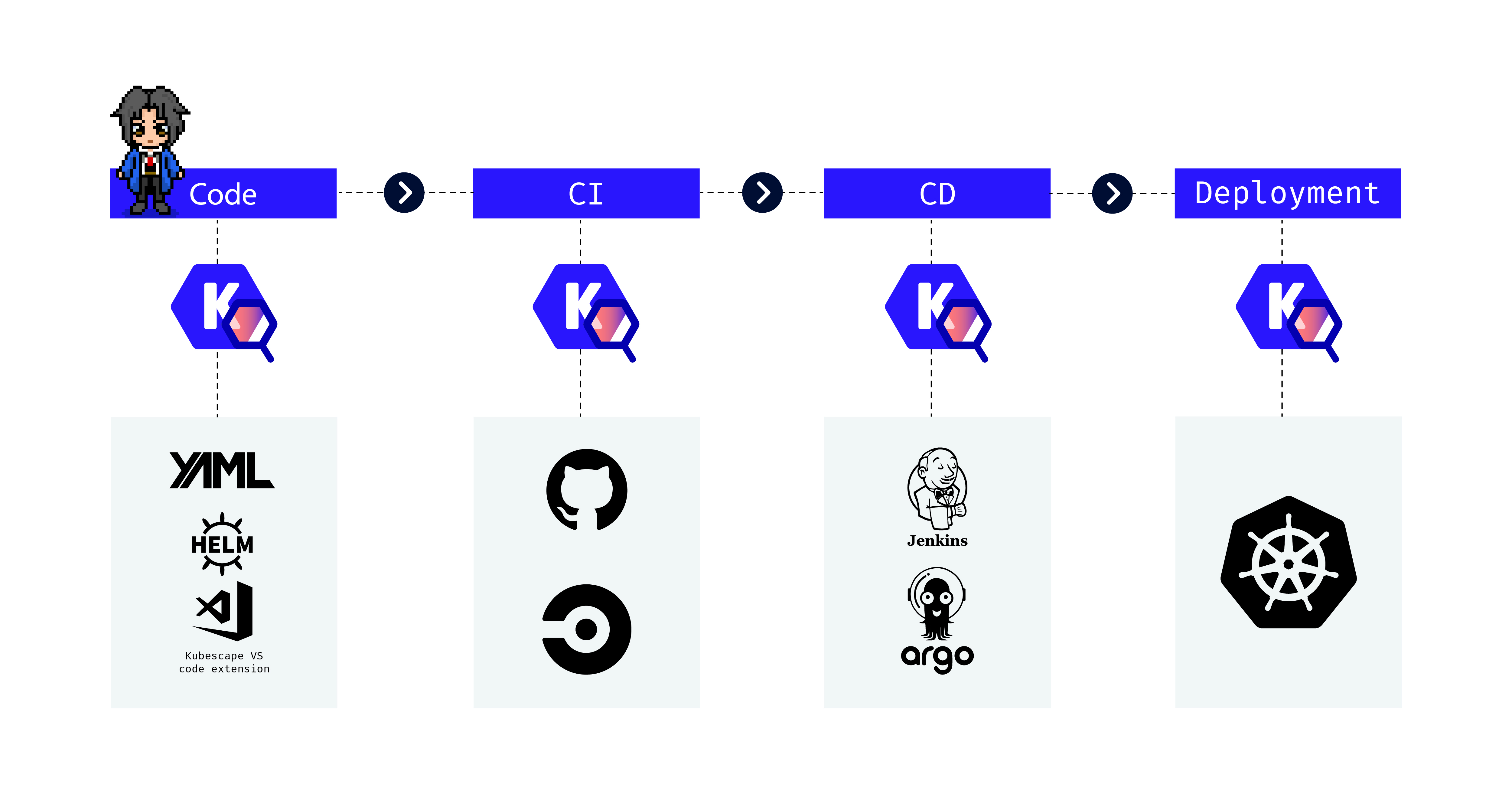
### CI/CD
| 平台 | 集成 |
|----------|-------------|
| **GitHub Actions** | [kubescape/github-action](https://github.com/marketplace/actions/kubescape) |
| **GitLab CI** | [文档](https://kubescape.io/docs/integrations/gitlab/) |
| **Jenkins** | [文档](https://kubescape.io/docs/integrations/jenkins/) |
### IDE 扩展
| IDE | 扩展 |
|-----|-----------|
| **VS Code** | [Kubescape 扩展](https://marketplace.visualstudio.com/items?itemName=kubescape.kubescape) |
| **Lens** | [Kubescape Lens 扩展](https://github.com/armosec/lens-kubescape) |
### 你可以在哪里使用 Kubescape
**附加功能:**
- 持续配置扫描
- 镜像漏洞扫描
- 基于 eBPF 的运行时分析
- 网络策略生成
📖 **[完整架构文档 →](docs/architecture.md)**
## ☸️ 集群内 Operator
Kubescape operator 在您的集群中提供持续的安全监控:
```
# 添加 Kubescape Helm 仓库
helm repo add kubescape https://kubescape.github.io/helm-charts/
# 安装 operator
helm upgrade --install kubescape kubescape/kubescape-operator \
--namespace kubescape \
--create-namespace
```
**Operator 功能:**
- 🔄 持续的配置错误扫描
- 🐳 为所有工作负载进行镜像漏洞扫描
- 🔍 运行时威胁检测(基于 eBPF)
- 🌐 网络策略生成
- 📈 Prometheus 指标集成
📖 **[Operator 安装指南 →](https://kubescape.io/docs/operator/)**
## 🔌 集成
### CI/CD
| 平台 | 集成 |
|----------|-------------|
| **GitHub Actions** | [kubescape/github-action](https://github.com/marketplace/actions/kubescape) |
| **GitLab CI** | [文档](https://kubescape.io/docs/integrations/gitlab/) |
| **Jenkins** | [文档](https://kubescape.io/docs/integrations/jenkins/) |
### IDE 扩展
| IDE | 扩展 |
|-----|-----------|
| **VS Code** | [Kubescape 扩展](https://marketplace.visualstudio.com/items?itemName=kubescape.kubescape) |
| **Lens** | [Kubescape Lens 扩展](https://github.com/armosec/lens-kubescape) |
### 你可以在哪里使用 Kubescape
 ## 👥 社区
Kubescape 是一个 CNCF 孵化项目,拥有活跃的社区。
### 参与其中
- 💬 **[Slack - 用户频道](https://cloud-native.slack.com/archives/C04EY3ZF9GE)** - 提问,获取帮助
- 💬 **[Slack - 开发者频道](https://cloud-native.slack.com/archives/C04GY6H082K)** - 参与开发贡献
- 🐛 **[GitHub Issues](https://github.com/kubescape/kubescape/issues)** - 报告错误和请求功能
- 📋 **[项目看板](https://github.com/orgs/kubescape/projects/4)** - 查看我们正在进行的工作
- 🗺️ **[路线图](https://github.com/kubescape/project-governance/blob/main/ROADMAP.md)** - 未来计划
### 贡献
我们欢迎您的贡献!请参阅我们的:
- **[贡献指南](https://github.com/kubescape/project-governance/blob/main/CONTRIBUTING.md)**
- **[行为准则](https://github.com/cncf/foundation/blob/master/code-of-conduct.md)**
### 社区资源
- **[社区信息](https://github.com/kubescape/project-governance/blob/main/COMMUNITY.md)**
- **[治理](https://github.com/kubescape/project-governance/blob/main/GOVERNANCE.md)**
- **[安全政策](https://github.com/kubescape/project-governance/blob/main/SECURITY.md)**
- **[维护者](https://github.com/kubescape/project-governance/blob/main/MAINTAINERS.md)**
### 贡献者
## 👥 社区
Kubescape 是一个 CNCF 孵化项目,拥有活跃的社区。
### 参与其中
- 💬 **[Slack - 用户频道](https://cloud-native.slack.com/archives/C04EY3ZF9GE)** - 提问,获取帮助
- 💬 **[Slack - 开发者频道](https://cloud-native.slack.com/archives/C04GY6H082K)** - 参与开发贡献
- 🐛 **[GitHub Issues](https://github.com/kubescape/kubescape/issues)** - 报告错误和请求功能
- 📋 **[项目看板](https://github.com/orgs/kubescape/projects/4)** - 查看我们正在进行的工作
- 🗺️ **[路线图](https://github.com/kubescape/project-governance/blob/main/ROADMAP.md)** - 未来计划
### 贡献
我们欢迎您的贡献!请参阅我们的:
- **[贡献指南](https://github.com/kubescape/project-governance/blob/main/CONTRIBUTING.md)**
- **[行为准则](https://github.com/cncf/foundation/blob/master/code-of-conduct.md)**
### 社区资源
- **[社区信息](https://github.com/kubescape/project-governance/blob/main/COMMUNITY.md)**
- **[治理](https://github.com/kubescape/project-governance/blob/main/GOVERNANCE.md)**
- **[安全政策](https://github.com/kubescape/project-governance/blob/main/SECURITY.md)**
- **[维护者](https://github.com/kubescape/project-governance/blob/main/MAINTAINERS.md)**
### 贡献者
 ## 更新日志
Kubescape 的变更记录在 [发布页面](https://github.com/kubescape/kubescape/releases)。
## 许可证
版权所有 2021-2025,Kubescape 作者。保留所有权利。
Kubescape 基于 [Apache 2.0 许可证](LICENSE) 发布。
Kubescape 是 [云原生计算基金会 (CNCF) 孵化项目](https://www.cncf.io/projects/kubescape/),由 [ARMO](https://www.armosec.io/?utm_source=github&utm_medium=repository) 贡献。
## 更新日志
Kubescape 的变更记录在 [发布页面](https://github.com/kubescape/kubescape/releases)。
## 许可证
版权所有 2021-2025,Kubescape 作者。保留所有权利。
Kubescape 基于 [Apache 2.0 许可证](LICENSE) 发布。
Kubescape 是 [云原生计算基金会 (CNCF) 孵化项目](https://www.cncf.io/projects/kubescape/),由 [ARMO](https://www.armosec.io/?utm_source=github&utm_medium=repository) 贡献。

_从开发到运行时的全面 Kubernetes 安全_
Kubescape 是一个开源的 Kubernetes 安全平台,在整个开发和部署生命周期中提供从左到右的全面安全保障。它提供加固、态势管理和运行时安全功能,以确保 Kubernetes 环境得到强有力的保护。
Kubescape 由 [ARMO](https://www.armosec.io/?utm_source=github&utm_medium=repository) 创建,并且是 [云原生计算基金会 (CNCF) 孵化项目](https://www.cncf.io/projects/)。
## 📑 目录
- [功能特性](#-features)
- [演示](#-demo)
- [快速入门](#-quick-start)
- [安装说明](#-installation)
- [CLI 命令](#%EF%B8%8F-cli-commands)
- [使用示例](#-usage-examples)
- [架构](#%EF%B8%8F-architecture)
- [集群内 Operator](#%EF%B8%8F-in-cluster-operator)
- [集成](#-integrations)
- [社区](#-community)
- [更新日志](#changelog)
- [许可证](#license)
## ✨ 功能特性
| 功能 | 描述 |
|---------|-------------|
| 🔍 **配置错误扫描** | 根据 NSA-CISA、MITRE ATT&CK® 和 CIS Benchmarks 扫描集群、YAML 文件和 Helm charts |
| 🐳 **镜像漏洞扫描** | 使用 [Grype](https://github.com/anchore/grype) 检测容器镜像中的 CVE |
| 🩹 **镜像补丁** | 使用 [Copacetic](https://github.com/project-copacetic/copacetic) 自动修补易受攻击的镜像 |
| 🔧 **自动修复** | 自动修复 Kubernetes manifests 中的配置错误 |
| 🛡️ **准入控制** | 使用 Validating Admission Policies (VAP) 实施安全策略 |
| 📊 **运行时安全** | 通过 [Inspektor Gadget](https://github.com/inspektor-gadget) 提供基于 eBPF 的运行时监控 |
| 🤖 **AI 集成** | 用于 AI 助手集成的 MCP 服务器 |
## 🎬 演示
## 🚀 快速入门
### 1. 安装 Kubescape
```
curl -s https://raw.githubusercontent.com/kubescape/kubescape/master/install.sh | /bin/bash
```
### 2. 运行你的第一次扫描
```
# 扫描当前集群
kubescape scan
# 扫描特定 YAML 文件或目录
kubescape scan /path/to/manifests/
# 扫描容器镜像以查找漏洞
kubescape scan image nginx:latest
```
### 3. 查看结果
Kubescape 提供详细的安全态势概览,包括:
- 控制平面安全状态
- 访问控制风险
- 工作负载配置错误
- 网络策略缺口
- 合规性分数 (MITRE, NSA)
## 📦 安装说明
### 一键安装 (Linux/macOS)
```
curl -s https://raw.githubusercontent.com/kubescape/kubescape/master/install.sh | /bin/bash
```
### 软件包管理器
| 平台 | 命令 |
|----------|---------|
| **Homebrew** | `brew install kubescape` |
| **Krew** | `kubectl krew install kubescape` |
| **Arch Linux** | `yay -S kubescape` |
| **Ubuntu** | `sudo add-apt-repository ppa:kubescape/kubescape && sudo apt install kubescape` |
| **NixOS** | `nix-shell -p kubescape` |
| **Chocolatey** | `choco install kubescape` |
| **Scoop** | `scoop install kubescape` |
### Windows (PowerShell)
```
iwr -useb https://raw.githubusercontent.com/kubescape/kubescape/master/install.ps1 | iex
```
📖 **[完整安装指南 →](docs/installation.md)**
## 🛠️ CLI 命令
Kubescape 提供了包含以下命令的综合 CLI:
| 命令 | 描述 |
|---------|-------------|
| [`kubescape scan`](#scanning) | 扫描集群、文件或镜像以查找安全问题 |
| [`kubescape scan image`](#image-scanning) | 扫描容器镜像以查找漏洞 |
| [`kubescape fix`](#auto-fix) | 自动修复 manifest 文件中的配置错误 |
| [`kubescape patch`](#image-patching) | 修补容器镜像以修复漏洞 |
| [`kubescape list`](#list-frameworks-and-controls) | 列出可用的框架和控制项 |
| [`kubescape download`](#offline-support) | 下载工件以供离线/气隙环境使用 |
| [`kubescape config`](#configuration) | 管理缓存的配置 |
| [`kubescape operator`](#operator-commands) | 与集群内的 Kubescape operator 交互 |
| [`kubescape vap`](#validating-admission-policies) | 管理 Validating Admission Policies |
| [`kubescape mcpserver`](#mcp-server) | 启动 MCP 服务器用于 AI 助手集成 |
| `kubescape completion` | 生成 shell 自动补全脚本 |
| `kubescape version` | 显示版本信息 |
## 📖 使用示例
### 扫描
#### 扫描运行中的集群
```
# 默认扫描(所有框架)
kubescape scan
# 使用特定框架扫描
kubescape scan framework nsa
kubescape scan framework mitre
kubescape scan framework cis-v1.23-t1.0.1
# 扫描特定控件
kubescape scan control C-0005 -v
```
#### 扫描文件和代码库
```
# 扫描本地 YAML 文件
kubescape scan /path/to/manifests/
# 扫描 Helm chart
kubescape scan /path/to/helm/chart/
# 扫描 Git 仓库
kubescape scan https://github.com/kubescape/kubescape
# 使用 Kustomize 扫描
kubescape scan /path/to/kustomize/directory/
```
#### 扫描选项
```
# 包含/排除命名空间
kubescape scan --include-namespaces production,staging
kubescape scan --exclude-namespaces kube-system,kube-public
# 使用替代的 kubeconfig
kubescape scan --kubeconfig /path/to/kubeconfig
# 设置合规性阈值(若低于阈值则退出码为 1)
kubescape scan --compliance-threshold 80
# 设置严重性阈值
kubescape scan --severity-threshold high
```
#### 输出格式
```
# JSON 输出
kubescape scan --format json --output results.json
# JUnit XML(用于 CI/CD)
kubescape scan --format junit --output results.xml
# SARIF(用于 GitHub Code Scanning)
kubescape scan --format sarif --output results.sarif
# HTML 报告
kubescape scan --format html --output report.html
# PDF 报告
kubescape scan --format pdf --output report.pdf
```
### 镜像扫描
```
# 扫描公共镜像
kubescape scan image nginx:1.21
# 使用详细输出扫描
kubescape scan image nginx:1.21 -v
# 扫描私有仓库镜像
kubescape scan image myregistry/myimage:tag --username user --password pass
```
#### 使用离线 Grype 数据库
```
# 启动离线 Grype-DB 服务器(使用 docker)
docker run --rm -p8080:8080 quay.io/kubescape/grype-offline-db:v6-latest
# 使用离线数据库扫描镜像:
kubescape scan image --grype-db-url http://localhost:8080/databases/ nginx:latest
```
### 自动修复
自动修复 manifest 文件中的配置错误:
```
# 首先,扫描并将结果保存为 JSON
kubescape scan /path/to/manifests --format json --output results.json
# 然后应用修复
kubescape fix results.json
# Dry run(预览更改而不应用)
kubescape fix results.json --dry-run
# 应用修复无需确认提示
kubescape fix results.json --no-confirm
```
### 镜像修补
修补容器镜像以修复操作系统级别的漏洞:
```
# 启动 buildkitd(必需)
sudo buildkitd &
# Patch 镜像
sudo kubescape patch --image docker.io/library/nginx:1.22
# 指定自定义输出 tag
sudo kubescape patch --image nginx:1.22 --tag nginx:1.22-patched
# 查看详细的漏洞报告
sudo kubescape patch --image nginx:1.22 -v
```
📖 **[完整的 Patch 命令文档 →](cmd/patch/README.md)**
### 列出框架和控制项
```
# 列出可用框架
kubescape list frameworks
# 列出所有控件
kubescape list controls
# 输出为 JSON
kubescape list controls --format json
```
### 离线支持
为气隙环境下载工件:
```
# 下载所有 artifacts
kubescape download artifacts --output /path/to/offline/dir
# 下载特定框架
kubescape download framework nsa --output /path/to/nsa.json
# 使用已下载的 artifacts 扫描
kubescape scan --use-artifacts-from /path/to/offline/dir
```
### 配置
```
# 查看当前配置
kubescape config view
# 设置账户 ID
kubescape config set accountID
标签:APT组织, CI/CD安全, CISA项目, CNCF, DevSecOps, Docker镜像, EVTX分析, Go语言, IDE插件, Kubescape, Llama, StruQ, Web截图, web渗透, 上游代理, 代码安全, 合规性扫描, 子域名字典, 安全合规, 容器安全, 日志审计, 漏洞枚举, 程序破解, 网络代理, 错误配置扫描, 风险分析