skypilot-org/skypilot
GitHub: skypilot-org/skypilot
跨多云和本地基础设施统一运行、管理和扩展 AI 工作负载的编排框架。
Stars: 10181 | Forks: 1107





在任意基础设施上运行 AI
#### [🌟 **SkyPilot Demo** 🌟:点击查看 1 分钟导览](https://demo.skypilot.co/dashboard/)
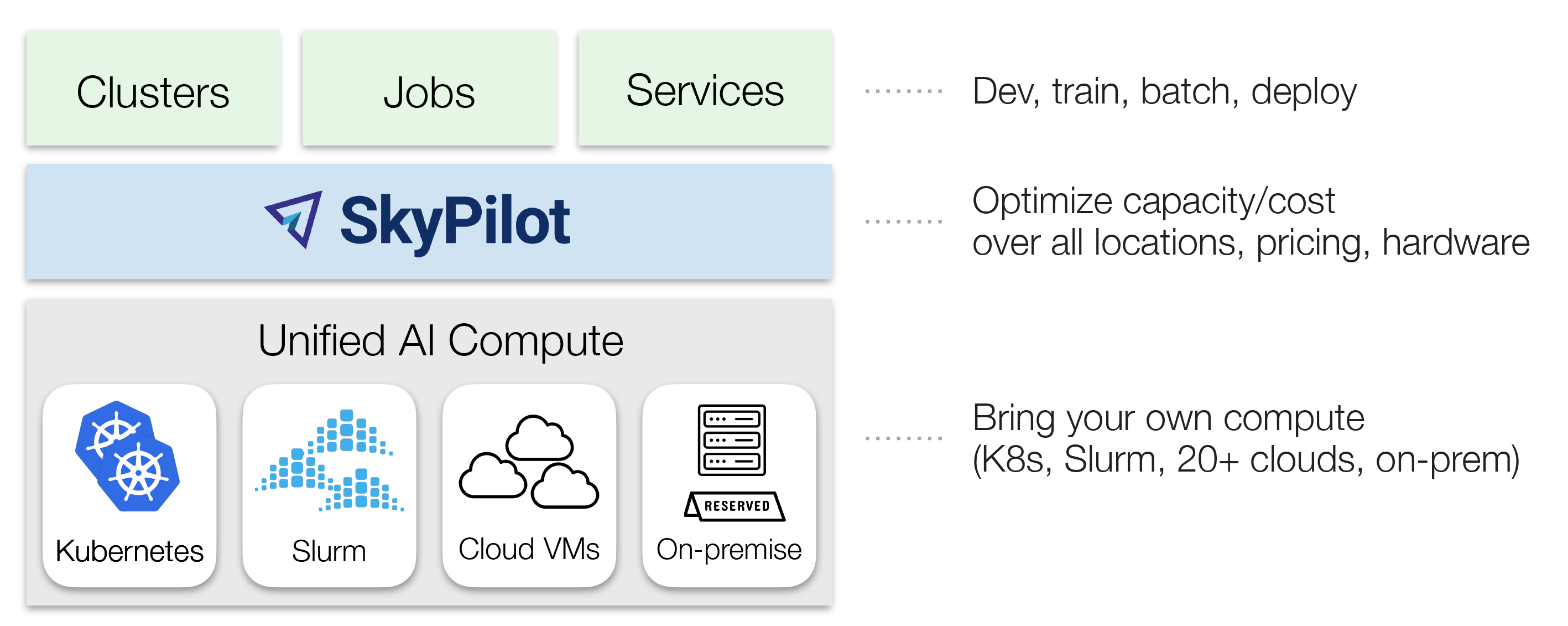
SkyPilot 是一个可以在任意 AI 基础设施上运行、管理和扩展 AI 工作负载的系统。
SkyPilot 为 **AI 团队** 提供了一个简单的接口,以便在任意基础设施上运行作业。
**基础设施团队** 获得了一个统一的控制平面来管理任何 AI 计算——具备高级调度、扩展和编排功能。
:fire: *新闻* :fire:
- [2026 年 3 月] **扩展 Karpathy 的 Autoresearch**:Autoresearch 一次运行 1 个实验。我们给它分配了 16 个 GPU 并让其并行运行:[**博客**](https://blog.skypilot.co/scaling-autoresearch/),[**HackerNews**](https://news.ycombinator.com/item?id=47442435)
- [2026 年 3 月] **SkyPilot Agent Skills**:为 AI agent 提供 GPU 访问和作业管理:[**文档**](https://docs.skypilot.co/en/latest/getting-started/skill.html)
- [2026 年 1 月] **Shopify 案例研究**:Shopify 在 SkyPilot 上运行所有 AI 训练工作负载:[**案例研究**](https://shopify.engineering/skypilot)
- [2025 年 12 月] **SkyPilot v0.11** 发布:多云资源池、快速托管作业、大规模企业级就绪、可编程性。[**发布说明**](https://github.com/skypilot-org/skypilot/releases/tag/v0.11.0)
- [2025 年 12 月] 在你的 Kubernetes 或云上通过 RL 训练 **agent 使用 Google Search** 作为工具:[**博客**](https://blog.skypilot.co/verl-tool-calling/),[**示例**](./llm/verl/)
- [2025 年 10 月] 在你的 Kubernetes 或云上使用 SkyRL 运行 **LLM 的 RL 训练**:[**示例**](./llm/skyrl/)
## 概述
SkyPilot **易于 AI 团队使用**:
- 在自有基础设施上快速启动计算
- 环境和作业即代码——简单且可移植
- 轻松的作业管理:排队、运行和自动恢复多个作业
SkyPilot **让 Kubernetes 对 AI 和基础设施团队变得更简单**:
- 类似 Slurm 的易用性,云原生的健壮性
- K8s 上的本地开发体验:SSH 进入 pod,同步代码,或连接 IDE
- 为集群加速:Gang 调度、多集群和扩展
SkyPilot **统一多个集群、云和硬件**:
- 一个接口即可使用预留 GPU、Kubernetes 集群、Slurm 集群或 20 多种云
- [灵活配置](https://docs.skypilot.co/en/latest/examples/auto-failover.html) GPU、TPU、CPU,支持自动重试
- [团队部署](https://docs.skypilot.co/en/latest/reference/api-server/api-server.html)和资源共享
SkyPilot **降低云成本并最大化 GPU 可用性**:
* Autostop:自动清理空闲资源
* [Spot 实例支持](https://docs.skypilot.co/en/latest/examples/managed-jobs.html#running-on-spot-instances):节省 3-6 倍成本,支持抢占自动恢复
* 智能调度:自动在最便宜且可用的基础设施上运行
SkyPilot 支持现有的 GPU、TPU 和 CPU 工作负载,无需修改代码。
使用 pip 安装:
```
# 选择您的 Cloud:
pip install -U "skypilot[kubernetes,aws,gcp,azure,oci,nebius,lambda,runpod,fluidstack,paperspace,cudo,ibm,scp,seeweb,shadeform,verda]"
```
如需获取最新功能和修复,请使用 nightly 版本或[从源码安装](https://docs.skypilot.co/en/latest/getting-started/installation.html):
```
# 选择您的 Cloud:
pip install "skypilot-nightly[kubernetes,aws,gcp,azure,oci,nebius,lambda,runpod,fluidstack,paperspace,cudo,ibm,scp,seeweb,shadeform,verda]"
```
要直接配合你的 agent(Claude Code、Codex 等)使用 SkyPilot,请安装 [SkyPilot Skill](https://docs.skypilot.co/en/latest/getting-started/skill.html)。告诉你的 agent:
```
Fetch and follow https://github.com/skypilot-org/skypilot/blob/HEAD/agent/INSTALL.md to install the skypilot skill
```
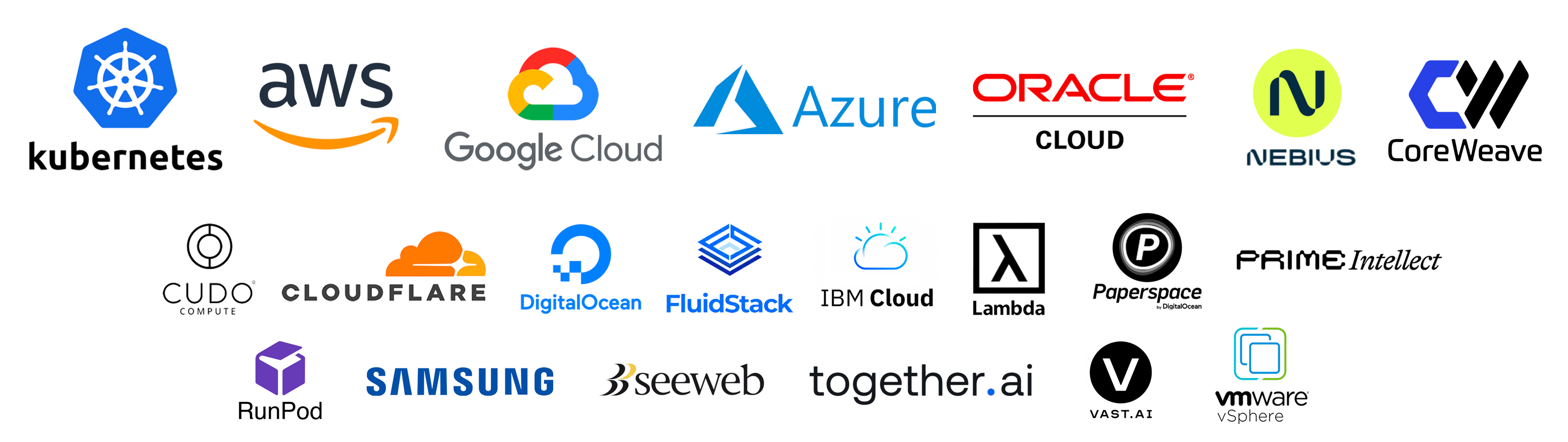
当前支持的基础设施:Kubernetes、Slurm、AWS、GCP、Azure、OCI、CoreWeave、Nebius、Lambda Cloud、RunPod、Fluidstack、
Cudo、Digital Ocean、Paperspace、Cloudflare、Samsung、IBM、Vast.ai、VMware vSphere、Seeweb、Prime Intellect、Shadeform、Verda Cloud、VastData、Crusoe。
## 入门指南
你可以在[这里](https://docs.skypilot.co/)找到我们的文档。
- [安装](https://docs.skypilot.co/en/latest/getting-started/installation.html)
- [快速开始](https://docs.skypilot.co/en/latest/getting-started/quickstart.html)
- [CLI 参考](https://docs.skypilot.co/en/latest/reference/cli.html)
## 1 分钟了解 SkyPilot
一个 SkyPilot 任务指定:资源需求、要同步的数据、设置命令和任务命令。
一旦在这个[**统一接口**](https://docs.skypilot.co/en/latest/reference/yaml-spec.html)(YAML 或 Python API)中编写完成,任务就可以在任何可用的基础设施(Kubernetes、Slurm、云等)上启动。这避免了供应商锁定,并允许轻松地将作业迁移到不同的提供商。
将以下内容粘贴到文件 `my_task.yaml` 中:
```
resources:
accelerators: A100:8 # 8x NVIDIA A100 GPU
num_nodes: 1 # Number of VMs to launch
# 包含项目代码库的 Working directory (可选)。
# 其内容同步到集群上的 ~/sky_workdir/。
workdir: ~/torch_examples
# 在执行 Job 前运行的 Commands。
# 典型用途:pip install -r requirements.txt, git clone 等。
setup: |
cd mnist
pip install -r requirements.txt
# 作为 Job 运行的 Commands。
# 典型用途:启动主程序。
run: |
cd mnist
python main.py --epochs 1
```
通过克隆准备 workdir:
```
git clone https://github.com/pytorch/examples.git ~/torch_examples
```
使用 `sky launch` 启动(注意:此示例需要[访问 GPU 实例](https://docs.skypilot.co/en/latest/cloud-setup/quota.html)):
```
sky launch my_task.yaml
```
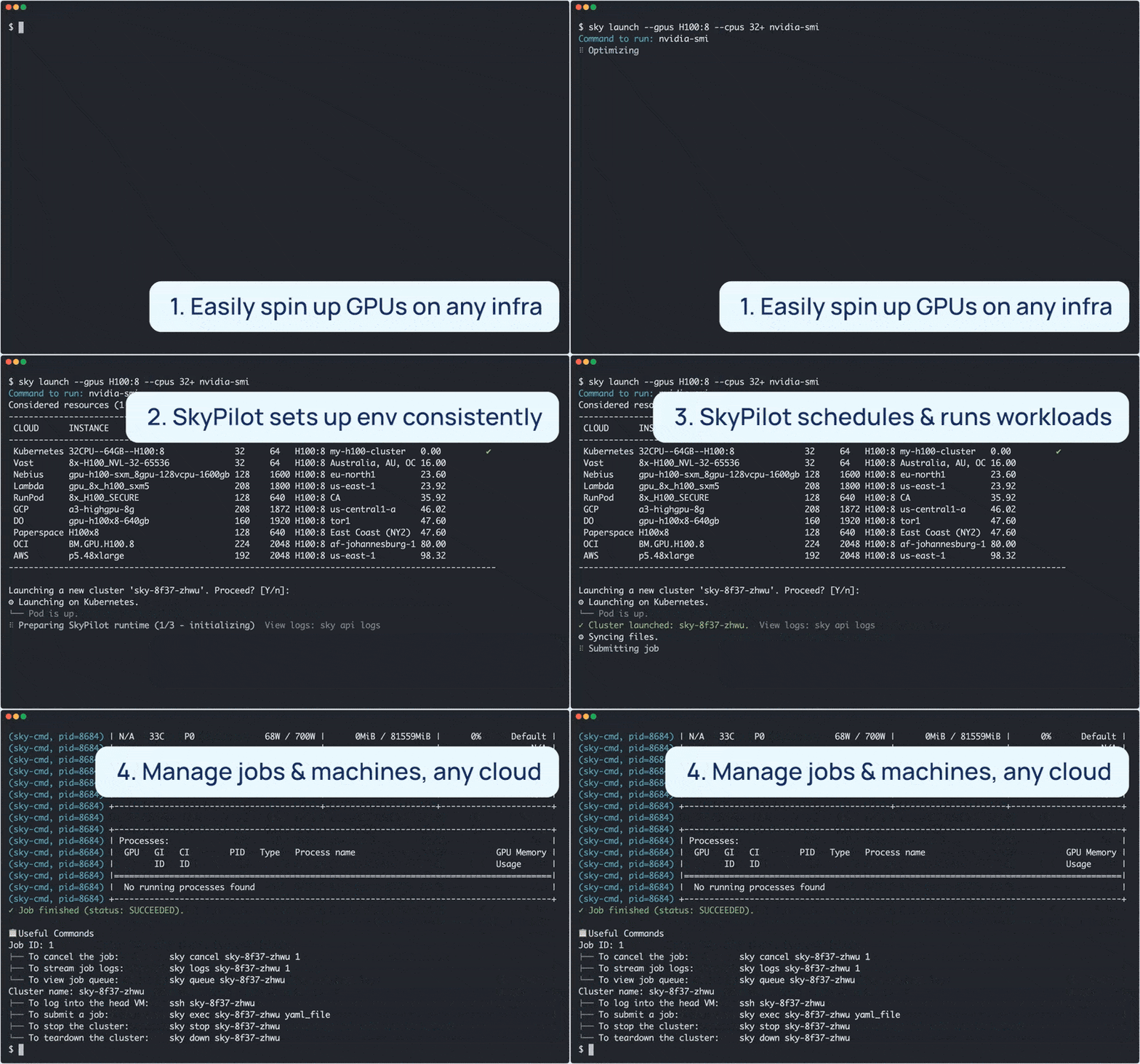
SkyPilot 随后会为你完成繁重的工作,包括:
1. 在你的集群或云中找到最便宜且可用的基础设施
2. 配置 GPU(pod 或 VM),如果基础设施返回容量错误则自动故障转移
3. 将本地 `workdir` 同步到配置好的集群
4. 通过运行任务的 `setup` 命令自动安装依赖项
5. 运行任务的 `run` 命令,并流式传输日志
请参阅 [快速开始](https://docs.skypilot.co/en/latest/getting-started/quickstart.html) 以开始使用 SkyPilot。
## 可运行示例
查看涵盖以下内容的 [**SkyPilot 示例**](https://docs.skypilot.co/en/docs-examples/examples/index.html):开发、训练、服务、LLM 模型、AI 应用和常见框架。
最新精选示例:
| 任务 | 示例 |
|----------|----------|
| Training | [Verl](https://docs.skypilot.co/en/latest/examples/training/verl.html), [Finetune Llama 4](https://docs.skypilot.co/en/latest/examples/training/llama-4-finetuning.html), [TorchTitan](https://docs.skypilot.co/en/latest/examples/training/torchtitan.html), [PyTorch](https://docs.skypilot.co/en/latest/getting-started/tutorial.html), [DeepSpeed](https://docs.skypilot.co/en/latest/examples/training/deepspeed.html), [NeMo](https://docs.skypilot.co/en/latest/examples/training/nemo.html), [Ray](https://docs.skypilot.co/en/latest/examples/training/ray.html), [Unsloth](https://docs.skypilot.co/en/latest/examples/training/unsloth.html), [Jax/TPU](https://docs.skypilot.co/en/latest/examples/training/tpu.html), [OpenRLHF](https://docs.skypilot.co/en/latest/examples/training/openrlhf.html) |
| Serving | [vLLM](https://docs.skypilot.co/en/latest/examples/serving/vllm.html), [SGLang](https://docs.skypilot.co/en/latest/examples/serving/sglang.html), [Ollama](https://docs.skypilot.co/en/latest/examples/serving/ollama.html) |
| Models | [DeepSeek-R1](https://docs.skypilot.co/en/latest/examples/models/deepseek-r1.html), [Llama 4](https://docs.skypilot.co/en/latest/examples/models/llama-4.html), [Llama 3](https://docs.skypilot.co/en/latest/examples/models/llama-3.html), [CodeLlama](https://docs.skypilot.co/en/latest/examples/models/codellama.html), [Qwen](https://docs.skypilot.co/en/latest/examples/models/qwen.html), [Kimi-K2](https://docs.skypilot.co/en/latest/examples/models/kimi-k2.html), [Kimi-K2-Thinking](https://docs.skypilot.co/en/latest/examples/models/kimi-k2-thinking.html), [Mixtral](https://docs.skypilot.co/en/latest/examples/models/mixtral.html) |
| AI apps | [RAG](https://docs.skypilot.co/en/latest/examples/applications/rag.html), [vector databases](https://docs.skypilot.co/en/latest/examples/applications/vector_database.html) (ChromaDB, CLIP) |
| Common frameworks | [Airflow](https://docs.skypilot.co/en/latest/examples/frameworks/airflow.html), [Jupyter](https://docs.skypilot.co/en/latest/examples/frameworks/jupyter.html), [marimo](https://docs.skypilot.co/en/latest/examples/frameworks/marimo.html) |
源文件可在 [`llm/`](https://github.com/skypilot-org/skypilot/tree/master/llm) 和 [`examples/`](https://github.com/skypilot-org/skypilot/tree/master/examples) 中找到。
## 更多信息
了解更多信息,请参阅 [SkyPilot 概述](https://docs.skypilot.co/en/latest/overview.html)、[SkyPilot 文档](https://docs.skypilot.co/en/latest/) 和 [SkyPilot 博客](https://blog.skypilot.co/)。
SkyPilot 采用者:[推荐与案例研究](https://blog.skypilot.co/case-studies/)
合作伙伴与集成:[社区聚焦](https://blog.skypilot.co/community/)
关注更新:
- [Slack](http://slack.skypilot.co)
- [X / Twitter](https://twitter.com/skypilot_org)
- [LinkedIn](https://www.linkedin.com/company/skypilot-oss/)
- [SkyPilot 博客](https://blog.skypilot.co/)([介绍博文](https://blog.skypilot.co/introducing-skypilot/))
阅读研究:
- [SkyPilot 论文](https://www.usenix.org/system/files/nsdi23-yang-zongheng.pdf)和[演讲](https://www.usenix.org/conference/nsdi23/presentation/yang-zongheng) (NSDI 2023)
- [Sky Computing 白皮书](https://arxiv.org/abs/2205.07147)
- [Sky Computing 愿景论文](https://sigops.org/s/conferences/hotos/2021/papers/hotos21-s02-stoica.pdf) (HotOS 2021)
- [SkyServe:跨区域和云的 AI 服务](https://arxiv.org/pdf/2411.01438) (EuroSys 2025)
- [托管作业 spot 实例策略](https://www.usenix.org/conference/nsdi24/presentation/wu-zhanghao) (NSDI 2024)
SkyPilot 最初由 UC Berkeley 的 [Sky Computing Lab](https://sky.cs.berkeley.edu) 启动,此后获得了许多行业贡献者。如需了解项目的起源和愿景,请参阅 [概念:Sky Computing](https://docs.skypilot.co/en/latest/sky-computing.html)。
## 问题与反馈
我们很乐意听取你的反馈:
* 如有问题和功能请求,请[提交 GitHub issue](https://github.com/skypilot-org/skypilot/issues/new)。
* 如有疑问,请使用 [GitHub Discussions](https://github.com/skypilot-org/skypilot/discussions)。
如需一般性讨论,请加入 [SkyPilot Slack](http://slack.skypilot.co)。
## 贡献
我们欢迎对项目的所有贡献!请参阅 [CONTRIBUTING](CONTRIBUTING.md) 了解如何参与。
标签:AI计算, Apex, DNS解析, GPU调度, HPC, MLOps, Python, SkyPilot, Slurm, Yelp, 云计算, 人工智能, 基础设施管理, 多云策略, 大模型, 子域名突变, 容器编排, 工作负载编排, 开源项目, 成本优化, 提示注入, 无后门, 本地部署, 机器学习, 模型推理, 模型训练, 深度学习, 混合云, 漏洞利用检测, 用户模式Hook绕过, 自动扩缩容, 规则引擎, 请求拦截, 资源调度, 跨云平台, 逆向工具, 集群管理, 高性能计算


