aquasecurity/cloudsploit
GitHub: aquasecurity/cloudsploit
CloudSploit 是一款开源的云安全态势管理工具,用于扫描多云环境中的安全配置错误与合规风险。
Stars: 3748 | Forks: 744
[ ](https://cloud.aquasec.com/signup)
[](https://travis-ci.com/aquasecurity/cloudsploit)
# Aqua CloudSploit - 云安全扫描
[
](https://cloud.aquasec.com/signup)
[](https://travis-ci.com/aquasecurity/cloudsploit)
# Aqua CloudSploit - 云安全扫描
[ ](https://cloud.aquasec.com/signup)
## 快速开始
### 通用
```
$ git clone https://github.com/aquasecurity/cloudsploit.git
$ cd cloudsploit
$ npm install
$ ./index.js -h
```
### Docker
```
$ git clone https://github.com/aquasecurity/cloudsploit.git
$ cd cloudsploit
$ docker build . -t cloudsploit:0.0.1
$ docker run cloudsploit:0.0.1 -h
$ docker run -e AWS_ACCESS_KEY_ID=XX -e AWS_SECRET_ACCESS_KEY=YY cloudsploit:0.0.1 --compliance=pci
```
## 文档
* [背景](#background)
* [部署选项](#deployment-options)
+ [自托管](#self-hosted)
+ [托管于 Aqua Wave](#hosted-at-aqua-wave)
* [安装](#installation)
* [配置](#configuration)
+ [Amazon Web Services](docs/aws.md#cloud-provider-configuration)
+ [Microsoft Azure](docs/azure.md#cloud-provider-configuration)
+ [Google Cloud Platform](docs/gcp.md#cloud-provider-configuration)
+ [Oracle Cloud Infrastructure](docs/oracle.md#cloud-provider-configuration)
+ [CloudSploit 配置文件](#cloudsploit-config-file)
+ [凭证文件](#credential-files)
+ [AWS](#aws)
+ [Azure](#azure)
+ [GCP](#gcp)
+ [Oracle OCI](#oracle-oci)
+ [环境变量](#environment-variables)
* [运行](#running)
* [CLI 选项](#cli-options)
* [合规性](#compliance)
+ [HIPAA](#hipaa)
+ [PCI](#pci)
+ [CIS 基准](#cis-benchmarks)
* [输出格式](#output-formats)
+ [控制台输出](#console-output)
+ [忽略通过结果](#ignoring-passing-results)
+ [CSV](#csv)
+ [JSON](#json)
+ [JUnit XML](#junit-xml)
+ [集合输出](#collection-output)
* [抑制](#suppressions)
* [运行单个插件](#running-a-single-plugin)
* [架构](#architecture)
* [编写插件](#writing-a-plugin)
* [其他说明](#other-notes)
## 背景
Aqua CloudSploit 是一个开源项目,旨在检测云基础设施账户中的安全风险,包括:Amazon Web Services (AWS)、Microsoft Azure、Google Cloud Platform (GCP)、Oracle Cloud Infrastructure (OCI) 和 GitHub。这些脚本旨在返回一系列潜在的配置错误和安全风险。
## 部署选项
CloudSploit 提供两种部署选项:
### 自托管
按照以下说明,只需几个简单的步骤即可在您的机器上部署 CloudSploit 的开源版本。
### 托管于 Aqua Wave
托管在 Aqua Wave 的 CloudSploit 商业版本。立即试用 [Aqua Wave](https://cloud.aquasec.com/signup)!
## 安装
确保已安装 NodeJS。如果未安装,请从[此处](https://nodejs.org/download/)安装。
```
$ git clone git@github.com:cloudsploit/scans.git
$ npm install
```
## 配置
CloudSploit 需要您的云账户的只读权限。请按照以下指南配置此访问权限:
* [Amazon Web Services](docs/aws.md#cloud-provider-configuration)
* [Microsoft Azure](docs/azure.md#cloud-provider-configuration)
* [Google Cloud Platform](docs/gcp.md#cloud-provider-configuration)
* [Oracle Cloud Infrastructure](docs/oracle.md#cloud-provider-configuration)
对于 AWS,您可以直接运行 CloudSploit,它将使用默认的 [AWS 凭证链](https://docs.aws.amazon.com/AWSJavaScriptSDK/latest/AWS/CredentialProviderChain.html)检测凭证。
### CloudSploit 配置文件
CloudSploit 配置文件允许您通过以下方式传递云提供商凭证:
1. 文件系统上的 JSON 文件
2. 环境变量
3. 硬编码(不推荐)
首先复制示例配置文件:
```
$ cp config_example.js config.js
```
通过取消注释您正在测试的云提供商的相关部分来编辑配置文件。每个云都有一个 `credential_file` 选项以及内联选项。例如:
```
azure: {
// OPTION 1: If using a credential JSON file, enter the path below
// credential_file: '/path/to/file.json',
// OPTION 2: If using hard-coded credentials, enter them below
// application_id: process.env.AZURE_APPLICATION_ID || '',
// key_value: process.env.AZURE_KEY_VALUE || '',
// directory_id: process.env.AZURE_DIRECTORY_ID || '',
// subscription_id: process.env.AZURE_SUBSCRIPTION_ID || ''
}
```
### 凭证文件
如果您使用 `credential_file` 选项,请指向文件系统中符合您所使用的云正确格式的文件。
#### AWS
```
{
"accessKeyId": "YOURACCESSKEY",
"secretAccessKey": "YOURSECRETKEY"
}
```
#### Azure
```
{
"ApplicationID": "YOURAZUREAPPLICATIONID",
"KeyValue": "YOURAZUREKEYVALUE",
"DirectoryID": "YOURAZUREDIRECTORYID",
"SubscriptionID": "YOURAZURESUBSCRIPTIONID"
}
```
#### GCP
注意:对于 GCP,您可以直接从 GCP 控制台[生成 JSON 文件](docs/gcp.md),不应对其进行编辑。
```
{
"type": "service_account",
"project": "GCPPROJECTNAME",
"client_email": "GCPCLIENTEMAIL",
"private_key": "GCPPRIVATEKEY"
}
```
#### Oracle OCI
```
{
"tenancyId": "YOURORACLETENANCYID",
"compartmentId": "YOURORACLECOMPARTMENTID",
"userId": "YOURORACLEUSERID",
"keyFingerprint": "YOURORACLEKEYFINGERPRINT",
"keyValue": "YOURORACLEKEYVALUE",
}
```
### 环境变量
CloudSploit 支持传递环境变量,但您必须先取消注释 `config.js` 文件中与正在扫描的云提供商相关的部分。
然后您可以传递每个部分中列出的变量。例如,对于 AWS:
```
{
access_key: process.env.AWS_ACCESS_KEY_ID || '',
secret_access_key: process.env.AWS_SECRET_ACCESS_KEY || '',
session_token: process.env.AWS_SESSION_TOKEN || '',
}
```
## 运行
要运行标准扫描并显示所有输出和结果,只需运行:
```
$ ./index.js
```
## CLI 选项
CloudSploit 支持许多选项来自定义运行时。一些常用选项包括:
* AWS GovCloud 支持:`--govcloud`
* AWS 中国支持:`--china`
* 保存原始云提供商响应数据:`--collection=file.json`
* 忽略通过 (OK) 结果:`--ignore-ok`
* 如果发现非通过结果则以非零代码退出:`--exit-code`
* 这是 CI/CD 系统的理想选项
* 将输出从表格更改为原始文本:`--console=text`
有关更多输出选项,请参阅下面的[输出格式](#output-formates)。
## 合规性
CloudSploit 支持将其插件映射到特定的合规策略。要运行合规扫描,请使用 `--compliance` 标志。例如:
```
$ ./index.js --compliance=hipaa
$ ./index.js --compliance=pci
```
可以同时运行多种合规模式:
```
$ ./index.js --compliance=cis1 --compliance=cis2
```
CloudSploit 目前支持以下合规映射:
### HIPAA
```
$ ./index.js --compliance=hipaa
```
HIPAA 扫描将 CloudSploit 插件映射到 1996 年的健康保险流通与责任法案 (Health Insurance Portability and Accountability Act)。
### PCI
```
$ ./index.js --compliance=pci
```
PCI 扫描将 CloudSploit 插件映射到支付卡行业数据安全标准。
### CIS 基准
```
$ ./index.js --compliance=cis
$ ./index.js --compliance=cis1
$ ./index.js --compliance=cis2
```
支持 CIS 基准,包括级别 1 和级别 2 控制。传递 `--compliance=cis` 将同时运行级别 1 和级别 2 控制。
## 输出格式
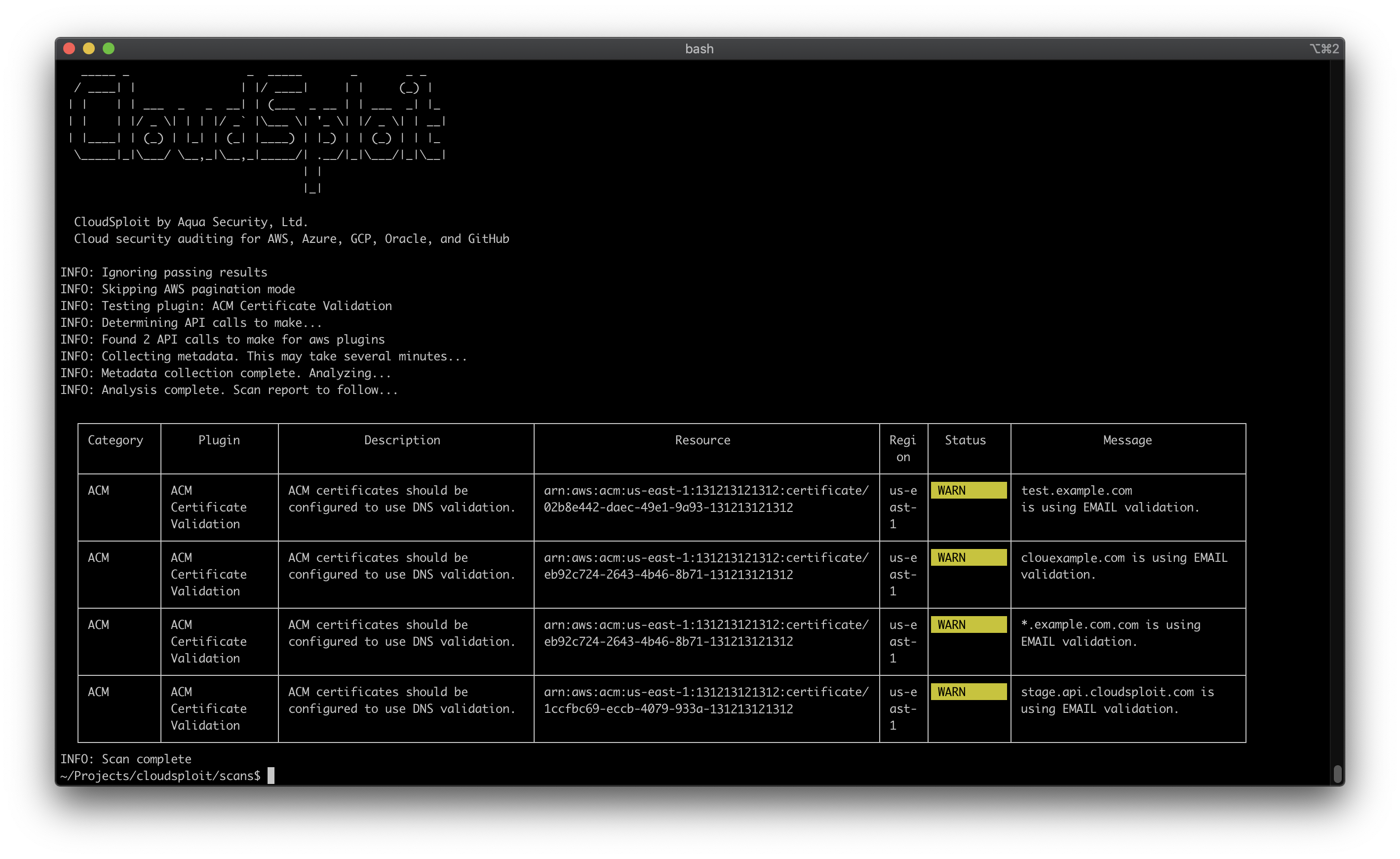
CloudSploit 支持多种输出格式,供其他工具使用。如果您未另行指定,CloudSploit 会将输出以表格形式写入标准输出(控制台)。
注意:您可以传递多种输出格式并组合选项以进行进一步自定义。例如:
```
# 打印表格到控制台并保存 CSV 文件
$ ./index.js --csv=file.csv --console=table
# 打印文本到控制台并保存 JSON 和 JUnit 文件,同时忽略通过的结果
$ ./index.js --json=file.json --junit=file.xml --console=text --ignore-ok
```
### 控制台输出
默认情况下,CloudSploit 结果以表格格式(带颜色)打印到控制台。您可以通过运行以下命令覆盖此设置并使用纯文本:
```
$ ./index.js --console=text
```
或者,您可以通过运行以下命令完全抑制控制台输出:
```
$ ./index.js --console=none
```
### 忽略通过结果
您可以通过传递 `--ignore-ok` 命令行参数来忽略输出中返回 OK 状态的结果。
### CSV
```
$ ./index.js --csv=file.csv
```
### JSON
```
$ ./index.js --json=file.json
```
### JUnit XML
```
$ ./index.js --junit=file.xml
```
### 集合输出
CloudSploit 将从云提供商 API 查询的数据保存为 JSON 格式,可以与其他文件一起保存以用于调试或历史记录目的。
```
$ ./index.js --collection=file.json
```
## 抑制
可以通过传递 `--suppress` 标志(支持多个选项)来抑制结果,格式如下:
```
--suppress pluginId:region:resourceId
```
例如:
```
# 禁止 acmValidation 插件的所有结果
$ ./index.js --suppress acmValidation:*:*
# 禁止 us-east-1 区域的所有结果
$ ./index.js --suppress *:us-east-1:*
# 禁止所有区域所有插件中匹配正则表达式 "certificate/*" 的所有结果
$ ./index.js --suppress *:*:certificate/*
```
## 运行单个插件
如果您只想运行一个插件,可以使用 `--plugin` 标志。
```
$ ./index.js --plugin acmValidation
```
## 架构
CloudSploit 分两个阶段工作。首先,它查询云基础设施 API 以获取有关您账户的各种元数据,即“收集”阶段。一旦收集了所有必要的数据,结果将传递到“扫描”阶段。扫描使用收集的数据搜索潜在的配置错误、风险和其他安全问题,这些就是最终的输出结果。
## 编写插件
请参阅我们的[贡献指南](.github/CONTRIBUTING.md)和编写 CloudSploit 插件的[完整指南](docs/writing-plugins.md)。
## 编写修复
如果您想为此参数中提到的插件运行修复,可以使用 `--remediate` 标志。它接受插件名称列表。
有关更多详细信息,请参阅我们的[开发修复指南](docs/writing-remediation.md)。
## 其他说明
有关 Aqua Wave SaaS 产品、AWS 安全策略等的更多详细信息,[请点击此处](docs/notes.md)。
](https://cloud.aquasec.com/signup)
## 快速开始
### 通用
```
$ git clone https://github.com/aquasecurity/cloudsploit.git
$ cd cloudsploit
$ npm install
$ ./index.js -h
```
### Docker
```
$ git clone https://github.com/aquasecurity/cloudsploit.git
$ cd cloudsploit
$ docker build . -t cloudsploit:0.0.1
$ docker run cloudsploit:0.0.1 -h
$ docker run -e AWS_ACCESS_KEY_ID=XX -e AWS_SECRET_ACCESS_KEY=YY cloudsploit:0.0.1 --compliance=pci
```
## 文档
* [背景](#background)
* [部署选项](#deployment-options)
+ [自托管](#self-hosted)
+ [托管于 Aqua Wave](#hosted-at-aqua-wave)
* [安装](#installation)
* [配置](#configuration)
+ [Amazon Web Services](docs/aws.md#cloud-provider-configuration)
+ [Microsoft Azure](docs/azure.md#cloud-provider-configuration)
+ [Google Cloud Platform](docs/gcp.md#cloud-provider-configuration)
+ [Oracle Cloud Infrastructure](docs/oracle.md#cloud-provider-configuration)
+ [CloudSploit 配置文件](#cloudsploit-config-file)
+ [凭证文件](#credential-files)
+ [AWS](#aws)
+ [Azure](#azure)
+ [GCP](#gcp)
+ [Oracle OCI](#oracle-oci)
+ [环境变量](#environment-variables)
* [运行](#running)
* [CLI 选项](#cli-options)
* [合规性](#compliance)
+ [HIPAA](#hipaa)
+ [PCI](#pci)
+ [CIS 基准](#cis-benchmarks)
* [输出格式](#output-formats)
+ [控制台输出](#console-output)
+ [忽略通过结果](#ignoring-passing-results)
+ [CSV](#csv)
+ [JSON](#json)
+ [JUnit XML](#junit-xml)
+ [集合输出](#collection-output)
* [抑制](#suppressions)
* [运行单个插件](#running-a-single-plugin)
* [架构](#architecture)
* [编写插件](#writing-a-plugin)
* [其他说明](#other-notes)
## 背景
Aqua CloudSploit 是一个开源项目,旨在检测云基础设施账户中的安全风险,包括:Amazon Web Services (AWS)、Microsoft Azure、Google Cloud Platform (GCP)、Oracle Cloud Infrastructure (OCI) 和 GitHub。这些脚本旨在返回一系列潜在的配置错误和安全风险。
## 部署选项
CloudSploit 提供两种部署选项:
### 自托管
按照以下说明,只需几个简单的步骤即可在您的机器上部署 CloudSploit 的开源版本。
### 托管于 Aqua Wave
托管在 Aqua Wave 的 CloudSploit 商业版本。立即试用 [Aqua Wave](https://cloud.aquasec.com/signup)!
## 安装
确保已安装 NodeJS。如果未安装,请从[此处](https://nodejs.org/download/)安装。
```
$ git clone git@github.com:cloudsploit/scans.git
$ npm install
```
## 配置
CloudSploit 需要您的云账户的只读权限。请按照以下指南配置此访问权限:
* [Amazon Web Services](docs/aws.md#cloud-provider-configuration)
* [Microsoft Azure](docs/azure.md#cloud-provider-configuration)
* [Google Cloud Platform](docs/gcp.md#cloud-provider-configuration)
* [Oracle Cloud Infrastructure](docs/oracle.md#cloud-provider-configuration)
对于 AWS,您可以直接运行 CloudSploit,它将使用默认的 [AWS 凭证链](https://docs.aws.amazon.com/AWSJavaScriptSDK/latest/AWS/CredentialProviderChain.html)检测凭证。
### CloudSploit 配置文件
CloudSploit 配置文件允许您通过以下方式传递云提供商凭证:
1. 文件系统上的 JSON 文件
2. 环境变量
3. 硬编码(不推荐)
首先复制示例配置文件:
```
$ cp config_example.js config.js
```
通过取消注释您正在测试的云提供商的相关部分来编辑配置文件。每个云都有一个 `credential_file` 选项以及内联选项。例如:
```
azure: {
// OPTION 1: If using a credential JSON file, enter the path below
// credential_file: '/path/to/file.json',
// OPTION 2: If using hard-coded credentials, enter them below
// application_id: process.env.AZURE_APPLICATION_ID || '',
// key_value: process.env.AZURE_KEY_VALUE || '',
// directory_id: process.env.AZURE_DIRECTORY_ID || '',
// subscription_id: process.env.AZURE_SUBSCRIPTION_ID || ''
}
```
### 凭证文件
如果您使用 `credential_file` 选项,请指向文件系统中符合您所使用的云正确格式的文件。
#### AWS
```
{
"accessKeyId": "YOURACCESSKEY",
"secretAccessKey": "YOURSECRETKEY"
}
```
#### Azure
```
{
"ApplicationID": "YOURAZUREAPPLICATIONID",
"KeyValue": "YOURAZUREKEYVALUE",
"DirectoryID": "YOURAZUREDIRECTORYID",
"SubscriptionID": "YOURAZURESUBSCRIPTIONID"
}
```
#### GCP
注意:对于 GCP,您可以直接从 GCP 控制台[生成 JSON 文件](docs/gcp.md),不应对其进行编辑。
```
{
"type": "service_account",
"project": "GCPPROJECTNAME",
"client_email": "GCPCLIENTEMAIL",
"private_key": "GCPPRIVATEKEY"
}
```
#### Oracle OCI
```
{
"tenancyId": "YOURORACLETENANCYID",
"compartmentId": "YOURORACLECOMPARTMENTID",
"userId": "YOURORACLEUSERID",
"keyFingerprint": "YOURORACLEKEYFINGERPRINT",
"keyValue": "YOURORACLEKEYVALUE",
}
```
### 环境变量
CloudSploit 支持传递环境变量,但您必须先取消注释 `config.js` 文件中与正在扫描的云提供商相关的部分。
然后您可以传递每个部分中列出的变量。例如,对于 AWS:
```
{
access_key: process.env.AWS_ACCESS_KEY_ID || '',
secret_access_key: process.env.AWS_SECRET_ACCESS_KEY || '',
session_token: process.env.AWS_SESSION_TOKEN || '',
}
```
## 运行
要运行标准扫描并显示所有输出和结果,只需运行:
```
$ ./index.js
```
## CLI 选项
CloudSploit 支持许多选项来自定义运行时。一些常用选项包括:
* AWS GovCloud 支持:`--govcloud`
* AWS 中国支持:`--china`
* 保存原始云提供商响应数据:`--collection=file.json`
* 忽略通过 (OK) 结果:`--ignore-ok`
* 如果发现非通过结果则以非零代码退出:`--exit-code`
* 这是 CI/CD 系统的理想选项
* 将输出从表格更改为原始文本:`--console=text`
有关更多输出选项,请参阅下面的[输出格式](#output-formates)。
## 合规性
CloudSploit 支持将其插件映射到特定的合规策略。要运行合规扫描,请使用 `--compliance` 标志。例如:
```
$ ./index.js --compliance=hipaa
$ ./index.js --compliance=pci
```
可以同时运行多种合规模式:
```
$ ./index.js --compliance=cis1 --compliance=cis2
```
CloudSploit 目前支持以下合规映射:
### HIPAA
```
$ ./index.js --compliance=hipaa
```
HIPAA 扫描将 CloudSploit 插件映射到 1996 年的健康保险流通与责任法案 (Health Insurance Portability and Accountability Act)。
### PCI
```
$ ./index.js --compliance=pci
```
PCI 扫描将 CloudSploit 插件映射到支付卡行业数据安全标准。
### CIS 基准
```
$ ./index.js --compliance=cis
$ ./index.js --compliance=cis1
$ ./index.js --compliance=cis2
```
支持 CIS 基准,包括级别 1 和级别 2 控制。传递 `--compliance=cis` 将同时运行级别 1 和级别 2 控制。
## 输出格式
CloudSploit 支持多种输出格式,供其他工具使用。如果您未另行指定,CloudSploit 会将输出以表格形式写入标准输出(控制台)。
注意:您可以传递多种输出格式并组合选项以进行进一步自定义。例如:
```
# 打印表格到控制台并保存 CSV 文件
$ ./index.js --csv=file.csv --console=table
# 打印文本到控制台并保存 JSON 和 JUnit 文件,同时忽略通过的结果
$ ./index.js --json=file.json --junit=file.xml --console=text --ignore-ok
```
### 控制台输出
默认情况下,CloudSploit 结果以表格格式(带颜色)打印到控制台。您可以通过运行以下命令覆盖此设置并使用纯文本:
```
$ ./index.js --console=text
```
或者,您可以通过运行以下命令完全抑制控制台输出:
```
$ ./index.js --console=none
```
### 忽略通过结果
您可以通过传递 `--ignore-ok` 命令行参数来忽略输出中返回 OK 状态的结果。
### CSV
```
$ ./index.js --csv=file.csv
```
### JSON
```
$ ./index.js --json=file.json
```
### JUnit XML
```
$ ./index.js --junit=file.xml
```
### 集合输出
CloudSploit 将从云提供商 API 查询的数据保存为 JSON 格式,可以与其他文件一起保存以用于调试或历史记录目的。
```
$ ./index.js --collection=file.json
```
## 抑制
可以通过传递 `--suppress` 标志(支持多个选项)来抑制结果,格式如下:
```
--suppress pluginId:region:resourceId
```
例如:
```
# 禁止 acmValidation 插件的所有结果
$ ./index.js --suppress acmValidation:*:*
# 禁止 us-east-1 区域的所有结果
$ ./index.js --suppress *:us-east-1:*
# 禁止所有区域所有插件中匹配正则表达式 "certificate/*" 的所有结果
$ ./index.js --suppress *:*:certificate/*
```
## 运行单个插件
如果您只想运行一个插件,可以使用 `--plugin` 标志。
```
$ ./index.js --plugin acmValidation
```
## 架构
CloudSploit 分两个阶段工作。首先,它查询云基础设施 API 以获取有关您账户的各种元数据,即“收集”阶段。一旦收集了所有必要的数据,结果将传递到“扫描”阶段。扫描使用收集的数据搜索潜在的配置错误、风险和其他安全问题,这些就是最终的输出结果。
## 编写插件
请参阅我们的[贡献指南](.github/CONTRIBUTING.md)和编写 CloudSploit 插件的[完整指南](docs/writing-plugins.md)。
## 编写修复
如果您想为此参数中提到的插件运行修复,可以使用 `--remediate` 标志。它接受插件名称列表。
有关更多详细信息,请参阅我们的[开发修复指南](docs/writing-remediation.md)。
## 其他说明
有关 Aqua Wave SaaS 产品、AWS 安全策略等的更多详细信息,[请点击此处](docs/notes.md)。
](https://cloud.aquasec.com/signup)
[](https://travis-ci.com/aquasecurity/cloudsploit)
# Aqua CloudSploit - 云安全扫描
[](https://cloud.aquasec.com/signup)
## 快速开始
### 通用
```
$ git clone https://github.com/aquasecurity/cloudsploit.git
$ cd cloudsploit
$ npm install
$ ./index.js -h
```
### Docker
```
$ git clone https://github.com/aquasecurity/cloudsploit.git
$ cd cloudsploit
$ docker build . -t cloudsploit:0.0.1
$ docker run cloudsploit:0.0.1 -h
$ docker run -e AWS_ACCESS_KEY_ID=XX -e AWS_SECRET_ACCESS_KEY=YY cloudsploit:0.0.1 --compliance=pci
```
## 文档
* [背景](#background)
* [部署选项](#deployment-options)
+ [自托管](#self-hosted)
+ [托管于 Aqua Wave](#hosted-at-aqua-wave)
* [安装](#installation)
* [配置](#configuration)
+ [Amazon Web Services](docs/aws.md#cloud-provider-configuration)
+ [Microsoft Azure](docs/azure.md#cloud-provider-configuration)
+ [Google Cloud Platform](docs/gcp.md#cloud-provider-configuration)
+ [Oracle Cloud Infrastructure](docs/oracle.md#cloud-provider-configuration)
+ [CloudSploit 配置文件](#cloudsploit-config-file)
+ [凭证文件](#credential-files)
+ [AWS](#aws)
+ [Azure](#azure)
+ [GCP](#gcp)
+ [Oracle OCI](#oracle-oci)
+ [环境变量](#environment-variables)
* [运行](#running)
* [CLI 选项](#cli-options)
* [合规性](#compliance)
+ [HIPAA](#hipaa)
+ [PCI](#pci)
+ [CIS 基准](#cis-benchmarks)
* [输出格式](#output-formats)
+ [控制台输出](#console-output)
+ [忽略通过结果](#ignoring-passing-results)
+ [CSV](#csv)
+ [JSON](#json)
+ [JUnit XML](#junit-xml)
+ [集合输出](#collection-output)
* [抑制](#suppressions)
* [运行单个插件](#running-a-single-plugin)
* [架构](#architecture)
* [编写插件](#writing-a-plugin)
* [其他说明](#other-notes)
## 背景
Aqua CloudSploit 是一个开源项目,旨在检测云基础设施账户中的安全风险,包括:Amazon Web Services (AWS)、Microsoft Azure、Google Cloud Platform (GCP)、Oracle Cloud Infrastructure (OCI) 和 GitHub。这些脚本旨在返回一系列潜在的配置错误和安全风险。
## 部署选项
CloudSploit 提供两种部署选项:
### 自托管
按照以下说明,只需几个简单的步骤即可在您的机器上部署 CloudSploit 的开源版本。
### 托管于 Aqua Wave
托管在 Aqua Wave 的 CloudSploit 商业版本。立即试用 [Aqua Wave](https://cloud.aquasec.com/signup)!
## 安装
确保已安装 NodeJS。如果未安装,请从[此处](https://nodejs.org/download/)安装。
```
$ git clone git@github.com:cloudsploit/scans.git
$ npm install
```
## 配置
CloudSploit 需要您的云账户的只读权限。请按照以下指南配置此访问权限:
* [Amazon Web Services](docs/aws.md#cloud-provider-configuration)
* [Microsoft Azure](docs/azure.md#cloud-provider-configuration)
* [Google Cloud Platform](docs/gcp.md#cloud-provider-configuration)
* [Oracle Cloud Infrastructure](docs/oracle.md#cloud-provider-configuration)
对于 AWS,您可以直接运行 CloudSploit,它将使用默认的 [AWS 凭证链](https://docs.aws.amazon.com/AWSJavaScriptSDK/latest/AWS/CredentialProviderChain.html)检测凭证。
### CloudSploit 配置文件
CloudSploit 配置文件允许您通过以下方式传递云提供商凭证:
1. 文件系统上的 JSON 文件
2. 环境变量
3. 硬编码(不推荐)
首先复制示例配置文件:
```
$ cp config_example.js config.js
```
通过取消注释您正在测试的云提供商的相关部分来编辑配置文件。每个云都有一个 `credential_file` 选项以及内联选项。例如:
```
azure: {
// OPTION 1: If using a credential JSON file, enter the path below
// credential_file: '/path/to/file.json',
// OPTION 2: If using hard-coded credentials, enter them below
// application_id: process.env.AZURE_APPLICATION_ID || '',
// key_value: process.env.AZURE_KEY_VALUE || '',
// directory_id: process.env.AZURE_DIRECTORY_ID || '',
// subscription_id: process.env.AZURE_SUBSCRIPTION_ID || ''
}
```
### 凭证文件
如果您使用 `credential_file` 选项,请指向文件系统中符合您所使用的云正确格式的文件。
#### AWS
```
{
"accessKeyId": "YOURACCESSKEY",
"secretAccessKey": "YOURSECRETKEY"
}
```
#### Azure
```
{
"ApplicationID": "YOURAZUREAPPLICATIONID",
"KeyValue": "YOURAZUREKEYVALUE",
"DirectoryID": "YOURAZUREDIRECTORYID",
"SubscriptionID": "YOURAZURESUBSCRIPTIONID"
}
```
#### GCP
注意:对于 GCP,您可以直接从 GCP 控制台[生成 JSON 文件](docs/gcp.md),不应对其进行编辑。
```
{
"type": "service_account",
"project": "GCPPROJECTNAME",
"client_email": "GCPCLIENTEMAIL",
"private_key": "GCPPRIVATEKEY"
}
```
#### Oracle OCI
```
{
"tenancyId": "YOURORACLETENANCYID",
"compartmentId": "YOURORACLECOMPARTMENTID",
"userId": "YOURORACLEUSERID",
"keyFingerprint": "YOURORACLEKEYFINGERPRINT",
"keyValue": "YOURORACLEKEYVALUE",
}
```
### 环境变量
CloudSploit 支持传递环境变量,但您必须先取消注释 `config.js` 文件中与正在扫描的云提供商相关的部分。
然后您可以传递每个部分中列出的变量。例如,对于 AWS:
```
{
access_key: process.env.AWS_ACCESS_KEY_ID || '',
secret_access_key: process.env.AWS_SECRET_ACCESS_KEY || '',
session_token: process.env.AWS_SESSION_TOKEN || '',
}
```
## 运行
要运行标准扫描并显示所有输出和结果,只需运行:
```
$ ./index.js
```
## CLI 选项
CloudSploit 支持许多选项来自定义运行时。一些常用选项包括:
* AWS GovCloud 支持:`--govcloud`
* AWS 中国支持:`--china`
* 保存原始云提供商响应数据:`--collection=file.json`
* 忽略通过 (OK) 结果:`--ignore-ok`
* 如果发现非通过结果则以非零代码退出:`--exit-code`
* 这是 CI/CD 系统的理想选项
* 将输出从表格更改为原始文本:`--console=text`
有关更多输出选项,请参阅下面的[输出格式](#output-formates)。
点击查看完整选项列表
``` $ ./index.js -h _____ _ _ _____ _ _ _ / ____| | | |/ ____| | | (_) | | | | | ___ _ _ __| | (___ _ __ | | ___ _| |_ | | | |/ _ \| | | |/ _` |\___ \| '_ \| |/ _ \| | __| | |____| | (_) | |_| | (_| |____) | |_) | | (_) | | |_ \_____|_|\___/ \__,_|\__,_|_____/| .__/|_|\___/|_|\__| | | |_| CloudSploit by Aqua Security, Ltd. Cloud security auditing for AWS, Azure, GCP, Oracle, and GitHub usage: index.js [-h] --config CONFIG [--compliance {hipaa,cis,cis1,cis2,pci}] [--plugin PLUGIN] [--govcloud] [--china] [--csv CSV] [--json JSON] [--junit JUNIT] [--table] [--console {none,text,table}] [--collection COLLECTION] [--ignore-ok] [--exit-code] [--skip-paginate] [--suppress SUPPRESS] optional arguments: -h, --help show this help message and exit --config CONFIG The path to a cloud provider credentials file. --compliance {hipaa,cis,cis1,cis2,pci} Compliance mode. Only return results applicable to the selected program. --plugin PLUGIN A specific plugin to run. If none provided, all plugins will be run. Obtain from the exports.js file. E.g. acmValidation --govcloud AWS only. Enables GovCloud mode. --china AWS only. Enables AWS China mode. --csv CSV Output: CSV file --json JSON Output: JSON file --junit JUNIT Output: Junit file --table Output: table --console {none,text,table} Console output format. Default: table --collection COLLECTION Output: full collection JSON as file --ignore-ok Ignore passing (OK) results --exit-code Exits with a non-zero status code if non-passing results are found --skip-paginate AWS only. Skips pagination (for debugging). --suppress SUPPRESS Suppress results matching the provided Regex. Format: pluginId:region:resourceId ```标签:Aqua Security, CIS 基准, CloudSploit, CSPM, DevSecOps, Docker 容器, GCP 安全, GNU通用公共许可证, HIPAA 合规, Nessus结果分析, Node.js, Oracle Cloud 安全, PCI DSS 合规, TinkerPop, 上游代理, 云安全态势管理, 前端应用, 安全合规, 属性图, 开源安全工具, 文档结构分析, 网络代理, 自定义脚本, 自定义脚本, 自定义脚本, 请求拦截, 调试插件, 逆向工程平台, 风险检测