rhysd/actionlint
GitHub: rhysd/actionlint
专门针对 GitHub Actions 工作流文件的静态检查工具,能自动发现语法错误、类型问题、安全隐患并集成脚本检查,帮助开发者在提交前拦截常见的工作流配置错误。
Stars: 4046 | Forks: 240
# actionlint
[][ci]
[][apidoc]
[actionlint][repo] 是一个针对 GitHub Actions 工作流文件的静态检查工具。[在线试用!][playground]
功能特点:
- **工作流文件语法检查**:根据[工作流语法][syntax-doc]检查是否存在意外的键或缺失的键
- **针对 `${{ }}` 表达式的强类型检查**:捕获多个语义错误,例如访问不存在的属性、类型不匹配等
- **Actions 使用检查**:检查 `with:` 处的输入和 `steps.{id}.outputs` 中的输出是否正确
- **可复用工作流检查**:检查可复用工作流以及工作流调用的 inputs/outputs/secrets
- **集成 [shellcheck][] 和 [pyflakes][]**:用于检查 `run:` 中的脚本
- **安全检查**:检查由不受信任输入导致的[脚本注入][script-injection-doc],以及硬编码的凭证
- **其他实用的检查**:[glob 语法][filter-pattern-doc] 验证、`needs:` 的依赖检查、Runner 标签验证、cron 语法验证等
请查看 actionlint 所做检查的[完整列表][checks]。
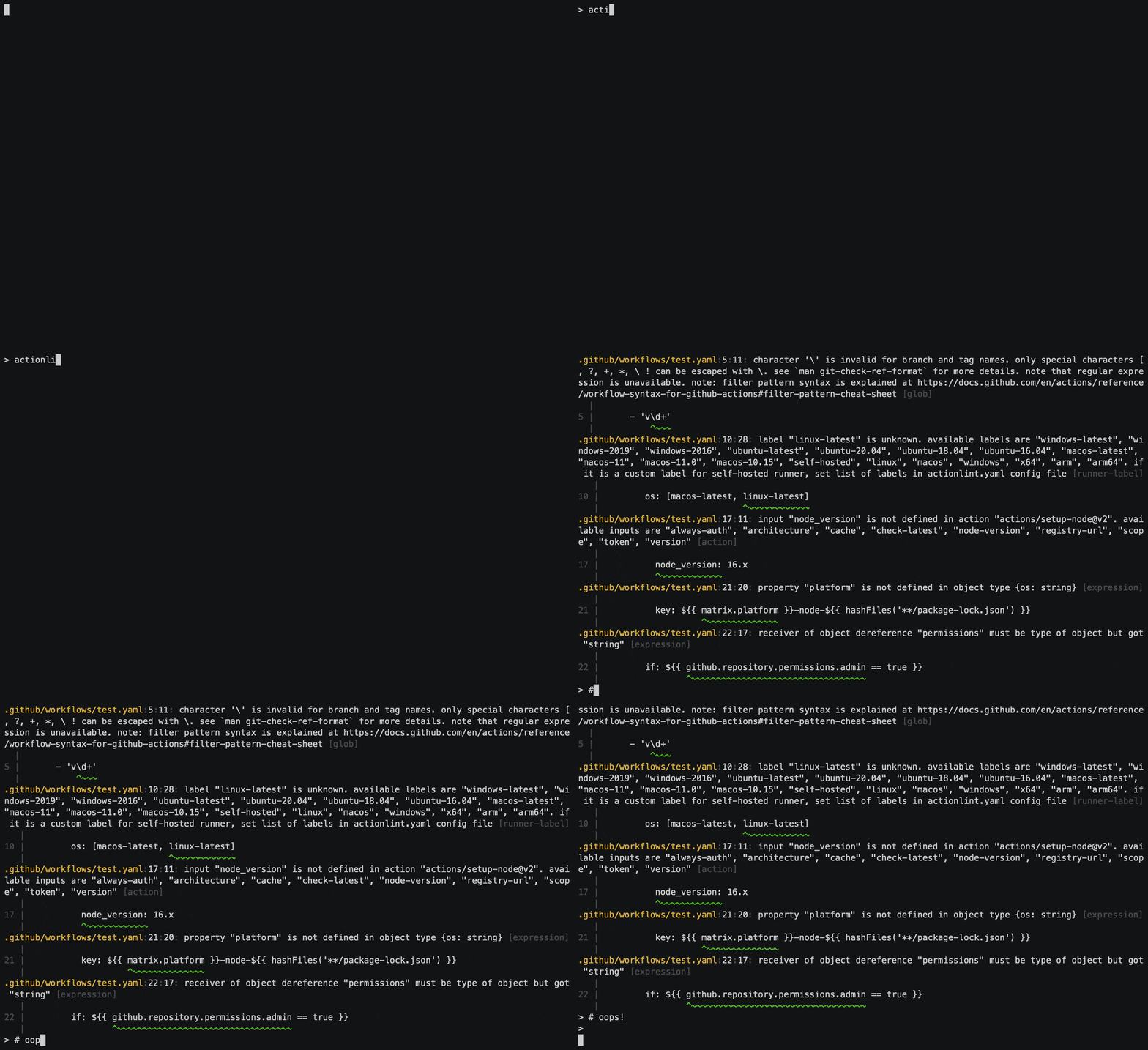 **错误工作流示例:**
```
on:
push:
branch: main
tags:
- 'v\d+'
jobs:
test:
strategy:
matrix:
os: [macos-latest, linux-latest]
runs-on: ${{ matrix.os }}
steps:
- run: echo "Checking commit '${{ github.event.head_commit.message }}'"
- uses: actions/checkout@v4
- uses: actions/setup-node@v4
with:
node_version: 18.x
- uses: actions/cache@v4
with:
path: ~/.npm
key: ${{ matrix.platform }}-node-${{ hashFiles('**/package-lock.json') }}
if: ${{ github.repository.permissions.admin == true }}
- run: npm install && npm test
```
**actionlint 报告了 7 个错误:**
```
test.yaml:3:5: unexpected key "branch" for "push" section. expected one of "branches", "branches-ignore", "paths", "paths-ignore", "tags", "tags-ignore", "types", "workflows" [syntax-check]
|
3 | branch: main
| ^~~~~~~
test.yaml:5:11: character '\' is invalid for branch and tag names. only special characters [, ?, +, *, \, ! can be escaped with \. see `man git-check-ref-format` for more details. note that regular expression is unavailable. note: filter pattern syntax is explained at https://docs.github.com/en/actions/using-workflows/workflow-syntax-for-github-actions#filter-pattern-cheat-sheet [glob]
|
5 | - 'v\d+'
| ^~~~
test.yaml:10:28: label "linux-latest" is unknown. available labels are "windows-latest", "windows-latest-8-cores", "windows-2025", "windows-2025-vs2026", windows-2022", "windows-11-arm", "ubuntu-slim", "ubuntu-latest", "ubuntu-latest-4-cores", "ubuntu-latest-8-cores", "ubuntu-latest-16-cores", "ubuntu-24.04", "ubuntu-24.04-arm", "ubuntu-22.04", "ubuntu-22.04-arm", "macos-latest", "macos-latest-xlarge", "macos-latest-large", "macos-26-intel", "macos-26-xlarge", "macos-26-large", "macos-26", "macos-15-intel", "macos-15-xlarge", "macos-15-large", "macos-15", "macos-14-xlarge", "macos-14-large", "macos-14", "self-hosted", "x64", "arm", "arm64", "linux", "macos", "windows". if it is a custom label for self-hosted runner, set list of labels in actionlint.yaml config file [runner-label]
|
10 | os: [macos-latest, linux-latest]
| ^~~~~~~~~~~~~
test.yaml:13:41: "github.event.head_commit.message" is potentially untrusted. avoid using it directly in inline scripts. instead, pass it through an environment variable. see https://docs.github.com/en/actions/reference/security/secure-use#good-practices-for-mitigating-script-injection-attacks for more details [expression]
|
13 | - run: echo "Checking commit '${{ github.event.head_commit.message }}'"
| ^~~~~~~~~~~~~~~~~~~~~~~~~~~~~~~~
test.yaml:17:11: input "node_version" is not defined in action "actions/setup-node@v4". available inputs are "always-auth", "architecture", "cache", "cache-dependency-path", "check-latest", "node-version", "node-version-file", "registry-url", "scope", "token" [action]
|
17 | node_version: 18.x
| ^~~~~~~~~~~~~
test.yaml:21:20: property "platform" is not defined in object type {os: string} [expression]
|
21 | key: ${{ matrix.platform }}-node-${{ hashFiles('**/package-lock.json') }}
| ^~~~~~~~~~~~~~~
test.yaml:22:17: receiver of object dereference "permissions" must be type of object but got "string" [expression]
|
22 | if: ${{ github.repository.permissions.admin == true }}
| ^~~~~~~~~~~~~~~~~~~~~~~~~~~~~~~~~~~
```
## 快速开始
通过下载[发布版本二进制文件][releases]、使用 Homebrew 或通过 `go install` 来安装 `actionlint` 命令。有关更多详细信息,例如如何通过各种包管理器管理该命令或通过 Docker 容器运行,请参阅[安装文档][install]。
```
go install github.com/rhysd/actionlint/cmd/actionlint@latest
```
基本上,您只需在您的仓库中运行 `actionlint` 命令即可。actionlint 会自动检测工作流并检查错误。actionlint 专注于发现错误。它试图尽可能多地捕获错误,并将误报降至最低。
```
actionlint
```
试用 actionlint 的另一种选择是[在线演练场][playground]。您的浏览器可以通过 WebAssembly 运行 actionlint。
有关更多详细信息,请参阅[使用文档][usage]。
## 文档
- [检查][checks]:actionlint 所做的所有检查的完整列表,包含示例输入、输出和演练场链接。
- [安装][install]:安装说明。提供预构建二进制文件、Docker 镜像、从源码构建、下载脚本(用于 CI),以及多种包管理器的支持。
- [使用][usage]:如何在本地或在 GitHub Actions 上使用 `actionlint` 命令、在线演练场、官方 Docker 镜像,以及与 reviewdog、Problem Matchers、super-linter、pre-commit、VS Code 的集成。
- [配置][config]:如何配置 actionlint 的行为。目前,可以设置自托管 Runner 的标签、配置变量以及每个文件路径的错误忽略模式。
- [Go API][api]:如何将 actionlint 作为 Go 库使用。
- [参考][refs]:相关资源链接。
## 报告 Bug
当您发现某些 Bug 或误报时,通过提供一个最小输入示例来[提交新 issue][issue-form] 会对我们很有帮助。也欢迎向我提供功能请求或新增检查想法等反馈。
有关更多详细信息,请参阅[贡献指南](./CONTRIBUTING.md)。
## 许可证
actionlint 基于 [MIT 许可证](./LICENSE.txt) 发布。
**错误工作流示例:**
```
on:
push:
branch: main
tags:
- 'v\d+'
jobs:
test:
strategy:
matrix:
os: [macos-latest, linux-latest]
runs-on: ${{ matrix.os }}
steps:
- run: echo "Checking commit '${{ github.event.head_commit.message }}'"
- uses: actions/checkout@v4
- uses: actions/setup-node@v4
with:
node_version: 18.x
- uses: actions/cache@v4
with:
path: ~/.npm
key: ${{ matrix.platform }}-node-${{ hashFiles('**/package-lock.json') }}
if: ${{ github.repository.permissions.admin == true }}
- run: npm install && npm test
```
**actionlint 报告了 7 个错误:**
```
test.yaml:3:5: unexpected key "branch" for "push" section. expected one of "branches", "branches-ignore", "paths", "paths-ignore", "tags", "tags-ignore", "types", "workflows" [syntax-check]
|
3 | branch: main
| ^~~~~~~
test.yaml:5:11: character '\' is invalid for branch and tag names. only special characters [, ?, +, *, \, ! can be escaped with \. see `man git-check-ref-format` for more details. note that regular expression is unavailable. note: filter pattern syntax is explained at https://docs.github.com/en/actions/using-workflows/workflow-syntax-for-github-actions#filter-pattern-cheat-sheet [glob]
|
5 | - 'v\d+'
| ^~~~
test.yaml:10:28: label "linux-latest" is unknown. available labels are "windows-latest", "windows-latest-8-cores", "windows-2025", "windows-2025-vs2026", windows-2022", "windows-11-arm", "ubuntu-slim", "ubuntu-latest", "ubuntu-latest-4-cores", "ubuntu-latest-8-cores", "ubuntu-latest-16-cores", "ubuntu-24.04", "ubuntu-24.04-arm", "ubuntu-22.04", "ubuntu-22.04-arm", "macos-latest", "macos-latest-xlarge", "macos-latest-large", "macos-26-intel", "macos-26-xlarge", "macos-26-large", "macos-26", "macos-15-intel", "macos-15-xlarge", "macos-15-large", "macos-15", "macos-14-xlarge", "macos-14-large", "macos-14", "self-hosted", "x64", "arm", "arm64", "linux", "macos", "windows". if it is a custom label for self-hosted runner, set list of labels in actionlint.yaml config file [runner-label]
|
10 | os: [macos-latest, linux-latest]
| ^~~~~~~~~~~~~
test.yaml:13:41: "github.event.head_commit.message" is potentially untrusted. avoid using it directly in inline scripts. instead, pass it through an environment variable. see https://docs.github.com/en/actions/reference/security/secure-use#good-practices-for-mitigating-script-injection-attacks for more details [expression]
|
13 | - run: echo "Checking commit '${{ github.event.head_commit.message }}'"
| ^~~~~~~~~~~~~~~~~~~~~~~~~~~~~~~~
test.yaml:17:11: input "node_version" is not defined in action "actions/setup-node@v4". available inputs are "always-auth", "architecture", "cache", "cache-dependency-path", "check-latest", "node-version", "node-version-file", "registry-url", "scope", "token" [action]
|
17 | node_version: 18.x
| ^~~~~~~~~~~~~
test.yaml:21:20: property "platform" is not defined in object type {os: string} [expression]
|
21 | key: ${{ matrix.platform }}-node-${{ hashFiles('**/package-lock.json') }}
| ^~~~~~~~~~~~~~~
test.yaml:22:17: receiver of object dereference "permissions" must be type of object but got "string" [expression]
|
22 | if: ${{ github.repository.permissions.admin == true }}
| ^~~~~~~~~~~~~~~~~~~~~~~~~~~~~~~~~~~
```
## 快速开始
通过下载[发布版本二进制文件][releases]、使用 Homebrew 或通过 `go install` 来安装 `actionlint` 命令。有关更多详细信息,例如如何通过各种包管理器管理该命令或通过 Docker 容器运行,请参阅[安装文档][install]。
```
go install github.com/rhysd/actionlint/cmd/actionlint@latest
```
基本上,您只需在您的仓库中运行 `actionlint` 命令即可。actionlint 会自动检测工作流并检查错误。actionlint 专注于发现错误。它试图尽可能多地捕获错误,并将误报降至最低。
```
actionlint
```
试用 actionlint 的另一种选择是[在线演练场][playground]。您的浏览器可以通过 WebAssembly 运行 actionlint。
有关更多详细信息,请参阅[使用文档][usage]。
## 文档
- [检查][checks]:actionlint 所做的所有检查的完整列表,包含示例输入、输出和演练场链接。
- [安装][install]:安装说明。提供预构建二进制文件、Docker 镜像、从源码构建、下载脚本(用于 CI),以及多种包管理器的支持。
- [使用][usage]:如何在本地或在 GitHub Actions 上使用 `actionlint` 命令、在线演练场、官方 Docker 镜像,以及与 reviewdog、Problem Matchers、super-linter、pre-commit、VS Code 的集成。
- [配置][config]:如何配置 actionlint 的行为。目前,可以设置自托管 Runner 的标签、配置变量以及每个文件路径的错误忽略模式。
- [Go API][api]:如何将 actionlint 作为 Go 库使用。
- [参考][refs]:相关资源链接。
## 报告 Bug
当您发现某些 Bug 或误报时,通过提供一个最小输入示例来[提交新 issue][issue-form] 会对我们很有帮助。也欢迎向我提供功能请求或新增检查想法等反馈。
有关更多详细信息,请参阅[贡献指南](./CONTRIBUTING.md)。
## 许可证
actionlint 基于 [MIT 许可证](./LICENSE.txt) 发布。
**错误工作流示例:**
```
on:
push:
branch: main
tags:
- 'v\d+'
jobs:
test:
strategy:
matrix:
os: [macos-latest, linux-latest]
runs-on: ${{ matrix.os }}
steps:
- run: echo "Checking commit '${{ github.event.head_commit.message }}'"
- uses: actions/checkout@v4
- uses: actions/setup-node@v4
with:
node_version: 18.x
- uses: actions/cache@v4
with:
path: ~/.npm
key: ${{ matrix.platform }}-node-${{ hashFiles('**/package-lock.json') }}
if: ${{ github.repository.permissions.admin == true }}
- run: npm install && npm test
```
**actionlint 报告了 7 个错误:**
```
test.yaml:3:5: unexpected key "branch" for "push" section. expected one of "branches", "branches-ignore", "paths", "paths-ignore", "tags", "tags-ignore", "types", "workflows" [syntax-check]
|
3 | branch: main
| ^~~~~~~
test.yaml:5:11: character '\' is invalid for branch and tag names. only special characters [, ?, +, *, \, ! can be escaped with \. see `man git-check-ref-format` for more details. note that regular expression is unavailable. note: filter pattern syntax is explained at https://docs.github.com/en/actions/using-workflows/workflow-syntax-for-github-actions#filter-pattern-cheat-sheet [glob]
|
5 | - 'v\d+'
| ^~~~
test.yaml:10:28: label "linux-latest" is unknown. available labels are "windows-latest", "windows-latest-8-cores", "windows-2025", "windows-2025-vs2026", windows-2022", "windows-11-arm", "ubuntu-slim", "ubuntu-latest", "ubuntu-latest-4-cores", "ubuntu-latest-8-cores", "ubuntu-latest-16-cores", "ubuntu-24.04", "ubuntu-24.04-arm", "ubuntu-22.04", "ubuntu-22.04-arm", "macos-latest", "macos-latest-xlarge", "macos-latest-large", "macos-26-intel", "macos-26-xlarge", "macos-26-large", "macos-26", "macos-15-intel", "macos-15-xlarge", "macos-15-large", "macos-15", "macos-14-xlarge", "macos-14-large", "macos-14", "self-hosted", "x64", "arm", "arm64", "linux", "macos", "windows". if it is a custom label for self-hosted runner, set list of labels in actionlint.yaml config file [runner-label]
|
10 | os: [macos-latest, linux-latest]
| ^~~~~~~~~~~~~
test.yaml:13:41: "github.event.head_commit.message" is potentially untrusted. avoid using it directly in inline scripts. instead, pass it through an environment variable. see https://docs.github.com/en/actions/reference/security/secure-use#good-practices-for-mitigating-script-injection-attacks for more details [expression]
|
13 | - run: echo "Checking commit '${{ github.event.head_commit.message }}'"
| ^~~~~~~~~~~~~~~~~~~~~~~~~~~~~~~~
test.yaml:17:11: input "node_version" is not defined in action "actions/setup-node@v4". available inputs are "always-auth", "architecture", "cache", "cache-dependency-path", "check-latest", "node-version", "node-version-file", "registry-url", "scope", "token" [action]
|
17 | node_version: 18.x
| ^~~~~~~~~~~~~
test.yaml:21:20: property "platform" is not defined in object type {os: string} [expression]
|
21 | key: ${{ matrix.platform }}-node-${{ hashFiles('**/package-lock.json') }}
| ^~~~~~~~~~~~~~~
test.yaml:22:17: receiver of object dereference "permissions" must be type of object but got "string" [expression]
|
22 | if: ${{ github.repository.permissions.admin == true }}
| ^~~~~~~~~~~~~~~~~~~~~~~~~~~~~~~~~~~
```
## 快速开始
通过下载[发布版本二进制文件][releases]、使用 Homebrew 或通过 `go install` 来安装 `actionlint` 命令。有关更多详细信息,例如如何通过各种包管理器管理该命令或通过 Docker 容器运行,请参阅[安装文档][install]。
```
go install github.com/rhysd/actionlint/cmd/actionlint@latest
```
基本上,您只需在您的仓库中运行 `actionlint` 命令即可。actionlint 会自动检测工作流并检查错误。actionlint 专注于发现错误。它试图尽可能多地捕获错误,并将误报降至最低。
```
actionlint
```
试用 actionlint 的另一种选择是[在线演练场][playground]。您的浏览器可以通过 WebAssembly 运行 actionlint。
有关更多详细信息,请参阅[使用文档][usage]。
## 文档
- [检查][checks]:actionlint 所做的所有检查的完整列表,包含示例输入、输出和演练场链接。
- [安装][install]:安装说明。提供预构建二进制文件、Docker 镜像、从源码构建、下载脚本(用于 CI),以及多种包管理器的支持。
- [使用][usage]:如何在本地或在 GitHub Actions 上使用 `actionlint` 命令、在线演练场、官方 Docker 镜像,以及与 reviewdog、Problem Matchers、super-linter、pre-commit、VS Code 的集成。
- [配置][config]:如何配置 actionlint 的行为。目前,可以设置自托管 Runner 的标签、配置变量以及每个文件路径的错误忽略模式。
- [Go API][api]:如何将 actionlint 作为 Go 库使用。
- [参考][refs]:相关资源链接。
## 报告 Bug
当您发现某些 Bug 或误报时,通过提供一个最小输入示例来[提交新 issue][issue-form] 会对我们很有帮助。也欢迎向我提供功能请求或新增检查想法等反馈。
有关更多详细信息,请参阅[贡献指南](./CONTRIBUTING.md)。
## 许可证
actionlint 基于 [MIT 许可证](./LICENSE.txt) 发布。
标签:AI工具, DevSecOps, DNS解析, EVTX分析, GitHub Actions, SOC Prime, 上游代理, 云安全监控, 代码审查, 安全检查, 工作流文件, 开发工具, 开源项目, 文档安全, 日志审计, 类型检查, 网络调试, 脚本注入检测, 自动化, 自动笔记, 语法检查, 软件供应链安全, 远程方法调用, 静态分析, 静态检查