majd/ipatool
GitHub: majd/ipatool
一款命令行工具,支持通过 Apple ID 认证从 iOS App Store 搜索并下载应用安装包(IPA 文件)。
Stars: 9415 | Forks: 797
# IPATool
[](https://GitHub.com/majd/ipatool/releases/)
[](https://github.com/majd/ipatool/blob/main/LICENSE)
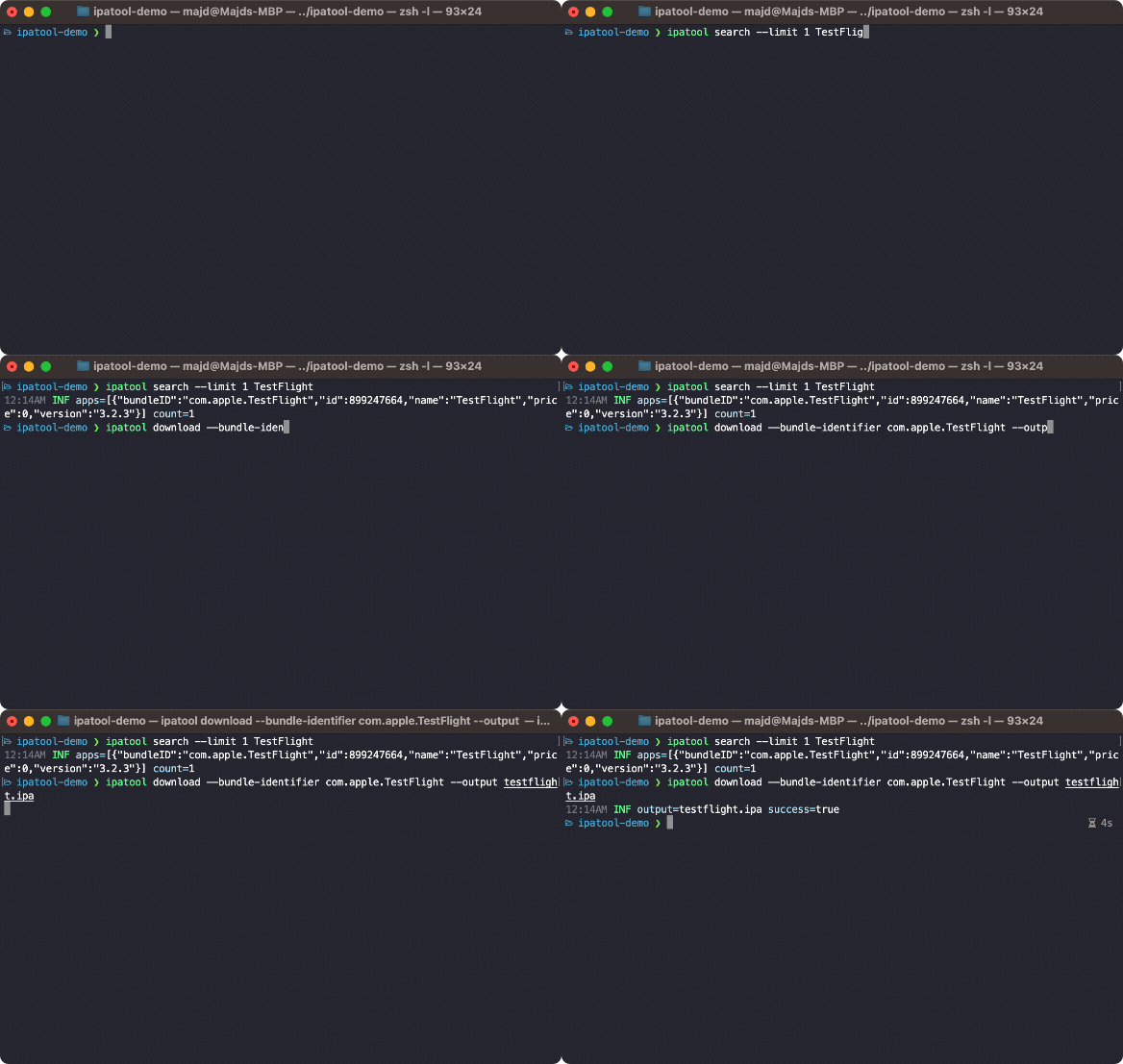
`ipatool` 是一个命令行工具,允许你在 [App Store](https://apps.apple.com) 上搜索 iOS 应用并下载应用包(即 _ipa_ 文件)的副本。
- [环境要求](#requirements)
- [安装](#installation)
- [手动安装](#manual)
- [包管理器 (macOS)](#package-manager-macos)
- [用法](#usage)
- [编译](#compiling)
- [许可证](#license)
- [版本发布](https://github.com/majd/ipatool/releases)
- [常见问题](https://github.com/majd/ipatool/wiki/FAQ)
## 环境要求
- 支持的操作系统(Windows、Linux 或 macOS)。
- 已设置为使用 App Store 的 Apple ID。
## 安装
### 手动安装
你可以从 [GitHub releases](https://github.com/majd/ipatool/releases) 获取最新版本的 `ipatool`。
### 包管理器 (macOS)
你可以使用 [Homebrew](https://brew.sh) 安装 `ipatool`。
```
$ brew install ipatool
```
## 用法
要向 App Store 进行身份验证,请使用 `auth` 命令。
```
Authenticate with the App Store
Usage:
ipatool auth [command]
Available Commands:
info Show current account info
login Login to the App Store
revoke Revoke your App Store credentials
Flags:
-h, --help help for auth
Global Flags:
--format format sets output format for command; can be 'text', 'json' (default text)
--non-interactive run in non-interactive session
--verbose enables verbose logs
Use "ipatool auth [command] --help" for more information about a command.
```
要在 App Store 上搜索应用,请使用 `search` 命令。
```
Search for iOS apps available on the App Store
Usage:
ipatool search [flags]
Flags:
-h, --help help for search
-l, --limit int maximum amount of search results to retrieve (default 5)
Global Flags:
--format format sets output format for command; can be 'text', 'json' (default text)
--non-interactive run in non-interactive session
--verbose enables verbose logs
```
要获取应用的许可证,请使用 `purchase` 命令。
```
Obtain a license for the app from the App Store
Usage:
ipatool purchase [flags]
Flags:
-b, --bundle-identifier string Bundle identifier of the target iOS app (required)
-h, --help help for purchase
Global Flags:
--format format sets output format for command; can be 'text', 'json' (default text)
--non-interactive run in non-interactive session
--verbose enables verbose logs
```
要获取可供下载的应用版本列表,请使用 `list-versions` 命令。
```
List the available versions of an iOS app
Usage:
ipatool list-versions [flags]
Flags:
-i, --app-id int ID of the target iOS app (required)
-b, --bundle-identifier string The bundle identifier of the target iOS app (overrides the app ID)
-h, --help help for list-versions
Global Flags:
--format format sets output format for command; can be 'text', 'json' (default text)
--keychain-passphrase string passphrase for unlocking keychain
--non-interactive run in non-interactive session
--verbose enables verbose logs
```
要下载 ipa 文件的副本,请使用 `download` 命令。
```
Download (encrypted) iOS app packages from the App Store
Usage:
ipatool download [flags]
Flags:
-i, --app-id int ID of the target iOS app (required)
-b, --bundle-identifier string The bundle identifier of the target iOS app (overrides the app ID)
--external-version-id string External version identifier of the target iOS app (defaults to latest version when not specified)
-h, --help help for download
-o, --output string The destination path of the downloaded app package
--purchase Obtain a license for the app if needed
Global Flags:
--format format sets output format for command; can be 'text', 'json' (default text)
--keychain-passphrase string passphrase for unlocking keychain
--non-interactive run in non-interactive session
--verbose enables verbose logs
```
要解析由 `list-versions` 命令返回的外部版本标识符,请使用 `get-version-metadata` 命令。
```
Retrieves the metadata for a specific version of an app
Usage:
ipatool get-version-metadata [flags]
Flags:
-i, --app-id int ID of the target iOS app (required)
-b, --bundle-identifier string The bundle identifier of the target iOS app (overrides the app ID)
--external-version-id string External version identifier of the target iOS app (required)
-h, --help help for get-version-metadata
Global Flags:
--format format sets output format for command; can be 'text', 'json' (default text)
--keychain-passphrase string passphrase for unlocking keychain
--non-interactive run in non-interactive session
--verbose enables verbose logs
```
**注意:** 该工具默认以交互模式运行。如果在自动化环境中运行,请使用 `--non-interactive` 标志。
## 编译
该工具可以使用 Go 工具链进行编译。
```
$ go build -o ipatool
```
可以使用以下命令执行单元测试。
```
$ go generate github.com/majd/ipatool/...
$ go test -v github.com/majd/ipatool/...
```
## 许可证
IPATool 是在 [MIT license](https://github.com/majd/ipatool/blob/main/LICENSE) 下发布的。
标签:Apple ID, App Store, BeEF, EVTX分析, EVTX分析, Golang, iOS, IPA下载, 二进制发布, 云资产清单, 安全编程, 应用归档, 开源工具, 日志审计, 查询库, 爬虫, 目录枚举, 移动安全, 网络信息收集, 网络调试, 自动化, 越狱替代, 软件分发, 逆向工程