Oros42/IMSI-catcher
GitHub: Oros42/IMSI-catcher
基于SDR的被动式GSM IMSI捕获工具,用于展示周围手机的IMSI号码及运营商信息。
Stars: 4248 | Forks: 865
# IMSI 捕获器
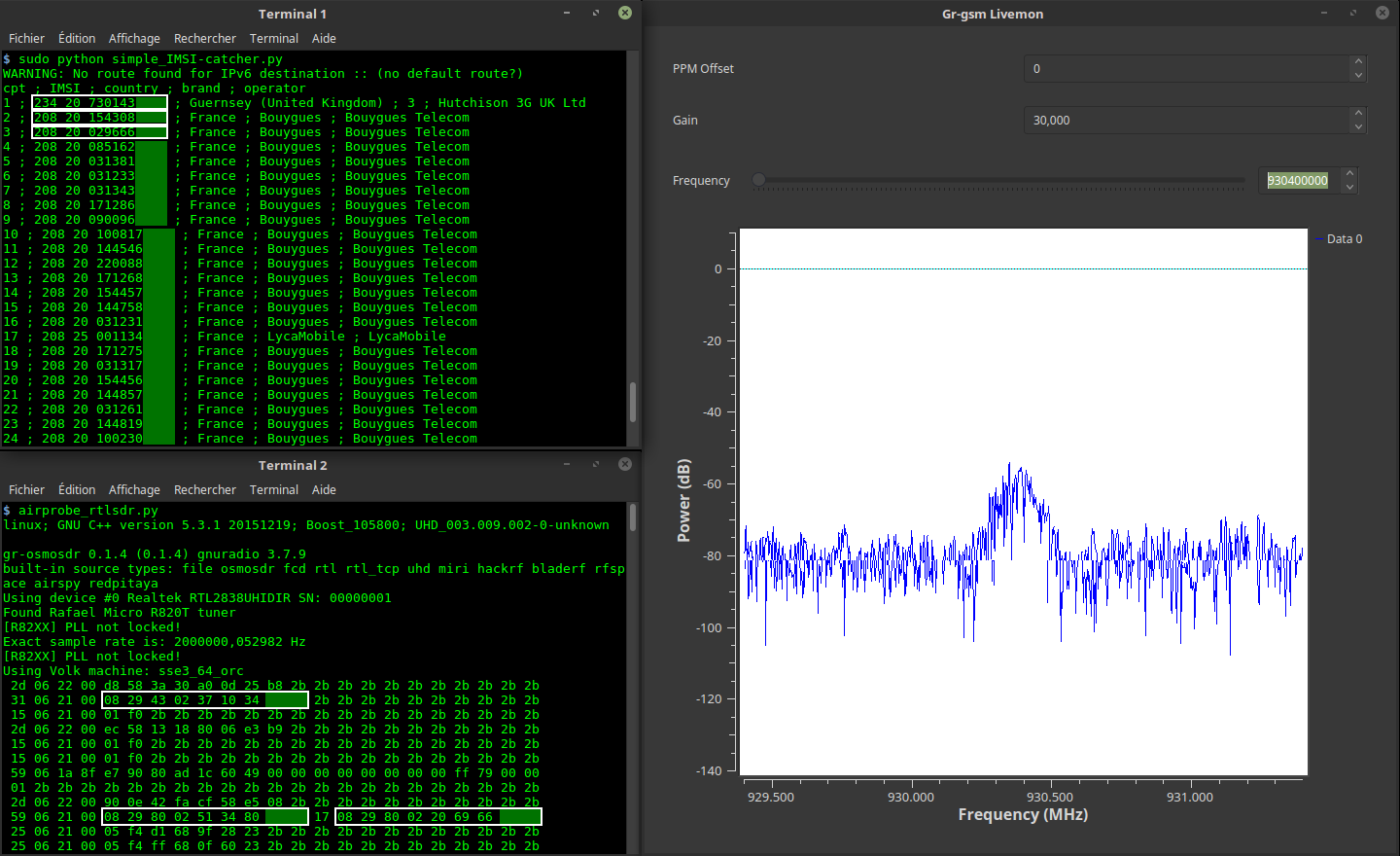
该程序向您展示周围手机的 IMSI 号码、国家、品牌和运营商。
/!\ 本程序旨在帮助理解 GSM 网络的工作原理。切勿用于恶意黑客行为!
## 您需要准备
1 台 Gnu/Linux 电脑。已测试:
- debian 10
- Ubuntu 20.04/LinuxMint 22.2+
- Kali 2025+
1 个 SDR 接收器。已测试:
- [USB DVB-T key (RTL2832U)](https://osmocom.org/projects/sdr/wiki/rtl-sdr) 带天线(低于 15 美元)
- [OsmocomBB 手机](https://osmocom.org/projects/baseband/wiki/Phones)
- [HackRF](https://greatscottgadgets.com/hackrf/)
- [BladeRF](https://www.nuand.com/bladerf-2-0-micro/)
## 设置
```
git clone https://github.com/Oros42/IMSI-catcher.git
cd IMSI-catcher
```
或
```
wget https://github.com/Oros42/IMSI-catcher/archive/master.zip && unzip -q master.zip
cd IMSI-catcher-master
```
```
sudo apt install python3-numpy python3-scipy python3-scapy gr-gsm
```
警告:请勿使用 python 3.9(ctypes 存在 bug)!
### Importlib vs Imp
从 Python 3.1 开始,Imp 被 importlib 取代。Imp 在 Python 3.11 中已被弃用,需满足以下新要求。
```
apt install python3-pip
pip install importlib
```
### 使用 Docker 安装 gr-gsm(不推荐)
```
sudo xhost +local:docker
docker pull atomicpowerman/imsi-catcher
docker run -ti --net=host -e DISPLAY=$DISPLAY --privileged -v /dev/bus/usb:/dev/bus/usb atomicpowerman/imsi-catcher bash
```
在此 docker 中运行所有 `grgsm_*` 命令。
## 用法
我们使用 `grgsm_livemon` 解码 GSM 信号,并使用 `simple_IMSI-catcher.py` 查找 IMSI。
```
python3 simple_IMSI-catcher.py -h
```
```
Usage: simple_IMSI-catcher.py: [options]
Options:
-h, --help show this help message and exit
-a, --alltmsi Show TMSI who haven't got IMSI (default : false)
-i IFACE, --iface=IFACE
Interface (default : lo)
-m IMSI, --imsi=IMSI IMSI to track (default : None, Example:
123456789101112 or "123 45 6789101112")
-p PORT, --port=PORT Port (default : 4729)
-s, --sniff sniff on interface instead of listening on port
(require root/suid access)
-w SQLITE, --sqlite=SQLITE
Save observed IMSI values to specified SQLite file
-t TXT, --txt=TXT Save observed IMSI values to specified TXT file
-z, --mysql Save observed IMSI values to specified MYSQL DB (copy
.env.dist to .env and edit it)
```
打开 2 个终端。
在终端 1 中
```
sudo python3 simple_IMSI-catcher.py -s
```
在终端 2 中
```
grgsm_livemon
```
现在,调整频率,直到终端显示如下内容:
```
15 06 21 00 01 f0 2b 2b 2b 2b 2b 2b 2b 2b 2b 2b 2b 2b 2b 2b 2b 2b 2b
25 06 21 00 05 f4 f8 68 03 26 23 2b 2b 2b 2b 2b 2b 2b 2b 2b 2b 2b 2b
49 06 1b 95 cc 02 f8 02 01 9c c8 03 1e 57 a5 01 79 00 00 1c 13 2b 2b
```
### Wireshark
您可以使用 wireshark 查看 GSM 数据包。
```
sudo apt install wireshark
sudo wireshark -k -Y '!icmp && gsmtap' -i lo
```
### 查找频率
```
grgsm_scanner
```
```
ARFCN: 974, Freq: 925.0M, CID: 2, LAC: 1337, MCC: 208, MNC: 20, Pwr: -41
ARFCN: 976, Freq: 925.4M, CID: 4242, LAC: 1007, MCC: 208, MNC: 20, Pwr: -45
```
现在,您可以为 `grgsm_livemon` 设置频率:
```
grgsm_livemon -f 925.4M
```
或者,对于 hackrf,按如下方式获取 kalibrate-hackrf 工具:
```
sudo apt-get install automake autoconf libhackrf-dev
git clone https://github.com/scateu/kalibrate-hackrf
cd kalibrate-hackrf/
./bootstrap
./configure
make
sudo make install
```
运行
```
kal -s GSM900
```
```
kal: Scanning for GSM-900 base stations.
GSM-900:
chan: 14 (937.8MHz + 10.449kHz) power: 3327428.82
chan: 15 (938.0MHz + 4.662kHz) power: 3190712.41
...
```
### 将数据记录到 mysql
使用 `db-example.sql` 创建您的数据库。
```
cp .env.dist .env
nano .env
# 设置你的 config
sudo apt install python-decouple python3-mysqldb
```
```
sudo python3 simple_IMSI-catcher.py -s --mysql
```
### scan-and-livemon(不再使用)
扫描频率并监听找到的第一个频率:
在终端 1 中
```
python3 scan-and-livemon
```
在终端 2 中
```
python3 simple_IMSI-catcher.py
```
# 链接
Gr-Gsm 设置:https://osmocom.org/projects/gr-gsm/wiki/Installation 和 https://github.com/velichkov/gr-gsm
频率:http://www.worldtimezone.com/gsm.html 和 https://fr.wikipedia.org/wiki/Global_System_for_Mobile_Communications
移动网络代码 (Mobile Network Code):https://en.wikipedia.org/wiki/Mobile_Network_Code
Scapy:http://secdev.org/projects/scapy/doc/usage.html
IMSI:https://fr.wikipedia.org/wiki/IMSI
Realtek RTL2832U:https://osmocom.org/projects/sdr/wiki/rtl-sdr 和 http://doc.ubuntu-fr.org/rtl2832u 和 http://doc.ubuntu-fr.org/rtl-sdr
# 捐赠
为了支持我的工作,给个 tipee 会很不错 ;-)
https://liberapay.com/Oros/
标签:BladeRF, ESC4, gr-gsm, GSM安全, HackRF, IMSI, IMSI捕获器, OSINT, Python, RTL-SDR, SDR, TMSI, 信号分析, 协议分析, 基站探测, 攻击路径可视化, 无后门, 无线嗅探, 权限提升, 移动通信, 网络安全, 网络安全, 请求拦截, 软件无线电, 逆向工具, 防御绕过, 隐私保护, 隐私保护, 黑客工具