awslabs/assisted-log-enabler-for-aws
GitHub: awslabs/assisted-log-enabler-for-aws
自动扫描 AWS 环境中未开启日志记录的资源并一键启用多种服务日志,帮助企业快速补齐安全可观测性短板。
Stars: 275 | Forks: 32
# Assisted Log Enabler for AWS - 查找未开启日志记录的资源,并将其开启。
Assisted Log Enabler for AWS 专为那些未为各种服务开启日志记录,且缺乏最佳实践知识或不知如何开启的客户而设计。
借助 Assisted Log Enabler for AWS,系统会自动为客户开启各种 AWS 服务的日志记录:
* Amazon VPC Flow Logs(单账户和使用 AWS Organizations 的多账户)
* AWS CloudTrail(仅限单账户)
* Amazon Elastic Kubernetes Service (EKS) Audit 和 Authenticator Logs(单账户和使用 AWS Organizations 的多账户)
* Amazon Route 53 Resolver Query Logs(单账户和使用 AWS Organizations 的多账户)
* Amazon S3 Server Access Logs(单账户和使用 AWS Organizations 的多账户)
* 新增!Elastic Load Balancing Access Logs(单账户和使用 AWS Organizations 的多账户)
* 新增!GuardDuty 启用和导出调查结果(单账户和使用 AWS Organizations 的多账户)
* 新增!WAFv2 Logging(单账户和使用 AWS Organizations 的多账户)
相关 AWS 开源博客文章链接:[介绍 Assisted Log Enabler for AWS](https://aws.amazon.com/blogs/opensource/introducing-assisted-log-enabler-for-aws/)
## 用例
日志信息对于排查故障和分析性能非常重要。当 Amazon Web Services (AWS) 客户未开启日志记录时,协助他们的能力就会受到限制,甚至可能导致无法进行分析。在某些情况下,客户可能缺乏为各种 AWS 服务正确设置日志记录所需的技术专业知识。
Assisted Log Enabler for AWS 旨在减轻客户在发生安全事件时学习如何开启日志的负担。Assisted Log Enabler for AWS 负责执行创建 Amazon Simple Storage Service (S3) 存储桶、检查各项服务是否开启了日志记录以及在发现日志关闭时将其激活的工作。
完成这些工作后,客户可以确保其 AWS 环境中的日志记录功能已激活,从而有助于调查未来(以及可能正在发生)的安全事件。
## 架构图
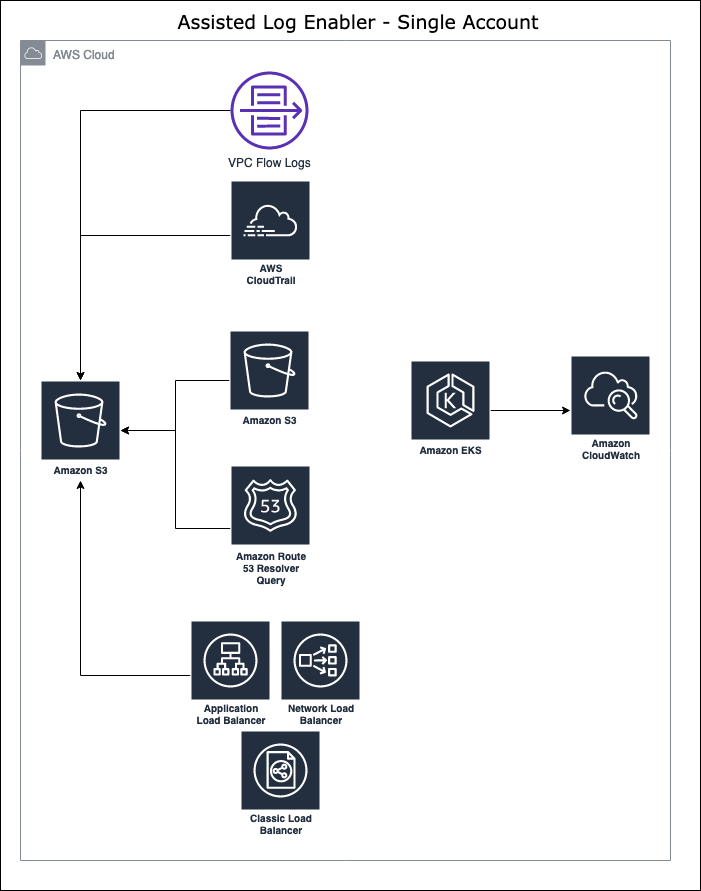
以下是一个简单的示意图,展示了 Assisted Log Enabler for AWS 如何在单账户中工作,以为客户开启日志记录。
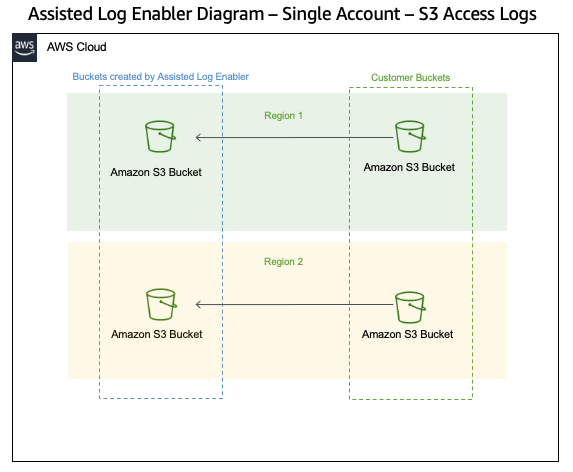
以下是一个简单的示意图,展示了 Assisted Log Enabler for AWS 如何在单账户中开启 Amazon S3 Server Access Logging:
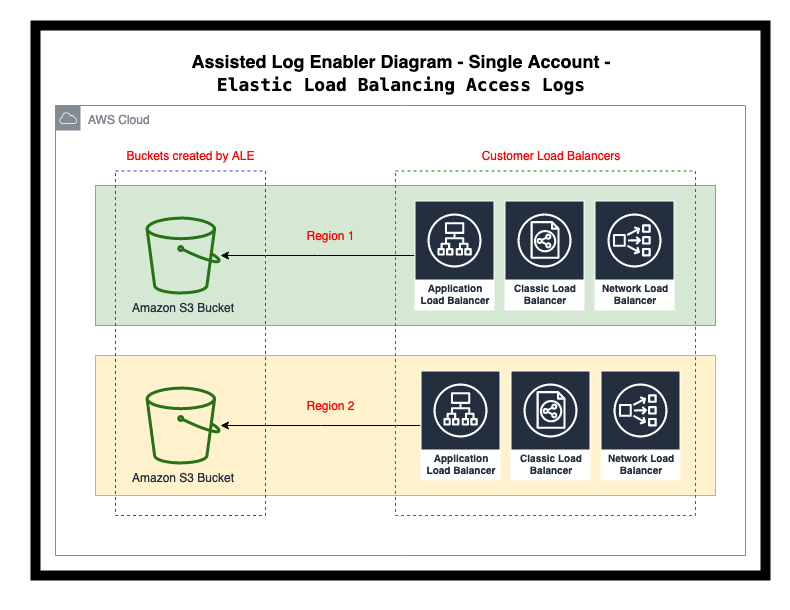
以下是一个简单的示意图,展示了 Assisted Log Enabler for AWS 如何在单账户中开启 Elastic Load Balancing Access Logging:
## 前置条件
### 权限
要运行 Assisted Log Enabler for AWS,需要在 AWS IAM 中具备以下权限。有关每个 AWS 服务和功能的详细权限细分,请参见各部分说明:
```
# Assisted Log Enabler for AWS 中使用的所有权限:
"ec2:DescribeVpcs",
"ec2:DescribeFlowLogs",
"ec2:CreateFlowLogs",
"ec2:CreateTags",
"logs:CreateLogDelivery",
"s3:GetBucketPolicy",
"s3:PutBucketPolicy",
"s3:PutLifecycleConfiguration"
"s3:PutObject",
"s3:GetObject",
"s3:CreateBucket",
"cloudtrail:StartLogging",
"cloudtrail:CreateTrail",
"cloudtrail:DescribeTrails",
"eks:UpdateClusterConfig",
"eks:ListClusters",
"route53resolver:ListResolverQueryLogConfigAssociations",
"route53resolver:CreateResolverQueryLogConfig",
"route53resolver:AssociateResolverQueryLogConfig",
"route53resolver:TagResource",
"iam:CreateServiceLinkRole", # This is used to create the AWSServiceRoleForRoute53 Resolver, which is used for creating the Amazon Route 53 Query Logging Configurations.
"route53resolver:ListResolverQueryLogConfigs",
"route53resolver:ListTagsForResource",
"route53resolver:DisassociateResolverQueryLogConfig",
"route53resolver:DeleteResolverQueryLogConfig"
"s3:PutBucketLogging",
"s3:GetBucketLogging",
"s3:ListBucket",
"s3:ListAllMyBuckets",
"s3:GetBucketLocation",
"s3:GetBucketAcl",
"s3:PutBucketAcl",
"s3:PutBucketPublicAccessBlock",
"s3:PutBucketLifecycleConfiguration",
"guardduty:ListDetectors",
"guardduty:TagResource",
"guardduty:GetDetector",
"guardduty:CreateDetector",
"guardduty:UpdateDetector",
"guardduty:ListPublishingDestinations",
"guardduty:CreatePublishingDestination",
"guardduty:DescribePublishingDestination",
"wafv2:ListWebACLs",
"wafv2:ListLoggingConfigurations",
"wafv2:PutLoggingConfiguration"
# 用于添加 AWS CloudTrail 日志:
"s3:GetBucketPolicy",
"s3:PutBucketPolicy",
"s3:PutLifecycleConfiguration"
"s3:PutObject",
"s3:CreateBucket",
"cloudtrail:StartLogging",
"cloudtrail:CreateTrail",
"cloudtrail:DescribeTrails"
# 用于添加 Amazon VPC Flow Logs:
"s3:GetBucketPolicy",
"s3:PutBucketPolicy",
"s3:PutLifecycleConfiguration"
"s3:PutObject",
"s3:CreateBucket",
"ec2:DescribeVpcs",
"ec2:DescribeFlowLogs",
"ec2:CreateFlowLogs",
"ec2:CreateTags"
# 用于添加 Amazon EKS 日志:
"eks:UpdateClusterConfig",
"eks:ListClusters",
"logs:CreateLogDelivery"
# 用于添加 Amazon Route 53 Resolver Query Logs:
"s3:GetBucketPolicy",
"s3:PutBucketPolicy",
"s3:PutLifecycleConfiguration"
"s3:PutObject",
"s3:CreateBucket",
"ec2:DescribeVpcs",
"route53resolver:ListResolverQueryLogConfigAssociations",
"route53resolver:CreateResolverQueryLogConfig",
"route53resolver:AssociateResolverQueryLogConfig",
"route53resolver:TagResource",
"iam:CreateServiceLinkRole" # This is used to create the AWSServiceRoleForRoute53 Resolver, which is used for creating the Amazon Route 53 Query Logging Configurations.
# 用于添加 Amazon S3 Server Access Logs:
"s3:PutBucketLogging",
"s3:GetBucketLogging",
"s3:ListBucket",
"s3:ListAllMyBuckets",
"s3:GetBucketLocation",
"s3:GetBucketAcl",
"s3:PutBucketAcl",
"s3:PutBucketPublicAccessBlock",
"s3:PutBucketLifecycleConfiguration"
# 新增!用于添加 Elastic Load Balancing Access Logs:
"elb:DescribeLoadBalancers",
"elb:DescribeLoadBalancerAttributes",
"elb:ModifyLoadBalancerAttributes",
"elbv2:DescribeLoadBalancers",
"elbv2:DescribeLoadBalancerAttributes",
"elbv2:ModifyLoadBalancerAttributes",
"elasticloadbalancing:DescribeLoadBalancers",
"elasticloadbalancing:DescribeLoadBalancerAttributes",
"elasticloadbalancing:ModifyLoadBalancerAttributes"
# 用于启用 GuardDuty 和导出发现结果:
"guardduty:ListDetectors",
"guardduty:GetDetector",
"guardduty:TagResource",
"guardduty:CreateDetector",
"guardduty:UpdateDetector",
"guardduty:ListPublishingDestinations",
"guardduty:CreatePublishingDestination",
"guardduty:DescribePublishingDestination",
"s3:GetObject",
"s3:ListBucket",
"s3:PutObject",
"s3:GetBucketLocation"
# 用于添加 WAFv2 logging:
"wafv2:ListWebACLs",
"wafv2:ListLoggingConfigurations",
"wafv2:PutLoggingConfiguration"
# 用于清理由 Assisted Log Enabler for AWS 创建的 Amazon Route 53 Resolver Query Logs:
"route53resolver:ListResolverQueryLogConfigs",
"route53resolver:ListTagsForResource",
"route53resolver:ListResolverQueryLogConfigAssociations",
"route53resolver:DisassociateResolverQueryLogConfig",
"route53resolver:DeleteResolverQueryLogConfig"
```
此外,如果在 AWS Lambda 函数中运行,该函数将需要 AWSLambdaBasicExecutionRole 才能成功运行。有关更多详细信息,请参阅以下链接:https://docs.aws.amazon.com/lambda/latest/dg/lambda-intro-execution-role.html
## 工作流程详情
以下是 Assisted Log Enabler for AWS 工作流程中发生的详细信息:
* 在客户账户中创建一个 Amazon S3 存储桶。
* 为该存储桶创建生命周期策略,参数如下:
* 在 90 天后将文件转换为 Intelligent-Tiering 存储
* 在 400 天后删除文件
* 为创建的 S3 存储桶显式设置“开启”阻止公共访问。
* 检查 Amazon VPC 以查看流日志是开启还是关闭。
* 对于未开启流日志的 Amazon VPC,将开启 VPC Flow Logging,并将其发送到所创建的存储桶。
* 将启用 Amazon VPC Flow Logs 版本 2、3、4 和 5 的字段。
* 检查 AWS CloudTrail 服务,确认是否至少配置了一个 CloudTrail。(在当前版本中仅限单账户)
* 如果未配置任何 trail,则创建一个并将其配置为记录到所创建的存储桶中。(在当前版本中仅限单账户)
* 如果存在 Amazon EKS Clusters,则开启 audit 和 authenticator logs。
* 为尚未开启日志记录的 VPC 开启 Amazon Route 53 Query Logging。
* 为尚未开启日志记录的 S3 存储桶创建 Amazon S3 Server Access Logs。
* 这不包括由 Assisted Log Enabler for AWS 创建的 S3 存储桶。
* Amazon S3 Server Access Logs 要求目标存储桶位于相同的账户和区域中,因此会为此创建额外的 Amazon S3 Server Access Logs 存储桶。
* 新增!为尚未开启日志记录的 Application、Network 和 Classic Load Balancers 创建 Elastic Load Balancing Access Logs。
* Elastic Load Balancing Access Logs 要求存储桶位于相同的区域中,因此会为此创建额外的 Elastic Load Balancing Access Logs 存储桶。
* 下表包含了在存储桶策略中用于替代 elb-account-id 的账户 ID:https://docs.aws.amazon.com/elasticloadbalancing/latest/application/load-balancer-access-logs.html
## 运行代码
当前形式的代码可以在以下环境中运行:
* AWS CloudShell(首选)
* AWS Lambda
```
python3 assisted_log_enabler.py
█████ ███████ ███████ ██ ███████ ████████ ███████ ██████
██ ██ ██ ██ ██ ██ ██ ██ ██ ██
███████ ███████ ███████ ██ ███████ ██ █████ ██ ██
██ ██ ██ ██ ██ ██ ██ ██ ██ ██
██ ██ ███████ ███████ ██ ███████ ██ ███████ ██████
██ ██████ ██████
██ ██ ██ ██
██ ██ ██ ██ ███
██ ██ ██ ██ ██
███████ ██████ ██████
███████ ███ ██ █████ ██████ ██ ███████ ██████
██ ████ ██ ██ ██ ██ ██ ██ ██ ██ ██
█████ ██ ██ ██ ███████ ██████ ██ █████ ██████
██ ██ ██ ██ ██ ██ ██ ██ ██ ██ ██ ██
███████ ██ ████ ██ ██ ██████ ███████ ███████ ██ ██
Joshua "DozerCat" McKiddy - Customer Incident Response Team (CIRT) - AWS
Cydney "StudyCat" Stude - Customer Incident Response Team (AWS) - Twitter: @cydneystude
Rogerio Kasa - Security Solutions Architect (AWS)
Andrew Yankowsky - Professional Services (AWS)
Twitter: @jdubm31
Type -h for help.
No valid option selected. Please run with -h to display valid options.
```
* 选项
```
python3 assisted_log_enabler.py -h
usage: assisted_log_enabler.py [-h] [--mode MODE] [--bucket BUCKET]
[--include_accounts ACCOUNT_NUMBERS]
[--exclude_accounts ACCOUNT_NUMBERS] [--all]
[--eks] [--vpcflow] [--r53querylogs] [--s3logs]
[--lblogs] [--cloudtrail] [--guardduty]
[--wafv2] [--single_r53querylogs]
[--single_cloudtrail] [--single_vpcflow]
[--single_all] [--single_s3logs]
[--single_lblogs] [--single_guardduty]
[--single_wafv2] [--single_account]
[--multi_account]
Assisted Log Enabler - Find resources that are not logging, and turn them on.
optional arguments:
-h, --help show this help message and exit
--mode MODE Choose the mode that you want to run Assisted Log
Enabler in. Available modes: single_account,
multi_account, cleanup, dryrun. WARNING: For
multi_account, You must have the associated
CloudFormation template deployed as a StackSet. See
the README file for more details.
--bucket BUCKET Specify the name of a pre-existing S3 bucket that you
want Assisted Log Enabler to store logs in. Otherwise,
a new S3 bucket will be created (default). Only used
for Amazon VPC Flow Logs, Amazon Route 53 Resolver
Query Logs, AWS CloudTrail logs, and Amazon GuardDuty.
WARNING: This will replace the bucket policy.
--include_accounts ACCOUNT_NUMBERS
Specify a comma separated list of AWS account numbers
to INCLUDE for multi_account mode.
--exclude_accounts ACCOUNT_NUMBERS
Specify a comma separated list of AWS account numbers
to EXCLUDE for multi_account mode.
Single & Multi Account Options:
Use these flags to choose which services you want to turn logging on for.
--all Turns on all of the log types within the Assisted Log
Enabler for AWS (does not include GuardDuty).
--eks Turns on Amazon EKS audit & authenticator logs.
--vpcflow Turns on Amazon VPC Flow Logs.
--r53querylogs Turns on Amazon Route 53 Resolver Query Logs.
--s3logs Turns on Amazon Bucket Logs.
--lblogs Turns on Amazon Load Balancer Logs.
--cloudtrail Turns on AWS CloudTrail. Only available in Single
Account version.
--guardduty Turns on Amazon GuardDuty and exports findings to an
S3 bucket. Will used specified bucket. WARNING: This
creates a KMS Key to export findings.
--wafv2 Turns on AWS WAFv2 Logs.
Cleanup Options:
Use these flags to choose which resources you want to turn logging off
for.
--single_r53querylogs
Removes Amazon Route 53 Resolver Query Log resources
created by Assisted Log Enabler for AWS.
--single_cloudtrail Removes AWS CloudTrail trails created by Assisted Log
Enabler for AWS.
--single_vpcflow Removes Amazon VPC Flow Log resources created by
Assisted Log Enabler for AWS.
--single_all Turns off all of the log types within the Assisted Log
Enabler for AWS.
--single_s3logs Removes Amazon Bucket Log resources created by
Assisted Log Enabler for AWS.
--single_lblogs Removes Amazon Load Balancer Log resources created by
Assisted Log Enabler for AWS.
--single_guardduty Removes Amazon GuardDuty detectors created by Assisted
Log Enabler for AWS.
--single_wafv2 Removes AWS WAFv2 Logging Configurations created by
Assisted Log Enabler for AWS.
Dry Run Options:
Use these flags to run Assisted Log Enabler for AWS in Dry Run mode.
--single_account Runs Assisted Log Enabler for AWS in Dry Run mode for
a single AWS account.
--multi_account Runs Assisted Log Enabler for AWS in Dry Run mode for
a multi-account AWS environment, using AWS
Organizations.
```
### 分步说明(适用于在 AWS CloudShell 中以单账户模式运行)
1. 登录到您想要运行 Assisted Log Enabler for AWS 的账户的 AWS 控制台。
* 确保用于登录 AWS 控制台的主体具有[上述](https://github.com/awslabs/assisted-log-enabler-for-aws#permissions)权限。
2. 点击搜索栏旁边的 AWS Cloudshell 图标。
* 确保您所在的区域当前支持 AWS CloudShell。
3. 会话开始后,在 AWS CloudShell 会话中下载 Assisted Log Enabler for AWS。
```
git clone https://github.com/awslabs/assisted-log-enabler-for-aws.git
```
4. 将目录更改为从第 3 步的链接克隆的文件夹:
```
cd assisted-log-enabler-for-aws
```
5. 运行以下命令以单账户模式运行 Assisted Log Enabler,针对您要检查的一个或多个 AWS 服务:
```
# 用于所有服务:
python3 assisted_log_enabler.py --mode single_account --all
# 用于 Amazon EKS:
python3 assisted_log_enabler.py --mode single_account --eks
# 用于 Amazon VPC Flow Logs:
python3 assisted_log_enabler.py --mode single_account --vpcflow
# 用于 Amazon Route 53 Resolver Query Logs:
python3 assisted_log_enabler.py --mode single_account --r53querylogs
# 用于 AWS CloudTrail:
python3 assisted_log_enabler.py --mode single_account --cloudtrail
# 用于 Amazon S3 Server Access Logs:
python3 assisted_log_enabler.py --mode single_account --s3logs
# 新增!用于 Elastic Load Balancing Access Logs:
python3 assisted_log_enabler.py --mode single_account --lblogs
# 新增!用于 GuardDuty:
python3 assisted_log_enabler.py --mode single_account --guardduty
# 新增!用于 WAFv2 Logs:
python3 assisted_log_enabler.py --mode single_account --wafv2
```
### 分步说明(适用于在 AWS CloudShell 中以多账户模式运行)
1. 登录到您想要运行 Assisted Log Enabler for AWS 的账户的 AWS 控制台。
* 确保您所在的 AWS 账户是您想要存储日志的账户。此外,请确保您所在的 AWS 账户有权访问您 AWS 环境中的 AWS Organizations 信息。
* 您可能需要在 AWS CloudFormation 中将您的 AWS 账户注册为委派管理员,以便在您选择的 AWS 账户中运行此代码。有关更多详细信息,请参阅以下链接:[注册委派管理员](https://docs.aws.amazon.com/AWSCloudFormation/latest/UserGuide/stacksets-orgs-delegated-admin.html)
2. 在 AWS 控制台中,转到 AWS CloudFormation。
3. 要在所有子账户中部署 IAM 权限:在 AWS CloudFormation 中,转到 StackSets。
4. 在 StackSets 屏幕中,选择 Create StackSet。
5. 在第 1 步的 Specify Template 下,选择 Upload a template file,并使用 permissions 文件夹中提供的 AWS CloudFormation 模板。[文件链接](https://github.com/awslabs/assisted-log-enabler-for-aws/blob/main/permissions/ALE_child_account_role.yaml)
6. 在第 2 步的 StackSet Name 下,添加一个描述性名称。
7. 在第 2 步的 Parameters 下,添加所需的参数:
* AssistedLogEnablerPolicyName:您可以保留默认值,也可以根据需要更改。
* OrgId:提供 AWS Organization ID
* SourceAccountNumber:提供将运行 Assisted Log Enabler for AWS 的源 AWS 账户号码。
8. 在第 3 步中,添加任何所需的标签,以及您想要选择的任何权限选项。
* 服务托管权限非常适合 Assisted Log Enabler for AWS,但如果需要,您也可以使用自助服务权限。
9. 在第 4 步的 Deployment targets 下,选择适合您的 AWS Organization 的选项。
* 如果您选择 Deploy to Organization,它将部署到除根 AWS 账户之外的所有 AWS 账户。如果您想包含该根账户,您可以直接将模板部署到根 AWS 账户,或者使用其他选项(详见下文)。
* 如果您选择 Deploy to organizational units (OUs),您可以直接部署到您定义的 OU,包括根 OU。
10. 在第 4 步的 Specify Regions 下,选择 US East (N.Virginia)。
* 此处无需选择多个区域。此模板仅部署全局的 AWS IAM 资源。
11. 在第 4 步的 Deployment options 下,保留默认设置。
12. 在第 5 步中,检查您在前面步骤中设置的设置。如果一切正确,请选中声明“I acknowledge that AWS CloudFormation might create IAM resources with custom names.”的复选框。
* 提交后,您需要等到 StackSet 完全部署完毕。如果出现错误,请检查错误并确保上述步骤中的所有信息都正确无误。
13. 要在运行 Assisted Log Enabler for AWS 的 AWS 账户中部署 IAM 权限(在当前账户中运行时需要):在 AWS CloudFormation 中,转到 Stacks。
14. 在 Stacks 屏幕中,转到 Create Stack 下拉菜单,然后选择 With new resources。
15. 在第 1 步中,选择 Upload a template file,选择 Choose File,并使用 permissions 文件夹中提供的 AWS CloudFormation 模板。[文件链接](https://github.com/awslabs/assisted-log-enabler-for-aws/blob/main/permissions/ALE_child_account_role.yaml)
16. 在第 2 步的 Stack Name 下,添加一个描述性名称。
17. 在第 2 步的 Parameters 下,添加所需的参数:
* AssistedLogEnablerPolicyName:您可以保留默认值,也可以根据需要更改。
* OrgId:提供 AWS Organization ID
* SourceAccountNumber:提供将运行 Assisted Log Enabler for AWS 的源 AWS 账户号码。
18. 在第 3 步中,添加任何所需的标签,以及您想要选择的任何权限选项。
* 服务托管权限非常适合 Assisted Log Enabler for AWS,但如果需要,您也可以使用自助服务权限。
19. 在第 5 步中,检查您在前面步骤中设置的设置。如果一切正确,请选中声明“I acknowledge that AWS CloudFormation might create IAM resources with custom names.”的复选框。
* 提交后,您需要等到 StackSet 完全部署完毕。如果出现错误,请检查错误并确保上述步骤中的所有信息都正确无误。
20. 一旦 StackSet 和 Stack 都成功部署,点击搜索栏旁边的 AWS Cloudshell 图标。
* 确保您所在的区域当前支持 AWS CloudShell。
21. 会话开始后,在 AWS CloudShell 会话中下载 Assisted Log Enabler for AWS。
```
git clone https://github.com/awslabs/assisted-log-enabler-for-aws.git
```
22. 将目录更改为从第 21 步的链接克隆的文件夹:
```
cd assisted-log-enabler-for-aws
```
23. 运行以下命令以多账户模式运行 Assisted Log Enabler,针对您要检查的一个或多个 AWS 服务:
```
# 用于所有服务:
python3 assisted_log_enabler.py --mode multi_account --all
# 用于 Amazon EKS:
python3 assisted_log_enabler.py --mode multi_account --eks
# 用于 Amazon VPC Flow Logs:
python3 assisted_log_enabler.py --mode multi_account --vpcflow
# 用于 Amazon Route 53 Resolver Query Logs:
python3 assisted_log_enabler.py --mode multi_account --r53querylogs
For Amazon S3 Server Access Logs:
python3 assisted_log_enabler.py --mode multi_account --s3logs
# 新增!用于 Elastic Load Balancing Access Logs:
python3 assisted_log_enabler.py --mode multi_account --lblogs
# 新增!用于 GuardDuty:
python3 assisted_log_enabler.py --mode multi_account --guardduty
# 新增!用于 WAFv2 Logs:
python3 assisted_log_enabler.py --mode multi_account --wafv2
```
### GovCloud 兼容性
要在 GovCloud 上运行 Assisted Log Enabler for AWS,请对代码进行以下调整:
1. 在 subfunctions 目录的所有文件中,将 `region_list` 替换为仅包含 GovCloud 区域(例如,`region_list = ['us-gov-east-1', 'us-gov-west-1']`)。
2. 将所有 ARN 替换为使用 GovCloud ARN 格式(将 `arn:aws` 更改为 `arn:aws-us-gov`)
3. 在为 WAFv2 logging 功能(`wafv2_logs`)创建存储桶时,将 LocationConstraint 设置为 GovCloud 区域,例如:
```
s3.create_bucket(
Bucket=bucket_name,
CreateBucketConfiguration={
"LocationConstraint": "us-gov-east-1"
}
)
```
### 日志记录
包含操作详细输出的日志文件将放置在 Assisted Log Enabler for AWS 工具的根目录中。文件的格式为 ALE_timestamp_here.log
日志文件中的示例输出:
```
2021-02-23 05:31:54,207 - INFO - Creating a list of VPCs without Flow Logs on in region us-west-2.
2021-02-23 05:31:54,208 - INFO - DescribeVpcs API Call
2021-02-23 05:31:54,679 - INFO - List of VPCs found within account 111122223333, region us-west-2:
2021-02-23 05:31:54,679 - INFO - DescribeFlowLogs API Call
2021-02-23 05:31:54,849 - INFO - List of VPCs found within account 111122223333, region us-west-2 WITHOUT VPC Flow Logs:
2021-02-23 05:31:54,849 - INFO - Activating logs for VPCs that do not have them turned on.
2021-02-23 05:31:54,849 - INFO - If all VPCs have Flow Logs turned on, you will get an MissingParameter error. That is normal.
2021-02-23 05:31:54,849 - INFO - CreateFlowLogs API Call
2021-02-23 05:31:54,944 - ERROR - An error occurred (MissingParameter) when calling the CreateFlowLogs operation: The request must include the ResourceIds parameter. Add the required parameter and retry the request.
2021-02-23 05:31:54,946 - INFO - Checking to see if CloudTrail is on, and will activate if needed.
2021-02-23 05:31:54,946 - INFO - DescribeTrails API Call
2021-02-23 05:31:54,983 - INFO - There is a CloudTrail trail active. No action needed.
2021-02-23 05:31:54,984 - INFO - Turning on audit and authenticator logging for EKS clusters in region af-south-1.
```
## Dry Run 模式
单账户和多账户的 Dry Run 模式均可用。这些模式允许您检查环境中未开启日志记录的资源,但不会为这些资源激活日志记录。
要以 Dry Run 模式运行 Assisted Log Enabler for AWS,您可以使用以下命令:
```
# 单账户 Dry Run
python3 assisted_log_enabler.py --mode dryrun --single_account
# 多账户 Dry Run
python3 assisted_log_enabler.py --mode dryrun --multi_account
```
## 清理
启用日志后,您可以安全地从 AWS CloudShell 中删除所有下载的文件。
* 注意:包含操作详细输出的日志文件将位于 Assisted Log Enabler for AWS 工具的根目录中。如果要保留此文件,请将其下载到安全的地方(本地或 Amazon S3 存储桶中)以作记录。有关如何从 AWS CloudShell 会话下载文件的信息,请参阅以下[链接](https://docs.aws.amazon.com/cloudshell/latest/userguide/working-with-cloudshell.html#files-storage)。
对于手动创建或使用 AWS CloudFormation StackSets 创建的任何 AWS IAM 角色,在通过 Assisted Log Enabler for AWS 启用日志后,都可以安全删除。
Assisted Log Enabler for AWS 中提供了一种清理模式(目前仅限单账户)。Amazon S3 中收集的日志将不会被删除,但是可以通过以下命令移除日志记录资源:
```
# 移除由 Assisted Log Enabler for AWS 创建的 Amazon Route 53 Resolver Query Log 资源(单账户):
python3 assisted_log_enabler.py --mode cleanup --single_r53querylogs
# 移除由 Assisted Log Enabler for AWS 创建的 Amazon VPC Flow Log 资源(单账户):
python3 assisted_log_enabler.py --mode cleanup --single_vpcflow
# 移除由 Assisted Log Enabler for AWS 创建的 AWS CloudTrail trails(单账户):
python3 assisted_log_enabler.py --mode cleanup --single_cloudtrail
# 移除由 Assisted Log Enabler for AWS 创建的 Amazon S3 Server Access logging(单账户):
python3 assisted_log_enabler.py --mode cleanup --single_s3logs
# 新增!移除由 Assisted Log Enabler for AWS 创建的 Elastic Load Balancing Access logging(单账户):
python3 assisted_log_enabler.py --mode cleanup --single_lblogs
# 新增!移除由 Assisted Log Enabler for AWS 创建的 GuardDuty detectors(单账户):
python3 assisted_log_enabler.py --mode cleanup --single_guardduty
# 新增!移除由 Assisted Log Enabler for AWS 创建的 WAFv2 logging(单账户):
python3 assisted_log_enabler.py --mode cleanup --single_wafv2
```
## 共同责任模型
所有创建的资源均属于共同责任模型的客户范畴。
对于 AWS 客户,请参阅以下链接以获取有关共同责任模型的更多信息:[链接](https://aws.amazon.com/compliance/shared-responsibility-model/)
## 附加工具
要分析由 Assisted Log Enabler for AWS 创建的日志,可以考虑了解 AWS Security Analytics Bootstrap,这是一个提供 Amazon Athena 分析环境的工具,可快速部署、即开即用且易于维护。[GitHub 仓库链接。](https://github.com/awslabs/aws-security-analytics-bootstrap)
如需一种快速便捷的解决方案分析 Amazon VPC Flow Logs,请查看[这篇 AWS 博客文章](https://aws.amazon.com/blogs/networking-and-content-delivery/analyze-vpc-flow-logs-with-point-and-click-amazon-athena-integration/),获取有关如何部署与您的 Amazon VPC Flow Logs 兼容的 Amazon Athena 分析环境的说明,它提供了几个示例查询,让您无需担心 Amazon VPC Flow Logs 的格式即可快速进行调查。
## 成本
有关此解决方案涉及的成本相关问题的解答,请参阅以下链接:
* AWS CloudTrail 定价:[链接](https://aws.amazon.com/cloudtrail/pricing/)
* Amazon S3 定价:[链接](https://aws.amazon.com/s3/pricing/)
* Amazon VPC Flow Logs 定价:[链接](https://docs.aws.amazon.com/vpc/latest/userguide/flow-logs.html#flow-logs-pricing)
* Amazon Route 53 定价(查找 Route 53 Resolver Query Logs 部分):[链接](https://aws.amazon.com/route53/pricing/)
* Amazon EKS 控制平面日志记录:[链接](https://docs.aws.amazon.com/eks/latest/userguide/control-plane-logs.html)
* Elastic Load Balancing 日志记录:[链接](https://aws.amazon.com/elasticloadbalancing/pricing/)
* GuardDuty 定价:[链接](https://aws.amazon.com/guardduty/pricing/)
* WAFv2 日志记录定价:[链接](https://docs.aws.amazon.com/waf/latest/developerguide/logging-pricing.html)
## 反馈
请使用 [Issues](https://github.com/awslabs/assisted-log-enabler-for-aws/issues) 部分提交任何反馈,例如功能或建议,以及遇到的任何错误。
## 安全
有关更多信息,请参阅 [CONTRIBUTING](CONTRIBUTING.md#security-issue-notifications)。
## 许可证
本项目采用 Apache-2.0 许可证授权。
标签:Amazon EKS, AWS, AWS Organizations, CloudTrail, DevSecOps, DPI, GuardDuty, IT运维, OISF, Route 53, S3, Socks5代理, VPC Flow Logs, WAFv2, 上游代理, 云计算, 人工智能安全, 合规性, 多账户管理, 安全最佳实践, 开源, 弹性负载均衡, 日志管理, 自动化运维, 规则引擎, 资源监控, 逆向工具