dcsoft-yyf/JIEJIE.NET
GitHub: dcsoft-yyf/JIEJIE.NET
一款开源的 .NET 程序集混淆工具,通过重命名、控制流混淆、字符串加密等功能保护软件版权,增加逆向工程难度。
Stars: 886 | Forks: 171
# 发布新项目 MWGA(Make WinForms Great Again) 于 [https://github.com/dcsoft-yyf/MWGA](https://github.com/dcsoft-yyf/MWGA)
# JIEJIE.NET | 结界.NET
一个用于混淆 .NET 程序集文件的开源工具,帮助人们保护其版权。
Jie(2)Jie(4) 在中文中是一种透明的神奇保护罩。
作者:中国 袁永福 (yongfu-yuan)。邮箱:28348092@qq.com ## 更新日志
2026-1-1 :修复加密资源的 bug。
2024-10-19: 添加 `StringsSelector` 命令参数。[祝福我的宝贝们 SAM 和 LISA 4岁生日快乐。]
2024-2-1 : 修复 `LoadResourceSet` 的 bug。
2024-1-12 : 修复 `SMF_GetContent` 的 bug。
2023-12-2 : 修复解析字符串值的 bug。
2023-11-7 : 支持 Blazor Web 程序集。清理自定义属性,移除死代码。
2023-2-15 : 支持 .NET6.0。
2022-11-11: 修复 `SMF_CreateEmptyTable` 和字段中 `marshal` 的 bug。
2022-11-7 : 修复 `modopt`、`modreq` 和 `marshal` 指令的 bug。修复 COM.Interop 的 bug。
2022-8-31 : 修复 `await` 调用的 bug。
2022-7-19 : 修复 `SMF_GetManifestResourceNames()` 的 bug。
2022-4-13 : 修复与 VS.NET 一起工作时的 bug。
2022-3-7 : 支持 `filter{}`。
2022-2-17 : 添加 Windows GUI。
2022-2-9 : 更强大的混淆控制流功能。
2022-1-31 : 春节快乐!!!!!!!!!
2022-1-6 : 加密嵌入资源。
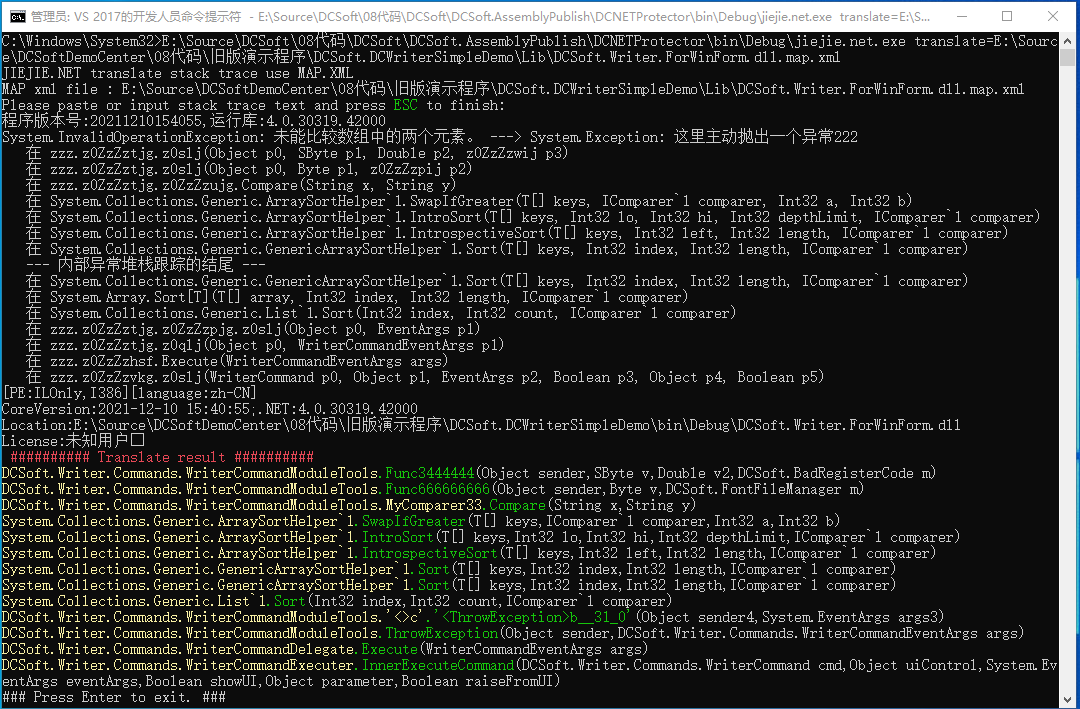
2021-12-30: 为新年提供更强大的堆栈跟踪转换功能。
2021-12-14: 让软件运行更快且占用更少内存。支持 .NET core 的 `crossgen.exe`。
2021-12-06: 支持 `ldtoken method`。
2021-11-19: 调用方法时加密枚举值。
2021-11-16: 加密 typeof() 指令。
2021-11-11: 加密字节数组和整数值。修复 COM interop 的问题。
2021-11-1 : 移除已重命名的属性/事件。
2021-10-25: 隐藏数组定义。
2021-10-23: 合并多个程序集文件为单个程序集文件。更改目标平台。
2021-9-21 : 清理已重命名的文档注释 xml 元素。
2021-9-9 : 打包小属性并更改 call/callvirt 指令。
2021-8-23 : 添加功能:支持 .NET core,修复一些 bug。
2021-7-20 : 添加功能:类型或成员重命名。
2021-4-2 : 添加功能:混淆控制流。
2021-3-22 : 首次发布。 ## 背景 许多 .NET 开发者担心他们的软件被破解、版权被侵犯,因此他们使用一些工具来混淆 IL 代码,比如 PreEmptive dotfuscator。但有时候,这还不够。
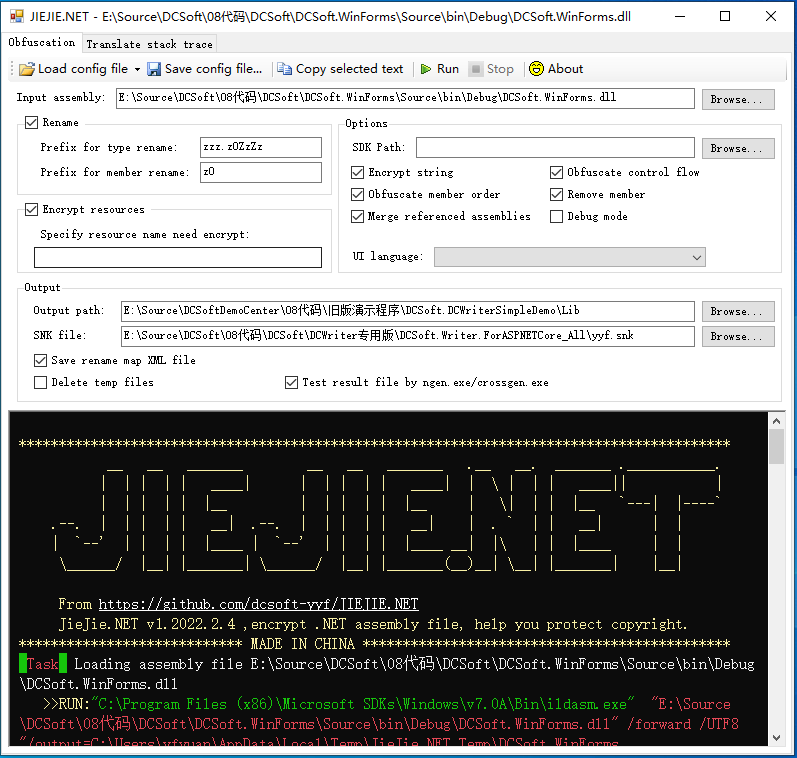
所以我编写了 JieJie.NET,可以深度加密 .NET 程序集,帮助人们保护版权。而且这个工具是开源的。 这是一个 .NET 应用程序,GUI 界面如下:
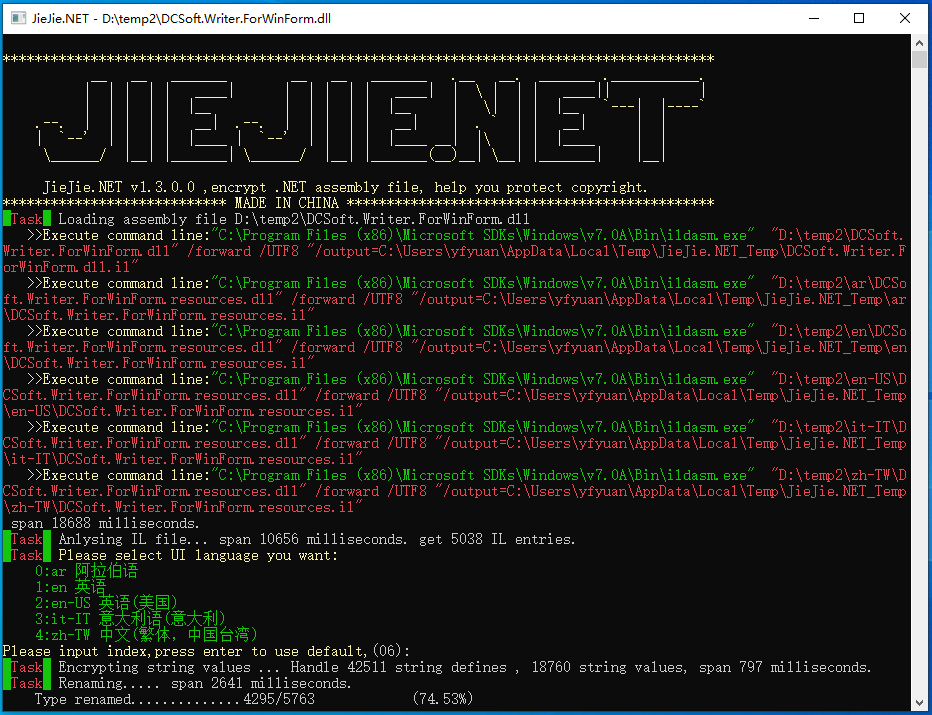
控制台界面如下:
 ## 功能
它具有以下功能。
## 1、重命名类型和成员。
JieJie 可以更改类型和成员的名称。这可以使理解 API 的含义变得更加困难。效果受 `[System.Reflection.ObfuscationAttribute]` 影响。
## 功能
它具有以下功能。
## 1、重命名类型和成员。
JieJie 可以更改类型和成员的名称。这可以使理解 API 的含义变得更加困难。效果受 `[System.Reflection.ObfuscationAttribute]` 影响。
例如,原始代码是: ``` public abstract class XTextDocumentContentElement : XTextContentElement { public override void AfterLoad(ElementLoadEventArgs args); public override void Clear(); [Obfuscation(Exclude = true, ApplyToMembers = true)] public override XTextElement Clone(bool Deeply); [Obfuscation(Exclude = true, ApplyToMembers = true)] public override XTextDocument CreateContentDocument(bool includeThis); public XTextSelection CreateSelection(int startIndex, int length); public override void Dispose(); public override void DrawContent(InnerDocumentPaintEventArgs args); [Obfuscation(Exclude = true, ApplyToMembers = true)] public override void EditorRefreshViewExt(bool fastMode); public float FixPageLinePosition(int pos); public override void Focus(); [Obfuscation(Exclude = true, ApplyToMembers = true)] public XTextLineList GetAllLines(); [Obfuscation(Exclude = true, ApplyToMembers = true)] public virtual XTextRange GetRange(int StartIndex, int EndIndex); public void InnerGetSelectionBorderElement(ref XTextElement startElement, ref XTextElement endElement); public void InvalidateSpecifyLayoutElements(); [Obfuscation(Exclude = true, ApplyToMembers = true)] public virtual bool IsSelected(XTextElement element); public void RefreshParagraphListState(bool checkFlag, bool updateListIndex); public XTextParagraphFlagElement RootParagraphFlag(); [Obfuscation(Exclude = true, ApplyToMembers = true)] public bool SetSelection(int startIndex, int length); [Obfuscation(Exclude = true, ApplyToMembers = true)] public bool SetSelectionRange(int firstIndex, int lastIndex); } ``` 重命名后,这些代码变为: ``` public abstract class XTextDocumentContentElement : XTextContentElement { public override void Clear(); public override XTextElement Clone(bool Deeply); public override XTextDocument CreateContentDocument(bool includeThis); public override void Dispose(); public override void EditorRefreshViewExt(bool fastMode); public override void Focus(); public XTextLineList GetAllLines(); public virtual XTextRange GetRange(int StartIndex, int EndIndex); public virtual bool IsSelected(XTextElement element); public bool SetSelection(int startIndex, int length); public bool SetSelectionRange(int firstIndex, int lastIndex); public XTextParagraphFlagElement z0ZzZzbmm1mO001(); public XTextSelection z0ZzZzbmm1mO011(int startIndex, int length); public void z0ZzZzbmm1mO01O(); public float z0ZzZzbmm1mOOm1(int pos); public void z0ZzZzbmm1mOOmn(ref XTextElement startElement, ref XTextElement endElement); public void z0ZzZzbmm1mOOmO(bool checkFlag, bool updateListIndex); public override void z0ZzZzbmmOO11nn(z0ZzZzbm0mmlm1O args); public override void z0ZzZzbmmOOl0nO(ElementLoadEventArgs args); } ``` 可以看到,一些 API 的名称被混淆了。 ## 2、混淆控制流。 JieJie 可以分析 IL 代码,并在不丢失任何功能的情况下随机混淆控制流。它可以破坏 `foreach/lock/using` 的语法结构,隐藏相等判断和字符串拼接操作。它使代码变得非常难以阅读,有时还会导致破解工具出错。
例如,原始代码是: ``` public int RemoveByControl(object control) { if (control == null) { throw new ArgumentNullException("control"); } if (CheckOwner() == false) { return -1; } int result = 0; lock (this) { for (int iCount = _Tasks.Count - 1; iCount >= 0; iCount--) { if (_Tasks[iCount].Control == control) { _Tasks.RemoveAt(iCount); result++; } } if (_CurrentTask != null && _CurrentTask.Control == control) { _CurrentTask = null; } } return result; } ``` 使用 JieJie.NET 后,这些代码在 ILSpy 中显示为: ``` public int RemoveByControl(object control) { //Discarded unreachable code: IL_000b, IL_0073 //IL_000b: Incompatible stack heights: 1 vs 0 //IL_0073: Incompatible stack heights: 1 vs 0 int num = z0ZzZzgw.z0kh; bool flag = default(bool); int num4 = default(int); int result = default(int); while (true) { switch (num) { default: { if (control == null) { throw new ArgumentNullException(z0ZzZzow.z0rj); } if (!z0rk()) { goto IL_0049; } int num2 = 0; z0ZzZzjw.z0uk(this); try { int num3 = z0ZzZzgw.z0ah; while (true) { switch (num3) { default: num2++; goto IL_0097; case 3: if (flag) { z0ik = null; } break; case 4: case 5: { num4 = z0bk.Count - 1; goto IL_009e; } IL_009e: if (num4 < 0) { flag = z0ik != null && z0ik.Control == control; num3 = z0ZzZzgw.z0wj; continue; } if (z0bk[num4].Control == control) { z0bk.RemoveAt(num4); num3 = z0ZzZzgw.z0sh; continue; } goto IL_0097; IL_0097: num4--; goto IL_009e; } break; } } finally { Monitor.Exit(this); } result = num2; break; } case 0: case 1: case 3: break; } break; IL_0049: result = -1; num = z0ZzZzgw.z0wj; } return result; } ``` 看,控制流非常难以理解,而且 ILSpy 出现了错误 `IL_000b: Incompatible stack heights: 1 vs 0`。使用 .NET Reflector 10.3,它直接停止工作。 ## 3、加密程序集中定义的所有字符串值。 JieJie.NET 可以收集程序集中定义的所有字符串值,将它们转换为新类中的静态只读字段,并加密它们的值。这样黑客就无法直接搜索字符串值,破解变得更加困难。
例如,原始代码是: ``` private string GetLicenseMessage() { return "This software license to :" + Environment.UserName; } ``` 使用 JieJie.NET 后,新代码是: ``` private string GetLicenseMessage() { string text = _0._6 + Environment.UserName; return text; } // also create a new class, contains all string value in assembly in random order. internal static class _0 { public static readonly string _0; public static readonly string _1; public static readonly string _2; public static readonly string _3; public static readonly string _4; public static readonly string _5; public static readonly string _6; public static readonly string _7; public static readonly string _8; public static readonly string _9; public static readonly string _10; public static readonly string _11; public static readonly string _12; public static readonly string _13; public static readonly string _14; public static readonly string _15; public static readonly string _16; public static readonly string _17; public static readonly string _18; public static readonly string _19; public static readonly string _20; public static readonly string _21; static _0() { byte[] datas = _BytesContainer__._0(); _11 = GetStringByLong(datas, 151732605047602L); _20 = GetStringByLong(datas, 450799767951810L); _7 = GetStringByLong(datas, 101155071172227L); _4 = GetStringByLong(datas, 47279000500949L); _15 = GetStringByLong(datas, 415615395474299L); _5 = GetStringByLong(datas, 54975582493063L); _2 = GetStringByLong(datas, 17592187197342L); _14 = GetStringByLong(datas, 206708198516324L); _8 = GetStringByLong(datas, 124244814685054L); _21 = GetStringByLong(datas, 459595860893446L); _6 = GetStringByLong(datas, 72567769190975L); _13 = GetStringByLong(datas, 182518931688172L); _18 = GetStringByLong(datas, 433207581847376L); _16 = GetStringByLong(datas, 417814419099513L); _3 = GetStringByLong(datas, 36283884381871L); _1 = GetStringByLong(datas, 9895605165436L); _9 = GetStringByLong(datas, 136339442622330L); _19 = GetStringByLong(datas, 440904163377248L); _17 = GetStringByLong(datas, 426610511995160L); _0 = GetStringByLong(datas, 598562L); _10 = GetStringByLong(datas, 148434069970387L); _12 = GetStringByLong(datas, 158329675868829L); } private static string GetStringByLong(byte[] datas, long key) { int num = (int)(key & 0xFFFF) ^ 0xEF83; key >>= 16; int num2 = (int)(key & 0xFFFFF); key >>= 24; int num3 = (int)key; char[] array = new char[num2]; int num4 = 0; while (num4 < num2) { int num5 = num4 + num3 << 1; array[num4] = (char)(((datas[num5] << 8) + datas[num5 + 1]) ^ num); num4++; num++; } return new string(array); } } ``` 此外,这个过程可以避免因程序集混淆导致的一种性能问题。
例如,使用以下代码: ``` public static byte[] ParseUpperHexString(string hexs) { var list = new List();
int Value = -1;
foreach (char c in hexs)
{
int index = "0123456789ABCDEF".IndexOf(c);
if (index >= 0)
{
if (Value < 0)
{
Value = index;
}
else
{
Value = Value * 16 + index;
list.Add((byte)Value);
Value = -1;
}
}
}
return list.ToArray();
}
```
经过混淆后,代码变为:
```
public static byte[] z0ZzZzbn(string A_0)
{
int a_ = 15;
List list = new List();
int num = -1;
foreach (char value in A_0)
{
int num2 = z0ZzZzbbz.b("\uf0bf\uf3c1\uf6c3\uf5c5\uffc9 ?\ue8cf\uebd1 G?e?? a???y", a_).IndexOf(value);
if (num2 >= 0)
{
if (num < 0)
{
num = num2;
continue;
}
num = num * 16 + num2;
list.Add((byte)num);
num = -1;
}
}
return list.ToArray();
}
internal unsafe static string z0ZzZzbbz.b(string A_0, int A_1)
{
char[] array = A_0.ToCharArray();
int num = (int)((long)(IntPtr)(void*)((long)(IntPtr)(void*)((long)(1169192937 + A_1) + 80L) + 78L) + 41L);
int num2 = 0;
if (num2 >= 1)
{
goto IL_0029;
}
goto IL_005c;
IL_005c:
if (num2 >= array.Length)
{
return string.Intern(new string(array));
}
goto IL_0029;
IL_0029:
int num3 = num2;
char num4 = array[num3];
byte b = (byte)((num4 & 0xFFu) ^ (uint)num++);
byte b2 = (byte)(((int)num4 >> 8) ^ num++);
byte num5 = b2;
b2 = b;
b = num5;
array[num3] = (char)((b2 << 8) | b);
num2++;
goto IL_005c;
}
```
这会导致严重的性能问题。为了解决这个问题,使用 JieJie.NET 后,此代码变为:
```
private static readonly string _HexChars = _0._11 ;
public static byte[] ParseUpperHexString(string hexs)
{
var list = new List();
int Value = -1;
foreach (char c in hexs)
{
int index = _HexChars.IndexOf(c);
if (index >= 0)
{
if (Value < 0)
{
Value = index;
}
else
{
Value = Value * 16 + index;
list.Add((byte)Value);
Value = -1;
}
}
}
return list.ToArray();
}
```
经过混淆后,代码变为:
```
private static readonly string z0ZzZzbg = z0ZzZzbbz.z0ZzZzbef;
public static byte[] z0ZzZzbu(string A_0)
{
List list = new List();
int num = -1;
foreach (char value in A_0)
{
int num2 = DCFormCheckBoxElement.z0ZzZzbg.IndexOf(value);
if (num2 >= 0)
{
if (num < 0)
{
num = num2;
continue;
}
num = num * 16 + num2;
list.Add((byte)num);
num = -1;
}
}
return list.ToArray();
}
```
这段代码避免了性能问题。
[2024-10-19]现在,JIEJIE.NET 添加了 `StringsSelector` 命令参数。字符串加密会导致更多内存消耗和更长的软件初始化时间。通常,大多数字符串值不需要加密,因此我们添加了 `StringsSelector` 参数来减少字符串加密的范围。
例如 `StringsSelector=+DCSoft.DCSR,+ShowAboutDialog,+GetNotSupportModules,+DCSoft.MyLicense*,-*`。其中 `+` 运算符让指定名称的类或方法包含在加密范围内,`-` 运算符排除加密范围。`*` 匹配一个或多个字符。 ## 4、加密 *.resources 文件。 黑客可以使用 ildasm.exe 反编译 .NET 程序集文件,获取程序集中嵌入的所有 `*.resouces` 文件,修改它们,可能替换他们的名称或 logo 图像,然后使用 ilasm.exe 重新构建 .NET 程序集文件。将您的版权界面改为黑客的版权界面。
JieJie.NET 可以加密 `*.resouces` 文件并隐藏它们,更难修改版权界面。因此它可以保护您的版权。
例如,您定义了一个 WinFrom,`InitializeComponent()` 函数代码是: ``` private void InitializeComponent() { System.ComponentModel.ComponentResourceManager resources = new System.ComponentModel.ComponentResourceManager(typeof(SampleWinApp.frmMain)); pictureBox1 = new System.Windows.Forms.PictureBox(); btnAbout = new System.Windows.Forms.Button(); btnDoWork = new System.Windows.Forms.Button(); label1 = new System.Windows.Forms.Label(); button1 = new System.Windows.Forms.Button(); ((System.ComponentModel.ISupportInitialize)pictureBox1).BeginInit(); SuspendLayout(); pictureBox1.Image = (System.Drawing.Image)resources.GetObject("pictureBox1.Image"); pictureBox1.Location = new System.Drawing.Point(150, 21); pictureBox1.Name = "pictureBox1"; pictureBox1.Size = new System.Drawing.Size(64, 64); pictureBox1.SizeMode = System.Windows.Forms.PictureBoxSizeMode.AutoSize; pictureBox1.TabIndex = 1; pictureBox1.TabStop = false; btnAbout.Location = new System.Drawing.Point(21, 188); btnAbout.Name = "btnAbout"; btnAbout.Size = new System.Drawing.Size(299, 64); btnAbout.TabIndex = 2; btnAbout.Text = "About..."; btnAbout.UseVisualStyleBackColor = true; btnAbout.Click += new System.EventHandler(btnAbout_Click); btnDoWork.Location = new System.Drawing.Point(21, 109); btnDoWork.Name = "btnDoWork"; btnDoWork.Size = new System.Drawing.Size(299, 64); btnDoWork.TabIndex = 3; btnDoWork.Text = "Do work"; btnDoWork.UseVisualStyleBackColor = true; btnDoWork.Click += new System.EventHandler(btnDoWork_Click); label1.AutoSize = true; label1.Location = new System.Drawing.Point(13, 43); label1.Name = "label1"; label1.Size = new System.Drawing.Size(131, 12); label1.TabIndex = 4; label1.Text = "This is a logo image:"; button1.Location = new System.Drawing.Point(21, 275); button1.Name = "button1"; button1.Size = new System.Drawing.Size(299, 63); button1.TabIndex = 5; button1.Text = "Get string in resource"; button1.UseVisualStyleBackColor = true; button1.Click += new System.EventHandler(button1_Click); base.AutoScaleDimensions = new System.Drawing.SizeF(6f, 12f); base.AutoScaleMode = System.Windows.Forms.AutoScaleMode.Font; base.ClientSize = new System.Drawing.Size(414, 365); base.Controls.Add(button1); base.Controls.Add(label1); base.Controls.Add(btnDoWork); base.Controls.Add(btnAbout); base.Controls.Add(pictureBox1); base.Name = "frmMain"; Text = "frmMain"; base.Load += new System.EventHandler(frmMain_Load); ((System.ComponentModel.ISupportInitialize)pictureBox1).EndInit(); ResumeLayout(false); PerformLayout(); } ``` 使用 JieJie.NET 后,代码变为: ``` private void InitializeComponent() { __DC20210205._Res1 res = new __DC20210205._Res1(); pictureBox1 = new System.Windows.Forms.PictureBox(); btnAbout = new System.Windows.Forms.Button(); btnDoWork = new System.Windows.Forms.Button(); label1 = new System.Windows.Forms.Label(); button1 = new System.Windows.Forms.Button(); ((System.ComponentModel.ISupportInitialize)pictureBox1).BeginInit(); SuspendLayout(); pictureBox1.Image = (System.Drawing.Image)res.GetObject(__DC20210205._0._2); pictureBox1.Location = new System.Drawing.Point(150, 21); pictureBox1.Name = __DC20210205._0._8; pictureBox1.Size = new System.Drawing.Size(64, 64); pictureBox1.SizeMode = System.Windows.Forms.PictureBoxSizeMode.AutoSize; pictureBox1.TabIndex = 1; pictureBox1.TabStop = false; btnAbout.Location = new System.Drawing.Point(21, 188); btnAbout.Name = __DC20210205._0._16; btnAbout.Size = new System.Drawing.Size(299, 64); btnAbout.TabIndex = 2; btnAbout.Text = __DC20210205._0._20; btnAbout.UseVisualStyleBackColor = true; btnAbout.Click += new System.EventHandler(btnAbout_Click); btnDoWork.Location = new System.Drawing.Point(21, 109); btnDoWork.Name = __DC20210205._0._0; btnDoWork.Size = new System.Drawing.Size(299, 64); btnDoWork.TabIndex = 3; btnDoWork.Text = __DC20210205._0._21; btnDoWork.UseVisualStyleBackColor = true; btnDoWork.Click += new System.EventHandler(btnDoWork_Click); label1.AutoSize = true; label1.Location = new System.Drawing.Point(13, 43); label1.Name = __DC20210205._0._11; label1.Size = new System.Drawing.Size(131, 12); label1.TabIndex = 4; label1.Text = __DC20210205._0._7; button1.Location = new System.Drawing.Point(21, 275); button1.Name = __DC20210205._0._4; button1.Size = new System.Drawing.Size(299, 63); button1.TabIndex = 5; button1.Text = __DC20210205._0._13; button1.UseVisualStyleBackColor = true; button1.Click += new System.EventHandler(button1_Click); base.AutoScaleDimensions = new System.Drawing.SizeF(6f, 12f); base.AutoScaleMode = System.Windows.Forms.AutoScaleMode.Font; base.ClientSize = new System.Drawing.Size(414, 365); base.Controls.Add(button1); base.Controls.Add(label1); base.Controls.Add(btnDoWork); base.Controls.Add(btnAbout); base.Controls.Add(pictureBox1); base.Name = __DC20210205._0._18; Text = __DC20210205._0._18; base.Load += new System.EventHandler(frmMain_Load); ((System.ComponentModel.ISupportInitialize)pictureBox1).EndInit(); ResumeLayout(false); PerformLayout(); } // And auto create a new class: internal class _Res1 : ComponentResourceManager, IDisposable { private ResourceSet _Data; public _Res1() { _Data = InnerAssemblyHelper20210315.LoadResourceSet( _BytesContainer__._2(), 224, gzip: true); } public override ResourceSet GetResourceSet( CultureInfo culture, bool createIfNotExists, bool tryParents) { return _Data; } protected override ResourceSet InternalGetResourceSet( CultureInfo culture, bool createIfNotExists, bool tryParents) { return _Data; } public void Dispose() { if (_Data != null) { _Data.Close(); _Data = null; } } } ``` 并移除了嵌入的资源 "SampleWinFormApp.frmMain.resources"。完成这些操作后,新代码非常难以破解。 此外,如果软件设计为支持多语言 UI 的全球化,软件将包含特定的 UI 语言资源 dll 文件。我的工具将提示操作员选择一种 UI 语言,并将 UI 语言数据合并到 IL 代码中。移除嵌入的 .resources 文件。这将提供更快的启动速度,且无需 UI 语言资源 dll。
我的工具还可以更改资源包类的代码。
例如,这是一个资源包类的代码: ``` [GeneratedCode("System.Resources.Tools.StronglyTypedResourceBuilder", "15.0.0.0")] [DebuggerNonUserCode] [CompilerGenerated] internal class Resource1 { private static ResourceManager resourceMan; private static CultureInfo resourceCulture; [EditorBrowsable(EditorBrowsableState.Advanced)] internal static ResourceManager ResourceManager { get { if (resourceMan == null) { ResourceManager temp = resourceMan = new ResourceManager( "SampleWinApp.Resource1", typeof(Resource1).Assembly); } return resourceMan; } } [EditorBrowsable(EditorBrowsableState.Advanced)] internal static CultureInfo Culture { get { return resourceCulture; } set { resourceCulture = value; } } internal static Bitmap blue96 { get { object obj = ResourceManager.GetObject("blue96", resourceCulture); return (Bitmap)obj; } } internal static string String2 { get{ return ResourceManager.GetString("String2", resourceCulture);} } internal static string StringValue { get{ return ResourceManager.GetString("StringValue", resourceCulture);} } internal Resource1() { } } ``` 使用我的工具后,它变为: ``` internal class Resource1 { private static readonly byte[] _Datas = _BytesContainer__._1(); private static Bitmap _blue96; public static Bitmap get_blue96() { if (_blue96 == null) { _blue96 = InnerAssemblyHelper20210315.GetBitmap(_Datas, 0, 36918, 1807292644); } return _blue96; } internal static string get_String2() { return InnerAssemblyHelper20210315.GetString(_Datas, 37002, 98, 614997590); } internal static string get_StringValue() { return InnerAssemblyHelper20210315.GetString(_Datas, 36918, 84, 57466195); } } ``` 资源数据已经被加密,难以破解。 ## 5、隐藏分配调用堆栈。 黑客可以使用内存分析工具等搜索关键信息,比如 Scitech .NET memory Profiler。但 JieJie.NET 可以更改这个堆栈,让黑客困惑。
例如,我使用以下代码显示软件许可证信息。 ``` private void btnAbout_Click(object sender, EventArgs e) { MessageBox.Show(this, GetLicenseMessage()); } private string GetLicenseMessage() { string msg = "This software license to :" + Environment.UserName; return msg; } ``` 当您在 Scitech .NET memory Profiler 中启动应用程序并显示关于对话框时,屏幕截图如下。
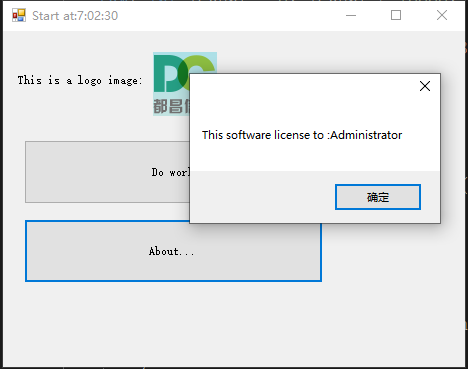
在 .NET Memory profiler 中,界面是
 搜索字符串 `"This software license to:Administrator"` 并双击,然后您可以看到以下界面:
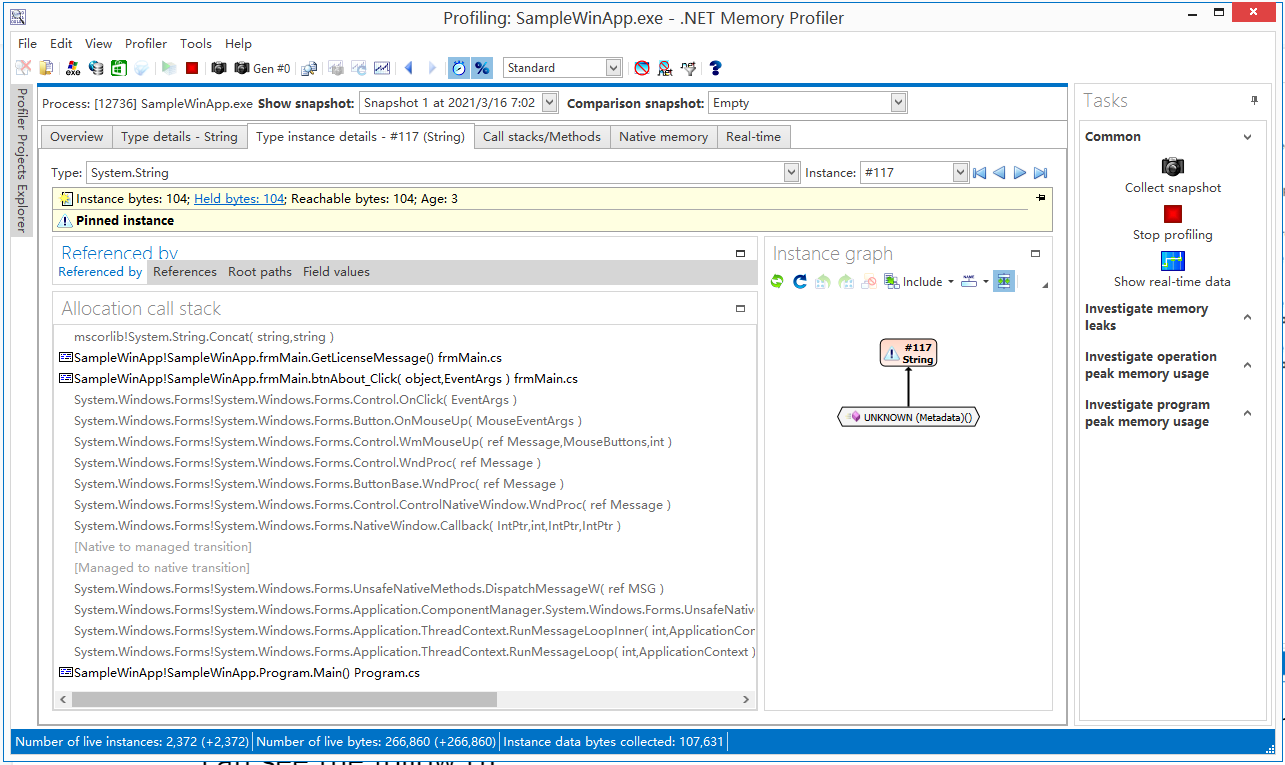 这里列出了关键字符串值的分配调用堆栈:
```
mscorlib!System.String.Concat( string,string )
SampleWinApp!SampleWinApp.frmMain.GetLicenseMessage() frmMain.cs
SampleWinApp!SampleWinApp.frmMain.btnAbout_Click( object,EventArgs ) frmMain.cs
System.Windows.Forms!System.Windows.Forms.Control.OnClick( EventArgs )
System.Windows.Forms!System.Windows.Forms.Button.OnMouseUp( MouseEventArgs )
System.Windows.Forms!System.Windows.Forms.Control.WmMouseUp( ref Message,MouseButtons,int )
System.Windows.Forms!System.Windows.Forms.Control.WndProc( ref Message )
System.Windows.Forms!System.Windows.Forms.ButtonBase.WndProc( ref Message )
System.Windows.Forms!System.Windows.Forms.Control.ControlNativeWindow.WndProc( ref Message )
System.Windows.Forms!System.Windows.Forms.NativeWindow.Callback( IntPtr,int,IntPtr,IntPtr )
[Native to managed transition]
[Managed to native transition]
System.Windows.Forms!System.Windows.Forms.UnsafeNativeMethods.DispatchMessageW( ref MSG )
System.Windows.Forms!System.Windows.Forms.Application.ComponentManager.System.Windows.Forms.UnsafeNativeMethods.IMsoComponentManager.FPushMessageLoop( int,int,int )
System.Windows.Forms!System.Windows.Forms.Application.ThreadContext.RunMessageLoopInner( int,ApplicationContext )
System.Windows.Forms!System.Windows.Forms.Application.ThreadContext.RunMessageLoop( int,ApplicationContext )
SampleWinApp!SampleWinApp.Program.Main() Program.cs
```
这个调用堆栈可能指出如何破解软件。
这里列出了关键字符串值的分配调用堆栈:
```
mscorlib!System.String.Concat( string,string )
SampleWinApp!SampleWinApp.frmMain.GetLicenseMessage() frmMain.cs
SampleWinApp!SampleWinApp.frmMain.btnAbout_Click( object,EventArgs ) frmMain.cs
System.Windows.Forms!System.Windows.Forms.Control.OnClick( EventArgs )
System.Windows.Forms!System.Windows.Forms.Button.OnMouseUp( MouseEventArgs )
System.Windows.Forms!System.Windows.Forms.Control.WmMouseUp( ref Message,MouseButtons,int )
System.Windows.Forms!System.Windows.Forms.Control.WndProc( ref Message )
System.Windows.Forms!System.Windows.Forms.ButtonBase.WndProc( ref Message )
System.Windows.Forms!System.Windows.Forms.Control.ControlNativeWindow.WndProc( ref Message )
System.Windows.Forms!System.Windows.Forms.NativeWindow.Callback( IntPtr,int,IntPtr,IntPtr )
[Native to managed transition]
[Managed to native transition]
System.Windows.Forms!System.Windows.Forms.UnsafeNativeMethods.DispatchMessageW( ref MSG )
System.Windows.Forms!System.Windows.Forms.Application.ComponentManager.System.Windows.Forms.UnsafeNativeMethods.IMsoComponentManager.FPushMessageLoop( int,int,int )
System.Windows.Forms!System.Windows.Forms.Application.ThreadContext.RunMessageLoopInner( int,ApplicationContext )
System.Windows.Forms!System.Windows.Forms.Application.ThreadContext.RunMessageLoop( int,ApplicationContext )
SampleWinApp!SampleWinApp.Program.Main() Program.cs
```
这个调用堆栈可能指出如何破解软件。
然后您可以更改源代码为: ``` private void btnAbout_Click(object sender, EventArgs e) { MessageBox.Show(this, GetLicenseMessage()); } private string GetLicenseMessage() { var str = "JIEJIE.NET.SWITCH:+allocationcallstack";;// no used,just let JieJie.NET know the owner method need change. string msg = "This software license to :" + Environment.UserName; return msg; } ``` 在那里,代码 `var str = "JIEJIE.NET.SWITCH:+allocationcallstack";` 什么都不做,只是让 JieJie.NET 知道这是一个需要更改的关键方法,值忽略大小写。
我的工具可以将这个调用堆栈更改为: ``` mscorlib!System.String.CtorCharArray( char[] ) SampleWinApp2!DCSoft.Common.InnerAssemblyHelper20210315.CloneStringCrossThead_Thread() mscorlib!System.Threading.ExecutionContext.RunInternal( ExecutionContext,ContextCallback,object,bool ) mscorlib!System.Threading.ExecutionContext.Run( ExecutionContext,ContextCallback,object,bool ) mscorlib!System.Threading.ExecutionContext.Run( ExecutionContext,ContextCallback,object ) mscorlib!System.Threading.ThreadHelper.ThreadStart() ``` 更难找出关键的调用堆栈。这个功能帮助您隐藏弱点,保护您的软件版权。 ## 6、混淆类的成员顺序。 当我们编写大型类的代码时,通常,用于同一目标的字段或方法非常接近,例如: ``` private string _RegisterCode = null; private bool _IsRegisteredFlag = false; public void SetRegisterCode( string code ){}; pulbic bool IsRegisterdCodeOK( string code ){}; public string GetErrorMessageForRegister(); XXXXXXX other members XXXXXX ``` 当黑客捕获一个关键成员(比如 `_RegisterCode`)并分析附近的其他成员时,可能会获得更多信息。
但 JieJie.NET 可以混淆类的成员顺序,就像这样: ``` private bool _IsRegisteredFlag = false; XXXXXXX other members XXXXXX private string _RegisterCode = null; XXXXXXX other members XXXXXX public string GetErrorMessageForRegister(); XXXXXXX other members XXXXXX pulbic bool IsRegisterdCodeOK( string code ){}; XXXXXXX other members XXXXXX public void SetRegisterCode( string code ){}; XXXXXXX other members XXXXXX ``` 附近的其他成员可能与某个关键成员无关。这可以使破解更加困难。 ## 7、清理文档注释 xml 文件。 JIEJIE.NET 可以清理文档注释 xml 文件。移除已重命名的成员的 xml 元素。 ## 8、保存重命名映射 xml 文件。 JIEJIE.NET 可以保存重命名映射 xml 文件,如下所示: ```
 ## 9、隐藏数组定义。
人们经常在源代码中定义数组,例如:
```
public static byte[] GetBytes()
{
return new byte[]
{
85,
203,
85,
204,
85,
255,
85,
245,
85,
247,
85,
171,
85,
165,
142,
157,
142,
184};
}
```
使用 JIEJIE.NET 后,代码变为:
```
public static byte[] GetBytes()
{
byte[] array = new byte[18];
InnerAssemblyHelper20211018.MyInitializeArray(
array,
(RuntimeFieldHandle)/*OpCode not supported: LdMemberToken*/);
return array;
}
```
## 10、加密 typeof() 指令。
人们经常使用 typeof() 指令来获取 Type。但这包含了一些可以被破解者利用的信息。JIEJIE.NET 可以隐藏它。例如:
```
public static string CheckXmlSerialize()
{
List
## 9、隐藏数组定义。
人们经常在源代码中定义数组,例如:
```
public static byte[] GetBytes()
{
return new byte[]
{
85,
203,
85,
204,
85,
255,
85,
245,
85,
247,
85,
171,
85,
165,
142,
157,
142,
184};
}
```
使用 JIEJIE.NET 后,代码变为:
```
public static byte[] GetBytes()
{
byte[] array = new byte[18];
InnerAssemblyHelper20211018.MyInitializeArray(
array,
(RuntimeFieldHandle)/*OpCode not supported: LdMemberToken*/);
return array;
}
```
## 10、加密 typeof() 指令。
人们经常使用 typeof() 指令来获取 Type。但这包含了一些可以被破解者利用的信息。JIEJIE.NET 可以隐藏它。例如:
```
public static string CheckXmlSerialize()
{
List rootTypes = new List();
rootTypes.Add(typeof(DCSoft.Writer.Dom.XTextDocument));
rootTypes.Add(typeof(DCSoft.TemperatureChart.TemperatureDocument));
rootTypes.Add(typeof(DCSoft.Writer.Dom.XTextAccountingNumberElement));
rootTypes.Add(typeof(DCSoft.Writer.Dom.XTextBarcodeFieldElement));
rootTypes.Add(typeof(DCSoft.Writer.Dom.XTextBeanFieldElement));
rootTypes.Add(typeof(DCSoft.Writer.Dom.XTextBlankLineElement));
rootTypes.Add(typeof(DCSoft.Writer.Dom.XTextBlockElement));
rootTypes.Add(typeof(DCSoft.Writer.Dom.XTextBookmark));
rootTypes.Add(typeof(DCSoft.Writer.Dom.XTextButtonElement));
rootTypes.Add(typeof(DCSoft.Writer.Dom.XTextCharElement));
string result = WriterUtils.CheckXmlName(rootTypes);
return result;
}
```
使用 JIEJIE.NET 后,代码变为:
```
public static string CheckXmlSerialize()
{
List list = new List();
list.Add(_RuntimeTypeHandleContainer.GetTypeInstance(_Int32ValueContainer._1002_827));
list.Add(_RuntimeTypeHandleContainer.GetTypeInstance(_Int32ValueContainer._1964_633));
list.Add(_RuntimeTypeHandleContainer.GetTypeInstance(_Int32ValueContainer._4356_95));
list.Add(_RuntimeTypeHandleContainer.GetTypeInstance(_Int32ValueContainer._680_162));
list.Add(_RuntimeTypeHandleContainer.GetTypeInstance(_Int32ValueContainer._533_68));
list.Add(_RuntimeTypeHandleContainer.GetTypeInstance(_Int32ValueContainer._4013_536));
list.Add(_RuntimeTypeHandleContainer.GetTypeInstance(_Int32ValueContainer._3964_1144));
list.Add(_RuntimeTypeHandleContainer.GetTypeInstance(_Int32ValueContainer._628_824));
list.Add(_RuntimeTypeHandleContainer.GetTypeInstance(_Int32ValueContainer._464_234));
list.Add(_RuntimeTypeHandleContainer.GetTypeInstance(_Int32ValueContainer._3013_501));
return WriterUtils.CheckXmlName(list);
}
```
如果与重命名配合使用,破解者很难找到 Type 值。
许多信息已被隐藏。
## 11、加密枚举值。
许多调用函数的代码使用枚举值,例如:
```
public Dictionary GetAllOptionValues()
{
Dictionary result = new Dictionary();
foreach (PropertyInfo p in this.GetType().GetProperties(BindingFlags.Public | BindingFlags.Instance))
{
object v = p.GetValue(this, null);
foreach (PropertyInfo p2 in v.GetType().GetProperties(BindingFlags.Public | BindingFlags.Instance))
{
if (p2.CanRead == false || p2.CanWrite == false)
{
continue;
}
object v2 = p2.GetValue(v, null);
if (v2 != null)
{
string txt = v2.ToString();
if (v2 is System.Drawing.Color)
{
txt = XMLSerializeHelper.ColorToString((Color)v2);
}
result[p.Name + '.' + p2.Name] = txt;
}
}//foreach
}//foreach
return result;
}
```
使用 JIEJIE.NET 后,它变为:
```
public Dictionary GetAllOptionValues()
{
Dictionary result = new Dictionary();
foreach (PropertyInfo p in this.GetType().GetProperties((BindingFlags)_Int32ValueContainer._22_20))
{
object v = p.GetValue(this, null);
foreach (PropertyInfo p2 in v.GetType().GetProperties((BindingFlags)_Int32ValueContainer._22_20))
{
if (p2.CanRead == false || p2.CanWrite == false)
{
continue;
}
object v2 = p2.GetValue(v, null);
if (v2 != null)
{
string txt = v2.ToString();
if (v2 is System.Drawing.Color)
{
txt = XMLSerializeHelper.ColorToString((Color)v2);
}
result[p.Name + '.' + p2.Name] = txt;
}
}//foreach
}//foreach
return result;
}
```
一些信息已被隐藏。
## 12、合并程序集文件。
在开发过程中,许多 .NET 应用程序拆分为多个程序集文件,可能包括一个 exe 文件和许多 dll 文件。
JIEJIE.NET 可以将程序集文件合并为单个程序集文件。这使应用程序更容易复制或升级。 ## 13、更改目标平台 JIEJIE.NET 支持更改 .coreflags 或 .subsystem 参数来更改结果程序集的目标平台。例如,一个 .NET 程序集是为 x86 设计的,使用以下命令行:
`jiejie.net.exe d:\aa.dll .corflags=0x1`
这可以将结果程序集文件修改为 x64 平台。 ## 14、支持 .NET Core 3.1 JIEJIE.NET 现在支持 .NET Core 3.1。 ## 16、支持 Blazor Web 程序集。 JIEJIE.NET 可以处理 Blazor Web 程序集,它可以删除 `*.pdb` 和 `*.pdb.gz` 文件,更新 `blazor.boot.json` 中的 SHA256 代码。 ## 17、移除死代码。 JIEJIE.NET 可以移除死代码,有三种类型:
`Disabled` = 禁用该选项。
`Normal` = JIEJIE.NET 移除所有已重命名且没有任何自定义属性且从未被使用的方法。
`All` = JIEJIE.NET 移除所有已重命名且从未被使用的方法。 ## 18、移除自定义属性。 ``` JIEJIE.NET can remove cutom attributes speicfy full type name.For example: ```
`jiejie.net.exe d:\a.dll RemoveCustomAttributeTypeFullnames=System.Runtime.InteropServices.ComVisibleAttribute,System.Runtime.InteropServices.GuidAttribute`
它可以减小输出文件的大小。 ## 19、易于使用。 我的新工具是一个 .NET framework 控制台应用程序。
它支持以下命令行参数: ``` input =[required,default argument,Full path of input .NET assembly file , can be .exe or .dll, currenttly only support .NET framework 2.0 or later] output=[optional,Full path of output .NET assmebly file , if it is empty , then use input argument value] snk =[optional,Full path of snk file. It use to add strong name to output assembly file.] switch=[optional,multi-switch split by ',',also can be define in [System.Reflection.ObfuscationAttribute.Feature]. It support : +contorlfow = enable obfuscate control flow in method body. -contorlfow = disable obfuscate control flow in method body. +/-strings = enable/disable encrypt string value. +/-resources = enable/disable encrypt resources data. +/-memberorder = enable/disable member list order in type. +/-rename = enable/disable rename type or member's name. +/-allocationcallstack = enable/disable encrypt string value allocation callstack. ] mapxml=[optional, a file/directory name to save map infomation for class/member's old name and new name in xml format.] pause =[optional,pause the console after finish process.] debugmode=[optional,Allow show some debug info text.] sdkpath=[optional,set the direcotry full name of ildasm.exe.] prefixfortyperename=[optional, the prefix use to rename type name.] prefixformemberrename=[optional,the prefix use to rename type's member name.] deletetempfile=[optional,delete template file after job finshed.default is false.] merge=[optional,some .net assembly file to merge to the result file. '*' for all referenced assembly files.] .subsystem=[optional, it a integer value, '2' for application in GUI mode.'3' for application in console mode.] .corflags=[optional, it is a integer flag,'3' for 32-bit process without strong name signature, '1' for 64-bit wihout strong name, '9' for 32-bit with strong name ,'10' for 64-bit with strong name.] [BlazorWebAssembly] , optional , process for Blazor web assembly. DeadCode=[optional ,It can be `Disalbed`, or `Normal`(All method renamed , and without any custom attributes and never used) or `All`(All method renamed and never used).] RemoveCustomAttributeTypeFullnames=[optional, Full type name list for custom attributes which you want remove.] Example 1, protect d:\a.dll ,this will modify dll file. >JIEJIE.NET.exe d:\a.dll Exmaple 2, anlyse d:\a.dll , and write result to another dll file with strong name. enable obfuscate control flow and not encript resources. >JIEJIE.NET.exe input=d:\a.dll output=d:\publish\a.dll snk=d:\source\company.snk switch=+contorlfow,-resources ``` ## 许可证 JieJIE.NET 使用 GPL-2.0 许可证。
JIEJIE.NET 可以为您的团队节省数万美元,因此您可以通过 paypal、alipay、Wechat 捐款,帮助作者喂养 2020 年出生的双胞胎。
Jie(2)Jie(4) 在中文中是一种透明的神奇保护罩。
作者:中国 袁永福 (yongfu-yuan)。邮箱:28348092@qq.com ## 更新日志
2026-1-1 :修复加密资源的 bug。
2024-10-19: 添加 `StringsSelector` 命令参数。[祝福我的宝贝们 SAM 和 LISA 4岁生日快乐。]
2024-2-1 : 修复 `LoadResourceSet` 的 bug。
2024-1-12 : 修复 `SMF_GetContent` 的 bug。
2023-12-2 : 修复解析字符串值的 bug。
2023-11-7 : 支持 Blazor Web 程序集。清理自定义属性,移除死代码。
2023-2-15 : 支持 .NET6.0。
2022-11-11: 修复 `SMF_CreateEmptyTable` 和字段中 `marshal` 的 bug。
2022-11-7 : 修复 `modopt`、`modreq` 和 `marshal` 指令的 bug。修复 COM.Interop 的 bug。
2022-8-31 : 修复 `await` 调用的 bug。
2022-7-19 : 修复 `SMF_GetManifestResourceNames()` 的 bug。
2022-4-13 : 修复与 VS.NET 一起工作时的 bug。
2022-3-7 : 支持 `filter{}`。
2022-2-17 : 添加 Windows GUI。
2022-2-9 : 更强大的混淆控制流功能。
2022-1-31 : 春节快乐!!!!!!!!!
2022-1-6 : 加密嵌入资源。
2021-12-30: 为新年提供更强大的堆栈跟踪转换功能。
2021-12-14: 让软件运行更快且占用更少内存。支持 .NET core 的 `crossgen.exe`。
2021-12-06: 支持 `ldtoken method`。
2021-11-19: 调用方法时加密枚举值。
2021-11-16: 加密 typeof() 指令。
2021-11-11: 加密字节数组和整数值。修复 COM interop 的问题。
2021-11-1 : 移除已重命名的属性/事件。
2021-10-25: 隐藏数组定义。
2021-10-23: 合并多个程序集文件为单个程序集文件。更改目标平台。
2021-9-21 : 清理已重命名的文档注释 xml 元素。
2021-9-9 : 打包小属性并更改 call/callvirt 指令。
2021-8-23 : 添加功能:支持 .NET core,修复一些 bug。
2021-7-20 : 添加功能:类型或成员重命名。
2021-4-2 : 添加功能:混淆控制流。
2021-3-22 : 首次发布。 ## 背景 许多 .NET 开发者担心他们的软件被破解、版权被侵犯,因此他们使用一些工具来混淆 IL 代码,比如 PreEmptive dotfuscator。但有时候,这还不够。
所以我编写了 JieJie.NET,可以深度加密 .NET 程序集,帮助人们保护版权。而且这个工具是开源的。 这是一个 .NET 应用程序,GUI 界面如下:
控制台界面如下:
## 功能
它具有以下功能。
## 1、重命名类型和成员。
JieJie 可以更改类型和成员的名称。这可以使理解 API 的含义变得更加困难。效果受 `[System.Reflection.ObfuscationAttribute]` 影响。
例如,原始代码是: ``` public abstract class XTextDocumentContentElement : XTextContentElement { public override void AfterLoad(ElementLoadEventArgs args); public override void Clear(); [Obfuscation(Exclude = true, ApplyToMembers = true)] public override XTextElement Clone(bool Deeply); [Obfuscation(Exclude = true, ApplyToMembers = true)] public override XTextDocument CreateContentDocument(bool includeThis); public XTextSelection CreateSelection(int startIndex, int length); public override void Dispose(); public override void DrawContent(InnerDocumentPaintEventArgs args); [Obfuscation(Exclude = true, ApplyToMembers = true)] public override void EditorRefreshViewExt(bool fastMode); public float FixPageLinePosition(int pos); public override void Focus(); [Obfuscation(Exclude = true, ApplyToMembers = true)] public XTextLineList GetAllLines(); [Obfuscation(Exclude = true, ApplyToMembers = true)] public virtual XTextRange GetRange(int StartIndex, int EndIndex); public void InnerGetSelectionBorderElement(ref XTextElement startElement, ref XTextElement endElement); public void InvalidateSpecifyLayoutElements(); [Obfuscation(Exclude = true, ApplyToMembers = true)] public virtual bool IsSelected(XTextElement element); public void RefreshParagraphListState(bool checkFlag, bool updateListIndex); public XTextParagraphFlagElement RootParagraphFlag(); [Obfuscation(Exclude = true, ApplyToMembers = true)] public bool SetSelection(int startIndex, int length); [Obfuscation(Exclude = true, ApplyToMembers = true)] public bool SetSelectionRange(int firstIndex, int lastIndex); } ``` 重命名后,这些代码变为: ``` public abstract class XTextDocumentContentElement : XTextContentElement { public override void Clear(); public override XTextElement Clone(bool Deeply); public override XTextDocument CreateContentDocument(bool includeThis); public override void Dispose(); public override void EditorRefreshViewExt(bool fastMode); public override void Focus(); public XTextLineList GetAllLines(); public virtual XTextRange GetRange(int StartIndex, int EndIndex); public virtual bool IsSelected(XTextElement element); public bool SetSelection(int startIndex, int length); public bool SetSelectionRange(int firstIndex, int lastIndex); public XTextParagraphFlagElement z0ZzZzbmm1mO001(); public XTextSelection z0ZzZzbmm1mO011(int startIndex, int length); public void z0ZzZzbmm1mO01O(); public float z0ZzZzbmm1mOOm1(int pos); public void z0ZzZzbmm1mOOmn(ref XTextElement startElement, ref XTextElement endElement); public void z0ZzZzbmm1mOOmO(bool checkFlag, bool updateListIndex); public override void z0ZzZzbmmOO11nn(z0ZzZzbm0mmlm1O args); public override void z0ZzZzbmmOOl0nO(ElementLoadEventArgs args); } ``` 可以看到,一些 API 的名称被混淆了。 ## 2、混淆控制流。 JieJie 可以分析 IL 代码,并在不丢失任何功能的情况下随机混淆控制流。它可以破坏 `foreach/lock/using` 的语法结构,隐藏相等判断和字符串拼接操作。它使代码变得非常难以阅读,有时还会导致破解工具出错。
例如,原始代码是: ``` public int RemoveByControl(object control) { if (control == null) { throw new ArgumentNullException("control"); } if (CheckOwner() == false) { return -1; } int result = 0; lock (this) { for (int iCount = _Tasks.Count - 1; iCount >= 0; iCount--) { if (_Tasks[iCount].Control == control) { _Tasks.RemoveAt(iCount); result++; } } if (_CurrentTask != null && _CurrentTask.Control == control) { _CurrentTask = null; } } return result; } ``` 使用 JieJie.NET 后,这些代码在 ILSpy 中显示为: ``` public int RemoveByControl(object control) { //Discarded unreachable code: IL_000b, IL_0073 //IL_000b: Incompatible stack heights: 1 vs 0 //IL_0073: Incompatible stack heights: 1 vs 0 int num = z0ZzZzgw.z0kh; bool flag = default(bool); int num4 = default(int); int result = default(int); while (true) { switch (num) { default: { if (control == null) { throw new ArgumentNullException(z0ZzZzow.z0rj); } if (!z0rk()) { goto IL_0049; } int num2 = 0; z0ZzZzjw.z0uk(this); try { int num3 = z0ZzZzgw.z0ah; while (true) { switch (num3) { default: num2++; goto IL_0097; case 3: if (flag) { z0ik = null; } break; case 4: case 5: { num4 = z0bk.Count - 1; goto IL_009e; } IL_009e: if (num4 < 0) { flag = z0ik != null && z0ik.Control == control; num3 = z0ZzZzgw.z0wj; continue; } if (z0bk[num4].Control == control) { z0bk.RemoveAt(num4); num3 = z0ZzZzgw.z0sh; continue; } goto IL_0097; IL_0097: num4--; goto IL_009e; } break; } } finally { Monitor.Exit(this); } result = num2; break; } case 0: case 1: case 3: break; } break; IL_0049: result = -1; num = z0ZzZzgw.z0wj; } return result; } ``` 看,控制流非常难以理解,而且 ILSpy 出现了错误 `IL_000b: Incompatible stack heights: 1 vs 0`。使用 .NET Reflector 10.3,它直接停止工作。 ## 3、加密程序集中定义的所有字符串值。 JieJie.NET 可以收集程序集中定义的所有字符串值,将它们转换为新类中的静态只读字段,并加密它们的值。这样黑客就无法直接搜索字符串值,破解变得更加困难。
例如,原始代码是: ``` private string GetLicenseMessage() { return "This software license to :" + Environment.UserName; } ``` 使用 JieJie.NET 后,新代码是: ``` private string GetLicenseMessage() { string text = _0._6 + Environment.UserName; return text; } // also create a new class, contains all string value in assembly in random order. internal static class _0 { public static readonly string _0; public static readonly string _1; public static readonly string _2; public static readonly string _3; public static readonly string _4; public static readonly string _5; public static readonly string _6; public static readonly string _7; public static readonly string _8; public static readonly string _9; public static readonly string _10; public static readonly string _11; public static readonly string _12; public static readonly string _13; public static readonly string _14; public static readonly string _15; public static readonly string _16; public static readonly string _17; public static readonly string _18; public static readonly string _19; public static readonly string _20; public static readonly string _21; static _0() { byte[] datas = _BytesContainer__._0(); _11 = GetStringByLong(datas, 151732605047602L); _20 = GetStringByLong(datas, 450799767951810L); _7 = GetStringByLong(datas, 101155071172227L); _4 = GetStringByLong(datas, 47279000500949L); _15 = GetStringByLong(datas, 415615395474299L); _5 = GetStringByLong(datas, 54975582493063L); _2 = GetStringByLong(datas, 17592187197342L); _14 = GetStringByLong(datas, 206708198516324L); _8 = GetStringByLong(datas, 124244814685054L); _21 = GetStringByLong(datas, 459595860893446L); _6 = GetStringByLong(datas, 72567769190975L); _13 = GetStringByLong(datas, 182518931688172L); _18 = GetStringByLong(datas, 433207581847376L); _16 = GetStringByLong(datas, 417814419099513L); _3 = GetStringByLong(datas, 36283884381871L); _1 = GetStringByLong(datas, 9895605165436L); _9 = GetStringByLong(datas, 136339442622330L); _19 = GetStringByLong(datas, 440904163377248L); _17 = GetStringByLong(datas, 426610511995160L); _0 = GetStringByLong(datas, 598562L); _10 = GetStringByLong(datas, 148434069970387L); _12 = GetStringByLong(datas, 158329675868829L); } private static string GetStringByLong(byte[] datas, long key) { int num = (int)(key & 0xFFFF) ^ 0xEF83; key >>= 16; int num2 = (int)(key & 0xFFFFF); key >>= 24; int num3 = (int)key; char[] array = new char[num2]; int num4 = 0; while (num4 < num2) { int num5 = num4 + num3 << 1; array[num4] = (char)(((datas[num5] << 8) + datas[num5 + 1]) ^ num); num4++; num++; } return new string(array); } } ``` 此外,这个过程可以避免因程序集混淆导致的一种性能问题。
例如,使用以下代码: ``` public static byte[] ParseUpperHexString(string hexs) { var list = new List
例如 `StringsSelector=+DCSoft.DCSR,+ShowAboutDialog,+GetNotSupportModules,+DCSoft.MyLicense*,-*`。其中 `+` 运算符让指定名称的类或方法包含在加密范围内,`-` 运算符排除加密范围。`*` 匹配一个或多个字符。 ## 4、加密 *.resources 文件。 黑客可以使用 ildasm.exe 反编译 .NET 程序集文件,获取程序集中嵌入的所有 `*.resouces` 文件,修改它们,可能替换他们的名称或 logo 图像,然后使用 ilasm.exe 重新构建 .NET 程序集文件。将您的版权界面改为黑客的版权界面。
JieJie.NET 可以加密 `*.resouces` 文件并隐藏它们,更难修改版权界面。因此它可以保护您的版权。
例如,您定义了一个 WinFrom,`InitializeComponent()` 函数代码是: ``` private void InitializeComponent() { System.ComponentModel.ComponentResourceManager resources = new System.ComponentModel.ComponentResourceManager(typeof(SampleWinApp.frmMain)); pictureBox1 = new System.Windows.Forms.PictureBox(); btnAbout = new System.Windows.Forms.Button(); btnDoWork = new System.Windows.Forms.Button(); label1 = new System.Windows.Forms.Label(); button1 = new System.Windows.Forms.Button(); ((System.ComponentModel.ISupportInitialize)pictureBox1).BeginInit(); SuspendLayout(); pictureBox1.Image = (System.Drawing.Image)resources.GetObject("pictureBox1.Image"); pictureBox1.Location = new System.Drawing.Point(150, 21); pictureBox1.Name = "pictureBox1"; pictureBox1.Size = new System.Drawing.Size(64, 64); pictureBox1.SizeMode = System.Windows.Forms.PictureBoxSizeMode.AutoSize; pictureBox1.TabIndex = 1; pictureBox1.TabStop = false; btnAbout.Location = new System.Drawing.Point(21, 188); btnAbout.Name = "btnAbout"; btnAbout.Size = new System.Drawing.Size(299, 64); btnAbout.TabIndex = 2; btnAbout.Text = "About..."; btnAbout.UseVisualStyleBackColor = true; btnAbout.Click += new System.EventHandler(btnAbout_Click); btnDoWork.Location = new System.Drawing.Point(21, 109); btnDoWork.Name = "btnDoWork"; btnDoWork.Size = new System.Drawing.Size(299, 64); btnDoWork.TabIndex = 3; btnDoWork.Text = "Do work"; btnDoWork.UseVisualStyleBackColor = true; btnDoWork.Click += new System.EventHandler(btnDoWork_Click); label1.AutoSize = true; label1.Location = new System.Drawing.Point(13, 43); label1.Name = "label1"; label1.Size = new System.Drawing.Size(131, 12); label1.TabIndex = 4; label1.Text = "This is a logo image:"; button1.Location = new System.Drawing.Point(21, 275); button1.Name = "button1"; button1.Size = new System.Drawing.Size(299, 63); button1.TabIndex = 5; button1.Text = "Get string in resource"; button1.UseVisualStyleBackColor = true; button1.Click += new System.EventHandler(button1_Click); base.AutoScaleDimensions = new System.Drawing.SizeF(6f, 12f); base.AutoScaleMode = System.Windows.Forms.AutoScaleMode.Font; base.ClientSize = new System.Drawing.Size(414, 365); base.Controls.Add(button1); base.Controls.Add(label1); base.Controls.Add(btnDoWork); base.Controls.Add(btnAbout); base.Controls.Add(pictureBox1); base.Name = "frmMain"; Text = "frmMain"; base.Load += new System.EventHandler(frmMain_Load); ((System.ComponentModel.ISupportInitialize)pictureBox1).EndInit(); ResumeLayout(false); PerformLayout(); } ``` 使用 JieJie.NET 后,代码变为: ``` private void InitializeComponent() { __DC20210205._Res1 res = new __DC20210205._Res1(); pictureBox1 = new System.Windows.Forms.PictureBox(); btnAbout = new System.Windows.Forms.Button(); btnDoWork = new System.Windows.Forms.Button(); label1 = new System.Windows.Forms.Label(); button1 = new System.Windows.Forms.Button(); ((System.ComponentModel.ISupportInitialize)pictureBox1).BeginInit(); SuspendLayout(); pictureBox1.Image = (System.Drawing.Image)res.GetObject(__DC20210205._0._2); pictureBox1.Location = new System.Drawing.Point(150, 21); pictureBox1.Name = __DC20210205._0._8; pictureBox1.Size = new System.Drawing.Size(64, 64); pictureBox1.SizeMode = System.Windows.Forms.PictureBoxSizeMode.AutoSize; pictureBox1.TabIndex = 1; pictureBox1.TabStop = false; btnAbout.Location = new System.Drawing.Point(21, 188); btnAbout.Name = __DC20210205._0._16; btnAbout.Size = new System.Drawing.Size(299, 64); btnAbout.TabIndex = 2; btnAbout.Text = __DC20210205._0._20; btnAbout.UseVisualStyleBackColor = true; btnAbout.Click += new System.EventHandler(btnAbout_Click); btnDoWork.Location = new System.Drawing.Point(21, 109); btnDoWork.Name = __DC20210205._0._0; btnDoWork.Size = new System.Drawing.Size(299, 64); btnDoWork.TabIndex = 3; btnDoWork.Text = __DC20210205._0._21; btnDoWork.UseVisualStyleBackColor = true; btnDoWork.Click += new System.EventHandler(btnDoWork_Click); label1.AutoSize = true; label1.Location = new System.Drawing.Point(13, 43); label1.Name = __DC20210205._0._11; label1.Size = new System.Drawing.Size(131, 12); label1.TabIndex = 4; label1.Text = __DC20210205._0._7; button1.Location = new System.Drawing.Point(21, 275); button1.Name = __DC20210205._0._4; button1.Size = new System.Drawing.Size(299, 63); button1.TabIndex = 5; button1.Text = __DC20210205._0._13; button1.UseVisualStyleBackColor = true; button1.Click += new System.EventHandler(button1_Click); base.AutoScaleDimensions = new System.Drawing.SizeF(6f, 12f); base.AutoScaleMode = System.Windows.Forms.AutoScaleMode.Font; base.ClientSize = new System.Drawing.Size(414, 365); base.Controls.Add(button1); base.Controls.Add(label1); base.Controls.Add(btnDoWork); base.Controls.Add(btnAbout); base.Controls.Add(pictureBox1); base.Name = __DC20210205._0._18; Text = __DC20210205._0._18; base.Load += new System.EventHandler(frmMain_Load); ((System.ComponentModel.ISupportInitialize)pictureBox1).EndInit(); ResumeLayout(false); PerformLayout(); } // And auto create a new class: internal class _Res1 : ComponentResourceManager, IDisposable { private ResourceSet _Data; public _Res1() { _Data = InnerAssemblyHelper20210315.LoadResourceSet( _BytesContainer__._2(), 224, gzip: true); } public override ResourceSet GetResourceSet( CultureInfo culture, bool createIfNotExists, bool tryParents) { return _Data; } protected override ResourceSet InternalGetResourceSet( CultureInfo culture, bool createIfNotExists, bool tryParents) { return _Data; } public void Dispose() { if (_Data != null) { _Data.Close(); _Data = null; } } } ``` 并移除了嵌入的资源 "SampleWinFormApp.frmMain.resources"。完成这些操作后,新代码非常难以破解。 此外,如果软件设计为支持多语言 UI 的全球化,软件将包含特定的 UI 语言资源 dll 文件。我的工具将提示操作员选择一种 UI 语言,并将 UI 语言数据合并到 IL 代码中。移除嵌入的 .resources 文件。这将提供更快的启动速度,且无需 UI 语言资源 dll。
我的工具还可以更改资源包类的代码。
例如,这是一个资源包类的代码: ``` [GeneratedCode("System.Resources.Tools.StronglyTypedResourceBuilder", "15.0.0.0")] [DebuggerNonUserCode] [CompilerGenerated] internal class Resource1 { private static ResourceManager resourceMan; private static CultureInfo resourceCulture; [EditorBrowsable(EditorBrowsableState.Advanced)] internal static ResourceManager ResourceManager { get { if (resourceMan == null) { ResourceManager temp = resourceMan = new ResourceManager( "SampleWinApp.Resource1", typeof(Resource1).Assembly); } return resourceMan; } } [EditorBrowsable(EditorBrowsableState.Advanced)] internal static CultureInfo Culture { get { return resourceCulture; } set { resourceCulture = value; } } internal static Bitmap blue96 { get { object obj = ResourceManager.GetObject("blue96", resourceCulture); return (Bitmap)obj; } } internal static string String2 { get{ return ResourceManager.GetString("String2", resourceCulture);} } internal static string StringValue { get{ return ResourceManager.GetString("StringValue", resourceCulture);} } internal Resource1() { } } ``` 使用我的工具后,它变为: ``` internal class Resource1 { private static readonly byte[] _Datas = _BytesContainer__._1(); private static Bitmap _blue96; public static Bitmap get_blue96() { if (_blue96 == null) { _blue96 = InnerAssemblyHelper20210315.GetBitmap(_Datas, 0, 36918, 1807292644); } return _blue96; } internal static string get_String2() { return InnerAssemblyHelper20210315.GetString(_Datas, 37002, 98, 614997590); } internal static string get_StringValue() { return InnerAssemblyHelper20210315.GetString(_Datas, 36918, 84, 57466195); } } ``` 资源数据已经被加密,难以破解。 ## 5、隐藏分配调用堆栈。 黑客可以使用内存分析工具等搜索关键信息,比如 Scitech .NET memory Profiler。但 JieJie.NET 可以更改这个堆栈,让黑客困惑。
例如,我使用以下代码显示软件许可证信息。 ``` private void btnAbout_Click(object sender, EventArgs e) { MessageBox.Show(this, GetLicenseMessage()); } private string GetLicenseMessage() { string msg = "This software license to :" + Environment.UserName; return msg; } ``` 当您在 Scitech .NET memory Profiler 中启动应用程序并显示关于对话框时,屏幕截图如下。
在 .NET Memory profiler 中,界面是
搜索字符串 `"This software license to:Administrator"` 并双击,然后您可以看到以下界面:
这里列出了关键字符串值的分配调用堆栈:
```
mscorlib!System.String.Concat( string,string )
SampleWinApp!SampleWinApp.frmMain.GetLicenseMessage() frmMain.cs
SampleWinApp!SampleWinApp.frmMain.btnAbout_Click( object,EventArgs ) frmMain.cs
System.Windows.Forms!System.Windows.Forms.Control.OnClick( EventArgs )
System.Windows.Forms!System.Windows.Forms.Button.OnMouseUp( MouseEventArgs )
System.Windows.Forms!System.Windows.Forms.Control.WmMouseUp( ref Message,MouseButtons,int )
System.Windows.Forms!System.Windows.Forms.Control.WndProc( ref Message )
System.Windows.Forms!System.Windows.Forms.ButtonBase.WndProc( ref Message )
System.Windows.Forms!System.Windows.Forms.Control.ControlNativeWindow.WndProc( ref Message )
System.Windows.Forms!System.Windows.Forms.NativeWindow.Callback( IntPtr,int,IntPtr,IntPtr )
[Native to managed transition]
[Managed to native transition]
System.Windows.Forms!System.Windows.Forms.UnsafeNativeMethods.DispatchMessageW( ref MSG )
System.Windows.Forms!System.Windows.Forms.Application.ComponentManager.System.Windows.Forms.UnsafeNativeMethods.IMsoComponentManager.FPushMessageLoop( int,int,int )
System.Windows.Forms!System.Windows.Forms.Application.ThreadContext.RunMessageLoopInner( int,ApplicationContext )
System.Windows.Forms!System.Windows.Forms.Application.ThreadContext.RunMessageLoop( int,ApplicationContext )
SampleWinApp!SampleWinApp.Program.Main() Program.cs
```
这个调用堆栈可能指出如何破解软件。
然后您可以更改源代码为: ``` private void btnAbout_Click(object sender, EventArgs e) { MessageBox.Show(this, GetLicenseMessage()); } private string GetLicenseMessage() { var str = "JIEJIE.NET.SWITCH:+allocationcallstack";;// no used,just let JieJie.NET know the owner method need change. string msg = "This software license to :" + Environment.UserName; return msg; } ``` 在那里,代码 `var str = "JIEJIE.NET.SWITCH:+allocationcallstack";` 什么都不做,只是让 JieJie.NET 知道这是一个需要更改的关键方法,值忽略大小写。
我的工具可以将这个调用堆栈更改为: ``` mscorlib!System.String.CtorCharArray( char[] ) SampleWinApp2!DCSoft.Common.InnerAssemblyHelper20210315.CloneStringCrossThead_Thread() mscorlib!System.Threading.ExecutionContext.RunInternal( ExecutionContext,ContextCallback,object,bool ) mscorlib!System.Threading.ExecutionContext.Run( ExecutionContext,ContextCallback,object,bool ) mscorlib!System.Threading.ExecutionContext.Run( ExecutionContext,ContextCallback,object ) mscorlib!System.Threading.ThreadHelper.ThreadStart() ``` 更难找出关键的调用堆栈。这个功能帮助您隐藏弱点,保护您的软件版权。 ## 6、混淆类的成员顺序。 当我们编写大型类的代码时,通常,用于同一目标的字段或方法非常接近,例如: ``` private string _RegisterCode = null; private bool _IsRegisteredFlag = false; public void SetRegisterCode( string code ){}; pulbic bool IsRegisterdCodeOK( string code ){}; public string GetErrorMessageForRegister(); XXXXXXX other members XXXXXX ``` 当黑客捕获一个关键成员(比如 `_RegisterCode`)并分析附近的其他成员时,可能会获得更多信息。
但 JieJie.NET 可以混淆类的成员顺序,就像这样: ``` private bool _IsRegisteredFlag = false; XXXXXXX other members XXXXXX private string _RegisterCode = null; XXXXXXX other members XXXXXX public string GetErrorMessageForRegister(); XXXXXXX other members XXXXXX pulbic bool IsRegisterdCodeOK( string code ){}; XXXXXXX other members XXXXXX public void SetRegisterCode( string code ){}; XXXXXXX other members XXXXXX ``` 附近的其他成员可能与某个关键成员无关。这可以使破解更加困难。 ## 7、清理文档注释 xml 文件。 JIEJIE.NET 可以清理文档注释 xml 文件。移除已重命名的成员的 xml 元素。 ## 8、保存重命名映射 xml 文件。 JIEJIE.NET 可以保存重命名映射 xml 文件,如下所示: ```
## 9、隐藏数组定义。
人们经常在源代码中定义数组,例如:
```
public static byte[] GetBytes()
{
return new byte[]
{
85,
203,
85,
204,
85,
255,
85,
245,
85,
247,
85,
171,
85,
165,
142,
157,
142,
184};
}
```
使用 JIEJIE.NET 后,代码变为:
```
public static byte[] GetBytes()
{
byte[] array = new byte[18];
InnerAssemblyHelper20211018.MyInitializeArray(
array,
(RuntimeFieldHandle)/*OpCode not supported: LdMemberToken*/);
return array;
}
```
## 10、加密 typeof() 指令。
人们经常使用 typeof() 指令来获取 Type。但这包含了一些可以被破解者利用的信息。JIEJIE.NET 可以隐藏它。例如:
```
public static string CheckXmlSerialize()
{
ListJIEJIE.NET 可以将程序集文件合并为单个程序集文件。这使应用程序更容易复制或升级。 ## 13、更改目标平台 JIEJIE.NET 支持更改 .coreflags 或 .subsystem 参数来更改结果程序集的目标平台。例如,一个 .NET 程序集是为 x86 设计的,使用以下命令行:
`jiejie.net.exe d:\aa.dll .corflags=0x1`
这可以将结果程序集文件修改为 x64 平台。 ## 14、支持 .NET Core 3.1 JIEJIE.NET 现在支持 .NET Core 3.1。 ## 16、支持 Blazor Web 程序集。 JIEJIE.NET 可以处理 Blazor Web 程序集,它可以删除 `*.pdb` 和 `*.pdb.gz` 文件,更新 `blazor.boot.json` 中的 SHA256 代码。 ## 17、移除死代码。 JIEJIE.NET 可以移除死代码,有三种类型:
`Disabled` = 禁用该选项。
`Normal` = JIEJIE.NET 移除所有已重命名且没有任何自定义属性且从未被使用的方法。
`All` = JIEJIE.NET 移除所有已重命名且从未被使用的方法。 ## 18、移除自定义属性。 ``` JIEJIE.NET can remove cutom attributes speicfy full type name.For example: ```
`jiejie.net.exe d:\a.dll RemoveCustomAttributeTypeFullnames=System.Runtime.InteropServices.ComVisibleAttribute,System.Runtime.InteropServices.GuidAttribute`
它可以减小输出文件的大小。 ## 19、易于使用。 我的新工具是一个 .NET framework 控制台应用程序。
它支持以下命令行参数: ``` input =[required,default argument,Full path of input .NET assembly file , can be .exe or .dll, currenttly only support .NET framework 2.0 or later] output=[optional,Full path of output .NET assmebly file , if it is empty , then use input argument value] snk =[optional,Full path of snk file. It use to add strong name to output assembly file.] switch=[optional,multi-switch split by ',',also can be define in [System.Reflection.ObfuscationAttribute.Feature]. It support : +contorlfow = enable obfuscate control flow in method body. -contorlfow = disable obfuscate control flow in method body. +/-strings = enable/disable encrypt string value. +/-resources = enable/disable encrypt resources data. +/-memberorder = enable/disable member list order in type. +/-rename = enable/disable rename type or member's name. +/-allocationcallstack = enable/disable encrypt string value allocation callstack. ] mapxml=[optional, a file/directory name to save map infomation for class/member's old name and new name in xml format.] pause =[optional,pause the console after finish process.] debugmode=[optional,Allow show some debug info text.] sdkpath=[optional,set the direcotry full name of ildasm.exe.] prefixfortyperename=[optional, the prefix use to rename type name.] prefixformemberrename=[optional,the prefix use to rename type's member name.] deletetempfile=[optional,delete template file after job finshed.default is false.] merge=[optional,some .net assembly file to merge to the result file. '*' for all referenced assembly files.] .subsystem=[optional, it a integer value, '2' for application in GUI mode.'3' for application in console mode.] .corflags=[optional, it is a integer flag,'3' for 32-bit process without strong name signature, '1' for 64-bit wihout strong name, '9' for 32-bit with strong name ,'10' for 64-bit with strong name.] [BlazorWebAssembly] , optional , process for Blazor web assembly. DeadCode=[optional ,It can be `Disalbed`, or `Normal`(All method renamed , and without any custom attributes and never used) or `All`(All method renamed and never used).] RemoveCustomAttributeTypeFullnames=[optional, Full type name list for custom attributes which you want remove.] Example 1, protect d:\a.dll ,this will modify dll file. >JIEJIE.NET.exe d:\a.dll Exmaple 2, anlyse d:\a.dll , and write result to another dll file with strong name. enable obfuscate control flow and not encript resources. >JIEJIE.NET.exe input=d:\a.dll output=d:\publish\a.dll snk=d:\source\company.snk switch=+contorlfow,-resources ``` ## 许可证 JieJIE.NET 使用 GPL-2.0 许可证。
JIEJIE.NET 可以为您的团队节省数万美元,因此您可以通过 paypal、alipay、Wechat 捐款,帮助作者喂养 2020 年出生的双胞胎。


标签:Blazor, .NET6, .NET安全, TLS抓取, Windows GUI, 二进制发布, 代码保护, 代码混淆, 反逆向工程, 多人体追踪, 字符串加密, 开源工具, 控制流混淆, 混淆器, 知识产权保护, 程序集保护, 资源加密, 软件安全, 软件版权保护