vaishnavpardhi/colabsth
GitHub: vaishnavpardhi/colabsth
该项目让用户在 Google Colab 上利用免费 GPU 算力运行 Search-That-Hash,实现无需本地硬件的快速哈希破解与查询。
Stars: 34 | Forks: 5
# 🔍ColabSTH
### [Search-That-Hash](https://github.com/HashPals/Search-That-Hash) 的 colab 版本
在 [Google colab](https://colab.research.google.com/) 中运行 [Search-That-Hash](https://github.com/HashPals/Search-That-Hash),并体验快速的离线模式
## 📖 使用说明
- 打开以下链接,它将在你的 Google Colab 中打开一份 **Colabsth.ipynb** 的副本
https://colab.research.google.com/github/vaishnavpardhi/colabsth/blob/main/Colabsth.ipynb
- 在 Google colab 中点击 **Runtime** 标签页,然后选择 **Change runtime type**,并在 **Hardware accelerator** 中选择 GPU。
- 打开你的 Google Drive 并创建一个名为 **sth** 的目录,你可以将哈希文件放在那里。
- 返回你的 Google colab,点击 **Runtime** 标签页并选择 **Run all**。
- 在第一个单元格中,当要求输入 **authorization code** 时,请务必点击其中的链接,使用你的 Google 账号进行身份验证并填入代码。
- **sth** 在 **离线模式** 下使用的默认字典是 **rockyou.txt**,但你也可以将自己的自定义字典上传到 Google Drive 的 **sth** 目录中。
- 编辑最后一个单元格以选择 **sth** 模式并运行它。
## 💻 ColabSTH 的命令用法
- 查看帮助菜单
- `!sth --help`
- 使用在线模式
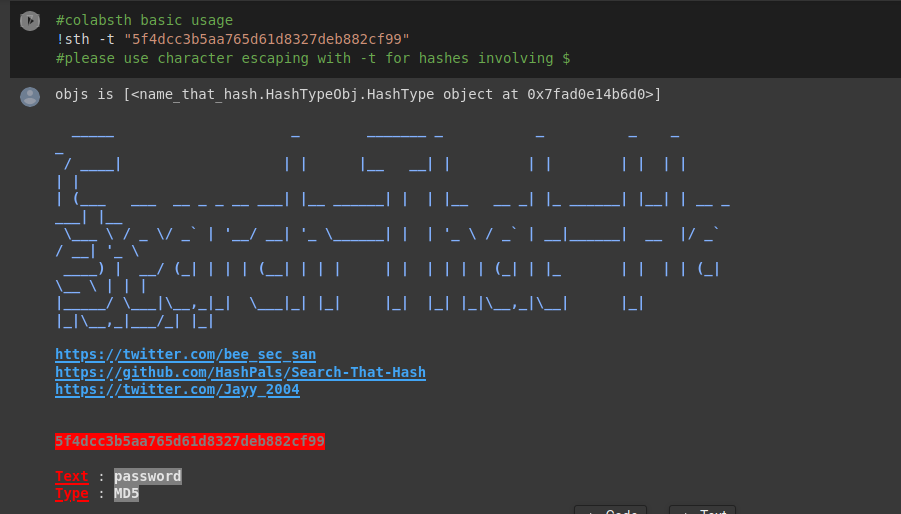
- `!sth -t "5f4dcc3b5aa765d61d8327deb882cf99"`
- 使用带 **-f** 的离线模式,请确保将哈希文件以 **.txt** 格式上传到你的 Google Drive 的 **sth 目录** 中
- `!sth -f /root/.sth/hash.txt -o -w /root/.sth/rockyou.txt`
- 使用带 **-t** 的离线模式,对于包含 **$** 的哈希值,请务必使用 **字符转义**
- `!sth -t "\$6\$GQXVvW4EuM\$ehD6jWiMsfNorxy5SINsgdlxmAEl3.yif0/c3NqzGLa0P.S7KRDYjycw5bnYkF5ZtB8wQy8KnskuWQS3Yr1wQ0" -o -w /root/.sth/rockyou.txt`
## 🤝 贡献
欢迎随时贡献代码,我们始终欢迎 Issue 和 Pull Request。
## 🙏 致谢
感谢 [Bee](https://twitter.com/bee_sec_san) 和 [Jayy](https://github.com/Jayy001) 开发出如此出色的工具 [Search-That-Hash](https://github.com/HashPals/Search-That-Hash),并给我机会通过 [Google Colab](https://colab.research.google.com/) 来加速它的离线模式。
查看他们其他出色的 infosec 工具 [Name-That-Hash](https://github.com/HashPals/Name-That-Hash) 和 [Ciphey](https://github.com/ciphey/ciphey)。
标签:Google Colab, hashcat, NoSQL, 逆向工具