fastfetch-cli/fastfetch
GitHub: fastfetch-cli/fastfetch
一款用 C 语言编写的跨平台高性能系统信息展示工具,是 neofetch 的积极维护替代方案。
Stars: 23229 | Forks: 798
# Fastfetch
[](https://github.com/fastfetch-cli/fastfetch/actions)
[](https://github.com/fastfetch-cli/fastfetch/blob/dev/LICENSE)
[](https://github.com/fastfetch-cli/fastfetch/graphs/contributors)
[](https://github.com/fastfetch-cli/fastfetch/blob/dev/CMakeLists.txt#L5)
[](https://github.com/fastfetch-cli/fastfetch/commits)
[](https://formulae.brew.sh/formula/fastfetch#default)
[](https://github.com/fastfetch-cli/fastfetch/releases)
[](https://github.com/fastfetch-cli/fastfetch/releases)
[](https://repology.org/project/fastfetch/versions)
[](https://repology.org/project/fastfetch/versions)
[](https://deepwiki.com/fastfetch-cli/fastfetch)
[](README-cn.md)
Fastfetch 是一个类似于 [neofetch](https://github.com/dylanaraps/neofetch) 的工具,用于获取系统信息并以美观的方式显示。它主要使用 C 语言编写,专注于性能和可定制性。目前支持 Linux, macOS, Windows 8.1+, Android, FreeBSD, OpenBSD, NetBSD, DragonFly, Haiku 和 SunOS (illumos, Solaris)。
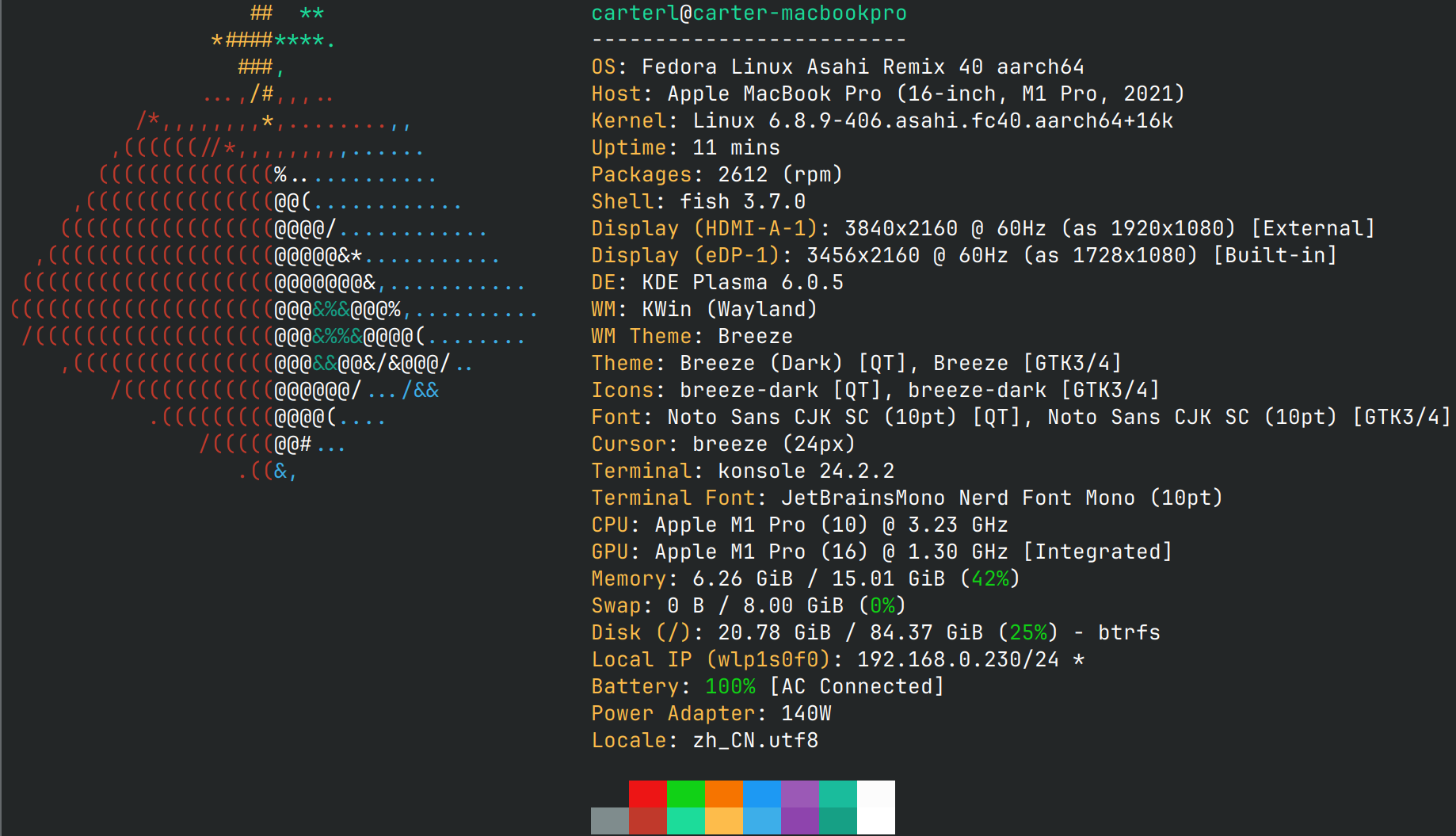

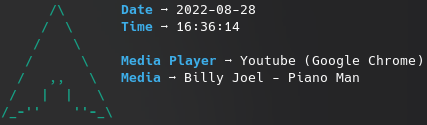
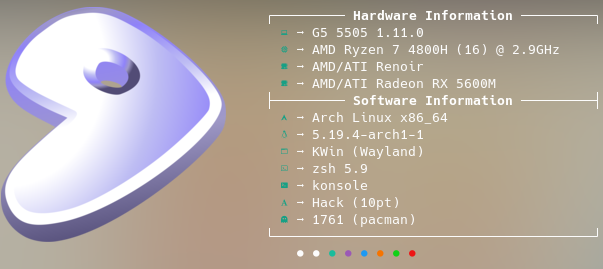
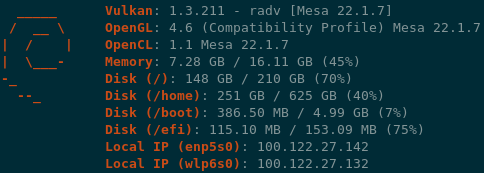
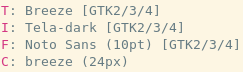 相关的配置文件示例位于[这里](https://github.com/fastfetch-cli/fastfetch/tree/dev/presets/examples)。
还有[不同平台的截图](https://github.com/fastfetch-cli/fastfetch/wiki)。
## 安装
### Linux
某些发行版打包的 fastfetch 版本较旧。旧版本不接受支持,因此请始终尝试使用最新版本。
相关的配置文件示例位于[这里](https://github.com/fastfetch-cli/fastfetch/tree/dev/presets/examples)。
还有[不同平台的截图](https://github.com/fastfetch-cli/fastfetch/wiki)。
## 安装
### Linux
某些发行版打包的 fastfetch 版本较旧。旧版本不接受支持,因此请始终尝试使用最新版本。
 * Ubuntu: [`ppa:zhangsongcui3371/fastfetch`](https://launchpad.net/~zhangsongcui3371/+archive/ubuntu/fastfetch) (Ubuntu 22.04 或更新版本;最新版本)
* Debian / Ubuntu: `apt install fastfetch` (Debian 13 或更新版本;Ubuntu 25.04 或更新版本)
* Debian / Ubuntu: 从 [Github release page](https://github.com/fastfetch-cli/fastfetch/releases/latest) 下载 `fastfetch-linux-<合适的架构>.deb` 并双击它 (适用于 Ubuntu 20.04 或更新版本以及 Debian 11 或更新版本)。
* Arch Linux: `pacman -S fastfetch`
* Fedora: `dnf install fastfetch`
* Gentoo: `emerge --ask app-misc/fastfetch`
* Alpine: `apk add --upgrade fastfetch`
* NixOS: `nix-shell -p fastfetch`
* openSUSE: `zypper install fastfetch`
* ALT Linux: `apt-get install fastfetch`
* Exherbo: `cave resolve --execute app-misc/fastfetch`
* Solus: `eopkg install fastfetch`
* Slackware: `sbopkg -i fastfetch`
* Void Linux: `xbps-install fastfetch`
* Venom Linux: `scratch install fastfetch`
您可能需要 `sudo`、`doas` 或 `sup` 来运行这些命令。
如果您的发行版没有打包 fastfetch 或打包版本过旧,[linuxbrew](https://brew.sh/) 是一个很好的替代方案:`brew install fastfetch`
### macOS
* [Homebrew](https://formulae.brew.sh/formula/fastfetch#default): `brew install fastfetch`
* [MacPorts](https://ports.macports.org/port/fastfetch/): `sudo port install fastfetch`
### Windows
* [scoop](https://scoop.sh/#/apps?q=fastfetch): `scoop install fastfetch`
* [Chocolatey](https://community.chocolatey.org/packages/fastfetch): `choco install fastfetch`
* [winget](https://github.com/microsoft/winget-pkgs/tree/master/manifests/f/Fastfetch-cli/Fastfetch): `winget install fastfetch`
* [MSYS2 MinGW](https://packages.msys2.org/base/mingw-w64-fastfetch): `pacman -S mingw-w64-
* Ubuntu: [`ppa:zhangsongcui3371/fastfetch`](https://launchpad.net/~zhangsongcui3371/+archive/ubuntu/fastfetch) (Ubuntu 22.04 或更新版本;最新版本)
* Debian / Ubuntu: `apt install fastfetch` (Debian 13 或更新版本;Ubuntu 25.04 或更新版本)
* Debian / Ubuntu: 从 [Github release page](https://github.com/fastfetch-cli/fastfetch/releases/latest) 下载 `fastfetch-linux-<合适的架构>.deb` 并双击它 (适用于 Ubuntu 20.04 或更新版本以及 Debian 11 或更新版本)。
* Arch Linux: `pacman -S fastfetch`
* Fedora: `dnf install fastfetch`
* Gentoo: `emerge --ask app-misc/fastfetch`
* Alpine: `apk add --upgrade fastfetch`
* NixOS: `nix-shell -p fastfetch`
* openSUSE: `zypper install fastfetch`
* ALT Linux: `apt-get install fastfetch`
* Exherbo: `cave resolve --execute app-misc/fastfetch`
* Solus: `eopkg install fastfetch`
* Slackware: `sbopkg -i fastfetch`
* Void Linux: `xbps-install fastfetch`
* Venom Linux: `scratch install fastfetch`
您可能需要 `sudo`、`doas` 或 `sup` 来运行这些命令。
如果您的发行版没有打包 fastfetch 或打包版本过旧,[linuxbrew](https://brew.sh/) 是一个很好的替代方案:`brew install fastfetch`
### macOS
* [Homebrew](https://formulae.brew.sh/formula/fastfetch#default): `brew install fastfetch`
* [MacPorts](https://ports.macports.org/port/fastfetch/): `sudo port install fastfetch`
### Windows
* [scoop](https://scoop.sh/#/apps?q=fastfetch): `scoop install fastfetch`
* [Chocolatey](https://community.chocolatey.org/packages/fastfetch): `choco install fastfetch`
* [winget](https://github.com/microsoft/winget-pkgs/tree/master/manifests/f/Fastfetch-cli/Fastfetch): `winget install fastfetch`
* [MSYS2 MinGW](https://packages.msys2.org/base/mingw-w64-fastfetch): `pacman -S mingw-w64---fastfetch`
您也可以直接从 [GitHub releases 页面](https://github.com/fastfetch-cli/fastfetch/releases/latest) 下载压缩包形式的程序。
### BSD 系统
* FreeBSD: `pkg install fastfetch`
* NetBSD: `pkgin in fastfetch`
* OpenBSD: `pkg_add fastfetch` (仅限 Snapshots)
* DragonFly BSD: `pkg install fastfetch` (仅限 Snapshots)
### Android (Termux)
* `pkg install fastfetch`
### 每日构建版 (Nightly)
## 从源代码构建
参见 Wiki: https://github.com/fastfetch-cli/fastfetch/wiki/Building
## 用法
* 使用默认配置运行:`fastfetch`
* 运行[所有支持的模块](https://github.com/fastfetch-cli/fastfetch/wiki/Support+Status#available-modules)以查找您感兴趣的内容:`fastfetch -c all.jsonc`
* 查看 fastfetch 检测到的所有数据:`fastfetch -s [:][:] --format json`
* 显示帮助信息:`fastfetch --help`
* 生成最小配置文件:`fastfetch [-s [:]] --gen-config []`
* 使用:`--gen-config-full` 生成包含所有可选选项的完整配置文件
## 自定义
Fastfetch 使用 JSONC (带注释的 JSON) 进行配置。[详情请参阅 Wiki](https://github.com/fastfetch-cli/fastfetch/wiki/Configuration)。[`presets`](presets) 目录中有一些预制配置文件,包括上面截图所用的那些。您可以使用 `-c ` 加载它们。这些文件可用作配置语法的示例。
Logo 也可以进行深度自定义;有关更多信息,请参阅 [logo 文档](https://github.com/fastfetch-cli/fastfetch/wiki/Logo-options)。
### 警告
Fastfetch 支持一个 `Command` 模块,可以运行任意 shell 命令。如果您从不受信任的来源复制配置文件,它可能包含恶意命令,会损害您的系统或危及您的隐私。请始终在使用前检查配置文件。
## 常见问题 (FAQ)
### 问:Neofetch 已经够用了。为什么我需要 fastfetch?
1. Fastfetch 处于积极维护状态。
2. Fastfetch 更快,正如其名。
3. Fastfetch 拥有更多的功能,尽管默认情况下只启用了少数模块;使用 `fastfetch -c all` 来发现您想要的内容。
4. Fastfetch 可定制性更强。您可以在 Wiki 中找到更多信息:。
5. Fastfetch 更加完善。例如,neofetch 在 Memory 模块中打印 `555 MiB`,在 Disk 模块中打印 `23 G`,而 fastfetch 分别打印 `555.00 MiB` 和 `22.97 GiB`。
6. Fastfetch 更加准确。例如,[neofetch 从未真正支持 Wayland 协议](https://github.com/dylanaraps/neofetch/pull/2395)。
### 问:Fastfetch 显示了我的本地 IP 地址。这会泄露我的隐私吗?
本地 IP 地址 (10.x.x.x, 172.x.x.x, 192.168.x.x) 与隐私无关。它只有在您处于同一网络中时才有意义,例如,如果您连接到同一个 Wi-Fi 网络。
实际上,`Local IP` 模块对我个人来说是最有用的模块。我 (@CarterLi) 安装了几个 VM 来测试 fastfetch,经常需要 SSH 进去。由于 shell 启动时会运行 fastfetch,我永远不需要手动输入 `ip addr`。
如果您真的不喜欢它,可以在 `config.jsonc` 中禁用 `Local IP` 模块。
### 问:配置文件在哪里?我找不到。
Fastfetch 不会自动生成配置文件。您可以使用 `fastfetch --gen-config` 生成一个。配置文件默认保存在 `~/.config/fastfetch/config.jsonc` 中。详见 [Wiki](https://github.com/fastfetch-cli/fastfetch/wiki/Configuration)。
### 问:配置太复杂了。文档在哪里?
Fastfetch 使用 JSON (带注释) 进行配置。我建议使用支持 JSON schema 的 IDE (如 VSCode) 进行编辑。
或者,您可以参考 [`presets` 目录](https://github.com/fastfetch-cli/fastfetch/tree/dev/presets) 中的预设。
编辑配置的**正确**方式:
这是一个[将大小前缀从 MiB / GiB 更改为 MB / GB](https://github.com/fastfetch-cli/fastfetch/discussions/1014) 的示例。使用的编辑器:[helix](https://github.com/helix-editor/helix)
[](https://asciinema.org/a/1uF6sTPGKrHKI1MVaFcikINSQ)
### 问:我要看文档!
[文档在这里](https://github.com/fastfetch-cli/fastfetch/wiki/Json-Schema)。它是从 [JSON schema](https://github.com/fastfetch-cli/fastfetch/blob/dev/doc/json_schema.json) 生成的,但您可能会发现它不是很用户友好。
### 问:如何自定义模块输出?
Fastfetch 使用 `format` 生成输出。例如,要使 `GPU` 模块仅显示 GPU 名称(其他信息不显示),您可以使用:
```
{
"modules": [
{
"type": "gpu",
"format": "{name}" // See `fastfetch -h gpu-format` for details
}
]
}
```
...这等同于 `fastfetch -s gpu --gpu-format '{name}'`
基本用法请参见 `fastfetch -h format`。特定模块的格式化请参见 `fastfetch -h -format`
### 问:我有自己的 ASCII 艺术 / 图像文件。如何在 fastfetch 中显示它?
尝试 `fastfetch -l /path/to/logo`。详情请参阅 [logo 文档](https://github.com/fastfetch-cli/fastfetch/wiki/Logo-options)。
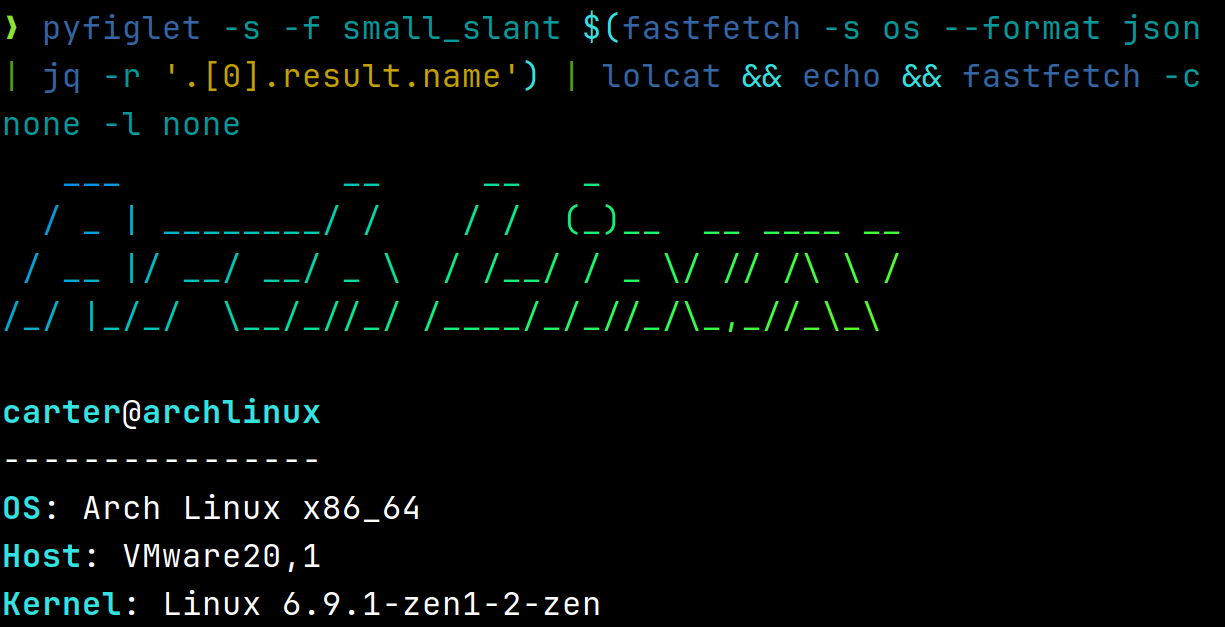
如果您只想以 [FIGlet 文本](https://github.com/pwaller/pyfiglet) 显示发行版名称:
```
# 先安装 pyfiglet 和 jq
pyfiglet -s -f small_slant $(fastfetch -s os --format json | jq -r '.[0].result.name') && fastfetch -l none
```
### 问:我的图像 logo 显示异常。如何修复?
参见故障排除部分:
### 问:Fastfetch 在 shell 启动时以黑白方式运行。为什么?
此问题通常发生在将 fastfetch 与 `p10k` 一起使用时。fastfetch 与 p10k instant prompt 之间存在已知的不兼容性。
p10k 文档明确指出,在 `p10k-instant-prompt` 初始化后,您不应向 stdout 打印任何内容。您应该将 `fastfetch` 放在 `p10k-instant-prompt` 初始化之前(推荐)。
您始终可以使用 `fastfetch --pipe false` 强制 fastfetch 以彩色模式运行。
### 问:为什么 fastfetch 和 neofetch 显示的内存使用结果不同?
参见 [#1096](https://github.com/fastfetch-cli/fastfetch/issues/1096)。
### 问:Fastfetch 显示的 dpkg 软件包数量比 neofetch 少。这是一个 bug 吗?
Neofetch 错误地计算了 `rc` 软件包(已被删除但仍有配置文件残留的软件包)。参见 bug:https://github.com/dylanaraps/neofetch/issues/2278
### 问:我使用 Debian / Ubuntu / Debian 衍生发行版。我的 GPU 被检测为 `XXXX Device XXXX (VGA compatible)`。这是一个 bug 吗?
尝试升级 `pci.ids`:下载 并覆盖文件 `/usr/share/hwdata/pci.ids`。对于 AMD GPU,您还应该升级 `amdgpu.ids`:下载 并覆盖文件 `/usr/share/libdrm/amdgpu.ids`
或者,您可以尝试使用 `fastfetch --gpu-driver-specific`,这将使 fastfetch 在支持的情况下尝试向驱动程序询问 GPU 名称。
### 问:以 root 身份运行 fastfetch 时出现错误 `Authorization required, but no authorization protocol specified`
尝试 `export XAUTHORITY=$HOME/.Xauthority`
### 问:Fastfetch 无法检测到我那很棒的第三方 macOS 窗口管理器!
尝试 `fastfetch --wm-detect-plugin`。另见 [#984](https://github.com/fastfetch-cli/fastfetch/issues/984)
### 问:如何更改 ASCII logo 的颜色?
尝试 `fastfetch --logo-color-[1-9] `,其中 `[1-9]` 是颜色占位符的索引。
例如:`fastfetch --logo-color-1 red --logo-color-2 green`。
在 JSONC 中,您可以使用:
```
{
"logo": {
"color": {
"1": "red",
"2": "green"
}
}
}
```
### 问:如何隐藏键 (Key)?
将键设置为空格。
```
{
"key": " "
}
```
### 问:如何在 Windows 上显示图像?
截至 2025 年 4 月:
#### mintty 和 Wezterm
mintty (由 Bash on Windows 和 MSYS2 使用) 和 Wezterm (仅限 nightly 构建) 在 Windows 上支持 iTerm 图像协议。
在 `config.jsonc` 中:
```
{
"logo": {
"type": "iterm",
"source": "C:/path/to/image.png",
"width":
}
}
```
#### Windows Terminal
Windows Terminal 仅支持 sixel 图像协议。
* 如果您通过 MSYS2 安装了 fastfetch:
1. 安装 imagemagick:`pacman -S mingw-w64--x86_64-imagemagick`
2. 在 `config.jsonc` 中:
```
{
"logo": {
"type": "sixel", // DO NOT USE "auto"
"source": "C:/path/to/image.png", // Do NOT use `~` as fastfetch is a native Windows program and doesn't apply cygwin path conversion
"width": , // Optional
"height": // Optional
}
}
```
* 如果您通过 scoop 安装了 fastfetch 或直接从 GitHub Releases 页面下载了二进制文件:
. 使用[任何在线图像转换服务](https://www.google.com/search?q=convert+image+to+sixel)手动将您的图像转换为 sixel 格式
2. 在 `config.jsonc` 中:
```
{
"logo": {
"type": "raw", // DO NOT USE "auto"
"source": "C:/path/to/image.sixel",
"width": , // Required
"height": // Required
}
}
```
### 问:我想要功能 A / B / C。Fastfetch 会支持吗?
Fastfetch 是一个系统信息工具。我们只接受硬件或系统级软件的功能请求。对于大多数个人用途,我建议使用 `Command` 模块来实现自定义功能,该模块可用于获取自定义 shell 脚本的输出:
```
// This module shows the default editor
{
"modules": [
{
"type": "command",
"text": "$EDITOR --version | head -1",
"key": "Editor"
}
]
}
```
否则,请在 [GitHub Issues](https://github.com/fastfetch-cli/fastfetch/issues) 中开启一个功能请求。
### 问:我有问题。哪里可以获得帮助?
* 对于使用问题,请在 [GitHub Discussions](https://github.com/fastfetch-cli/fastfetch/discussions) 中发起讨论。
* 对于可能的 bug,请在 [GitHub Issues](https://github.com/fastfetch-cli/fastfetch/issues) 中提交 issue。务必仔细填写 bug 报告模板,以帮助开发者进行调查。
## 捐赠
如果您觉得 Fastfetch 有用,请考虑捐赠。
* 现任维护者:[@CarterLi](https://paypal.me/zhangsongcui)
* 原作者:[@LinusDierheimer](https://github.com/sponsors/LinusDierheimer)
## 代码签名
* 免费代码签名由 [SignPath.io](https://about.signpath.io/) 提供,证书由 [SignPath Foundation](https://signpath.org/) 提供
* 除非用户或安装/操作人员明确要求,否则本程序不会向其他网络系统传输任何信息
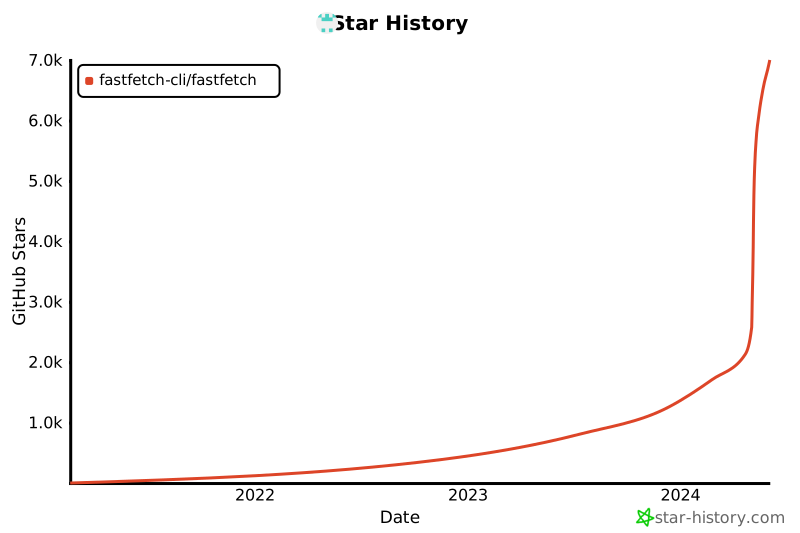
## Star 历史
给我们一个 star 以表示您的支持!
相关的配置文件示例位于[这里](https://github.com/fastfetch-cli/fastfetch/tree/dev/presets/examples)。
还有[不同平台的截图](https://github.com/fastfetch-cli/fastfetch/wiki)。
## 安装
### Linux
某些发行版打包的 fastfetch 版本较旧。旧版本不接受支持,因此请始终尝试使用最新版本。
* Ubuntu: [`ppa:zhangsongcui3371/fastfetch`](https://launchpad.net/~zhangsongcui3371/+archive/ubuntu/fastfetch) (Ubuntu 22.04 或更新版本;最新版本)
* Debian / Ubuntu: `apt install fastfetch` (Debian 13 或更新版本;Ubuntu 25.04 或更新版本)
* Debian / Ubuntu: 从 [Github release page](https://github.com/fastfetch-cli/fastfetch/releases/latest) 下载 `fastfetch-linux-<合适的架构>.deb` 并双击它 (适用于 Ubuntu 20.04 或更新版本以及 Debian 11 或更新版本)。
* Arch Linux: `pacman -S fastfetch`
* Fedora: `dnf install fastfetch`
* Gentoo: `emerge --ask app-misc/fastfetch`
* Alpine: `apk add --upgrade fastfetch`
* NixOS: `nix-shell -p fastfetch`
* openSUSE: `zypper install fastfetch`
* ALT Linux: `apt-get install fastfetch`
* Exherbo: `cave resolve --execute app-misc/fastfetch`
* Solus: `eopkg install fastfetch`
* Slackware: `sbopkg -i fastfetch`
* Void Linux: `xbps-install fastfetch`
* Venom Linux: `scratch install fastfetch`
您可能需要 `sudo`、`doas` 或 `sup` 来运行这些命令。
如果您的发行版没有打包 fastfetch 或打包版本过旧,[linuxbrew](https://brew.sh/) 是一个很好的替代方案:`brew install fastfetch`
### macOS
* [Homebrew](https://formulae.brew.sh/formula/fastfetch#default): `brew install fastfetch`
* [MacPorts](https://ports.macports.org/port/fastfetch/): `sudo port install fastfetch`
### Windows
* [scoop](https://scoop.sh/#/apps?q=fastfetch): `scoop install fastfetch`
* [Chocolatey](https://community.chocolatey.org/packages/fastfetch): `choco install fastfetch`
* [winget](https://github.com/microsoft/winget-pkgs/tree/master/manifests/f/Fastfetch-cli/Fastfetch): `winget install fastfetch`
* [MSYS2 MinGW](https://packages.msys2.org/base/mingw-w64-fastfetch): `pacman -S mingw-w64-标签:Awesome, Bash脚本, CLI, Fastfetch, Linux工具, Mr. Robot, Neofetch替代, Shell, SOC Prime, WiFi技术, 后渗透, 客户端加密, 开发工具, 性能优化, 无线安全, 桌面美化, 检测绕过, 流量嗅探, 硬件检测, 端口探测, 系统信息, 系统管理, 系统诊断, 终端, 配置打印