six2dez/reconftw
GitHub: six2dez/reconftw
一款整合了多种侦察工具的自动化框架,用于对目标域名进行从资产发现到漏洞扫描的全流程安全测试。
Stars: 7703 | Forks: 1185

reconFTW



















**reconFTW** 是一款功能强大的自动化侦察工具,专为安全研究人员和渗透测试人员设计。它通过执行子域名枚举、漏洞扫描、OSINT 等操作,简化了针对目标收集情报的过程。凭借模块化设计、丰富的配置选项以及对通过 AX Framework 进行分布式扫描的支持,reconFTW 旨在高效地交付全面的扫描结果。
reconFTW 利用了广泛的技术,包括被动和主动子域名发现、Web 漏洞检查(例如 XSS、SSRF、SQLi)、OSINT、目录模糊测试、端口扫描和截图。它集成了尖端的工具和 API,以最大化覆盖范围和准确性,确保您在侦察工作中保持领先。
**关键特性:**
- 全面的子域名枚举(被动、暴力破解、排列组合、证书透明度等)
- 针对 XSS、SSRF、SQLi、LFI、SSTI 等的漏洞扫描
- 针对电子邮件、元数据、API 泄露和第三方配置错误的 OSINT
- 利用 AX Framework 进行分布式扫描,实现更快的执行速度
- 可通过详细的配置文件自定义工作流
- 集成 Faraday 进行报告和可视化
- 支持 Docker、Terraform 和 Ansible 部署
**免责声明:** 未经事先同意使用 reconFTW 攻击目标是非法的。用户有责任遵守所有适用法律。开发者不对滥用或本工具造成的损害承担任何责任。请负责任地使用。
## 📔 目录
- [📔 目录](#-table-of-contents)
- [✨ 特性](#-features)
- [OSINT](#osint)
- [子域名](#subdomains)
- [主机](#hosts)
- [Web 分析](#web-analysis)
- [漏洞检查](#vulnerability-checks)
- [额外功能](#extras)
- [🏗️ 架构](#️-architecture)
- [💿 安装](#-installation)
- [本地安装 (PC/VPS/VM)](#local-installation-pcvpsvm)
- [Docker](#docker)
- [Terraform + Ansible](#terraform--ansible)
- [⚙️ 配置](#️-configuration)
- [🚀 用法](#-usage)
- [目标选项](#target-options)
- [模式选项](#mode-options)
- [通用选项](#general-options)
- [用法示例](#example-usage)
- [☁️ Ax Framework 支持 (原 Axiom)](#️-ax-framework-support-previously-axiom)
- [💻 Faraday 支持](#-faraday-support)
- [🧠 AI 集成](#-ai-integration)
- [🗂️ 数据管理](#️-data-management)
- [Makefile](#makefile)
- [手动操作](#manual)
- [🧪 测试](#-testing)
- [思维导图/工作流](#mindmapworkflow)
- [示例视频](#sample-video)
- [🤝 如何贡献](#-how-to-contribute)
- [🔒 安全](#-security)
- [❓ 需要帮助?](#-need-help)
- [💖 支持本项目](#-support-this-project)
- [🙏 致谢](#-thanks)
- [📝 更新日志](#-changelog)
- [🛠️ 开发](#️-development)
- [📜 许可证](#-license)
- [⭐ Star 历史](#-star-history)
## ✨ 特性
reconFTW 功能丰富,旨在使侦察工作彻底且高效。以下是其功能的详细分类,已更新以反映脚本和配置中的最新功能。
### OSINT
- **域名信息**:用于域名注册详情的 WHOIS 查询 ([whois](https://github.com/rfc1036/whois))。
- **邮箱和密码泄露**:搜索泄露的邮箱和凭据 ([emailfinder](https://github.com/Josue87/EmailFinder) 和 [LeakSearch](https://github.com/JoelGMSec/LeakSearch))。
- **Microsoft 365/Azure 映射**:识别 Microsoft 365 和 Azure 租户 ([msftrecon](https://github.com/Arcanum-Sec/msftrecon))。
- **元数据提取**:从索引的 Office 文档中提取元数据 ([metagoofil](https://github.com/opsdisk/metagoofil))。
- **API 泄露**:检测公共来源中暴露的 API ([porch-pirate](https://github.com/MandConsultingGroup/porch-pirate), [SwaggerSpy](https://github.com/UndeadSec/SwaggerSpy) 和 [postleaksNg](https://github.com/six2dez/postleaksNG))。
- **Google Dorking**:自动执行 Google dork 查询以获取敏感信息 ([dorks_hunter](https://github.com/six2dez/dorks_hunter) 和 [xnldorker](https://github.com/xnl-h4ck3r/xnldorker))。
- **GitHub 分析**:使用可选引擎扫描 GitHub 组织的仓库和机密 ([enumerepo](https://github.com/trickest/enumerepo), [trufflehog](https://github.com/trufflesecurity/trufflehog), [gitleaks](https://github.com/gitleaks/gitleaks), [titus](https://github.com/praetorian-inc/titus), [noseyparker](https://github.com/praetorian-inc/noseyparker))。
- **GitHub Actions 审计 (可选)**:使用 [gato](https://github.com/praetorian-inc/gato) 审计工作流工件和 CI/CD 暴露情况。
- **第三方配置错误**:识别配置错误的第三方服务 ([misconfig-mapper](https://github.com/intigriti/misconfig-mapper))。
- **邮件卫生**:检查 SPF/DMARC 配置以标记欺骗或投递问题。
- **云存储枚举**:调查主要提供商的 Bucket 暴露情况 ([cloud_enum](https://github.com/initstring/cloud_enum))。
- **可欺骗域名**:检查易受欺骗的域名 ([spoofcheck](https://github.com/MattKeeley/Spoofy))。
### 子域名
- **被动枚举**:使用 API 和公共来源进行子域名发现 ([subfinder](https://github.com/projectdiscovery/subfinder) 和 [github-subdomains](https://github.com/gwen001/github-subdomains))。
- **证书透明度**:查询证书透明度日志 ([crt](https://github.com/cemulus/crt))。
- **NOERROR 发现**:识别具有 DNS NOERROR 响应的子域名 ([dnsx](https://github.com/projectdiscovery/dnsx),更多信息请参阅 [此处](https://www.securesystems.de/blog/enhancing-subdomain-enumeration-ents-and-noerror/))。
- **暴力破解**:使用可自定义字典执行 DNS 暴力破解 ([puredns](https://github.com/d3mondev/puredns) 和自定义字典)。
- **排列组合**:使用 AI、正则表达式和工具生成子域名排列 ([Gotator](https://github.com/Josue87/gotator) 作为单一排列引擎,加上 [regulator](https://github.com/cramppet/regulator) 和 [subwiz](https://github.com/hadriansecurity/subwiz))。
- **网页抓取**:从被动 URL 来源和实时 Web 元数据中提取子域名 ([urlfinder](https://github.com/projectdiscovery/urlfinder), [waymore](https://github.com/xnl-h4ck3r/waymore), [httpx](https://github.com/projectdiscovery/httpx), [csprecon](https://github.com/edoardottt/csprecon))。
- **DNS 记录**:解析子域名的 DNS 记录 ([dnsx](https://github.com/projectdiscovery/dnsx))。
- **Google Analytics**:通过 Analytics ID 识别子域名 ([AnalyticsRelationships](https://github.com/Josue87/AnalyticsRelationships))。
- **TLS 握手**:通过 TLS 端口发现子域名 ([tlsx](https://github.com/projectdiscovery/tlsx))。
- **递归搜索**:结合执行递归被动或暴力破解枚举 ([dsieve](https://github.com/trickest/dsieve))。
- **子域名接管**:检测易受攻击的子域名 ([nuclei](https://github.com/projectdiscovery/nuclei) 和 [dnstake](https://github.com/pwnesia/dnstake))。
- **DNS 区域传送**:检查配置错误的 DNS 区域传送 ([dig](https://linux.die.net/man/1/dig))。
- **云 Bucket**:识别配置错误的云 Bucket 和暴露的存储资产 ([S3Scanner](https://github.com/sa7mon/S3Scanner) 和 [cloud_enum](https://github.com/initstring/cloud_enum))。
- **云覆盖说明**:在用 cloud_enum 替换 CloudHunter 后,云 Bucket 检查不再包括 Alibaba OSS 覆盖范围。
- **云输出迁移**:旧的 `cloudhunter_*` Bucket 工件已被移除;请改用 `subdomains/cloud_enum_buckets_trufflehog.txt`。
- **反向 IP 查询**:通过 IP 范围发现子域名 ([hakip2host](https://github.com/hakluke/hakip2host))。
### 主机
- **IP 信息**:检索地理位置和 WHOIS 数据 ([ipinfo](https://www.ipinfo.io/))。
- **CDN 检测**:识别位于 CDN 后的 IP ([cdncheck](https://github.com/projectdiscovery/cdncheck))。
- **WAF 检测**:检测 Web 应用防火墙 ([wafw00f](https://github.com/EnableSecurity/wafw00f))。
- **端口扫描**:使用 [nmap](https://github.com/nmap/nmap) 进行主动扫描(可选前置 [naabu](https://github.com/projectdiscovery/naabu))以及使用 [smap](https://github.com/s0md3v/Smap) 进行被动扫描。
- **服务指纹识别**:使用 [fingerprintx](https://github.com/praetorian-inc/fingerprintx) 对发现的主机:端口对上的暴露服务进行指纹识别。
- **服务漏洞 (可选)**:深度 portscan 配置文件可以通过 [vulners](https://github.com/vulnersCom/nmap-vulners) 丰富 CVE 匹配结果。
- **密码喷洒**:在选定的引擎上尝试对识别的服务进行密码喷洒 ([brutespray](https://github.com/x90skysn3k/brutespray) 或 [brutus](https://github.com/praetorian-inc/brutus))。
- **地理位置**:将 IP 地址映射到地理位置 ([ipinfo](https://www.ipinfo.io/))。
- **IPv6 发现**:当启用 `IPV6_SCAN` 时,可选地枚举和扫描发现的 IPv6 目标。
### Web 分析
- **Web 探测**:检测标准和非标准端口上的实时 Web 服务器 (([httpx](https://github.com/projectdiscovery/httpx)))。
- **截图**:捕获网页截图 ([nuclei](https://github.com/projectdiscovery/nuclei))。
- **虚拟主机模糊测试**:通过模糊测试 HTTP 头识别虚拟主机 ([VhostFinder](https://github.com/wdahlenburg/VhostFinder))。
- **CMS 检测**:识别内容管理系统 ([CMSeeK](https://github.com/Tuhinshubhra/CMSeeK))。
- **URL 提取**:被动和主动收集 URL ([urlfinder](https://github.com/projectdiscovery/urlfinder), [waymore](https://github.com/xnl-h4ck3r/waymore), [katana](https://github.com/projectdiscovery/katana), [github-endpoints](https://gist.github.com/six2dez/d1d516b606557526e9a78d7dd49cacd3) 和 [JSA](https://github.com/w9w/JSA))。
- **URL 模式分析**:使用模式对 URL 进行分类 ([urless](https://github.com/xnl-h4ck3r/urless), [gf](https://github.com/tomnomnom/gf) 和 [gf-patterns](https://github.com/1ndianl33t/Gf-Patterns))。
- **Favicon 技术侦察**:从 favicon 哈希识别技术 ([favirecon](https://github.com/edoardottt/favirecon))。
- **JavaScript 分析**:从 JS 文件中提取机密和端点 ([subjs](https://github.com/lc/subjs), [JSA](https://github.com/w9w/JSA), [xnLinkFinder](https://github.com/xnl-h4ck3r/xnLinkFinder), [getjswords](https://github.com/m4ll0k/BBTz), [mantra](https://github.com/MrEmpy/mantra), [jsluice](https://github.com/BishopFox/jsluice))。
- **Source Map 提取**:从 JavaScript Source Map 中检索敏感数据 ([sourcemapper](https://github.com/denandz/sourcemapper))。
- **GraphQL 检测**:使用 nuclei 发现 GraphQL 端点,并可选择执行深度内省 ([GQLSpection](https://github.com/doyensec/GQLSpection))。
- **参数发现**:暴力破解端点上的隐藏参数 ([arjun](https://github.com/s0md3v/Arjun))。
- **WebSocket 审计**:验证 `ws://` 和 `wss://` 端点上的升级握手和 Origin 处理。
- **gRPC 反射**:探测常见 gRPC 端口以查找暴露的服务反射 ([grpcurl](https://github.com/fullstorydev/grpcurl))。
- **LLM 服务指纹识别 (可选)**:使用 [julius](https://github.com/praetorian-inc/julius) 探测发现的 Web/API 端点以查找暴露的 LLM 服务。
- **模糊测试**:执行目录和参数模糊测试 ([ffuf](https://github.com/ffuf/ffuf))。
- **文件扩展名排序**:按文件扩展名组织 URL。
- **字典生成**:为模糊测试创建自定义字典。
- **密码字典**:从实时内容生成密码字典 ([cewler](https://github.com/roys/cewler))。
- **IIS 短文件名扫描**:检测 IIS 短文件名漏洞 ([shortscan](https://github.com/bitquark/shortscan))。
### 漏洞检查
- **CVE**:检查 CVE 和常见漏洞 [nuclei](https://github.com/projectdiscovery/nuclei)
- **Nuclei DAST**:在收集的 URL 和 GF 候选上运行 `nuclei -dast` 模板以获得额外的 DAST 覆盖。
- **XSS**:测试跨站脚本漏洞 ([dalfox](https://github.com/hahwul/dalfox))。
- **SSL/TLS**:检查 SSL/TLS 配置错误 ([testssl](https://github.com/drwetter/testssl.sh))。
- **SSRF**:测试服务器端请求伪造 ([interactsh](https://github.com/projectdiscovery/interactsh),使用 [ffuf](https://github.com/ffuf/ffuf) 的参数值,以及可选的备用协议)。
- **CRLF**:检查 CRLF 注入漏洞 ([crlfuzz](https://github.com/dwisiswant0/crlfuzz))。
- **LFI**:通过模糊测试测试本地文件包含 ([ffuf](https://github.com/ffuf/ffuf))。
- **SSTI**:检测服务器端模板注入 ([TInjA](https://github.com/Hackmanit/TInjA))。
- **SQLi**:测试 SQL 注入 ([SQLMap](https://github.com/sqlmapproject/sqlmap) 和 [ghauri](https://github.com/r0oth3x49/ghauri))。
- **失效链接**:识别失效链接和可能易受接管的外部引用 ([second-order](https://github.com/mhmdiaa/second-order))。
- **命令注入**:测试命令注入漏洞 ([commix](https://github.com/commixproject/commix))。
- **HTTP 请求走私**:检查请求走私漏洞 ([smugglex](https://github.com/hahwul/smugglex))。
- **Web 缓存**:识别 Web 缓存漏洞 ([Web-Cache-Vulnerability-Scanner](https://github.com/Hackmanit/Web-Cache-Vulnerability-Scanner) 和 [toxicache](https://github.com/xhzeem/toxicache))。
- **4XX 绕过**:尝试绕过 4XX 响应 ([nomore403](https://github.com/devploit/nomore403))。
- **参数模糊测试**:对 URL 参数进行模糊测试以查找漏洞 ([nuclei](https://github.com/projectdiscovery/nuclei))。
### 额外功能
- **多线程**:优化性能 ([Interlace](https://github.com/codingo/Interlace))。
- **自定义解析器**:生成 DNS 解析器 ([dnsvalidator](https://github.com/vortexau/dnsvalidator))。
- **Docker 支持**:[DockerHub](https://hub.docker.com/r/six2dez/reconftw) 上的官方 Docker 镜像。
- **AWS 部署**:通过 Terraform 和 Ansible 部署。
- **IP/CIDR 支持**:扫描 IP 范围和 CIDR 块。
- **扫描恢复**:从最后完成的步骤恢复扫描。
- **自定义输出**:将结果保存到用户定义的目录。
- **Diff 模式**:在后续扫描中高亮显示新发现。
- **范围过滤**:支持范围内和范围外列表 ([inscope](https://github.com/tomnomnom/hacks/tree/master/inscope))。
- **通知**:通过 Slack、Discord 或 Telegram 发送警报 ([notify](https://github.com/projectdiscovery/notify))。
- **结果压缩**:压缩并发送结果。
- **Faraday 集成**:将结果导出到 [Faraday](https://github.com/infobyte/faraday) 进行报告。
- **AI 报告生成**:使用本地 AI 模型生成报告 ([reconftw_ai](https://github.com/six2dez/reconftw_ai))。
- **快速重扫模式**:当未发现新资产时自动跳过繁重的阶段 (`--quick-rescan` / `QUICK_RESCAN`)。
- **热点列表构建器**:根据新发现对风险最高的资产进行评分和高亮显示 (`hotlist.txt`)。
- **命令追踪**:开启 `SHOW_COMMANDS` 以将每个执行的命令记录到目标日志中以进行调试。
- **资产存储**:当启用 `ASSET_STORE` 时,将发现追加到 `assets.jsonl` 以供下游自动化使用。
- **综合报告**:扫描结束时自动生成 `report/report.json` 和 `report/index.html`。
- **ARM 支持**:兼容 Raspberry Pi 和 ARM 架构(包括 MacOS MX)。
- **健康检查**:通过 `--health-check` 进行内置系统健康检查(也被 Docker `HEALTHCHECK` 使用)。
- **增量模式**:仅扫描自上次运行以来的新发现 (`--incremental`)。
- **自适应速率限制**:在出现 429/503 错误时自动回退 (`--adaptive-rate`)。
- **结构化日志**:可选的 JSON 日志输出,用于高级分析 (`STRUCTURED_LOGGING`)。
- **输入清洗**:清洗所有用户输入以防止命令注入。
- **空跑模式**:预览将执行的内容而不运行命令 (`--dry-run`)。
- **并行模式**:并行运行独立函数以加快扫描速度 (`--parallel`,使用 `--no-parallel` 禁用)。
- **模块化架构**:代码库拆分为 8 个专注的模块,以提高可维护性。
- **机密管理**:环境变量、`secrets.cfg` 和 Docker 运行时机密(参见 [SECURITY.md](SECURITY.md))。
- **熔断器**:在多次失败后自动跳过工具以避免扫描挂起。
- **检查点系统**:从最后成功的阶段恢复中断的扫描。
- **macOS 原生支持**:完全兼容 macOS(BSD coreutils,Homebrew Bash 4+)。
## 🏗️ 架构
reconFTW 采用模块化架构。主入口点 (`reconftw.sh`) 处理参数解析,并从 `modules/` 目录加载 8 个专用模块。
### 目录布局
```
reconftw/
├── reconftw.sh # Entry point — arg parsing, module loading, dispatch
├── reconftw.cfg # Default configuration
├── install.sh # Installer
├── Makefile # Data management, lint, fmt, test targets
├── modules/
│ ├── core.sh # Lifecycle, logging, notifications, cleanup (1024 lines)
│ ├── modes.sh # Scan modes, argument parsing, help (902 lines)
│ ├── subdomains.sh # Subdomain enumeration (1938 lines)
│ ├── web.sh # Web analysis, fuzzing, JS checks (1712 lines)
│ ├── vulns.sh # Vulnerability scanning (926 lines)
│ ├── osint.sh # OSINT functions (500 lines)
│ ├── axiom.sh # Axiom/Ax fleet helpers (143 lines)
│ └── utils.sh # Utilities, sanitization, validation (508 lines)
├── tests/
│ ├── run_tests.sh # Test runner
│ ├── unit/ # bats-core unit tests
│ ├── integration/ # Integration tests
│ └── fixtures/ # Test data
├── Docker/
│ └── Dockerfile # Official Docker image
└── Terraform/ # AWS deployment
```
### 模块参考
| 模块 | 行数 | 用途 |
|--------|------:|---------|
| `core.sh` | 1024 | 生命周期管理、日志记录、通知、清理陷阱 |
| `modes.sh` | 902 | 扫描模式定义、参数解析、帮助输出 |
| `subdomains.sh` | 1938 | 所有子域名枚举函数 |
| `web.sh` | 1712 | Web 分析、模糊测试、JS 分析、CMS 检测 |
| `vulns.sh` | 926 | 漏洞扫描(XSS、SQLi、SSRF 等) |
| `osint.sh` | 500 | OSINT 函数(WHOIS、电子邮件、Dorks、元数据) |
| `utils.sh` | 508 | 共享实用程序、输入清洗、验证 |
| `axiom.sh` | 143 | Axiom/Ax 分布式集群管理 |
`--source-only` 标志允许加载 `reconftw.sh` 而不执行主逻辑,从而实现对单个函数的单元测试。
## 💿 安装
reconFTW 支持多种安装方法以适应不同的环境。确保您有足够的磁盘空间(建议至少 10 GB)和稳定的互联网连接。
### 快速开始
1. 克隆并安装
```
git clone https://github.com/six2dez/reconftw
cd reconftw
./install.sh --verbose
```
2. 运行扫描(完整 + 恢复)
```
./reconftw.sh -d example.com -r
```
3. 最小化运行(仅被动足迹)
```
./reconftw.sh -d example.com -p
```
### 本地安装 (PC/VPS/VM)
1. **先决条件**:
- **Golang**:最新版本(`install_golang` 在 `reconftw.cfg` 中默认启用)。
- **系统权限**:如果不以 root 身份运行,请配置 sudo 以避免提示:
sudo echo "${USERNAME} ALL=(ALL:ALL) NOPASSWD: ALL" | sudo tee -a /etc/sudoers.d/reconFTW
2. **步骤**:
git clone https://github.com/six2dez/reconftw
cd reconftw
./install.sh
./reconftw.sh -d target.com -r
3. **注意**:
- `install.sh` 脚本安装依赖项、工具并配置路径(`GOROOT`、`GOPATH`、`PATH`)。
- 如果 Golang 已配置,请在 `reconftw.cfg` 中设置 `install_golang=false`。
- 对于现有设置,运行 `./install.sh --tools` 以刷新 Go 二进制文件、pipx 包和仓库,而不涉及系统包。
- 查看 [安装指南](https://github.com/six2dez/reconftw/wiki/0.-Installation-Guide) 获取详细说明。
### Docker
1. **拉取镜像**:
docker pull six2dez/reconftw:main
2. **运行容器**:
docker run -it --rm \
-v "${PWD}/OutputFolder/:/reconftw/Recon/" \
six2dez/reconftw:main -d example.com -r
对于目标列表,将列表文件绑定挂载到容器中,并引用容器内的路径:
docker run -it --rm \
-v "${PWD}/domains.txt:/reconftw/domains.txt:ro" \
-v "${PWD}/OutputFolder/:/reconftw/Recon/" \
six2dez/reconftw:main -l /reconftw/domains.txt -r
3. **查看结果**:
- 结果保存在主机上的 `OutputFolder` 目录中(而不是容器内部)。
4. **自定义**:
- 修改 Docker 镜像或构建您自己的镜像;参见 [Docker 指南](https://github.com/six2dez/reconftw/wiki/4.-Docker)。
- 要在自定义构建中跳过 Axiom 工具,请传递 `--build-arg INSTALL_AXIOM=false`。
- 如果您使用通知,请在容器内的 `~/.config/notify/provider-config.yaml` 挂载您的 notify 配置。
5. **运行时机密**:
通过环境变量传递 API 密钥和机密 —— 切勿将它们烘焙到镜像中:
docker run -it --rm \
-e SHODAN_API_KEY="your-key" \
-e PDCP_API_KEY="your-projectdiscovery-key" \
-e COLLAB_SERVER="your-server" \
-e XSS_SERVER="your-server" \
-v "${PWD}/OutputFolder/:/reconftw/Recon/" \
six2dez/reconftw:main -d example.com -r
有关完整的机密管理指导,请参见 [SECURITY.md](SECURITY.md)。
6. **健康检查**:
Docker 镜像包含内置的 `HEALTHCHECK`,每 60 秒运行一次 `./reconftw.sh --health-check`。您也可以手动运行它:
docker exec
./reconftw.sh --health-check
### Terraform + Ansible
- 使用 Terraform 和 Ansible 在 AWS 上部署 reconFTW。
- 按照 [Terraform/README.md](Terraform/README.md) 中的指南进行设置说明。
## 🛠️ 故障排除
- macOS 上的 Bash 4+:脚本在 Homebrew Bash 下自动重新启动。如果您看到关于 Bash < 4 的消息,请运行 `brew install bash`,打开一个新终端,然后重新运行 `./install.sh`。
- macOS 上的 timeout:macOS 通过 `brew install coreutils` 提供 `gtimeout`。脚本现在会自动检测并使用它。
- 网络小故障:安装程序隐藏了大多数命令输出。如果出现问题,请在 `reconftw.cfg` 中使用 `upgrade_tools=true` 重新运行,执行 `./install.sh --tools`,或手动安装缺失的工具(错误会指出其名称)。
- GOPATH 二进制文件:二进制文件被复制到 `/usr/local/bin`。如果您不希望这样,请确保 `~/go/bin` 在您的 `PATH` 中。
- Nuclei 模板:如果模板未被克隆,请删除 `~/nuclei-templates` 并重新运行 `./install.sh`。
## 🔑 API 清单 (可选)
- `subfinder`: `~/.config/subfinder/provider-config.yaml`
- GitHub tokens: `~/Tools/.github_tokens` (每行一个)
- GitLab tokens: `~/Tools/.gitlab_tokens` (每行一个)
- WHOISXML: 在 `reconftw.cfg` 或环境变量中设置 `WHOISXML_API`
- ASN 枚举 (`asnmap`): 在环境变量/配置中设置 `PDCP_API_KEY` (如果未设置,`ASN_ENUM` 将跳过)
- Slack/Discord/Telegram: 在 `~/.config/notify/provider-config.yaml` 中配置 `notify`
- SSRF 服务器: 如果使用,设置 `COLLAB_SERVER` 环境变量/配置
- Blind XSS 服务器: 如果使用,设置 `XSS_SERVER` 环境 variable/配置
## 💾 要求
- 磁盘:建议 10–20 GB 可用空间(工具链 + 数据)
- 网络:安装和更新期间连接稳定
- 操作系统:Linux/macOS,Bash ≥ 4
- 其他:`shellcheck` 和 `shfmt`(可选)用于 `make lint`/`make fmt`
## ⚙️ 配置
`reconftw.cfg` 文件控制 reconFTW 的整个执行过程。它允许对以下内容进行细粒度自定义:
- **工具路径**:设置工具、解析器和字典的路径(`tools`、`resolvers`、`fuzz_wordlist`)。
- **API 密钥**:通过环境变量或 `secrets.cfg` 配置 Shodan、WHOISXML 等的密钥(参见 [SECURITY.md](SECURITY.md))。
- **扫描模式**:启用/禁用模块(例如 `OSINT`、`SUBDOMAINS_GENERAL`、`VULNS_GENERAL`)。
- **性能**:调整线程、速率限制和超时(例如 `FFUF_THREADS`、`HTTPX_RATELIMIT`)。
- **自适应速率限制**:在出现 429/503 错误时自动回退(`ADAPTIVE_RATE_LIMIT`、`MIN_RATE_LIMIT`、`MAX_RATE_LIMIT`)。
- **增量扫描**:仅扫描自上次运行以来的新发现(`INCREMENTAL_MODE`)。
- **通知**:设置 Slack、Discord 或 Telegram 通知(`NOTIFY_CONFIG`)。
- **Axiom**:配置分布式扫描和解析路径(`AXIOM_FLEET_NAME`、`AXIOM_FLEET_COUNT`、`AXIOM_RESOLVERS_PATH`)。
- **AI 报告**:配置模型/配置文件/格式和上下文控制(`AI_MODEL`、`AI_REPORT_PROFILE`、`AI_REPORT_TYPE`、`AI_MAX_CHARS_PER_FILE`)。
- **高级 Web 检查**:切换 GraphQL 内省、参数发现、WebSocket 测试、gRPC 探测和 IPv6 扫描。
- **自动化与数据**:控制快速重扫启发式、资产日志记录、块大小、热点列表和调试跟踪(`QUICK_RESCAN`、`ASSET_STORE`、`CHUNK_LIMIT`、`HOTLIST_TOP`、`SHOW_COMMANDS`)。
- **磁盘与日志**:预检磁盘检查(`MIN_DISK_SPACE_GB`)、日志轮换(`MAX_LOG_FILES`、`MAX_LOG_AGE_DAYS`)、结构化 JSON 日志(`STRUCTURED_LOGGING`)。
- **缓存**:配置字典和解析器的缓存过期时间(`CACHE_MAX_AGE_DAYS`)。
- **DNS 解析器保障**:缺失的解析器文件现在会在 DNS 暴力破解/解析开始之前快速失败,解析器下载使用可配置的重试/超时参数(`RESOLVER_DOWNLOAD_*`),并且 DNS 暴力破解/解析超时默认为禁用(`DNS_*_TIMEOUT=0`)并带有心跳进度。
- **机密**:使用 `secrets.cfg` 进行本地覆盖,或使用环境变量进行 CI/Docker(参见 [SECURITY.md](SECURITY.md))。
**示例配置**:
```
#############################################
# reconFTW 配置文件
#############################################
# 通用值
tools=$HOME/Tools # Path installed tools
if [[ -z "${SCRIPTPATH:-}" ]]; then
if [[ -n "${BASH_SOURCE[0]:-}" ]]; then
SCRIPTPATH="$( cd "$(dirname "${BASH_SOURCE[0]}")" >/dev/null 2>&1 ; pwd -P )" # Get current script's path
else
SCRIPTPATH="$( cd "$(dirname "$0")" >/dev/null 2>&1 ; pwd -P )" # Get current script's path
fi
fi
_detected_shell="${SHELL:-/bin/bash}"
profile_shell=".$(basename "${_detected_shell}")rc" # Get current shell profile
if git rev-parse --is-inside-work-tree >/dev/null 2>&1; then
reconftw_version="$(git rev-parse --abbrev-ref HEAD)-$(git describe --tags 2>/dev/null || git rev-parse --short HEAD)"
else
reconftw_version="standalone"
fi # Fetch current reconftw version
DATA_DIR="${SCRIPTPATH}/data"
WORDLISTS_DIR="${DATA_DIR}/wordlists"
PATTERNS_DIR="${DATA_DIR}/patterns"
generate_resolvers=false # Generate custom resolvers with dnsvalidator
update_resolvers=true # Fetch and rewrite resolvers from trickest/resolvers before DNS resolution
resolvers_url="https://raw.githubusercontent.com/trickest/resolvers/main/resolvers.txt"
resolvers_trusted_url="https://gist.githubusercontent.com/six2dez/ae9ed7e5c786461868abd3f2344401b6/raw/trusted_resolvers.txt"
RESOLVER_DOWNLOAD_CONNECT_TIMEOUT=10 # Seconds to wait for resolver download TCP connection
RESOLVER_DOWNLOAD_MAX_TIME=120 # Hard cap in seconds for resolver downloads
RESOLVER_DOWNLOAD_RETRY=2 # Retry count for resolver downloads
RESOLVER_DOWNLOAD_RETRY_DELAY=2 # Delay in seconds between resolver download retries
fuzzing_remote_list="https://raw.githubusercontent.com/six2dez/OneListForAll/main/onelistforallmicro.txt" # Used to send to axiom(if used) on fuzzing
proxy_url="http://127.0.0.1:8080/" # Proxy url
install_golang=true # Set it to false if you already have Golang configured and ready
upgrade_tools=true
upgrade_before_running=false # Upgrade tools before running
#dir_output=/custom/output/path
SHOW_COMMANDS=false # Set true to log every executed command to the per-target log (verbose; may include sensitive data)
MIN_DISK_SPACE_GB=0 # Minimum required disk space in GB before starting reconnaissance (0 to disable check)
# 增量模式配置
INCREMENTAL_MODE=false # Only scan new findings since last run (use --incremental flag to enable)
MONITOR_MODE=false # Continuous monitor mode (enabled by --monitor)
MONITOR_INTERVAL_MIN=60 # Minutes between monitoring cycles
MONITOR_MAX_CYCLES=0 # 0 = run forever until interrupted
ALERT_SUPPRESSION=true # Suppress repeated monitor alerts by fingerprint history
ALERT_SEEN_FILE=".incremental/alerts_seen.hashes" # Store of seen alert fingerprints
# 自适应速率限制配置
ADAPTIVE_RATE_LIMIT=false # Automatically adjust rate limits when encountering 429/503 errors (use --adaptive-rate flag to enable)
MIN_RATE_LIMIT=10 # Minimum rate limit (requests per second)
MAX_RATE_LIMIT=500 # Maximum rate limit (requests per second)
RATE_LIMIT_BACKOFF_FACTOR=0.5 # Multiply rate by this when errors occur (0.5 = half speed)
RATE_LIMIT_INCREASE_FACTOR=1.2 # Multiply rate by this on success (1.2 = 20% faster)
# Cache 配置
CACHE_MAX_AGE_DAYS=30 # Maximum age in days for cached wordlists/resolvers (30 = 1 month)
CACHE_MAX_AGE_DAYS_RESOLVERS=7 # Resolver cache TTL
CACHE_MAX_AGE_DAYS_WORDLISTS=30 # Wordlist cache TTL
CACHE_MAX_AGE_DAYS_TOOLS=14 # Tool cache TTL
CACHE_REFRESH=false # Force-refresh cache (or use --refresh-cache)
# 日志轮转
MAX_LOG_FILES=10 # Maximum number of log files to keep per target
MAX_LOG_AGE_DAYS=30 # Delete log files older than this many days
# 结构化日志配置 (JSON 格式)
STRUCTURED_LOGGING=false # Enable JSON structured logging for advanced log analysis
# Golang 变量 (自行注释或修改)
export GOROOT="${GOROOT:-/usr/local/go}"
export GOPATH="${GOPATH:-$HOME/go}"
case ":${PATH}:" in
*":$GOPATH/bin:"*) ;;
*) PATH="$GOPATH/bin:$PATH" ;;
esac
case ":${PATH}:" in
*":$GOROOT/bin:"*) ;;
*) PATH="$GOROOT/bin:$PATH" ;;
esac
case ":${PATH}:" in
*":$HOME/.local/bin:"*) ;;
*) PATH="$HOME/.local/bin:$PATH" ;;
esac
export PATH
# Rust 变量 (自行注释或修改)
export PATH="$HOME/.cargo/bin:$PATH"
# 工具配置文件
#NOTIFY_CONFIG=~/.config/notify/provider-config.yaml # No need to define
GITHUB_TOKENS=${tools}/.github_tokens
GITLAB_TOKENS=${tools}/.gitlab_tokens
#CUSTOM_CONFIG=custom_config_path.txt # In case you use a custom config file, uncomment this line and set your files path
# API/TOKEN - 通过环境变量设置 (推荐) 或取消注释并在下方编辑。
# 如果设置了环境变量,则环境变量优先。
SHODAN_API_KEY="${SHODAN_API_KEY:-}"
WHOISXML_API="${WHOISXML_API:-}"
PDCP_API_KEY="${PDCP_API_KEY:-}"
XSS_SERVER="${XSS_SERVER:-}"
COLLAB_SERVER="${COLLAB_SERVER:-}"
slack_channel="${slack_channel:-}"
slack_auth="${slack_auth:-}"
# 对于额外的机密信息,创建一个 secrets.cfg 文件 (gitignored),它将被自动加载
# 文件描述符
DEBUG_STD="&>/dev/null" # Skips STD output on installer
DEBUG_ERROR="2>/dev/null" # Skips ERR output on installer
# Osint
OSINT=true # Enable or disable the whole OSINT module
GOOGLE_DORKS=true
GITHUB_DORKS=true
GITHUB_REPOS=true
METADATA=true # Fetch metadata from indexed office documents
EMAILS=true # Fetch emails from differents sites
DOMAIN_INFO=true # whois info
IP_INFO=true # Reverse IP search, geolocation and whois
API_LEAKS=true # Check for API leaks
API_LEAKS_POSTLEAKS=true # Enhance API leaks with postleaksNg
THIRD_PARTIES=true # Check for 3rd parties misconfigs
SPOOF=true # Check spoofable domains
MAIL_HYGIENE=true # Check DMARC/SPF records
CLOUD_ENUM=true # Enumerate cloud storage across providers with cloud_enum
GITHUB_LEAKS=true # Search for leaked secrets across GitHub with ghleaks
GHLEAKS_THREADS=5 # Concurrent download threads for ghleaks
SECRETS_ENGINE="gitleaks" # gitleaks|titus|noseyparker|hybrid
SECRETS_SCAN_GIT_HISTORY=false # Include git history scans when supported
SECRETS_VALIDATE=false # Validate detected secrets when supported (titus)
GITHUB_ACTIONS_AUDIT=false # Audit GitHub Actions artifacts/workflows with gato
GATO_INCLUDE_ALL_ARTIFACT_SECRETS=false # Include noisy artifact secret matches in gato output
# 子域名
SUBDOMAINS_GENERAL=true # Enable or disable the whole Subdomains module
SUBPASSIVE=true # Passive subdomains search
SUBCRT=true # crtsh search
CTR_LIMIT=999999 # Limit the number of results
SUBNOERROR=false # Check DNS NOERROR response and BF on them
SUBANALYTICS=true # Google Analytics search
SUBBRUTE=true # DNS bruteforcing
SUBSCRAPING=true # Subdomains extraction from passive URLs and live web metadata
SUBPERMUTE=true # DNS permutations
SUBIAPERMUTE=true # Permutations by AI analysis
SUBREGEXPERMUTE=true # Permutations by regex analysis
GOTATOR_FLAGS=" -depth 1 -numbers 3 -mindup -adv -md" # Flags for gotator
PERMUTATIONS_WORDLIST_MODE=auto # auto|full|short (auto: short if subs > threshold, full if DEEP)
PERMUTATIONS_SHORT_THRESHOLD=100 # Use short wordlist when subdomain count exceeds this
SUBTAKEOVER=true # Check subdomain takeovers, false by default cuz nuclei already check this
SUB_RECURSIVE_PASSIVE=false # Uses a lot of API keys queries
DEEP_RECURSIVE_PASSIVE=10 # Number of top subdomains for recursion
SUB_RECURSIVE_BRUTE=false # Needs big disk space and time to resolve
ZONETRANSFER=true # Check zone transfer
S3BUCKETS=true # Check S3 buckets misconfigs
REVERSE_IP=false # Check reverse IP subdomain search (set True if your target is CIDR/IP)
TLS_PORTS="21,22,25,80,110,135,143,261,271,324,443,448,465,563,614,631,636,664,684,695,832,853,854,990,993,989,992,994,995,1129,1131,1184,2083,2087,2089,2096,2221,2252,2376,2381,2478,2479,2482,2484,2679,2762,3077,3078,3183,3191,3220,3269,3306,3410,3424,3471,3496,3509,3529,3539,3535,3660,36611,3713,3747,3766,3864,3885,3995,3896,4031,4036,4062,4064,4081,4083,4116,4335,4336,4536,4590,4740,4843,4849,5443,5007,5061,5321,5349,5671,5783,5868,5986,5989,5990,6209,6251,6443,6513,6514,6619,6697,6771,7202,7443,7673,7674,7677,7775,8243,8443,8991,8989,9089,9295,9318,9443,9444,9614,9802,10161,10162,11751,12013,12109,14143,15002,16995,41230,16993,20003"
INSCOPE=false # Uses inscope tool to filter the scope, requires .scope file in reconftw folder
# Web 检测
WEBPROBEFULL=true # Unified web probing over configured ports
WEBSCREENSHOT=true # Webs screenshooting
VIRTUALHOSTS=false # Check virtualhosts by fuzzing HOST header
UNCOMMON_PORTS_WEB="81,300,591,593,832,981,1010,1311,1099,2082,2095,2096,2480,3000,3001,3002,3003,3128,3333,4243,4567,4711,4712,4993,5000,5104,5108,5280,5281,5601,5800,6543,7000,7001,7396,7474,8000,8001,8008,8014,8042,8060,8069,8080,8081,8083,8088,8090,8091,8095,8118,8123,8172,8181,8222,8243,8280,8281,8333,8337,8443,8500,8834,8880,8888,8983,9000,9001,9043,9060,9080,9090,9091,9092,9200,9443,9502,9800,9981,10000,10250,11371,12443,15672,16080,17778,18091,18092,20720,32000,55440,55672"
WEBPROBE_PORTS="80,443,${UNCOMMON_PORTS_WEB}" # Ports used by webprobe_full
# Host
FAVIRECON=true # Favicon-based technology recon for discovered web targets
PORTSCANNER=true # Enable or disable the whole Port scanner module
GEO_INFO=true # Fetch Geolocalization info
PORTSCAN_PASSIVE=true # Port scanner with Shodan
PORTSCAN_ACTIVE=true # Port scanner with nmap
PORTSCAN_ACTIVE_OPTIONS="--top-ports 200 -sV -n -Pn --open --max-retries 2"
PORTSCAN_DEEP_OPTIONS="--top-ports 1000 -sV -n -Pn --open --max-retries 2 --script vulners"
PORTSCAN_STRATEGY=legacy # legacy|naabu_nmap
NAABU_ENABLE=true
NAABU_RATE=1000
NAABU_PORTS="--top-ports 1000"
SERVICE_FINGERPRINT=true # Fingerprint exposed services with fingerprintx
SERVICE_FINGERPRINT_ENGINE="fingerprintx" # fingerprintx
SERVICE_FINGERPRINT_TIMEOUT_MS=2000 # fingerprintx timeout per target (ms)
PORTSCAN_UDP=false
PORTSCAN_UDP_OPTIONS="--top-ports 20 -sU -sV -n -Pn --open"
CDN_IP=true # Check which IPs belongs to CDN
CDN_BYPASS=true # Try origin IP discovery on CDN-fronted hosts with hakoriginfinder
# Web 分析
WAF_DETECTION=true # Detect WAFs
NUCLEICHECK=true # Enable or disable nuclei
NUCLEI_TEMPLATES_PATH="$HOME/nuclei-templates" # Set nuclei templates path
NUCLEI_SEVERITY="info,low,medium,high,critical" # Set templates criticity
NUCLEI_EXTRA_ARGS="" # Additional nuclei extra flags, don't set the severity here but the exclusions like " -etags openssh"
#NUCLEI_EXTRA_ARGS="-etags openssh,ssl -eid node-express-dev-env,keycloak-xss,CVE-2023-24044,CVE-2021-20323,header-sql,header-reflection" # Additional nuclei extra flags, don't set the severity here but the exclusions like " -etags openssh"
NUCLEI_DAST=true # Run additional nuclei -dast module over webs/urls/gf candidates (forced on when VULNS_GENERAL=true, e.g. -a)
URL_CHECK=true # Enable or disable URL collection
URL_CHECK_PASSIVE=true # Search for urls, passive methods from Archive, OTX, CommonCrawl, etc
URL_CHECK_ACTIVE=true # Search for urls by crawling the websites
WAYMORE_TIMEOUT=30m # Timeout for waymore passive URL collection
WAYMORE_LIMIT=5000 # Optional URL collection limit for waymore
URL_GF=true # Url patterns classification
URL_EXT=true # Returns a list of files divided by extension
JSCHECKS=true # JS analysis
FUZZ=true # Web fuzzing
FUZZ_RECURSION_DEPTH=2 # ffuf recursion depth used in DEEP mode
IIS_SHORTNAME=true
CMS_SCANNER=true # CMS scanner
WORDLIST=true # Wordlist generation
ROBOTSWORDLIST=true # Check historic disallow entries on waybackMachine (DEEP mode only)
PASSWORD_DICT=true # Generate password dictionary
PASSWORD_DICT_ENGINE=cewler # cewler|pydictor
PASSWORD_MIN_LENGTH=5 # Min password length
PASSWORD_MAX_LENGTH=14 # Max password length
KATANA_HEADLESS_PROFILE=off # off|smart|full
CLOUD_ENUM_S3_PROFILE=optimized # optimized: quickscan (-qs + safe -m/-b paths) | exhaustive: -m/-b ${tools}/cloud_enum/enum_tools/fuzz.txt (missing fuzz => optimized)
CLOUD_ENUM_S3_THREADS=20 # Threads used by cloud_enum in s3buckets/cloud enumeration
# 漏洞
VULNS_GENERAL=false # Enable or disable the vulnerability module (very intrusive and slow)
XSS=true # Check for xss with dalfox
TEST_SSL=true # SSL misconfigs
SSRF_CHECKS=true # SSRF checks
CRLF_CHECKS=true # CRLF checks
LFI=true # LFI by fuzzing
SSTI=true # SSTI by fuzzing
SSTI_ENGINE="TInjA" # SSTI engine
SQLI=true # Check SQLI
SQLMAP=true # Check SQLI with sqlmap
GHAURI=false # Check SQLI with ghauri
BROKENLINKS=true # Check for brokenlinks
BROKENLINKS_ENGINE="second-order" # Broken links engine
SPRAY=true # Performs password spraying
SPRAY_ENGINE="brutespray" # brutespray|brutus
SPRAY_BRUTUS_ONLY_DEEP=true # Run brutus only in DEEP mode unless disabled
BRUTUS_USERNAMES="" # Optional comma-separated usernames for brutus
BRUTUS_PASSWORDS="" # Optional comma-separated passwords for brutus
BRUTUS_KEY_FILE="" # Optional SSH private key path for brutus
COMM_INJ=true # Check for command injections with commix
SMUGGLING=true # Check for HTTP request smuggling flaws
WEBCACHE=true # Check for Web Cache issues
WEBCACHE_TOXICACHE=true # Complement web cache checks with toxicache
BYPASSER4XX=true # Check for 4XX bypasses
FUZZPARAMS=true # Fuzz parameters values
# 额外功能
NOTIFICATION=false # Notification for every function
SOFT_NOTIFICATION=false # Only for start/end
DEEP=false # DEEP mode, really slow and don't care about the number of results
DEEP_LIMIT=500 # First limit to not run unless you run DEEP
DEEP_LIMIT2=1500 # Second limit to not run unless you run DEEP
DIFF=false # Diff function, run every module over an already scanned target, printing only new findings (but save everything)
REMOVETMP=false # Delete temporary files after execution (to free up space)
REMOVELOG=false # Delete logs after execution
PROXY=false # Send to proxy the websites found
SENDZIPNOTIFY=false # Send to zip the results (over notify)
PRESERVE=true # set to true to avoid deleting the .called_fn files on really large scans
FFUF_FLAGS=" -mc all -fc 404 -sf -noninteractive -of json" # Ffuf flags
# HTTP 选项
HEADER="User-Agent: Mozilla/5.0 (X11; Linux x86_64; rv:72.0) Gecko/20100101 Firefox/72.0" # Default header
# 线程 (根据 CPU 核心数自动缩放,覆盖此项以设置固定值)
AVAILABLE_CORES=$(nproc 2>/dev/null || sysctl -n hw.ncpu 2>/dev/null || echo 4)
FFUF_THREADS=$((AVAILABLE_CORES * 10))
HTTPX_THREADS=$((AVAILABLE_CORES * 12))
HTTPX_UNCOMMONPORTS_THREADS=$((AVAILABLE_CORES * 25))
KATANA_THREADS=$((AVAILABLE_CORES * 5))
BRUTESPRAY_CONCURRENCE=$((AVAILABLE_CORES * 2))
DNSTAKE_THREADS=$((AVAILABLE_CORES * 25))
DALFOX_THREADS=$((AVAILABLE_CORES * 50))
DNS_RESOLVER=auto # auto|puredns|dnsx (auto: detects NAT/CGNAT → dnsx for home, puredns for VPS)
PUREDNS_PUBLIC_LIMIT=0 # Set between 2000 - 10000 if your router blows up, 0 means unlimited
PUREDNS_TRUSTED_LIMIT=400
PUREDNS_WILDCARDTEST_LIMIT=30
PUREDNS_WILDCARDBATCH_LIMIT=1500000
DNSX_THREADS=25 # Threads for dnsx when behind NAT (safe for home routers)
DNSX_RATE_LIMIT=100 # QPS for dnsx
DNSVALIDATOR_THREADS=200
INTERLACE_THREADS=10
TLSX_THREADS=1000
XNLINKFINDER_DEPTH=3
# 速率限制
HTTPX_RATELIMIT=150
NUCLEI_RATELIMIT=150
FFUF_RATELIMIT=0
# 超时
SUBFINDER_ENUM_TIMEOUT=180 # Minutes
CMSSCAN_TIMEOUT=3600 # Seconds
FFUF_MAXTIME=900 # Seconds
HTTPX_TIMEOUT=10 # Seconds
HTTPX_UNCOMMONPORTS_TIMEOUT=10 # Seconds
PERMUTATIONS_LIMIT=21474836480 # Bytes, default is 20 GB
DNS_BRUTE_TIMEOUT=0 # timeout/gtimeout duration for DNS bruteforce (0 disables hard-timeout, e.g. 4h)
DNS_RESOLVE_TIMEOUT=0 # timeout/gtimeout duration for DNS resolve (0 disables hard-timeout, e.g. 6h)
DNS_HEARTBEAT_INTERVAL_SECONDS=20 # Progress heartbeat interval for long DNS jobs
# 列表
fuzz_wordlist=${WORDLISTS_DIR}/fuzz_wordlist.txt
lfi_wordlist=${WORDLISTS_DIR}/lfi_wordlist.txt
ssti_wordlist=${WORDLISTS_DIR}/ssti_wordlist.txt
subs_wordlist=${WORDLISTS_DIR}/subdomains.txt
subs_wordlist_big=${tools}/subdomains_n0kovo_big.txt
headers_inject=${WORDLISTS_DIR}/headers_inject.txt
resolvers=${tools}/resolvers.txt
resolvers_trusted=${tools}/resolvers_trusted.txt
# Axiom Fleet
# Axiom 实例上的 Resolver 路径 (如果你的 fleet 使用不同的主目录请更改)
AXIOM_RESOLVERS_PATH="/home/op/lists/resolvers.txt"
AXIOM_RESOLVERS_TRUSTED_PATH="/home/op/lists/resolvers_trusted.txt"
# 如果存在同名且大小相同 (或更大) 的 fleet,则不会启动新 fleet
# AXIOM=false 仅取消注释以覆盖命令行标志
AXIOM_FLEET_LAUNCH=true # Enable or disable spin up a new fleet, if false it will use the current fleet with the AXIOM_FLEET_NAME prefix
AXIOM_FLEET_NAME="reconFTW" # Fleet's prefix name
AXIOM_FLEET_COUNT=10 # Fleet's number
AXIOM_FLEET_REGIONS="eu-central" # Fleet's region
AXIOM_FLEET_SHUTDOWN=true # # Enable or disable delete the fleet after the execution
AXIOM_AUTO_FIX_HOSTKEY=true # Auto-repair known_hosts entries on SSH host-key mismatch before fallback to local mode
# 这是你 reconftw 主机上的一个脚本,可能会按照你的方式准备一些事情...
#AXIOM_POST_START="~/Tools/axiom_config.sh" # Useful to send your config files to the fleet
AXIOM_EXTRA_ARGS="" # Leave empty if you don't want to add extra arguments
#AXIOM_EXTRA_ARGS=" --rm-logs" # Example
# Faraday-Server
FARADAY=false # Enable or disable Faraday integration
FARADAY_WORKSPACE="reconftw" # Faraday workspace
# AI
AI_EXECUTABLE="python3" # Python executable fallback if reconftw_ai venv python is not available
AI_MODEL="llama3:8b" # Model to use
AI_REPORT_TYPE="md" # Report type to use (md, txt)
AI_REPORT_PROFILE="bughunter" # Report profile to use (executive, brief, or bughunter)
AI_PROMPTS_FILE="" # Optional custom prompts file (empty uses reconftw_ai default)
AI_MAX_CHARS_PER_FILE=50000 # Max chars loaded per file before truncation
AI_MAX_FILES_PER_CATEGORY=200 # Max files loaded per category for AI context
AI_REDACT=true # Redact sensitive indicators before AI analysis
AI_ALLOW_MODEL_PULL=false # Allow reconftw_ai to auto-pull missing model
AI_STRICT=false # Fail AI analysis if one or more categories have no data
# API & 高级 Web 检查
GRAPHQL_CHECK=true # Detect GraphQL endpoints and introspection
GQLSPECTION=false # Run GQLSpection deep introspection on detected GraphQL endpoints (heavier)
PARAM_DISCOVERY=true # Parameter discovery with arjun
GRPC_SCAN=false # Attempt basic gRPC reflection on common ports
LLM_PROBE=false # Probe discovered web/API endpoints for LLM services with julius
LLM_PROBE_AUGUSTUS=false # Include augustus generator config in julius output
# IPv6
IPV6_SCAN=true # Attempt IPv6 discovery/portscan where addresses exist
# 新模块的 Wordlists / 线程
ARJUN_THREADS=10
# 数据 & 自动化
ASSET_STORE=true # Append assets/findings to assets.jsonl
EXPORT_FORMAT="" # Optional exporter at end of scan: json|html|csv|all
REPORT_ONLY=false # Rebuild report artifacts from existing results (or use --report-only)
QUICK_RESCAN=false # Skip heavy steps if no new subdomains/webs
CHUNK_LIMIT=2000 # Split very large lists into chunks (urls, webs)
HOTLIST_TOP=50 # Number of top risky assets to highlight
# 性能
RESOLVER_IQ=false # Prefer fast/healthy resolvers (experimental)
PERF_PROFILE="balanced" # low|balanced|max
# 跳过的重度模块预估耗时 (秒)
TIME_EST_NUCLEI=600
TIME_EST_FUZZ=900
TIME_EST_URLCHECKS=300
TIME_EST_JSCHECKS=300
TIME_EST_API=300
TIME_EST_GQL=180
TIME_EST_PARAM=240
TIME_EST_GRPC=120
TIME_EST_IIS=60
# 终端颜色
bred='\033[1;31m'
bblue='\033[1;34m'
bgreen='\033[1;32m'
byellow='\033[1;33m'
red='\033[0;31m'
blue='\033[0;34m'
green='\033[0;32m'
cyan='\033[0;36m'
yellow='\033[0;33m'
reset='\033[0m'
```
**DNS 解析器护栏**:
- 缺失/空的解析器文件现在会在 DNS 暴力破解/解析开始之前快速失败。
- 解析器下载可通过 `RESOLVER_DOWNLOAD_CONNECT_TIMEOUT`、`RESOLVER_DOWNLOAD_MAX_TIME`、`RESOLVER_DOWNLOAD_RETRY` 和 `RESOLVER_DOWNLOAD_RETRY_DELAY` 进行配置。
- `DNS_BRUTE_TIMEOUT=0` 和 `DNS_RESOLVE_TIMEOUT=0` 默认禁用硬超时(对于非常大的目标集推荐使用)。心跳进度仍会每 `DNS_HEARTBEAT_INTERVAL_SECONDS` 打印一次。
```
DNS_BRUTE_TIMEOUT=4h
DNS_RESOLVE_TIMEOUT=6h
DNS_HEARTBEAT_INTERVAL_SECONDS=20
```
**完整详情**:请参阅 [配置指南](https://github.com/six2dez/reconftw/wiki/3.-Configuration-file)。
## 🚀 用法
reconFTW 支持多种模式和选项以进行灵活的侦察。使用 `-h` 标志查看帮助菜单。
### 目标选项
| 标志 | 描述 |
| ---- | ------------------------------------------------------------ |
| `-d` | 单个目标域名 (例如 `example.com`) |
| `-l` | 包含目标域名列表的文件 (每行一个) |
| `-m` | 多域名目标 (例如公司名称,用于查找相关域名) |
| `-x` | 排除子域名 (范围外列表) |
| `-i` | 包含子域名 (范围内列表) |
### 模式选项
| 标志 | 描述 |
| ---- | --------------------------------------------------------------------- |
| `-r` | **Recon**: 全面侦察,不包括主动攻击 |
| `-s` | **Subdomains**: 子域名枚举、Web 探测和接管检查 |
| `-p` | **Passive**: 仅被动侦察 |
| `-a` | **All**: 全面侦察加上主动漏洞检查 |
| `-w` | **Web**: 对特定 Web 目标进行漏洞检查 |
| `-n` | **OSINT**: OSINT 扫描,不进行子域名枚举或攻击 |
| `-z` | **Zen**: 轻量级侦察,执行基本检查和一些漏洞扫描 |
| `-c` | **Custom**: 运行特定函数 (需要额外参数) |
| `-h` | 显示帮助菜单 |
### 通用选项
| 标志 | 描述 |
| ----------------- | -------------------------------------------------------- |
| `--deep` | 启用深度扫描 (较慢,推荐 VPS 使用) |
| `-f` | 自定义配置文件路径 |
| `-o` | 结果的输出目录 |
| `-v` | 启用 Axiom 分布式扫描 |
| `--vps-count` | 为此次运行覆盖 Axiom 集群实例数量 |
| `-q` | 设置速率限制 (每秒请求数) |
| `-y` | 启用 AI 结果分析 |
| `--check-tools` | 如果缺少所需工具则退出 |
| `--quick-rescan` | 未发现新子域名/Web 时跳过繁重模块 |
| `--health-check` | 运行系统健康检查并退出 |
| `--incremental` | 仅扫描自上次运行以来的新发现 |
| `--adaptive-rate` | 出现错误时自动调整速率限制 (429/503) |
| `--dry-run` | 显示将执行的内容而不运行命令 |
| `--parallel` | 并行运行独立函数 (更快,更多 RAM) |
| `--no-parallel` | 即使启用了并行,也强制顺序执行 |
| `--monitor` | 持续监控模式 (单目标; `-w` 支持 `-l`) |
| `--monitor-interval` | 监控周期之间的分钟数 |
| `--monitor-cycles` | N 个周期后停止 (0 = 无限) |
| `--report-only` | 重新构建报告工件而不进行扫描 |
| `--refresh-cache` | 强制刷新缓存的解析器/字典 |
| `--export` | 导出工件: `json`, `html`, `csv`, 或 `all` |
### 用法示例
1. **对单个目标进行全面侦察**:
./reconftw.sh -d target.com -r
2. **对多个目标进行侦察**:
./reconftw.sh -l targets.txt -r -o /path/to/output/
3. **深度侦察 (推荐 VPS)**:
./reconftw.sh -d target.com -r --deep
4. **并行模式 (更快,需要更多 RAM)**:
./reconftw.sh -d target.com -r --parallel
5. **强制顺序模式**:
./reconftw.sh -d target.com -r --no-parallel
6. **多域名侦察**:
./reconftw.sh -m company -l domains.txt -r
7. **Axiom 集成**:
./reconftw.sh -d target.com -r -v
8. **带集群覆盖的 Axiom 集成**:
./reconftw.sh -d target.com -r -v 30
9. **带攻击的全面侦察 (YOLO 模式)**:
./reconftw.sh -d target.com -a
10. **显示帮助**:
```
./reconftw.sh -h
```
11. **强制刷新缓存**:
```
./reconftw.sh -d target.com -r --refresh-cache
```
12. **导出所有报告工件**:
```
./reconftw.sh -d target.com -r --export all
```
13. **持续监控 (每 30 分钟,48 个周期)**:
```
./reconftw.sh -d target.com -r --monitor --monitor-interval 30 --monitor-cycles 48
```
14. **仅重建报告 (不扫描):**
```
./reconftw.sh -d target.com --report-only --export all
```
**完整指南**:请参阅 [用法指南](https://github.com/six2dez/reconftw/wiki/2.-Usage-Guide)。
## ☁️ Ax Framework 支持 (原 Axiom)
reconFTW 集成了 [Ax](https://github.com/attacksurge/ax) 进行分布式扫描,通过将任务分配到多个云实例来减少执行时间。
- **设置**:在 Axiom 配置期间选择 `reconftw` 作为配置器。
- **集群管理**:自动创建和销毁集群(`AXIOM_FLEET_LAUNCH`、`AXIOM_FLEET_SHUTDOWN`)或使用现有集群。
- **配置**:在 `reconftw.cfg` 中设置集群大小、区域和名称(`AXIOM_FLEET_COUNT`、`AXIOM_FLEET_REGIONS`、`AXIOM_FLEET_NAME`)。
**示例**:
```
./reconftw.sh -d target.com -r -v
```
**详情**:请参阅 [Axiom 指南](https://github.com/six2dez/reconftw/wiki/5.-Axiom-version) 和官方 [Ax 文档](https://ax.attacksurge.com/)。
## 💻 Faraday 支持
reconFTW 集成了 [Faraday](https://faradaysec.com/) 进行基于 Web 的报告和漏洞管理。
- **设置**:安装 Faraday,通过 `faraday-cli` 进行身份验证,并在 `reconftw.cfg` 中配置工作区(`FARADAY_WORKSPACE`)。
- **用法**:在 `reconftw.cfg` 中启用 `FARADAY=true`。
## 🧠 AI 集成
reconFTW 使用 AI 通过工具 [reconftw_ai](https://github.com/six2dez/reconftw_ai) 从扫描结果生成详细报告。
- **模型**:可配置的 AI 模型(例如通过 `AI_MODEL` 设置的 `llama3:8b`)。
- **报告类型**:Markdown 或纯文本(`AI_REPORT_TYPE`)。
- **配置文件**:Executive(高管)、brief(简报)或 bug hunter(漏洞猎人)(`AI_REPORT_PROFILE`)。
- **结构化输出**:`reconftw` 在 `ai_result/reconftw_analysis.json` 中存储机器可读报告。
- **上下文控制**:使用 `AI_MAX_CHARS_PER_FILE` 和 `AI_MAX_FILES_PER_CATEGORY` 限制输入大小。
- **安全控制**:使用 `AI_REDACT` 和 `AI_STRICT` 切换修订和严格模式。
**示例**:
```
AI_EXECUTABLE="python3"
AI_MODEL="llama3:8b"
AI_REPORT_TYPE="md"
AI_REPORT_PROFILE="bughunter"
AI_MAX_CHARS_PER_FILE=50000
AI_MAX_FILES_PER_CATEGORY=200
AI_REDACT=true
AI_ALLOW_MODEL_PULL=false
AI_STRICT=false
```
## 🗂️ 数据管理
使用私有仓库安全管理扫描数据和 API 密钥。
当 `ASSET_STORE=true` 时,reconFTW 在每次运行期间将关键发现聚合到 `assets.jsonl` 中,从而便于仅将可操作的增量同步到您的私有仓库。
### Makefile
使用提供的 `Makefile` 进行简单的仓库管理(需要 [GitHub CLI](https://cli.github.com/))。
1. **初始化**:
export PRIV_REPO="$HOME/reconftw-data"
make bootstrap
2. **与上游同步**:
make sync
3. **上传数据**:
make upload
4. **Lint / 格式化脚本**:
make lint # 针对 reconftw.sh, modules/*.sh & install.sh 的 shellcheck
make fmt # 使用项目默认设置的 shfmt
5. **运行测试**:
make test # 单元测试
make test-all # 单元 + 集成测试
### 手动操作
1. 在 GitHub/GitLab 上创建一个私有仓库。
2. 克隆并配置:
git clone https://github.com/yourusername/reconftw-data
cd reconftw-data
git commit --allow-empty -m "Initial commit"
git remote add upstream https://github.com/six2dez/reconftw
git fetch upstream
git rebase upstream/main master
3. **上传更改**:
git add .
git commit -m "Data upload"
git push origin master
4. **更新工具**:
git fetch upstream
git rebase upstream/main master
## 🧪 测试
reconFTW 使用 [bats-core](https://github.com/bats-core/bats-core) 进行自动化测试。
### 安装 bats-core
```
# macOS
brew install bats-core
# Debian/Ubuntu
apt install bats
# 从源码
git clone https://github.com/bats-core/bats-core.git /tmp/bats
sudo /tmp/bats/install.sh /usr/local
```
### 运行测试
```
# 仅单元测试
make test
# 单元 + 集成测试
make test-all
# 通过 runner 脚本
./tests/run_tests.sh # unit only
./tests/run_tests.sh --all # unit + integration
```
### 测试目录结构
```
tests/
├── run_tests.sh # Test runner script
├── unit/ # Unit tests (fast, no network)
│ ├── test_sanitize.bats
│ ├── test_utils.bats
│ └── test_validation.bats
├── integration/ # Integration tests (require installed tools)
│ └── test_smoke.bats
├── security/ # Security tests (injection, etc.)
│ └── test_injection.bats
├── mocks/ # Mock tools for offline testing
└── fixtures/ # Shared test data files
```
### 运行安全测试
```
# 测试命令注入防护
make test-security
# 或者直接
bats tests/security/
```
### 编写测试
测试使用 `--source-only` 模式加载函数而不执行主脚本:
```
#!/usr/bin/env bats
setup() {
source ./reconftw.sh --source-only
}
@test "sanitize_domain strips invalid chars" {
result="$(sanitize_domain 'exam;ple.com')"
[ "$result" = "example.com" ]
}
```
### CI 流水线
GitHub Actions 工作流 (`.github/workflows/tests.yml`) 在每次推送和拉取请求时运行:
1. **ShellCheck** — 对 `reconftw.sh`、`modules/*.sh` 和 `install.sh` 进行 lint
2. **单元测试** — 运行所有 `tests/unit/*.bats` 文件
3. **集成测试** — 安装 reconFTW 并验证工具可用性
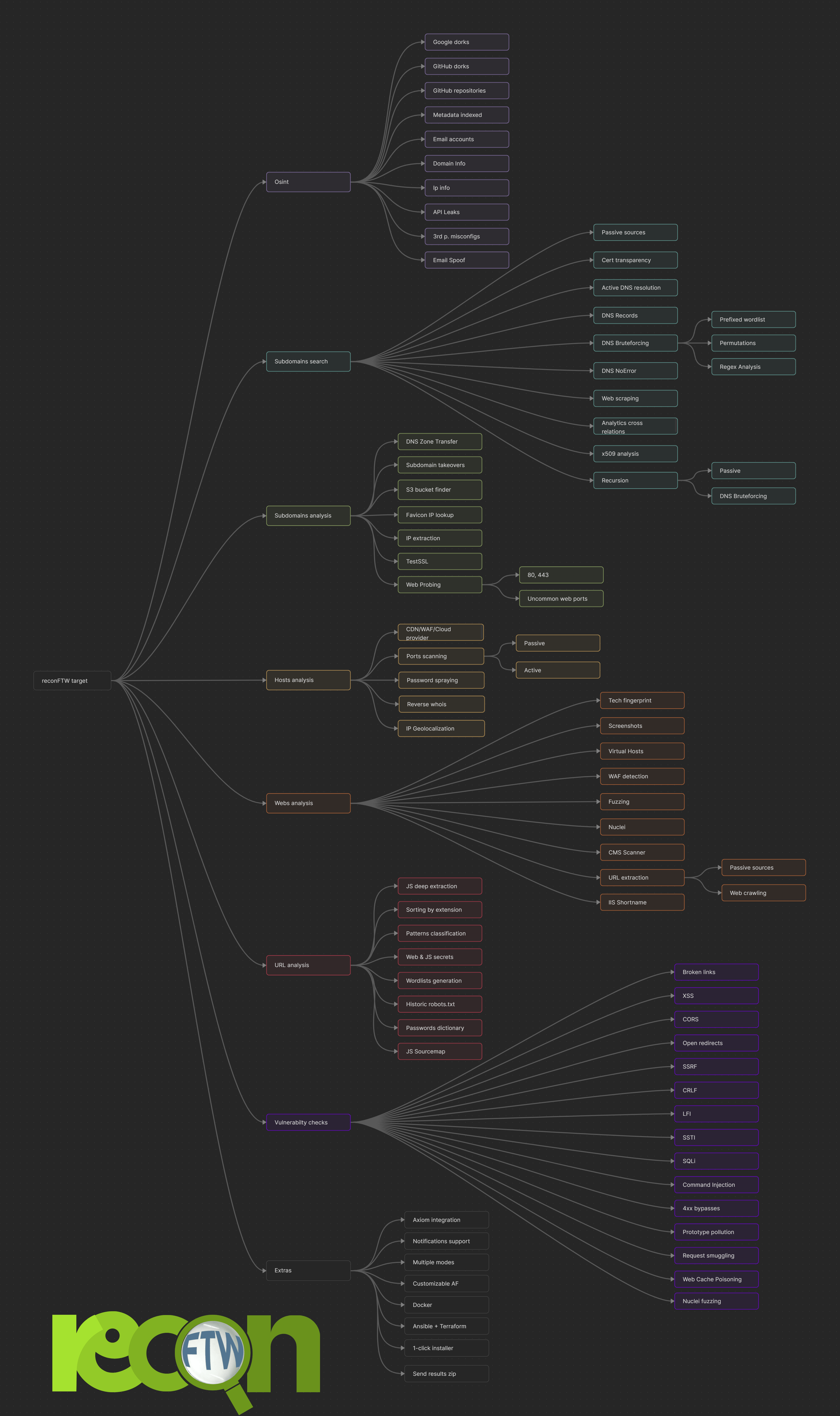
## 思维导图/工作流
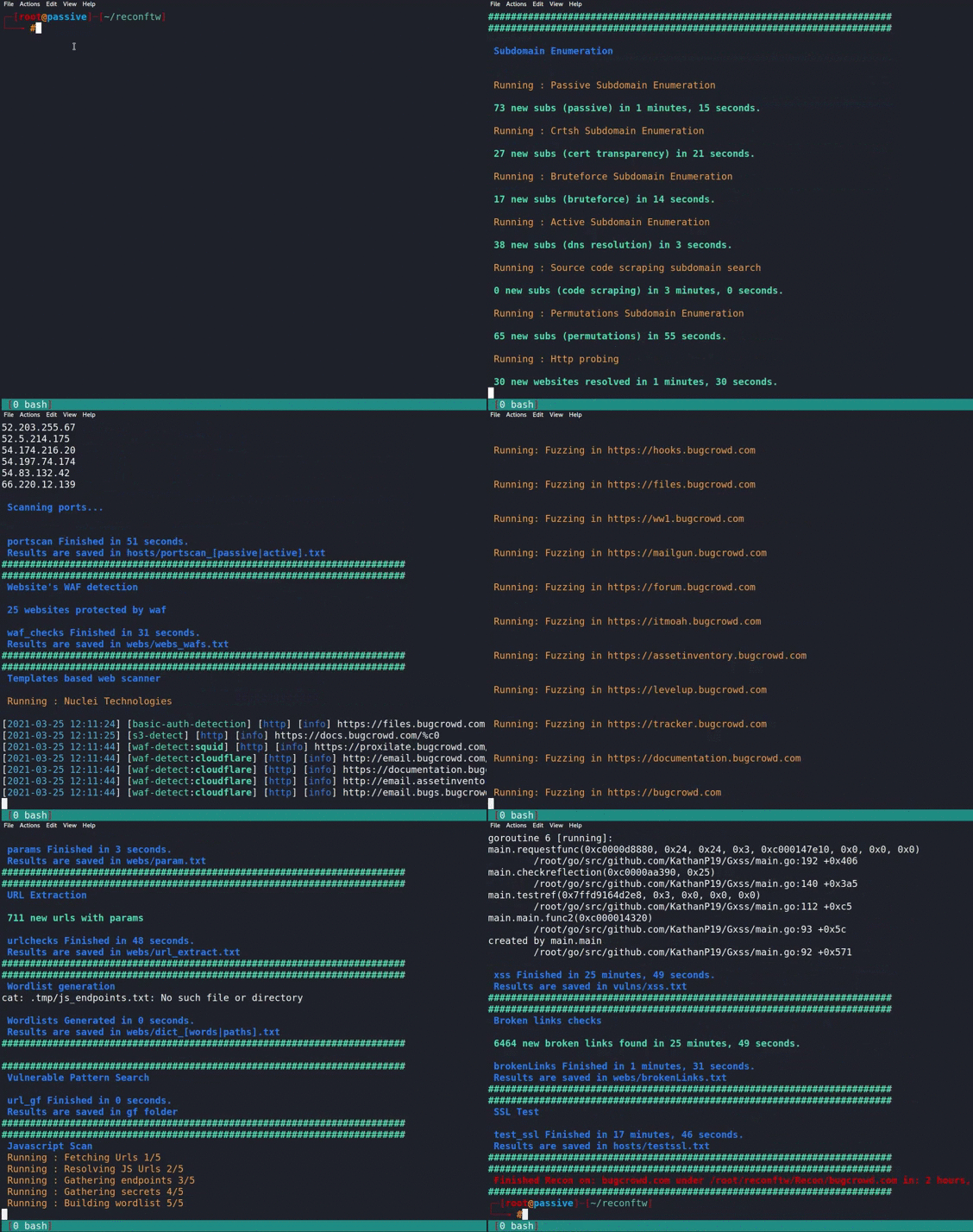
## 示例视频
## 🤝 如何贡献
请参阅 [CONTRIBUTING.md](CONTRIBUTING.md) 获取完整的贡献指南,包括开发设置、代码风格、测试和 PR 流程。
快速链接:
- [报告 Bug](https://github.com/six2dez/reconftw/issues/new/choose)
- [提交 Pull Request](https://github.com/six2dez/reconftw/tree/dev) (目标分支为 `dev`)
- [行为准则](CODE_OF_CONDUCT.md)
## 🔒 安全
有关安全策略、机密管理和漏洞报告,请参阅 [SECURITY.md](SECURITY.md)。
## ❓ 需要帮助?
- **Wiki**:探索 [reconFTW Wiki](https://github.com/six2dez/reconftw/wiki)。
- **FAQ**:查看 [FAQ](https://github.com/six2dez/reconftw/wiki/7.-FAQs)。
- **社区**:加入 [Discord 服务器](https://discord.gg/R5DdXVEdTy) 或 [Telegram 群组](https://t.me/joinchat/TO_R8NYFhhbmI5co)。
## 💖 支持本项目
通过以下方式支持 reconFTW 的开发:
- **Buy Me a Coffee**: [buymeacoffee.com/six2dez](https://www.buymeacoffee.com/six2dez)
[ ](https://www.buymeacoffee.com/six2dez)
- **DigitalOcean Referral**: [推荐链接](https://www.digitalocean.com/?refcode=f362a6e193a1&utm_campaign=Referral_Invite&utm_medium=Referral_Program&utm_source=badge)
](https://www.buymeacoffee.com/six2dez)
- **DigitalOcean Referral**: [推荐链接](https://www.digitalocean.com/?refcode=f362a6e193a1&utm_campaign=Referral_Invite&utm_medium=Referral_Program&utm_source=badge)
 - **GitHub Sponsorship**: [github.com/sponsors/six2dez](https://github.com/sponsors/six2dez)
## 🙏 致谢
特别感谢以下服务对 reconFTW 的支持:
- [C99](https://api.c99.nl/)
- [CIRCL](https://www.circl.lu/)
- [NetworksDB](https://networksdb.io/)
- [ipinfo](https://ipinfo.io/)
- [hackertarget](https://hackertarget.com/)
- [Censys](https://censys.io/)
- [Fofa](https://fofa.info/)
- [intelx](https://intelx.io/)
- [Whoxy](https://www.whoxy.com/)
## 📝 更新日志
请参阅 [CHANGELOG.md](CHANGELOG.md) 获取每个版本的详细更改列表。
## 🛠️ 开发
### 项目结构
```
reconftw/
├── reconftw.sh # Main entry point (~500 lines)
├── reconftw.cfg # Configuration file
├── modules/ # Phase modules
│ ├── utils.sh # Utilities, sanitization, caching, circuit breaker
│ ├── core.sh # Framework core, logging, lifecycle, health check
│ ├── modes.sh # Scan modes, argument parsing
│ ├── subdomains.sh # Subdomain enumeration
│ ├── web.sh # Web analysis, nuclei scans
│ ├── vulns.sh # Vulnerability scanning
│ ├── osint.sh # OSINT functions
│ └── axiom.sh # Axiom/Ax fleet helpers
├── lib/ # Pure utility libraries
│ └── validation.sh # Input validation functions
├── tests/ # Test suite (100+ tests)
│ ├── unit/ # Unit tests (bats)
│ ├── integration/ # Integration/smoke tests
│ └── security/ # Injection prevention tests
├── docs/ # Documentation
│ └── ARCHITECTURE.md # Detailed architecture guide
└── secrets.cfg.example # Template for API keys
```
### 运行测试
```
make test # Unit tests
make test-security # Security tests
make test-all # All tests
make lint # Shellcheck
make lint-fix # Auto-fix with shfmt
```
### 开发工作流
```
# 1. 加载而不执行 (用于测试)
source ./reconftw.sh --source-only
# 2. 测试单个函数
sanitize_domain "test;domain.com"
# 3. 运行健康检查
./reconftw.sh --health-check
# 4. Dry run 以预览
./reconftw.sh -d example.com -r --dry-run
```
### 贡献
有关开发指南,请参阅 [CONTRIBUTING.md](CONTRIBUTING.md);有关技术细节,请参阅 [docs/ARCHITECTURE.md](docs/ARCHITECTURE.md)。
## 📜 许可证
reconFTW 根据 [MIT 许可证](LICENSE) 授权。
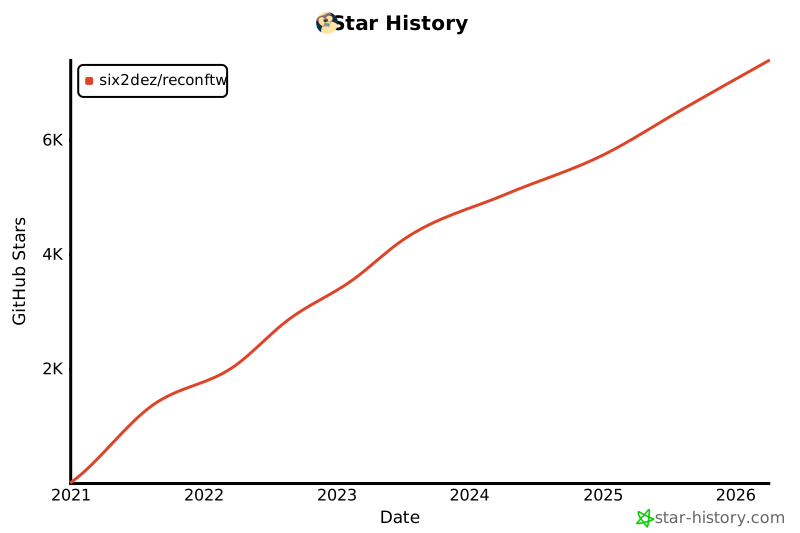
## ⭐ Star 历史
[](https://www.star-history.com/#six2dez/reconftw&Date)
- **GitHub Sponsorship**: [github.com/sponsors/six2dez](https://github.com/sponsors/six2dez)
## 🙏 致谢
特别感谢以下服务对 reconFTW 的支持:
- [C99](https://api.c99.nl/)
- [CIRCL](https://www.circl.lu/)
- [NetworksDB](https://networksdb.io/)
- [ipinfo](https://ipinfo.io/)
- [hackertarget](https://hackertarget.com/)
- [Censys](https://censys.io/)
- [Fofa](https://fofa.info/)
- [intelx](https://intelx.io/)
- [Whoxy](https://www.whoxy.com/)
## 📝 更新日志
请参阅 [CHANGELOG.md](CHANGELOG.md) 获取每个版本的详细更改列表。
## 🛠️ 开发
### 项目结构
```
reconftw/
├── reconftw.sh # Main entry point (~500 lines)
├── reconftw.cfg # Configuration file
├── modules/ # Phase modules
│ ├── utils.sh # Utilities, sanitization, caching, circuit breaker
│ ├── core.sh # Framework core, logging, lifecycle, health check
│ ├── modes.sh # Scan modes, argument parsing
│ ├── subdomains.sh # Subdomain enumeration
│ ├── web.sh # Web analysis, nuclei scans
│ ├── vulns.sh # Vulnerability scanning
│ ├── osint.sh # OSINT functions
│ └── axiom.sh # Axiom/Ax fleet helpers
├── lib/ # Pure utility libraries
│ └── validation.sh # Input validation functions
├── tests/ # Test suite (100+ tests)
│ ├── unit/ # Unit tests (bats)
│ ├── integration/ # Integration/smoke tests
│ └── security/ # Injection prevention tests
├── docs/ # Documentation
│ └── ARCHITECTURE.md # Detailed architecture guide
└── secrets.cfg.example # Template for API keys
```
### 运行测试
```
make test # Unit tests
make test-security # Security tests
make test-all # All tests
make lint # Shellcheck
make lint-fix # Auto-fix with shfmt
```
### 开发工作流
```
# 1. 加载而不执行 (用于测试)
source ./reconftw.sh --source-only
# 2. 测试单个函数
sanitize_domain "test;domain.com"
# 3. 运行健康检查
./reconftw.sh --health-check
# 4. Dry run 以预览
./reconftw.sh -d example.com -r --dry-run
```
### 贡献
有关开发指南,请参阅 [CONTRIBUTING.md](CONTRIBUTING.md);有关技术细节,请参阅 [docs/ARCHITECTURE.md](docs/ARCHITECTURE.md)。
## 📜 许可证
reconFTW 根据 [MIT 许可证](LICENSE) 授权。
## ⭐ Star 历史
[](https://www.star-history.com/#six2dez/reconftw&Date)标签:Bug Bounty, C2日志可视化, CTI, ESC6, GitHub, GitHub安全项目, MISP, 侦察框架, 可自定义解析器, 子域名挖掘, 实时处理, 密码管理, 应用安全, 指纹识别, 插件系统, 数据统计, 日志审计, 端口扫描, 系统提示词, 网络安全, 自动化侦察, 请求拦截, 逆向工具, 隐私保护, 靶场工具