JetBrains/qodana-action
GitHub: JetBrains/qodana-action
JetBrains Qodana 的 CI/CD 集成 Action,用于在 GitHub、Azure、CircleCI 等流水线中自动扫描代码质量与安全漏洞。
Stars: 306 | Forks: 42
# Qodana Scan [ ](https://www.producthunt.com/posts/jetbrains-qodana)
[][jb:confluence-on-gh]
[][jb:discussions]
[][jb:twitter]
**Qodana** 是一个代码质量监控工具,能够识别并提供针对 Bug、安全漏洞、重复代码和各种瑕疵的修复建议。
**目录**
- Qodana Scan
- [用法](#usage)
- [配置](#configuration)
- [问题追踪器](#issue-tracker)
## 用法
[Qodana Scan GitHub action](https://github.com/marketplace/actions/qodana-scan) 允许你在 GitHub 仓库上运行 Qodana。
](https://www.producthunt.com/posts/jetbrains-qodana)
[][jb:confluence-on-gh]
[][jb:discussions]
[][jb:twitter]
**Qodana** 是一个代码质量监控工具,能够识别并提供针对 Bug、安全漏洞、重复代码和各种瑕疵的修复建议。
**目录**
- Qodana Scan
- [用法](#usage)
- [配置](#configuration)
- [问题追踪器](#issue-tracker)
## 用法
[Qodana Scan GitHub action](https://github.com/marketplace/actions/qodana-scan) 允许你在 GitHub 仓库上运行 Qodana。
```
基于此,你将能够检测到 Pull Request 中超出基线的仅有新问题。同时,**新**问题超过 `fail-threshold` 限制的 Pull Request 将被阻止,并且工作流将失败。
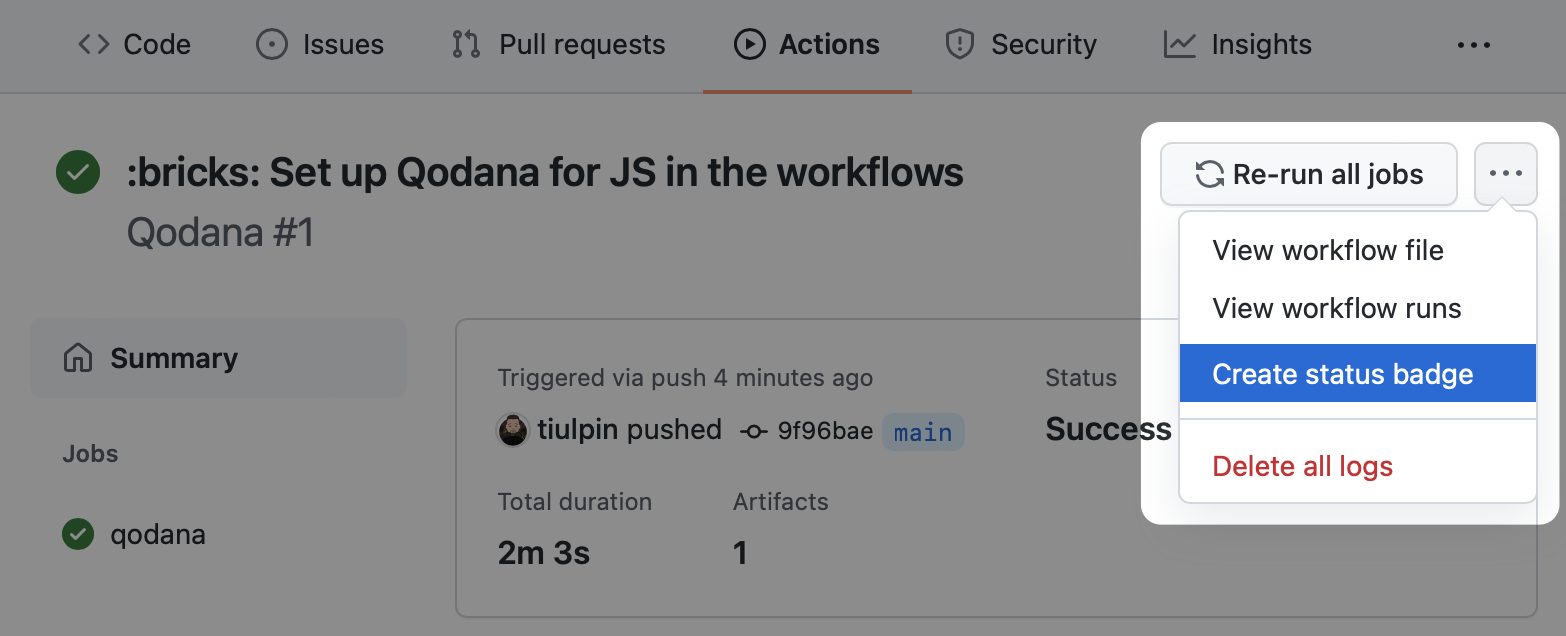
### 获取 Qodana 徽章
你可以在你的仓库中设置 Qodana 工作流徽章,为此,请按照以下步骤操作:
1. 导航到你之前配置的工作流运行。
2. 在工作流页面上,选择 **Create status badge**。
3. 将 Markdown 文本复制到你的仓库 README 文件中。
 ## 配置
大多数情况下,除了 `args` 之外你不需要其他选项:如果你在一个工作流中配置多个 Qodana Scan 作业,所有其他选项才会派上用场。
使用 [`with`](https://docs.github.com/en/actions/using-workflows/workflow-syntax-for-github-actions#jobsjob_idstepswith) 来定义任何 action 参数:
```
with:
args: --baseline,qodana.sarif.json
cache-default-branch-only: true
```
| 名称 | 描述 | 默认值 |
|-----------------------------|----------------------------------------------------------------------------------------------------------------------------------------------------------------------------------------------|-----------------------------------------------------|
| `args` | 额外的 [Qodana CLI `scan` 命令](https://github.com/jetbrains/qodana-cli#scan) 参数,用逗号 (`,`) 分隔参数,例如 `-i,frontend,--print-problems`。可选。 | - |
| `results-dir` | 存储分析结果的目录。可选。 | `${{ runner.temp }}/qodana/results` |
| `upload-result` | 将 Qodana 结果(SARIF、其他 artifacts、日志)作为 artifact 上传到作业。可选。 | `false` |
| `artifact-name` | 指定 Qodana 结果 artifact 名称,用于结果上传。可选。 | `qodana-report` |
| `cache-dir` | 存储 Qodana 缓存的目录。可选。 | `${{ runner.temp }}/qodana/caches` |
| `use-caches` | 在 Qodana 运行中使用 [GitHub 缓存](https://docs.github.com/en/actions/using-workflows/caching-dependencies-to-speed-up-workflows#usage-limits-and-eviction-policy)。可选。 | `true` |
| `primary-cache-key` | 设置[主缓存键](https://docs.github.com/en/actions/using-workflows/caching-dependencies-to-speed-up-workflows#matching-a-cache-key)。可选。 | `qodana-2026.1-${{ github.ref }}-${{ github.sha }}` |
| `additional-cache-key` | 设置[附加缓存键](https://docs.github.com/en/actions/using-workflows/caching-dependencies-to-speed-up-workflows#matching-a-cache-key)。可选。 | `qodana-2026.1-${{ github.ref }}` |
| `cache-default-branch-only` | 仅为默认分支上传缓存。可选。 | `false` |
| `use-annotations` | 使用标注在 GitHub 用户界面中标记结果。可选。 | `true` |
| `pr-mode` | 仅分析 Pull Request 中更改的文件。可选。 | `true` |
| `post-pr-comment` | 将包含 Qodana 结果摘要的评论发布到 Pull Request。可选。 | `true` |
| `github-token` | 用于访问仓库的 GitHub token:发布标注、评论。可选。 | `${{ github.token }}` |
| `push-fixes` | 将 Qodana 修复推送到仓库,可以是 `none`、`branch`(推送到当前分支)或 `pull-request`。可选。 | `none` |
## 问题追踪器
所有与 Qodana 相关的问题、功能请求和支持均在 [YouTrack][youtrack] 上处理。
如果你想提交新问题,请使用链接 [YouTrack | New Issue][youtrack-new-issue]。
## 配置
大多数情况下,除了 `args` 之外你不需要其他选项:如果你在一个工作流中配置多个 Qodana Scan 作业,所有其他选项才会派上用场。
使用 [`with`](https://docs.github.com/en/actions/using-workflows/workflow-syntax-for-github-actions#jobsjob_idstepswith) 来定义任何 action 参数:
```
with:
args: --baseline,qodana.sarif.json
cache-default-branch-only: true
```
| 名称 | 描述 | 默认值 |
|-----------------------------|----------------------------------------------------------------------------------------------------------------------------------------------------------------------------------------------|-----------------------------------------------------|
| `args` | 额外的 [Qodana CLI `scan` 命令](https://github.com/jetbrains/qodana-cli#scan) 参数,用逗号 (`,`) 分隔参数,例如 `-i,frontend,--print-problems`。可选。 | - |
| `results-dir` | 存储分析结果的目录。可选。 | `${{ runner.temp }}/qodana/results` |
| `upload-result` | 将 Qodana 结果(SARIF、其他 artifacts、日志)作为 artifact 上传到作业。可选。 | `false` |
| `artifact-name` | 指定 Qodana 结果 artifact 名称,用于结果上传。可选。 | `qodana-report` |
| `cache-dir` | 存储 Qodana 缓存的目录。可选。 | `${{ runner.temp }}/qodana/caches` |
| `use-caches` | 在 Qodana 运行中使用 [GitHub 缓存](https://docs.github.com/en/actions/using-workflows/caching-dependencies-to-speed-up-workflows#usage-limits-and-eviction-policy)。可选。 | `true` |
| `primary-cache-key` | 设置[主缓存键](https://docs.github.com/en/actions/using-workflows/caching-dependencies-to-speed-up-workflows#matching-a-cache-key)。可选。 | `qodana-2026.1-${{ github.ref }}-${{ github.sha }}` |
| `additional-cache-key` | 设置[附加缓存键](https://docs.github.com/en/actions/using-workflows/caching-dependencies-to-speed-up-workflows#matching-a-cache-key)。可选。 | `qodana-2026.1-${{ github.ref }}` |
| `cache-default-branch-only` | 仅为默认分支上传缓存。可选。 | `false` |
| `use-annotations` | 使用标注在 GitHub 用户界面中标记结果。可选。 | `true` |
| `pr-mode` | 仅分析 Pull Request 中更改的文件。可选。 | `true` |
| `post-pr-comment` | 将包含 Qodana 结果摘要的评论发布到 Pull Request。可选。 | `true` |
| `github-token` | 用于访问仓库的 GitHub token:发布标注、评论。可选。 | `${{ github.token }}` |
| `push-fixes` | 将 Qodana 修复推送到仓库,可以是 `none`、`branch`(推送到当前分支)或 `pull-request`。可选。 | `none` |
## 问题追踪器
所有与 Qodana 相关的问题、功能请求和支持均在 [YouTrack][youtrack] 上处理。
如果你想提交新问题,请使用链接 [YouTrack | New Issue][youtrack-new-issue]。
](https://www.producthunt.com/posts/jetbrains-qodana)
[][jb:confluence-on-gh]
[][jb:discussions]
[][jb:twitter]
**Qodana** 是一个代码质量监控工具,能够识别并提供针对 Bug、安全漏洞、重复代码和各种瑕疵的修复建议。
**目录**
- Qodana Scan
- [用法](#usage)
- [配置](#configuration)
- [问题追踪器](#issue-tracker)
## 用法
[Qodana Scan GitHub action](https://github.com/marketplace/actions/qodana-scan) 允许你在 GitHub 仓库上运行 Qodana。
💡完整脚本示例
``` name: Qodana on: workflow_dispatch: pull_request: push: branches: - master - 'releases/*' jobs: qodana: runs-on: ubuntu-latest permissions: contents: write pull-requests: write checks: write steps: - uses: actions/checkout@v3 with: ref: ${{ github.event.pull_request.head.sha }} fetch-depth: 0 - name: 'Qodana Scan' uses: JetBrains/qodana-action@v2026.1 with: args: --cleanup - run: | git config user.name github-actions git config user.email github-actions@github.com git checkout -b quick-fixes-$GITHUB_RUN_ID git add -- . ':!.idea' git commit -m "I fixed some issues" git push origin quick-fixes-$GITHUB_RUN_ID gh pr create --repo $GITHUB_REPOSITORY --base $GITHUB_REF_NAME --head quick-fixes-$GITHUB_RUN_ID --title "Pull requests" --body "I fixed some issues" env: GH_TOKEN: ${{ github.token }} ```
## 配置
大多数情况下,除了 `args` 之外你不需要其他选项:如果你在一个工作流中配置多个 Qodana Scan 作业,所有其他选项才会派上用场。
使用 [`with`](https://docs.github.com/en/actions/using-workflows/workflow-syntax-for-github-actions#jobsjob_idstepswith) 来定义任何 action 参数:
```
with:
args: --baseline,qodana.sarif.json
cache-default-branch-only: true
```
| 名称 | 描述 | 默认值 |
|-----------------------------|----------------------------------------------------------------------------------------------------------------------------------------------------------------------------------------------|-----------------------------------------------------|
| `args` | 额外的 [Qodana CLI `scan` 命令](https://github.com/jetbrains/qodana-cli#scan) 参数,用逗号 (`,`) 分隔参数,例如 `-i,frontend,--print-problems`。可选。 | - |
| `results-dir` | 存储分析结果的目录。可选。 | `${{ runner.temp }}/qodana/results` |
| `upload-result` | 将 Qodana 结果(SARIF、其他 artifacts、日志)作为 artifact 上传到作业。可选。 | `false` |
| `artifact-name` | 指定 Qodana 结果 artifact 名称,用于结果上传。可选。 | `qodana-report` |
| `cache-dir` | 存储 Qodana 缓存的目录。可选。 | `${{ runner.temp }}/qodana/caches` |
| `use-caches` | 在 Qodana 运行中使用 [GitHub 缓存](https://docs.github.com/en/actions/using-workflows/caching-dependencies-to-speed-up-workflows#usage-limits-and-eviction-policy)。可选。 | `true` |
| `primary-cache-key` | 设置[主缓存键](https://docs.github.com/en/actions/using-workflows/caching-dependencies-to-speed-up-workflows#matching-a-cache-key)。可选。 | `qodana-2026.1-${{ github.ref }}-${{ github.sha }}` |
| `additional-cache-key` | 设置[附加缓存键](https://docs.github.com/en/actions/using-workflows/caching-dependencies-to-speed-up-workflows#matching-a-cache-key)。可选。 | `qodana-2026.1-${{ github.ref }}` |
| `cache-default-branch-only` | 仅为默认分支上传缓存。可选。 | `false` |
| `use-annotations` | 使用标注在 GitHub 用户界面中标记结果。可选。 | `true` |
| `pr-mode` | 仅分析 Pull Request 中更改的文件。可选。 | `true` |
| `post-pr-comment` | 将包含 Qodana 结果摘要的评论发布到 Pull Request。可选。 | `true` |
| `github-token` | 用于访问仓库的 GitHub token:发布标注、评论。可选。 | `${{ github.token }}` |
| `push-fixes` | 将 Qodana 修复推送到仓库,可以是 `none`、`branch`(推送到当前分支)或 `pull-request`。可选。 | `none` |
## 问题追踪器
所有与 Qodana 相关的问题、功能请求和支持均在 [YouTrack][youtrack] 上处理。
如果你想提交新问题,请使用链接 [YouTrack | New Issue][youtrack-new-issue]。
标签:Azure, CircleCI, CMS安全, DevSecOps, GitHub Actions, Go, Gradle, JavaScript, JetBrains, Kotlin, OpenVAS, PHP, Python, Qodana, Ruby工具, TypeScript, 上游代理, 代码安全, 代码审查, 代码重复检测, 后台面板检测, 安全专业人员, 安全插件, 弱口令爆破, 技术债, 数据管道, 无后门, 漏洞枚举, 漏洞测试, 自动化审查, 自动笔记, 自定义脚本, 请求拦截, 软件工程, 静态代码扫描, 静态应用安全测试 (SAST)