jpillora/chisel
GitHub: jpillora/chisel
一款基于 HTTP 传输、SSH 加密的 TCP/UDP 隧道工具,专为穿透防火墙和建立安全网络通道而设计。
Stars: 16133 | Forks: 1586
# Chisel
[](https://godoc.org/github.com/jpillora/chisel) [](https://github.com/jpillora/chisel/actions?workflow=CI)
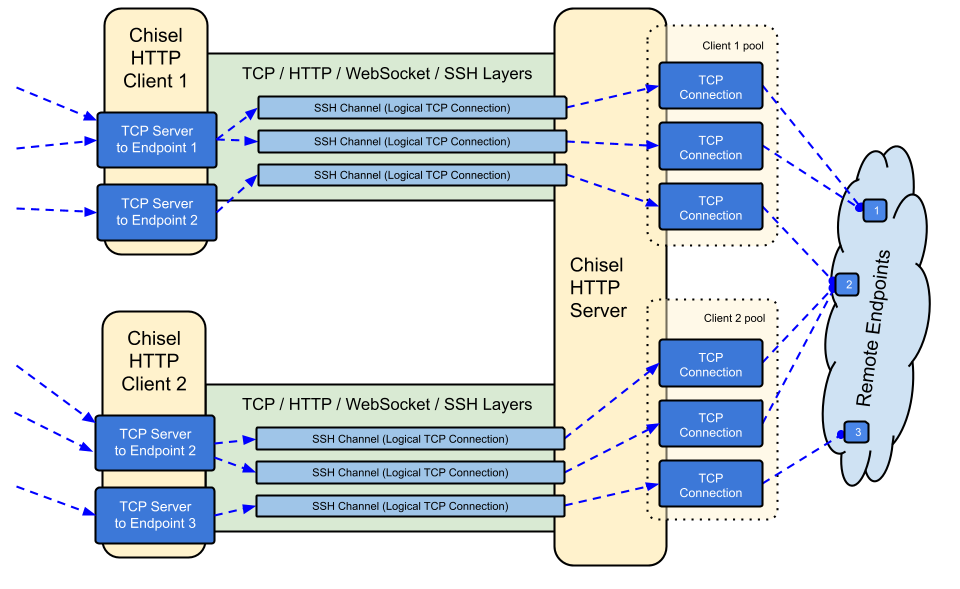
Chisel 是一个快速的 TCP/UDP 隧道,通过 HTTP 传输,并通过 SSH 加密。单个可执行文件同时包含客户端和服务器。使用 Go (golang) 编写。Chisel 主要用于穿透防火墙,不过它也可以用来为你的网络提供一个安全入口。
## 目录
- [功能特性](#features)
- [安装](#install)
- [演示](#demo)
- [用法](#usage)
- [贡献](#contributing)
- [更新日志](#changelog)
- [许可证](#license)
## 功能特性
- 易于使用
- [高性能](./test/bench/perf.md)\*
- 使用 SSH 协议(通过 `crypto/ssh`)进行 [加密连接](#security)
- [认证连接](#authentication);通过用户配置文件进行客户端认证连接,通过指纹匹配进行服务器认证连接。
- 客户端通过 [指数退避](https://github.com/jpillora/backoff) 算法自动重连
- 客户端可以在一个 TCP 连接上创建多个隧道端点
- 客户端可以选择通过 SOCKS 或 HTTP CONNECT 代理
- 反向端口转发(连接通过服务器流出客户端)
- 服务器可选择兼作 [反向代理](http://golang.org/pkg/net/http/httputil/#NewSingleHostReverseProxy)
- 服务器可选择允许 [SOCKS5](https://en.wikipedia.org/wiki/SOCKS) 连接(参见 [下方指南](#socks5-guide))
- 客户端可选择允许来自反向端口转发的 [SOCKS5](https://en.wikipedia.org/wiki/SOCKS) 连接
- 客户端通过 stdio 连接,支持 `ssh -o ProxyCommand`,从而提供基于 HTTP 的 SSH
## 安装
### 二进制文件
[](https://github.com/jpillora/chisel/releases) [](https://github.com/jpillora/chisel/releases)
参见 [最新发布版本](https://github.com/jpillora/chisel/releases/latest) 或立即使用 `curl https://i.jpillora.com/chisel! | bash` 下载并安装
### Docker
[](https://hub.docker.com/r/jpillora/chisel/) [](https://microbadger.com/images/jpillora/chisel)
```
docker run --rm -it jpillora/chisel --help
```
### Fedora
该软件包由 Fedora 社区维护。如果您遇到与 RPM 使用相关的问题,请使用此 [问题跟踪器](https://bugzilla.redhat.com/buglist.cgi?bug_status=NEW&bug_status=ASSIGNED&classification=Fedora&component=chisel&list_id=11614537&product=Fedora&product=Fedora%20EPEL)。
```
sudo dnf -y install chisel
```
### 源码
```
$ go install github.com/jpillora/chisel@latest
```
## 演示
Heroku 上的一个 [演示应用](https://chisel-demo.herokuapp.com) 正在运行此 `chisel server`:
```
$ chisel server --port $PORT --proxy http://example.com
# 监听 $PORT,将 web 请求代理到 http://example.com
```
此演示应用还在 `:3000` 端口上运行了一个 [简单文件服务器](https://www.npmjs.com/package/serve),由于 Heroku 的防火墙,该端口通常无法访问。但是,如果我们通过以下方式隧道连接:
```
$ chisel client https://chisel-demo.herokuapp.com 3000
# 连接到 https://chisel-demo.herokuapp.com 的 chisel server,
# 将你的 localhost:3000 隧道传输到 server 的 localhost:3000
```
然后访问 [localhost:3000](http://localhost:3000/),我们应该能看到目录列表。此外,如果我们 在浏览器中访问 [演示应用](https://chisel-demo.herokuapp.com),我们将命中服务器的默认代理并看到 [example.com](http://example.com) 的副本。
## 用法
```
$ chisel --help
Usage: chisel [command] [--help]
Version: X.Y.Z
Commands:
server - runs chisel in server mode
client - runs chisel in client mode
Read more:
https://github.com/jpillora/chisel
```
```
$ chisel server --help
Usage: chisel server [options]
Options:
--host, Defines the HTTP listening host – the network interface
(defaults the environment variable HOST and falls back to 0.0.0.0).
--port, -p, Defines the HTTP listening port (defaults to the environment
variable PORT and fallsback to port 8080).
--key, (deprecated use --keygen and --keyfile instead)
An optional string to seed the generation of a ECDSA public
and private key pair. All communications will be secured using this
key pair. Share the subsequent fingerprint with clients to enable detection
of man-in-the-middle attacks (defaults to the CHISEL_KEY environment
variable, otherwise a new key is generate each run).
--keygen, A path to write a newly generated PEM-encoded SSH private key file.
If users depend on your --key fingerprint, you may also include your --key to
output your existing key. Use - (dash) to output the generated key to stdout.
--keyfile, An optional path to a PEM-encoded SSH private key. When
this flag is set, the --key option is ignored, and the provided private key
is used to secure all communications. (defaults to the CHISEL_KEY_FILE
environment variable). Since ECDSA keys are short, you may also set keyfile
to an inline base64 private key (e.g. chisel server --keygen - | base64).
--authfile, An optional path to a users.json file. This file should
be an object with users defined like:
{
"": ["",""]
}
when connects, their will be verified and then
each of the remote addresses will be compared against the list
of address regular expressions for a match. Addresses will
always come in the form ":" for normal remotes
and "R::" for reverse port forwarding
remotes. This file will be automatically reloaded on change.
--auth, An optional string representing a single user with full
access, in the form of . It is equivalent to creating an
authfile with {"": [""]}. If unset, it will use the
environment variable AUTH.
--keepalive, An optional keepalive interval. Since the underlying
transport is HTTP, in many instances we'll be traversing through
proxies, often these proxies will close idle connections. You must
specify a time with a unit, for example '5s' or '2m'. Defaults
to '25s' (set to 0s to disable).
--backend, Specifies another HTTP server to proxy requests to when
chisel receives a normal HTTP request. Useful for hiding chisel in
plain sight.
--socks5, Allow clients to access the internal SOCKS5 proxy. See
chisel client --help for more information.
--reverse, Allow clients to specify reverse port forwarding remotes
in addition to normal remotes.
--tls-key, Enables TLS and provides optional path to a PEM-encoded
TLS private key. When this flag is set, you must also set --tls-cert,
and you cannot set --tls-domain.
--tls-cert, Enables TLS and provides optional path to a PEM-encoded
TLS certificate. When this flag is set, you must also set --tls-key,
and you cannot set --tls-domain.
--tls-domain, Enables TLS and automatically acquires a TLS key and
certificate using LetsEncrypt. Setting --tls-domain requires port 443.
You may specify multiple --tls-domain flags to serve multiple domains.
The resulting files are cached in the "$HOME/.cache/chisel" directory.
You can modify this path by setting the CHISEL_LE_CACHE variable,
or disable caching by setting this variable to "-". You can optionally
provide a certificate notification email by setting CHISEL_LE_EMAIL.
--tls-ca, a path to a PEM encoded CA certificate bundle or a directory
holding multiple PEM encode CA certificate bundle files, which is used to
validate client connections. The provided CA certificates will be used
instead of the system roots. This is commonly used to implement mutual-TLS.
--pid Generate pid file in current working directory
-v, Enable verbose logging
--help, This help text
Signals:
The chisel process is listening for:
a SIGUSR2 to print process stats, and
a SIGHUP to short-circuit the client reconnect timer
Version:
X.Y.Z
Read more:
https://github.com/jpillora/chisel
```
```
$ chisel client --help
Usage: chisel client [options] [remote] [remote] ...
is the URL to the chisel server.
s are remote connections tunneled through the server, each of
which come in the form:
:::/
■ local-host defaults to 0.0.0.0 (all interfaces).
■ local-port defaults to remote-port.
■ remote-port is required*.
■ remote-host defaults to 0.0.0.0 (server localhost).
■ protocol defaults to tcp.
which shares : from the server to the client
as :, or:
R::::/
which does reverse port forwarding, sharing :
from the client to the server's :.
example remotes
3000
example.com:3000
3000:google.com:80
192.168.0.5:3000:google.com:80
socks
5000:socks
R:2222:localhost:22
R:socks
R:5000:socks
stdio:example.com:22
1.1.1.1:53/udp
When the chisel server has --socks5 enabled, remotes can
specify "socks" in place of remote-host and remote-port.
The default local host and port for a "socks" remote is
127.0.0.1:1080. Connections to this remote will terminate
at the server's internal SOCKS5 proxy.
When the chisel server has --reverse enabled, remotes can
be prefixed with R to denote that they are reversed. That
is, the server will listen and accept connections, and they
will be proxied through the client which specified the remote.
Reverse remotes specifying "R:socks" will listen on the server's
default socks port (1080) and terminate the connection at the
client's internal SOCKS5 proxy.
When stdio is used as local-host, the tunnel will connect standard
input/output of this program with the remote. This is useful when
combined with ssh ProxyCommand. You can use
ssh -o ProxyCommand='chisel client chiselserver stdio:%h:%p' \
user@example.com
to connect to an SSH server through the tunnel.
Options:
--fingerprint, A *strongly recommended* fingerprint string
to perform host-key validation against the server's public key.
Fingerprint mismatches will close the connection.
Fingerprints are generated by hashing the ECDSA public key using
SHA256 and encoding the result in base64.
Fingerprints must be 44 characters containing a trailing equals (=).
--auth, An optional username and password (client authentication)
in the form: ":". These credentials are compared to
the credentials inside the server's --authfile. defaults to the
AUTH environment variable.
--keepalive, An optional keepalive interval. Since the underlying
transport is HTTP, in many instances we'll be traversing through
proxies, often these proxies will close idle connections. You must
specify a time with a unit, for example '5s' or '2m'. Defaults
to '25s' (set to 0s to disable).
--max-retry-count, Maximum number of times to retry before exiting.
Defaults to unlimited.
--max-retry-interval, Maximum wait time before retrying after a
disconnection. Defaults to 5 minutes.
--proxy, An optional HTTP CONNECT or SOCKS5 proxy which will be
used to reach the chisel server. Authentication can be specified
inside the URL.
For example, http://admin:password@my-server.com:8081
or: socks://admin:password@my-server.com:1080
--header, Set a custom header in the form "HeaderName: HeaderContent".
Can be used multiple times. (e.g --header "Foo: Bar" --header "Hello: World")
--hostname, Optionally set the 'Host' header (defaults to the host
found in the server url).
--sni, Override the ServerName when using TLS (defaults to the
hostname).
--tls-ca, An optional root certificate bundle used to verify the
chisel server. Only valid when connecting to the server with
"https" or "wss". By default, the operating system CAs will be used.
--tls-skip-verify, Skip server TLS certificate verification of
chain and host name (if TLS is used for transport connections to
server). If set, client accepts any TLS certificate presented by
the server and any host name in that certificate. This only affects
transport https (wss) connection. Chisel server's public key
may be still verified (see --fingerprint) after inner connection
is established.
--tls-key, a path to a PEM encoded private key used for client
authentication (mutual-TLS).
--tls-cert, a path to a PEM encoded certificate matching the provided
private key. The certificate must have client authentication
enabled (mutual-TLS).
--pid Generate pid file in current working directory
-v, Enable verbose logging
--help, This help text
Signals:
The chisel process is listening for:
a SIGUSR2 to print process stats, and
a SIGHUP to short-circuit the client reconnect timer
Version:
X.Y.Z
Read more:
https://github.com/jpillora/chisel
```
### 安全性
加密始终处于启用状态。当你启动一个 chisel 服务器时,它将生成一个内存中的 ECDSA 公钥/私钥对。公钥指纹(base64 编码的 SHA256)将在服务器启动时显示。服务器可以使用 `--keyfile` 选项指定一个密钥文件,而不是生成随机密钥。当客户端连接时,它们也会显示服务器的公钥指纹。客户端可以使用 `--fingerprint` 选项强制指定特定的指纹。更多信息请参见上文的 `--help`。
### 认证
使用 `--authfile` 选项,服务器可以选择提供一个 `user.json` 配置文件来创建已接受用户的列表。然后客户端使用 `--auth` 选项进行认证。示例认证配置文件请参见 [users.json](example/users.json)。更多信息请参见上文的 `--help`。
在内部,这是使用 SSH 提供的 _Password_ 认证方法完成的。在此处了解更多关于 `crypto/ssh` 的信息 http://blog.gopheracademy.com/go-and-ssh/。
### 使用 Docker 的 SOCKS5 指南
1. 在终端打印一个新的私钥
chisel server --keygen -
# 或者将其保存到磁盘 --keygen /path/to/mykey
2. 启动你的 chisel 服务器
jpillora/chisel server --keyfile '' -p 9312 --socks5
3. 连接你的 chisel 客户端(使用服务器的指纹)
chisel client --fingerprint '' :9312 socks
4. 将你的 SOCKS5 客户端(例如 OS/Browser)指向:
:1080
5. 现在你拥有了一个基于 HTTP 的加密、认证的 SOCKS5 连接
#### 注意事项
由于需要 WebSocket 支持:
- IaaS 提供商都会支持 WebSocket(除非在你面前强制放置了一个不支持的 HTTP 代理,在这种情况下,我会认为你已经降级到了 PaaS)
- PaaS 提供商对 WebSocket 的支持各不相同
- Heroku 完全支持
- Openshift 完全支持,尽管只能在端口 8443 和 8080 上接受连接
- Google App Engine **不**支持(在 [他们的仓库](https://code.google.com/p/googleappengine/issues/detail?id=2535) 中追踪此问题)
## 更新日志
- `1.0` - 初始发布
- `1.1` - 将简单的对称加密替换为 ECDSA SSH
- `1.2` - 添加了 SOCKS5(服务器)和 HTTP CONNECT(客户端)支持
- `1.3` - 添加了反向隧道支持
- `1.4` - 添加了任意 HTTP 头支持
- `1.5` - 添加了反向 SOCKS 支持(由 @aus 贡献)
- `1.6` - 添加了客户端 stdio 支持(由 @BoleynSu 贡献)
- `1.7` - 添加了 UDP 支持
- `1.8` - 迁移到 `scratch` Docker 镜像
- `1.9` - 升级到 Go 1.21。从 `--key` 种子切换到使用 `--key{gen,file}` 的 P256 密钥字符串(由 @cmenginnz 贡献)
- `1.10` - 升级到 Go 1.22。在发布版本中添加 `.rpm` `.deb` 和 `.akp`。修复错误的版本比较。
- `1.11` - 升级到 Go 1.25.1。更新所有依赖项。
## 许可证
[MIT](https://github.com/jpillora/chisel/blob/master/LICENSE) © Jaime Pillora
标签:DNS枚举, EVTX分析, Go语言, HTTP隧道, SOCKS5代理, SSH加密, TCP/UDP, 内存分配, 内网穿透, 反向代理, 反向端口转发, 日志审计, 程序破解, 端口转发, 网络安全工具, 网络隧道, 请求拦截, 轻量级工具, 边界突破, 远程访问, 防火墙绕过, 隧道代理