ossf/scorecard
GitHub: ossf/scorecard
OpenSSF Scorecard 是一款开源项目安全态势自动化评估工具,通过多项启发式检查项帮助维护者改进安全实践,并帮助消费者判断依赖项的风险等级。
Stars: 5550 | Forks: 673
# OpenSSF Scorecard
[](https://scorecard.dev/viewer/?uri=github.com/ossf/scorecard)
[](https://www.bestpractices.dev/projects/5621)
[](https://github.com/ossf/scorecard/actions/workflows/main.yml)
[](https://github.com/ossf/scorecard/actions/workflows/codeql-analysis.yml)
[](https://pkg.go.dev/github.com/ossf/scorecard/v4)
[](https://goreportcard.com/report/github.com/ossf/scorecard/v4)
[](https://codecov.io/gh/ossf/scorecard)
[](https://slsa.dev)
[](https://slack.openssf.org/#scorecard)
 ## 概述
- [什么是 Scorecard?](#what-is-scorecard)
- [主要的 Scorecard 用户](#prominent-scorecard-users)
- [查看项目评分](#view-a-projects-score)
- [Scorecard 的公共数据](#public-data)
## 使用 Scorecard
- [Scorecard GitHub Action](#scorecard-github-action)
- [Scorecard REST API](#scorecard-rest-api)
- [Scorecard 徽章](#scorecard-badges)
- [Scorecard 命令行界面](#scorecard-command-line-interface)
- [前置条件](#prerequisites)
- [安装](#installation)
- [认证](#authentication)
- [基本用法](#basic-usage)
## 检查
- [默认 Scorecard 检查项](#scorecard-checks)
- [详细检查文档](docs/checks.md) (评分标准、风险和
修复)
- [Scorecard 检查项新手指南](#beginners-guide-to-scorecard-checks)
## 其他重要建议
- [双因素认证 (2FA)](#two-factor-authentication-2fa)
## 评分
- [综合评分](#aggregate-score)
## 贡献
- [报告问题](#report-problems)
- [行为准则](CODE_OF_CONDUCT.md)
- [为 Scorecard 做贡献 ](CONTRIBUTING.md)
- [添加新检查项](checks/write.md)
- [联系 Scorecard 社区](#connect-with-the-scorecard-community)
- [报告安全问题](SECURITY.md)
## 常见问题
- [FAQ](docs/faq.md)
## 概述
### 什么是 Scorecard?
我们创建 Scorecard 旨在帮助开源维护者改进其安全最佳实践,并帮助开源消费者判断其依赖项是否安全。
Scorecard 是一种自动化工具,用于评估与软件安全相关的多项重要启发式[“检查项”](#scorecard-checks),并为每个检查项分配一个 0-10 的分数。您可以使用这些分数来了解需要改进的具体领域,从而加强您项目的安全态势。
您还可以评估依赖项带来的风险,并就接受这些风险、评估替代方案或与维护者合作进行改进做出明智的决策。
Scorecard logo 的灵感来源:
[“你通过了!全是 D ... 还有一个 A!”](https://youtu.be/rDMMYT3vkTk)
#### 项目目标
1. 自动化对开源项目安全态势的分析和信任决策。
2. 利用这些数据主动改善全球所依赖的关键项目的安全态势。
3. 作为现有策略的衡量工具
如果 OSS 消费者要求其依赖项具备某些行为,可以使用 Scorecard 进行衡量。在 V5 版本中,如果存在支持的分析,我们将结构化结果视为实现这一目标的一种方式。与其依赖 X/10 的综合评分或 Y/10 的维护评分,OSS 消费者可能更希望确保他们依赖的仓库未被存档(这由 `archived` 探针覆盖)。OpenSSF 在其自己的项目安全基线中也采用了这种方法。
#### 项目非目标
1. 成为所有项目都应遵循的权威报告或要求。
Scorecard 并非旨在成为一刀切的解决方案。我们生成结果的每一步都带有主观性:包含或排除哪些检查项、每项检查的重要性以及分数的计算方式。检查项本身是启发式的;存在误报和漏报。无论是由于适用性、可行性还是观点差异,Scorecard 结果中包含或排除的内容都会引发大量讨论。要创建一个让每个人都满意的 Scorecard 是不可能的,因为不同的受众会关注不同的行为子集。综合评分尤其无法告诉你仓库正在或未在执行哪些具体行为。许多检查分数被汇总为一个分数,而有多种方法可以达到相同的分数。随着我们增加新的启发式方法或完善现有方法,这些分数也会发生变化。
### 主要的 Scorecard 用户
Scorecard 已在数千个项目上运行,以监控和跟踪安全指标。使用 Scorecard 的知名项目包括:
- [Tensorflow](https://github.com/tensorflow/tensorflow)
- [Angular](https://github.com/angular/angular)
- [Flutter](https://github.com/flutter/flutter)
- [sos.dev](https://sos.dev)
- [deps.dev](https://deps.dev)
### 查看项目评分
要查看 Scorecard 定期扫描的项目评分,请导航至 [webviewer](https://scorecard.dev/viewer/?uri=)。您也可以替换以下模板链接中的占位符文本(平台、用户/组织和仓库名称),以生成仓库的自定义 Scorecard 链接:
`https://scorecard.dev/viewer/?uri=
## 概述
- [什么是 Scorecard?](#what-is-scorecard)
- [主要的 Scorecard 用户](#prominent-scorecard-users)
- [查看项目评分](#view-a-projects-score)
- [Scorecard 的公共数据](#public-data)
## 使用 Scorecard
- [Scorecard GitHub Action](#scorecard-github-action)
- [Scorecard REST API](#scorecard-rest-api)
- [Scorecard 徽章](#scorecard-badges)
- [Scorecard 命令行界面](#scorecard-command-line-interface)
- [前置条件](#prerequisites)
- [安装](#installation)
- [认证](#authentication)
- [基本用法](#basic-usage)
## 检查
- [默认 Scorecard 检查项](#scorecard-checks)
- [详细检查文档](docs/checks.md) (评分标准、风险和
修复)
- [Scorecard 检查项新手指南](#beginners-guide-to-scorecard-checks)
## 其他重要建议
- [双因素认证 (2FA)](#two-factor-authentication-2fa)
## 评分
- [综合评分](#aggregate-score)
## 贡献
- [报告问题](#report-problems)
- [行为准则](CODE_OF_CONDUCT.md)
- [为 Scorecard 做贡献 ](CONTRIBUTING.md)
- [添加新检查项](checks/write.md)
- [联系 Scorecard 社区](#connect-with-the-scorecard-community)
- [报告安全问题](SECURITY.md)
## 常见问题
- [FAQ](docs/faq.md)
## 概述
### 什么是 Scorecard?
我们创建 Scorecard 旨在帮助开源维护者改进其安全最佳实践,并帮助开源消费者判断其依赖项是否安全。
Scorecard 是一种自动化工具,用于评估与软件安全相关的多项重要启发式[“检查项”](#scorecard-checks),并为每个检查项分配一个 0-10 的分数。您可以使用这些分数来了解需要改进的具体领域,从而加强您项目的安全态势。
您还可以评估依赖项带来的风险,并就接受这些风险、评估替代方案或与维护者合作进行改进做出明智的决策。
Scorecard logo 的灵感来源:
[“你通过了!全是 D ... 还有一个 A!”](https://youtu.be/rDMMYT3vkTk)
#### 项目目标
1. 自动化对开源项目安全态势的分析和信任决策。
2. 利用这些数据主动改善全球所依赖的关键项目的安全态势。
3. 作为现有策略的衡量工具
如果 OSS 消费者要求其依赖项具备某些行为,可以使用 Scorecard 进行衡量。在 V5 版本中,如果存在支持的分析,我们将结构化结果视为实现这一目标的一种方式。与其依赖 X/10 的综合评分或 Y/10 的维护评分,OSS 消费者可能更希望确保他们依赖的仓库未被存档(这由 `archived` 探针覆盖)。OpenSSF 在其自己的项目安全基线中也采用了这种方法。
#### 项目非目标
1. 成为所有项目都应遵循的权威报告或要求。
Scorecard 并非旨在成为一刀切的解决方案。我们生成结果的每一步都带有主观性:包含或排除哪些检查项、每项检查的重要性以及分数的计算方式。检查项本身是启发式的;存在误报和漏报。无论是由于适用性、可行性还是观点差异,Scorecard 结果中包含或排除的内容都会引发大量讨论。要创建一个让每个人都满意的 Scorecard 是不可能的,因为不同的受众会关注不同的行为子集。综合评分尤其无法告诉你仓库正在或未在执行哪些具体行为。许多检查分数被汇总为一个分数,而有多种方法可以达到相同的分数。随着我们增加新的启发式方法或完善现有方法,这些分数也会发生变化。
### 主要的 Scorecard 用户
Scorecard 已在数千个项目上运行,以监控和跟踪安全指标。使用 Scorecard 的知名项目包括:
- [Tensorflow](https://github.com/tensorflow/tensorflow)
- [Angular](https://github.com/angular/angular)
- [Flutter](https://github.com/flutter/flutter)
- [sos.dev](https://sos.dev)
- [deps.dev](https://deps.dev)
### 查看项目评分
要查看 Scorecard 定期扫描的项目评分,请导航至 [webviewer](https://scorecard.dev/viewer/?uri=)。您也可以替换以下模板链接中的占位符文本(平台、用户/组织和仓库名称),以生成仓库的自定义 Scorecard 链接:
`https://scorecard.dev/viewer/?uri=.com//`
例如:
- [https://scorecard.dev/viewer/?uri=github.com/ossf/scorecard](https://scorecard.dev/viewer/?uri=github.com/ossf/scorecard)
- [https://scorecard.dev/viewer/?uri=gitlab.com/fdroid/fdroidclient](https://scorecard.dev/viewer/?uri=gitlab.com/fdroid/fdroidclient)
要查看 webviewer 中未包含的项目的评分,请使用 [Scorecard CLI](#scorecard-command-line-interface)。
### 公共数据
我们根据直接依赖关系,每周对 100 万个最关键的开源项目运行 Scorecard 扫描,并将结果发布在 [BigQuery 公共数据集](https://cloud.google.com/bigquery/public-data)中。
该数据可在公共 BigQuery 数据集 `openssf:scorecardcron.scorecard-v2` 中获取。最新结果可在 BigQuery 视图 `openssf:scorecardcron.scorecard-v2_latest` 中获取。
您可以通过导航到 Add Data > Star a project by name > 'openssf',使用 [BigQuery Explorer](http://console.cloud.google.com/bigquery) 查询数据。
例如,您可能对项目的分数随时间变化的情况感兴趣:
```
SELECT date, score FROM `openssf.scorecardcron.scorecard-v2` WHERE repo.name="github.com/ossf/scorecard" ORDER BY date ASC
```
您可以使用 [`bq`](https://cloud.google.com/bigquery/docs/bq-command-line-tool) 工具将最新结果以 JSON 格式提取到 Google Cloud 存储中:
```
# 获取最新的 PARTITION_ID
bq query --nouse_legacy_sql 'SELECT partition_id FROM
openssf.scorecardcron.INFORMATION_SCHEMA.PARTITIONS WHERE table_name="scorecard-v2"
AND partition_id!="__NULL__" ORDER BY partition_id DESC
LIMIT 1'
# 提取到 GCS
bq extract --destination_format=NEWLINE_DELIMITED_JSON
'openssf:scorecardcron.scorecard-v2$' gs://bucket-name/filename-*.json
```
被检查的项目列表位于本仓库的 [`cron/internal/data/projects.csv`](https://github.com/ossf/scorecard/blob/main/cron/internal/data/projects.csv) 文件中。如果您希望我们跟踪更多项目,请随时发送包含其他项目的 Pull Request。目前,此列表仅派生自 **GitHub 上托管的项目**。我们计划在不久的将来扩展它们,以涵盖托管在其他源代码控制系统上的项目。
## 使用 Scorecard
### Scorecard GitHub Action
在您拥有的 GitHub 项目上使用 Scorecard 的最简单方法是使用 [Scorecard GitHub Action](https://github.com/ossf/scorecard-action)。该 Action 在任何仓库更改时运行,并发出维护者可在仓库的 Security 标签页中查看的警报。有关更多信息,请参阅 Scorecard GitHub Action [安装说明](https://github.com/ossf/scorecard-action#installation)。
### Scorecard REST API
要查询 OSS 项目的预计算分数,请使用 [REST API](https://api.scorecard.dev)。
从我们的[每周扫描](#public-data)计算的分数省略了 `CI-Tests`、`Contributors` 和 `Dependency-Update-Tool` 检查,因为大规模运行它们会产生相关的 API 成本。
API 结果通过 CDN 进行缓存(感谢 [Fastly](https://www.fastly.com/) 及其 [Fast Forward](https://www.fastly.com/fast-forward) 计划)。当新结果可用时,结果会从 CDN 中清除,但如果您发现过期数据的问题,请提交 issue。
要使您的项目在 REST API 上可用,请在 Scorecard GitHub Action 设置中设置 [`publish_results: true`](https://github.com/ossf/scorecard-action/blob/dd5015aaf9688596b0e6d11e7f24fff566aa366b/action.yaml#L35)。
REST API 提供的数据根据 [CDLA Permissive 2.0](https://cdla.dev/permissive-2-0) 授权。
### Scorecard 徽章
在 Scorecard GitHub Actions 中启用 [`publish_results: true`](https://github.com/ossf/scorecard-action/blob/dd5015aaf9688596b0e6d11e7f24fff566aa366b/action.yaml#L35) 也允许维护者在其仓库上显示 Scorecard 徽章,以展示他们的辛勤工作。此徽章也会针对仓库所做的每次更改自动更新。更多详情请参阅 [这篇 OSSF 博客文章](https://openssf.org/blog/2022/09/08/show-off-your-security-score-announcing-scorecards-badges/)。
要在您的项目仓库中包含徽章,只需将以下 markdown 添加到您的 README 中:
```
[](https://scorecard.dev/viewer/?uri=github.com/{owner}/{repo})
```
### Scorecard 命令行界面
要对您不拥有的项目运行 Scorecard 扫描,请使用命令行界面安装选项。
#### 前置条件
平台:目前,Scorecard 支持 OSX 和 Linux 平台。如果您使用的是 Windows 操作系统,可能会遇到问题。欢迎贡献对 Windows 的支持。
语言:您必须安装 GoLang 才能运行 Scorecard
(https://golang.org/doc/install)
#### 安装
##### Docker
`scorecard` 可作为 Docker 容器使用:
```
docker pull ghcr.io/ossf/scorecard:latest
```
要使用特定的 scorecard 版本(例如 v3.2.1),请运行:
```
docker pull ghcr.io/ossf/scorecard:v3.2.1
```
##### 独立版
要将 Scorecard 安装为独立版:
访问我们最新的 [发布页面](https://github.com/ossf/scorecard/releases/latest) 并下载适合您操作系统的正确 zip 文件。
将二进制文件添加到您的 `GOPATH/bin` 目录(如有必要,请使用 `go env GOPATH` 识别您的目录)。
###### 验证下载版本的 SLSA 来源
我们在发布过程中使用 OpenSSF 的 [slsa-framework/slsa-github-generator](https://github.com/slsa-framework/slsa-github-generator) 生成 [SLSA3 签名](https://slsa.dev)。要验证发布二进制文件:
1. 从 [slsa-framework/slsa-verifier#installation](https://github.com/slsa-framework/slsa-verifier#installation) 安装验证工具。
2. 从 [GitHub 发布页面](https://github.com/GoogleContainerTools/jib/releases/latest) 下载签名文件 `attestation.intoto.jsonl`。
3. 运行验证器:
```
slsa-verifier -artifact-path -provenance attestation.intoto.jsonl -source github.com/ossf/scorecard -tag
```
##### 使用包管理器
包管理器 | 支持的发行版 | 命令
---------------------------------------------------------- | ---------------------- | -------
Nix | NixOS | `nix-shell -p nixpkgs.scorecard`
[AUR helper](https://wiki.archlinux.org/title/AUR_helpers) | Arch Linux | 使用您的 AUR helper 安装 `scorecard`
[Homebrew](https://brew.sh/) | macOS or Linux | `brew install scorecard`
#### 认证
GitHub 对未经身份验证的请求施加了 [api 速率限制](https://developer.github.com/v3/#rate-limiting)。为了避免这些限制,您必须在运行 Scorecard 之前对您的请求进行身份验证。有两种方法可以对您的请求进行身份验证:创建 GitHub 个人访问令牌,或创建 GitHub App 安装。
- [创建经典 GitHub 个人访问令牌](https://docs.github.com/en/authentication/keeping-your-account-and-data-secure/creating-a-personal-access-token#creating-a-personal-access-token-classic)。
创建个人访问令牌时,我们建议您选择 `public_repo` 范围。根据您的平台,使用以下命令在名为 `GITHUB_AUTH_TOKEN`、`GITHUB_TOKEN`、`GH_AUTH_TOKEN` 或 `GH_TOKEN` 的环境变量中设置令牌。
```
# 对于 posix 平台,例如 linux、mac:
export GITHUB_AUTH_TOKEN=
# 可以提供多个 token,以逗号分隔,
# 并以 round robin 方式使用。
export GITHUB_AUTH_TOKEN=,
# 对于 windows:
set GITHUB_AUTH_TOKEN=
set GITHUB_AUTH_TOKEN=,
```
或
- [创建 GitHub App 安装](https://docs.github.com/en/developers/apps/building-github-apps/creating-a-github-app)
以获得更高的速率限制配额。如果您安装了 GitHub App 和密钥文件,您可以使用以下三个环境变量,遵循您的平台显示的命令(`set` 或 `export`)。
```
GITHUB_APP_KEY_PATH=
GITHUB_APP_INSTALLATION_ID=
GITHUB_APP_ID=
```
这些变量可以从 GitHub [开发者设置](https://github.com/settings/apps)页面获取。
#### 基本用法
##### 使用仓库 URL
Scorecard 可以仅使用一个参数(目标仓库的 URL)运行:
```
scorecard --repo=github.com/ossf-tests/scorecard-check-branch-protection-e2e
```
```
Starting [CII-Best-Practices]
Starting [Fuzzing]
Starting [Pinned-Dependencies]
Starting [CI-Tests]
Starting [Maintained]
Starting [Packaging]
Starting [SAST]
Starting [Dependency-Update-Tool]
Starting [Token-Permissions]
Starting [Security-Policy]
Starting [Signed-Releases]
Starting [Binary-Artifacts]
Starting [Branch-Protection]
Starting [Code-Review]
Starting [Contributors]
Starting [Vulnerabilities]
Finished [CI-Tests]
Finished [Maintained]
Finished [Packaging]
Finished [SAST]
Finished [Signed-Releases]
Finished [Binary-Artifacts]
Finished [Branch-Protection]
Finished [Code-Review]
Finished [Contributors]
Finished [Dependency-Update-Tool]
Finished [Token-Permissions]
Finished [Security-Policy]
Finished [Vulnerabilities]
Finished [CII-Best-Practices]
Finished [Fuzzing]
Finished [Pinned-Dependencies]
RESULTS
-------
Aggregate score: 7.9 / 10
Check scores:
|---------|------------------------|--------------------------------|---------------------------------------------------------------------------|
| SCORE | NAME | REASON | DOCUMENTATION/REMEDIATION |
|---------|------------------------|--------------------------------|---------------------------------------------------------------------------|
| 10 / 10 | Binary-Artifacts | no binaries found in the repo | github.com/ossf/scorecard/blob/main/docs/checks.md#binary-artifacts |
|---------|------------------------|--------------------------------|---------------------------------------------------------------------------|
| 9 / 10 | Branch-Protection | branch protection is not | github.com/ossf/scorecard/blob/main/docs/checks.md#branch-protection |
| | | maximal on development and all | |
| | | release branches | |
|---------|------------------------|--------------------------------|---------------------------------------------------------------------------|
| ? | CI-Tests | no pull request found | github.com/ossf/scorecard/blob/main/docs/checks.md#ci-tests |
|---------|------------------------|--------------------------------|---------------------------------------------------------------------------|
| 0 / 10 | CII-Best-Practices | no badge found | github.com/ossf/scorecard/blob/main/docs/checks.md#cii-best-practices |
|---------|------------------------|--------------------------------|---------------------------------------------------------------------------|
| 10 / 10 | Code-Review | branch protection for default | github.com/ossf/scorecard/blob/main/docs/checks.md#code-review |
| | | branch is enabled | |
|---------|------------------------|--------------------------------|---------------------------------------------------------------------------|
| 0 / 10 | Contributors | 0 different companies found -- | github.com/ossf/scorecard/blob/main/docs/checks.md#contributors |
| | | score normalized to 0 | |
|---------|------------------------|--------------------------------|---------------------------------------------------------------------------|
| 0 / 10 | Dependency-Update-Tool | no update tool detected | github.com/ossf/scorecard/blob/main/docs/checks.md#dependency-update-tool |
|---------|------------------------|--------------------------------|---------------------------------------------------------------------------|
| 0 / 10 | Fuzzing | project is not fuzzed in | github.com/ossf/scorecard/blob/main/docs/checks.md#fuzzing |
| | | OSS-Fuzz | |
|---------|------------------------|--------------------------------|---------------------------------------------------------------------------|
| 1 / 10 | Maintained | 2 commit(s) found in the last | github.com/ossf/scorecard/blob/main/docs/checks.md#maintained |
| | | 90 days -- score normalized to | |
| | | 1 | |
|---------|------------------------|--------------------------------|---------------------------------------------------------------------------|
| ? | Packaging | no published package detected | github.com/ossf/scorecard/blob/main/docs/checks.md#packaging |
|---------|------------------------|--------------------------------|---------------------------------------------------------------------------|
| 8 / 10 | Pinned-Dependencies | unpinned dependencies detected | github.com/ossf/scorecard/blob/main/docs/checks.md#pinned-dependencies |
| | | -- score normalized to 8 | |
|---------|------------------------|--------------------------------|---------------------------------------------------------------------------|
| 0 / 10 | SAST | no SAST tool detected | github.com/ossf/scorecard/blob/main/docs/checks.md#sast |
|---------|------------------------|--------------------------------|---------------------------------------------------------------------------|
| 0 / 10 | Security-Policy | security policy file not | github.com/ossf/scorecard/blob/main/docs/checks.md#security-policy |
| | | detected | |
|---------|------------------------|--------------------------------|---------------------------------------------------------------------------|
| ? | Signed-Releases | no releases found | github.com/ossf/scorecard/blob/main/docs/checks.md#signed-releases |
|---------|------------------------|--------------------------------|---------------------------------------------------------------------------|
| 10 / 10 | Token-Permissions | tokens are read-only in GitHub | github.com/ossf/scorecard/blob/main/docs/checks.md#token-permissions |
| | | workflows | |
|---------|------------------------|--------------------------------|---------------------------------------------------------------------------|
| 10 / 10 | Vulnerabilities | no vulnerabilities detected | github.com/ossf/scorecard/blob/main/docs/checks.md#vulnerabilities |
|---------|------------------------|--------------------------------|---------------------------------------------------------------------------|
```
###### Docker
`GITHUB_AUTH_TOKEN` 必须设置为有效的 [令牌](#Authentication)
```
docker run -e GITHUB_AUTH_TOKEN=token ghcr.io/ossf/scorecard:latest --show-details --repo=https://github.com/ossf/scorecard
```
要使用特定的 scorecard 版本(例如 v3.2.1),请运行:
```
docker run -e GITHUB_AUTH_TOKEN=token ghcr.io/ossf/scorecard:v3.2.1 --show-details --repo=https://github.com/ossf/scorecard
```
##### 显示详细结果
有关检查失败原因的更多详细信息,请使用 `--show-details` 选项:
```
./scorecard --repo=github.com/ossf-tests/scorecard-check-branch-protection-e2e --checks Branch-Protection --show-details
```
```
Starting [Pinned-Dependencies]
Finished [Pinned-Dependencies]
RESULTS
-------
|---------|------------------------|--------------------------------|--------------------------------|---------------------------------------------------------------------------|
| SCORE | NAME | REASON | DETAILS | DOCUMENTATION/REMEDIATION |
|---------|------------------------|--------------------------------|--------------------------------|---------------------------------------------------------------------------|
| 9 / 10 | Branch-Protection | branch protection is not | Info: 'force pushes' disabled | github.com/ossf/scorecard/blob/main/docs/checks.md#branch-protection |
| | | maximal on development and all | on branch 'main' Info: 'allow | |
| | | release branches | deletion' disabled on branch | |
| | | | 'main' Info: linear history | |
| | | | enabled on branch 'main' Info: | |
| | | | strict status check enabled | |
| | | | on branch 'main' Warn: status | |
| | | | checks for merging have no | |
| | | | specific status to check on | |
| | | | branch 'main' Info: number | |
| | | | of required reviewers is 2 | |
| | | | on branch 'main' Info: Stale | |
| | | | review dismissal enabled on | |
| | | | branch 'main' Info: Owner | |
| | | | review required on branch | |
| | | | 'main' Info: 'administrator' | |
| | | | PRs need reviews before being | |
| | | | merged on branch 'main' | |
|---------|------------------------|--------------------------------|--------------------------------|---------------------------------------------------------------------------|
```
##### 显示维护者注释
**维护者注释**允许维护者添加上下文信息,以与 Scorecard 检查结果一并显示。当 Scorecard 对项目的安全实践评估不完整时,注释可以为用户提供额外的信息。要查看每个检查的维护者注释,请使用 `--show-annotations` 选项。
有关可用注释或如何进行注释的更多信息,请参阅 [配置文档](config/README.md)。
##### 使用 GitLab 仓库
要在 GitLab 仓库上运行 Scorecard,您必须创建具有以下权限的 [GitLab Access Token](https://gitlab.com/-/profile/personal_access_tokens):
- `read_api`
- `read_user`
- `read_repository`
您可以通过设置 `GITLAB_AUTH_TOKEN` 环境变量在 GitLab 仓库上运行 Scorecard:
_BLOCK_14/>
有关在 GitLab CI/CD 中使用 Scorecard 的示例,请参阅 [此处](https://gitlab.com/ossf-test/scorecard-pipeline-example)。
###### 自托管版本
虽然我们专注于 GitLab.com 支持,但 Scorecard 也适用于自托管的 GitLab 安装。
如果您的平台托管在子域(例如 `gitlab.foo.com`),Scorecard 应该可以开箱即用。
如果您的平台托管在某个 slug(例如 `foo.com/bar/`),您需要设置 `GL_HOST` 环境变量。
```
export GITLAB_AUTH_TOKEN=glpat-xxxx
export GL_HOST=foo.com/bar
scorecard --repo foo.com/bar//
```
##### 使用基于 GitHub Enterprise Server (GHES) 的仓库
要使用 GitHub Enterprise 主机 `github.corp.com`,请使用 `GH_HOST` 环境变量。
```
# 设置不带 https 前缀或斜杠的 GitHub Enterprise host 及相关的 authentication token
export GH_HOST=github.corp.com
export GITHUB_AUTH_TOKEN=token
scorecard --repo=github.corp.com/org/repo
# 或者不带 github host url
scorecard --repo=org/repo
```
##### 使用包管理器
对于 `--npm`、`--pypi`、`--rubygems` 或 `--nuget` 生态系统中的项目,您可以选择使用包管理器运行 Scorecard。提供包名称以在相应的 GitHub 源代码上运行检查。
例如,`--npm=angular`。
注意:包生态系统标志仅用于查找 GitHub 仓库。
这些标志不会改变检查的最终评估。
此外,这些标志不能与 `--repo` 一起使用。
##### 运行特定检查
要仅运行特定的检查,请添加带有检查名称列表的 `--checks` 参数。
例如,`--checks=CI-Tests,Code-Review`。
##### 格式化结果
目前支持的格式有 `default`(文本)和 `json`。
可以使用 `--format` 标志指定这些格式。例如,`--format=json`。
## 检查
### Scorecard 检查项
以下检查项默认情况下都会针对目标项目运行:
名称 | 描述 | 风险等级 | 所需令牌 | GitLab 支持 | 注释
----------- | ----------------------------------------- | ---------- | --------------- | -------------- | --- |
[Binary-Artifacts](docs/checks.md#binary-artifacts) | 项目是否没有已提交的二进制文件? | 高 | PAT, GITHUB_TOKEN | 支持 |
[Branch-Protection](docs/checks.md#branch-protection) | 项目是否使用[分支保护](https://docs.github.com/en/free-pro-team@latest/github/administering-a-repository/about-protected-branches)? | 高 | PAT (`repo` 或 `repo> public_repo`), GITHUB_TOKEN | 支持(见注释) | 某些设置仅由维护者 PAT 支持
[CI-Tests](docs/checks.md#ci-tests) | 项目是否在 CI 中运行测试,例如 [GitHub Actions](https://docs.github.com/en/free-pro-team@latest/actions), [Prow](https://github.com/kubernetes/test-infra/tree/master/prow)? | 低 | PAT, GITHUB_TOKEN | 支持
[CII-Best-Practices](docs/checks.md#cii-best-practices) | 项目是否在通过、银级或金级获得了 [OpenSSF(前身为 CII)最佳实践徽章](https://www.bestpractices.dev)? | 低 | PAT, GITHUB_TOKEN | 验证中 |
[Code-Review](docs/checks.md#code-review) | 项目是否在代码合并前进行代码审查? | 高 | PAT, GITHUB_TOKEN | 验证中 |
[Contributors](docs/checks.md#contributors) | 项目是否至少有两个不同组织的贡献者? | 低 | PAT, GITHUB_TOKEN | 验证中 |
[Dangerous-Workflow](docs/checks.md#dangerous-workflow) | 项目是否在 GitHub Action 工作流中避免了危险的编码模式? | 关键 | PAT, GITHUB_TOKEN | 不支持 |
[Dependency-Update-Tool](docs/checks.md#dependency-update-tool) | 项目是否使用工具帮助更新其依赖项? | 高 | PAT, GITHUB_TOKEN | 不支持 |
[Fuzzing](docs/checks.md#fuzzing) | 项目是否使用模糊测试工具,例如 [OSS-Fuzz](https://github.com/google/oss-fuzz), [QuickCheck](https://hackage.haskell.org/package/QuickCheck) 或 [fast-check](https://fast-check.dev/)? | 中 | PAT, GITHUB_TOKEN | 验证中
[License](docs/checks.md#license) | 项目是否声明了许可证? | 低 | PAT, GITHUB_TOKEN | 验证中 |
[Maintained](docs/checks.md#maintained) | 项目是否至少有 90 天历史,并且处于维护状态? | 高 | PAT, GITHUB_TOKEN | 验证中 |
[Pinned-Dependencies](docs/checks.md#pinned-dependencies) | 项目是否声明并固定[依赖项](https://docs.github.com/en/free-pro-team@latest/github/visualizing-repository-data-with-graphs/about-the-dependency-graph#supported-package-ecosystems)? | 中 | PAT, GITHUB_TOKEN | 验证中 |
[Packaging](docs/checks.md#packaging) | 项目是否从 CI/CD 构建并发布官方包,例如 [GitHub Publishing](https://docs.github.com/en/free-pro-team@latest/actions/guides/about-packaging-with-github-actions#workflows-for-publishing-packages) ? | 中 | PAT, GITHUB_TOKEN | 验证中 |
[SAST](docs/checks.md#sast) | 项目是否使用静态代码分析工具,例如 [CodeQL](https://docs.github.com/en/free-pro-team@latest/github/finding-security-vulnerabilities-and-errors-in-your-code/enabling-code-scanning-for-a-repository#enabling-code-scanning-using-actions), [LGTM (已弃用)](https://lgtm.com), [SonarCloud](https://sonarcloud.io)? | 中 | PAT, GITHUB_TOKEN | 不支持 |
[Security-Policy](docs/checks.md#security-policy) | 项目是否包含[安全策略](https://docs.github.com/en/free-pro-team@latest/github/managing-security-vulnerabilities/adding-a-security-policy-to-your-repository)? | 中 | PAT, GITHUB_TOKEN | 验证中 |
[Signed-Releases](docs/checks.md#signed-releases) | 项目是否对发布版本进行加密[签名](https://wiki.debian.org/Creating%20signed%20GitHub%20releases)? | 高 | PAT, GITHUB_TOKEN | 验证中 |
[Token-Permissions](docs/checks.md#token-permissions) | 项目是否将 GitHub 工作流令牌声明为[只读](https://docs.github.com/en/actions/reference/authentication-in-a-workflow)? | 高 | PAT, GITHUB_TOKEN | 不支持 |
[Vulnerabilities](docs/checks.md#vulnerabilities) | 项目是否有未修复的漏洞?使用 [OSV 服务](https://osv.dev)。 | 高 | PAT, GITHUB_TOKEN | 验证中 |
[Webhooks](docs/checks.md#webhooks) | 仓库中定义的 Webhook 是否配置了令牌以验证请求的来源? | 关键 | 维护者 PAT (`admin: repo_hook` 或 `admin> read:repo_hook` [文档](https://docs.github.com/en/rest/webhooks/repo-config#get-a-webhook-configuration-for-a-repository) | | 实验性
### 详细检查文档
要查看有关每个检查项的详细信息、其评分标准和修复步骤,请查看 [检查文档页面](docs/checks.md)。
### Scorecard 检查项新手指南
有关入门时应使用的检查项指南,请参阅 [Scorecard 检查项新手指南](docs/beginner-checks.md)。
## 其他重要建议
### 双因素认证 (2FA)
[双因素认证 (2FA)](https://docs.github.com/en/authentication/securing-your-account-with-two-factor-authentication-2fa/about-two-factor-authentication) 在登录网站或应用程序时增加了一层额外的安全性。如果您的密码被盗,2FA 通过要求第二种形式的身份验证(例如通过短信或身份验证应用程序发送的代码,或触摸物理安全密钥)来保护您的帐户。
我们强烈建议您在所有提供 2FA 的重要帐户上启用它。2FA 不是 Scorecard 的检查项,因为 GitHub 和 GitLab 不公开有关用户帐户的该数据。可以说,这些数据应该始终保持私密,因为没有 2FA 的帐户非常容易受到攻击。
虽然这不是官方检查项,但我们敦促所有项目维护者启用 2FA,以保护其项目免受侵害。
#### 启用 2FA
##### 对于用户
按照 [配置双因素认证](https://docs.github.com/en/authentication/securing-your-account-with-two-factor-authentication-2fa/configuring-two-factor-authentication) 中描述的步骤操作
如果可能,请使用以下任一方式:
- 物理安全密钥(首选),例如 Titan 或 Yubikey
- 恢复代码,存储在受访问保护和加密的保管库中
作为最后的选择,请使用短信。请注意:使用短信的 2FA 容易受到 [SIM 卡交换攻击](https://en.wikipedia.org/wiki/SIM_swap_scam)。
##### 对于组织
1. [准备在您的组织中要求 2FA](https://docs.github.com/en/organizations/keeping-your-organization-secure/managing-two-factor-authentication-for-your-organization/preparing-to-require-two-factor-authentication-in-your-organization)
2. [在您的组织中要求 2FA](https://docs.github.com/en/organizations/keeping-your-organization-secure/managing-two-factor-authentication-for-your-organization/requiring-two-factor-authentication-in-your-organization)
## 评分
### 综合评分
每个单独的检查项返回 0 到 10 的分数,其中 10 代表可能的最高分。Scorecard 还会生成一个综合评分,它是根据风险加权的各个检查项的权重平均值。
* “关键”风险检查项的权重为 10
* “高”风险检查项的权重为 7.5
* “中”风险检查项的权重为 5
* “低”风险检查项的权重为 2.5
有关每个检查项的风险级别,请参阅 [当前 Scorecard 检查项列表](#scorecard-checks)。
## 贡献
### 报告问题
如果您发现看起来像 bug 的问题,请使用 [GitHub 问题跟踪系统。](https://github.com/ossf/scorecard/issues) 在提交问题之前,请搜索现有问题以查看您的问题是否已被涵盖。
### 为 Scorecard 做贡献
在贡献之前,请遵循我们的[行为准则](CODE_OF_CONDUCT.md)。
请参阅[贡献](CONTRIBUTING.md)文档,获取有关如何为项目做出贡献的指南。
### 添加 Scorecard 检查项
如果您想添加检查项,请参阅[此处](checks/write.md)的指南。
### 联系 Scorecard 社区
如果您想参与 Scorecard 社区或有想法想要讨论,我们会在 [OSSF 最佳实践工作组](https://github.com/ossf/wg-best-practices-os-developers)会议上讨论此项目。
制品 | 链接
----------------------------- | ----
Scorecard 开发者论坛 | [ossf-scorecard-dev@](https://groups.google.com/g/ossf-scorecard-dev)
Scorecard 公告论坛 | [ossf-scorecard-announce@](https://groups.google.com/g/ossf-scorecard-announce)
社区会议 VC | [z o o m 会议链接](https://zoom-lfx.platform.linuxfoundation.org/meeting/95007214146?password=250040c3-80c0-48c4-80c1-07a373116d54)
社区会议日历 | **_APAC 友好_** 每两周周四 1:00-2:00 PM 太平洋时间 ([OSSF 公共日历](https://calendar.google.com/calendar/u/0/embed?height=600&wkst=1&bgcolor=%238E24AA&showTitle=1&mode=WEEK&showCalendars=0&showTabs=1&showPrint=0&title=OpenSSF+Community+Calendar&src=czYzdm9lZmhwNWk5cGZsdGI1cTY3bmdwZXNAZ3JvdXAuY2FsZW5kYXIuZ29vZ2xlLmNvbQ&color=%238E24AA))
视频通话: [LFX Zoom](https://zoom-lfx.platform.linuxfoundation.org/meeting/95007214146?password=250040c3-80c0-48c4-80c1-07a373116d54)
**_EMEA 友好_** 每 4 周周一 7:00-8:00 AM 太平洋时间 ([OSSF 公共日历](https://calendar.google.com/calendar/u/0/embed?height=600&wkst=1&bgcolor=%238E24AA&showTitle=1&mode=WEEK&showCalendars=0&showTabs=1&showPrint=0&title=OpenSSF+Community+Calendar&src=czYzdm9lZmhwNWk5cGZsdGI1cTY3bmdwZXNAZ3JvdXAuY2FsZW5kYXIuZ29vZ2xlLmNvbQ&color=%238E24AA))
视频通话: [LFX Zoom](https://zoom-lfx.platform.linuxfoundation.org/meeting/93377638314?password=d53af562-d908-4100-8ae1-52686756cc5d) 会议笔记 | [笔记](https://docs.google.com/document/d/1b6d3CVJLsl7YnTE7ZaZQHdkdYIvuOQ8rzAmvVdypOWM/edit?usp=sharing) Slack 频道 | [#scorecard](https://slack.openssf.org/#scorecard) __维护者__ 列在 [CODEOWNERS 文件](.github/CODEOWNERS)中。 ### 报告安全问题 要报告安全问题,请遵循[此处](SECURITY.md)的说明。 ### 加入 Scorecard 项目会议 #### Zoom **_APAC 友好_** 每两周周四 1:00-2:00 PM 太平洋时间 ([OSSF 公共日历](https://calendar.google.com/calendar/u/0/embed?height=600&wkst=1&bgcolor=%238E24AA&showTitle=1&mode=WEEK&showCalendars=0&showTabs=1&showPrint=0&title=OpenSSF+Community+Calendar&src=czYzdm9lZmhwNWk5cGZsdGI1cTY3bmdwZXNAZ3JvdXAuY2FsZW5kYXIuZ29vZ2xlLmNvbQ&color=%238E24AA)) 视频通话: [LFX z o o m](https://zoom-lfx.platform.linuxfoundation.org/meeting/95007214146?password=250040c3-80c0-48c4-80c1-07a373116d54) **_EMEA 友好_** 每 4 周周一 7:00-8:00 AM 太平洋时间 ([OSSF 公共日历](https://calendar.google.com/calendar/u/0/embed?height=600&wkst=1&bgcolor=%238E24AA&showTitle=1&mode=WEEK&showCalendars=0&showTabs=1&showPrint=0&title=OpenSSF+Community+Calendar&src=czYzdm9lZmhwNWk5cGZsdGI1cTY3bmdwZXNAZ3JvdXAuY2FsZW5kYXIuZ29vZ2xlLmNvbQ&color=%238E24AA)) 视频通话: [LFX z o o m](https://zoom-lfx.platform.linuxfoundation.org/meeting/93377638314?password=d53af562-d908-4100-8ae1-52686756cc5d) #### 议程 您可以查看[此处的议程和会议笔记](https://docs.google.com/document/d/1b6d3CVJLsl7YnTE7ZaZQHdkdYIvuOQ8rzAmvVdypOWM/edit?usp=sharing)。 ## 随时间变化的 Stargazers [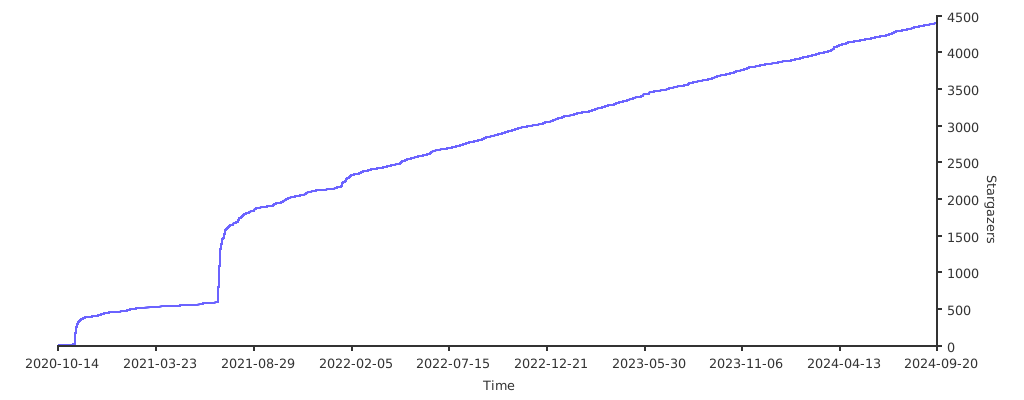](https://starchart.cc/ossf/scorecard) ## 常见问题 ### 常见问题 请参阅 [FAQ](docs/faq.md) 获取有关 Scorecard 的常见问题的解答。
## 概述
- [什么是 Scorecard?](#what-is-scorecard)
- [主要的 Scorecard 用户](#prominent-scorecard-users)
- [查看项目评分](#view-a-projects-score)
- [Scorecard 的公共数据](#public-data)
## 使用 Scorecard
- [Scorecard GitHub Action](#scorecard-github-action)
- [Scorecard REST API](#scorecard-rest-api)
- [Scorecard 徽章](#scorecard-badges)
- [Scorecard 命令行界面](#scorecard-command-line-interface)
- [前置条件](#prerequisites)
- [安装](#installation)
- [认证](#authentication)
- [基本用法](#basic-usage)
## 检查
- [默认 Scorecard 检查项](#scorecard-checks)
- [详细检查文档](docs/checks.md) (评分标准、风险和
修复)
- [Scorecard 检查项新手指南](#beginners-guide-to-scorecard-checks)
## 其他重要建议
- [双因素认证 (2FA)](#two-factor-authentication-2fa)
## 评分
- [综合评分](#aggregate-score)
## 贡献
- [报告问题](#report-problems)
- [行为准则](CODE_OF_CONDUCT.md)
- [为 Scorecard 做贡献 ](CONTRIBUTING.md)
- [添加新检查项](checks/write.md)
- [联系 Scorecard 社区](#connect-with-the-scorecard-community)
- [报告安全问题](SECURITY.md)
## 常见问题
- [FAQ](docs/faq.md)
## 概述
### 什么是 Scorecard?
我们创建 Scorecard 旨在帮助开源维护者改进其安全最佳实践,并帮助开源消费者判断其依赖项是否安全。
Scorecard 是一种自动化工具,用于评估与软件安全相关的多项重要启发式[“检查项”](#scorecard-checks),并为每个检查项分配一个 0-10 的分数。您可以使用这些分数来了解需要改进的具体领域,从而加强您项目的安全态势。
您还可以评估依赖项带来的风险,并就接受这些风险、评估替代方案或与维护者合作进行改进做出明智的决策。
Scorecard logo 的灵感来源:
[“你通过了!全是 D ... 还有一个 A!”](https://youtu.be/rDMMYT3vkTk)
#### 项目目标
1. 自动化对开源项目安全态势的分析和信任决策。
2. 利用这些数据主动改善全球所依赖的关键项目的安全态势。
3. 作为现有策略的衡量工具
如果 OSS 消费者要求其依赖项具备某些行为,可以使用 Scorecard 进行衡量。在 V5 版本中,如果存在支持的分析,我们将结构化结果视为实现这一目标的一种方式。与其依赖 X/10 的综合评分或 Y/10 的维护评分,OSS 消费者可能更希望确保他们依赖的仓库未被存档(这由 `archived` 探针覆盖)。OpenSSF 在其自己的项目安全基线中也采用了这种方法。
#### 项目非目标
1. 成为所有项目都应遵循的权威报告或要求。
Scorecard 并非旨在成为一刀切的解决方案。我们生成结果的每一步都带有主观性:包含或排除哪些检查项、每项检查的重要性以及分数的计算方式。检查项本身是启发式的;存在误报和漏报。无论是由于适用性、可行性还是观点差异,Scorecard 结果中包含或排除的内容都会引发大量讨论。要创建一个让每个人都满意的 Scorecard 是不可能的,因为不同的受众会关注不同的行为子集。综合评分尤其无法告诉你仓库正在或未在执行哪些具体行为。许多检查分数被汇总为一个分数,而有多种方法可以达到相同的分数。随着我们增加新的启发式方法或完善现有方法,这些分数也会发生变化。
### 主要的 Scorecard 用户
Scorecard 已在数千个项目上运行,以监控和跟踪安全指标。使用 Scorecard 的知名项目包括:
- [Tensorflow](https://github.com/tensorflow/tensorflow)
- [Angular](https://github.com/angular/angular)
- [Flutter](https://github.com/flutter/flutter)
- [sos.dev](https://sos.dev)
- [deps.dev](https://deps.dev)
### 查看项目评分
要查看 Scorecard 定期扫描的项目评分,请导航至 [webviewer](https://scorecard.dev/viewer/?uri=)。您也可以替换以下模板链接中的占位符文本(平台、用户/组织和仓库名称),以生成仓库的自定义 Scorecard 链接:
`https://scorecard.dev/viewer/?uri=视频通话: [LFX Zoom](https://zoom-lfx.platform.linuxfoundation.org/meeting/95007214146?password=250040c3-80c0-48c4-80c1-07a373116d54)
**_EMEA 友好_** 每 4 周周一 7:00-8:00 AM 太平洋时间 ([OSSF 公共日历](https://calendar.google.com/calendar/u/0/embed?height=600&wkst=1&bgcolor=%238E24AA&showTitle=1&mode=WEEK&showCalendars=0&showTabs=1&showPrint=0&title=OpenSSF+Community+Calendar&src=czYzdm9lZmhwNWk5cGZsdGI1cTY3bmdwZXNAZ3JvdXAuY2FsZW5kYXIuZ29vZ2xlLmNvbQ&color=%238E24AA))
视频通话: [LFX Zoom](https://zoom-lfx.platform.linuxfoundation.org/meeting/93377638314?password=d53af562-d908-4100-8ae1-52686756cc5d) 会议笔记 | [笔记](https://docs.google.com/document/d/1b6d3CVJLsl7YnTE7ZaZQHdkdYIvuOQ8rzAmvVdypOWM/edit?usp=sharing) Slack 频道 | [#scorecard](https://slack.openssf.org/#scorecard) __维护者__ 列在 [CODEOWNERS 文件](.github/CODEOWNERS)中。 ### 报告安全问题 要报告安全问题,请遵循[此处](SECURITY.md)的说明。 ### 加入 Scorecard 项目会议 #### Zoom **_APAC 友好_** 每两周周四 1:00-2:00 PM 太平洋时间 ([OSSF 公共日历](https://calendar.google.com/calendar/u/0/embed?height=600&wkst=1&bgcolor=%238E24AA&showTitle=1&mode=WEEK&showCalendars=0&showTabs=1&showPrint=0&title=OpenSSF+Community+Calendar&src=czYzdm9lZmhwNWk5cGZsdGI1cTY3bmdwZXNAZ3JvdXAuY2FsZW5kYXIuZ29vZ2xlLmNvbQ&color=%238E24AA)) 视频通话: [LFX z o o m](https://zoom-lfx.platform.linuxfoundation.org/meeting/95007214146?password=250040c3-80c0-48c4-80c1-07a373116d54) **_EMEA 友好_** 每 4 周周一 7:00-8:00 AM 太平洋时间 ([OSSF 公共日历](https://calendar.google.com/calendar/u/0/embed?height=600&wkst=1&bgcolor=%238E24AA&showTitle=1&mode=WEEK&showCalendars=0&showTabs=1&showPrint=0&title=OpenSSF+Community+Calendar&src=czYzdm9lZmhwNWk5cGZsdGI1cTY3bmdwZXNAZ3JvdXAuY2FsZW5kYXIuZ29vZ2xlLmNvbQ&color=%238E24AA)) 视频通话: [LFX z o o m](https://zoom-lfx.platform.linuxfoundation.org/meeting/93377638314?password=d53af562-d908-4100-8ae1-52686756cc5d) #### 议程 您可以查看[此处的议程和会议笔记](https://docs.google.com/document/d/1b6d3CVJLsl7YnTE7ZaZQHdkdYIvuOQ8rzAmvVdypOWM/edit?usp=sharing)。 ## 随时间变化的 Stargazers [](https://starchart.cc/ossf/scorecard) ## 常见问题 ### 常见问题 请参阅 [FAQ](docs/faq.md) 获取有关 Scorecard 的常见问题的解答。
标签:DevSecOps, EVTX分析, GitHub Action, Go语言, REST API, SBOM, SLSA, 上游代理, 云安全监控, 依赖安全, 安全合规, 安全态势感知, 安全评分, 文档安全, 日志审计, 最佳实践, 硬件无关, 程序破解, 网络代理, 网络测绘, 自动化检查, 请求拦截, 跌倒检测, 软件物料清单, 静态分析