raceintospace/raceintospace
GitHub: raceintospace/raceintospace
这是一款开源的太空竞赛模拟游戏,基于经典桌游改编,提供数字版的游戏体验。
Stars: 215 | Forks: 56
# 驶向太空
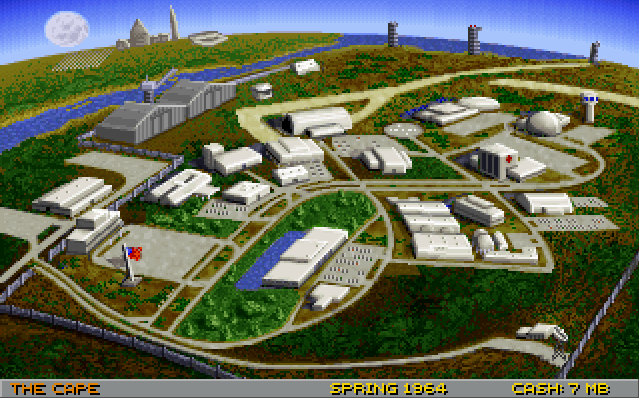
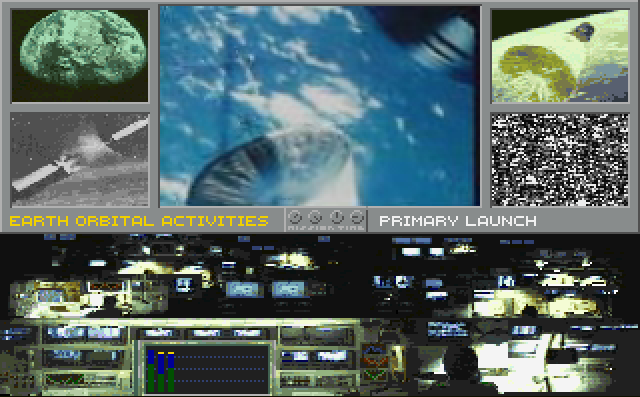 《驶向太空》是 Interplay 公司《巴兹·奥尔德林的驶向太空》的自由软件版本。这是基于 Fritz Bronner 开发的《Liftoff!》电脑版桌游源代码发布后制作的重制版本。原版由 Strategic Visions 开发,Interplay 于 1992 年以软盘游戏形式发行,1994 年发行了 CD-ROM 版本。
# 最新版本
最新的稳定版本是 2.0.0,发布于 2025 年 3 月 27 日。该版本包含以下可供下载的文件:
* [raceintospace-2.0.0-Debian12.deb](https://github.com/raceintospace/raceintospace/releases/download/v2.0.0/raceintospace-2.0.0-Debian12.deb)
* [raceintospace-2.0.0-Linux.deb](https://github.com/raceintospace/raceintospace/releases/download/v2.0.0/raceintospace-2.0.0-Linux.deb)
* [raceintospace-2.0.0-Linux.rpm](https://github.com/raceintospace/raceintospace/releases/download/v2.0.0/raceintospace-2.0.0-Linux.rpm)
* [raceintospace-2.0.0-Linux.tar.gz](https://github.com/raceintospace/raceintospace/releases/download/v2.0.0/raceintospace-2.0.0-Linux.tar.gz)
* [raceintospace-2.0.0-Source.tar.gz](https://github.com/raceintospace/raceintospace/releases/download/v2.0.0/raceintospace-2.0.0-Source.tar.gz)
* [raceintospace-2.0.0-win32.exe](https://github.com/raceintospace/raceintospace/releases/download/v2.0.0/raceintospace-2.0.0-win32.exe)
* [raceintospace-macos-arm64.zip](https://github.com/raceintospace/raceintospace/releases/download/v2.0.0/raceintospace-macos-arm64.zip)
更多信息可以在[发布页面](https://github.com/raceintospace/raceintospace/releases/tag/v2.0.0)找到。[游戏手册](https://github.com/raceintospace/raceintospace/blob/master/doc/manual/manual.md
)可以在我们的文档部分查看。
致 MacOS 玩家:要在 MacOS 上运行 .app 文件,请右键单击->`打开` .app 文件,或运行 `xattr -c raceintospace.app` 以移除应用隔离属性。此外,还需运行 `brew install sdl12-compat`。这两项要求将在未来的版本中自动化处理。
# 许可证
《驶向太空》依据 GNU 通用公共许可证 (GPL) 第 2 版进行分发。你可以在 `COPYING` 文件中找到相关条款和条件。
# 获取帮助
我们有一个 [Matrix 空间](https://matrix.to/#/#raceintospace:matrix.org),你可以在那里获得帮助、讨论游戏,并寻找对手进行对战。该空间包含两个聊天室:
| 聊天室 | 描述 |
| --------------------- | ------------------------------------- |
| [raceintospace-general](https://matrix.to/#/#raceintospace-general:matrix.org) | 关于游戏的一般性讨论。 |
| [raceintospace-games](https://matrix.to/#/#raceintospace-games:matrix.org) | 安排与其他人的对战。 |
# 获取源代码和数据文件
克隆 git 仓库:
```
git clone --recurse-submodules git://github.com/raceintospace/raceintospace.git
```
如果 git 协议遇到问题,可以尝试通过 https:
```
git clone --recurse-submodules https://github.com/raceintospace/raceintospace
```
这会创建一个名为 `raceintospace` 的子目录,你可以在此目录下构建游戏。
如果你在克隆仓库时未指定 `--recurse-submodules`,则需要初始化克隆仓库内的 `vcpkg` 子模块:
```
git submodule update --init
```
# 构建
你需要一个现代 C++ 编译器和 CMake。
构建系统使用 [vcpkg.io](https://vcpkg.io/) 来自动下载和构建所有依赖项。
创建用于发布的二进制包的说明请参见[单独的一套说明](Release.md)。
## Linux
### Debian/Ubuntu
我们依赖操作系统来提供大部分依赖项。如果你使用的是基于 Debian 的系统,可以通过以下命令获取所有依赖:
```
sudo apt-get install cmake libsdl1.2-dev libboost-dev libpng-dev \
libjsoncpp-dev libogg-dev libvorbis-dev libtheora-dev \
libphysfs-dev libcereal-dev libprotobuf-dev protobuf-compiler
```
或者在一行内输入:
```
sudo apt-get install cmake libsdl1.2-dev libboost-dev libpng-dev libjsoncpp-dev libogg-dev libvorbis-dev libtheora-dev libphysfs-dev libcereal-dev libprotobuf-dev protobuf-compiler
```
如果你尚未安装 git,还需要运行:
```
sudo apt install git
```
你可能还需要运行(特别是在出现 "No CMAKE_CXX_COMPILER could be found." 错误时):
```
sudo apt-get install build-essential
```
### Fedora
如果你使用的是基于 Fedora 的系统,可以通过以下命令获取所有依赖:
```
$ sudo dnf install cmake gcc-c++ SDL-devel protobuf-devel boost-devel libogg-devel libvorbis-devel libtheora-devel jsoncpp-devel physfs-devel libpng-devel cereal-devel
```
### 使用系统依赖构建
要快速编译并运行游戏,请从源代码目录执行以下命令:
```
cmake --preset linux-release
cmake --build --preset linux-release --target run
```
构建目录为 `build/release`,你可以随时删除它以进行全新构建。
### 无需系统依赖构建
或者,你可以让所有依赖项自动下载和构建:
```
cmake --preset linux-vcpkg
cmake --build --preset linux-vcpkg --target run
```
### 安装
要安装到默认的系统位置:
```
sudo cmake --build --preset XXX --target install
```
要安装到你的主目录,你需要先向 `configure` 传递 `--prefix` 参数:
```
cmake --preset XXX --prefix "$HOME"
cmake --build --preset XXX --target install
```
## Mac OS X
构建支持在 MacOS 15 及更高版本的 Apple 芯片上进行。
你需要 CMake,可以方便地从 [Homebrew](http://mxcl.github.com/homebrew/) 获取,你可能已经安装了它。如果你还没有,也需要安装 `pkg-config`。唯一需要的外部依赖是 `sdl`。
```
$ brew install cmake sdl pkg-config sdl12-compat
```
CMake 和 vcpkg 会自动处理所有其他依赖。
获取源代码并构建使用:
```
$ git clone --recurse-submodules git://github.com/raceintospace/raceintospace.git
$ cd raceintospace
$ cmake --preset macos-vcpkg
$ cmake --build --preset macos-vcpkg
```
你可能想使用 Xcode 进行开发。CMake 可以生成 Xcode 项目文件:
```
$ cmake --preset macos-vcpkg -G Xcode
$ open raceintospace.xcodeproj
```
## Windows
编译游戏最简单的方法如下:
1. 开始之前,请确保已安装以下内容:
* [Visual Studio Community](https://visualstudio.microsoft.com/vs/community/)(免费,但请阅读相关条款)
* 至少安装 *MSVC*、*C++ CMake for Windows* 和 *Windows SDK* 组件!它可能显示为“使用 C++ 的桌面开发”。
* 如果你已安装 Visual Studio 但缺少组件,可以启动 Visual Studio 安装程序应用,选择“修改”并选择要安装的其他组件。
* [Git](https://git-scm.com/downloads)(可以接受默认设置,但你可能希望告诉它使用记事本作为默认编辑器。)你可能需要重启才能将 git 添加到你的 $PATH。
2. 启动 Visual Studio 并选择“继续但无需代码”。
3. 启动工具 -> 命令行 -> [开发者命令提示符](https://learn.microsoft.com/en-us/visualstudio/ide/reference/command-prompt-powershell?view=vs-2022)。这一步很重要,它会将 cmake 和 ninja 添加到你的路径中。
4. 在该命令提示符(而非 Windows 的 cmd)中,克隆、配置并构建游戏:
git clone --recurse-submodules https://github.com/raceintospace/raceintospace.git
cd raceintospace
cmake --preset windows-release
cmake --build --preset windows-release
5. 构建完成后,导航到 raceintospace 文件夹,你就可以启动游戏了:
`.\build\release\src\game\raceintospace.exe BARIS_DATA=data`
以下说明可能适用于在 Visual Studio IDE 中进行设置:
- 通过打开 "raceintospace.sln" 启动 Visual Studio。
- 右键单击 "ALL_BUILD" 并选择“生成”(所有内容都会下载并安装)。
- 右键单击 "Race Into Space" 并选择“设为启动项目”。
- 右键单击 "Race Into Space" 并选择“属性”。
- 打开“配置属性”并选择“输出目录”,将其设置为 "raceintospace-build\local\bin" 的路径。
- 单击“调试”并编辑“环境”。
添加:
```
BARIS_DATA=[path to raceintospace\data]
BARIS_SAVE=.\save
```
单击“运行”
# 测试
该项目拥有一个基于 Boost.Test 的测试套件,涵盖任务逻辑、谓词和步骤链遍历。参见 [TESTING.md](TESTING.md) 了解如何在本地运行测试、套件覆盖范围以及已知的覆盖空白。
测试会在每次推送和拉取请求时在 CI 中自动运行。
# 音乐
由于版权问题,游戏音乐已被放置在一个非自由仓库中。
要向游戏添加音乐,请从该仓库获取文件:
```
git clone https://github.com/raceintospace/raceintospace-nonfree
```
然后将 `raceintospace-nonfree` 中的 `data/audio/music` 目录复制到:
1. 源代码目录中的 `data/audio`(如果你正在从源代码构建游戏),或者
2. 你安装游戏的目录中的 `data/audio`。
《驶向太空》是 Interplay 公司《巴兹·奥尔德林的驶向太空》的自由软件版本。这是基于 Fritz Bronner 开发的《Liftoff!》电脑版桌游源代码发布后制作的重制版本。原版由 Strategic Visions 开发,Interplay 于 1992 年以软盘游戏形式发行,1994 年发行了 CD-ROM 版本。
# 最新版本
最新的稳定版本是 2.0.0,发布于 2025 年 3 月 27 日。该版本包含以下可供下载的文件:
* [raceintospace-2.0.0-Debian12.deb](https://github.com/raceintospace/raceintospace/releases/download/v2.0.0/raceintospace-2.0.0-Debian12.deb)
* [raceintospace-2.0.0-Linux.deb](https://github.com/raceintospace/raceintospace/releases/download/v2.0.0/raceintospace-2.0.0-Linux.deb)
* [raceintospace-2.0.0-Linux.rpm](https://github.com/raceintospace/raceintospace/releases/download/v2.0.0/raceintospace-2.0.0-Linux.rpm)
* [raceintospace-2.0.0-Linux.tar.gz](https://github.com/raceintospace/raceintospace/releases/download/v2.0.0/raceintospace-2.0.0-Linux.tar.gz)
* [raceintospace-2.0.0-Source.tar.gz](https://github.com/raceintospace/raceintospace/releases/download/v2.0.0/raceintospace-2.0.0-Source.tar.gz)
* [raceintospace-2.0.0-win32.exe](https://github.com/raceintospace/raceintospace/releases/download/v2.0.0/raceintospace-2.0.0-win32.exe)
* [raceintospace-macos-arm64.zip](https://github.com/raceintospace/raceintospace/releases/download/v2.0.0/raceintospace-macos-arm64.zip)
更多信息可以在[发布页面](https://github.com/raceintospace/raceintospace/releases/tag/v2.0.0)找到。[游戏手册](https://github.com/raceintospace/raceintospace/blob/master/doc/manual/manual.md
)可以在我们的文档部分查看。
致 MacOS 玩家:要在 MacOS 上运行 .app 文件,请右键单击->`打开` .app 文件,或运行 `xattr -c raceintospace.app` 以移除应用隔离属性。此外,还需运行 `brew install sdl12-compat`。这两项要求将在未来的版本中自动化处理。
# 许可证
《驶向太空》依据 GNU 通用公共许可证 (GPL) 第 2 版进行分发。你可以在 `COPYING` 文件中找到相关条款和条件。
# 获取帮助
我们有一个 [Matrix 空间](https://matrix.to/#/#raceintospace:matrix.org),你可以在那里获得帮助、讨论游戏,并寻找对手进行对战。该空间包含两个聊天室:
| 聊天室 | 描述 |
| --------------------- | ------------------------------------- |
| [raceintospace-general](https://matrix.to/#/#raceintospace-general:matrix.org) | 关于游戏的一般性讨论。 |
| [raceintospace-games](https://matrix.to/#/#raceintospace-games:matrix.org) | 安排与其他人的对战。 |
# 获取源代码和数据文件
克隆 git 仓库:
```
git clone --recurse-submodules git://github.com/raceintospace/raceintospace.git
```
如果 git 协议遇到问题,可以尝试通过 https:
```
git clone --recurse-submodules https://github.com/raceintospace/raceintospace
```
这会创建一个名为 `raceintospace` 的子目录,你可以在此目录下构建游戏。
如果你在克隆仓库时未指定 `--recurse-submodules`,则需要初始化克隆仓库内的 `vcpkg` 子模块:
```
git submodule update --init
```
# 构建
你需要一个现代 C++ 编译器和 CMake。
构建系统使用 [vcpkg.io](https://vcpkg.io/) 来自动下载和构建所有依赖项。
创建用于发布的二进制包的说明请参见[单独的一套说明](Release.md)。
## Linux
### Debian/Ubuntu
我们依赖操作系统来提供大部分依赖项。如果你使用的是基于 Debian 的系统,可以通过以下命令获取所有依赖:
```
sudo apt-get install cmake libsdl1.2-dev libboost-dev libpng-dev \
libjsoncpp-dev libogg-dev libvorbis-dev libtheora-dev \
libphysfs-dev libcereal-dev libprotobuf-dev protobuf-compiler
```
或者在一行内输入:
```
sudo apt-get install cmake libsdl1.2-dev libboost-dev libpng-dev libjsoncpp-dev libogg-dev libvorbis-dev libtheora-dev libphysfs-dev libcereal-dev libprotobuf-dev protobuf-compiler
```
如果你尚未安装 git,还需要运行:
```
sudo apt install git
```
你可能还需要运行(特别是在出现 "No CMAKE_CXX_COMPILER could be found." 错误时):
```
sudo apt-get install build-essential
```
### Fedora
如果你使用的是基于 Fedora 的系统,可以通过以下命令获取所有依赖:
```
$ sudo dnf install cmake gcc-c++ SDL-devel protobuf-devel boost-devel libogg-devel libvorbis-devel libtheora-devel jsoncpp-devel physfs-devel libpng-devel cereal-devel
```
### 使用系统依赖构建
要快速编译并运行游戏,请从源代码目录执行以下命令:
```
cmake --preset linux-release
cmake --build --preset linux-release --target run
```
构建目录为 `build/release`,你可以随时删除它以进行全新构建。
### 无需系统依赖构建
或者,你可以让所有依赖项自动下载和构建:
```
cmake --preset linux-vcpkg
cmake --build --preset linux-vcpkg --target run
```
### 安装
要安装到默认的系统位置:
```
sudo cmake --build --preset XXX --target install
```
要安装到你的主目录,你需要先向 `configure` 传递 `--prefix` 参数:
```
cmake --preset XXX --prefix "$HOME"
cmake --build --preset XXX --target install
```
## Mac OS X
构建支持在 MacOS 15 及更高版本的 Apple 芯片上进行。
你需要 CMake,可以方便地从 [Homebrew](http://mxcl.github.com/homebrew/) 获取,你可能已经安装了它。如果你还没有,也需要安装 `pkg-config`。唯一需要的外部依赖是 `sdl`。
```
$ brew install cmake sdl pkg-config sdl12-compat
```
CMake 和 vcpkg 会自动处理所有其他依赖。
获取源代码并构建使用:
```
$ git clone --recurse-submodules git://github.com/raceintospace/raceintospace.git
$ cd raceintospace
$ cmake --preset macos-vcpkg
$ cmake --build --preset macos-vcpkg
```
你可能想使用 Xcode 进行开发。CMake 可以生成 Xcode 项目文件:
```
$ cmake --preset macos-vcpkg -G Xcode
$ open raceintospace.xcodeproj
```
## Windows
编译游戏最简单的方法如下:
1. 开始之前,请确保已安装以下内容:
* [Visual Studio Community](https://visualstudio.microsoft.com/vs/community/)(免费,但请阅读相关条款)
* 至少安装 *MSVC*、*C++ CMake for Windows* 和 *Windows SDK* 组件!它可能显示为“使用 C++ 的桌面开发”。
* 如果你已安装 Visual Studio 但缺少组件,可以启动 Visual Studio 安装程序应用,选择“修改”并选择要安装的其他组件。
* [Git](https://git-scm.com/downloads)(可以接受默认设置,但你可能希望告诉它使用记事本作为默认编辑器。)你可能需要重启才能将 git 添加到你的 $PATH。
2. 启动 Visual Studio 并选择“继续但无需代码”。
3. 启动工具 -> 命令行 -> [开发者命令提示符](https://learn.microsoft.com/en-us/visualstudio/ide/reference/command-prompt-powershell?view=vs-2022)。这一步很重要,它会将 cmake 和 ninja 添加到你的路径中。
4. 在该命令提示符(而非 Windows 的 cmd)中,克隆、配置并构建游戏:
git clone --recurse-submodules https://github.com/raceintospace/raceintospace.git
cd raceintospace
cmake --preset windows-release
cmake --build --preset windows-release
5. 构建完成后,导航到 raceintospace 文件夹,你就可以启动游戏了:
`.\build\release\src\game\raceintospace.exe BARIS_DATA=data`
以下说明可能适用于在 Visual Studio IDE 中进行设置:
- 通过打开 "raceintospace.sln" 启动 Visual Studio。
- 右键单击 "ALL_BUILD" 并选择“生成”(所有内容都会下载并安装)。
- 右键单击 "Race Into Space" 并选择“设为启动项目”。
- 右键单击 "Race Into Space" 并选择“属性”。
- 打开“配置属性”并选择“输出目录”,将其设置为 "raceintospace-build\local\bin" 的路径。
- 单击“调试”并编辑“环境”。
添加:
```
BARIS_DATA=[path to raceintospace\data]
BARIS_SAVE=.\save
```
单击“运行”
# 测试
该项目拥有一个基于 Boost.Test 的测试套件,涵盖任务逻辑、谓词和步骤链遍历。参见 [TESTING.md](TESTING.md) 了解如何在本地运行测试、套件覆盖范围以及已知的覆盖空白。
测试会在每次推送和拉取请求时在 CI 中自动运行。
# 音乐
由于版权问题,游戏音乐已被放置在一个非自由仓库中。
要向游戏添加音乐,请从该仓库获取文件:
```
git clone https://github.com/raceintospace/raceintospace-nonfree
```
然后将 `raceintospace-nonfree` 中的 `data/audio/music` 目录复制到:
1. 源代码目录中的 `data/audio`(如果你正在从源代码构建游戏),或者
2. 你安装游戏的目录中的 `data/audio`。
《驶向太空》是 Interplay 公司《巴兹·奥尔德林的驶向太空》的自由软件版本。这是基于 Fritz Bronner 开发的《Liftoff!》电脑版桌游源代码发布后制作的重制版本。原版由 Strategic Visions 开发,Interplay 于 1992 年以软盘游戏形式发行,1994 年发行了 CD-ROM 版本。
# 最新版本
最新的稳定版本是 2.0.0,发布于 2025 年 3 月 27 日。该版本包含以下可供下载的文件:
* [raceintospace-2.0.0-Debian12.deb](https://github.com/raceintospace/raceintospace/releases/download/v2.0.0/raceintospace-2.0.0-Debian12.deb)
* [raceintospace-2.0.0-Linux.deb](https://github.com/raceintospace/raceintospace/releases/download/v2.0.0/raceintospace-2.0.0-Linux.deb)
* [raceintospace-2.0.0-Linux.rpm](https://github.com/raceintospace/raceintospace/releases/download/v2.0.0/raceintospace-2.0.0-Linux.rpm)
* [raceintospace-2.0.0-Linux.tar.gz](https://github.com/raceintospace/raceintospace/releases/download/v2.0.0/raceintospace-2.0.0-Linux.tar.gz)
* [raceintospace-2.0.0-Source.tar.gz](https://github.com/raceintospace/raceintospace/releases/download/v2.0.0/raceintospace-2.0.0-Source.tar.gz)
* [raceintospace-2.0.0-win32.exe](https://github.com/raceintospace/raceintospace/releases/download/v2.0.0/raceintospace-2.0.0-win32.exe)
* [raceintospace-macos-arm64.zip](https://github.com/raceintospace/raceintospace/releases/download/v2.0.0/raceintospace-macos-arm64.zip)
更多信息可以在[发布页面](https://github.com/raceintospace/raceintospace/releases/tag/v2.0.0)找到。[游戏手册](https://github.com/raceintospace/raceintospace/blob/master/doc/manual/manual.md
)可以在我们的文档部分查看。
致 MacOS 玩家:要在 MacOS 上运行 .app 文件,请右键单击->`打开` .app 文件,或运行 `xattr -c raceintospace.app` 以移除应用隔离属性。此外,还需运行 `brew install sdl12-compat`。这两项要求将在未来的版本中自动化处理。
# 许可证
《驶向太空》依据 GNU 通用公共许可证 (GPL) 第 2 版进行分发。你可以在 `COPYING` 文件中找到相关条款和条件。
# 获取帮助
我们有一个 [Matrix 空间](https://matrix.to/#/#raceintospace:matrix.org),你可以在那里获得帮助、讨论游戏,并寻找对手进行对战。该空间包含两个聊天室:
| 聊天室 | 描述 |
| --------------------- | ------------------------------------- |
| [raceintospace-general](https://matrix.to/#/#raceintospace-general:matrix.org) | 关于游戏的一般性讨论。 |
| [raceintospace-games](https://matrix.to/#/#raceintospace-games:matrix.org) | 安排与其他人的对战。 |
# 获取源代码和数据文件
克隆 git 仓库:
```
git clone --recurse-submodules git://github.com/raceintospace/raceintospace.git
```
如果 git 协议遇到问题,可以尝试通过 https:
```
git clone --recurse-submodules https://github.com/raceintospace/raceintospace
```
这会创建一个名为 `raceintospace` 的子目录,你可以在此目录下构建游戏。
如果你在克隆仓库时未指定 `--recurse-submodules`,则需要初始化克隆仓库内的 `vcpkg` 子模块:
```
git submodule update --init
```
# 构建
你需要一个现代 C++ 编译器和 CMake。
构建系统使用 [vcpkg.io](https://vcpkg.io/) 来自动下载和构建所有依赖项。
创建用于发布的二进制包的说明请参见[单独的一套说明](Release.md)。
## Linux
### Debian/Ubuntu
我们依赖操作系统来提供大部分依赖项。如果你使用的是基于 Debian 的系统,可以通过以下命令获取所有依赖:
```
sudo apt-get install cmake libsdl1.2-dev libboost-dev libpng-dev \
libjsoncpp-dev libogg-dev libvorbis-dev libtheora-dev \
libphysfs-dev libcereal-dev libprotobuf-dev protobuf-compiler
```
或者在一行内输入:
```
sudo apt-get install cmake libsdl1.2-dev libboost-dev libpng-dev libjsoncpp-dev libogg-dev libvorbis-dev libtheora-dev libphysfs-dev libcereal-dev libprotobuf-dev protobuf-compiler
```
如果你尚未安装 git,还需要运行:
```
sudo apt install git
```
你可能还需要运行(特别是在出现 "No CMAKE_CXX_COMPILER could be found." 错误时):
```
sudo apt-get install build-essential
```
### Fedora
如果你使用的是基于 Fedora 的系统,可以通过以下命令获取所有依赖:
```
$ sudo dnf install cmake gcc-c++ SDL-devel protobuf-devel boost-devel libogg-devel libvorbis-devel libtheora-devel jsoncpp-devel physfs-devel libpng-devel cereal-devel
```
### 使用系统依赖构建
要快速编译并运行游戏,请从源代码目录执行以下命令:
```
cmake --preset linux-release
cmake --build --preset linux-release --target run
```
构建目录为 `build/release`,你可以随时删除它以进行全新构建。
### 无需系统依赖构建
或者,你可以让所有依赖项自动下载和构建:
```
cmake --preset linux-vcpkg
cmake --build --preset linux-vcpkg --target run
```
### 安装
要安装到默认的系统位置:
```
sudo cmake --build --preset XXX --target install
```
要安装到你的主目录,你需要先向 `configure` 传递 `--prefix` 参数:
```
cmake --preset XXX --prefix "$HOME"
cmake --build --preset XXX --target install
```
## Mac OS X
构建支持在 MacOS 15 及更高版本的 Apple 芯片上进行。
你需要 CMake,可以方便地从 [Homebrew](http://mxcl.github.com/homebrew/) 获取,你可能已经安装了它。如果你还没有,也需要安装 `pkg-config`。唯一需要的外部依赖是 `sdl`。
```
$ brew install cmake sdl pkg-config sdl12-compat
```
CMake 和 vcpkg 会自动处理所有其他依赖。
获取源代码并构建使用:
```
$ git clone --recurse-submodules git://github.com/raceintospace/raceintospace.git
$ cd raceintospace
$ cmake --preset macos-vcpkg
$ cmake --build --preset macos-vcpkg
```
你可能想使用 Xcode 进行开发。CMake 可以生成 Xcode 项目文件:
```
$ cmake --preset macos-vcpkg -G Xcode
$ open raceintospace.xcodeproj
```
## Windows
编译游戏最简单的方法如下:
1. 开始之前,请确保已安装以下内容:
* [Visual Studio Community](https://visualstudio.microsoft.com/vs/community/)(免费,但请阅读相关条款)
* 至少安装 *MSVC*、*C++ CMake for Windows* 和 *Windows SDK* 组件!它可能显示为“使用 C++ 的桌面开发”。
* 如果你已安装 Visual Studio 但缺少组件,可以启动 Visual Studio 安装程序应用,选择“修改”并选择要安装的其他组件。
* [Git](https://git-scm.com/downloads)(可以接受默认设置,但你可能希望告诉它使用记事本作为默认编辑器。)你可能需要重启才能将 git 添加到你的 $PATH。
2. 启动 Visual Studio 并选择“继续但无需代码”。
3. 启动工具 -> 命令行 -> [开发者命令提示符](https://learn.microsoft.com/en-us/visualstudio/ide/reference/command-prompt-powershell?view=vs-2022)。这一步很重要,它会将 cmake 和 ninja 添加到你的路径中。
4. 在该命令提示符(而非 Windows 的 cmd)中,克隆、配置并构建游戏:
git clone --recurse-submodules https://github.com/raceintospace/raceintospace.git
cd raceintospace
cmake --preset windows-release
cmake --build --preset windows-release
5. 构建完成后,导航到 raceintospace 文件夹,你就可以启动游戏了:
`.\build\release\src\game\raceintospace.exe BARIS_DATA=data`
以下说明可能适用于在 Visual Studio IDE 中进行设置:
- 通过打开 "raceintospace.sln" 启动 Visual Studio。
- 右键单击 "ALL_BUILD" 并选择“生成”(所有内容都会下载并安装)。
- 右键单击 "Race Into Space" 并选择“设为启动项目”。
- 右键单击 "Race Into Space" 并选择“属性”。
- 打开“配置属性”并选择“输出目录”,将其设置为 "raceintospace-build\local\bin" 的路径。
- 单击“调试”并编辑“环境”。
添加:
```
BARIS_DATA=[path to raceintospace\data]
BARIS_SAVE=.\save
```
单击“运行”
# 测试
该项目拥有一个基于 Boost.Test 的测试套件,涵盖任务逻辑、谓词和步骤链遍历。参见 [TESTING.md](TESTING.md) 了解如何在本地运行测试、套件覆盖范围以及已知的覆盖空白。
测试会在每次推送和拉取请求时在 CI 中自动运行。
# 音乐
由于版权问题,游戏音乐已被放置在一个非自由仓库中。
要向游戏添加音乐,请从该仓库获取文件:
```
git clone https://github.com/raceintospace/raceintospace-nonfree
```
然后将 `raceintospace-nonfree` 中的 `data/audio/music` 目录复制到:
1. 源代码目录中的 `data/audio`(如果你正在从源代码构建游戏),或者
2. 你安装游戏的目录中的 `data/audio`。标签:Bash脚本, 免费游戏, 单人游戏, 历史模拟, 回合制策略, 太空探索, 太空模拟, 太空竞赛, 棋盘游戏改编, 游戏, 游戏开发, 电子游戏, 策略游戏, 经典游戏, 计算机游戏, 资源管理, 软件开发