TomWright/dasel
GitHub: TomWright/dasel
Dasel 是一个统一的数据查询、修改和转换工具,解决多格式数据结构的处理问题。
Stars: 8005 | Forks: 170
[](https://daseldocs.tomwright.me)
[](https://goreportcard.com/report/github.com/tomwright/dasel/v3)
[](https://pkg.go.dev/github.com/tomwright/dasel/v3)


[](https://codecov.io/gh/TomWright/dasel)
[](https://github.com/avelino/awesome-go)



[](https://github.com/TomWright/dasel/releases/latest)
[](https://formulae.brew.sh/formula/dasel)
 # Dasel
Dasel (缩写自 **Data-Select**) 是一个命令行工具和库,用于查询、修改和转换数据结构,例如 JSON、YAML、TOML、XML、CSV 和 KDL。
它提供了一致且强大的语法来遍历和更新数据,使其对开发人员、DevOps 和数据整理任务非常有用。
## 功能特性
## 安装说明
### Homebrew (macOS/Linux)
```
brew install dasel
```
### Go 安装
```
go install github.com/tomwright/dasel/v3/cmd/dasel@master
```
### 预构建二进制文件
适用于 Linux、macOS 和 Windows 的预构建二进制文件可在 [Releases](https://github.com/TomWright/dasel/releases) 页面获取。
### 以上都不是?
请查看[安装文档](https://daseldocs.tomwright.me/getting-started/installation)以获取更多选项。
## Shell 补全
Dasel 支持 Bash、Zsh、Fish 和 PowerShell 的 Tab 补全。为您的 shell 生成并加载补全脚本:
```
# Bash
source <(dasel completion bash)
# Zsh
source <(dasel completion zsh)
# Fish
dasel completion fish | source
# PowerShell
dasel completion powershell | Out-String | Invoke-Expression
```
请查看 [Shell 补全文档](https://daseldocs.tomwright.me/getting-started/shell-completion) 了解永久安装说明。
## Man 手册
生成并查看 man page:
```
dasel man | man -l -
```
## 基本用法
### 选择值
默认情况下,Dasel 会计算最终的 Selector 并打印结果。
```
echo '{"foo": {"bar": "baz"}}' | dasel -i json 'foo.bar'
# Output: "baz"
```
### 修改值
内联更新值:
```
echo '{"foo": {"bar": "baz"}}' | dasel -i json 'foo.bar = "bong"'
# Output: "bong"
```
使用 `--root` 在修改后输出完整的文档:
```
echo '{"foo": {"bar": "baz"}}' | dasel -i json --root 'foo.bar = "bong"'
# Output:
{
"foo": {
"bar": "bong"
}
}
```
基于先前的值更新值:
```
echo '[1,2,3,4,5]' | dasel -i json --root 'each($this = $this*2)'
# Output:
[
2,
4,
6,
8,
10
]
```
### 格式转换
```
cat data.json | dasel -i json -o yaml
```
### 递归下降 (`..`)
在所有嵌套对象和数组中搜索匹配的键或索引。
```
echo '{"foo": {"bar": "baz"}}' | dasel -i json '..bar'
# Output:
[
"baz"
]
```
### 搜索 (`search`)
在数据结构的任何位置查找所有匹配条件的值。
```
echo '{"foo": {"bar": "baz"}}' | dasel -i json 'search(bar == "baz")'
# Output:
[
{
"bar": "baz"
}
]
```
## 文档
完整文档可在 [daseldocs.tomwright.me](https://daseldocs.tomwright.me) 获取。
## 许可证
MIT 许可证。详见 [LICENSE](./LICENSE)。
## 随时间变化的 Stargazers
[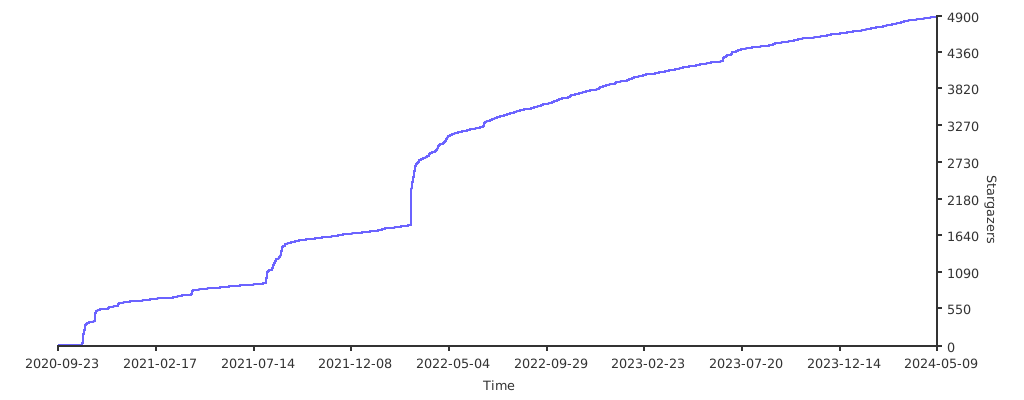](https://starchart.cc/TomWright/dasel)
# Dasel
Dasel (缩写自 **Data-Select**) 是一个命令行工具和库,用于查询、修改和转换数据结构,例如 JSON、YAML、TOML、XML、CSV 和 KDL。
它提供了一致且强大的语法来遍历和更新数据,使其对开发人员、DevOps 和数据整理任务非常有用。
## 功能特性
## 安装说明
### Homebrew (macOS/Linux)
```
brew install dasel
```
### Go 安装
```
go install github.com/tomwright/dasel/v3/cmd/dasel@master
```
### 预构建二进制文件
适用于 Linux、macOS 和 Windows 的预构建二进制文件可在 [Releases](https://github.com/TomWright/dasel/releases) 页面获取。
### 以上都不是?
请查看[安装文档](https://daseldocs.tomwright.me/getting-started/installation)以获取更多选项。
## Shell 补全
Dasel 支持 Bash、Zsh、Fish 和 PowerShell 的 Tab 补全。为您的 shell 生成并加载补全脚本:
```
# Bash
source <(dasel completion bash)
# Zsh
source <(dasel completion zsh)
# Fish
dasel completion fish | source
# PowerShell
dasel completion powershell | Out-String | Invoke-Expression
```
请查看 [Shell 补全文档](https://daseldocs.tomwright.me/getting-started/shell-completion) 了解永久安装说明。
## Man 手册
生成并查看 man page:
```
dasel man | man -l -
```
## 基本用法
### 选择值
默认情况下,Dasel 会计算最终的 Selector 并打印结果。
```
echo '{"foo": {"bar": "baz"}}' | dasel -i json 'foo.bar'
# Output: "baz"
```
### 修改值
内联更新值:
```
echo '{"foo": {"bar": "baz"}}' | dasel -i json 'foo.bar = "bong"'
# Output: "bong"
```
使用 `--root` 在修改后输出完整的文档:
```
echo '{"foo": {"bar": "baz"}}' | dasel -i json --root 'foo.bar = "bong"'
# Output:
{
"foo": {
"bar": "bong"
}
}
```
基于先前的值更新值:
```
echo '[1,2,3,4,5]' | dasel -i json --root 'each($this = $this*2)'
# Output:
[
2,
4,
6,
8,
10
]
```
### 格式转换
```
cat data.json | dasel -i json -o yaml
```
### 递归下降 (`..`)
在所有嵌套对象和数组中搜索匹配的键或索引。
```
echo '{"foo": {"bar": "baz"}}' | dasel -i json '..bar'
# Output:
[
"baz"
]
```
### 搜索 (`search`)
在数据结构的任何位置查找所有匹配条件的值。
```
echo '{"foo": {"bar": "baz"}}' | dasel -i json 'search(bar == "baz")'
# Output:
[
{
"bar": "baz"
}
]
```
## 文档
完整文档可在 [daseldocs.tomwright.me](https://daseldocs.tomwright.me) 获取。
## 许可证
MIT 许可证。详见 [LICENSE](./LICENSE)。
## 随时间变化的 Stargazers
[](https://starchart.cc/TomWright/dasel)
标签:CSV处理, DevOps工具, EVTX分析, Go语言, HCL处理, INI处理, JSON处理, KDL处理, SOC Prime, TOML处理, XML处理, YAML处理, 一致性语法, 工具库, 开发工具, 数据修改, 数据更新, 数据查询, 数据转换, 数据遍历, 文档结构分析, 日志审计, 程序破解, 跨格式工具, 配置文件处理