microsoft/qlib
GitHub: microsoft/qlib
Qlib 是微软推出的面向 AI 的量化投资平台,提供了从数据处理、模型训练到回测分析的完整机器学习流水线,帮助研究者和从业者用 AI 技术驱动量化投资全流程。
Stars: 45237 | Forks: 7203
[](https://pypi.org/project/pyqlib/#files)
[](https://pypi.org/project/pyqlib/#files)
[](https://pypi.org/project/pyqlib/#history)
[](https://pypi.org/project/pyqlib/)
[](https://github.com/microsoft/qlib/actions)
[](https://qlib.readthedocs.io/en/latest/?badge=latest)
[](LICENSE)
[](https://gitter.im/Microsoft/qlib?utm_source=badge&utm_medium=badge&utm_campaign=pr-badge&utm_content=badge)
## :newspaper: **最新消息!** :sparkling_heart:
近期发布的功能
### 介绍  :基于 LLM 的工业数据驱动研发自主进化智能体
我们非常高兴地宣布 **RD-Agent** 📢 的发布,这是一个强大的工具,支持在量化投资研发中进行自动化的因子挖掘和模型优化。
RD-Agent 现已在 [GitHub](https://github.com/microsoft/RD-Agent) 上发布,欢迎 star🌟!
了解更多信息,请访问 [RD-Agent 仓库](https://github.com/microsoft/RD-Agent)。我们为您准备了几个公开的演示视频:
| 场景 | 演示视频 (英文) | 演示视频 (中文) |
| -- | ------ | ------ |
| 量化因子挖掘 | [YouTube](https://www.youtube.com/watch?v=X4DK2QZKaKY&t=6s) | [YouTube](https://www.youtube.com/watch?v=X4DK2QZKaKY&t=6s) |
| 从报告挖掘量化因子 | [YouTube](https://www.youtube.com/watch?v=ECLTXVcSx-c) | [YouTube](https://www.youtube.com/watch?v=ECLTXVcSx-c) |
| 量化模型优化 | [YouTube](https://www.youtube.com/watch?v=dm0dWL49Bc0&t=104s) | [YouTube](https://www.youtube.com/watch?v=dm0dWL49Bc0&t=104s) |
- 📃**论文**:[R&D-Agent-Quant: A Multi-Agent Framework for Data-Centric Factors and Model Joint Optimization](https://arxiv.org/abs/2505.15155)
- 👾**代码**:https://github.com/microsoft/RD-Agent/
```
@misc{li2025rdagentquant,
title={R\&D-Agent-Quant: A Multi-Agent Framework for Data-Centric Factors and Model Joint Optimization},
author={Yuante Li and Xu Yang and Xiao Yang and Minrui Xu and Xisen Wang and Weiqing Liu and Jiang Bian},
year={2025},
eprint={2505.15155},
archivePrefix={arXiv},
primaryClass={cs.AI}
}
```
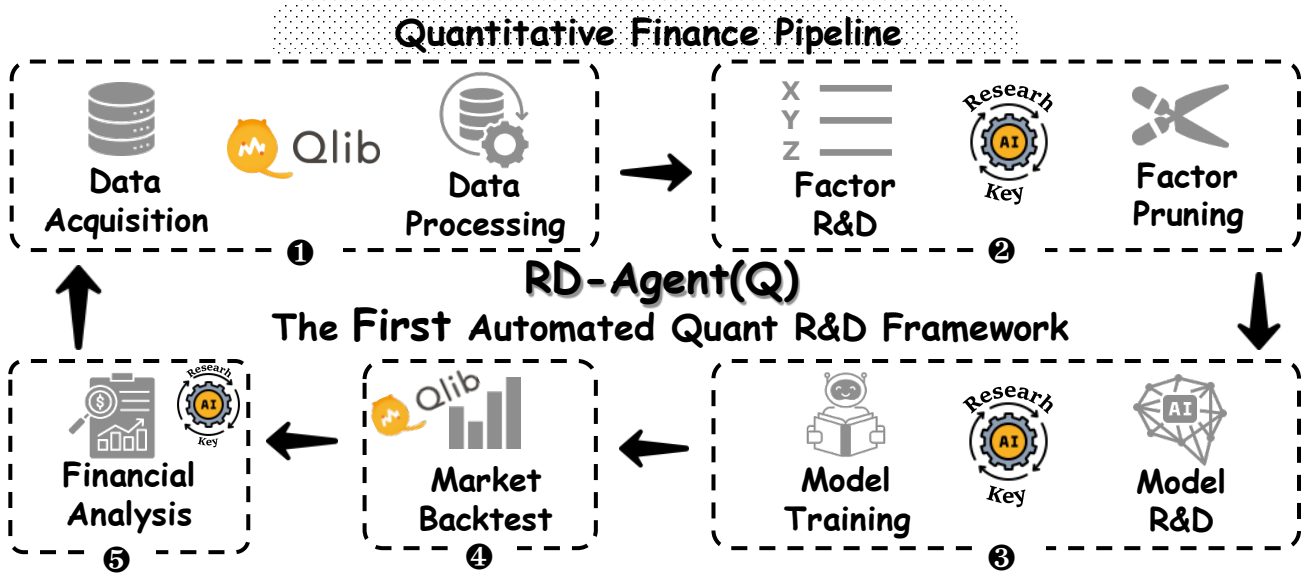
| 功能 | 状态 |
| -- | ------ |
| [R&D-Agent-Quant](https://arxiv.org/abs/2505.15155) 已发布 | 将 R&D-Agent 应用于 Qlib 进行量化交易 |
| 用于端到端学习的 BPQP | 📈即将推出!([审阅中](https://github.com/microsoft/qlib/pull/1863)) |
| 🔥LLM 驱动的自动量化工厂🔥 | 🚀 于 2024 年 8 月 8 日在 [♾️RD-Agent](https://github.com/microsoft/RD-Agent) 中发布 |
| KRNN 和 Sandwich 模型 | :chart_with_upwards_trend: 于 2023 年 5 月 26 日 [发布](https://github.com/microsoft/qlib/pull/1414/) |
| 发布 Qlib v0.9.0 | :octocat: 于 2022 年 12 月 9 日 [发布](https://github.com/microsoft/qlib/releases/tag/v0.9.0) |
| 强化学习框架 | :hammer: :chart_with_upwards_trend: 于 2022 年 11 月 10 日发布。 [#1332](https://github.com/microsoft/qlib/pull/1332), [#1322](https://github.com/microsoft/qlib/pull/1322), [#1316](https://github.com/microsoft/qlib/pull/1316),[#1299](https://github.com/microsoft/qlib/pull/1299),[#1263](https://github.com/microsoft/qlib/pull/1263), [#1244](https://github.com/microsoft/qlib/pull/1244), [#1169](https://github.com/microsoft/qlib/pull/1169), [#1125](https://github.com/microsoft/qlib/pull/1125), [#1076](https://github.com/microsoft/qlib/pull/1076)|
| HIST 和 IGMTF 模型 | :chart_with_upwards_trend: 于 2022 年 4 月 10 日 [发布](https://github.com/microsoft/qlib/pull/1040) |
| Qlib [notebook 教程](https://github.com/microsoft/qlib/tree/main/examples/tutorial) | 📖 于 2022 年 4 月 7 日 [发布](https://github.com/microsoft/qlib/pull/1037) |
| Ibovespa 指数数据 | :rice: 于 2022 年 4 月 6 日 [发布](https://github.com/microsoft/qlib/pull/990) |
| Point-in-Time 数据库 | :hammer: 于 2022 年 3 月 10 日 [发布](https://github.com/microsoft/qlib/pull/343) |
| Arctic 提供程序后端和 Orderbook 数据示例 | :hammer: 于 2022 年 1 月 17 日 [发布](https://github.com/microsoft/qlib/pull/744) |
| 基于 Meta-Learning 的框架 & DDG-DA | :chart_with_upwards_trend: :hammer: 于 2022 年 1 月 10 日 [发布](https://github.com/microsoft/qlib/pull/743) |
| 基于规划的投资组合优化 | :hammer: 于 2021 年 12 月 28 日 [发布](https://github.com/microsoft/qlib/pull/754) |
| 发布 Qlib v0.8.0 | :octocat: 于 2021 年 12 月 8 日 [发布](https://github.com/microsoft/qlib/releases/tag/v0.8.0) |
| ADD 模型 | :chart_with_upwards_trend: 于 2021 年 11 月 22 日 [发布](https://github.com/microsoft/qlib/pull/704) |
| ADARNN 模型 | :chart_with_upwards_trend: 于 2021 年 11 月 14 日 [发布](https://github.com/microsoft/qlib/pull/689) |
| TCN 模型 | :chart_with_upwards_trend: 于 2021 年 11 月 4 日 [发布](https://github.com/microsoft/qlib/pull/668) |
| 嵌套决策框架 | :hammer: 于 2021 年 10 月 1 日 [发布](https://github.com/microsoft/qlib/pull/438)。[示例](https://github.com/microsoft/qlib/blob/main/examples/nested_decision_execution/workflow.py) 和 [文档](https://qlib.readthedocs.io/en/latest/component/highfreq.html) |
| Temporal Routing Adaptor (TRA) | :chart_with_upwards_trend: 于 2021 年 7 月 30 日 [发布](https://github.com/microsoft/qlib/pull/531) |
| Transformer & Localformer | :chart_with_upwards_trend: 于 2021 年 7 月 22 日 [发布](https://github.com/microsoft/qlib/pull/508) |
| 发布 Qlib v0.7.0 | :octocat: 于 2021 年 7 月 12 日 [发布](https://github.com/microsoft/qlib/releases/tag/v0.7.0) |
| TCTS 模型 | :chart_with_upwards_trend: 于 2021 年 7 月 1 日 [发布](https://github.com/microsoft/qlib/pull/491) |
| 在线服务和自动模型滚动 | :hammer: 于 2021 年 5 月 17 日 [发布](https://github.com/microsoft/qlib/pull/290) |
| DoubleEnsemble 模型 | :chart_with_upwards_trend: 于 2021 年 3 月 2 日 [发布](https://github.com/microsoft/qlib/pull/286) |
| 高频数据处理示例 | :hammer: 于 2021 年 2 月 5 日 [发布](https://github.com/microsoft/qlib/pull/257) |
| 高频交易示例 | :chart_with_upwards_trend: 于 2021 年 1 月 28 日 [部分代码发布](https://github.com/microsoft/qlib/pull/227) |
| 高频数据(1分钟) | :rice: 于 2021 年 1 月 27 日 [发布](https://github.com/microsoft/qlib/pull/221) |
| Tabnet 模型 | :chart_with_upwards_trend: 于 2021 年 1 月 22 日 [发布](https://github.com/microsoft/qlib/pull/205) |
2021 年之前发布的功能不在此处列出。
:基于 LLM 的工业数据驱动研发自主进化智能体
我们非常高兴地宣布 **RD-Agent** 📢 的发布,这是一个强大的工具,支持在量化投资研发中进行自动化的因子挖掘和模型优化。
RD-Agent 现已在 [GitHub](https://github.com/microsoft/RD-Agent) 上发布,欢迎 star🌟!
了解更多信息,请访问 [RD-Agent 仓库](https://github.com/microsoft/RD-Agent)。我们为您准备了几个公开的演示视频:
| 场景 | 演示视频 (英文) | 演示视频 (中文) |
| -- | ------ | ------ |
| 量化因子挖掘 | [YouTube](https://www.youtube.com/watch?v=X4DK2QZKaKY&t=6s) | [YouTube](https://www.youtube.com/watch?v=X4DK2QZKaKY&t=6s) |
| 从报告挖掘量化因子 | [YouTube](https://www.youtube.com/watch?v=ECLTXVcSx-c) | [YouTube](https://www.youtube.com/watch?v=ECLTXVcSx-c) |
| 量化模型优化 | [YouTube](https://www.youtube.com/watch?v=dm0dWL49Bc0&t=104s) | [YouTube](https://www.youtube.com/watch?v=dm0dWL49Bc0&t=104s) |
- 📃**论文**:[R&D-Agent-Quant: A Multi-Agent Framework for Data-Centric Factors and Model Joint Optimization](https://arxiv.org/abs/2505.15155)
- 👾**代码**:https://github.com/microsoft/RD-Agent/
```
@misc{li2025rdagentquant,
title={R\&D-Agent-Quant: A Multi-Agent Framework for Data-Centric Factors and Model Joint Optimization},
author={Yuante Li and Xu Yang and Xiao Yang and Minrui Xu and Xisen Wang and Weiqing Liu and Jiang Bian},
year={2025},
eprint={2505.15155},
archivePrefix={arXiv},
primaryClass={cs.AI}
}
```

| 功能 | 状态 |
| -- | ------ |
| [R&D-Agent-Quant](https://arxiv.org/abs/2505.15155) 已发布 | 将 R&D-Agent 应用于 Qlib 进行量化交易 |
| 用于端到端学习的 BPQP | 📈即将推出!([审阅中](https://github.com/microsoft/qlib/pull/1863)) |
| 🔥LLM 驱动的自动量化工厂🔥 | 🚀 于 2024 年 8 月 8 日在 [♾️RD-Agent](https://github.com/microsoft/RD-Agent) 中发布 |
| KRNN 和 Sandwich 模型 | :chart_with_upwards_trend: 于 2023 年 5 月 26 日 [发布](https://github.com/microsoft/qlib/pull/1414/) |
| 发布 Qlib v0.9.0 | :octocat: 于 2022 年 12 月 9 日 [发布](https://github.com/microsoft/qlib/releases/tag/v0.9.0) |
| 强化学习框架 | :hammer: :chart_with_upwards_trend: 于 2022 年 11 月 10 日发布。 [#1332](https://github.com/microsoft/qlib/pull/1332), [#1322](https://github.com/microsoft/qlib/pull/1322), [#1316](https://github.com/microsoft/qlib/pull/1316),[#1299](https://github.com/microsoft/qlib/pull/1299),[#1263](https://github.com/microsoft/qlib/pull/1263), [#1244](https://github.com/microsoft/qlib/pull/1244), [#1169](https://github.com/microsoft/qlib/pull/1169), [#1125](https://github.com/microsoft/qlib/pull/1125), [#1076](https://github.com/microsoft/qlib/pull/1076)|
| HIST 和 IGMTF 模型 | :chart_with_upwards_trend: 于 2022 年 4 月 10 日 [发布](https://github.com/microsoft/qlib/pull/1040) |
| Qlib [notebook 教程](https://github.com/microsoft/qlib/tree/main/examples/tutorial) | 📖 于 2022 年 4 月 7 日 [发布](https://github.com/microsoft/qlib/pull/1037) |
| Ibovespa 指数数据 | :rice: 于 2022 年 4 月 6 日 [发布](https://github.com/microsoft/qlib/pull/990) |
| Point-in-Time 数据库 | :hammer: 于 2022 年 3 月 10 日 [发布](https://github.com/microsoft/qlib/pull/343) |
| Arctic 提供程序后端和 Orderbook 数据示例 | :hammer: 于 2022 年 1 月 17 日 [发布](https://github.com/microsoft/qlib/pull/744) |
| 基于 Meta-Learning 的框架 & DDG-DA | :chart_with_upwards_trend: :hammer: 于 2022 年 1 月 10 日 [发布](https://github.com/microsoft/qlib/pull/743) |
| 基于规划的投资组合优化 | :hammer: 于 2021 年 12 月 28 日 [发布](https://github.com/microsoft/qlib/pull/754) |
| 发布 Qlib v0.8.0 | :octocat: 于 2021 年 12 月 8 日 [发布](https://github.com/microsoft/qlib/releases/tag/v0.8.0) |
| ADD 模型 | :chart_with_upwards_trend: 于 2021 年 11 月 22 日 [发布](https://github.com/microsoft/qlib/pull/704) |
| ADARNN 模型 | :chart_with_upwards_trend: 于 2021 年 11 月 14 日 [发布](https://github.com/microsoft/qlib/pull/689) |
| TCN 模型 | :chart_with_upwards_trend: 于 2021 年 11 月 4 日 [发布](https://github.com/microsoft/qlib/pull/668) |
| 嵌套决策框架 | :hammer: 于 2021 年 10 月 1 日 [发布](https://github.com/microsoft/qlib/pull/438)。[示例](https://github.com/microsoft/qlib/blob/main/examples/nested_decision_execution/workflow.py) 和 [文档](https://qlib.readthedocs.io/en/latest/component/highfreq.html) |
| Temporal Routing Adaptor (TRA) | :chart_with_upwards_trend: 于 2021 年 7 月 30 日 [发布](https://github.com/microsoft/qlib/pull/531) |
| Transformer & Localformer | :chart_with_upwards_trend: 于 2021 年 7 月 22 日 [发布](https://github.com/microsoft/qlib/pull/508) |
| 发布 Qlib v0.7.0 | :octocat: 于 2021 年 7 月 12 日 [发布](https://github.com/microsoft/qlib/releases/tag/v0.7.0) |
| TCTS 模型 | :chart_with_upwards_trend: 于 2021 年 7 月 1 日 [发布](https://github.com/microsoft/qlib/pull/491) |
| 在线服务和自动模型滚动 | :hammer: 于 2021 年 5 月 17 日 [发布](https://github.com/microsoft/qlib/pull/290) |
| DoubleEnsemble 模型 | :chart_with_upwards_trend: 于 2021 年 3 月 2 日 [发布](https://github.com/microsoft/qlib/pull/286) |
| 高频数据处理示例 | :hammer: 于 2021 年 2 月 5 日 [发布](https://github.com/microsoft/qlib/pull/257) |
| 高频交易示例 | :chart_with_upwards_trend: 于 2021 年 1 月 28 日 [部分代码发布](https://github.com/microsoft/qlib/pull/227) |
| 高频数据(1分钟) | :rice: 于 2021 年 1 月 27 日 [发布](https://github.com/microsoft/qlib/pull/221) |
| Tabnet 模型 | :chart_with_upwards_trend: 于 2021 年 1 月 22 日 [发布](https://github.com/microsoft/qlib/pull/205) |
2021 年之前发布的功能不在此处列出。
# 计划
正在开发的新功能(按预计发布时间排序)。
您对这些功能的反馈非常重要。
# Qlib 的框架
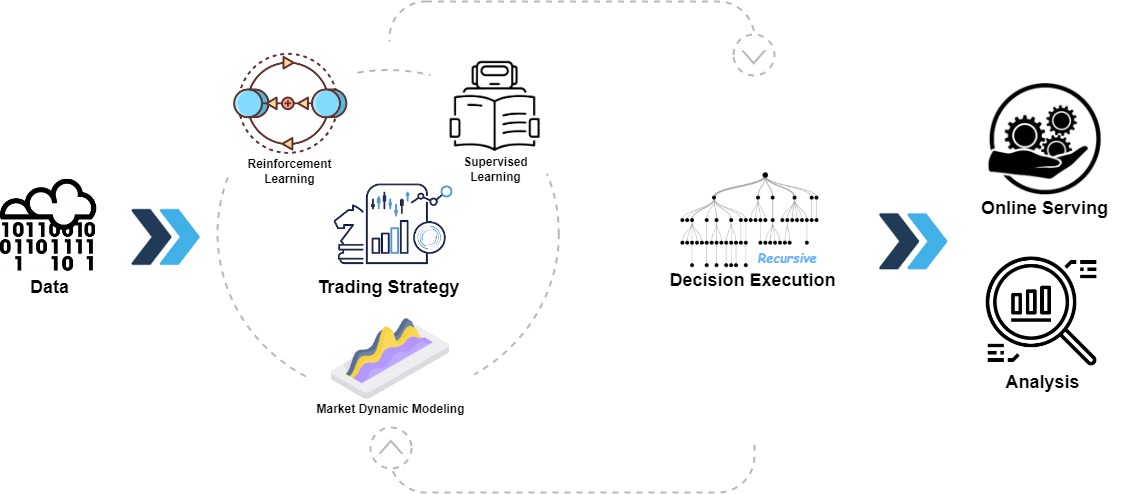 Qlib 的高层框架如上图所示(在深入了解细节时,用户可以找到 Qlib 设计的[详细框架](https://qlib.readthedocs.io/en/latest/introduction/introduction.html#framework))。
各组件被设计为松耦合模块,每个组件都可以独立使用。
Qlib 提供了强大的基础设施来支持量化研究。[数据](https://qlib.readthedocs.io/en/latest/component/data.html)始终是其中的重要组成部分。
强大的学习框架旨在支持多种学习范式(例如[强化学习](https://qlib.readthedocs.io/en/latest/component/rl.html)、[监督学习](https://qlib.readthedocs.io/en/latest/component/workflow.html#model-section))和不同层级的模式(例如[市场动态建模](https://qlib.readthedocs.io/en/latest/component/meta.html))。
通过对市场进行建模,[交易策略](https://qlib.readthedocs.io/en/latest/component/strategy.html)将生成将要执行交易决策。不同层级或粒度的多种交易策略和执行器可以[嵌套在一起进行优化和运行](https://qlib.readthedocs.io/en/latest/component/highfreq.html)。
最后,将提供全面的[分析](https://qlib.readthedocs.io/en/latest/component/report.html),并且模型可以低成本的[在线服务](https://qlib.readthedocs.io/en/latest/component/online.html)。
# 快速开始
本快速入门指南试图展示:
1. 使用 _Qlib_ 构建完整的量化研究工作流并尝试您的想法非常容易。
2. 尽管使用的是*公开数据*和*简单模型*,机器技术在实际量化投资中**效果非常好**。
这是一个快速 **[演示](https://terminalizer.com/view/3f24561a4470)** 展示了如何安装 ``Qlib``,以及如何使用 ``qrun`` 运行 LightGBM。**但是**,请确保您已经按照[说明](#data-preparation)准备好了数据。
## 安装说明
此表格展示了 `Qlib` 支持的 Python 版本:
| | 使用 pip 安装 | 从源码安装 | 绘图 |
| ------------- |:---------------------:|:--------------------:|:------------------:|
| Python 3.8 | :heavy_check_mark: | :heavy_check_mark: | :heavy_check_mark: |
| Python 3.9 | :heavy_check_mark: | :heavy_check_mark: | :heavy_check_mark: |
| Python 3.10 | :heavy_check_mark: | :heavy_check_mark: | :heavy_check_mark: |
| Python 3.11 | :heavy_check_mark: | :heavy_check_mark: | :heavy_check_mark: |
| Python 3.12 | :heavy_check_mark: | :heavy_check_mark: | :heavy_check_mark: |
**注意**:
1. 建议使用 **Conda** 来管理您的 Python 环境。在某些情况下,在 `conda` 环境之外使用 Python 可能会缺少头文件,导致某些包安装失败。
2. 请注意,在 Python 3.6 中安装 cython 时,从源码安装 ``Qlib`` 会引发一些错误。如果用户在其机器上使用 Python 3.6,建议将 Python *升级* 到 3.8 或更高版本,或者使用 `conda` 的 Python 从源码安装 ``Qlib``。
### 使用 pip 安装
用户可以根据以下命令通过 pip 轻松安装 ``Qlib``。
```
pip install pyqlib
```
**注意**:pip 将安装最新的稳定版 qlib。然而,qlib 的主分支正在积极开发中。如果您想测试主分支中最新的脚本或功能,请使用以下方法安装 qlib。
### 从源码安装
此外,用户可以按照以下步骤通过源代码安装最新开发版本的 ``Qlib``:
* 在从源码安装 ``Qlib`` 之前,用户需要安装一些依赖:
pip install numpy
pip install --upgrade cython
* 克隆仓库并按如下方式安装 ``Qlib``。
git clone https://github.com/microsoft/qlib.git && cd qlib
pip install . # 开发推荐使用 `pip install -e .[dev]`。详情请查阅 docs/developer/code_standard_and_dev_guide.rst
**提示**:如果您在您的环境中安装 `Qlib` 或运行示例失败,对比您的步骤与 [CI 工作流](.github/workflows/test_qlib_from_source.yml) 可能有助于您找到问题。
**Mac 提示**:如果您使用的是 M1 芯片的 Mac,您可能会在为 LightGBM 构建 wheel 时遇到问题,这是因为缺少 OpenMP 的依赖。要解决此问题,请先使用 ``brew install libomp`` 安装 openmp,然后再运行 ``pip install .`` 即可成功构建。
## 数据准备
❗ 由于更严格的数据安全策略,官方数据集暂时禁用。您可以尝试由社区贡献的[这个数据源](https://github.com/chenditc/investment_data/releases)。
以下是下载最新数据的示例。
```
wget https://github.com/chenditc/investment_data/releases/latest/download/qlib_bin.tar.gz
mkdir -p ~/.qlib/qlib_data/cn_data
tar -zxvf qlib_bin.tar.gz -C ~/.qlib/qlib_data/cn_data --strip-components=1
rm -f qlib_bin.tar.gz
```
以下官方数据集将在不久的将来恢复。
通过运行以下代码加载并准备数据:
### 通过模块获取
```
# 获取 1d 数据
python -m qlib.cli.data qlib_data --target_dir ~/.qlib/qlib_data/cn_data --region cn
# 获取 1min 数据
python -m qlib.cli.data qlib_data --target_dir ~/.qlib/qlib_data/cn_data_1min --region cn --interval 1min
```
### 从源码获取
```
# 获取 1d 数据
python scripts/get_data.py qlib_data --target_dir ~/.qlib/qlib_data/cn_data --region cn
# 获取 1min 数据
python scripts/get_data.py qlib_data --target_dir ~/.qlib/qlib_data/cn_data_1min --region cn --interval 1min
```
此数据集是由发布在同一仓库中的[爬虫脚本](scripts/data_collector/)收集的公共数据创建的。
用户可以使用它创建相同的数据集。[数据集描述](https://github.com/microsoft/qlib/tree/main/scripts/data_collector#description-of-dataset)
*请注意,数据是从 [Yahoo Finance](https://finance.yahoo.com/lookup) 收集的,数据可能并不完美。
我们建议用户如果拥有高质量的数据集,最好准备自己的数据。有关更多信息,用户可以参考[相关文档](https://qlib.readthedocs.io/en/latest/component/data.html#converting-csv-format-into-qlib-format)*。
### 自动更新日频数据(来自 yahoo finance)
* 每个交易日自动更新数据到“qlib”目录 (Linux)
* 使用 *crontab*:`crontab -e`
* 设置定时任务:
* * * * 1-5 python
Qlib 的高层框架如上图所示(在深入了解细节时,用户可以找到 Qlib 设计的[详细框架](https://qlib.readthedocs.io/en/latest/introduction/introduction.html#framework))。
各组件被设计为松耦合模块,每个组件都可以独立使用。
Qlib 提供了强大的基础设施来支持量化研究。[数据](https://qlib.readthedocs.io/en/latest/component/data.html)始终是其中的重要组成部分。
强大的学习框架旨在支持多种学习范式(例如[强化学习](https://qlib.readthedocs.io/en/latest/component/rl.html)、[监督学习](https://qlib.readthedocs.io/en/latest/component/workflow.html#model-section))和不同层级的模式(例如[市场动态建模](https://qlib.readthedocs.io/en/latest/component/meta.html))。
通过对市场进行建模,[交易策略](https://qlib.readthedocs.io/en/latest/component/strategy.html)将生成将要执行交易决策。不同层级或粒度的多种交易策略和执行器可以[嵌套在一起进行优化和运行](https://qlib.readthedocs.io/en/latest/component/highfreq.html)。
最后,将提供全面的[分析](https://qlib.readthedocs.io/en/latest/component/report.html),并且模型可以低成本的[在线服务](https://qlib.readthedocs.io/en/latest/component/online.html)。
# 快速开始
本快速入门指南试图展示:
1. 使用 _Qlib_ 构建完整的量化研究工作流并尝试您的想法非常容易。
2. 尽管使用的是*公开数据*和*简单模型*,机器技术在实际量化投资中**效果非常好**。
这是一个快速 **[演示](https://terminalizer.com/view/3f24561a4470)** 展示了如何安装 ``Qlib``,以及如何使用 ``qrun`` 运行 LightGBM。**但是**,请确保您已经按照[说明](#data-preparation)准备好了数据。
## 安装说明
此表格展示了 `Qlib` 支持的 Python 版本:
| | 使用 pip 安装 | 从源码安装 | 绘图 |
| ------------- |:---------------------:|:--------------------:|:------------------:|
| Python 3.8 | :heavy_check_mark: | :heavy_check_mark: | :heavy_check_mark: |
| Python 3.9 | :heavy_check_mark: | :heavy_check_mark: | :heavy_check_mark: |
| Python 3.10 | :heavy_check_mark: | :heavy_check_mark: | :heavy_check_mark: |
| Python 3.11 | :heavy_check_mark: | :heavy_check_mark: | :heavy_check_mark: |
| Python 3.12 | :heavy_check_mark: | :heavy_check_mark: | :heavy_check_mark: |
**注意**:
1. 建议使用 **Conda** 来管理您的 Python 环境。在某些情况下,在 `conda` 环境之外使用 Python 可能会缺少头文件,导致某些包安装失败。
2. 请注意,在 Python 3.6 中安装 cython 时,从源码安装 ``Qlib`` 会引发一些错误。如果用户在其机器上使用 Python 3.6,建议将 Python *升级* 到 3.8 或更高版本,或者使用 `conda` 的 Python 从源码安装 ``Qlib``。
### 使用 pip 安装
用户可以根据以下命令通过 pip 轻松安装 ``Qlib``。
```
pip install pyqlib
```
**注意**:pip 将安装最新的稳定版 qlib。然而,qlib 的主分支正在积极开发中。如果您想测试主分支中最新的脚本或功能,请使用以下方法安装 qlib。
### 从源码安装
此外,用户可以按照以下步骤通过源代码安装最新开发版本的 ``Qlib``:
* 在从源码安装 ``Qlib`` 之前,用户需要安装一些依赖:
pip install numpy
pip install --upgrade cython
* 克隆仓库并按如下方式安装 ``Qlib``。
git clone https://github.com/microsoft/qlib.git && cd qlib
pip install . # 开发推荐使用 `pip install -e .[dev]`。详情请查阅 docs/developer/code_standard_and_dev_guide.rst
**提示**:如果您在您的环境中安装 `Qlib` 或运行示例失败,对比您的步骤与 [CI 工作流](.github/workflows/test_qlib_from_source.yml) 可能有助于您找到问题。
**Mac 提示**:如果您使用的是 M1 芯片的 Mac,您可能会在为 LightGBM 构建 wheel 时遇到问题,这是因为缺少 OpenMP 的依赖。要解决此问题,请先使用 ``brew install libomp`` 安装 openmp,然后再运行 ``pip install .`` 即可成功构建。
## 数据准备
❗ 由于更严格的数据安全策略,官方数据集暂时禁用。您可以尝试由社区贡献的[这个数据源](https://github.com/chenditc/investment_data/releases)。
以下是下载最新数据的示例。
```
wget https://github.com/chenditc/investment_data/releases/latest/download/qlib_bin.tar.gz
mkdir -p ~/.qlib/qlib_data/cn_data
tar -zxvf qlib_bin.tar.gz -C ~/.qlib/qlib_data/cn_data --strip-components=1
rm -f qlib_bin.tar.gz
```
以下官方数据集将在不久的将来恢复。
通过运行以下代码加载并准备数据:
### 通过模块获取
```
# 获取 1d 数据
python -m qlib.cli.data qlib_data --target_dir ~/.qlib/qlib_data/cn_data --region cn
# 获取 1min 数据
python -m qlib.cli.data qlib_data --target_dir ~/.qlib/qlib_data/cn_data_1min --region cn --interval 1min
```
### 从源码获取
```
# 获取 1d 数据
python scripts/get_data.py qlib_data --target_dir ~/.qlib/qlib_data/cn_data --region cn
# 获取 1min 数据
python scripts/get_data.py qlib_data --target_dir ~/.qlib/qlib_data/cn_data_1min --region cn --interval 1min
```
此数据集是由发布在同一仓库中的[爬虫脚本](scripts/data_collector/)收集的公共数据创建的。
用户可以使用它创建相同的数据集。[数据集描述](https://github.com/microsoft/qlib/tree/main/scripts/data_collector#description-of-dataset)
*请注意,数据是从 [Yahoo Finance](https://finance.yahoo.com/lookup) 收集的,数据可能并不完美。
我们建议用户如果拥有高质量的数据集,最好准备自己的数据。有关更多信息,用户可以参考[相关文档](https://qlib.readthedocs.io/en/latest/component/data.html#converting-csv-format-into-qlib-format)*。
### 自动更新日频数据(来自 yahoo finance)
* 每个交易日自动更新数据到“qlib”目录 (Linux)
* 使用 *crontab*:`crontab -e`
* 设置定时任务:
* * * * 1-5 python
:基于 LLM 的工业数据驱动研发自主进化智能体
我们非常高兴地宣布 **RD-Agent** 📢 的发布,这是一个强大的工具,支持在量化投资研发中进行自动化的因子挖掘和模型优化。
RD-Agent 现已在 [GitHub](https://github.com/microsoft/RD-Agent) 上发布,欢迎 star🌟!
了解更多信息,请访问 [RD-Agent 仓库](https://github.com/microsoft/RD-Agent)。我们为您准备了几个公开的演示视频:
| 场景 | 演示视频 (英文) | 演示视频 (中文) |
| -- | ------ | ------ |
| 量化因子挖掘 | [YouTube](https://www.youtube.com/watch?v=X4DK2QZKaKY&t=6s) | [YouTube](https://www.youtube.com/watch?v=X4DK2QZKaKY&t=6s) |
| 从报告挖掘量化因子 | [YouTube](https://www.youtube.com/watch?v=ECLTXVcSx-c) | [YouTube](https://www.youtube.com/watch?v=ECLTXVcSx-c) |
| 量化模型优化 | [YouTube](https://www.youtube.com/watch?v=dm0dWL49Bc0&t=104s) | [YouTube](https://www.youtube.com/watch?v=dm0dWL49Bc0&t=104s) |
- 📃**论文**:[R&D-Agent-Quant: A Multi-Agent Framework for Data-Centric Factors and Model Joint Optimization](https://arxiv.org/abs/2505.15155)
- 👾**代码**:https://github.com/microsoft/RD-Agent/
```
@misc{li2025rdagentquant,
title={R\&D-Agent-Quant: A Multi-Agent Framework for Data-Centric Factors and Model Joint Optimization},
author={Yuante Li and Xu Yang and Xiao Yang and Minrui Xu and Xisen Wang and Weiqing Liu and Jiang Bian},
year={2025},
eprint={2505.15155},
archivePrefix={arXiv},
primaryClass={cs.AI}
}
```

| 功能 | 状态 |
| -- | ------ |
| [R&D-Agent-Quant](https://arxiv.org/abs/2505.15155) 已发布 | 将 R&D-Agent 应用于 Qlib 进行量化交易 |
| 用于端到端学习的 BPQP | 📈即将推出!([审阅中](https://github.com/microsoft/qlib/pull/1863)) |
| 🔥LLM 驱动的自动量化工厂🔥 | 🚀 于 2024 年 8 月 8 日在 [♾️RD-Agent](https://github.com/microsoft/RD-Agent) 中发布 |
| KRNN 和 Sandwich 模型 | :chart_with_upwards_trend: 于 2023 年 5 月 26 日 [发布](https://github.com/microsoft/qlib/pull/1414/) |
| 发布 Qlib v0.9.0 | :octocat: 于 2022 年 12 月 9 日 [发布](https://github.com/microsoft/qlib/releases/tag/v0.9.0) |
| 强化学习框架 | :hammer: :chart_with_upwards_trend: 于 2022 年 11 月 10 日发布。 [#1332](https://github.com/microsoft/qlib/pull/1332), [#1322](https://github.com/microsoft/qlib/pull/1322), [#1316](https://github.com/microsoft/qlib/pull/1316),[#1299](https://github.com/microsoft/qlib/pull/1299),[#1263](https://github.com/microsoft/qlib/pull/1263), [#1244](https://github.com/microsoft/qlib/pull/1244), [#1169](https://github.com/microsoft/qlib/pull/1169), [#1125](https://github.com/microsoft/qlib/pull/1125), [#1076](https://github.com/microsoft/qlib/pull/1076)|
| HIST 和 IGMTF 模型 | :chart_with_upwards_trend: 于 2022 年 4 月 10 日 [发布](https://github.com/microsoft/qlib/pull/1040) |
| Qlib [notebook 教程](https://github.com/microsoft/qlib/tree/main/examples/tutorial) | 📖 于 2022 年 4 月 7 日 [发布](https://github.com/microsoft/qlib/pull/1037) |
| Ibovespa 指数数据 | :rice: 于 2022 年 4 月 6 日 [发布](https://github.com/microsoft/qlib/pull/990) |
| Point-in-Time 数据库 | :hammer: 于 2022 年 3 月 10 日 [发布](https://github.com/microsoft/qlib/pull/343) |
| Arctic 提供程序后端和 Orderbook 数据示例 | :hammer: 于 2022 年 1 月 17 日 [发布](https://github.com/microsoft/qlib/pull/744) |
| 基于 Meta-Learning 的框架 & DDG-DA | :chart_with_upwards_trend: :hammer: 于 2022 年 1 月 10 日 [发布](https://github.com/microsoft/qlib/pull/743) |
| 基于规划的投资组合优化 | :hammer: 于 2021 年 12 月 28 日 [发布](https://github.com/microsoft/qlib/pull/754) |
| 发布 Qlib v0.8.0 | :octocat: 于 2021 年 12 月 8 日 [发布](https://github.com/microsoft/qlib/releases/tag/v0.8.0) |
| ADD 模型 | :chart_with_upwards_trend: 于 2021 年 11 月 22 日 [发布](https://github.com/microsoft/qlib/pull/704) |
| ADARNN 模型 | :chart_with_upwards_trend: 于 2021 年 11 月 14 日 [发布](https://github.com/microsoft/qlib/pull/689) |
| TCN 模型 | :chart_with_upwards_trend: 于 2021 年 11 月 4 日 [发布](https://github.com/microsoft/qlib/pull/668) |
| 嵌套决策框架 | :hammer: 于 2021 年 10 月 1 日 [发布](https://github.com/microsoft/qlib/pull/438)。[示例](https://github.com/microsoft/qlib/blob/main/examples/nested_decision_execution/workflow.py) 和 [文档](https://qlib.readthedocs.io/en/latest/component/highfreq.html) |
| Temporal Routing Adaptor (TRA) | :chart_with_upwards_trend: 于 2021 年 7 月 30 日 [发布](https://github.com/microsoft/qlib/pull/531) |
| Transformer & Localformer | :chart_with_upwards_trend: 于 2021 年 7 月 22 日 [发布](https://github.com/microsoft/qlib/pull/508) |
| 发布 Qlib v0.7.0 | :octocat: 于 2021 年 7 月 12 日 [发布](https://github.com/microsoft/qlib/releases/tag/v0.7.0) |
| TCTS 模型 | :chart_with_upwards_trend: 于 2021 年 7 月 1 日 [发布](https://github.com/microsoft/qlib/pull/491) |
| 在线服务和自动模型滚动 | :hammer: 于 2021 年 5 月 17 日 [发布](https://github.com/microsoft/qlib/pull/290) |
| DoubleEnsemble 模型 | :chart_with_upwards_trend: 于 2021 年 3 月 2 日 [发布](https://github.com/microsoft/qlib/pull/286) |
| 高频数据处理示例 | :hammer: 于 2021 年 2 月 5 日 [发布](https://github.com/microsoft/qlib/pull/257) |
| 高频交易示例 | :chart_with_upwards_trend: 于 2021 年 1 月 28 日 [部分代码发布](https://github.com/microsoft/qlib/pull/227) |
| 高频数据(1分钟) | :rice: 于 2021 年 1 月 27 日 [发布](https://github.com/microsoft/qlib/pull/221) |
| Tabnet 模型 | :chart_with_upwards_trend: 于 2021 年 1 月 22 日 [发布](https://github.com/microsoft/qlib/pull/205) |
2021 年之前发布的功能不在此处列出。

| 框架、教程、数据与 DevOps | 量化研究中的主要挑战与解决方案 |
|---|---|
|
|
|