textlint/textlint
GitHub: textlint/textlint
textlint 是一个类似 ESLint 的可插拔自然语言文本检查工具,帮助团队在文档撰写和持续集成中自动保障内容质量。
Stars: 3142 | Forks: 161
# textlint

textlint 类似于 [ESLint](http://eslint.org/ "ESLint"),但它是用于自然语言的。
[](https://github.com/textlint/textlint/actions?workflow=CI)
## 网站
- 在线演示
- 可搜索的文档
- 发布博客
访问 [https://textlint.org/](https://textlint.org/)。
## 功能
- 无捆绑规则。
- 要使用规则,请通过 npm 安装 textlint 规则。
- `npm install textlint-rule-xxx`。
- 参见 [textlint 规则集合](https://github.com/textlint/textlint/wiki/Collection-of-textlint-rule "Collection of textlint rule · textlint/textlint Wiki")
- 默认支持 [Markdown](./packages/@textlint/textlint-plugin-markdown) 和 [纯文本](./packages/@textlint/textlint-plugin-text)。通过插件可支持 [HTML](https://github.com/textlint/textlint-plugin-html) 和 [其他文件格式](https://github.com/textlint/textlint#supported-file-formats)。
- 支持使用自定义格式化程序和格式化程序捆绑包 [formatter(reporter)](./packages/@textlint/linter-formatter)
## 快速入门
有关 textlint 的快速入门,请查看我们的 [入门](./docs/getting-started.md) 指南 :squirrel:
## 安装
你可以使用 npm 安装 `textlint` 命令:
```
$ npm install textlint --save-dev
```
**要求**:
- Node.js 20+
如果你不确定正在运行的 Node 版本,可以在控制台中运行 `node -v` 来查看。
**:warning: 警告:**
- 如果你全局安装了 `textlint`,则也必须全局安装每个引用的规则。
- 如果你在本地安装了 `textlint`,则也必须在本地安装每个规则。
我们建议在本地安装 `textlint`。
### Node.js 初学者
如果你从未使用过 Node.js 和 npm,请参阅以下内容:
- [安装 Node.js 和更新 npm | npm 文档](https://docs.npmjs.com/getting-started/installing-node "02 - Installing Node.js and updating npm | npm Documentation")
## 用法

textlint 没有默认规则!!
你可以使用 `.textlintrc.json` 配置文件运行 textlint。
```
# 将 textlint 和 rules 安装到本地目录
npm install --save-dev textlint textlint-rule-no-todo
```
`npx textlint --init` 命令会根据已安装的规则创建 `.textlintrc.json` 文件。
```
npx textlint --init
```
`.textlintrc.json` 将像这样创建:
```
{
"rules": {
"no-todo": true
}
}
```
通过 textlint 对文件进行 lint:
```
npx textlint ./README.md
```
`textlint` 从当前目录加载 `.textlintrc.json` 并对 `README.md` 进行 lint。
## CLI
运行 `npx textlint -h` 获取有关如何使用 CLI 的信息。
```
$ textlint [options] file.md [file|dir|glob*]
Options:
-h, --help Show help.
-c, --config path::String Use configuration from this file or sharable config.
--ignore-path path::String Specify path to a file containing patterns that describes files to ignore. - default: .textlintignore
--init Create the config file if not existed. - default: false
--fix Automatically fix problems
--dry-run Enable dry-run mode for --fix. Only show result, don't change the file.
--debug Outputs debugging information
--print-config Print the config object to stdout
-v, --version Outputs the version number.
Using stdin:
--stdin Lint text provided on . - default: false
--stdin-filename String Specify filename to process STDIN as
Output:
-o, --output-file path::String Enable report to be written to a file.
-f, --format String Use a specific output format.
Available formatter : checkstyle, compact, github, jslint-xml, json, junit, pretty-error, stylish, table, tap, unix
Available formatter for --fix: compats, diff, fixed-result, json, stylish - default: stylish
--no-color Disable color in piped output.
--quiet Report errors only. - default: false
Specifying rules and plugins:
--no-textlintrc Disable .textlintrc
--plugin [String] Set plugin package name
--rule [String] Set rule package name
--preset [String] Set preset package name and load rules from preset package.
--rulesdir [path::String] Use additional rules from this directory
Caching:
--cache Only check changed files - default: false
--cache-location path::String Path to the cache file or directory - default: .textlintcache
Experimental:
--experimental Enable experimental flag.Some feature use on experimental.
--rules-base-directory path::String Set module base directory. textlint load modules(rules/presets/plugins) from the base directory.
--mcp Start textlint as the Model Context Protocol (MCP) server.
```
运行 textlint 时,你可以使用 glob 模式来定位要进行 lint 的文件。
确保用引号将你传递的任何 glob 参数括起来。
```
$ npx textlint "docs/**"
```
有关更多详细信息,请参阅 [CLI](./docs/cli.md) 文档。
- 文档:[CLI](./docs/cli.md)
示例:
- :information_source: 参见 [examples/cli](examples/cli)
## .textlintrc
`.textlintrc` 是通过 [azu/rc-config-loader](https://github.com/azu/rc-config-loader) 作为 JSON、YAML 或 JS 加载的配置文件。
使用以下参数运行 textlint
```
$ npx textlint --rule no-todo --rule very-nice-rule README.md
```
等效于在包含以下 JSON 的 `.textlintrc.json` 目录中运行 `textlint README.md`
```
{
"rules": {
"no-todo": true,
"very-nice-rule": true
}
}
```
你还可以在 `.textlintrc.json` 文件中配置特定规则的选项。
```
{
"rules": {
"no-todo": false, // disable
"very-nice-rule": {
"key": "value"
}
}
}
```
例如,我们在此将选项 ("key": "value") 传递给 `very-nice-rule`。
可以在 `.textlintrc.json` 文件中指定选项,如下所示:
```
{
// Allow to comment in JSON
"rules": {
"": true | false | object
}
}
```
:information_source: 更多详情请参见
- [docs/configuring](docs/configuring.md)
- [examples/config-file](examples/config-file)
### 插件
textlint 插件是一组规则和 rulesConfig 或自定义解析器。
要启用插件,请将 "plugin-name" 放入 `.textlintrc.json` 中。
```
// `.textlintrc.json`
{
"plugins": [
"plugin-name"
],
// overwrite-plugins rules config
// /
"rules": {
"plugin-name/rule-name" : false
}
}
```
:information_source: 参见 [docs/plugin.md](docs/plugin.md)
### 支持的文件格式
textlint 默认支持 Markdown 和纯文本。
安装 **Processor Plugin** 以添加新的文件格式支持。
例如,如果你要对 HTML 进行 lint,请使用 [textlint-plugin-html](https://github.com/textlint/textlint-plugin-html "textlint-plugin-html") 作为插件。
```
npm install textlint-plugin-html --save-dev
```
将 `"html"` 添加到 `.textlintrc.json` 中
```
{
"plugins": [
"html"
]
}
```
在 `.html` 文件上运行 textlint:
textlint index.html
- 示例:[examples/html-plugin](examples/html-plugin)
- 文档:[docs/plugin.md](docs/plugin.md)
可选支持的文件类型:
- HTML:[textlint-plugin-html](https://github.com/textlint/textlint-plugin-html "textlint-plugin-html")
- reStructuredText:[textlint-plugin-rst](https://github.com/jimo1001/textlint-plugin-rst "textlint-plugin-rst")
- Fork:[shiguredo/textlint-plugin-rst](https://github.com/shiguredo/textlint-plugin-rst)
- AsciiDoc/Asciidoctor:[textlint-plugin-asciidoc-loose](https://github.com/azu/textlint-plugin-asciidoc-loose "textlint-plugin-asciidoc-loose")
- Re:VIEW:[textlint-plugin-review](https://github.com/orangain/textlint-plugin-review "textlint-plugin-review")
- Org-mode:[textlint-plugin-org](https://github.com/kijimaD/textlint-plugin-org "textlint-plugin-org")
详情请参见 [Processor Plugin 列表](https://github.com/textlint/textlint/wiki/Collection-of-textlint-rule#processor-plugin-list "Processor Plugin List")。
### 规则列表 :green_heart:
- 查看它:[textlint 规则集合 · textlint/textlint Wiki](https://github.com/textlint/textlint/wiki/Collection-of-textlint-rule "Collection of textlint rule · textlint/textlint Wiki")
textlint 没有内置规则,但有 100 多个可插拔的规则:
- [textlint-rule-no-todo](https://github.com/textlint-rule/textlint-rule-no-todo)
- [textlint-rule-max-number-of-lines](https://github.com/azu/textlint-rule-max-number-of-lines)
- [textlint-rule-common-misspellings](https://github.com/io-monad/textlint-rule-common-misspellings)
- [等等...](https://github.com/textlint/textlint/wiki/Collection-of-textlint-rule)
更多详情请参见 [textlint 规则集合 · textlint/textlint Wiki](https://github.com/textlint/textlint/wiki/Collection-of-textlint-rule "Collection of textlint rule · textlint/textlint Wiki")。
如果你创建了新规则,请将其添加到 wiki :)
### 可修复
[](https://textlint.org/)
某些规则可以使用 `--fix` 命令行标志进行修复。
```
$ npx textlint --fix README.md
# 如果可能,textlint 将 fix 内容。
```
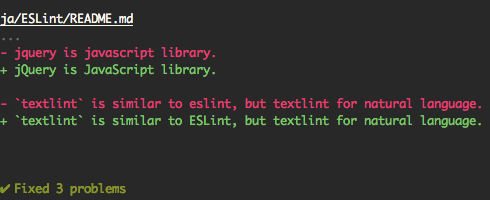
此外,支持 [dry run](https://en.wikipedia.org/wiki/Dry_run_(testing) “试运行”模式。
```
$ npx textlint --fix --dry-run --format diff README.md
# 显示 fixed 内容与原始内容之间的差异。
```
你可以复制并粘贴到你的 README 中。
```
[](https://textlint.org/)
```
### 内置格式化程序
使用以下格式化程序:
- stylish(默认)
- compact
- checkstyle
- github
- jslint-xml
- junit
- tap
- table
- pretty-error
- json
- unix
例如,使用 `pretty-error` 格式化程序:
```
$ npx textlint -f pretty-error file.md
```
更多详情请参见 [@textlint/linter-formatter](./packages/@textlint/linter-formatter "@textlint/linter-formatter")。
## 作为 node 模块使用
你可以将 textlint 用作 node 模块。
```
$ npm install textlint --save-dev
```
最小用法:
```
import { createLinter, loadTextlintrc, loadLinterFormatter } from "textlint";
const descriptor = await loadTextlintrc();
const linter = createLinter({ descriptor });
const results = await linter.lintFiles(["*.md"]);
// textlint has two types formatter sets for linter and fixer
const formatter = await loadLinterFormatter({ formatterName: "stylish" });
const output = formatter.format(results);
console.log(output);
```
有关更多详细信息,请阅读以下文档:
- 参见 [docs/use-as-modules.md](docs/use-as-modules.md)
[@textlint/kernel](./packages/@textlint/kernel "@textlint/kernel") 是 textlint 的低级 API。
它对于浏览器或非 Node.js 环境很有用。
```
import { TextlintKernel } from "@textlint/kernel";
const kernel = new TextlintKernel();
const options = {
filePath: "/path/to/file.md",
ext: ".md",
plugins: [
{
pluginId: "markdown",
plugin: require("@textlint/textlint-plugin-markdown")
}
],
rules: [
{
ruleId: "no-todo",
rule: require("textlint-rule-no-todo").default
}
]
};
kernel.lintText("TODO: text", options).then(result => {
assert.ok(typeof result.filePath === "string");
assert.ok(result.messages.length === 1);
});
```
## 结论
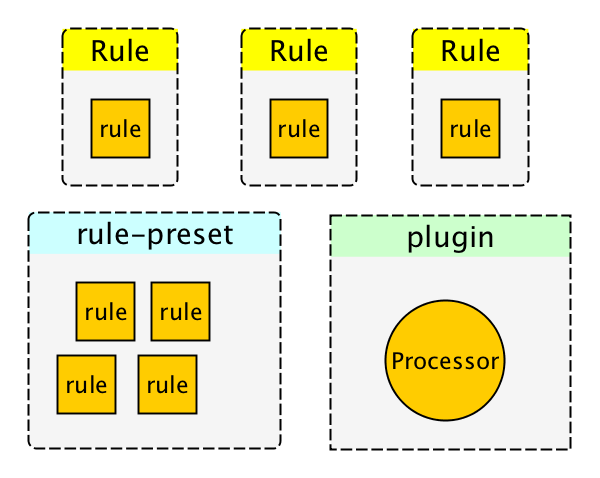
textlint 有四个可扩展点:
- [规则](docs/rule.md)
- 规则是用于 lint 的规则。
- [过滤规则](docs/filter-rule.md)
- 过滤规则是用于过滤错误结果的规则。
- [规则预设集](docs/rule-preset.md)
- 规则预设集包含多个规则。
- [插件](docs/plugin.md)
- 插件包含一个处理器。
## 常见问题:如何创建规则?
请参见 docs/
- [docs/txtnode.md](docs/txtnode.md)
- 什么是 TxtNode?
- [docs/rule.md](docs/rule.md)
- 如何创建规则?
- 教程:创建 `no-todo` 规则。
- [docs/rule-advanced.md](docs/rule-advanced.md)
- 创建规则的高级教程。
## 常见问题:如何通过像 `` 这样的注释抑制错误?
你可以使用像 [textlint-filter-rule-comments](https://github.com/textlint/textlint-filter-rule-comments "textlint-filter-rule-comments") 这样的过滤规则。
更多详情请参见 [忽略文本 · textlint](https://textlint.org/docs/ignore.html)。
## 集成
有关更多详细信息,请参见[集成文档](./docs/integrations.md)。
### AI 助手 (MCP)
textlint 可用作 [Model Context Protocol (MCP)](https://modelcontextprotocol.io/) 服务器,使 AI 助手能够直接与 textlint 交互:
```
npx textlint --mcp
```
支持的编辑器:
- 带有 GitHub Copilot 的 VS Code
- Cursor
- Windsurf
- 等等。
有关设置说明,请参见 [MCP 设置指南](./docs/mcp.md)。
### 应用程序
- [textlint-app](https://github.com/textlint/textlint-app "textlint-app")
- 独立的跨平台应用程序。无需 Node.js 环境。
### 构建系统
- gulp 插件
- [gulp-textlint](https://github.com/textlint/gulp-textlint "gulp-textlint")
- Grunt 插件
- [grunt-textlint](https://github.com/textlint/grunt-textlint "grunt-textlint")
### 编辑器
- Atom Editor
- [1000ch/linter-textlint](https://github.com/1000ch/linter-textlint "1000ch/linter-textlint")
- SublimeText
- [joeybaker/sublimelinter-textlint](https://github.com/joeybaker/sublimelinter-textlint)
- Vim
- [vim-textlint](https://github.com/heavenshell/vim-textlint "vim-textlint")
- [scrooloose/syntastic](https://github.com/vim-syntastic/syntastic "scrooloose/syntastic")
- 参见 [scrooloose/syntastic Wiki](https://github.com/vim-syntastic/syntastic/wiki/Syntax-Checkers "Syntax Checkers · scrooloose/syntastic Wiki") 的 [Markdown](https://github.com/vim-syntastic/syntastic/wiki/Markdown "Markdown")、[Text](https://github.com/vim-syntastic/syntastic/wiki/Text "Text") 和 [HTML](https://github.com/vim-syntastic/syntastic/wiki/HTML "HTML")
- VS Code
- [textlint/vscode-textlint](https://github.com/textlint/vscode-textlint)
- [micro](https://github.com/zyedidia/micro "micro")
- [hidaruma/micro-textlint-plugin](https://github.com/hidaruma/micro-textlint-plugin "hidaruma/micro-textlint-plugin: textlint plugin for micro-editor")
- NetBeans
- [netbeans-textlint-plugin](https://github.com/junichi11/netbeans-textlint-plugin "netbeans-textlint-plugin")
### 浏览器
- Chrome 扩展程序
- [Chrome:textlint-proofreader](https://chrome.google.com/webstore/detail/textlint-proofreader/hdongmdneapmhfblomidbafplpanpdmm)
- [io-monad/textlint-chrome-extension:textlint Chrome 扩展程序](https://github.com/io-monad/textlint-chrome-extension "io-monad/textlint-chrome-extension: textlint Chrome Extension")
### 其他
- [Pronto](https://github.com/prontolabs/pronto "Pronto"):[pronto-textlint](https://github.com/seikichi/pronto-textlint "pronto-textlint")
- [reviewdog](https://github.com/reviewdog/reviewdog "reviewdog"):[azu/textlint-reviewdog-example](https://github.com/azu/textlint-reviewdog-example "azu/textlint-reviewdog-example: textlint + reviewdog example project")
## 谁在使用 textlint?
- [survivejs/webpack-book](https://github.com/survivejs/webpack-book "survivejs/webpack-book: From apprentice to master (CC BY-NC-ND)")
- [hoodiehq/hoodie](https://github.com/hoodiehq/hoodie "hoodiehq/hoodie")
- [asciidwango/js-primer](https://github.com/asciidwango/js-primer "asciidwango/js-primer: JavaScriptの入門書")
- [vuejs-jp/vuejs.org](https://github.com/vuejs-jp/jp.vuejs.org "vuejs-jp/vuejs.org")
- [cypress-io/cypress-documentation](https://github.com/cypress-io/cypress-documentation "cypress-io/cypress-documentation: Cypress Documentation including Guides, API, Plugins, Examples, & FAQ. docs.cypress.io")
## 包
本仓库是一个我们使用 [Lerna](https://github.com/lerna/lerna) 管理的 monorepo。这意味着我们实际上是从相同的代码库向 npm 发布[多个包](./packages),包括:
### 核心
这些模块是 textlint 的组成部分。
| 包 | 版本 | 描述 |
| :--------------------------------------- | :--------------------------------------- |:--------------------------------------------------------|
| [`textlint`](./packages/textlint) | [](https://www.npmjs.com/package/textlint) | textlint 命令行工具本身 |
| [`@textlint/kernel`](./packages/@textlint/kernel) | [](https://www.npmjs.com/package/@textlint/kernel) | textlint 主逻辑模块。它是通用的 JavaScript。 |
| [`@textlint/linter-formatter`](./packages/@textlint/linter-formatter) | [](https://www.npmjs.com/package/@textlint/linter-formatter) | textlint 输出格式化程序 |
| [`@textlint/fixer-formatter`](./packages/@textlint/fixer-formatter) | [](https://www.npmjs.com/package/@textlint/fixer-formatter) | 用于修复器的 textlint 输出格式化程序 |
| [`@textlint/textlint-plugin-markdown`](./packages/@textlint/textlint-plugin-markdown) | [](https://www.npmjs.com/package/@textlint/textlint-plugin-markdown) | textlint 的 markdown 支持 |
| [`@textlint/textlint-plugin-text`](./packages/@textlint/textlint-plugin-text) | [](https://www.npmjs.com/package/@textlint/textlint-plugin-text) | textlint 的纯文本支持 |
| [`@textlint/ast-tester`](./packages/@textlint/ast-tester) | [ [](https://deepwiki.com/textlint/textlint)
[](https://deepwiki.com/textlint/textlint)
[](https://deepwiki.com/textlint/textlint)
标签:DNS解析, ESLint, GNU通用公共许可证, HTML, Linter, LNA, Markdown, MITM代理, Node.js, npm, pptx, 云安全监控, 代码检查工具, 前端开发工具, 开源项目, 技术写作, 插件化, 数据可视化, 文本检查, 文本编辑器插件, 文档规范, 暗色界面, 格式化工具, 正则表达式, 系统triage, 纯文本, 自动化payload嵌入, 自动化攻击, 自定义规则, 静态分析