# [Picosnitch](https://elesiuta.github.io/picosnitch/)
- 🔔 当有新程序连接网络或被修改时接收通知
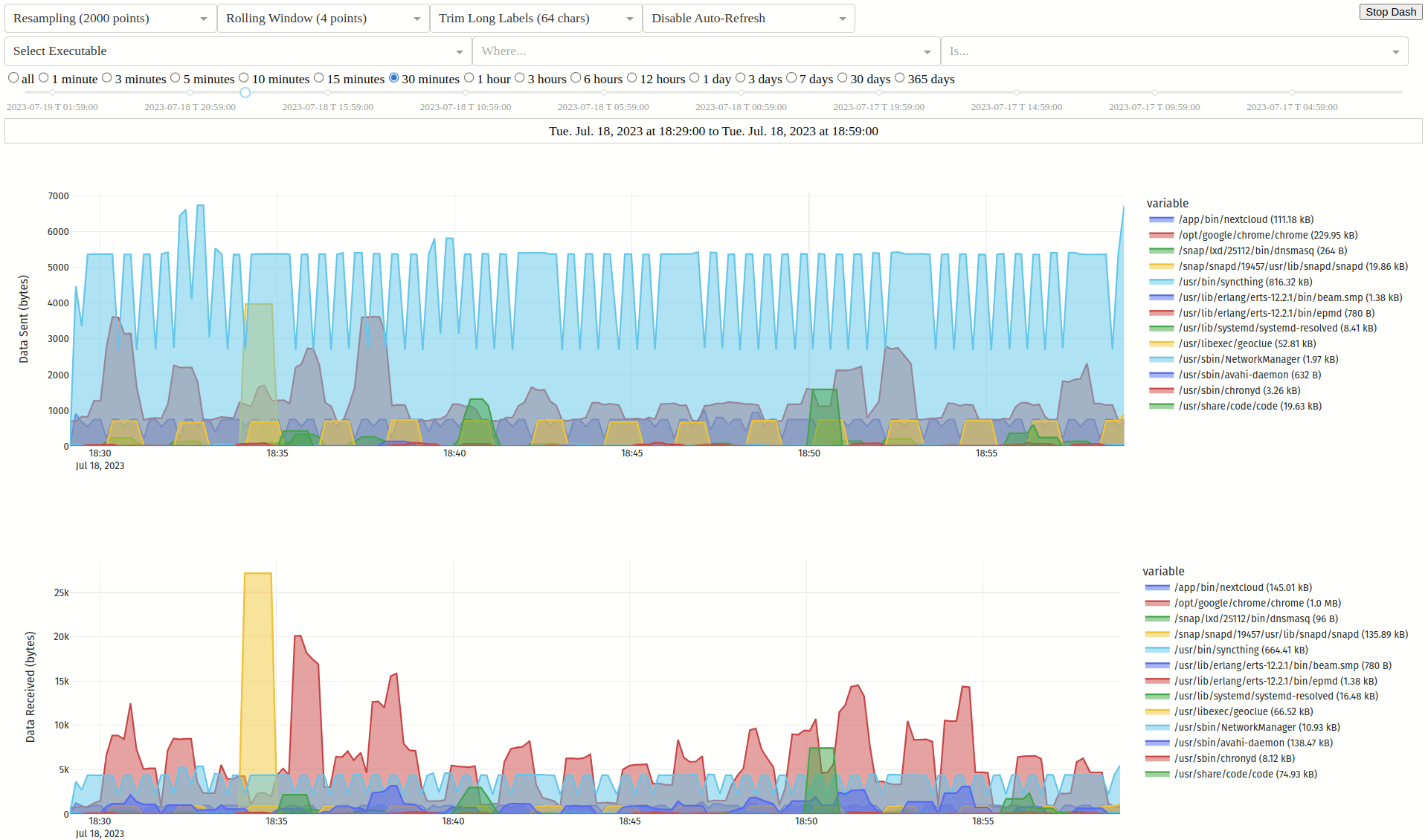
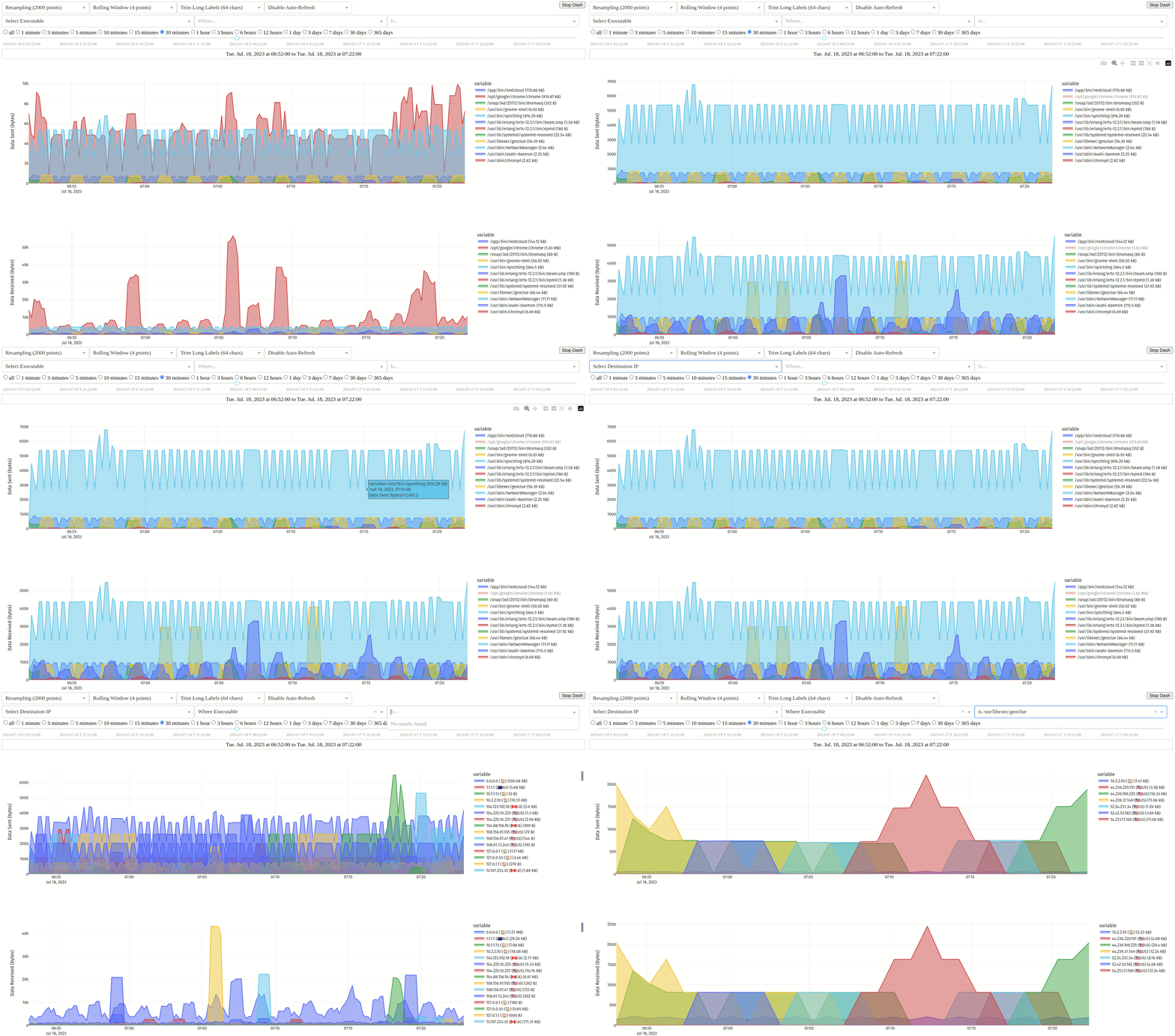
- 📈 监控您的带宽,按可执行文件、哈希值、父进程、域名、端口或用户随时间细分流量
- 🌍 提供 Web 和终端界面,并为每个连接提供 GeoIP 查询 ([IP 地理定位由 DB-IP 提供](https://db-ip.com))
- 🛡️ 可选择使用 [VirusTotal](https://www.virustotal.com) 检查哈希值或可执行文件
- 🚀 基于设备号和 inode 缓存可执行文件哈希值,以提高性能
- 🐳 检测在容器内运行的应用程序,同一应用程序的多个版本根据其哈希值进行区分
- 🕵️ 使用 [BPF](https://ebpf.io/) 进行[精确、低开销的带宽监控](https://www.gcardone.net/2020-07-31-per-process-bandwidth-monitoring-on-Linux-with-bpftrace/),并使用 [fanotify](https://man7.org/linux/man-pages/man7/fanotify.7.html) 监视可执行文件是否被修改
- 👨👦 由于应用程序可以调用其他程序来代其发送/接收数据,因此每个连接还会记录父可执行文件及其哈希值
- 🧰 务实且极简的设计,专注于[精确检测,并在无法检测时提供清晰可靠的错误报告](#limitations)
# [安装](#installation)
### [AUR](https://aur.archlinux.org/packages/picosnitch/) 适用于 Arch 及其衍生版

详情
- [手动](https://wiki.archlinux.org/title/Arch_User_Repository#Installing_and_upgrading_packages)安装 `picosnitch` 或使用您首选的 [AUR 助手](https://wiki.archlinux.org/title/AUR_helpers)
### [PPA](https://launchpad.net/~elesiuta/+archive/ubuntu/picosnitch) 适用于 Ubuntu 及其衍生版

详情
- `sudo add-apt-repository ppa:elesiuta/picosnitch`
- `sudo apt update`
- `sudo apt install picosnitch`
- 可选择使用 [pip](https://pip.pypa.io/) 或 [pipx](https://pypa.github.io/pipx/) 安装 [dash](https://pypi.org/project/dash/)
- `sudo apt install pipx`
- `pipx install dash`
- 您可能需要更新版本的 [BCC](https://github.com/iovisor/bcc/blob/master/INSTALL.md#ubuntu---binary) ([非官方 PPA](https://launchpad.net/~hadret/+archive/ubuntu/bpfcc)),因为 [Ubuntu 仓库](https://repology.org/project/bcc-bpf/versions)中的版本有时会落后于其[支持的内核](https://github.com/iovisor/bcc/releases)
### [OBS](https://software.opensuse.org//download.html?project=home%3Aelesiuta&package=picosnitch) 适用于 Debian 及其衍生版

详情
- 访问 [OBS picosnitch 页面](https://software.opensuse.org//download.html?project=home%3Aelesiuta&package=picosnitch)并按照您的发行版说明操作
- 可选择使用 [pip](https://pip.pypa.io/) 或 [pipx](https://pypa.github.io/pipx/) 安装 [dash](https://pypi.org/project/dash/)
- `sudo apt install pipx`
- `pipx install dash`
- 如果您在 bullseye 上遇到问题,可能需要更新版本的 [BCC](https://github.com/iovisor/bcc/blob/master/INSTALL.md#debian---binary)
### [OBS](https://software.opensuse.org//download.html?project=home%3Aelesiuta&package=picosnitch) 适用于 openSUSE Tumbleweed 及其衍生版

详情
- `sudo zypper addrepo https://download.opensuse.org/repositories/home:elesiuta/openSUSE_Tumbleweed/home:elesiuta.repo`
- `sudo zypper refresh`
- `sudo zypper install picosnitch`
### [Copr](https://copr.fedorainfracloud.org/coprs/elesiuta/picosnitch/) 适用于 Fedora、Mageia、Mandriva 及其衍生版

详情
- `sudo dnf copr enable elesiuta/picosnitch`
- `sudo dnf install picosnitch`
- 可选择使用 [pip](https://pip.pypa.io/) 或 [pipx](https://pypa.github.io/pipx/) 安装 [dash](https://pypi.org/project/dash/)
- `sudo dnf install pipx`
- `pipx install dash`
### [Nixpkgs](https://search.nixos.org/packages?show=picosnitch) 适用于 Nix

详情
- 使用 [picosnitch 服务选项](https://search.nixos.org/options?show=services.picosnitch.enable)进行安装和启用
- 将 `services.picosnitch.enable = true;` 添加到您的 Nix 配置文件中(通常为 `/etc/nixos/configuration.nix`)
- 运行 `sudo nixos-rebuild switch`
- “无法编译 BPF 模块”的变通解决方法
- `systemctl stop picosnitch`
- `sudo picosnitch start-no-daemon` 然后发送 SIGINT (ctrl + c)
- `systemctl start picosnitch`
### [PyPI](https://pypi.org/project/picosnitch/) 适用于任何 Python >= 3.8 的 Linux 发行版

详情
- 为您的发行版安装 [BPF Compiler Collection](https://github.com/iovisor/bcc/blob/master/INSTALL.md) python 包
- 包名通常为 `python-bcc` 或 `python-bpfcc`
- 使用 [pip](https://pip.pypa.io/) 或 [pipx](https://pypa.github.io/pipx/) 安装 picosnitch
- `pipx install "picosnitch[full]"`
- 创建 systemd 服务文件以运行 picosnitch(推荐)
- `picosnitch systemd`
- 可选依赖项(如果尚未安装,将使用 `[full]` 从 [PyPI](https://pypi.org/) 安装)
- 用于 dash:[dash](https://pypi.org/project/dash/)、[pandas](https://pypi.org/project/pandas/) 和 [plotly](https://pypi.org/project/plotly/)
- 用于 dash 主题:[dash-bootstrap-components](https://pypi.org/project/dash-bootstrap-components/) 和 [dash-bootstrap-templates](https://pypi.org/project/dash-bootstrap-templates/)
- 用于 GeoIP 查询:[geoip2](https://pypi.org/project/geoip2/)
- 用于通知:`dbus-python`、`python-dbus` 或 `python3-dbus`(名称取决于您的发行版,应从其仓库安装)
- 用于 SQL 服务器:[psycopg](https://pypi.org/project/psycopg/)、[pymysql](https://pypi.org/project/PyMySQL/)、[mariadb](https://pypi.org/project/mariadb/) 或 [psycopg2](https://pypi.org/project/psycopg2/) 其中之一(后两者不包含在 `[full]` 中)
- 用于 VirusTotal:[requests](https://pypi.org/project/requests/)
### [GitHub](https://github.com/elesiuta/picosnitch) 用于从源码安装

详情
- 克隆仓库或下载 `picosnitch.py` 和 `setup.py`
- 为您的发行版安装 [BPF Compiler Collection](https://github.com/iovisor/bcc/blob/master/INSTALL.md) python 包
- 包名通常为 `python-bcc` 或 `python-bpfcc`
- 安装 [psutil](https://pypi.org/project/psutil/)
- 安装 `python-setuptools`
- 使用 `python setup.py install --user` 安装 picosnitch
- 使用 `python setup.py [build|install] --help` 查看其他选项
- 您也可以直接运行脚本 `picosnitch.py`
# [使用](#usage)
- 运行 picosnitch
- 使用 `systemctl enable|disable picosnitch` 启用/禁用重启时自启动
- 使用 `systemctl start|stop|restart picosnitch` 启动/停止/重启
- 或者如果不使用 systemd,使用 `picosnitch start|stop|restart`
- 用于浏览过往连接的 Web 用户界面
- 使用 `picosnitch dash` 启动
- 访问 [http://localhost:5100](http://localhost:5100)(您可以通过设置环境变量 `HOST` 和 `PORT` 来更改此地址)
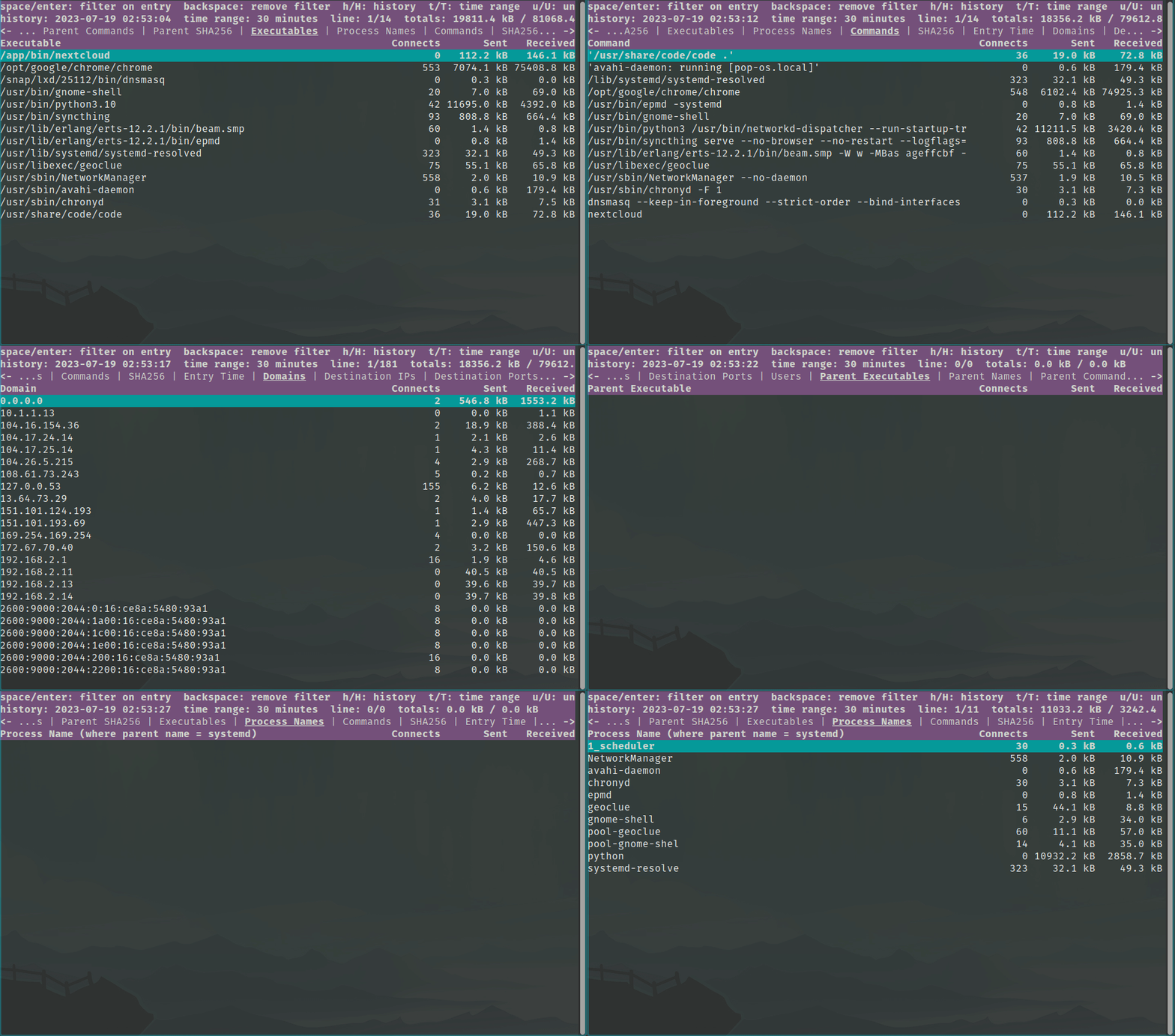
- 用于浏览过往连接的终端用户界面
- 使用 `picosnitch view` 启动
- `space/enter/f`:过滤条目 `e`:排除条目 `backspace/F/E`:移除过滤 `h/H`:遍历历史记录(时间偏移) `t/T`:切换时间范围 `u/U`:切换单位 `r`:刷新视图 `q`:退出
- 使用 `picosnitch help` 显示用法
# [配置](#configuration)
- 配置存储在 `~/.config/picosnitch/config.json`
- 如果 picosnitch 当前正在运行,需重启以使更改生效
```
{
"DB retention (days)": 30, # How many days to keep connection logs in snitch.db
"DB sql log": true, # Write connection logs to snitch.db (SQLite)
"DB sql server": {}, # Write connection logs to a MariaDB, MySQL, or PostgreSQL server
"DB text log": false, # Write connection logs to conn.log
"DB write limit (seconds)": 10, # Minimum time between connection log entries
# increasing it decreases disk writes by grouping traffic into larger time windows
# reducing time precision, decreasing database size, and increasing hash latency
"Dash scroll zoom": true, # Enable scroll zooming on plots
"Dash theme": "", # Select a theme name from https://bootswatch.com/
# requires installing https://pypi.org/project/dash-bootstrap-components/
# and https://pypi.org/project/dash-bootstrap-templates/ with pip or pipx
"Desktop notifications": true, # Try connecting to dbus to show notifications
"Every exe (not just conns)": false, # Check every running executable with picosnitch
# these are treated as "connections" with a port of -1
# this feature is experimental but should work fairly well, errors should be expected as
# picosnitch is unable to open file descriptors for some extremely short-lived processes
# if you just want logs (no hashes) to trace process hierarchy, see execsnoop or forkstat
"GeoIP lookup": true, # GeoIP lookup of IP addresses in user interface (terminal and web)
"Log addresses": true, # Log remote addresses for each connection
"Log commands": true, # Log command line args for each executable
"Log ignore": [], # List of hashes (str), domains (str), IP subnets (str), or ports (int)
# will omit connections that match any of these from the connection log
# domains are in reverse domain name notation and will match all subdomains
# the process name, executable, and hash will still be recorded in record.json
"Log ports": true, # Log local and remote ports for each connection
"Perf ring buffer (pages)": 256, # Power of two number of pages for BPF program
# only change this if it is giving you errors (e.g. missed events)
# picosnitch opens a perf buffer for each event type, so this is multiplied by up to 18
"Set RLIMIT_NOFILE": null, # Set the maximum number of open file descriptors (int)
# it is used for caching process executables and hashes (typical system default is 1024)
# this is good enough for most people since caching is based on executable device + inode
# fanotify is used to detect if a cached executable is modified to trigger a hash update
"Set st_dev mask": null, # Mask device number for open file descriptors (int)
# set to 0 to disable verification if it is giving you errors (e.g. FD cache errors)
# defaults to 0 if a btrfs partition is detected, otherwise 0xffffffff
"VT API key": "", # API key for VirusTotal, leave blank to disable (str)
"VT file upload": false, # Upload file if hash not found, only hashes are used by default
"VT request limit (seconds)": 15 # Number of seconds between requests (free tier quota)
}
```
# [日志](#logging)
- 已见可执行文件的日志存储在 `~/.config/picosnitch/exe.log`
- 这是您的通知历史记录
- 已见可执行文件的记录存储在 `~/.config/picosnitch/record.json`
- 用于确定是否创建通知
- 它包含按可执行文件索引的已知进程名、按进程名索引的可执行文件,以及按可执行文件索引的带 VirusTotal 结果的 sha256 哈希值
- 启用 `DB sql log`(默认)以将完整连接日志写入 `~/.config/picosnitch/snitch.db`
- 用于 `picosnitch dash`、`picosnitch view` 或类似 [DB Browser](https://sqlitebrowser.org/) 的工具
- 注意,连接时间基于处理分组的时间,因此它们最多只能精确到 `DB write limit (seconds)`,如果上一组哈希计算较慢,可能会延迟
- 通知由单独的子进程处理,因此不受连接日志那样的延迟影响
- 使用 `DB sql server` 将完整连接日志写入 MariaDB、MySQL 或 PostgreSQL 服务器
- 这独立于 `DB sql log`,用于提供[系统外副本以防止篡改](https://en.wikipedia.org/wiki/Host-based_intrusion_detection_system#Protecting_the_HIDS)(使用 [GRANT](https://www.postgresql.org/docs/current/sql-grant.html) 分配权限,并参阅[限制](#limitations)了解其他注意事项)
- 要配置,需向 `DB sql server` 添加键 `client`,值为 `mariadb`、`psycopg`、`psycopg2` 或 `pymysql`,您也可以选择设置 `table_name`
- 将 [mariadb](https://mariadb-corporation.github.io/mariadb-connector-python/usage.html#connecting)、[psycopg](https://www.psycopg.org/docs/module.html#psycopg2.connect) 或 [pymysql](https://pymysql.readthedocs.io/en/latest/modules/connections.html) 的其余连接参数作为键值对分配给 `DB sql server`
- 启用 `DB text log` 以将完整连接日志写入 `~/.config/picosnitch/conn.log`
- 这对于使用其他程序监视可能很有用
- 它包含以下字段,以逗号分隔(值中的逗号、换行符和空字符已被移除)
- `条目时间, 发送字节, 接收字节, 可执行路径, 进程名, 命令行, sha256, 父可执行文件, 父进程名, 父命令行, 父sha256, 用户ID, 本地端口, 远程端口, 本地地址, 远程地址, 域名`
- 错误日志存储在 `~/.config/picosnitch/error.log`
- 错误也会触发通知,通常由过多或极短命的进程/连接引起,或者在计算新可执行文件哈希时挂起系统导致
- 虽然极不可能遗漏进程/连接(除非启用了 `Every exe (not just conns)`),但 picosnitch 的设计使其仍应检测到这种情况并记录错误,让您了解发生了什么
- 对于大多数人在大多数情况下,这应该引起对程序可能行为异常的怀疑
- 程序不应能躲避 picosnitch(无论是通过遗漏还是伪装成其他程序)而不让 picosnitch 报告错误
- 请参阅下文[限制](#limitations)了解其他错误来源
# [限制](#limitations)
- 尽管专注于可靠性并相比[现有工具](https://www.gcardone.net/2020-07-31-per-process-bandwidth-monitoring-on-Linux-with-bpftrace/#existing-tools-to-measure-bandwidth-usage-on-linux)具有显著优势,picosnitch 根据其使用场景仍有一些限制
- 当作为安全/审计工具使用时,具有足够权限的程序可能会更改 picosnitch 或其日志,或使用 picosnitch 未监控且可能对内核不可见的替代通信机制,一些缓解措施包括
- 使用 `DB sql server` 维护[日志的系统外副本](https://en.wikipedia.org/wiki/Host-based_intrusion_detection_system#Protecting_the_HIDS)
- 与[独立路由器/防火墙](https://en.wikipedia.org/wiki/List_of_router_and_firewall_distributions)交叉核对,以确保所有通信都被记录
- 使用[沙盒](https://wiki.archlinux.org/title/Security#Sandboxing_applications)技术,如 [flatpak](https://www.privacyguides.org/linux-desktop/sandboxing/#flatpak)
- 使用 [BPF](https://ebpf.io/) 检测打开的套接字并识别进程非常可靠;然而,如果存在恶意行为,可执行文件名和路径可能模糊不清或被伪造,作为对策picosnitch 对可执行文件进行哈希处理以提供可靠的标识符
- 仅对进程可执行文件本身进行哈希处理,未包含可能受损的共享库(例如 LD_PRELOAD rootkit)、扩展或脚本
- 一些可能的缓解措施包括使用[不可变操作系统](https://www.redhat.com/sysadmin/immutability-silverblue)或 [AIDE](https://wiki.archlinux.org/title/AIDE)、[fs-verity](https://www.kernel.org/doc/html/latest/filesystems/fsverity.html)、[IMA/EVM](https://wiki.gentoo.org/wiki/Integrity_Measurement_Architecture) 或 [debsums(有注意事项)](https://manpages.debian.org/unstable/debsums/debsums.1.en.html)等工具
- 对于极短命的进程,picosnitch 可能无法及时打开文件描述符以进行哈希处理(这种情况很少见)
- 会检查打开的文件描述符的设备号和 inode 是否与 BPF 程序报告的一致,以检测可执行文件是否被替换;然而,BTRFS 使用非唯一 inode,导致此保护失效(为了完整性而提及的一个微不足道的问题)
- 如果因任何原因导致可执行文件哈希失败,流量仍将记录所有可用信息,并附带错误通知
- 大量新进程或连接的涌入可能导致遗漏一些日志条目,因为 picosnitch 优先保持系统流量延迟,而不是阻碍它来追赶处理事件回调
- 此类事件将被检测到,记录为错误,并通知您
- 您可以通过增加 `Perf ring buffer (pages)` 来缓解此问题
- 除了错误,请报告任何可能被遗漏的其他限制!