tomhallmain/dev_scripts
GitHub: tomhallmain/dev_scripts
一套扩展 bash/zsh 终端的通用脚本工具集,提供表格数据格式化、筛选、连接、透视、聚合及 Git 多仓库管理等功能,旨在提升开发与数据分析工作流效率。
Stars: 5 | Forks: 1
# dev_scripts
这些脚本和 CLI 命令旨在提升开发和数据分析工作流的效率,扩展你的 bash 或 zsh 终端的功能与便利性。
所有命令均命名于 `ds:*` 命名空间下,因此应该极少甚至不会与你本地 shell 环境中的任何现有命令发生冲突。
## 安装说明
### 基本安装
在项目根目录下运行 [install.sh](https://github.com/tomhallmain/dev_scripts/blob/master/install.sh) 脚本。如果在运行此脚本时遇到任何问题,请参阅下方的手动安装说明。
### 手动安装
要使用 `commands.sh` 文件中的实用工具,请确保将以下行添加到你的 `~/.bashrc` 和/或 `~/.zshrc`(如果使用 zshell)文件中。如果这些文件不存在,可能需要先创建它们。
```
DS_LOC=/your/path/to/dev_scripts
source "$DS_LOC/commands.sh"
```
要验证安装是否成功,请打开一个新的终端并运行 `ds:commands`。
请注意,某些命令需要使用 GNU coreutils 来重载默认的 \*nix 命令。如果使用 homebrew,可以通过以下命令进行设置:
```
$ brew install coreutils
$ echo "export PATH=\"$(brew --prefix coreutils)/libexec/gnubin:/usr/local/bin:$PATH\"" >> ~/.zshrc # OR ~/.bashrc if using bash
```
## 用法及精选功能
安装完成后,启动一个 bash 或 zsh 会话并运行 `ds:commands`,即可查看可用的命令、相关的别名以及用法模式。
以下功能在终端中工作时尤其有用,并且可以应用于多种常规场景。
#### `ds:fit`
将表格数据(包括多字节字符)动态适配到你的终端中,并根据用户的要求尝试进行丰富且智能的格式化。如果所有字段的最大字段长度总和过长,最长的字段将被右侧截断,直到达到终端宽度。
该命令还支持将文件集作为单次调用的参数,以便快速报告文件集的情况。
```
$ head -n5 tests/data/taxables.csv
"Index", "Item", "Cost", "Tax", "Total"
1, "Fruit of the Loom Girl's Socks", 7.97, 0.60, 8.57
2, "Rawlings Little League Baseball", 2.97, 0.22, 3.19
3, "Secret Antiperspirant", 1.29, 0.10, 1.39
4, "Deadpool DVD", 14.96, 1.12, 16.08
$ head -n5 tests/data/taxables.csv | ds:fit -v gridlines=1
┌─────┬─────────────────────────────────┬───────┬──────┬───────┐
│Index│ Item │ Cost│ Tax│ Total│
├─────┼─────────────────────────────────┼───────┼──────┼───────┤
│ 1│ Fruit of the Loom Girl's Socks │ 7.97│ 0.60│ 8.57│
├─────┼─────────────────────────────────┼───────┼──────┼───────┤
│ 2│ Rawlings Little League Baseball│ 2.97│ 0.22│ 3.19│
├─────┼─────────────────────────────────┼───────┼──────┼───────┤
│ 3│ Secret Antiperspirant │ 1.29│ 0.10│ 1.39│
├─────┼─────────────────────────────────┼───────┼──────┼───────┤
│ 4│ Deadpool DVD │ 14.96│ 1.12│ 16.08│
└─────┴─────────────────────────────────┴───────┴──────┴───────┘
$ ds:fit $(fd -e csv) # Fit all CSVs in current dir with fd
```
#### `ds:reo`
使用推断出的字段分隔符来选择、重新排序和切分数据。支持表达式求值、正则表达式搜索、排除项、和/或逻辑、帧表达式、反转等操作。如果输出目标是终端,则会在输出时自动运行 ds:fit。
该命令还支持将文件集作为单次调用的参数,以便快速报告文件集的情况。
```
$ head -n5 tests/data/company_funding_data.csv
permalink,company,numEmps,category,city,state,fundedDate,raisedAmt,raisedCurrency,round
lifelock,LifeLock,,web,Tempe,AZ,1-May-07,6850000,USD,b
lifelock,LifeLock,,web,Tempe,AZ,1-Oct-06,6000000,USD,a
lifelock,LifeLock,,web,Tempe,AZ,1-Jan-08,25000000,USD,c
mycityfaces,MyCityFaces,7,web,Scottsdale,AZ,1-Jan-08,50000,USD,seed
$ wc -l tests/data/company_funding_data.csv
1460 tests/data/company_funding_data.csv
$ ds:reo tests/data/company_funding_data.csv '1, >200000000' '[^c, [^r'
company category city raisedAmt raisedCurrency round
Facebook web Palo Alto 300000000 USD c
ZeniMax web Rockville 300000000 USD a
$ ds:reo tests/data/company_funding_data.csv '[lifelock' '[round,[funded'
b 1-May-07
a 1-Oct-06
c 1-Jan-08
$ ds:reo tests/data/company_funding_data.csv '~Jan-08 && NR<6, 3..1' '[company,~Jan-08'
LifeLock 1-Jan-08
MyCityFaces 1-Jan-08
LifeLock 1-Oct-06
LifeLock 1-May-07
company fundedDate
```
如果你的 awk 版本支持,`ds:fit` 和 `ds:reo` 也可以处理多字节字符。
```
$ head -n4 tests/data/emoji
Generating_code_base10 emoji init_awk_len len_simple_extract len_remaining
9193 ⏩ 3 1 2
Generating_code_base10 emoji init_awk_len len_simple_extract len_remaining
9194 ⏪ 3 1 2
$ ds:reo tests/data/emoji '1, NR%2 && NR>80 && NR<90' '[emoji,others'
emoji Generating_code_base10 init_awk_len len_simple_extract len_remaining
❎ 10062 3 1 2
🚧 unknown 4 1 3
❓ 10067 3 1 2
❔ 10068 3 1 2
```
#### `ds:join`
基于多键集合连接数据,或执行数据的完全合并。如果输出目标是终端,则会在输出时自动运行 ds:fit。
```
$ for i in /tmp/jn_a /tmp/jn_b; do echo $i; cat $i; done
/tmp/jn_a
a b c d
1 2 3 4
/tmp/jn_b
a b c d
1 3 2 4
$ ds:join /tmp/jn_a /tmp/jn_b inner 1,4
a b c d b c
1 2 3 4 3 2
$ ds:join /tmp/jn_a /tmp/jn_b right 1,2,3,4 1,3,2,4
a c b d
1 2 3 4
$ ds:join /tmp/jn_a /tmp/jn_b outer merge -v verbose=1
BOTH a b c d
/tmp/jn_b 1 3 2 4
/tmp/jn_a 1 2 3 4
```
#### `ds:pivot`
对表格数据进行透视(Pivot)操作。如果输出目标是终端,则会在输出时自动运行 ds:fit。
```
$ ds:pivot /tmp/jn_a 1,2 4 3
PIVOT 4 d
1 2 3
a b c
```
#### `ds:agg`
按特定索引或按字段值聚合整行/整列数据。例如,统计正则表达式匹配到的所有实例、对每个索引处的数字数据求和,或者根据另一个索引中的唯一值对某一个索引的操作结果进行分组。此外还支持中位数、众数、四分位数和标准差等扩展统计信息(`ds:agg -h`)。
```
$ cat /tmp/agg_ex
a 1 -2 3.0 4
b 0 -3 4.0 1
c 3 6 2.5 4
$ ds:agg /tmp/agg_ex
a 1 -2 3.0 4 6.0
b 0 -3 4.0 1 2.0
c 3 6 2.5 4 15.5
+|all 4 1 9.5 9 23.5
$ ds:agg /tmp/agg_ex '*|all,$4*$3,~b' '+,*'
a 1 -2 3.0 4 -24 -6 ~b
b 0 -3 4.0 1 0 -12 1
c 3 6 2.5 4 180 15 0
+ 4 1 9.5 9 156 -3 1
* 3 36 30.0 16 0 1080 0
```
#### `ds:uniq` / `ds:fieldcounts`
获取唯一的行或字段集合,并可选择附带计数数据。如果输出目标是终端,则会在输出时自动运行 ds:fit。
```
$ cat /tmp/ex
a:1
a:2
a:1
b:1
$ ds:uniq /tmp/ex
a:1
a:2
b:1
$ ds:fieldcounts /tmp/ex | cat
1 a:2
1 b:1
2 a:1
$ ds:fieldcounts /tmp/ex 2
1 2
3 1
```
#### `ds:subsep`
根据给定的字段子分隔符模式拆分出新字段。
```
$ ds:reo tests/data/testcrimedata.csv 1..5 1,2
cdatetime address
1/1/06 0:00 3108 OCCIDENTAL DR
1/1/06 0:00 2082 EXPEDITION WAY
1/1/06 0:00 4 PALEN CT
1/1/06 0:00 22 BECKFORD CT
$ ds:subsep tests/data/testcrimedata.csv '\\/' "" -v apply_to_fields=1 | ds:reo 1..5 1..4
cdatetime address
1 1 06 0:00 3108 OCCIDENTAL DR
1 1 06 0:00 2082 EXPEDITION WAY
1 1 06 0:00 4 PALEN CT
1 1 06 0:00 22 BECKFORD CT
```
#### `ds:vi` / `ds:grepvi`
根据特定模式直接跳转到指定文件和/或行号的 vim 中。
```
$ ds:vi commands
Multiple matches found - select a file:
1 commands.sh
2 support/commands
3 support/commands_utils
4 tests/commands_cov.sh
5 tests/commands_tests.sh
6 tests/commands_variants.sh
7 tests/data/commands
Enter a number from the set of files or a pattern: sh
1 commands.sh
2 tests/commands_cov.sh
3 tests/commands_tests.sh
4 tests/commands_variants.sh
Enter a number from the set of files or a pattern: ^commands
$ ds:vi 'function GetOrSet'
No match found - Did you mean to search with ds:grepvi? (y/n) y
Multiple matches found - select a file:
1 README.md
2 scripts/agg_functions.awk
3 scripts/diff_fields.awk
4 scripts/fit_columns_functions.awk
5 scripts/hist.awk
6 scripts/plot.awk
7 scripts/power.awk
Enter a number from the set of files or a pattern: 4
```
#### `ds:trace`
查看或搜索 shell trace 的输出。
```
$ ds:test 't(rue)?' true
$ ds:trace
Press enter to trace last command
+ds:trace:7> eval 'ds:test '\''t(rue)?'\'' true'
+(eval):1> ds:test 't(rue)?' true
+ds:test:1> ds:pipe_open
+ds:pipe_open:1> [ '!' -t 0 ']'
+ds:test:2> [[ "$3" -regex-match t ]]
+ds:test:3> echo true
+ds:test:3> grep -Eq 't(rue)?'
```
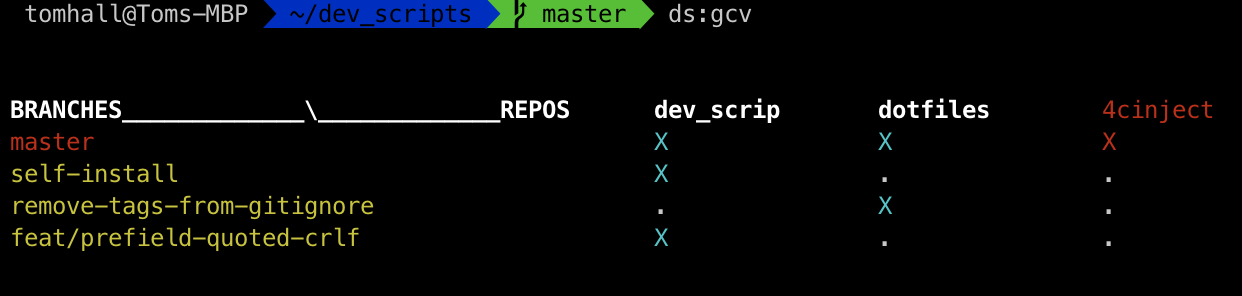
#### `ds:git_cross_view`
查看所有代码仓库中 git 分支的当前状态。
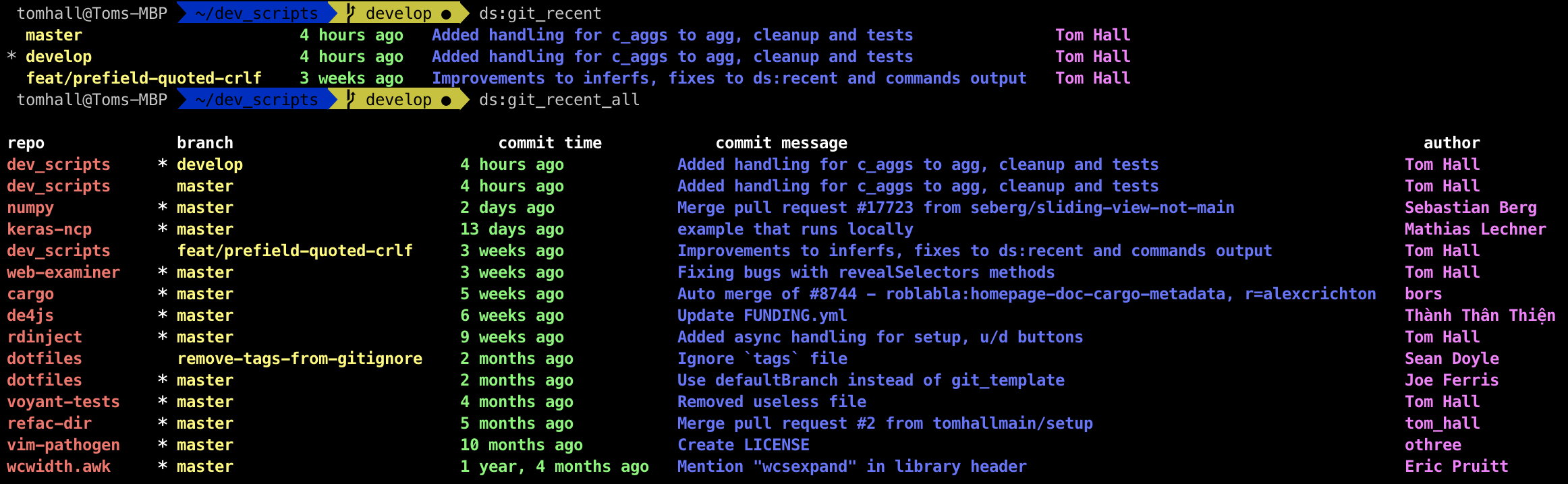
#### `ds:git_recent` 和 `ds:git_recent_all`
以彩色的方式查看当前代码仓库或所有代码仓库的最近提交(commit)。
#### `ds:git_refresh`
使用最新数据刷新给定根目录下的所有代码仓库。
## 鸣谢
由 Eric Pruitt 开发的 [wcwidth.awk](https://github.com/ericpruitt/wcwidth.awk) 是让 `ds:fit` 能够支持多字节字符的底层库。非常感谢他提供的这一实现。
## 问题反馈
如需报告 Bug,请联系:tomhall.main@gmail.com
标签:Shell脚本, SOC Prime, 开发工具, 效率工具