ByCh4n/BCHackTool
GitHub: ByCh4n/BCHackTool
一个基于 Bash 编排多工具的自动化渗透测试框架,解决从侦察到漏洞报告的一站式高效安全评估问题。
Stars: 532 | Forks: 88

**Professional Penetration Testing Framework v4.0**
[](https://github.com/ByCh4n/BCHackTool)
[](LICENSE)
[](https://www.gnu.org/software/bash/)
[](https://www.linux.org/)
## 📋 目录
- [Overview](#-overview)
- [What's New in v4.0](#-whats-new-in-v40)
- [Features](#-features)
- [Installation](#-installation)
- [Usage](#-usage)
- [Scan Modes](#-scan-modes)
- [Pipeline Architecture](#-pipeline-architecture)
- [Configuration](#-configuration)
- [Tools Integrated](#-tools-integrated)
- [Output & Reports](#-output--reports)
- [API Integration](#-api-integration)
- [Notifications](#-notifications)
- [Troubleshooting](#-troubleshooting)
- [Contributing](#-contributing)
- [License](#-license)
## 🎯 概述
**BCHackTool** 是一个全面的、专业级别的渗透测试框架,专为安全研究人员、赏金猎人以及渗透测试人员设计。使用 Bash 编写,它将多个行业标准的网络安全工具编排成一个 streamlined、automated 的工作流程。
### 关键亮点
- 🎨 **Modern UI/UX** - 带有实时漏洞展示的 emoji 丰富界面
- 🚀 **Parallel Scanning** - 通过并发工具执行实现 10 倍加速
- 🎯 **Smart Targeting** - 智能子域名枚举与服务发现
- 🔍 **Deep Vulnerability Scanning** - 使用 Nuclei(9000+ 模板)进行实时详细发现
- 📊 **Professional Reports** - 清晰的可读性 TXT 报告,包含易理解的漏洞发现
- ⚡ **Resume Capability** - 自动继续中断的扫描
- 🔔 **Notifications** - 通过 Telegram/Discord/Slack 实时提醒
- 🛠️ **Modular Architecture** - 易于扩展和自定义
## 🆕 v4.0 新功能
### 主要特性
#### 1. **现代 UI/UX 设计** 🎨
带有实时漏洞展示和清晰视觉层级的 emoji 丰富界面!
**Features:**
- 🎯 **Emoji Navigation** - 带有视觉指示器的直观菜单系统
- 📊 **Real-time Vulnerability Display** - Nuclei 发现时实时展示详细发现
- 🎨 **Color-coded Severity** - 即时视觉反馈(🔴 Critical, 🟠 High, 🟡 Medium, 🟢 Low, ℹ️ Info)
- ✨ **Clean Spacing Design** - 无框线字符,兼容通用终端
- 📋 **Clean TXT Reports** - 当前目录下的易读漏洞报告
- 📁 **Current Directory Output** - 所有结果保存在 BCHackTool_Results/ 文件夹
**Live Vulnerability Display:**
```
[▶] Starting vulnerability scan...
🔴 [CRITICAL] CVE-2024-1234-RCE
└─ Target: https://demo.xooi.com/api
🟠 [HIGH] SQL Injection Found
└─ Target: https://our.xooi.com/login
🟡 [MEDIUM] XSS Vulnerability Detected
└─ Target: https://app.xooi.com/search
🟢 [LOW] Information Disclosure
└─ Target: https://api.xooi.com/debug
ℹ️ [INFO] Missing Security Headers
└─ Target: https://www.xooi.com
```
#### 2. **子域名列表输入模式(选项 3)** 🎯
完全跳过侦察阶段,直接进入漏洞扫描!
```
# 使用预收集的子域名
sudo bash bchacktool.sh
> 3 # Subdomain List option
Enter subdomain list file path: /path/to/subdomains.txt
Mode> ALL
```
**Benefits:**
- ⏱️ 节省 30-50% 扫描时间
- 🔄 与外部侦察工具集成
- 🎯 仅测试特定子域名
- 📝 使用之前的扫描结果
**File Format:**
```
example.com
www.example.com
api.example.com
mail.example.com
```
#### 3. **完整的 Nuclei 严重性扫描** 🔍
现在扫描 **ALL** 严重级别,而不仅仅是 medium+
**Before v4.0:**
- ❌ Info level: 过滤
- ❌ Low level: 过滤
- ✅ Medium: 包含
- ✅ High: 包含
- ✅ Critical: 包含
**v4.0:**
- ✅ Info: 版本泄露,技术栈检测
- ✅ Low: 弱头部,小型错误配置
- ✅ Medium: CSRF,开放重定向
- ✅ High: SQL 注入,XSS
- ✅ Critical: RCE,认证绕过
**Impact:**
- 📈 3-5 倍更多发现
- 🎯 完整的安全视图
- 📊 更好的合规性报告
#### 3. **实时漏洞显示** 📊
漏洞被发现时实时展示详细发现
```
[▶] Starting vulnerability scan...
🔴 [CRITICAL] CVE-2024-1234-RCE
└─ Target: https://api.example.com/admin
🟠 [HIGH] SQL Injection - Authentication Bypass
└─ Target: https://login.example.com
🟡 [MEDIUM] Cross-Site Scripting (XSS)
└─ Target: https://search.example.com?q=test
```
**Features:**
- 发现时即时漏洞通知
- 详细的模板识别
- 每个发现的精确目标 URL
- 用于快速评估的颜色编码严重性
- 无需等待扫描完成即可查看结果
### v3.1 的改进
- ✅ 最多 10 个并发作业的并行扫描
- ✅ 检查点系统用于恢复能力
- ✅ 增强的错误处理和重试逻辑
- ✅ 所有工具的 JSON 结构化输出
- ✅ 带有解析漏洞数据的干净 TXT 报告
- ✅ API 密钥集成(Shodan,VirusTotal 等)
- ✅ 多平台通知支持
- ✅ 详细日志系统
## ✨ 功能
### 🔍 侦察
- **7 Parallel Subdomain Enumeration Tools**
- Subfinder(被动 OSINT)
- Assetfinder(网页抓取)
- Findomain(多源 API)
- Wayback Machine(Archive.org 历史)
- GAU(GetAllUrls)
- Crt.sh(证书透明日志)
- Anubis(被动 DNS)
### 🔓 端口扫描
- 使用 Naabu 的快速 SYN 扫描
- 默认前 1000 个端口
- CDN 排除以获得准确结果
- 速率限制(300 req/sec - 隐身模式)
### 🌐 网络探测
- HTTP/HTTPS 服务检测
- 技术栈识别
- 状态码验证
- 标题提取
- 重定向跟踪
### 🎯 漏洞扫描
- 使用 Nuclei v3.6+ 的基于模板的检测
- 9000+ 漏洞模板(自动更新)
- CVE 数据库集成
- 自定义模板支持
- 所有严重级别(info 到 critical)
- 实时详细漏洞展示
- 发现时实时展示 findings
### 📊 报告
- 带有以下内容的干净 TXT 报告:
- 按严重性划分的漏洞细分
- 子域名发现结果
- 实时服务清单
- 人类可读格式
- JSON 输出用于自动化
- JSONL 格式用于流式处理
- 所有结果保存在当前目录(BCHackTool_Results/)
### 🔔 通知
- Telegram 机器人集成
- Discord Webhook 支持
- Slack Webhook 支持
- 扫描完成提醒
- 错误通知
### ⚡ 性能
- 并行工具执行(10 个并发作业)
- 优化的漏洞计数(快 80%)
- 超时管理
- 资源优化
- 隐身模式速率限制(300 req/sec)
- 干净、高效的输出(无开销)
### 🛠️ 高级功能
- 恢复中断的扫描
- 检查点系统
- API 密钥管理
- 自动工具更新
- 模板自动更新
- 全面日志记录
## 📦 安装
### 先决条件
- **Operating System**: Linux(Ubuntu 20.04+,Debian 10+,Kali Linux)
- **Root Access**: 某些工具需要
- **Internet Connection**: 用于工具安装和更新
### 快速安装
```
# 下载
git clone https://github.com/ByCh4n/BCHackTool.git
cd BCHackTool
# 运行(自动安装依赖)
sudo bash bchacktool.sh
```
### 手动安装
```
# 1. 安装系统依赖
sudo apt-get update
sudo apt-get install -y git curl jq python3 perl unzip pv gcc make libpcap-dev
# 2. 安装 Go(如未安装)
wget https://go.dev/dl/go1.22.0.linux-amd64.tar.gz
sudo tar -C /usr/local -xzf go1.22.0.linux-amd64.tar.gz
export PATH=$PATH:/usr/local/go/bin
# 3. 运行 BCHackTool
sudo bash bchacktool.sh
# 首次运行时工具将自动安装
```
### 已安装工具
脚本自动安装:
**Go-based 工具:**
- subfinder
- naabu
- httpx
- nuclei
- notify
- assetfinder
- waybackurls
- gau
**Binary 工具:**
- findomain
## 🚀 用法
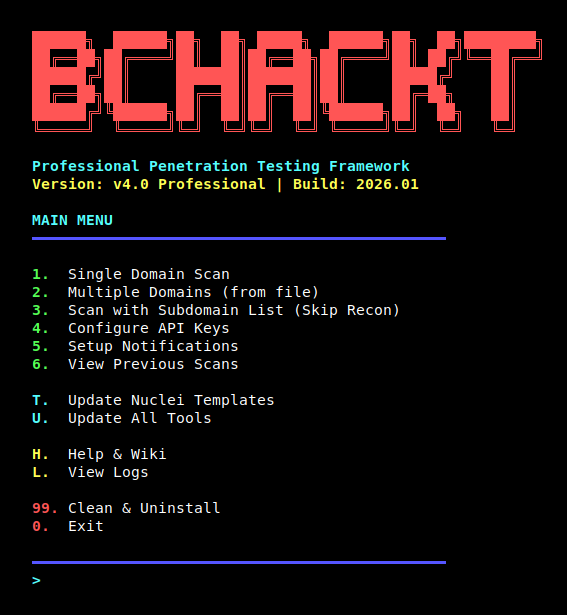 BCHackTool Main Menu Interface
### 基本用法
```
# 启动 BCHackTool
sudo bash bchacktool.sh
# 从菜单选择扫描类型
1. Single Domain Scan # Scan one domain
2. Multiple Domains # Scan domains from file
3. Subdomain List # Use pre-collected subdomains (NEW!)
4. Configure API Keys # Setup API integrations
5. Setup Notifications # Configure alerts
6. View Previous Scans # Browse scan history
T. Update Nuclei Templates # Update vulnerability templates
U. Update All Tools # Update all tools to latest
H. Help & Wiki # Detailed documentation
L. View Logs # Check error logs
0. Exit # Close tool
```
### 示例工作流
#### 1. 单域名扫描(完整流水线)
```
sudo bash bchacktool.sh
> 1 # Single Domain Scan
Enter target domain: example.com
Mode> ALL # Comprehensive scan
# 输出:
# ✓ 发现 247 个子域名
# ✓ 找到 89 个开放端口
# ✓ 34 个活跃 Web 服务
# ✓ 检测到 12 个漏洞
# 报告:BCHackTool_Results/example_com_20260108_123456/vulnerabilities.txt
```
#### 2. 多域名
```
# 创建 domains.txt
echo "example.com" > domains.txt
echo "test.com" >> domains.txt
sudo bash bchacktool.sh
> 2 # Multiple Domains
Enter file path: /path/to/domains.txt
Mode> A # Web scan only
```
#### 3. 子域名列表(跳过侦察)- 新增!
```
# 已从外部工具获取子域名
cat subdomains.txt
# example.com
# www.example.com
# api.example.com
sudo bash bchacktool.sh
> 3 # Subdomain List
Enter subdomain list file path: /path/to/subdomains.txt
Mode> ALL
# 跳过侦察阶段
# 直接从端口扫描开始
```
#### 4. 恢复中断的扫描
```
# 如果扫描被中断(Ctrl+C 或网络问题)
# 只需再次运行相同扫描
sudo bash bchacktool.sh
> 1
Enter target domain: example.com
Mode> ALL
# [INFO] 发现检查点,从以下位置恢复:web_done
# 自动从上一个已完成阶段继续
```
## 🎯 扫描模式
**🆕 所有模式现在都使用 ALL Nuclei 模板(9000+)进行全方位覆盖!**
### 模式 A:WEB 应用程序扫描
**Target:** 活动的 Web 应用程序(仅 HTTP/HTTPS)
**Input:** `alive.txt` - 已发现的活 web 服务
**Templates:** 🌟 **ALL 模板**(9000+)- Nuclei 根据目标类型智能过滤
**Best For:** 漏洞赏金 Web 应用测试,OWASP Top 10
**What runs:**
- ✅ HTTP 模板(XSS,SQL 注入,LFI,RCE,SSRF 等)
- ✅ SSL/TLS 模板(证书问题,错误配置)
- ✅ CVE 模板(已知漏洞)
- ✅ 文件模板(路径遍历,LFI)
- ✅ 无头模板(基于 JavaScript 的攻击)
- ✅ WebSocket 模板
- ✅ **其他一切** - Nuclei 自动跳过不相关模板
### 模式 B:DNS 与基础设施扫描
**Target:** 所有子域名(包括非 HTTP)
**Input:** `subdomains.txt` - 所有发现的子域名
**Templates:** 🌟 **ALL 模板**(9000+)
**Best For:** 基础设施评估,子域名劫持搜寻
**What runs:**
- ✅ DNS 模板(子域名劫持,DNS 错误配置)
- ✅ SSL/TLS 模板
- ✅ HTTP 模板(如果子域名解析为 Web 服务)
- ✅ WHOIS 模板
- ✅ **其他一切** - Nuclei 自动跳过不相关模板
### 模式 C:网络服务扫描
**Target:** 非 Web 服务和端口
**Input:** `ports.txt` - 已发现的开放端口(host:port 格式)
**Templates:** 🌟 **ALL 模板**(9000+)
**Best For:** 内部网络渗透测试,服务错误配置
**What runs:**
- ✅ 网络模板(FTP,SSH,Redis,MongoDB,SMTP)
- ✅ SSL/TLS 模板
- ✅ 特定协议模板
- ✅ **其他一切** - Nuclei 自动跳过不相关模板
### 模式 ALL:全面扫描
**Target:** 合并后的所有内容(Web + DNS + 网络)
**Input:** `all_targets.txt` - 所有发现的合并目标
**Templates:** 🌟 **ALL 模板**(9000+)
**Best For:** 完整的安全审计,最大覆盖范围
**Includes:**
- ✅ 来自 Mode A 的所有 Web 服务
- ✅ 来自 Mode B 的所有子域名
- ✅ 来自 Mode C 的所有开放端口
- ✅ 完整的攻击面映射
- ✅ 零漏洞遗漏
### 💡 智能模板过滤
**不要担心性能!** Nuclei 是智能的:
```
# 示例:alive.txt(https://example.com)
✅ HTTP templates run (XSS, SQLi, etc.)
❌ DNS templates skip (URL detected, not domain)
✅ SSL templates run (HTTPS detected)
❌ Network templates skip (no port specified)
# 示例:subdomains.txt(example.com)
✅ DNS templates run (domain detected)
✅ HTTP templates run (if resolves to web)
❌ Network templates skip (no port info)
# 示例:ports.txt(example.com:22)
✅ Network/SSH templates run (port 22 detected)
❌ HTTP templates skip (port 22 is not web)
```
**结果:** 所有模式使用 9000+ 模板,但仅执行相关模板!
## 🔄 流水线架构
### 🎯 阶段 1:侦察
**并行执行 - 7 个工具同时运行**
| Tool | Purpose |
|------|---------|
| 🔍 Subfinder | 被动 OSINT |
| 🌐 Assetfinder | 网页抓取 |
| 📡 Findomain | 多源 API |
| 📚 Wayback Machine | Archive.org 历史 |
| 🔗 GAU | URL 枚举 |
| 🔒 Crt.sh | 证书透明日志 |
| 📋 Anubis | 被动 DNS 记录 |
**Output:** `subdomains.txt`(去重并清理)
⬇️
### 🔎 阶段 2:端口扫描
**Tool:** Naabu - 快速 SYN 扫描器
**Features:**
- ✅ 前 1000 个端口
- ✅ CDN 排除
- ✅ 速率限制(300/sec - 隐身模式)
**Output:** `ports.txt`(host:port 格式)
⬇️
### 🌐 阶段 3:Web 探测
**Tool:** Httpx - HTTP 服务检测
**Features:**
- ✅ 状态码验证
- ✅ 技术检测
- ✅ 标题提取
- ✅ 重定向跟踪
**Output:** `alive.txt` + `httpx_results.json`
⬇️
### 🛡️ 阶段 4:漏洞扫描
**Tool:** Nuclei - 基于模板的扫描器
**Features:**
- ✅ 9000+ 模板(自动更新)
- ✅ 所有严重级别(info→critical)**[NEW in v4.0]**
- ✅ 实时详细漏洞展示 **[NEW in v4.0]**
- ✅ CVE 数据库集成
- ✅ 速率限制(150/sec)
- ✅ 批量处理(25 个主机)
- ✅ 25 个并发线程
**Output:** `nuclei_results.json`(JSONL 格式)
⬇️
### 📊 阶段 5:报告生成
**Features:**
- ✅ 带有易读格式的干净 TXT 报告
- ✅ 按严重性(critical → info)分组的漏洞细分
- ✅ 子域名发现结果
- ✅ 实时服务清单
- ✅ 扫描统计
- ✅ 带有目标 URL 的易读漏洞描述
**Output:** `BCHackTool_Results/[target]_[timestamp]/vulnerabilities.txt`(干净、易读的格式)
### ⚡ Subdomain List Input (Option 3) - 简化流程
**🎯 USER PROVIDES:** `subdomains.txt` → **完全跳过 Stage 1** → Stages 2-5 正常进行
**Time Saved:** 30-50% 总扫描时间
## ⚙️ 配置
### 配置文件位置
```
~/.bchacktool/config.json
```
### 配置结构
```
{
"api_keys": {
"shodan": "YOUR_SHODAN_API_KEY",
"virustotal": "YOUR_VT_API_KEY",
"securitytrails": "YOUR_ST_API_KEY",
"censys": "YOUR_CENSYS_API_KEY"
},
"notifications": {
"telegram_bot_token": "YOUR_BOT_TOKEN",
"telegram_chat_id": "YOUR_CHAT_ID",
"discord_webhook": "https://discord.com/api/webhooks/...",
"slack_webhook": "https://hooks.slack.com/services/..."
},
"scan_settings": {
"max_parallel": 10,
"timeout": 300
}
}
```
### 编辑配置
```
# 方法 1:通过菜单
sudo bash bchacktool.sh
> 4 # Configure API Keys
# 方法 2:直接编辑
nano ~/.bchacktool/config.json
# 方法 3:命令行
vim ~/.bchacktool/config.json
```
## 🛠️ 集成工具
### 侦察工具
| Tool | Purpose | Speed | Output Quality |
|------|---------|-------|----------------|
| **Subfinder** | 被动 OSINT | ⚡⚡⚡ | ⭐⭐⭐⭐⭐ |
| **Assetfinder** | 网页抓取 | ⚡⚡ | ⭐⭐⭐⭐ |
| **Findomain** | 多源 API | ⚡⚡⚡ | ⭐⭐⭐⭐⭐ |
| **Wayback** | 存档历史 | ⚡⚡ | ⭐⭐⭐ |
| **GAU** | URL 枚举 | ⚡⚡ | ⭐⭐⭐ |
| **Crt.sh** | 证书日志 | ⚡⚡⚡ | ⭐⭐⭐⭐ |
| **Anubis** | 被动 DNS | ⚡⚡ | ⭐⭐⭐⭐ |
### 扫描工具
| Tool | Purpose | Features |
|------|---------|----------|
| **Naabu** | 端口扫描 | SYN 扫描,CDN 排除,快速 |
| **Httpx** | Web 探测 | 技术检测,标题,JSON 输出 |
| **Nuclei** | 漏洞扫描 | 2500+ 模板,CVE 数据库 |
### 分析工具
| Tool | Purpose | Use Case |
|------|---------|----------|
## 📄 输出与报告
### 目录结构
```
~/.bchacktool/
├── config.json # Configuration file
├── bchacktool.log # Main log file
└── checkpoints/ # Resume points
└── example_com.checkpoint
BCHackTool_Results/ # Scan results (in current directory)
└── example_com_20260108_123456/
├── vulnerabilities.txt # Clean TXT report with vulnerability findings
├── subdomains.txt # Discovered subdomains
├── ports.txt # Open ports (host:port)
├── alive.txt # Live URLs
├── httpx_results.json # Web probe details
├── nuclei_results.json # Vulnerabilities (JSONL - raw output)
└── *_raw.txt # Raw tool outputs
```
### TXT 报告功能 ✨ v4.0
- **Clean Human-Readable Format**
- 易于阅读和解析
- 保存在当前目录(BCHackTool_Results/)
- 无需在浏览器中打开 HTML
- **Vulnerability Breakdown**
- 按严重性分组(critical → info)
- 清晰性标签 [CRITICAL],[HIGH],[MEDIUM],[LOW],[INFO]
- 详细的漏洞名称
- 每个发现对应的受影响目标 URL 列表
- **Report Header**
- 扫描日期和时间戳
- 目标信息
- 使用的扫描模式
- **Subdomain Inventory**
- 完整的发现子域名列表
- 可滚动界面(最多显示 50 个)
- 快速预览
- **Live Services**
- 所有活动的 HTTP/HTTPS 端点
- 状态码
- 页面标题
- 技术检测
- **Scan Statistics**
- 扫描时长
- 工具性能指标
- 时间戳信息
- 由 BCHackTool v4.0 提供支持
## 🔑 API 集成
### Shodan API
**Purpose:** 增强子域名发现和服务指纹识别
**Setup:**
1. 创建账户:https://account.shodan.io/
2. 从仪表板获取 API 密钥
3. 添加到配置:`"shodan": "YOUR_KEY"`
**Benefits:**
- 历史 DNS 数据
- 服务横幅信息
- 漏洞关联
### VirusTotal API
**Purpose:** 域名信誉和恶意软件分析
**Setup:**
1. 注册:https://virustotal.com/gui/my-apikey
2. 复制 API 密钥
3. 添加到配置:`"virustotal": "YOUR_KEY"`
**Benefits:**
- 通过被动 DNS 进行子域名发现
- URL 信誉检查
- 恶意软件检测
### SecurityTrails API
**Purpose:** 历史 DNS 和 WHOIS 数据
**Setup:**
1. 注册:https://securitytrails.com/
2. 生成 API 密钥
3. 添加到配置:`"securitytrails": "YOUR_KEY"`
**Benefits:**
- 历史子域名记录
- DNS 历史
- WHOIS 数据
## 🔔 通知
### Telegram 设置
1. **Create Bot:**
在 Telegram 中搜索 @BotFather
发送:/newbot
按照说明操作
复制机器人令牌:123456:ABC-DEF1234ghIkl-zyx57W2v1u123ew11
2. **Get Chat ID:**
与你的机器人聊天
发送任何消息
访问:https://api.telegram.org/bot
/getUpdates
查找:"chat":{"id":YOUR_CHAT_ID}
3. **Configure:**
"telegram_bot_token": "123456:ABC-DEF1234...",
"telegram_chat_id": "123456789"
### Discord 设置
1. **Create Webhook:**
Discord 服务器 → 服务器设置 → 集成
创建 Webhook → 复制 Webhook URL
2. **Configure:**
"discord_webhook": "https://discord.com/api/webhooks/..."
### Slack 设置
1. **Create Webhook:**
Slack 工作区 → Apps → Incoming Webhooks
添加到 Slack → 选择频道 → 复制 URL
2. **Configure:**
"slack_webhook": "https://hooks.slack.com/services/..."
## 🐛 故障排除
### 常见问题
#### 1. 权限被拒绝
**Error:**
```
[✗] Root privileges required. Run: sudo bash bchacktool.sh
```
**Solution:**
```
sudo bash bchacktool.sh
```
#### 2. Go 不在 PATH 中
**Error:**
```
go: command not found
```
**Solution:**
```
export GOROOT=/usr/local/go
export GOPATH=$HOME/go
export PATH=$PATH:/usr/local/go/bin:$GOPATH/bin
# 永久修复
echo 'export PATH=$PATH:/usr/local/go/bin:$HOME/go/bin' >> ~/.bashrc
source ~/.bashrc
```
#### 3. 工具安装失败
**Error:**
```
[✗] Failed to install subfinder
```
**Solution:**
```
# 手动安装
go install github.com/projectdiscovery/subfinder/v2/cmd/subfinder@latest
# 或更新所有工具
sudo bash bchacktool.sh
> U # Update All Tools
```
#### 4. 未找到子域名
**Issue:** 所有侦察工具返回 0 结果
**Possible Causes:**
- 网络连接问题
- 目标域名没有子域名
- DNS 解析问题
- API 速率限制
**Solution:**
```
# 检查网络
ping 8.8.8.8
# 测试 DNS
nslookup example.com
# 尝试使用 API 密钥(结果更佳)
sudo bash bchacktool.sh
> 4 # Configure API Keys
```
#### 5. Nuclei 无输出
**Issue:** Nuclei 运行但未显示漏洞
**Solution:**
- 如果没有找到漏洞是正常的
- 漏洞会在发现时实时展示
- 等待 Nuclei 完成所有模板扫描
- 检查最终摘要中的总发现数
- 如需跳过,按 Ctrl+C 停止 Nuclei
## 📈 性能提示
### 1. 优化并行任务
```
"scan_settings": {
"max_parallel": 15 // Increase for powerful systems
}
```
**Guidelines:**
- 4 CPU 核心:max_parallel = 8
- 8 CPU 核心:max_parallel = 15
- 16 CPU 核心:max_parallel = 20
### 2. 使用子域名列表输入
如果已有子域名列表,跳过侦察:
```
# 节省 30-50% 扫描时间
sudo bash bchacktool.sh
> 3 # Subdomain List
```
### 3. 选择性扫描模式
根据目标选择适当的模式:
- 仅 Web 应用?→ 使用 Mode A(更快)
- 基础设施审计?→ 使用 Mode B
- 完整评估?→ 使用 Mode ALL
### 4. 恢复能力
不要从头开始:
```
# 中断扫描自动恢复
# 检查点系统跟踪进度
```
### 5. API 密钥
显著提升子域名发现:
```
# 无 API 密钥:50-100 个子域名
# 有 API 密钥:200-500+ 个子域名
```
## 🔒 负责任披露
### 重要通知
⚠️ **此工具仅供授权的安全测试使用!**
**合法使用场景:**
- ✅ 漏洞赏金计划
- ✅ 获得书面授权的渗透测试
- ✅ 对自有资产的安全研究
- ✅ 控制环境中的教育用途
- ✅ 具备适当批准的红队演练
**非法使用场景:**
- ❌ 未经授权扫描第三方系统
- ❌ 未经许可的扫描
- ❌ 发现的漏洞进行利用
- ❌ 出售漏洞数据
- ❌ 任何恶意活动
## 📊 版本历史
### v4.0(2026-01-09)- 重大发布
**UI/UX & Feature Enhancements:**
- ✅ **NEW:** 🎨 完整的 UI/UX 重新设计,带有 emoji 丰富的界面
- ✅ **NEW:** 📊 实时漏洞展示,带有详细发现
- ✅ **NEW:** 🎯 颜色编码的严重性指示器(🔴 Critical, 🟠 High, 🟡 Medium, 🟢 Low, ℹ️ Info)
- ✅ **NEW:** ✨ 基于空格的设计,兼容通用终端
- ✅ **NEW:** 📋 干净的 TXT 报告,包含易理解的漏洞发现
- ✅ **NEW:** 📁 当前目录输出(BCHackTool_Results/ 文件夹)
- ✅ **NEW:** 🔍 实时详细漏洞信息(模板名称 + 目标 URL)
- ✅ **NEW:** ⚡ 子域名列表输入(Option 3 - 跳过侦察)
- ✅ **NEW:** 🎯 所有扫描模式现在使用完整的 Nuclei 模板集(9000+)
- ✅ **NEW:** 🌟 智能模板过滤 - Nuclei 自动跳过不相关模板
- ✅ **NEW:** 📡 增强的侦察工具状态报告(0 结果,超时,速率限制)
- ✅ **NEW:** ⏰ 人类可读的时间格式(YYYY-MM-DD HH:MM:SS)
- ✅ **NEW:** 🎯 改进的输入处理 - 不再出现退格问题
- ✅ **NEW:** 📏 更好的输出间距,终端显示更干净
**Fixes & Improvements:**
- ✅ **FIX:** 域名验证正则表达式(现在接受所有有效域名)
- ✅ **FIX:** 终端兼容性问题的 Unicode 字符
- ✅ **FIX:** Nuclei 模板路径错误(已移除无效路径)
- ✅ **FIX:** Anubis API 端点已更新(jldc.me → anubisdb.com)
- ✅ **FIX:** Go GOROOT 环境检测(使用 env -i 隔离)
- ✅ **FIX:** Naabu 速率限制(1000→300/sec 用于隐身模式)
- ✅ **FIX:** 清理/卸载日志文件错误
- ✅ **FIX:** 输入字段处理(read -e → read -r 并修剪 xargs)
- ✅ **FIX:** Ctrl+C 中断处理(移除重复消息)
- ✅ **REMOVED:** Nikto Web 扫描器(专注于 Nuclei)
- ✅ **REMOVED:**Map SQL 注入工具(专注于 Nuclei)
- ✅ **REMOVED:** HTML 报告生成(仅 TXT 报告)
- ✅ 优化漏洞计数(性能提升 80%)
- ✅ 添加域名输入验证和安全检查
- ✅ 移除进度条开销(更干净、更快)
- ✅ 修复 Nuclei 输出可见性和格式
### v3.1(2026-01-07)
- ✅ 并行扫描(最多 10 个并发作业)
- ✅ 检查点/恢复系统
- ✅ 增强的错误处理
- ✅ JSON 结构化输出
### v3.0(2026-01-07)
- ✅ 修复退出代码 3 错误
- ✅ 改进侦察阶段
- ✅ 更好的空文件处理
### v3.0(2026-01-07)
- ✅ 工具自动更新功能(U 键)
- ✅ 模板更新功能(T 键)
- ✅ 主域名回退
### v3.0(2026-01-07)
- ✅ 现代 UI 重新设计
- ✅ 初始发布
## 🤝 贡献
我们欢迎贡献!步骤如下:
1. Fork 该仓库
2. 创建功能分支
3. 进行修改
4. 彻底测试
5. 提交 Pull Request
## 📜 许可证
MIT License - 仅限教育用途
## 🙏 致谢
### 项目负责人
- **ByCh4n** - 原始概念和开发
### 贡献者
- AI 辅助增强
- 社区反馈和测试
- ProjectDiscovery 团队(工具创建者)
### 特别感谢
- OWASP 社区
- 赏金平台
- 全球安全研究人员
- 开源贡献者
**用 ❤️ 制作的 ByCh4n**
**如果觉得有用请给 ⭐ 这个仓库!**
[Report Bug](https://github.com/ByCh4n/BCHackTool/issues) ·
[Request Feature](https://github.com/ByCh4n/BCHackTool/issues)
标签:API集成, Discord, Google, HTML报告, Linux平台, Nuclei, parallel execution, resume capability, SEO渗透测试, Slack, SOC工具, Telegram, 专业报告, 可观测性, 实时进度跟踪, 并发扫描, 并行扫描, 应用安全, 开源安全工具, 数据统计, 断点续扫, 日志审计, 智能目标识别, 模块化架构, 渗透测试框架, 漏洞发现, 漏洞猎人, 现代UI, 端口扫描, 自动化子域名枚举, 逆向工程平台, 通知集成, 防御