huxingyi/autoremesher
GitHub: huxingyi/autoremesher
AutoRemesher 是一款开源跨平台工具,能自动将高多边形网格转换为干净的四边形拓扑结构,解决三维建模中手动重拓扑耗时的问题。
Stars: 2721 | Forks: 194
# AutoRemesher
AutoRemesher 是一个跨平台的自动四边形重网格化工具,能将高多边形网格转换为干净的四边形拓扑结构。它基于以下库构建:[Geogram](https://github.com/BrunoLevy/geogram)、[libigl](https://github.com/libigl)、[isotropicremesher](https://github.com/huxingyi/isotropicremesher) 以及[其他库](https://github.com/huxingyi/autoremesher/blob/master/ACKNOWLEDGEMENTS.html)。
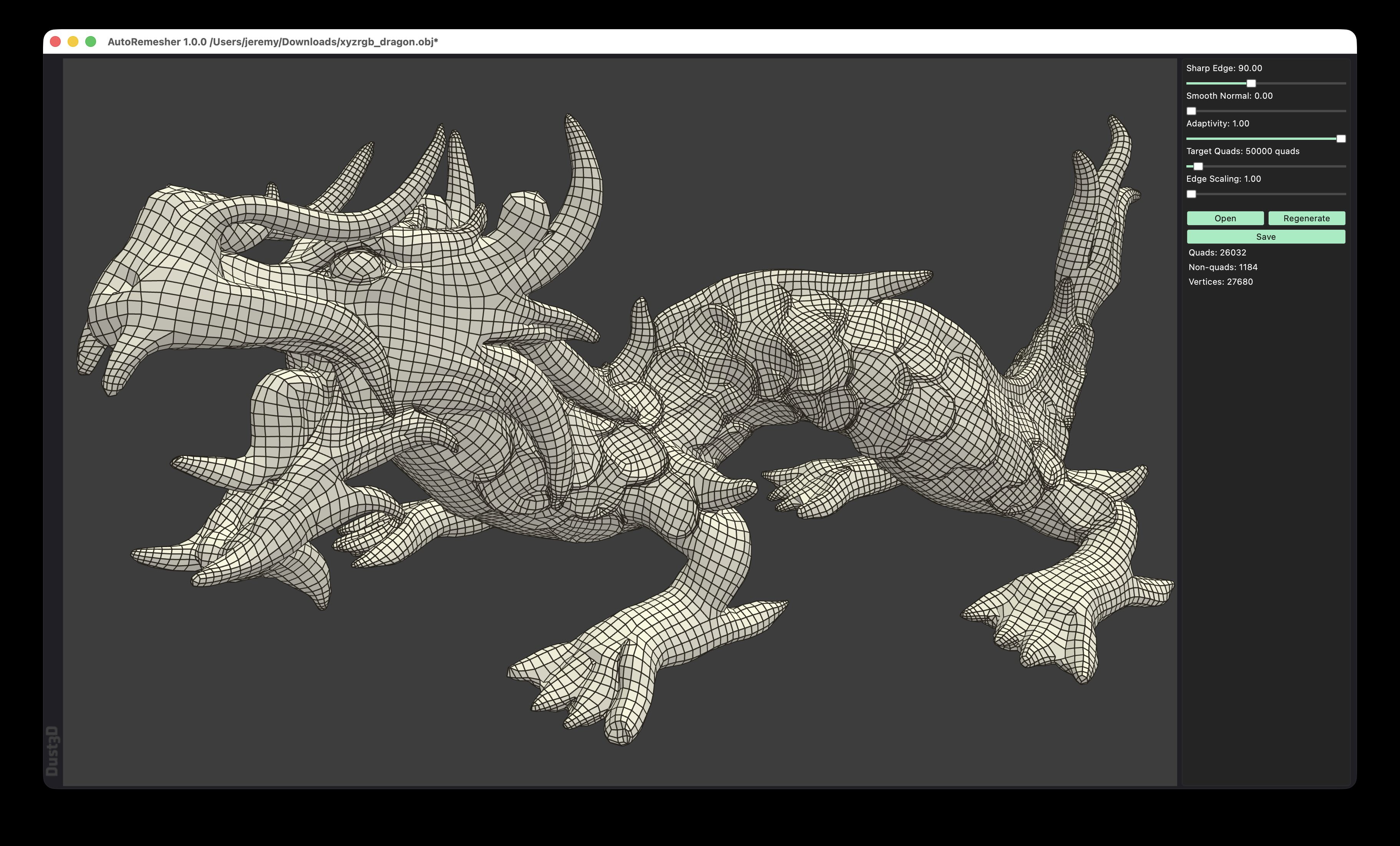 ## 入门指南
这些说明将帮助您在本地计算机上拷贝并运行 AutoRemesher 副本,以便进行开发和测试。
### 前置条件
- 支持 C++14 的 C++ 编译器
- CMake 3.12 或更高版本
- TBB (Intel Threading Building Blocks)
### 构建说明
1. 克隆代码仓库
```
git clone https://github.com/huxingyi/autoremesher.git
```
2. 使用 QMake 进行构建
```
cd autoremesher
sudo apt install qt5-qmake qtbase5-dev
qmake autoremesher.pro
make
```
#### Windows
1. 安装带有 C++ 开发工具的 Visual Studio 2022
2. 从 [cmake.org](https://cmake.org/) 安装 CMake
3. 打开命令提示符并按照上述构建步骤操作,或者在 Visual Studio 中打开项目文件夹,让其自动处理 CMake 配置
#### macOS
1. 安装 Xcode Command Line Tools:`xcode-select --install`
2. 通过 Homebrew 安装 CMake:`brew install cmake`
3. 按照上述构建步骤操作
#### Linux
1. 使用您所用发行版的包管理器安装构建依赖项:
- Ubuntu/Debian:`sudo apt install build-essential cmake libtbb-dev`
- Fedora:`sudo dnf install gcc-c++ cmake tbb-devel`
### 快速开始
#### Windows
从[发布页面](https://github.com/huxingyi/autoremesher/releases)下载 `autoremesher-
## 入门指南
这些说明将帮助您在本地计算机上拷贝并运行 AutoRemesher 副本,以便进行开发和测试。
### 前置条件
- 支持 C++14 的 C++ 编译器
- CMake 3.12 或更高版本
- TBB (Intel Threading Building Blocks)
### 构建说明
1. 克隆代码仓库
```
git clone https://github.com/huxingyi/autoremesher.git
```
2. 使用 QMake 进行构建
```
cd autoremesher
sudo apt install qt5-qmake qtbase5-dev
qmake autoremesher.pro
make
```
#### Windows
1. 安装带有 C++ 开发工具的 Visual Studio 2022
2. 从 [cmake.org](https://cmake.org/) 安装 CMake
3. 打开命令提示符并按照上述构建步骤操作,或者在 Visual Studio 中打开项目文件夹,让其自动处理 CMake 配置
#### macOS
1. 安装 Xcode Command Line Tools:`xcode-select --install`
2. 通过 Homebrew 安装 CMake:`brew install cmake`
3. 按照上述构建步骤操作
#### Linux
1. 使用您所用发行版的包管理器安装构建依赖项:
- Ubuntu/Debian:`sudo apt install build-essential cmake libtbb-dev`
- Fedora:`sudo dnf install gcc-c++ cmake tbb-devel`
### 快速开始
#### Windows
从[发布页面](https://github.com/huxingyi/autoremesher/releases)下载 `autoremesher--win32-x86_64.zip`,解压并运行 `autoremesher.exe`。
#### macOS
从[发布页面](https://github.com/huxingyi/autoremesher/releases)下载 `autoremesher-.dmg`。
*首次运行时,Apple 会拒绝运行并弹出类似“无法打开,因为无法验证其完整性”的提示。请转到“系统偏好设置” > “安全性与隐私” > “通用”,在“允许从以下位置下载的 App”下点击相应按钮以允许运行。*
#### Linux
从[发布页面](https://github.com/huxingyi/autoremesher/releases)下载 `autoremesher-.AppImage`。
```
$ chmod a+x ./autoremesher-.AppImage
$ ./autoremesher-.AppImage
```
### 链接
- [查看开源自动重拓扑工具 AutoRemesher](http://www.cgchannel.com/2020/08/check-out-open-source-auto-retopology-tool-autoremesher/) **cgchannel.com**
- [一款新的开源自动重拓扑工具](https://80.lv/articles/a-new-open-source-auto-retopology-tool/) **80.lv**
- [[非 Blender] Autoremesher 自动重拓扑工具发布](https://www.blendernation.com/2020/08/18/non-blender-autoremesher-auto-retopology-tool-released/) **blendernation.com**
- [开源的新自动网格化工具 Auto Remesher](https://cginterest.com/2020/08/20/%e3%82%aa%e3%83%bc%e3%83%97%e3%83%b3%e3%82%bd%e3%83%bc%e3%82%b9%e3%81%ae%e6%96%b0%e3%81%97%e3%81%84%e3%82%aa%e3%83%bc%e3%83%88%e3%83%aa%e3%83%a1%e3%83%83%e3%82%b7%e3%83%a5%e3%83%84%e3%83%bc%e3%83%ab-a/) **cginterest.com**
- [AutoRemesher 1.0.0-alpha - 超高速且高质量的四边形多边形生成!Dust3D 开发者推出的开源自动重网格化工具!](https://3dnchu.com/archives/autoremesher-1-0-0-alpha/) **3dnchu.com**
- [开源 AutoRemesher 发布](https://cgpress.org/archives/open-source-remesher.html) **cgpress.org**
- [「autoremesher」能自动对多边形进行重拓扑的免费拓扑工具](https://modelinghappy.com/archives/30339) **modelinghappy.com**
- [开源 Auto Remesher](https://blender-addons.org/open-source-auto-remesher/) **blender-addons.org**
- [AutoRemesher | 自动重拓扑工具](https://www.digitalproduction.com/2020/08/05/autoremesher-auto-retopology-tool/) **digitalproduction.com**
- [Autoremesher 开源自动重拓扑工具](https://blenderartists.org/t/autoremesher-open-source-auto-retopology-tool/1245131/126) **blenderartists.org**
## 许可证
AutoRemesher 采用 MIT 许可证授权 - 详见 [LICENSE](https://github.com/huxingyi/autoremesher/blob/master/LICENSE) 文件。
## 致谢
有关本项目使用的库和资源列表,请查看完整的 [ACKNOWLEDGEMENTS](https://github.com/huxingyi/autoremesher/blob/master/ACKNOWLEDGEMENTS.html)。
## 入门指南
这些说明将帮助您在本地计算机上拷贝并运行 AutoRemesher 副本,以便进行开发和测试。
### 前置条件
- 支持 C++14 的 C++ 编译器
- CMake 3.12 或更高版本
- TBB (Intel Threading Building Blocks)
### 构建说明
1. 克隆代码仓库
```
git clone https://github.com/huxingyi/autoremesher.git
```
2. 使用 QMake 进行构建
```
cd autoremesher
sudo apt install qt5-qmake qtbase5-dev
qmake autoremesher.pro
make
```
#### Windows
1. 安装带有 C++ 开发工具的 Visual Studio 2022
2. 从 [cmake.org](https://cmake.org/) 安装 CMake
3. 打开命令提示符并按照上述构建步骤操作,或者在 Visual Studio 中打开项目文件夹,让其自动处理 CMake 配置
#### macOS
1. 安装 Xcode Command Line Tools:`xcode-select --install`
2. 通过 Homebrew 安装 CMake:`brew install cmake`
3. 按照上述构建步骤操作
#### Linux
1. 使用您所用发行版的包管理器安装构建依赖项:
- Ubuntu/Debian:`sudo apt install build-essential cmake libtbb-dev`
- Fedora:`sudo dnf install gcc-c++ cmake tbb-devel`
### 快速开始
#### Windows
从[发布页面](https://github.com/huxingyi/autoremesher/releases)下载 `autoremesher-标签:Bash脚本, C++, 三维建模, 图形图像, 数据擦除, 网格重拓扑, 自动四边化