mandiant/capa
GitHub: mandiant/capa
Mandiant FLARE 团队开源的可执行文件能力识别工具,通过静态分析或沙箱报告自动提取程序行为特征并映射到 MITRE ATT&CK 框架。
Stars: 6059 | Forks: 703

Website
|
Download
|
Web Interface
[](https://pypi.org/project/flare-capa)
[](https://github.com/mandiant/capa/releases)
[](https://github.com/mandiant/capa-rules)
[](https://github.com/mandiant/capa/actions?query=workflow%3ACI+event%3Apush+branch%3Amaster)
[](https://github.com/mandiant/capa/releases)
[](LICENSE.txt)
capa 检测可执行文件中的能力。
你可以针对 PE、ELF、.NET 模块、Shellcode 文件或沙箱报告运行它,它会告诉你它认为该程序可以做什么。
例如,它可能会提示该文件是一个后门,能够安装服务,或者依赖 HTTP 进行通信。
要在浏览器中交互式地检查 capa 结果,请使用 [capa Explorer Web](https://mandiant.github.io/capa/explorer/)。
如果你想检查或编写 capa 规则,请前往 [capa-rules 仓库](https://github.com/mandiant/capa-rules)。否则,请继续阅读。
你可以在下方找到[包含更多详细信息的 capa 博客文章列表](#blog-posts)。
# capa 输出示例
```
$ capa.exe suspicious.exe
+--------------------+------------------------------------------------------------------------+
| ATT&CK Tactic | ATT&CK Technique |
|--------------------+------------------------------------------------------------------------|
| DEFENSE EVASION | Obfuscated Files or Information [T1027] |
| DISCOVERY | Query Registry [T1012] |
| | System Information Discovery [T1082] |
| EXECUTION | Command and Scripting Interpreter::Windows Command Shell [T1059.003] |
| | Shared Modules [T1129] |
| EXFILTRATION | Exfiltration Over C2 Channel [T1041] |
| PERSISTENCE | Create or Modify System Process::Windows Service [T1543.003] |
+--------------------+------------------------------------------------------------------------+
+-------------------------------------------+-------------------------------------------------+
| CAPABILITY | NAMESPACE |
|-------------------------------------------+-------------------------------------------------|
| read and send data from client to server | c2/file-transfer |
| execute shell command and capture output | c2/shell |
| receive data (2 matches) | communication |
| send data (6 matches) | communication |
| connect to HTTP server (3 matches) | communication/http/client |
| send HTTP request (3 matches) | communication/http/client |
| create pipe | communication/named-pipe/create |
| get socket status (2 matches) | communication/socket |
| receive data on socket (2 matches) | communication/socket/receive |
| send data on socket (3 matches) | communication/socket/send |
| connect TCP socket | communication/socket/tcp |
| encode data using Base64 | data-manipulation/encoding/base64 |
| encode data using XOR (6 matches) | data-manipulation/encoding/xor |
| run as a service | executable/pe |
| get common file path (3 matches) | host-interaction/file-system |
| read file | host-interaction/file-system/read |
| write file (2 matches) | host-interaction/file-system/write |
| print debug messages (2 matches) | host-interaction/log/debug/write-event |
| resolve DNS | host-interaction/network/dns/resolve |
| get hostname | host-interaction/os/hostname |
| create process | host-interaction/process/create |
| create registry key | host-interaction/registry/create |
| create service | host-interaction/service/create |
| create thread | host-interaction/thread/create |
| persist via Windows service | persistence/service |
+-------------------------------------------+-------------------------------------------------+
```
# 下载与使用
请点击[此处](https://github.com/mandiant/capa/releases)下载独立 capa 二进制文件的稳定版本。你可以直接运行独立二进制文件而无需安装。capa 是一个命令行工具,应在终端中运行。
要将 capa 作为库使用或与其他工具集成,请参阅 [doc/installation.md](https://github.com/mandiant/capa/blob/master/doc/installation.md) 获取进一步的设置说明。
**文档:** [使用技巧](doc/usage.md) · [安装说明](doc/installation.md) · [限制](doc/limitations.md) · [常见问题](doc/faq.md)
# capa Explorer Web
[capa Explorer Web](https://mandiant.github.io/capa/explorer/) 让你能够在 Web 浏览器中交互式地探索 capa 结果。除了在线版本外,你还可以下载独立的 HTML 文件以供本地离线使用。

关于 Web UI 的更多详情,请参阅 [capa Explorer Web README](https://github.com/mandiant/capa/blob/master/web/explorer/README.md)。
# 示例
在上方的示例输出中,我们对一个未知二进制文件(`suspicious.exe`)运行了 capa,
工具报告称该程序可以发送 HTTP 请求,通过 XOR 和 Base64 解码数据,
安装服务,并生成新进程。
综上所述,这让我们认为 `suspicious.exe` 可能是一个持久性后门。
因此,我们的下一步分析可能是在沙箱中运行 `suspicious.exe` 并尝试恢复命令与控制(C2)服务器。
## 详细结果
通过传入 `-vv` 标志(表示非常详细),capa 会准确报告它在何处发现了这些能力的证据。
这至少有两个方面的用处:
- 它有助于解释为什么我们应该信任这些结果,并使我们能够验证结论,以及
- 它展示了二进制文件中经验丰富的分析师可能会使用 IDA Pro 进行研究的位置
```
$ capa.exe suspicious.exe -vv
...
execute shell command and capture output
namespace c2/shell
author matthew.williams@mandiant.com
scope function
att&ck Execution::Command and Scripting Interpreter::Windows Command Shell [T1059.003]
references https://docs.microsoft.com/en-us/windows/win32/api/processthreadsapi/ns-processthreadsapi-startupinfoa
function @ 0x4011C0
and:
match: create a process with modified I/O handles and window @ 0x4011C0
and:
number: 257 = STARTF_USESTDHANDLES | STARTF_USESHOWWINDOW @ 0x4012B8
or:
number: 68 = StartupInfo.cb (size) @ 0x401282
or: = API functions that accept a pointer to a STARTUPINFO structure
api: kernel32.CreateProcess @ 0x401343
match: create pipe @ 0x4011C0
or:
api: kernel32.CreatePipe @ 0x40126F, 0x401280
optional:
match: create thread @ 0x40136A, 0x4013BA
or:
and:
os: windows
or:
api: kernel32.CreateThread @ 0x4013D7
or:
and:
os: windows
or:
api: kernel32.CreateThread @ 0x401395
or:
string: "cmd.exe" @ 0x4012FD
...
```
capa 还支持对多种沙箱进行动态能力检测,包括:
* [CAPE](https://github.com/kevoreilly/CAPEv2) (支持的报告格式:`.json`, `.json_`, `.json.gz`)
* [DRAKVUF](https://github.com/CERT-Polska/drakvuf-sandbox/) (支持的报告格式:`.log`, `.log.gz`)
* [VMRay](https://www.vmray.com/) (支持的报告格式:分析归档 `.zip`)
要使用此功能,请将你的文件提交到支持的沙箱,然后下载生成的报告文件并对该报告运行 capa。此功能使 capa 能够匹配沙箱在执行期间捕获的动态和静态特征对应的能力。
这是一个对加壳文件运行 capa,然后对同一加壳文件生成的 CAPE 报告运行 capa 的示例:
```
$ capa 05be49819139a3fdcdbddbdefd298398779521f3d68daa25275cc77508e42310.exe
WARNING:capa.capabilities.common:--------------------------------------------------------------------------------
WARNING:capa.capabilities.common: This sample appears to be packed.
WARNING:capa.capabilities.common:
WARNING:capa.capabilities.common: Packed samples have often been obfuscated to hide their logic.
WARNING:capa.capabilities.common: capa cannot handle obfuscation well using static analysis. This means the results may be misleading or incomplete.
WARNING:capa.capabilities.common: If possible, you should try to unpack this input file before analyzing it with capa.
WARNING:capa.capabilities.common: Alternatively, run the sample in a supported sandbox and invoke capa against the report to obtain dynamic analysis results.
WARNING:capa.capabilities.common:
WARNING:capa.capabilities.common: Identified via rule: (internal) packer file limitation
WARNING:capa.capabilities.common:
WARNING:capa.capabilities.common: Use -v or -vv if you really want to see the capabilities identified by capa.
WARNING:capa.capabilities.common:--------------------------------------------------------------------------------
$ capa 05be49819139a3fdcdbddbdefd298398779521f3d68daa25275cc77508e42310.json
┍━━━━━━━━━━━━━━━━━━━━━━━━┯━━━━━━━━━━━━━━━━━━━━━━━━━━━━━━━━━━━━━━━━━━━━━━━━━━━━━━━━━━━━━━━━━━━━━━━━━━━━━━━━━━━━┑
│ ATT&CK Tactic │ ATT&CK Technique │
┝━━━━━━━━━━━━━━━━━━━━━━━━┿━━━━━━━━━━━━━━━━━━━━━━━━━━━━━━━━━━━━━━━━━━━━━━━━━━━━━━━━━━━━━━━━━━━━━━━━━━━━━━━━━━━━┥
│ CREDENTIAL ACCESS │ Credentials from Password Stores T1555 │
├────────────────────────┼────────────────────────────────────────────────────────────────────────────────────┤
│ DEFENSE EVASION │ File and Directory Permissions Modification T1222 │
│ │ Modify Registry T1112 │
│ │ Obfuscated Files or Information T1027 │
│ │ Virtualization/Sandbox Evasion::User Activity Based Checks T1497.002 │
├────────────────────────┼────────────────────────────────────────────────────────────────────────────────────┤
│ DISCOVERY │ Account Discovery T1087 │
│ │ Application Window Discovery T1010 │
│ │ File and Directory Discovery T1083 │
│ │ Query Registry T1012 │
│ │ System Information Discovery T1082 │
│ │ System Location Discovery::System Language Discovery T1614.001 │
│ │ System Owner/User Discovery T1033 │
├────────────────────────┼────────────────────────────────────────────────────────────────────────────────────┤
│ EXECUTION │ System Services::Service Execution T1569.002 │
├────────────────────────┼────────────────────────────────────────────────────────────────────────────────────┤
│ PERSISTENCE │ Boot or Logon Autostart Execution::Registry Run Keys / Startup Folder T1547.001 │
│ │ Boot or Logon Autostart Execution::Winlogon Helper DLL T1547.004 │
│ │ Create or Modify System Process::Windows Service T1543.003 │
┕━━━━━━━━━━━━━━━━━━━━━━━━┷━━━━━━━━━━━━━━━━━━━━━━━━━━━━━━━━━━━━━━━━━━━━━━━━━━━━━━━━━━━━━━━━━━━━━━━━━━━━━━━━━━━━┙
┍━━━━━━━━━━━━━━━━━━━━━━━━━━━━━━━━━━━━━━━━━━━━━━━━━━━━━━┯━━━━━━━━━━━━━━━━━━━━━━━━━━━━━━━━━━━━━━━━━━━━━━━━━━━━━━┑
│ Capability │ Namespace │
┝━━━━━━━━━━━━━━━━━━━━━━━━━━━━━━━━━━━━━━━━━━━━━━━━━━━━━━┿━━━━━━━━━━━━━━━━━━━━━━━━━━━━━━━━━━━━━━━━━━━━━━━━━━━━━━┥
│ check for unmoving mouse cursor (3 matches) │ anti-analysis/anti-vm/vm-detection │
│ gather bitkinex information │ collection/file-managers │
│ gather classicftp information │ collection/file-managers │
│ gather filezilla information │ collection/file-managers │
│ gather total-commander information │ collection/file-managers │
│ gather ultrafxp information │ collection/file-managers │
│ resolve DNS (23 matches) │ communication/dns │
│ initialize Winsock library (7 matches) │ communication/socket │
│ act as TCP client (3 matches) │ communication/tcp/client │
│ create new key via CryptAcquireContext │ data-manipulation/encryption │
│ encrypt or decrypt via WinCrypt │ data-manipulation/encryption │
│ hash data via WinCrypt │ data-manipulation/hashing │
│ initialize hashing via WinCrypt │ data-manipulation/hashing │
│ hash data with MD5 │ data-manipulation/hashing/md5 │
│ generate random numbers via WinAPI │ data-manipulation/prng │
│ extract resource via kernel32 functions (2 matches) │ executable/resource │
│ interact with driver via control codes (2 matches) │ host-interaction/driver │
│ get Program Files directory (18 matches) │ host-interaction/file-system │
│ get common file path (575 matches) │ host-interaction/file-system │
│ create directory (2 matches) │ host-interaction/file-system/create │
│ delete file │ host-interaction/file-system/delete │
│ get file attributes (122 matches) │ host-interaction/file-system/meta │
│ set file attributes (8 matches) │ host-interaction/file-system/meta │
│ move file │ host-interaction/file-system/move │
│ find taskbar (3 matches) │ host-interaction/gui/taskbar/find │
│ get keyboard layout (12 matches) │ host-interaction/hardware/keyboard │
│ get disk size │ host-interaction/hardware/storage │
│ get hostname (4 matches) │ host-interaction/os/hostname │
│ allocate or change RWX memory (3 matches) │ host-interaction/process/inject │
│ query or enumerate registry key (3 matches) │ host-interaction/registry │
│ query or enumerate registry value (8 matches) │ host-interaction/registry │
│ delete registry key │ host-interaction/registry/delete │
│ start service │ host-interaction/service/start │
│ get session user name │ host-interaction/session │
│ persist via Run registry key │ persistence/registry/run │
│ persist via Winlogon Helper DLL registry key │ persistence/registry/winlogon-helper │
│ persist via Windows service (2 matches) │ persistence/service │
┕━━━━━━━━━━━━━━━━━━━━━━━━━━━━━━━━━━━━━━━━━━━━━━━━━━━━━━┷━━━━━━━━━━━━━━━━━━━━━━━━━━━━━━━━━━━━━━━━━━━━━━━━━━━━━━┙
```
# capa 规则
capa 使用一组规则来识别程序中的能力。
这些规则易于编写,即使是逆向工程新手也能上手。
通过编写规则,你可以扩展 capa 识别的能力范围。
在某些方面,capa 规则是 OpenIOC、Yara 和 YAML 格式的混合体。
这是一个 capa 使用的规则示例:
```
rule:
meta:
name: create TCP socket
namespace: communication/socket/tcp
authors:
- william.ballenthin@mandiant.com
- joakim@intezer.com
- anushka.virgaonkar@mandiant.com
scopes:
static: basic block
dynamic: call
mbc:
- Communication::Socket Communication::Create TCP Socket [C0001.011]
examples:
- Practical Malware Analysis Lab 01-01.dll_:0x10001010
features:
- or:
- and:
- number: 6 = IPPROTO_TCP
- number: 1 = SOCK_STREAM
- number: 2 = AF_INET
- or:
- api: ws2_32.socket
- api: ws2_32.WSASocket
- api: socket
- property/read: System.Net.Sockets.TcpClient::Client
```
[github.com/mandiant/capa-rules](https://github.com/mandiant/capa-rules) 仓库包含数百个随 capa 分发的标准规则。
请学习编写规则,并在你在恶意软件中发现有趣的技术时贡献新条目。
# IDA Pro 插件:capa explorer
如果你使用 IDA Pro,那么你可以使用 [capa explorer](https://github.com/mandiant/capa/tree/master/capa/ida/plugin) 插件。
capa explorer 可帮助你识别程序的有趣区域,并使用直接从 IDA Pro 数据库提取的特征构建新的 capa 规则。
它还会利用你对 .idb 的本地更改来提取更好的特征,例如当你重命名一个包含动态解析 API 地址的全局变量时。

# Ghidra 集成
capa 支持使用 Ghidra(通过 [PyGhidra](https://github.com/NationalSecurityAgency/ghidra/tree/master/Ghidra/Features/PyGhidra))作为特征提取后端。这允许你使用 Ghidra 的分析引擎对二进制文件运行 capa。
你可以使用 [capa explorer for Ghidra](https://github.com/mandiant/capa/tree/master/capa/ghidra/plugin) 在 Ghidra UI 中运行并查看 capa 结果。
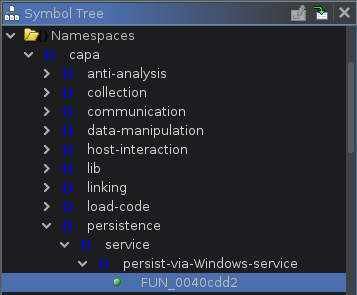
你也可以使用 [Ghidra 后端](https://github.com/mandiant/capa/tree/master/capa/ghidra)从命令行运行 capa。
# 博客文章
- [Riding Dragons: capa Harnesses Ghidra](https://www.mandiant.com/resources/blog/capa-harnesses-ghidra)
- [Dynamic capa: Exploring Executable Run-Time Behavior with the CAPE Sandbox](https://www.mandiant.com/resources/blog/dynamic-capa-executable-behavior-cape-sandbox)
- [capa v4: casting a wider .NET](https://www.mandiant.com/resources/blog/capa-v4-casting-wider-net) (.NET 支持)
- [ELFant in the Room – capa v3](https://www.mandiant.com/resources/elfant-in-the-room-capa-v3) (ELF 支持)
- [capa 2.0: Better, Stronger, Faster](https://www.mandiant.com/resources/capa-2-better-stronger-faster)
- [capa: Automatically Identify Malware Capabilities](https://www.mandiant.com/resources/capa-automatically-identify-malware-capabilities)
# 更多信息
## capa
- [安装说明](https://github.com/mandiant/capa/blob/master/doc/installation.md)
- [使用方法](https://github.com/mandiant/capa/blob/master/doc/usage.md)
- [限制](https://github.com/mandiant/capa/blob/master/doc/limitations.md)
- [贡献指南](https://github.com/mandiant/capa/blob/master/.github/CONTRIBUTING.md)
## capa 规则
- [capa-rules 仓库](https://github.com/mandiant/capa-rules)
- [capa-rules 规则格式](https://github.com/mandiant/capa-rules/blob/master/doc/format.md)
## capa 测试文件
[capa-testfiles 仓库](https://github.com/mandiant/capa-testfiles) 包含我们用于测试 capa 代码和规则的数据
## 邮件列表
订阅 FLARE 邮件列表以获取社区公告!发送内容为 "subscribe" 的邮件至 [flare-external@google.com](mailto:flare-external@google.com?subject=subscribe)。
标签:DNS 反向解析, DNS枚举, EDR, ELF文件, FLARE, HTTP工具, IP 地址批量处理, Mandiant, Mr. Robot, PE文件, Python, Shellcode, TCP/UDP协议, YARA, 二进制分析, 云安全监控, 云安全运维, 云资产可视化, 云资产清单, 可执行文件分析, 后渗透, 后门检测, 威胁情报, 库, 应急响应, 开发者工具, 恶意代码分析, 技术调研, 数据包嗅探, 无后门, 无线安全, 流量嗅探, 漏洞分析, 网络信息收集, 网络安全, 网络安全审计, 网络安全工具, 脆弱性评估, 自动化分析, 跨站脚本, 路径探测, 软件行为分析, 逆向工具, 逆向工程, 配置文件, 隐私保护, 静态分析