GitGuardian/ggshield-action
GitHub: GitGuardian/ggshield-action
GitGuardian Shield 的 GitHub Action,用于在 GitHub 工作流中自动扫描提交内容并发现暴露的密钥与凭证。
Stars: 347 | Forks: 27
 # [GitGuardian Shield](https://github.com/GitGuardian/ggshield) GitHub Action
[](https://github.com/marketplace/actions/gitguardian-shield-action)
[](https://hub.docker.com/r/gitguardian/ggshield)
[](LICENSE)

使用 [**GitGuardian shield**](https://github.com/GitGuardian/ggshield) 查找提交中暴露的凭证。
**GitGuardian shield** (ggshield) 是一个 CLI 应用程序,可在您的本地环境
或 CI 环境中运行,帮助您检测超过 400 种类型的 secret,以及其他潜在的安全漏洞或策略违规。
**GitGuardian shield** 通过 [py-gitguardian](https://github.com/GitGuardian/py-gitguardian) 使用我们的 [公开 API](https://api.gitguardian.com/doc) 来扫描您的文件,并检测代码中潜在的 secret 或问题。**[公开 API](https://api.gitguardian.com/doc) 的 `/v1/scan` endpoint 是无状态的。我们不会存储您发送的任何文件或我们检测到的任何 secret**。
## 要求
- 一个 GitGuardian 账户。如果您之前没有注册,请立即 [**注册**](https://dashboard.gitguardian.com/api/v1/auth/user/github_login/authorize?utm_source=github&utm_medium=gg_shield&utm_campaign=shield1)!
- 一个 GitGuardian API Key。您可以 [**在此处**](https://dashboard.gitguardian.com/api/v1/auth/user/github_login/authorize?utm_source=github&utm_medium=gg_shield&utm_campaign=shield1) 创建您的 API Key。唯一必需的作用域是 `scan`。
## 使用说明
使用 `GitGuardian/ggshield-action` action 在您的 GitHub 工作流中添加一个新作业。
```
name: GitGuardian scan
on: [push, pull_request]
jobs:
scanning:
name: GitGuardian scan
runs-on: ubuntu-latest
permissions:
contents: read
steps:
- name: Checkout
uses: actions/checkout@v4
with:
fetch-depth: 0 # fetch all history so multiple commits can be scanned
- name: GitGuardian scan
uses: GitGuardian/ggshield-action@v1
env:
GITHUB_PUSH_BEFORE_SHA: ${{ github.event.before }}
GITHUB_PUSH_BASE_SHA: ${{ github.event.base }}
GITHUB_DEFAULT_BRANCH: ${{ github.event.repository.default_branch }}
GITGUARDIAN_API_KEY: ${{ secrets.GITGUARDIAN_API_KEY }}
```
将您的 [GitGuardian API Key](https://dashboard.gitguardian.com/api/v1/auth/user/github_login/authorize?utm_source=github&utm_medium=gg_shield&utm_campaign=shield1) 添加到项目设置的 `GITGUARDIAN_API_KEY` secret 中。
## 为 action 添加额外选项
该 action 接受与 `ggshield secret scan ci` 命令相同的额外选项。这是 [命令参考](https://docs.gitguardian.com/ggshield-docs/reference/secret/scan/ci)。
示例:
```
name: GitGuardian scan
on: [push, pull_request]
jobs:
scanning:
name: GitGuardian scan
runs-on: ubuntu-latest
permissions:
contents: read
steps:
- name: Checkout
uses: actions/checkout@v4
with:
fetch-depth: 0 # fetch all history so multiple commits can be scanned
- name: GitGuardian scan
uses: GitGuardian/ggshield-action@v1
with:
args: -v --ignore-known-secrets
env:
GITHUB_PUSH_BEFORE_SHA: ${{ github.event.before }}
GITHUB_PUSH_BASE_SHA: ${{ github.event.base }}
GITHUB_DEFAULT_BRANCH: ${{ github.event.repository.default_branch }}
GITGUARDIAN_API_KEY: ${{ secrets.GITGUARDIAN_API_KEY }}
```
## GitGuardian 扫描示例
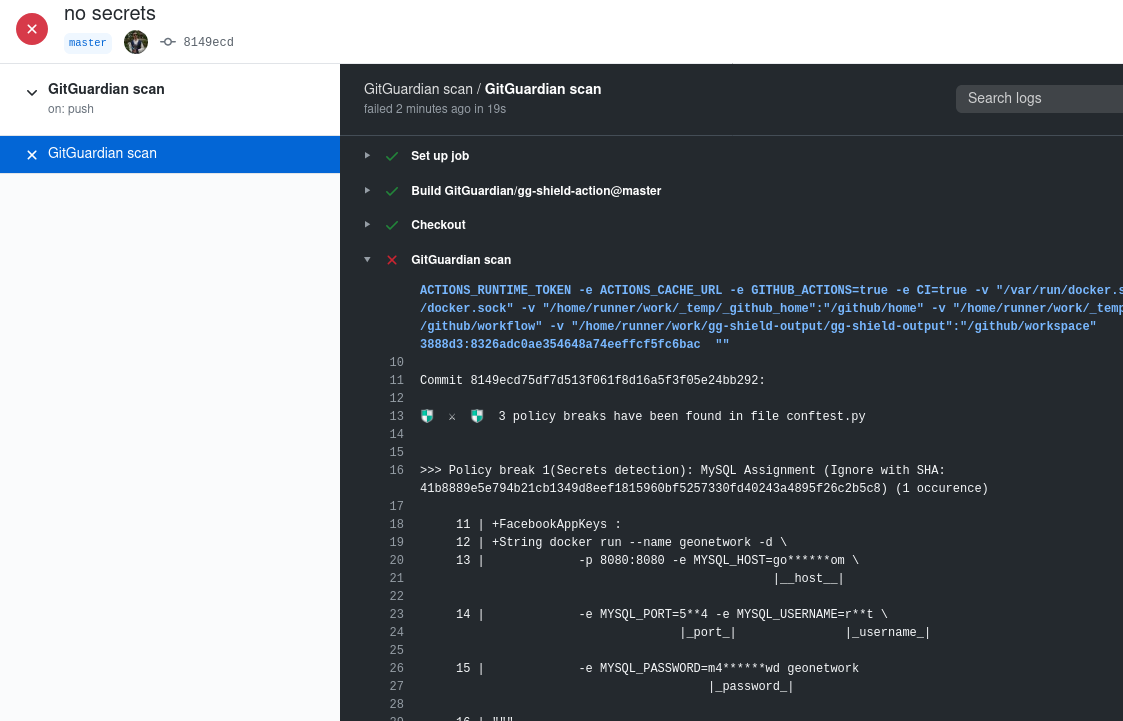
这是 **GitGuardian shield** 的扫描结果示例。
如果检测到的 secret 已被撤销,并且您不想重写 git 历史记录,您可以使用策略违规的值(例如:`|_password_|` 的值)或在您的 `.gitguardian.yaml` 文件中 `matches-ignore` 下显示的忽略 SHA。
您可以 [在此处](https://github.com/GitGuardian/ggshield/blob/main/.gitguardian.example.yml) 查看示例配置文件。
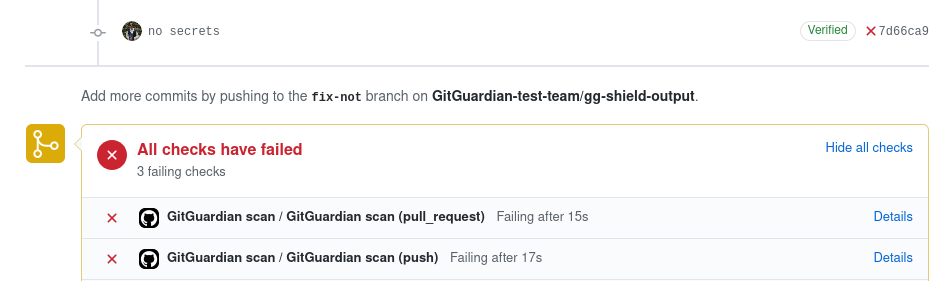
如果您的提交中存在 secret 泄露或其他安全问题,您的工作流将被标记为失败。
请务必在您的仓库设置中将 `GitGuardian scan` 添加到必需的状态检查中,以阻止存在安全问题的 pull request 被合并。
# 许可证
**GitGuardian shield** 采用 MIT 许可证。
# [GitGuardian Shield](https://github.com/GitGuardian/ggshield) GitHub Action
[](https://github.com/marketplace/actions/gitguardian-shield-action)
[](https://hub.docker.com/r/gitguardian/ggshield)
[](LICENSE)

使用 [**GitGuardian shield**](https://github.com/GitGuardian/ggshield) 查找提交中暴露的凭证。
**GitGuardian shield** (ggshield) 是一个 CLI 应用程序,可在您的本地环境
或 CI 环境中运行,帮助您检测超过 400 种类型的 secret,以及其他潜在的安全漏洞或策略违规。
**GitGuardian shield** 通过 [py-gitguardian](https://github.com/GitGuardian/py-gitguardian) 使用我们的 [公开 API](https://api.gitguardian.com/doc) 来扫描您的文件,并检测代码中潜在的 secret 或问题。**[公开 API](https://api.gitguardian.com/doc) 的 `/v1/scan` endpoint 是无状态的。我们不会存储您发送的任何文件或我们检测到的任何 secret**。
## 要求
- 一个 GitGuardian 账户。如果您之前没有注册,请立即 [**注册**](https://dashboard.gitguardian.com/api/v1/auth/user/github_login/authorize?utm_source=github&utm_medium=gg_shield&utm_campaign=shield1)!
- 一个 GitGuardian API Key。您可以 [**在此处**](https://dashboard.gitguardian.com/api/v1/auth/user/github_login/authorize?utm_source=github&utm_medium=gg_shield&utm_campaign=shield1) 创建您的 API Key。唯一必需的作用域是 `scan`。
## 使用说明
使用 `GitGuardian/ggshield-action` action 在您的 GitHub 工作流中添加一个新作业。
```
name: GitGuardian scan
on: [push, pull_request]
jobs:
scanning:
name: GitGuardian scan
runs-on: ubuntu-latest
permissions:
contents: read
steps:
- name: Checkout
uses: actions/checkout@v4
with:
fetch-depth: 0 # fetch all history so multiple commits can be scanned
- name: GitGuardian scan
uses: GitGuardian/ggshield-action@v1
env:
GITHUB_PUSH_BEFORE_SHA: ${{ github.event.before }}
GITHUB_PUSH_BASE_SHA: ${{ github.event.base }}
GITHUB_DEFAULT_BRANCH: ${{ github.event.repository.default_branch }}
GITGUARDIAN_API_KEY: ${{ secrets.GITGUARDIAN_API_KEY }}
```
将您的 [GitGuardian API Key](https://dashboard.gitguardian.com/api/v1/auth/user/github_login/authorize?utm_source=github&utm_medium=gg_shield&utm_campaign=shield1) 添加到项目设置的 `GITGUARDIAN_API_KEY` secret 中。
## 为 action 添加额外选项
该 action 接受与 `ggshield secret scan ci` 命令相同的额外选项。这是 [命令参考](https://docs.gitguardian.com/ggshield-docs/reference/secret/scan/ci)。
示例:
```
name: GitGuardian scan
on: [push, pull_request]
jobs:
scanning:
name: GitGuardian scan
runs-on: ubuntu-latest
permissions:
contents: read
steps:
- name: Checkout
uses: actions/checkout@v4
with:
fetch-depth: 0 # fetch all history so multiple commits can be scanned
- name: GitGuardian scan
uses: GitGuardian/ggshield-action@v1
with:
args: -v --ignore-known-secrets
env:
GITHUB_PUSH_BEFORE_SHA: ${{ github.event.before }}
GITHUB_PUSH_BASE_SHA: ${{ github.event.base }}
GITHUB_DEFAULT_BRANCH: ${{ github.event.repository.default_branch }}
GITGUARDIAN_API_KEY: ${{ secrets.GITGUARDIAN_API_KEY }}
```
## GitGuardian 扫描示例

这是 **GitGuardian shield** 的扫描结果示例。
如果检测到的 secret 已被撤销,并且您不想重写 git 历史记录,您可以使用策略违规的值(例如:`|_password_|` 的值)或在您的 `.gitguardian.yaml` 文件中 `matches-ignore` 下显示的忽略 SHA。
您可以 [在此处](https://github.com/GitGuardian/ggshield/blob/main/.gitguardian.example.yml) 查看示例配置文件。

如果您的提交中存在 secret 泄露或其他安全问题,您的工作流将被标记为失败。
请务必在您的仓库设置中将 `GitGuardian scan` 添加到必需的状态检查中,以阻止存在安全问题的 pull request 被合并。
# 许可证
**GitGuardian shield** 采用 MIT 许可证。标签:DevSecOps, GitHub Action, LNA, StruQ, 上游代理, 安全, 请求拦截, 超时处理, 逆向工具