aws-cloudformation/cloudformation-guard
GitHub: aws-cloudformation/cloudformation-guard
AWS CloudFormation Guard 是一款基于 Rust 的通用策略即代码工具,通过声明式 DSL 验证 CloudFormation、Kubernetes 和 Terraform 等 JSON/YAML 配置的合规性。
Stars: 1384 | Forks: 196
# AWS CloudFormation Guard
**使用策略即代码验证云环境**
AWS CloudFormation Guard 是一个开源的通用策略即代码评估工具。它为开发人员提供了一种简单易用、功能强大且富有表现力的领域特定语言 (DSL) 来定义策略,并使开发人员能够使用这些策略验证 JSON 或 YAML 格式的结构化数据。
Guard 3.0 版本引入了对有状态规则的支持,通过内置函数实现;支持将 SAM CLI 作为 `cfn-guard-lambda` 的替代部署方法;支持 Shell 命令自动补全;支持高级正则表达式;改进了 test 命令对内部函数的处理;并为 validate 命令添加了 `--structured` 标志,以输出可解析的 JSON/YAML 格式结果。请注意,由于修正了内部函数的处理行为,之前编写的测试可能需要重新审查。请参阅发布说明以获取完整详情和示例。
Guard 可用于以下领域:
1. **预防性治理与合规(左移):** 根据代表组织安全、合规等最佳实践的 Guard 策略,验证基础设施即代码 或基础设施/服务组合,例如 CloudFormation 模板、CloudFormation 变更集、Terraform JSON 配置文件、Kubernetes 配置等。例如,开发人员可以将 Guard 策略与以下内容结合使用:
1. Terraform plan(**JSON 格式**)用于部署安全评估检查,或 Terraform 状态文件用于检测实时状态偏差。
2. 对 IaC 模板进行静态评估,以确定网络可达性,例如部署在 VPC 内部的 Amazon Redshift 集群,并阻止此类堆栈的预配。
2. **检测性治理与合规:** 验证配置管理数据库 (CMDB) 资源的合规性,例如基于 AWS Config 的配置项。例如,开发人员可以针对 AWS Config CI 使用 Guard 策略,持续监控已部署的 AWS 和非 AWS 资源的状态,检测策略违规并触发补救措施。
3. **部署安全:** 验证 CloudFormation 变更集,以确保部署前的更改是安全的。例如,重命名 Amazon DynamoDB 表将导致该表的替换。使用 Guard 3.0,您可以在 CI/CD 流水线中阻止此类更改。
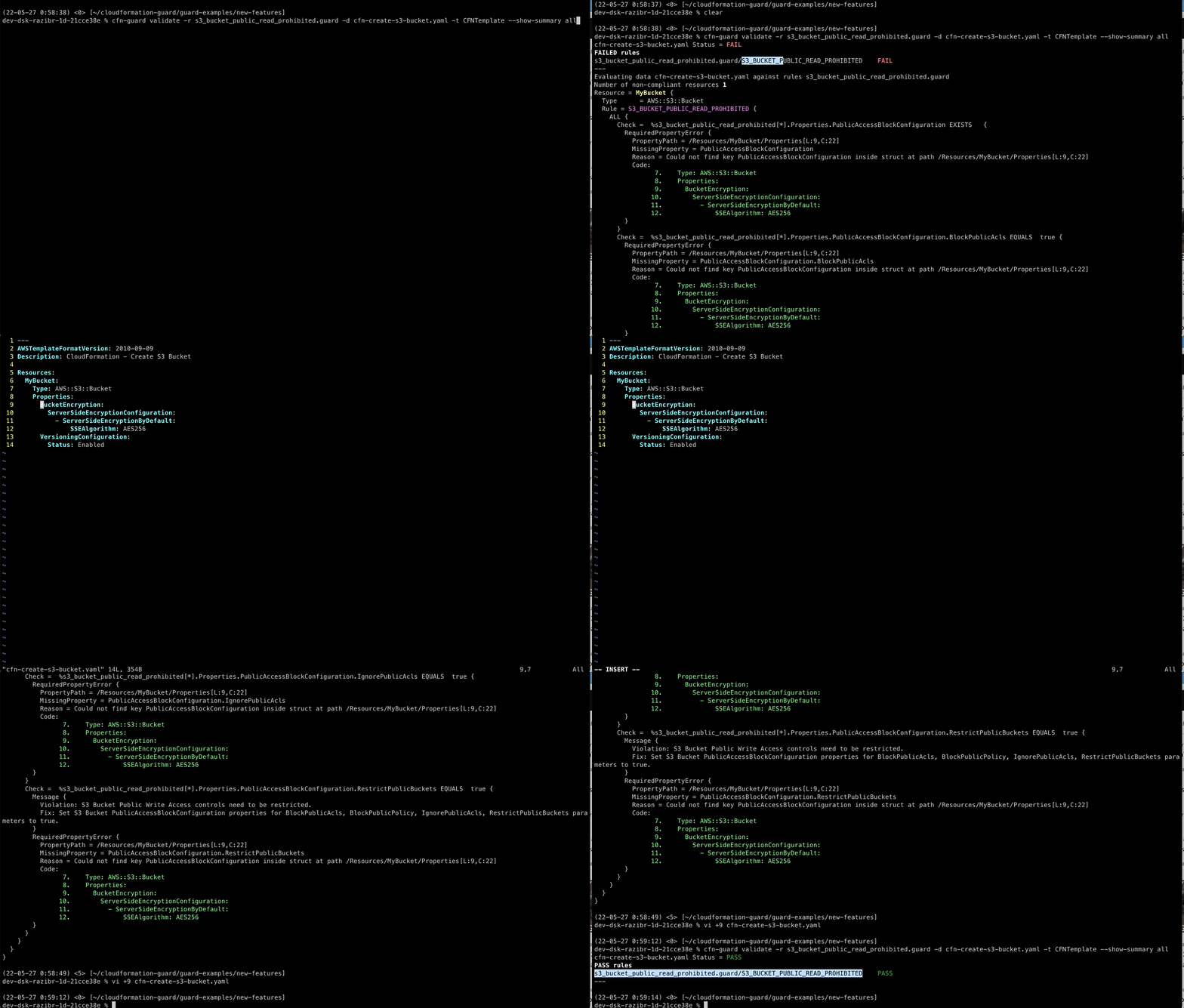
**Guard 实战演示**
**客户反馈**
请填写此[调查问卷](https://amazonmr.au1.qualtrics.com/jfe/form/SV_bpyzpfoYGGuuUl0)以提供关于 cfn-guard 的反馈
## 目录
- [常见问题 (FAQs)](#faqs)
- [Guard DSL](#guard-dsl)
- [原则](#tenets)
- [Guard DSL 的功能](#features-of-guard-dsl)
- [Guard CLI](#guard-cli)
- [安装](#installation)
- [Guard CLI 如何工作?](#how-does-guard-cli-work?)
- [规则编写参考](#references)
- [内置函数与有状态规则](#functions)
- [AWS 规则注册表](#registry)
- [将 Guard 用作 Docker 镜像](#docker)
- [将 Guard 用作 Github Action](https://github.com/aws-cloudformation/cloudformation-guard/tree/main/action#readme)
- [将 Guard 用作 CI 工具](#ci)
- [将 Guard 用作 pre-commit hook](#pre-commit-hook)
- [使用 VSCode 中的 DevContainer 进行贡献](#devcontainer)
- [许可证](#license)
## 常见问题 (FAQs)
**1) 什么是 Guard?**
**2) Guard 不是什么?**
**3) 我可以在哪里使用 Guard?**
**3) Guard 中的 clause(子句)是什么?**
```
Type == /AWS::S3::Bucket/
```
**4) 我可以使用哪些支持的** **类型** **来定义子句?**
**5) 我可以使用哪些二元和一元比较运算符?**
```
Properties.SslPolicy IN ["ELBSecurityPolicy-TLS-1-2-2017-01", "ELBSecurityPolicy-TLS-1-2-Ext-2018-06"]
```
**6) 如何定义高级策略规则?**
```
let s3_buckets = Resources.*[ Type == /S3::Bucket/ ]
# Skip the checks if there are no S3 buckets present
rule s3_bucket_name_encryption_check when %s3_buckets !empty {
%s3_buckets {
Properties {
# common prefix
BucketName == /^MyCompanyPrefix/
# encryption MUST BE on
BucketEncryption.ServerSideEncryptionConfiguration[*] {
# only KMS
ServerSideEncryptionByDefault.SSEAlgorithm IN
["aws:KMS"]
}
}
}
}
```
**7) 我可以轻松测试策略规则吗?**
**8)** **Guard 是否支持规则类别?**
**9) 我可以在哪里评估 Guard 策略?**
**10) 还有什么没告诉我?这听起来太好了,不像真的。**
**11) 我们真正感激的是什么?**
## Guard DSL
### 原则
**(除非您知道更好的原则)**
这些原则有助于指导 Guard DSL 的开发:
- **简单**:该语言必须让客户能够轻松编写策略规则,易于与集成开发环境 (IDE) 集成,易于供人类阅读理解,并且可由机器强制执行。
- **无歧义**:该语言不得允许模棱两可的解释,以免客户难以理解策略评估。该工具针对安全和合规相关的证明,需要审计员始终如一且明确地理解规则及其评估。
- **确定性**:语言设计必须允许语言实现具有确定性、一致且隔离的评估。对于相同的上下文和规则,重复评估的结果必须每次都评估为相同的结果。在近乎相同的环境中评估结果的时间必须在可接受的容限范围内。
- **可组合**:该语言必须支持组合,以帮助构建更高级别的功能,例如通过轻松组合构建块来检查 PCI 合规性。组合不应增加解释结果、语法或导航的复杂性。
### Guard DSL 的功能
- **子句:** 为 Guard 提供基础支撑。它们是评估为真或假的断言。您可以使用[合取范式](https://en.wikipedia.org/wiki/Conjunctive_normal_form) 组合子句。您可以将它们用于直接断言、作为过滤器的一部分来选择值,或用于条件评估。要了解更多信息,请阅读 [Guard: 子句](docs/CLAUSES.md)
- **上下文感知评估、`this` 绑定和循环:** 在遍历分层数据时自动绑定上下文值,支持使用简单语法对集合进行隐式循环。集合可能源于访问元素数组、映射的值以及过滤器,或者来自查询。要了解更多信息,请阅读 [Guard: 上下文感知评估、this 和循环](docs/CONTEXTAWARE_EVALUATIONS_AND_LOOPS.md)
- **查询与过滤:** 查询支持简单的十进制点分格式语法来访问分层数据中的属性。数组/集合使用 `[]` 访问。Map 或 Struct 的值可以使用 `*` 来访问所有键的值。所有集合都可以通过过滤进一步缩小范围,以定位集合内的特定实例。要了解更多信息,请阅读 [Guard: 查询和过滤](docs/QUERY_AND_FILTERING.md)
- **变量、投影和查询插值:** Guard 支持使用 **`let`** 关键字进行一次性变量赋值。查询产生的所有变量赋值都是一个列表(结果集)。您还可以将静态字面量赋值给变量。变量使用前缀 **`%`** 进行评估,并可在查询内部用于插值。要了解更多信息,请阅读 [Guard: 查询、投影和插值](docs/QUERY_PROJECTION_AND_INTERPOLATION.md)
- **复杂组合:** 如前所述,子句可以用合取范式表示。独立行上的子句是 AND 关系。析取关系使用 `or|OR` 关键字表示。您可以将子句分组到一个命名规则中。然后,您可以在其他规则中使用命名规则来创建更高级的组合。此外,您可以拥有多个包含命名规则的文件,这些文件共同构成针对特定合规性(如“确保静态加密”)的一类检查。要了解更多信息,请阅读 [Guard: 复杂组合](docs/COMPLEX_COMPOSITION.md)
## Guard CLI
### 安装
#### 从预构建的发布二进制文件安装
##### MacOS
默认情况下,这是为 macOS-12 (Monterey) 构建的。请参阅 [OS 矩阵](https://docs.github.com/en/actions/reference/workflow-syntax-for-github-actions#github-hosted-runners)
1. 打开您选择的终端。默认按 `Cmd+Space`,输入 `terminal`
2. 复制并粘贴以下命令(默认为最新版本,添加 `-s -- -v ` 以安装其他版本,例如 `-s -- -v 3.1.2`)
```
$ curl --proto '=https' --tlsv1.2 -sSf https://raw.githubusercontent.com/aws-cloudformation/cloudformation-guard/main/install-guard.sh | sh
```
请记得将 `~/.guard/bin/` 添加到您的 `$PATH` 中。
或者,您可以使用 [Homebrew](https://brew.sh/) 安装最新版本。
```
$ brew install cloudformation-guard
```
这样您就不需要修改 `$PATH`。
##### Ubuntu
1. 打开您选择的任何终端
2. 复制并粘贴以下命令(默认为最新版本,添加 `-s -- -v ` 以安装其他版本,例如 `-s -- -v 3.1.2`)
```
$ curl --proto '=https' --tlsv1.2 -sSf https://raw.githubusercontent.com/aws-cloudformation/cloudformation-guard/main/install-guard.sh | sh
```
请记得将 `~/.guard/bin/` 添加到您的 `$PATH` 中。
##### Windows
1. 以管理员身份打开 PowerShell
2. 复制并粘贴以下命令
```
$GuardWindowsInstallScript = Invoke-WebRequest https://raw.githubusercontent.com/aws-cloudformation/cloudformation-guard/main/install-guard.ps1; Invoke-Expression $($GuardWindowsInstallScript.Content)
```
如果遇到有关执行脚本授权的错误,请在重试第 2 步之前运行以下命令:
```
Set-ExecutionPolicy -Scope Process -ExecutionPolicy Bypass
```
#### 安装 Rust 和 Cargo
##### Ubuntu/MacOS:安装 Rust 和 Cargo
```
$ curl --proto '=https' --tlsv1.2 -sSf https://sh.rustup.rs | sh
```
如果您尚未运行,请按照 rust 安装程序的建议运行 `source $HOME/.cargo/env`。请阅读[此处](https://rustup.rs/)了解更多信息。
如果在 `Ubuntu` 上构建,建议运行 `sudo apt-get update; sudo apt install build-essential`。
##### Windows 10:安装 Rust 和 Cargo
1. 创建一个 Windows 10 工作区。
2. 安装 Microsoft Visual C++ 生成工具 2019 版,该版本仅提供 Visual C++ 生成工具:https://visualstudio.microsoft.com/downloads/#build-tools-for-visual-studio-2019。
3. 下载安装程序并运行它。
4. 选择“单个组件”选项卡,并勾选“Windows 10 SDK”。
5. 选择“语言包”选项卡,并确保至少选择了“英语”。
6. 点击“安装”。
7. 让其下载,如果询问则重新启动。
8. 安装 [Rust](https://forge.rust-lang.org/infra/other-installation-methods.html#other-ways-to-install-rustup)。
9. 下载 [rust-init.exe](https://static.rust-lang.org/rustup/dist/i686-pc-windows-gnu/rustup-init.exe)。
10. 运行它并接受默认设置。
#### 基于 Cargo 的安装
既然您已经[安装了 rust 和 cargo](https://doc.rust-lang.org/cargo/getting-started/installation.html),安装 cfn-guard 就很简单了:
```
$ cargo install cfn-guard
```
检查 `help` 以查看其是否正常工作。
```
$ cfn-guard help
cfn-guard 3.1.2
Guard is a general-purpose tool that provides a simple declarative syntax to define
policy-as-code as rules to validate against any structured hierarchical data (like JSON/YAML).
Rules are composed of clauses expressed using Conjunctive Normal Form
(fancy way of saying it is a logical AND of OR clauses). Guard has deep
integration with CloudFormation templates for evaluation but is a general tool
that equally works for any JSON- and YAML- data.
Usage: cfn-guard [COMMAND]
Commands:
parse-tree Prints out the parse tree for the rules defined in the file.
test Built in unit testing capability to validate a Guard rules file against
unit tests specified in YAML format to determine each individual rule's success
or failure testing.
validate Evaluates rules against the data files to determine success or failure.
You can point rules flag to a rules directory and point data flag to a data directory.
When pointed to a directory it will read all rules in the directory file and evaluate
them against the data files found in the directory. The command can also point to a
single file and it would work as well.
Note - When pointing the command to a directory, the directory may not contain a mix of
rules and data files. The directory being pointed to must contain only data files,
or rules files.
rulegen Autogenerate rules from an existing JSON- or YAML- formatted data. (Currently works with only CloudFormation templates)
completions Generate auto-completions for all the sub-commands in shell.
help Print this message or the help of the given subcommand(s)
Options:
-h, --help Print help
-V, --version Print version
```
### Guard CLI 如何工作?
Guard CLI 的两个常用命令是 `validate` 和 `test`。
#### Validate
当您需要根据一组策略文件评估传入的 JSON/YAML 数据的合规性或安全态势时,可以使用 Validate 命令。常用的数据负载包括 CloudFormation 模板、CloudFormation 变更集、Kubernetes Pod 策略、JSON 格式的 Terraform Plan/Configuration 等。以下是用于评估 Kubernetes Pod 容器配置的 `validate` 命令的示例运行
1. 将下面的示例策略规则文件保存为 `k8s-pod-containers-limits.guard`:
```
#
# Kubernetes container based limit checks
#
#
# These set of rules primarily apply to the version 1 of the API spec (including v1Beta) and
# the kind of document is a 'Pod'
#
rule version_and_kind_match
{
apiVersion == /v1/
kind == 'Pod'
}
#
# For the 'Pod' document ensure that containers have resource limits set
# for memory
#
rule ensure_container_has_memory_limits when version_and_kind_match
{
spec.containers[*]
{
resources.limits
{
#
# Ensure that memory attribute is set
#
memory exists
<<
Id: K8S_REC_22
Description: Memory limit must be set for the container
>>
}
}
}
#
# For the 'Pod' document ensure that containers have resource limits set
# for cpu
#
rule ensure_container_has_cpu_limits when version_and_kind_match
{
spec.containers[*]
{
resources.limits
{
#
# Ensure that cpu attribute is set
#
cpu exists
<<
Id: K8S_REC_24
Description: Cpu limit must be set for the container
>>
}
}
}
```
2. 粘贴以下命令并按 `enter` 键
```
cfn-guard validate -r k8s-pod-containers-limits.guard
```
3. 在 STDIN 上复制并粘贴以下 k8s pods 的示例配置,然后按 `CTRL+D`:
```
apiVersion: v1
kind: Pod
metadata:
name: frontend
spec:
containers:
- name: app
image: "images.my-company.example/app:v4"
resources:
requests:
memory: 64Mi
cpu: 0.25
limits:
memory: 128Mi
- name: log-aggregator
image: "images.my-company.example/log-aggregator:v6"
resources:
requests:
memory: 64Mi
cpu: 0.25
limits:
memory: 128Mi
cpu: 0.75
```
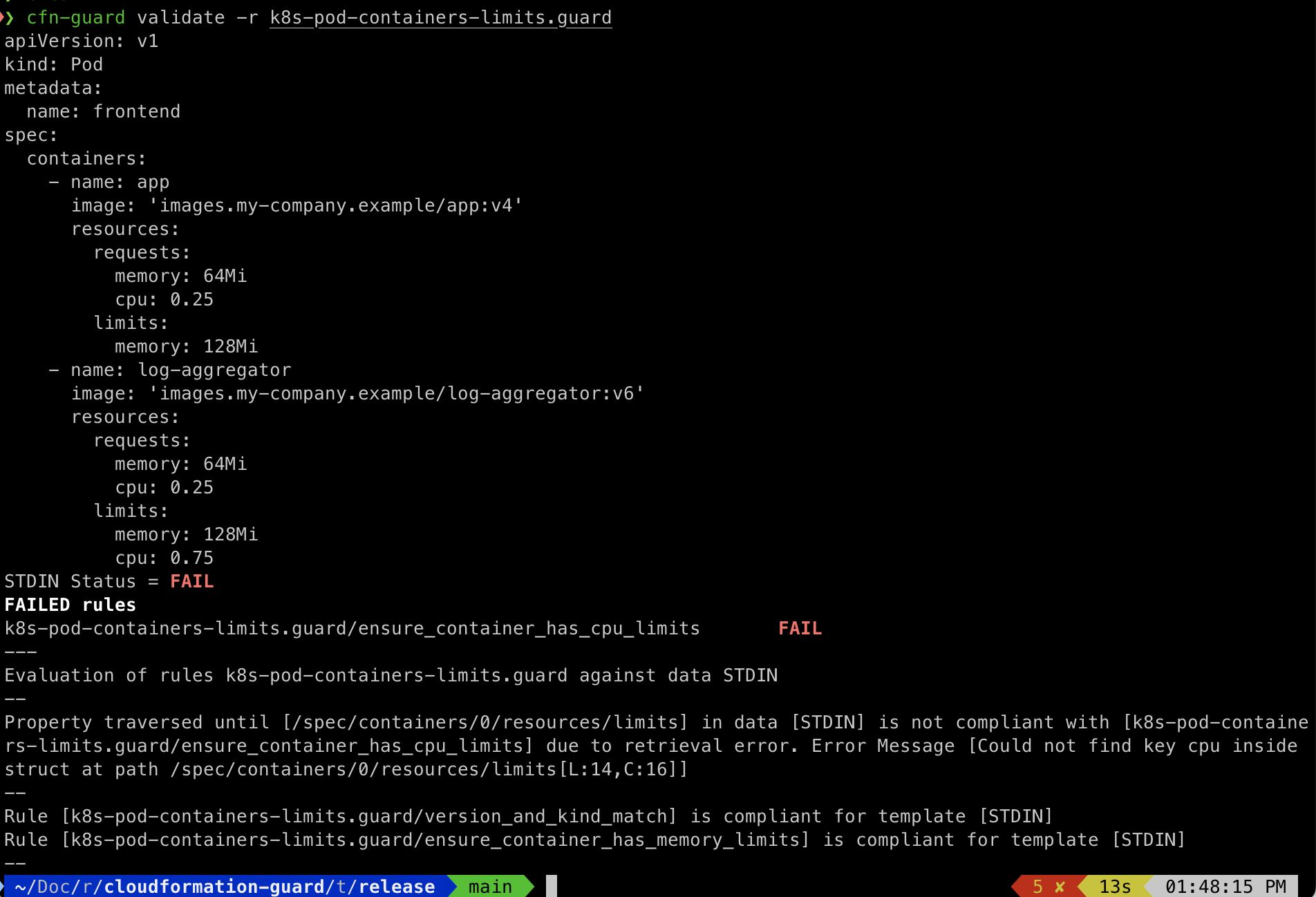
容器 `app` 未包含指定的 CPU 限制,这导致整体评估失败,如屏幕截图所示。
#### 使用输入参数
Guard 允许您在验证期间使用输入参数进行动态数据查找。当您需要在规则中引用外部数据时,此功能特别有用。但是,在指定输入参数键时,Guard 要求不能有冲突的路径。
##### 如何使用
1. 使用 `--input-parameters` 或 `-i` 标志指定包含输入参数的文件。可以指定多个输入参数文件,它们将组合成一个公共上下文。输入参数键不能有冲突的路径。
2. 使用 `--data` 或 `-d` 标志指定要验证的实际模板文件。
##### 示例用法
1. 创建一个输入参数文件(例如 `network.yaml`):
```
NETWORK:
allowed_security_groups: ["sg-282850", "sg-292040"]
allowed_prefix_lists: ["pl-63a5400a", "pl-02cd2c6b"]
```
2. 在您的 guard 规则文件中引用这些参数(例如 `security_groups.guard`):
```
let groups = Resources.*[ Type == 'AWS::EC2::SecurityGroup' ]
let permitted_sgs = NETWORK.allowed_security_groups
let permitted_pls = NETWORK.allowed_prefix_lists
rule check_permitted_security_groups_or_prefix_lists(groups) {
%groups {
this in %permitted_sgs or
this in %permitted_pls
}
}
rule CHECK_PERMITTED_GROUPS when %groups !empty {
check_permitted_security_groups_or_prefix_lists(
%groups.Properties.GroupName
)
}
```
3. 创建一个失败的数据模板(例如 `security_groups_fail.yaml`):
```
# ---
# AWSTemplateFormatVersion: 2010-09-09
# Description: CloudFormation - EC2 Security Group
Resources:
mySecurityGroup:
Type: "AWS::EC2::SecurityGroup"
Properties:
GroupName: "wrong"
```
4. 运行 validate 命令:
```
cfn-guard validate -r security_groups.guard -i network.yaml -d security_groups_fail.yaml
```
在此命令中:
- `-r` 指定规则文件
- `-i` 指定输入参数文件
- `-d` 指定要验证的数据文件(模板)
##### 多个输入参数
您可以指定多个输入参数文件:
```
cfn-guard validate -r rules.guard -i params1.yaml -i params2.yaml -d template.yaml
```
所有用 `-i` 指定的文件将组合成一个单一的上下文用于参数查找。
#### Test
Test 命令在开发 guard 策略规则文件期间使用。Test 提供了一个简单的集成单元测试框架,允许作者针对不同类型的输入单独测试每个策略文件。单元测试有助于作者确信规则确实符合预期。它也可以用作规则的回归测试。以下是 `test` 命令的示例运行
1. 将下面的示例策略规则文件保存为 `api_gateway_private_access.guard`:
```
#
# Select from Resources section of the template all ApiGateway resources
# present in the template.
#
let api_gws = Resources.*[ Type == 'AWS::ApiGateway::RestApi' ]
#
# Rule intent
# a) All ApiGateway instances deployed must be private
# b) All ApiGateway instances must have atleast one IAM policy condition key to allow access from a VPC
#
# Expectations:
# 1) SKIP when there are not API Gateway instances in the template
# 2) PASS when ALL ApiGateway instances MUST be "PRIVATE" and
# ALL ApiGateway instances MUST have one IAM Condition key with aws:sourceVpc or aws:SourceVpc
# 3) FAIL otherwise
#
#
rule check_rest_api_is_private when %api_gws !empty {
%api_gws {
Properties.EndpointConfiguration.Types[*] == "PRIVATE"
}
}
rule check_rest_api_has_vpc_access when check_rest_api_is_private {
%api_gws {
Properties {
#
# ALL ApiGateways must have atleast one IAM statement that has Condition keys with
# aws:sourceVpc
#
some Policy.Statement[*] {
Condition.*[ keys == /aws:[sS]ource(Vpc|VPC|Vpce|VPCE)/ ] !empty
}
}
}
}
```
2. 将下面的示例测试文件保存为 `api_gateway_private_access_tests.yaml`:
```
---
- input: {}
expectations:
rules:
check_rest_api_is_private: SKIP
check_rest_api_has_vpc_access: SKIP
- input:
Resources: {}
expectations:
rules:
check_rest_api_is_private: SKIP
check_rest_api_has_vpc_access: SKIP
- input:
Resources:
apiGw:
Type: AWS::ApiGateway::RestApi
expectations:
rules:
check_rest_api_is_private: FAIL
check_rest_api_has_vpc_access: SKIP
- input:
Resources:
apiGw:
Type: AWS::ApiGateway::RestApi
Properties:
EndpointConfiguration:
Types: PRIVATE
expectations:
rules:
check_rest_api_is_private: PASS
check_rest_api_has_vpc_access: FAIL
- input:
Resources:
apiGw:
Type: AWS::ApiGateway::RestApi
Properties:
EndpointConfiguration:
Types: [PRIVATE, REGIONAL]
expectations:
rules:
check_rest_api_is_private: FAIL
check_rest_api_has_vpc_access: SKIP
- input:
Resources:
apiGw:
Type: AWS::ApiGateway::RestApi
Properties:
EndpointConfiguration:
Types: PRIVATE
Policy:
Statement:
- Action: Allow
Resource: "*"
Condition:
StringLike:
"aws:sourceVPC": vpc-12345678
expectations:
rules:
check_rest_api_is_private: PASS
check_rest_api_has_vpc_access: PASS
```
3. 运行 test 命令
```
cfn-guard test -r api_gateway_private_access.guard -t api_gateway_private_access_tests.yaml
```

阅读 [Guard: 单元测试](docs/UNIT_TESTING.md) 以了解有关单元测试的更多信息。要了解其他命令,请阅读 [guard 目录中的 Readme](guard/README.md)。
## 规则编写参考
作为为您自己或您的组织编写 Guard 规则的起点,我们建议遵循[此官方指南](https://docs.aws.amazon.com/cfn-guard/latest/ug/writing-rules.html)
### 快速链接:
[编写 AWS CloudFormation Guard 规则](https://docs.aws.amazon.com/cfn-guard/latest/ug/writing-rules.html)
1. [子句](https://docs.aws.amazon.com/cfn-guard/latest/ug/writing-rules.html#clauses)
2. [在子句中使用查询](https://docs.aws.amazon.com/cfn-guard/latest/ug/writing-rules.html#clauses-queries)
3. [在子句中使用运算符](https://docs.aws.amazon.com/cfn-guard/latest/ug/writing-rules.html#clauses-operators)
4. [在子句中使用自定义消息](https://docs.aws.amazon.com/cfn-guard/latest/ug/writing-rules.html#clauses-custom-messages)
5. [组合子句](https://docs.aws.amazon.com/cfn-guard/latest/ug/writing-rules.html#combining-clauses)
6. [将块与 Guard 规则一起使用](https://docs.aws.amazon.com/cfn-guard/latest/ug/writing-rules.html#blocks)
7. [定义查询和过滤](https://docs.aws.amazon.com/cfn-guard/latest/ug/query-and-filtering.html)
8. [在 AWS CloudFormation Guard 规则中分配和引用变量](https://docs.aws.amazon.com/cfn-guard/latest/ug/variables.html)
9. [在 AWS CloudFormation Guard 中组合命名规则块](https://docs.aws.amazon.com/cfn-guard/latest/ug/named-rule-block-composition.html)
10. [编写子句以执行上下文感知评估](https://docs.aws.amazon.com/cfn-guard/latest/ug/context-aware-evaluations.html)
## 内置函数与有状态规则
Guard 3.0 引入了对函数的支持,允许创建有状态规则,这些规则可以基于从数据模板中提取的某些属性对评估的值运行。
### 示例模板
假设我们的模板中有一个属性,它包含一个名为 `Collection` 的列表,我们需要确保其中至少有 3 个项目。
```
Resources:
newServer:
Type: AWS::New::Service
Collection:
- a
- b
```
### 示例规则
我们可以编写一个规则来检查此条件,如下所示:
```
let server = Resources.*[ Type == 'AWS::New::Service' ]
rule COUNT_CHECK when %server !empty {
let collection = %server.Collection.*
let count_of_items = count(%collection)
%count_of_items >= 3
<<
Violation: Collection should contain at least 3 items
>>
}
```
预期结果是规则失败并向我们显示违规消息,因为我们的模板不合规。
有关所有受支持函数的详细文档,请[点击此链接](./docs/FUNCTIONS.md)。有关函数使用的限制,请阅读[此说明](./docs/KNOWN_ISSUES.md#function-limitation)。
## AWS 规则注册表
作为 Guard 规则和规则集的参考,这些规则和规则集包含(尽最大努力)符合围绕 AWS 资源使用的行业最佳实践的合规策略,我们最近推出了
[AWS Guard 规则注册表](https://github.com/aws-cloudformation/aws-guard-rules-registry)。
## 将 Guard 用作 Docker 镜像
Guard 也作为 ECR 镜像发布在 [ECR 公共库](https://gallery.ecr.aws/aws-cloudformation/cloudformation-guard) 中,并可用作 docker 容器中的镜像。
### 先决条件
1. 安装 docker。遵循[此指南](https://docs.docker.com/engine/install/)。
2. 在您计划下载 docker 镜像的主机上准备一个目录,其中包含您打算使用的数据模板和 Guard 规则,我们可以挂载此目录并将文件用作 `cfn-guard` 的输入。在本指南的其余部分,我们将此目录称为 `guard-files`
### 使用指南
要使用该二进制文件,我们应该拉取最新的 docker 镜像,我们可以使用以下命令来执行此操作:
```
docker pull public.ecr.aws/aws-cloudformation/cloudformation-guard:latest
```
现在继续运行 docker 镜像,使用我们存放模板和规则文件的目录中的文件,使用:
```
docker run \
--mount src=/path/to/guard-files,target=/container/guard-files,type=bind \
-it public.ecr.aws/aws-cloudformation/cloudformation-guard:latest \
./cfn-guard validate -d /container/guard-files/template.yml -r /container/guard-files/rule.guard
```
我们应该会在控制台上看到评估结果输出。
### 标记约定
- 我们使用 `latest` 标记来标记最新的 docker 镜像,该镜像与 `cloudformation-guard` GitHub 仓库的 `main` 分支同步发布。
- 我们使用约定 `.` 来标记历史 docker 镜像
## 将 Guard 用作 CI 工具
Guard 非常适合使用 Junit 输出格式进行 CI 检查,使验证或测试模板的过程变得无缝且简单。查看下面的示例。
### GitHub Actions
#### Junit
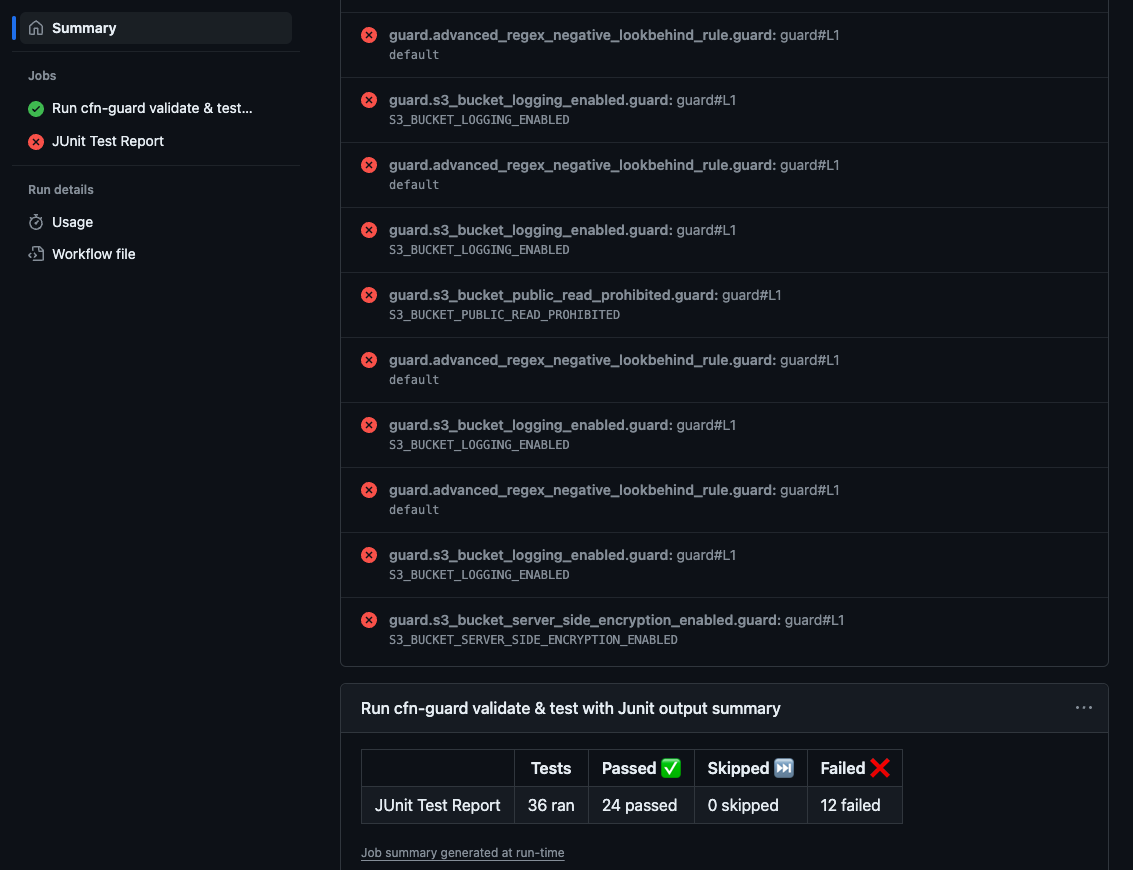
[在此处获取模板!](https://github.com/aws-cloudformation/cloudformation-guard/tree/main/guard-examples/ci/.github/workflows/junit-test-and-validate.yml)
#### SARIF
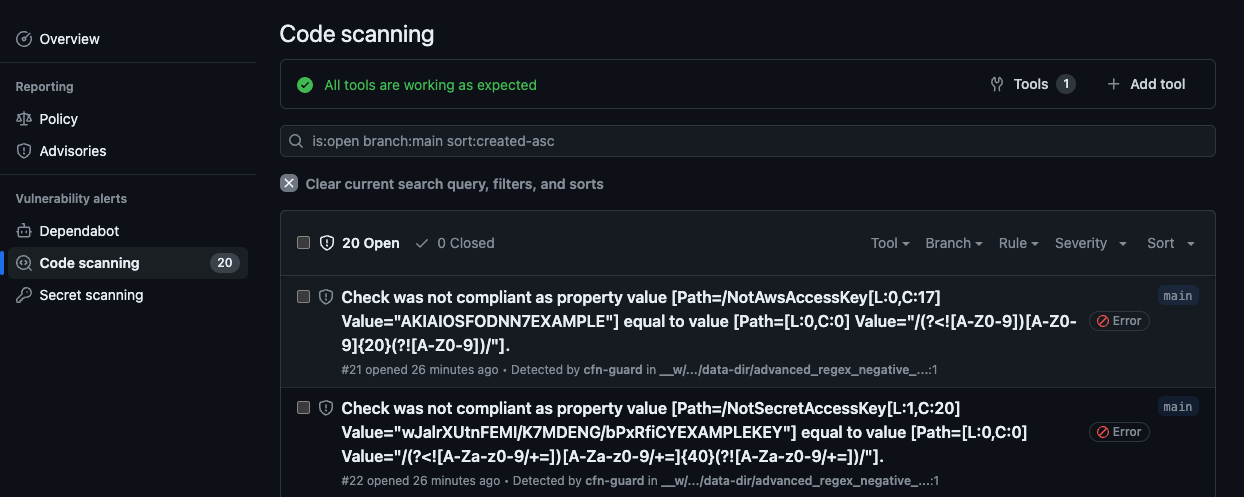
[在此处获取模板!](https://github.com/aws-cloudformation/cloudformation-guard/tree/main/guard-examples/ci/.github/workflows/sarif-validate.yml)
### CircleCI
#### Junit
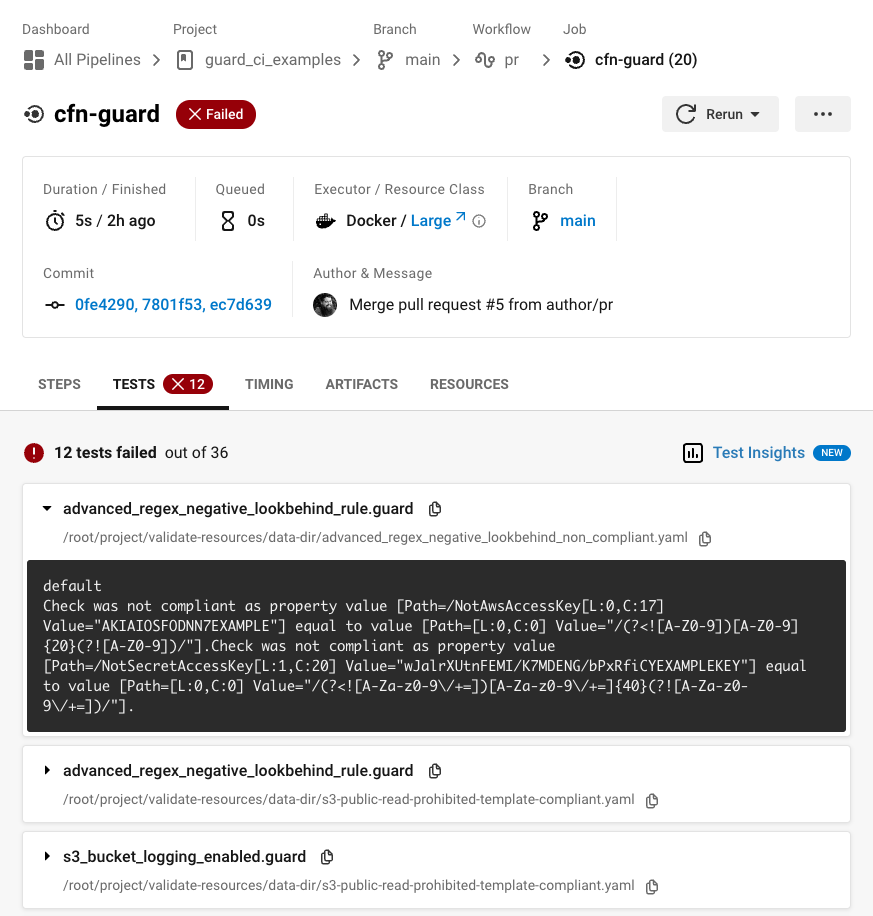
[在此处获取模板!](https://github.com/aws-cloudformation/cloudformation-guard/tree/main/guard-examples/ci/.circleci/config.yml)
## 将 Guard 用作 pre-commit hook
Guard 可作为 pre-commit hook 使用,并提供 `test` 和 `validate` 操作。您可以通过将以下配置的变体添加到您的 `.pre-commit-config.yaml` 文件中来使用它们:
```
# Since the cfn-guard hook's tagging strategy is incompatible
# with pre-commit's autoupdate feature, you may want to use
# the pre-commit-update hook. If you don't require the autoupdate
# feature, you may skip the pre-commit-update hook.
repos:
# pre-commit-update hook
- repo: https://gitlab.com/vojko.pribudic.foss/pre-commit-update
rev: v0.5.0
hooks:
- id: pre-commit-update
args: [--tag-prefix, cloudformation-guard, pre-commit-v]
# cfn-guard pre-commit hook
- repo: https://github.com/aws-cloudformation/cloudformation-guard
rev: pre-commit-v0.0.2
hooks:
# Validate
- id: cfn-guard
args:
- --operation=validate # Specify the validate operation
- --rules=path/to/rules/ # Rules directory
files: ^path/to/data/.* # Directory to watch for changes and validate against
# Test
- id: cfn-guard
args:
- --operation=test # Specify the test operation
- --dir=path/to/resources/ # Directory that contains rules & their tests
files: ^path/to/resources.* # Same directory supplied to the --dir arg so that rule and test file changes trigger a run
```
**注意**:pre-commit hook 的参数与您直接传递给 Guard 的标志不完全相同。对于此 hook,您无法将 `data` 标志传递给 `validate`,因为它依赖于 hook 提供的 `filenames`,并且您只能对 `test` hook 使用 `dir` 标志。
## 使用 VSCode 中的 DevContainer 进行贡献
### 设置
**注意**:devcontainer 支持带有主题和别名的 zsh 和 bash。您可以在 VSCode 会话的终端选项中选择您喜欢的 shell。
1. 遵循[此处](https://code.visualstudio.com/learn/develop-cloud/containers)的先决条件说明。
2. 在 VSCode 中安装完成后,打开命令面板。
3. 搜索“Dev Containers: Build Container”
4. 完成后,在容器内打开项目。
### 别名
- `gval`: `cargo run --bin cfn-guard validate`
- `gtest`: `cargo run --bin cfn-guard test`
- `gparse`: `cargo run --bin cfn-guard parse-tree`
- `cb`: `cargo build`
- `ct`: `cargo nextest run`
- `cn`: `cargo +nightly`
## 许可证
本项目根据 Apache-2.0 许可证获得许可。
标签:Android, AWS, CloudFormation, DevSecOps, DPI, DSL, EC2, ECS, Homebrew安装, IaC, JSON, LNA, PaC, Shift Left, Terraform, YAML, 上游代理, 二进制发布, 云安全监控, 可视化界面, 安全合规, 安全库, 属性图, 开源工具, 治理, 策略即代码, 网络代理, 聊天机器人安全, 请求拦截, 通知系统, 静态分析, 验证