postgres-ai/database-lab-engine
GitHub: postgres-ai/database-lab-engine
Database Lab Engine 通过基于写时复制技术的秒级轻量克隆,为 PostgreSQL 数据库的 CI/CD 测试、开发与 QA 提供了高效的分支管理能力。
Stars: 2478 | Forks: 72
DBLab Engine
⚡ 极速的 PostgreSQL 克隆与分支 🐘
🛠️ 构建强大的开发/测试环境。
🔃 通过 CI 测试实现 100% 的数据库迁移覆盖。
💡 快速验证 ChatGPT 的想法以消除幻觉。
适用于任何 PostgreSQL,包括自托管服务以及诸如 AWS RDS、GCP Cloud SQL、Supabase 和 Timescale 等托管服务*。
它可以安装并在任何地方使用:跨越所有云环境和本地部署。
*对于像 AWS RDS 或 Heroku 这样的 PostgreSQL 云托管服务,无法进行直接的物理连接和访问 PGDATA。在这些情况下,DBLab 应在同一区域内的单独 VM 上运行。它会定期自动刷新数据,有效地充当数据库即服务解决方案。这种设置随后提供了非常适合开发和测试的轻量级数据库分支功能。
## 为什么选择 DBLab?
- 使用完整的、类似于生产环境的数据库构建开发/QA/预发布环境。
- 为 SQL 查询分析和优化提供临时的全尺寸数据库克隆(另见:[SQL 优化聊天机器人 Joe](https://gitlab.com/postgres-ai/joe))。
- 在 CI/CD pipeline 中自动测试数据库变更,最大程度降低生产环境事故的风险。
- 快速验证 ChatGPT 或其他 LLM 概念,检查幻觉,并迭代出有效的解决方案。
例如,克隆一个 1 TiB 的 PostgreSQL 数据库只需大约 10 秒钟。在单台机器上,您可以同时运行数十个独立的克隆,支持广泛的开发和测试活动,而无需增加任何硬件成本。
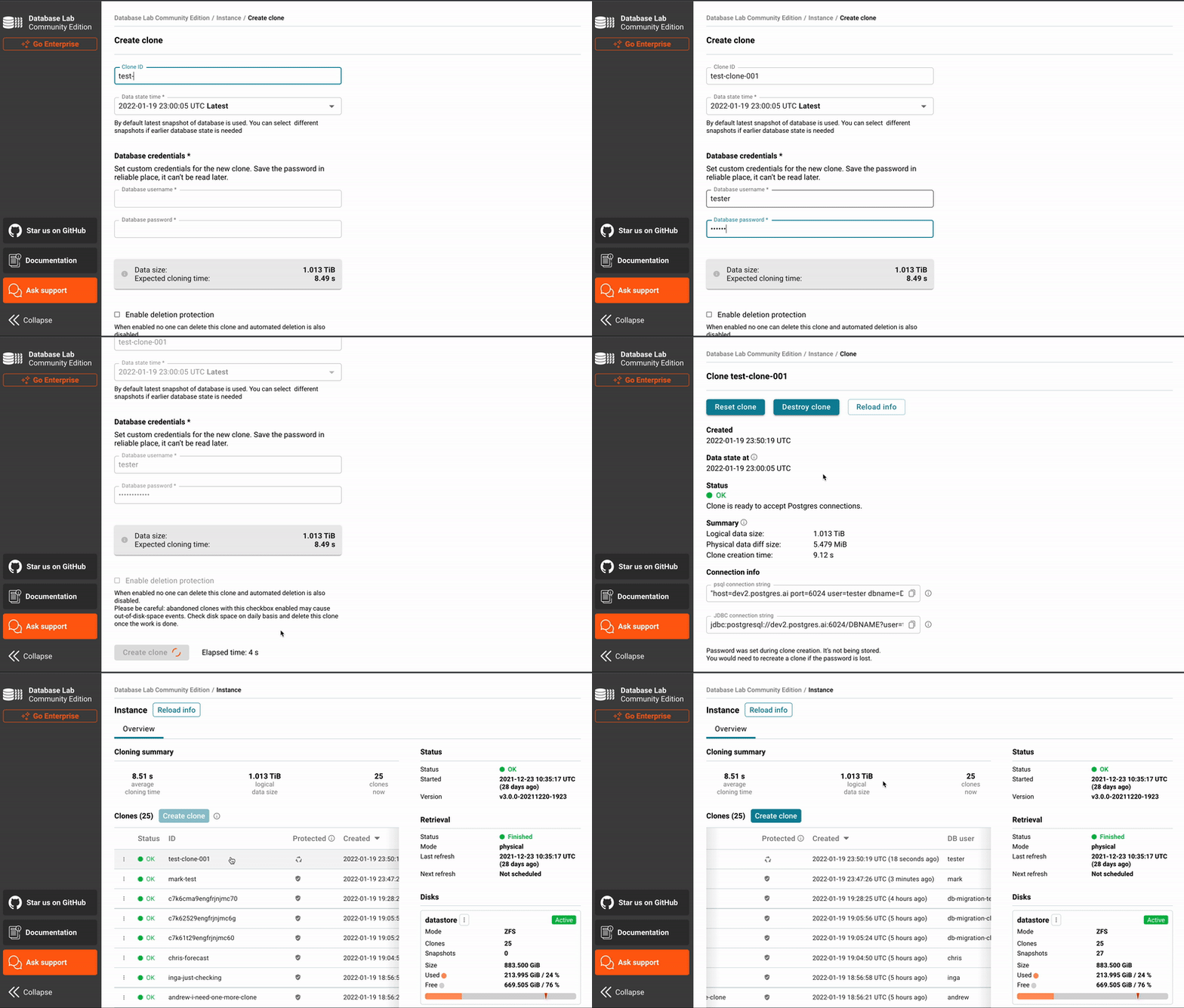
立即亲自尝试:
- 访问 [Postgres.ai Console](https://console.postgres.ai/),设置您的第一个组织,并将 DBLab 标准版 部署到任何云或本地环境。
- [定价](https://postgres.ai/pricing)(每月 62 美元起)
- [文档:如何安装 DBLab SE](https://postgres.ai/docs/how-to-guides/administration/install-dle-from-postgres-ai)
- Demo:https://demo.dblab.dev(使用 token `demo-token` 进行访问)
- 在寻找免费版本?通过[遵循本教程](https://postgres.ai/docs/tutorials/database-lab-tutorial)安装 DBLab 社区版。
## 工作原理
轻量级克隆之所以速度快,是因为它基于 [Copy-on-Write (CoW)](https://en.wikipedia.org/wiki/Copy-on-write#In_computer_storage)。DBLab 采用两种技术来实现轻量级克隆:[ZFS](https://en.wikipedia.org/wiki/ZFS)(默认)和 [LVM](https://en.wikipedia.org/wiki/Logical_Volume_Manager_(Linux))。
使用 ZFS 时,DBLab 会定期对数据目录进行新快照,管理这些快照集合,并删除旧的或未使用的快照。在请求新克隆时,用户可以选择他们偏好的快照。
了解更多:
- [工作原理](https://postgres.ai/products/how-it-works)
- [数据库迁移测试](https://postgres.ai/products/database-migration-testing)
- [使用 Joe Bot 进行 SQL 优化](https://postgres.ai/products/joe)
- [问答](https://postgres.ai/docs/questions-and-answers)
## 从哪里开始
- [适用于任何 PostgreSQL 数据库的 DBLab 教程](https://postgres.ai/docs/tutorials/database-lab-tutorial)
- [适用于 Amazon RDS 的 DBLab 教程](https://postgres.ai/docs/tutorials/database-lab-tutorial-amazon-rds)
- [如何使用 Postgres.ai Console 安装 DBLab SE](https://postgres.ai/docs/how-to-guides/administration/install-dle-from-postgres-ai)
- [如何使用 AWS Marketplace 安装 DBLab SE](https://postgres.ai/docs/how-to-guides/administration/install-dle-from-aws-marketplace)
## 案例研究
- GitLab:[GitLab 如何迭代 SQL 性能优化工作流以降低停机风险](https://postgres.ai/resources/case-studies/gitlab)
## 功能
- 速度与规模
- 极速克隆 PostgreSQL 数据库——无论数据库大小,均可在几秒内完成克隆
- 快照/克隆的理论最大值:2
64([ZFS](https://en.wikipedia.org/wiki/ZFS),默认)
- PostgreSQL 数据目录的最大大小:256 万亿 ZB,或 2
128 字节([ZFS](https://en.wikipedia.org/wiki/ZFS),默认)
- 支持与技术
- 支持的 PostgreSQL 版本:10–18
- 轻量级克隆([CoW](https://en.wikipedia.org/wiki/Copy-on-write))技术:[ZFS](https://en.wikipedia.org/wiki/ZFS) 和 [LVM](https://en.wikipedia.org/wiki/Logical_Volume_Manager_(Linux))
- 用于手动任务的 UI 以及用于自动化的 API 和 CLI
- 所有组件均打包在 Docker 容器中
- PostgreSQL 容器
- 包含 contrib 模块、pgvector、HypoPG 等热门扩展在内的众多扩展([文档](https://postgres.ai/docs/database-lab/supported-databases#extensions-included-by-default))
- 容器的自定义功能([文档](https://postgres.ai/docs/database-lab/supported-databases#how-to-add-more-extensions))
- DBLab 配置中的 Docker 容器和 PostgreSQL 配置参数
- 源数据库要求
- 位置灵活性:自托管 PostgreSQL、AWS RDS、GCP Cloud SQL、Azure 等——无需对源端进行调整。
- 源数据库无 ZFS 或 Docker 要求
- 数据配置与检索
- 物理(pg_basebackup、WAL-G、pgBackRest)和逻辑(dump/restore)配置
- 逻辑模式下的部分数据检索(特定数据库/表)
- 快照创建期间的数据库重命名(`databaseRename` 选项)
- 物理模式下的持续更新
- 逻辑模式下的定期完全刷新且无需停机
- 恢复与管理
- 物理模式下的快速时间点恢复
- 自动删除未使用的克隆
- DBLab 配置中的快照保留策略
- 克隆
- “删除保护”以防止克隆被删除
- 持久化克隆可经受 DBLab 重启
- 用于数据版本切换的“重置”命令
- 资源配额:CPU、RAM
- 监控与安全
- `/healthz` API endpoint(无需身份验证),扩展的 `/status` endpoint([API 文档](https://api.dblab.dev))
- 用于监控的 Prometheus metrics endpoint(`/metrics`)
- 用于洞察的 Netdata 模块
### 提交想法或报告 Bug
有关提案、Bug 报告和参与开发的信息,请参阅我们的[贡献指南](./CONTRIBUTING.md)。
### 参考指南
- [DBLab 组件](https://postgres.ai/docs/reference-guides/database-lab-engine-components)
- [客户端 CLI 参考](https://postgres.ai/docs/database-lab/cli-reference)
- [DBLab API 参考](https://api.dblab.dev/)
- [DBLab 配置参考](https://postgres.ai/docs/database-lab/config-reference)
### 操作指南
- [如何安装和初始化 Database Lab CLI](https://postgres.ai/docs/how-to-guides/cli/cli-install-init)
- [如何管理 DBLab](https://postgres.ai/docs/how-to-guides/administration)
- [如何操作克隆](https://postgres.ai/docs/how-to-guides/cloning)
- [如何操作分支](https://postgres.ai/docs/dblab-howtos/branching)
- 如何将 DBLab 与 GitHub Actions 集成 – 待定
- 如何将 DBLab 与 GitLab CI/CD 集成 – 待定
您可以在文档的[“操作指南”部分](https://postgres.ai/docs/how-to-guides)找到更多内容。
### 其他
- [DBLab Docker 镜像](https://hub.docker.com/r/postgresai/dblab-server)
- [PostgreSQL 的扩展 Docker 镜像(包含大量扩展)](https://hub.docker.com/r/postgresai/extended-postgres)
- [SQL 优化聊天机器人](https://postgres.ai/docs/joe-bot)
- [DB 迁移检查器](https://postgres.ai/docs/db-migration-checker)
## 许可证
DBLab 源代码采用 OSI 批准的开源许可证 [Apache 2.0](https://opensource.org/license/apache-2-0/)。
如果您希望获得不包含 GPL 条款的试用版或商业许可证,请联系 Postgres.ai 团队:[联系页面](https://postgres.ai/contact)。
## 翻译
让全球工程师更轻松地使用 DBLab 对本项目是极大的帮助。请在[贡献指南的翻译部分](./CONTRIBUTING.md#translation)查看详情。
本 README 提供以下翻译版本:
- [德语 / Deutsch](translations/README.german.md)(由 [@ane4ka](https://github.com/ane4ka) 提供)
- [巴西葡萄牙语 / Português (BR)](translations/README.portuguese-br.md)(由 [@Alexand](https://gitlab.com/Alexand) 提供)
- [俄语 / Русский](translations/README.russian.md)(由 [@Tanya301](https://github.com/Tanya301) 提供)
- [西班牙语 / Español](translations/README.spanish.md)(由 [@asotolongo](https://gitlab.com/asotolongo) 提供)
- [乌克兰语 / Українська](translations/README.ukrainian.md)(由 [@denis-boost](https://github.com/denis-boost) 提供)
👉 [如何进行翻译贡献](./CONTRIBUTING.md#translation)
标签:EVTX分析, PostgreSQL, 开发测试环境, 开源框架, 持续集成, 数据克隆, 数据库测试, 日志审计, 测试用例, 请求拦截