pthom/hello_imgui
GitHub: pthom/hello_imgui
一个基于 Dear ImGui 的跨平台 GUI 库,让开发者用极简代码一次性构建桌面、移动端和 Web 图形界面。
Stars: 895 | Forks: 118
**OpenGL**
[](https://github.com/pthom/hello_imgui/actions/workflows/Win_Mac_Linux.yml) [](https://github.com/pthom/hello_imgui/actions/workflows/MinGW.yml) **移动端和 Web**
[](https://github.com/pthom/hello_imgui/actions/workflows/iOS.yml) [](https://github.com/pthom/hello_imgui/actions/workflows/Android.yml) [](https://github.com/pthom/hello_imgui/actions/workflows/Emscripten.yml) **替代渲染后端**
[](https://github.com/pthom/hello_imgui/actions/workflows/Metal.yml) [](https://github.com/pthom/hello_imgui/actions/workflows/Vulkan.yml) [](https://github.com/pthom/hello_imgui/actions/workflows/DirectX.yml) **其他**
[](https://github.com/pthom/hello_imgui/actions/workflows/TestEngine.yml) [](https://github.com/pthom/hello_imgui/actions/workflows/Automate.yml) [](https://github.com/pthom/hello_imgui/actions/workflows/StarterTemplate.yml) 请参阅 [HelloImGui 文档网站](https://pthom.github.io/hello_imgui/) 获取 API、用法及构建说明。 # Hello ImGui  Hello ImGui 是一个库,旨在让跨平台应用程序的开发变得像编写“Hello World”程序一样简单,它基于 [Dear ImGui](https://github.com/ocornut/imgui) 构建。 其灵活性使其适用于复杂应用程序以及简单原型,让你专注于项目的创意方面。 ## 功能 **跨平台工具** * 无缝跨平台:支持 Linux、Windows、macOS、iOS、Android 和 Emscripten,最小化设置(1 行 CMake 代码) * 所有平台资源嵌入(无需代码) * 轻松自定义应用程序,包括移动端应用图标和名称(无需代码) * 通用应用程序图标自定义,扩展到移动端和 macOS(无需代码) **Dear ImGui 调整** * 节能模式:空闲时降低 FPS 以优化性能 * 高 DPI 支持:自动缩放 UI 以匹配任何平台的屏幕 DPI * 增强的布局处理:可停靠窗口和复杂 UI 的多布局 * 窗口几何工具:自动调整应用程序窗口大小,恢复应用窗口位置 * 主题调整:丰富的主题列表 * 支持可移动和可调整大小的无边框窗口 * 高级字体支持:图标、表情符号和彩色字体 * 与 ImGui Test Engine 集成:自动化和测试你的应用 * 保存用户设置:窗口位置、布局、已打开窗口、主题、用户自定义设置 * 轻松为应用添加自定义 3D 背景 **后端** * 可用的平台后端:SDL2、Glfw3 * 可用的渲染后端:OpenGL3、Metal、Vulkan、DirectX ## 完整手册(PDF) 查看或下载本手册的 [完整 PDF](https://raw.githubusercontent.com/pthom/imgui_related_docs/refs/heads/main/manuals/hello_imgui_manual.pdf)。你可以将其输入到 ChatGPT 等 LLM 中,以便在使用 Hello ImGui 时获得帮助。 ## 演示与真实应用 ### 口号 开始开发 GUI 应用程序的最小代码量应该是……最少。以下是一个跨平台的 Hello World,仅需 7 行代码。 *6 行 C++* ``` #include "hello_imgui/hello_imgui.h" int main(int , char *[]) { HelloImGui::Run( []{ ImGui::Text("Hello, world!"); }, // Gui code "Hello!", true); // Window title + Window size auto } ``` *1 行 CMake* ``` hello_imgui_add_app(hello_world hello_world.cpp) ``` ### 高级布局 Docking 演示展示了如何处理复杂布局、使用主题、存储用户设置、空闲时降低 FPS 和 CPU 使用率、加载字体和图标等。 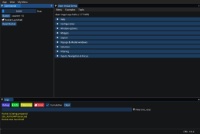 [在线演示](https://traineq.org/imgui_bundle_explorer/demo_docking.html) - [源代码](https://github.com/pthom/hello_imgui/blob/master/src/hello_imgui_demos/hello_imgui_demodocking/hello_imgui_demodocking.main.cpp) - 视频教程:[如何处理多个复杂布局](https://www.youtube.com/watch?v=XKxmz__F4ow) ### 自定义 3D 背景 如何在你的应用中使用自定义 3D 背景 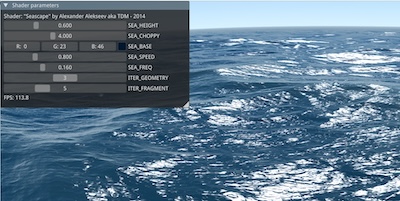 [在线演示](https://traineq.org/imgui_bundle_explorer/demo_custom_background.html) - [源代码](https://github.com/pthom/hello_imgui/blob/master/src/hello_imgui_demos/hello_custom_background/hello_custom_background.main.cpp) ### ImGui 手册 [ImGui 手册](https://pthom.github.io/imgui_explorer/) 是一个用于 Dear ImGui 的交互式手册,基于 Hello ImGui 构建。 [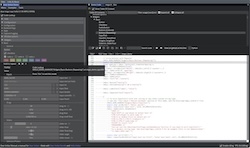](https://pthom.github.io/imgui_explorer/) [在线手册](https://pthom.github.io/imgui_explorer/) - [源代码](https://github.com/pthom/imgui_explorer) ### RPN 计算器 [RPN 计算器](https://pthom.github.io/imgui_rpn_calculator/) 是一个简单的 RPN 计算器,用于演示如何轻松构建跨平台应用。 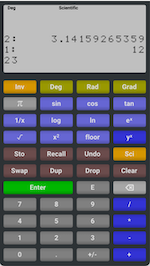 [在线演示](https://traineq.org/HelloImGui/rpn/rpn_calculator.html) - [源代码](https://github.com/pthom/rpn_calculator/) - [视频教程](https://www.youtube.com/watch?v=dArP4lBnOr8) ### 启动模板 [启动模板](https://github.com/pthom/hello_imgui_template) 可让你在 5 分钟内开始使用,并展示如何在所有平台上嵌入资源、自定义应用图标等。 ### Dear ImGui Bundle [Dear ImGui Bundle](https://pthom.github.io/imgui_bundle/) 是一个功能齐全的库,构建在 Hello ImGui 之上,提供了大量额外控件 ([imgui](https://github.com/ocornut/imgui.git)、[implot](https://github.com/epezent/implot)、[imgui-node-editor](https://github.com/thedmd/imgui-node-editor)、[ImFileDialog](https://github.com/pthom/ImFileDialog.git)、[ImGuiColorTextEdit](https://github.com/BalazsJako/ImGuiColorTextEdit)、[imgui_md](https://github.com/mekhontsev/imgui_md.git)) 以及完整的 Python 绑定。 [在线交互式演示](https://traineq.org/imgui_bundle_explorer) - [C++ 演示源代码](https://github.com/pthom/imgui_bundle/tree/main/bindings/imgui_bundle/demos_cpp) - [Python 演示源代码](https://github.com/pthom/imgui_bundle/tree/main/bindings/imgui_bundle/demos_python)
### 主题调整
如何使用 Hello ImGui 提供的主题调整工具
[在线视频教程](https://www.youtube.com/watch?v=4f_-3DDcAZk)
## 关于
### 许可证
Hello ImGui 根据 MIT 许可证授权,请参阅 [LICENSE](https://github.com/pthom/hello_imgui/blob/master/LICENSE)。
### 支持该项目
Hello ImGui 是一个免费且开源的项目,其开发和维护需要大量投入。
如果你发现它对你的工作有价值——尤其是在商业企业或研究环境中——请考虑通过 [捐赠](https://www.paypal.com/donate/?hosted_button_id=SHJ68RVDKURZA) 支持其开发。感谢你!
[在线交互式演示](https://traineq.org/imgui_bundle_explorer) - [C++ 演示源代码](https://github.com/pthom/imgui_bundle/tree/main/bindings/imgui_bundle/demos_cpp) - [Python 演示源代码](https://github.com/pthom/imgui_bundle/tree/main/bindings/imgui_bundle/demos_python)
### 主题调整
如何使用 Hello ImGui 提供的主题调整工具
[在线视频教程](https://www.youtube.com/watch?v=4f_-3DDcAZk)
## 关于
### 许可证
Hello ImGui 根据 MIT 许可证授权,请参阅 [LICENSE](https://github.com/pthom/hello_imgui/blob/master/LICENSE)。
### 支持该项目
Hello ImGui 是一个免费且开源的项目,其开发和维护需要大量投入。
如果你发现它对你的工作有价值——尤其是在商业企业或研究环境中——请考虑通过 [捐赠](https://www.paypal.com/donate/?hosted_button_id=SHJ68RVDKURZA) 支持其开发。感谢你!
[](https://github.com/pthom/hello_imgui/actions/workflows/Win_Mac_Linux.yml) [](https://github.com/pthom/hello_imgui/actions/workflows/MinGW.yml) **移动端和 Web**
[](https://github.com/pthom/hello_imgui/actions/workflows/iOS.yml) [](https://github.com/pthom/hello_imgui/actions/workflows/Android.yml) [](https://github.com/pthom/hello_imgui/actions/workflows/Emscripten.yml) **替代渲染后端**
[](https://github.com/pthom/hello_imgui/actions/workflows/Metal.yml) [](https://github.com/pthom/hello_imgui/actions/workflows/Vulkan.yml) [](https://github.com/pthom/hello_imgui/actions/workflows/DirectX.yml) **其他**
[](https://github.com/pthom/hello_imgui/actions/workflows/TestEngine.yml) [](https://github.com/pthom/hello_imgui/actions/workflows/Automate.yml) [](https://github.com/pthom/hello_imgui/actions/workflows/StarterTemplate.yml) 请参阅 [HelloImGui 文档网站](https://pthom.github.io/hello_imgui/) 获取 API、用法及构建说明。 # Hello ImGui  Hello ImGui 是一个库,旨在让跨平台应用程序的开发变得像编写“Hello World”程序一样简单,它基于 [Dear ImGui](https://github.com/ocornut/imgui) 构建。 其灵活性使其适用于复杂应用程序以及简单原型,让你专注于项目的创意方面。 ## 功能 **跨平台工具** * 无缝跨平台:支持 Linux、Windows、macOS、iOS、Android 和 Emscripten,最小化设置(1 行 CMake 代码) * 所有平台资源嵌入(无需代码) * 轻松自定义应用程序,包括移动端应用图标和名称(无需代码) * 通用应用程序图标自定义,扩展到移动端和 macOS(无需代码) **Dear ImGui 调整** * 节能模式:空闲时降低 FPS 以优化性能 * 高 DPI 支持:自动缩放 UI 以匹配任何平台的屏幕 DPI * 增强的布局处理:可停靠窗口和复杂 UI 的多布局 * 窗口几何工具:自动调整应用程序窗口大小,恢复应用窗口位置 * 主题调整:丰富的主题列表 * 支持可移动和可调整大小的无边框窗口 * 高级字体支持:图标、表情符号和彩色字体 * 与 ImGui Test Engine 集成:自动化和测试你的应用 * 保存用户设置:窗口位置、布局、已打开窗口、主题、用户自定义设置 * 轻松为应用添加自定义 3D 背景 **后端** * 可用的平台后端:SDL2、Glfw3 * 可用的渲染后端:OpenGL3、Metal、Vulkan、DirectX ## 完整手册(PDF) 查看或下载本手册的 [完整 PDF](https://raw.githubusercontent.com/pthom/imgui_related_docs/refs/heads/main/manuals/hello_imgui_manual.pdf)。你可以将其输入到 ChatGPT 等 LLM 中,以便在使用 Hello ImGui 时获得帮助。 ## 演示与真实应用 ### 口号 开始开发 GUI 应用程序的最小代码量应该是……最少。以下是一个跨平台的 Hello World,仅需 7 行代码。 *6 行 C++* ``` #include "hello_imgui/hello_imgui.h" int main(int , char *[]) { HelloImGui::Run( []{ ImGui::Text("Hello, world!"); }, // Gui code "Hello!", true); // Window title + Window size auto } ``` *1 行 CMake* ``` hello_imgui_add_app(hello_world hello_world.cpp) ``` ### 高级布局 Docking 演示展示了如何处理复杂布局、使用主题、存储用户设置、空闲时降低 FPS 和 CPU 使用率、加载字体和图标等。  [在线演示](https://traineq.org/imgui_bundle_explorer/demo_docking.html) - [源代码](https://github.com/pthom/hello_imgui/blob/master/src/hello_imgui_demos/hello_imgui_demodocking/hello_imgui_demodocking.main.cpp) - 视频教程:[如何处理多个复杂布局](https://www.youtube.com/watch?v=XKxmz__F4ow) ### 自定义 3D 背景 如何在你的应用中使用自定义 3D 背景  [在线演示](https://traineq.org/imgui_bundle_explorer/demo_custom_background.html) - [源代码](https://github.com/pthom/hello_imgui/blob/master/src/hello_imgui_demos/hello_custom_background/hello_custom_background.main.cpp) ### ImGui 手册 [ImGui 手册](https://pthom.github.io/imgui_explorer/) 是一个用于 Dear ImGui 的交互式手册,基于 Hello ImGui 构建。 [](https://pthom.github.io/imgui_explorer/) [在线手册](https://pthom.github.io/imgui_explorer/) - [源代码](https://github.com/pthom/imgui_explorer) ### RPN 计算器 [RPN 计算器](https://pthom.github.io/imgui_rpn_calculator/) 是一个简单的 RPN 计算器,用于演示如何轻松构建跨平台应用。  [在线演示](https://traineq.org/HelloImGui/rpn/rpn_calculator.html) - [源代码](https://github.com/pthom/rpn_calculator/) - [视频教程](https://www.youtube.com/watch?v=dArP4lBnOr8) ### 启动模板 [启动模板](https://github.com/pthom/hello_imgui_template) 可让你在 5 分钟内开始使用,并展示如何在所有平台上嵌入资源、自定义应用图标等。 ### Dear ImGui Bundle [Dear ImGui Bundle](https://pthom.github.io/imgui_bundle/) 是一个功能齐全的库,构建在 Hello ImGui 之上,提供了大量额外控件 ([imgui](https://github.com/ocornut/imgui.git)、[implot](https://github.com/epezent/implot)、[imgui-node-editor](https://github.com/thedmd/imgui-node-editor)、[ImFileDialog](https://github.com/pthom/ImFileDialog.git)、[ImGuiColorTextEdit](https://github.com/BalazsJako/ImGuiColorTextEdit)、[imgui_md](https://github.com/mekhontsev/imgui_md.git)) 以及完整的 Python 绑定。
[在线交互式演示](https://traineq.org/imgui_bundle_explorer) - [C++ 演示源代码](https://github.com/pthom/imgui_bundle/tree/main/bindings/imgui_bundle/demos_cpp) - [Python 演示源代码](https://github.com/pthom/imgui_bundle/tree/main/bindings/imgui_bundle/demos_python)
### 主题调整
如何使用 Hello ImGui 提供的主题调整工具
[在线视频教程](https://www.youtube.com/watch?v=4f_-3DDcAZk)
## 关于
### 许可证
Hello ImGui 根据 MIT 许可证授权,请参阅 [LICENSE](https://github.com/pthom/hello_imgui/blob/master/LICENSE)。
### 支持该项目
Hello ImGui 是一个免费且开源的项目,其开发和维护需要大量投入。
如果你发现它对你的工作有价值——尤其是在商业企业或研究环境中——请考虑通过 [捐赠](https://www.paypal.com/donate/?hosted_button_id=SHJ68RVDKURZA) 支持其开发。感谢你!