ultralytics/yolov5
GitHub: ultralytics/yolov5
基于 PyTorch 的高性能计算机视觉模型,提供目标检测、图像分割与分类能力,支持多平台部署导出。
Stars: 57681 | Forks: 17468









Ultralytics YOLOv5 🚀 is a fast, accurate, and easy-to-use computer vision model developed by [Ultralytics](https://www.ultralytics.com/). Based on the [PyTorch](https://pytorch.org/) framework, YOLOv5 is renowned for its speed, accuracy, and simplicity. It incorporates insights and best practices from extensive research and development, making it a popular and reliable choice for a wide range of vision AI tasks, including [object detection](https://docs.ultralytics.com/tasks/detect), [image segmentation](https://docs.ultralytics.com/tasks/segment), and [image classification](https://docs.ultralytics.com/tasks/classify). We hope the resources here help you get the most out of YOLOv5. Please browse the [YOLOv5 Docs](https://docs.ultralytics.com/yolov5) for detailed information, raise an issue on [GitHub](https://github.com/ultralytics/yolov5/issues/new/choose) for support, and join our [Discord community](https://discord.com/invite/ultralytics) for questions and discussions! To request an Enterprise License, please complete the form at [Ultralytics Licensing](https://www.ultralytics.com/license).




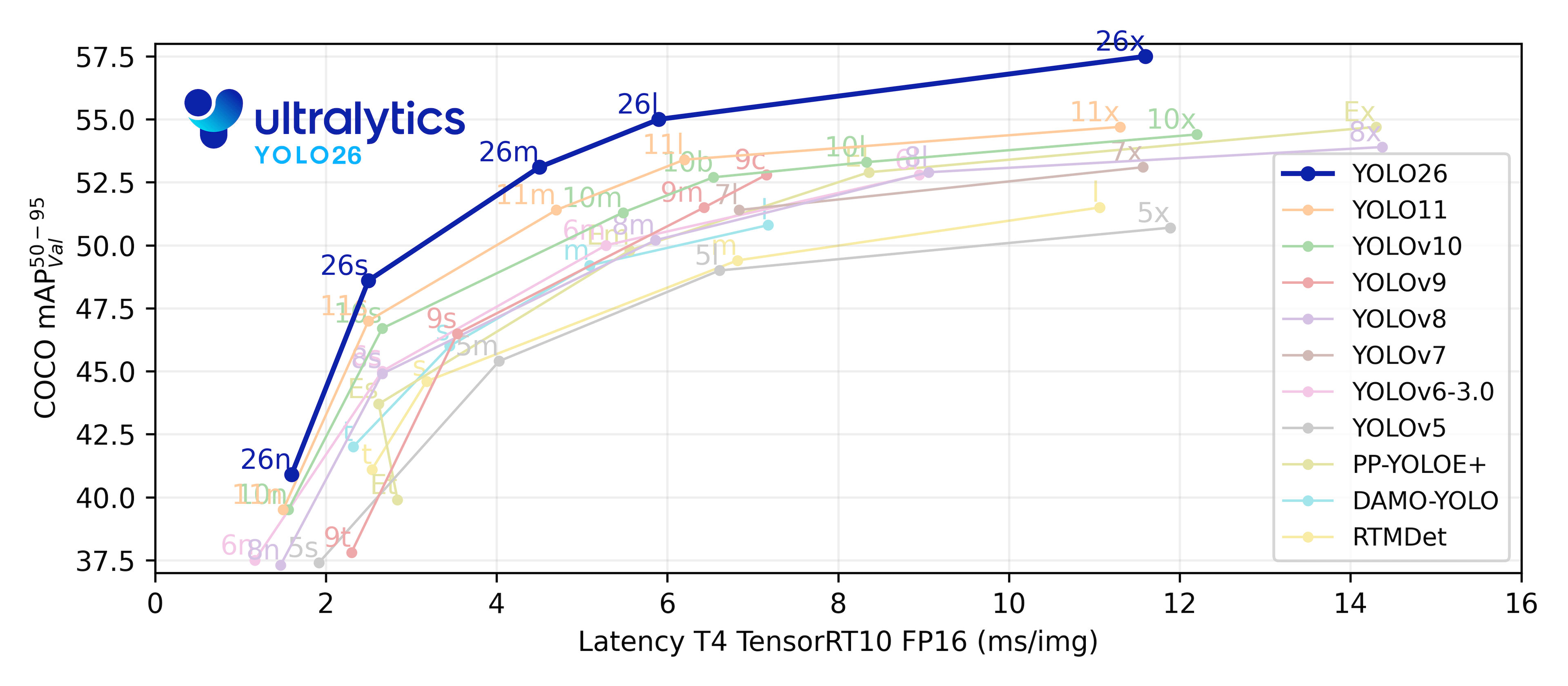
## 🚀 Explore the Ultralytics YOLO Ecosystem YOLOv5 is a mature, production-proven model that remains an excellent choice for fast and reliable [object detection](https://docs.ultralytics.com/tasks/detect), [instance segmentation](https://docs.ultralytics.com/tasks/segment), and [image classification](https://docs.ultralytics.com/tasks/classify). If your project calls for the newest architectures, additional tasks such as [pose estimation](https://docs.ultralytics.com/tasks/pose) and [oriented object detection (OBB)](https://docs.ultralytics.com/tasks/obb), or a unified Python and CLI interface, the actively maintained [`ultralytics`](https://github.com/ultralytics/ultralytics) package brings the latest [Ultralytics YOLO models](https://docs.ultralytics.com/models) together in one place. Explore the [Ultralytics Docs](https://docs.ultralytics.com/) to find the best fit for your use case. # Install the ultralytics package for the latest Ultralytics YOLO models pip install ultralytics
Install
Clone the repository and install dependencies in a [**Python>=3.8.0**](https://www.python.org/) environment. Ensure you have [**PyTorch>=1.8**](https://pytorch.org/get-started/locally/) installed. # Clone the YOLOv5 repository git clone https://github.com/ultralytics/yolov5 # Navigate to the cloned directory cd yolov5 # Install required packages pip install -r requirements.txtInference with PyTorch Hub
Use YOLOv5 via [PyTorch Hub](https://docs.ultralytics.com/yolov5/tutorials/pytorch_hub_model_loading) for inference. [Models](https://github.com/ultralytics/yolov5/tree/master/models) are automatically downloaded from the latest YOLOv5 [release](https://github.com/ultralytics/yolov5/releases). import torch # Load a YOLOv5 model (options: yolov5n, yolov5s, yolov5m, yolov5l, yolov5x) model = torch.hub.load("ultralytics/yolov5", "yolov5s") # Default: yolov5s # Define the input image source (URL, local file, PIL image, OpenCV frame, numpy array, or list) img = "https://ultralytics.com/images/zidane.jpg" # Example image # Perform inference (handles batching, resizing, normalization automatically) results = model(img) # Process the results (options: .print(), .show(), .save(), .crop(), .pandas()) results.print() # Print results to console results.show() # Display results in a window results.save() # Save results to runs/detect/expInference with detect.py
The `detect.py` script runs inference on various sources. It automatically downloads [models](https://github.com/ultralytics/yolov5/tree/master/models) from the latest YOLOv5 [release](https://github.com/ultralytics/yolov5/releases) and saves the results to the `runs/detect` directory. # Run inference using a webcam python detect.py --weights yolov5s.pt --source 0 # Run inference on a local image file python detect.py --weights yolov5s.pt --source img.jpg # Run inference on a local video file python detect.py --weights yolov5s.pt --source vid.mp4 # Run inference on a screen capture python detect.py --weights yolov5s.pt --source screen # Run inference on a directory of images python detect.py --weights yolov5s.pt --source path/to/images/ # Run inference on a text file listing image paths python detect.py --weights yolov5s.pt --source list.txt # Run inference on a text file listing stream URLs python detect.py --weights yolov5s.pt --source list.streams # Run inference using a glob pattern for images python detect.py --weights yolov5s.pt --source 'path/to/*.jpg' # Run inference on a YouTube video URL python detect.py --weights yolov5s.pt --source 'https://youtu.be/LNwODJXcvt4' # Run inference on an RTSP, RTMP, or HTTP stream python detect.py --weights yolov5s.pt --source 'rtsp://example.com/media.mp4'Training
The commands below demonstrate how to reproduce YOLOv5 [COCO dataset](https://docs.ultralytics.com/datasets/detect/coco) results. Both [models](https://github.com/ultralytics/yolov5/tree/master/models) and [datasets](https://github.com/ultralytics/yolov5/tree/master/data) are downloaded automatically from the latest YOLOv5 [release](https://github.com/ultralytics/yolov5/releases). Training times for YOLOv5n/s/m/l/x are approximately 1/2/4/6/8 days on a single [NVIDIA V100 GPU](https://www.nvidia.com/en-us/data-center/v100/). Using [Multi-GPU training](https://docs.ultralytics.com/yolov5/tutorials/multi_gpu_training) can significantly reduce training time. Use the largest `--batch-size` your hardware allows, or use `--batch-size -1` for YOLOv5 [AutoBatch](https://github.com/ultralytics/yolov5/pull/5092). The batch sizes shown below are for V100-16GB GPUs. # Train YOLOv5n on COCO for 300 epochs python train.py --data coco.yaml --epochs 300 --weights '' --cfg yolov5n.yaml --batch-size 128 # Train YOLOv5s on COCO for 300 epochs python train.py --data coco.yaml --epochs 300 --weights '' --cfg yolov5s.yaml --batch-size 64 # Train YOLOv5m on COCO for 300 epochs python train.py --data coco.yaml --epochs 300 --weights '' --cfg yolov5m.yaml --batch-size 40 # Train YOLOv5l on COCO for 300 epochs python train.py --data coco.yaml --epochs 300 --weights '' --cfg yolov5l.yaml --batch-size 24 # Train YOLOv5x on COCO for 300 epochs python train.py --data coco.yaml --epochs 300 --weights '' --cfg yolov5x.yaml --batch-size 16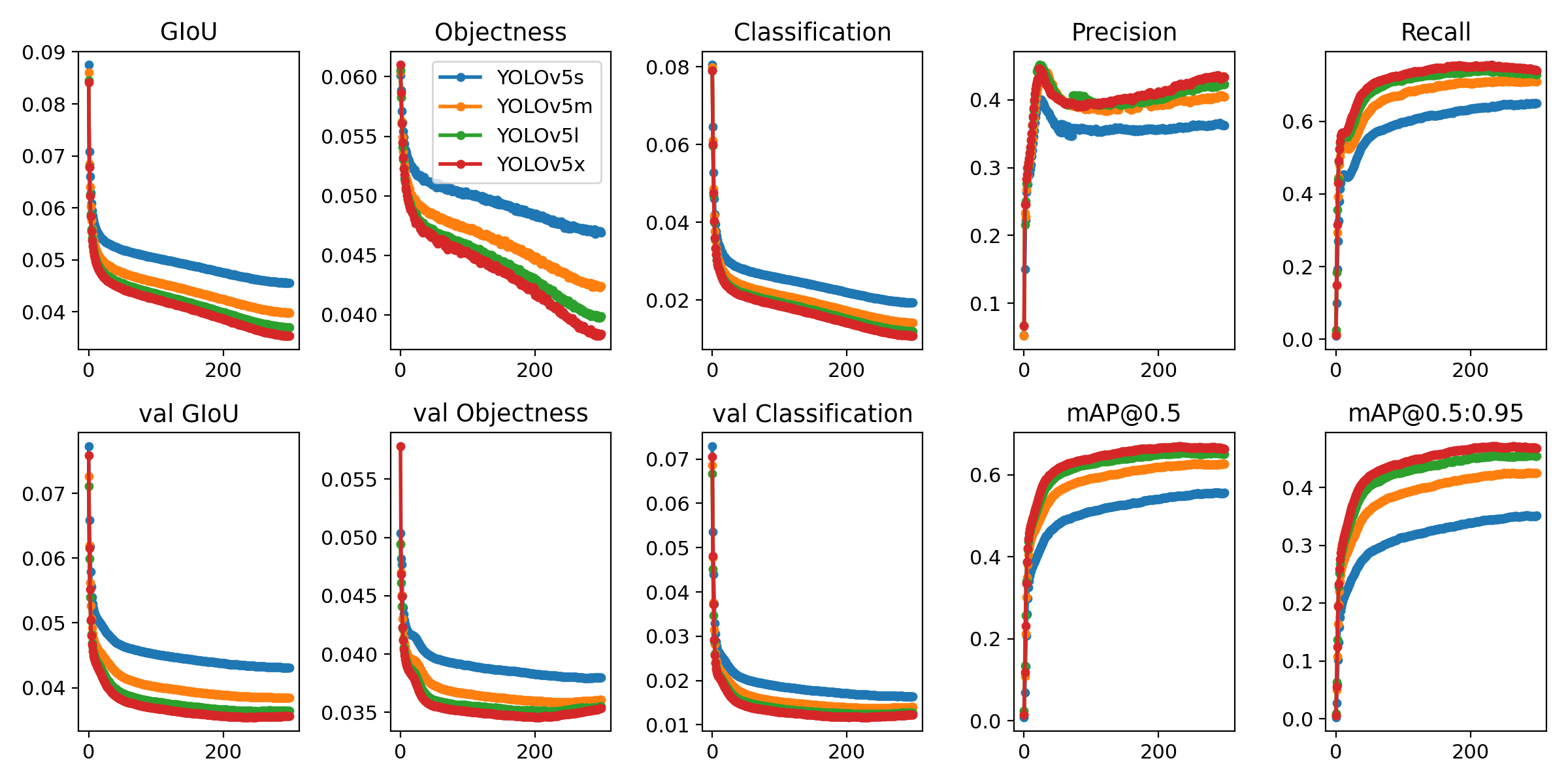
Tutorials
- **[Train Custom Data](https://docs.ultralytics.com/yolov5/tutorials/train_custom_data)** 🚀 **RECOMMENDED**: Learn how to train YOLOv5 on your own datasets. - **[Tips for Best Training Results](https://docs.ultralytics.com/guides/model-training-tips)** ☘️: Improve your model's performance with expert tips. - **[Multi-GPU Training](https://docs.ultralytics.com/yolov5/tutorials/multi_gpu_training)**: Speed up training using multiple GPUs. - **[PyTorch Hub Integration](https://docs.ultralytics.com/yolov5/tutorials/pytorch_hub_model_loading)**: Easily load models using PyTorch Hub. - **[Model Export (TFLite, ONNX, CoreML, TensorRT)](https://docs.ultralytics.com/yolov5/tutorials/model_export)** 🚀: Convert your models to various deployment formats like [ONNX](https://onnx.ai/) or [TensorRT](https://developer.nvidia.com/tensorrt). - **[NVIDIA Jetson Deployment](https://docs.ultralytics.com/guides/nvidia-jetson)**: Deploy YOLOv5 on [NVIDIA Jetson](https://developer.nvidia.com/embedded-computing) devices. - **[Test-Time Augmentation (TTA)](https://docs.ultralytics.com/yolov5/tutorials/test_time_augmentation)**: Enhance prediction accuracy with TTA. - **[Model Ensembling](https://docs.ultralytics.com/yolov5/tutorials/model_ensembling)**: Combine multiple models for better performance. - **[Model Pruning/Sparsity](https://docs.ultralytics.com/yolov5/tutorials/model_pruning_and_sparsity)**: Optimize models for size and speed. - **[Hyperparameter Evolution](https://docs.ultralytics.com/yolov5/tutorials/hyperparameter_evolution)**: Automatically find the best training hyperparameters. - **[Transfer Learning with Frozen Layers](https://docs.ultralytics.com/yolov5/tutorials/transfer_learning_with_frozen_layers)**: Adapt pretrained models to new tasks efficiently using [transfer learning](https://www.ultralytics.com/glossary/transfer-learning). - **[Architecture Summary](https://docs.ultralytics.com/yolov5/tutorials/architecture_description)**: Understand the YOLOv5 model architecture. - **[Ultralytics Platform Training](https://platform.ultralytics.com)** 🚀 **RECOMMENDED**: Train and deploy YOLO models using Ultralytics Platform. - **[ClearML Logging](https://docs.ultralytics.com/yolov5/tutorials/clearml_logging_integration)**: Integrate with [ClearML](https://clear.ml/) for experiment tracking. - **[Neural Magic DeepSparse Integration](https://docs.ultralytics.com/yolov5/tutorials/neural_magic_pruning_quantization)**: Accelerate inference with DeepSparse. - **[Comet Logging](https://docs.ultralytics.com/yolov5/tutorials/comet_logging_integration)**: Log experiments using [Comet ML](https://www.comet.com/site/).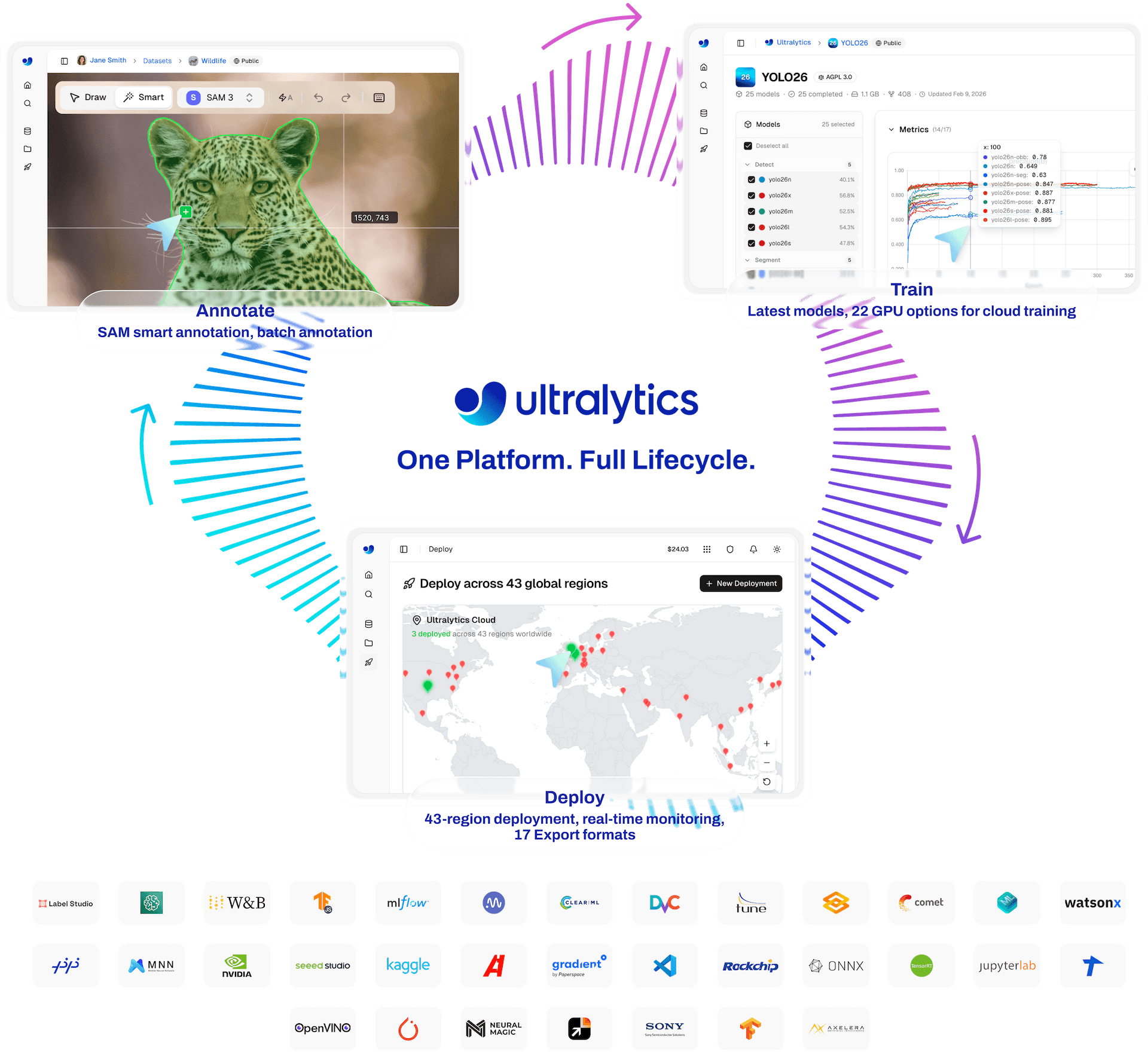 ## 🤔 Why YOLOv5?
YOLOv5 is designed for simplicity and ease of use. We prioritize real-world performance and accessibility.
## 🤔 Why YOLOv5?
YOLOv5 is designed for simplicity and ease of use. We prioritize real-world performance and accessibility.
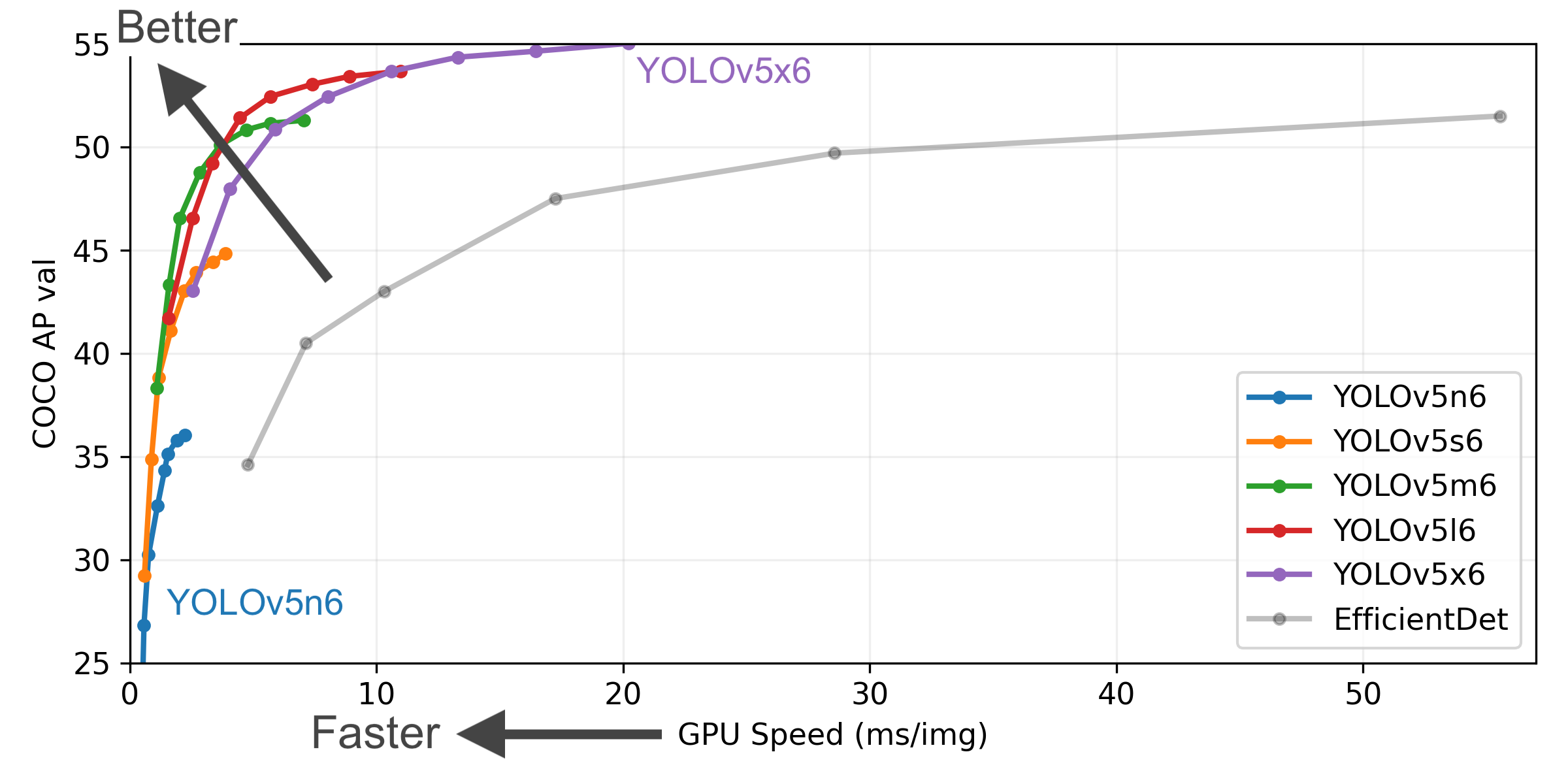
YOLOv5-P5 640 Figure
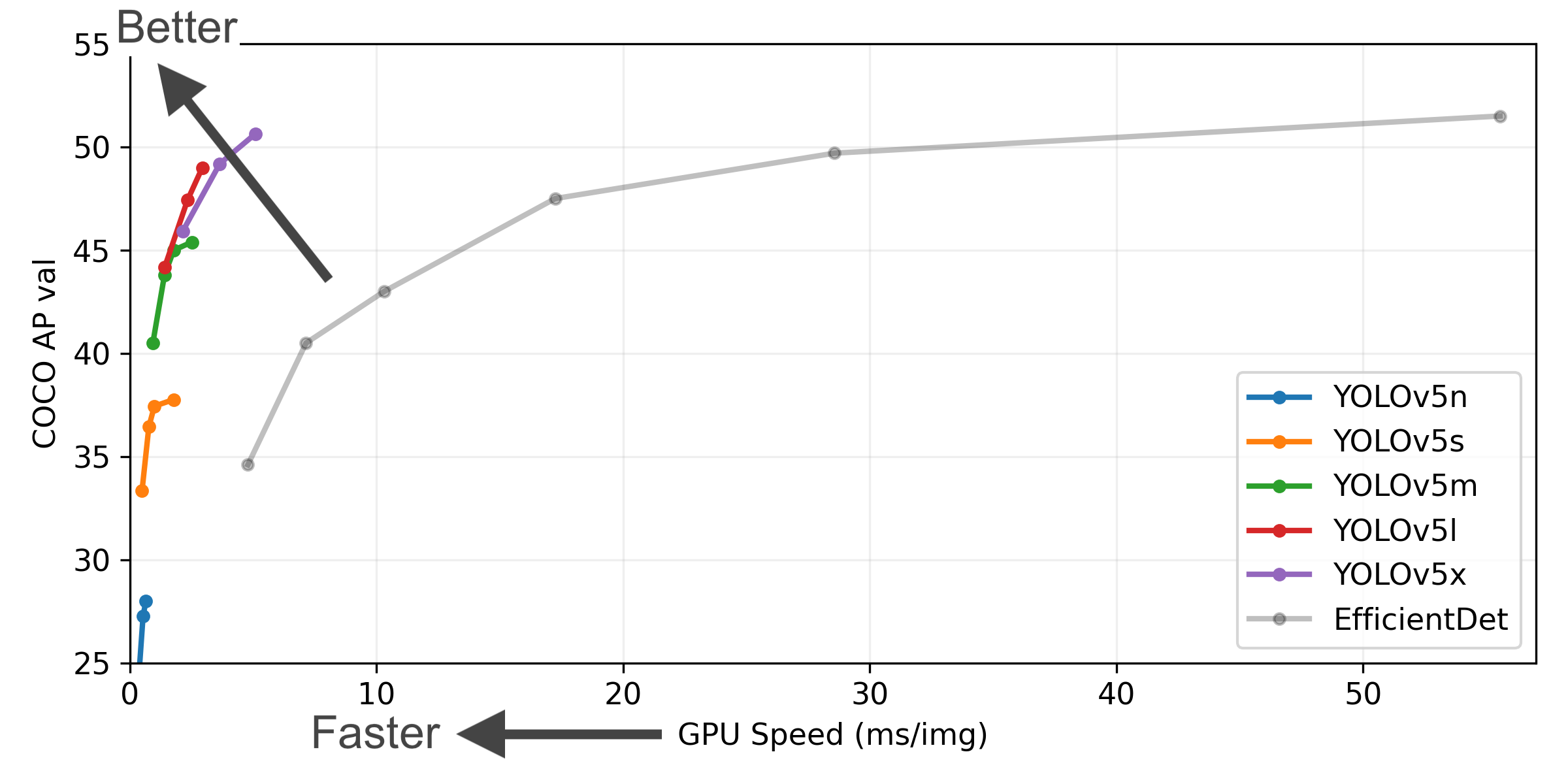
Figure Notes
- **COCO AP val** denotes the [mean Average Precision (mAP)](https://www.ultralytics.com/glossary/mean-average-precision-map) at [Intersection over Union (IoU)](https://www.ultralytics.com/glossary/intersection-over-union-iou) thresholds from 0.5 to 0.95, measured on the 5,000-image [COCO val2017 dataset](https://docs.ultralytics.com/datasets/detect/coco) across various inference sizes (256 to 1536 pixels). - **GPU Speed** measures the average inference time per image on the [COCO val2017 dataset](https://docs.ultralytics.com/datasets/detect/coco) using an [AWS p3.2xlarge V100 instance](https://aws.amazon.com/ec2/instance-types/p4/) with a batch size of 32. - **EfficientDet** data is sourced from the [google/automl repository](https://github.com/google/automl) at batch size 8. - **Reproduce** these results using the command: `python val.py --task study --data coco.yaml --iou 0.7 --weights yolov5n6.pt yolov5s6.pt yolov5m6.pt yolov5l6.pt yolov5x6.pt`(pixels) | mAPval
50-95 | mAPval
50 | Speed
CPU b1
(ms) | Speed
V100 b1
(ms) | Speed
V100 b32
(ms) | Params
(M) | FLOPs
@640 (B) | | ------------------------------------------------------------------------------------------------------------------------------------------------------------------------ | --------------------- | -------------------- | ----------------- | ---------------------------- | ----------------------------- | ------------------------------ | ------------------ | ---------------------- | | [YOLOv5n](https://github.com/ultralytics/yolov5/releases/download/v7.0/yolov5n.pt) | 640 | 28.0 | 45.7 | **45** | **6.3** | **0.6** | **1.9** | **4.5** | | [YOLOv5s](https://github.com/ultralytics/yolov5/releases/download/v7.0/yolov5s.pt) | 640 | 37.4 | 56.8 | 98 | 6.4 | 0.9 | 7.2 | 16.5 | | [YOLOv5m](https://github.com/ultralytics/yolov5/releases/download/v7.0/yolov5m.pt) | 640 | 45.4 | 64.1 | 224 | 8.2 | 1.7 | 21.2 | 49.0 | | [YOLOv5l](https://github.com/ultralytics/yolov5/releases/download/v7.0/yolov5l.pt) | 640 | 49.0 | 67.3 | 430 | 10.1 | 2.7 | 46.5 | 109.1 | | [YOLOv5x](https://github.com/ultralytics/yolov5/releases/download/v7.0/yolov5x.pt) | 640 | 50.7 | 68.9 | 766 | 12.1 | 4.8 | 86.7 | 205.7 | | | | | | | | | | | | [YOLOv5n6](https://github.com/ultralytics/yolov5/releases/download/v7.0/yolov5n6.pt) | 1280 | 36.0 | 54.4 | 153 | 8.1 | 2.1 | 3.2 | 4.6 | | [YOLOv5s6](https://github.com/ultralytics/yolov5/releases/download/v7.0/yolov5s6.pt) | 1280 | 44.8 | 63.7 | 385 | 8.2 | 3.6 | 12.6 | 16.8 | | [YOLOv5m6](https://github.com/ultralytics/yolov5/releases/download/v7.0/yolov5m6.pt) | 1280 | 51.3 | 69.3 | 887 | 11.1 | 6.8 | 35.7 | 50.0 | | [YOLOv5l6](https://github.com/ultralytics/yolov5/releases/download/v7.0/yolov5l6.pt) | 1280 | 53.7 | 71.3 | 1784 | 15.8 | 10.5 | 76.8 | 111.4 | | [YOLOv5x6](https://github.com/ultralytics/yolov5/releases/download/v7.0/yolov5x6.pt)
+ [[TTA]](https://docs.ultralytics.com/yolov5/tutorials/test_time_augmentation/) | 1280
1536 | 55.0
**55.8** | 72.7
**72.7** | 3136
- | 26.2
- | 19.4
- | 140.7
- | 209.8
- |
Table Notes
- All checkpoints were trained for 300 epochs using default settings. Nano (n) and Small (s) models use [hyp.scratch-low.yaml](https://github.com/ultralytics/yolov5/blob/master/data/hyps/hyp.scratch-low.yaml) hyperparameters, while Medium (m), Large (l), and Extra-Large (x) models use [hyp.scratch-high.yaml](https://github.com/ultralytics/yolov5/blob/master/data/hyps/hyp.scratch-high.yaml). - **mAPval** values represent single-model, single-scale performance on the [COCO val2017 dataset](https://docs.ultralytics.com/datasets/detect/coco).Reproduce using: `python val.py --data coco.yaml --img 640 --conf 0.001 --iou 0.65` - **Speed** metrics are averaged over COCO val images using an [AWS p3.2xlarge V100 instance](https://aws.amazon.com/ec2/instance-types/p4/). Non-Maximum Suppression (NMS) time (~1 ms/image) is not included.
Reproduce using: `python val.py --data coco.yaml --img 640 --task speed --batch 1` - **TTA** ([Test Time Augmentation](https://docs.ultralytics.com/yolov5/tutorials/test_time_augmentation)) includes reflection and scale augmentations for improved accuracy.
Reproduce using: `python val.py --data coco.yaml --img 1536 --iou 0.7 --augment`
Segmentation Checkpoints
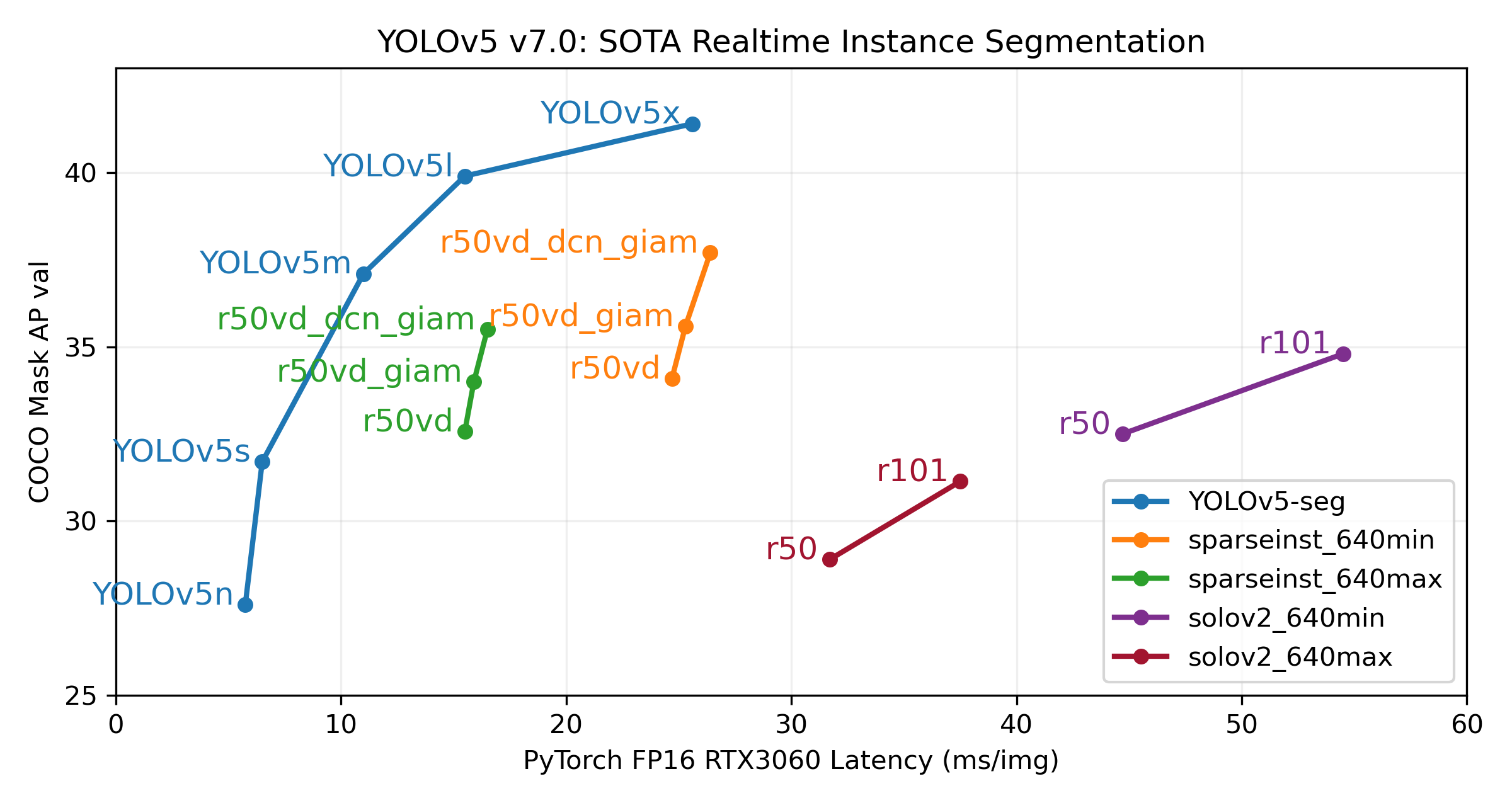
(pixels) | mAPbox
50-95 | mAPmask
50-95 | Train Time
300 epochs
A100 (hours) | Speed
ONNX CPU
(ms) | Speed
TRT A100
(ms) | Params
(M) | FLOPs
@640 (B) | | ------------------------------------------------------------------------------------------ | --------------------- | -------------------- | --------------------- | --------------------------------------------- | ------------------------------ | ------------------------------ | ------------------ | ---------------------- | | [YOLOv5n-seg](https://github.com/ultralytics/yolov5/releases/download/v7.0/yolov5n-seg.pt) | 640 | 27.6 | 23.4 | 80:17 | **62.7** | **1.2** | **2.0** | **7.1** | | [YOLOv5s-seg](https://github.com/ultralytics/yolov5/releases/download/v7.0/yolov5s-seg.pt) | 640 | 37.6 | 31.7 | 88:16 | 173.3 | 1.4 | 7.6 | 26.4 | | [YOLOv5m-seg](https://github.com/ultralytics/yolov5/releases/download/v7.0/yolov5m-seg.pt) | 640 | 45.0 | 37.1 | 108:36 | 427.0 | 2.2 | 22.0 | 70.8 | | [YOLOv5l-seg](https://github.com/ultralytics/yolov5/releases/download/v7.0/yolov5l-seg.pt) | 640 | 49.0 | 39.9 | 66:43 (2x) | 857.4 | 2.9 | 47.9 | 147.7 | | [YOLOv5x-seg](https://github.com/ultralytics/yolov5/releases/download/v7.0/yolov5x-seg.pt) | 640 | **50.7** | **41.4** | 62:56 (3x) | 1579.2 | 4.5 | 88.8 | 265.7 | - All checkpoints were trained for 300 epochs using the SGD optimizer with `lr0=0.01` and `weight_decay=5e-5` at an image size of 640 pixels, using default settings.
Training runs are logged at [https://wandb.ai/glenn-jocher/YOLOv5_v70_official](https://wandb.ai/glenn-jocher/YOLOv5_v70_official). - **Accuracy** values represent single-model, single-scale performance on the COCO dataset.
Reproduce using: `python segment/val.py --data coco.yaml --weights yolov5s-seg.pt` - **Speed** metrics are averaged over 100 inference images using a [Colab Pro A100 High-RAM instance](https://colab.research.google.com/signup). Values indicate inference speed only (NMS adds approximately 1ms per image).
Reproduce using: `python segment/val.py --data coco.yaml --weights yolov5s-seg.pt --batch 1` - **Export** to ONNX (FP32) and TensorRT (FP16) was performed using `export.py`.
Reproduce using: `python export.py --weights yolov5s-seg.pt --include engine --device 0 --half`
Segmentation Usage Examples
### Train
YOLOv5 segmentation training supports automatic download of the [COCO128-seg dataset](https://docs.ultralytics.com/datasets/segment/coco128-seg) via the `--data coco128-seg.yaml` argument. For the full [COCO-segments dataset](https://docs.ultralytics.com/datasets/segment/coco), download it manually using `bash data/scripts/get_coco.sh --train --val --segments` and then train with `python segment/train.py --data coco.yaml`.
# Train on a single GPU
python segment/train.py --data coco128-seg.yaml --weights yolov5s-seg.pt --img 640
# Train using Multi-GPU Distributed Data Parallel (DDP)
python -m torch.distributed.run --nproc_per_node 4 --master_port 1 segment/train.py --data coco128-seg.yaml --weights yolov5s-seg.pt --img 640 --device 0,1,2,3
### Val
Validate the mask [mean Average Precision (mAP)](https://www.ultralytics.com/glossary/mean-average-precision-map) of YOLOv5s-seg on the COCO dataset:
# Download COCO validation segments split (780MB, 5000 images)
bash data/scripts/get_coco.sh --val --segments
# Validate the model
python segment/val.py --weights yolov5s-seg.pt --data coco.yaml --img 640
### Predict
Use the pretrained YOLOv5m-seg.pt model to perform segmentation on `bus.jpg`:
# Run prediction
python segment/predict.py --weights yolov5m-seg.pt --source data/images/bus.jpg
# Load model from PyTorch Hub (Note: Inference support might vary)
model = torch.hub.load("ultralytics/yolov5", "custom", "yolov5m-seg.pt")
| 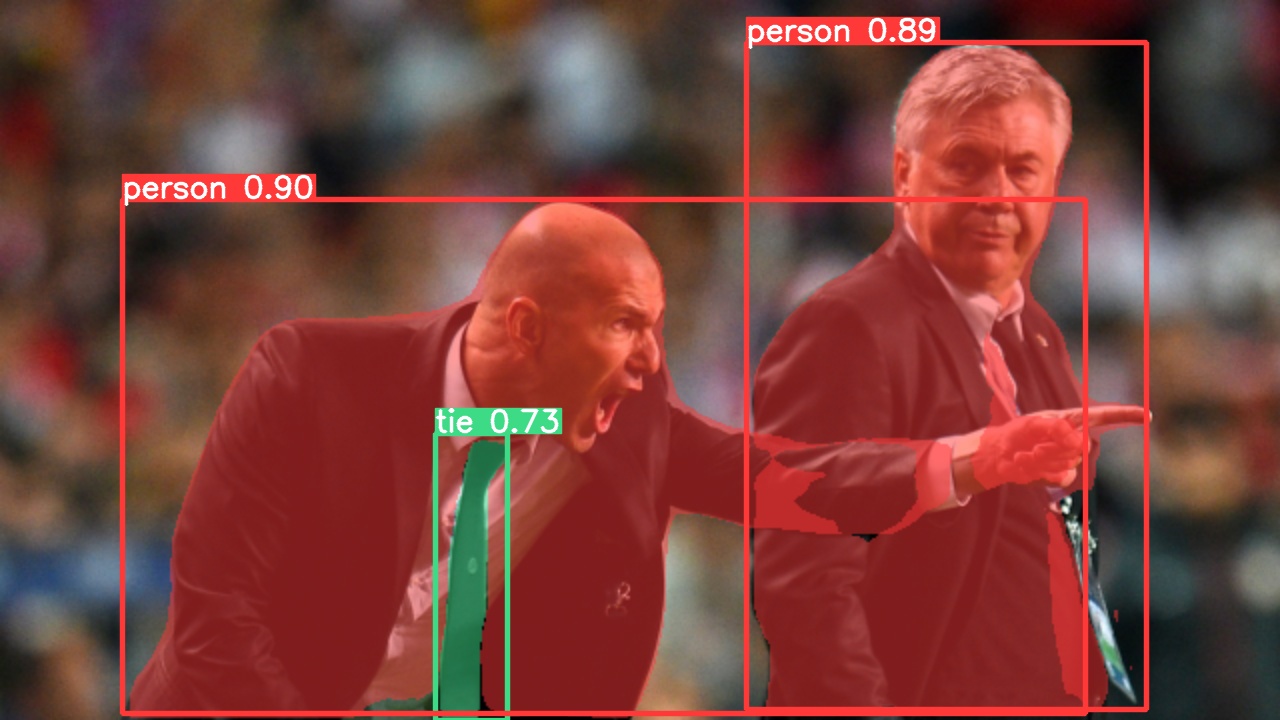 | 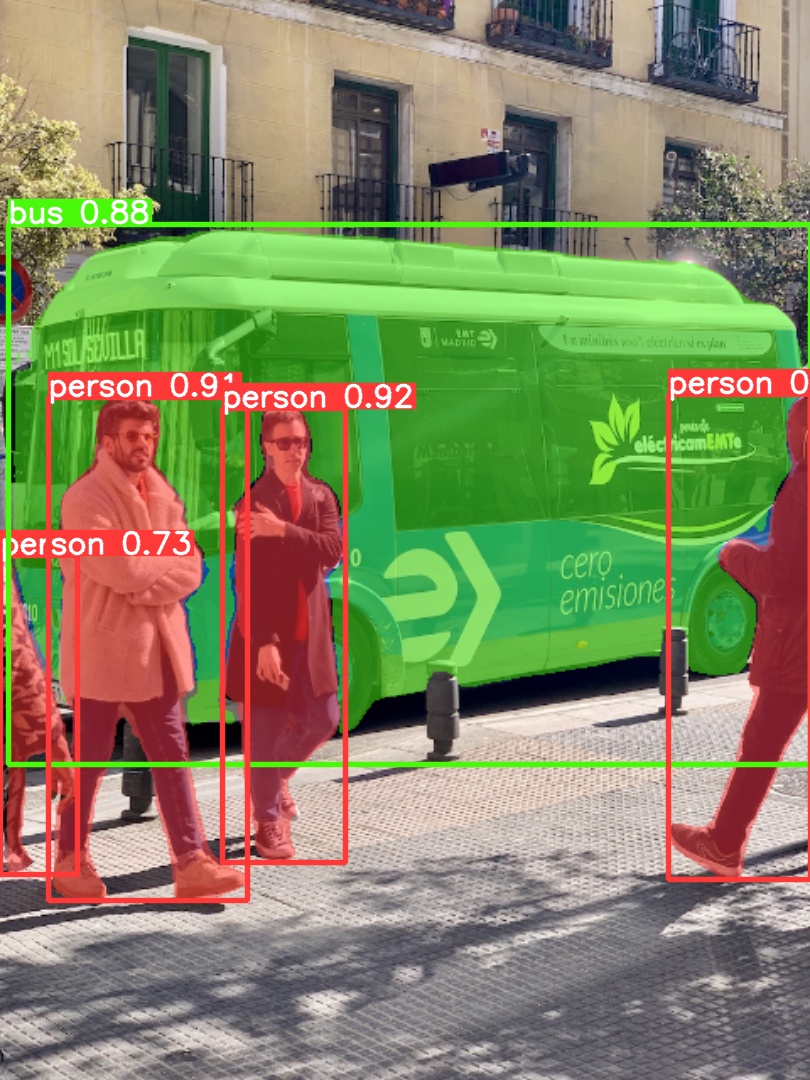 |
| :-----------------------------------------------------------------------------------------------------------------------------------: | :--------------------------------------------------------------------------------------------------------------------------------: |
### Export
Export the YOLOv5s-seg model to ONNX and TensorRT formats:
# Export model
python export.py --weights yolov5s-seg.pt --include onnx engine --img 640 --device 0
Classification Checkpoints
YOLOv5-cls classification models were trained on [ImageNet](https://docs.ultralytics.com/datasets/classify/imagenet) for 90 epochs using a 4xA100 instance. [ResNet](https://arxiv.org/abs/1512.03385) and [EfficientNet](https://arxiv.org/abs/1905.11946) models were trained alongside under identical settings for comparison. Models were exported to [ONNX](https://onnx.ai/) FP32 (CPU speed tests) and [TensorRT](https://developer.nvidia.com/tensorrt) FP16 (GPU speed tests). All speed tests were run on Google [Colab Pro](https://colab.research.google.com/signup) for reproducibility. | Model | Size
(pixels) | Acc
top1 | Acc
top5 | Training
90 epochs
4xA100 (hours) | Speed
ONNX CPU
(ms) | Speed
TensorRT V100
(ms) | Params
(M) | FLOPs
@224 (B) | | -------------------------------------------------------------------------------------------------- | --------------------- | ---------------- | ---------------- | -------------------------------------------- | ------------------------------ | ----------------------------------- | ------------------ | ---------------------- | | [YOLOv5n-cls](https://github.com/ultralytics/yolov5/releases/download/v7.0/yolov5n-cls.pt) | 224 | 64.6 | 85.4 | 7:59 | **3.3** | **0.5** | **2.5** | **0.5** | | [YOLOv5s-cls](https://github.com/ultralytics/yolov5/releases/download/v7.0/yolov5s-cls.pt) | 224 | 71.5 | 90.2 | 8:09 | 6.6 | 0.6 | 5.4 | 1.4 | | [YOLOv5m-cls](https://github.com/ultralytics/yolov5/releases/download/v7.0/yolov5m-cls.pt) | 224 | 75.9 | 92.9 | 10:06 | 15.5 | 0.9 | 12.9 | 3.9 | | [YOLOv5l-cls](https://github.com/ultralytics/yolov5/releases/download/v7.0/yolov5l-cls.pt) | 224 | 78.0 | 94.0 | 11:56 | 26.9 | 1.4 | 26.5 | 8.5 | | [YOLOv5x-cls](https://github.com/ultralytics/yolov5/releases/download/v7.0/yolov5x-cls.pt) | 224 | **79.0** | **94.4** | 15:04 | 54.3 | 1.8 | 48.1 | 15.9 | | | | | | | | | | | | [ResNet18](https://github.com/ultralytics/yolov5/releases/download/v7.0/resnet18.pt) | 224 | 70.3 | 89.5 | **6:47** | 11.2 | 0.5 | 11.7 | 3.7 | | [ResNet34](https://github.com/ultralytics/yolov5/releases/download/v7.0/resnet34.pt) | 224 | 73.9 | 91.8 | 8:33 | 20.6 | 0.9 | 21.8 | 7.4 | | [ResNet50](https://github.com/ultralytics/yolov5/releases/download/v7.0/resnet50.pt) | 224 | 76.8 | 93.4 | 11:10 | 23.4 | 1.0 | 25.6 | 8.5 | | [ResNet101](https://github.com/ultralytics/yolov5/releases/download/v7.0/resnet101.pt) | 224 | 78.5 | 94.3 | 17:10 | 42.1 | 1.9 | 44.5 | 15.9 | | | | | | | | | | | | [EfficientNet_b0](https://github.com/ultralytics/yolov5/releases/download/v7.0/efficientnet_b0.pt) | 224 | 75.1 | 92.4 | 13:03 | 12.5 | 1.3 | 5.3 | 1.0 | | [EfficientNet_b1](https://github.com/ultralytics/yolov5/releases/download/v7.0/efficientnet_b1.pt) | 224 | 76.4 | 93.2 | 17:04 | 14.9 | 1.6 | 7.8 | 1.5 | | [EfficientNet_b2](https://github.com/ultralytics/yolov5/releases/download/v7.0/efficientnet_b2.pt) | 224 | 76.6 | 93.4 | 17:10 | 15.9 | 1.6 | 9.1 | 1.7 | | [EfficientNet_b3](https://github.com/ultralytics/yolov5/releases/download/v7.0/efficientnet_b3.pt) | 224 | 77.7 | 94.0 | 19:19 | 18.9 | 1.9 | 12.2 | 2.4 |
Table Notes (click to expand)
- All checkpoints were trained for 90 epochs using the SGD optimizer with `lr0=0.001` and `weight_decay=5e-5` at an image size of 224 pixels, using default settings.Training runs are logged at [https://wandb.ai/glenn-jocher/YOLOv5-Classifier-v6-2](https://wandb.ai/glenn-jocher/YOLOv5-Classifier-v6-2). - **Accuracy** values (top-1 and top-5) represent single-model, single-scale performance on the [ImageNet-1k dataset](https://docs.ultralytics.com/datasets/classify/imagenet).
Reproduce using: `python classify/val.py --data ../datasets/imagenet --img 224` - **Speed** metrics are averaged over 100 inference images using a Google [Colab Pro V100 High-RAM instance](https://colab.research.google.com/signup).
Reproduce using: `python classify/val.py --data ../datasets/imagenet --img 224 --batch 1` - **Export** to ONNX (FP32) and TensorRT (FP16) was performed using `export.py`.
Reproduce using: `python export.py --weights yolov5s-cls.pt --include engine onnx --imgsz 224`
Classification Usage Examples
### Train
YOLOv5 classification training supports automatic download for datasets like [MNIST](https://docs.ultralytics.com/datasets/classify/mnist), [Fashion-MNIST](https://docs.ultralytics.com/datasets/classify/fashion-mnist), [CIFAR10](https://docs.ultralytics.com/datasets/classify/cifar10), [CIFAR100](https://docs.ultralytics.com/datasets/classify/cifar100), [Imagenette](https://docs.ultralytics.com/datasets/classify/imagenette), [Imagewoof](https://docs.ultralytics.com/datasets/classify/imagewoof), and [ImageNet](https://docs.ultralytics.com/datasets/classify/imagenet) using the `--data` argument. For example, start training on MNIST with `--data mnist`.
# Train on a single GPU using CIFAR-100 dataset
python classify/train.py --model yolov5s-cls.pt --data cifar100 --epochs 5 --img 224 --batch 128
# Train using Multi-GPU DDP on ImageNet dataset
python -m torch.distributed.run --nproc_per_node 4 --master_port 1 classify/train.py --model yolov5s-cls.pt --data imagenet --epochs 5 --img 224 --device 0,1,2,3
### Val
Validate the accuracy of the YOLOv5m-cls model on the ImageNet-1k validation dataset:
# Download ImageNet validation split (6.3GB, 50,000 images)
bash data/scripts/get_imagenet.sh --val
# Validate the model
python classify/val.py --weights yolov5m-cls.pt --data ../datasets/imagenet --img 224
### Predict
Use the pretrained YOLOv5s-cls.pt model to classify the image `bus.jpg`:
# Run prediction
python classify/predict.py --weights yolov5s-cls.pt --source data/images/bus.jpg
# Load model from PyTorch Hub
model = torch.hub.load("ultralytics/yolov5", "custom", "yolov5s-cls.pt")
### Export
Export trained YOLOv5s-cls, ResNet50, and EfficientNet_b0 models to ONNX and TensorRT formats:
# Export models
python export.py --weights yolov5s-cls.pt resnet50.pt efficientnet_b0.pt --include onnx engine --img 224






标签:CNCF毕业项目, ONNX, PyTorch, YOLO, 人工智能, 凭据扫描, 用户模式Hook绕过, 目标检测, 计算机视觉, 请求拦截, 边缘计算, 逆向工具