google/xls
GitHub: google/xls
XLS 是一套高层次综合工具链,能将高层次的软件化功能描述自动转化为可综合的 Verilog/SystemVerilog 硬件设计,同时保证软硬件实现的功能一致性。
Stars: 1795 | Forks: 265
# **XLS**:加速硬件综合
[**文档**](https://google.github.io/xls/) | [**快速开始**](https://google.github.io/xls/tools_quick_start/) [](https://bit.ly/learn-xls) | [**教程**](https://google.github.io/xls/tutorials/)
[**Conda 包**](https://anaconda.org/litex-hub/xls) [](https://anaconda.org/litex-hub/xls) [](https://anaconda.org/litex-hub/xls)
[](https://github.com/google/xls/actions/workflows/continuous-integration.yml) [](https://github.com/google/xls/actions/workflows/nightly-ubuntu-22.04.yml)
## 什么是 XLS?
XLS 实现了一个高层次综合(High Level Synthesis)工具链,它能够从灵活、高层次的功能描述中生成可综合的设计(Verilog 和 SystemVerilog)。它采用 Apache 2.0 许可证。
XLS(加速硬件综合)旨在成为摩尔定律终结时代软件工程师的软件开发工具包(SDK)。在这个“专业化时代”,软件和硬件工程师必须跨越领域边界进行更多的协同设计——在共享的产出物上进行协作,理解彼此的成本模型,并共享工具/方法论。XLS 试图利用自动化、软件工程师和机器周期来加速这一整体过程。
XLS 支持通过“软件风格”的方法论快速开发*硬件 IP*,这些 IP 也能作为高效的*主机软件*运行。XLS 设计可以以原生速度运行,用于主机软件或模拟器中,同时该设计也能生成硬件模块输出——XLS 工具的正确性确保(并提供了辅助形式化验证的工具)它们在功能上是完全一致的。
XLS 既支持具有纯连线 I/O 接口的函数(可选择流水线化),也支持[*并发进程*](https://google.github.io/xls/tutorials/what_is_a_proc/)(或 `proc`)。Proc 是有状态的,允许随时间进行归纳,并包含更通用的通信接口。
## 项目状态
XLS 是实验性的,正在快速开发中,并且不是 Google 官方支持的产品。预计会存在错误和未完善的粗糙之处。请通过尝试使用它、浏览[一些教程](https://google.github.io/xls/tutorials/)、[报告错误](https://github.com/google/xls/issues)来帮助我们。
我们处于早期阶段,这会产生一些实际影响:
- 我们欢迎您的 issue 和 PR。
- 请尽量先提出 issue。如果您希望向上游提交更改,请与我们进行对话。在没有通过 issue 与我们进行充分交流的情况下直接发送 PR,可能会使成功之路变得漫长。如果您认为您的 PR 已经准备就绪,但在两个工作日内未收到回复,请在 issue 中发出提醒,并附上您认为的后续步骤。
- 在当前演进阶段,我们会定期改进 DSLX,而不考虑向后兼容性。
- 如果您正在使用 XLS 构建硬件库,请谨慎考虑引入新版本编译器的流程。
## Colab Notebooks
如需一种免设置且独立于环境的方式来体验 XLS,请查看我们的 colab notebooks:
- [bit.ly/learn-xls](https://bit.ly/learn-xls):一个“Y 分钟学会 XLS”风格的演练,使用 DSLX(我们受 Rust 启发的领域特定语言,即 DSL)。
- [bit.ly/xls-playground](https://bit.ly/xls-playground):一个 XLS 评估环境,可交互式地运行以下内容:
- XLS 测试
- XLS→IR 转换
- IR→Verilog 代码生成
- 通过 Yosys 进行 Verilog 综合(使用开源 PDK ASAP7 和 SKY130)
- 通过 OpenROAD 进行布局布线 (P&R)
- 功耗/性能/面积 (PPA) 指标收集
## 安装最新版本
以下命令用于为 x64 Linux 机器下载最新的 github 仓库发布版二进制文件:
```
# 确定最新 release tarball 的 url。
LATEST_XLS_RELEASE_TARBALL_URL=$(curl -s -L \
-H "Accept: application/vnd.github+json" \
-H "X-GitHub-Api-Version: 2022-11-28" \
https://api.github.com/repos/google/xls/releases | \
grep -m 1 -o 'https://.*/releases/download/.*\.tar\.gz')
# 下载 tarball 并解压,观察包含的每个工具的版本号。
curl -O -L ${LATEST_XLS_RELEASE_TARBALL_URL}
tar -xzvvf xls-*.tar.gz
cd xls-*/
./interpreter_main --version
./ir_converter_main --version
./opt_main --version
./codegen_main --version
./proto_to_dslx_main --version
```
## 从源码构建
除了上述适用于 x64 Linux 的二进制发布版和可用的 colab notebooks 外,XLS 必须使用 Bazel 构建系统从源码进行构建。
以下说明适用于 Ubuntu 22.04 (Jammy Jellyfish) Linux 发行版。
在普通的 8 核虚拟机上:
- **不包括** C++ 前端的完整初始构建(例如,“仅 DSLX”)**大约需要 2 小时**,
- **包括** C++ 前端**最多可能需要 6 小时**。
请参阅下面相应的两行命令——我们首先假设您已经[安装了 Bazel](https://bazel.build/install/ubuntu):
```
~$ git clone https://github.com/google/xls.git
~$ cd xls
~/xls$ # Follow the bazel install instructions to install bazel 7
~/xls$ # https://bazel.build/install/ubuntu
~/xls$ # Note we're going to tell Ubuntu that `/usr/bin/env python` is actually python3
~/xls$ # here, since that has not been the case by default on past Ubuntus.
~/xls$ # This is important. Without this step, you may experience cryptic error messages:
~/xls$ sudo apt install python3-dev libtinfo6 python-is-python3
~/xls$ # Now build/test in optimized build mode.
~/xls$ # If you don't plan on using the C++ front-end, which is not strictly
~/xls$ # needed (i.e. DSLX front-end only), use this command line:
~/xls$ bazel test -c opt -- //xls/... -//xls/contrib/xlscc/...
~/xls$ # To build everything, including the C++ front-end:
~/xls$ bazel test -c opt -- //xls/...
```
### Docker 构建
如果您在您的环境中难以设置上述(有限的)依赖项,我们还通过 `Dockerfile` 提供了参考构建/测试环境设置:
```
~$ git clone https://github.com/google/xls.git
~$ cd xls
~/xls$ # Build and run xls tests.
~/xls$ docker build . -f Dockerfile-ubuntu-22.04
~/xls$ # Setup the xls build environment and allow for manual testing/building
~/xls$ docker build . -f Dockerfile-ubuntu-22.04 \
-t xls-build-docker \
--build-arg SKIP_TESTS=1
...
~/xls$ docker run -it --rm xls-build-docker /bin/bash
...
xls-developer@de12154edf52:~/xls$ bazel build --verbose_failures -c opt //xls/jit:jit_channel_queue_test
...
```
### 添加额外的构建缓存
许多程序员习惯使用像 `ccache` 这样的程序来改善构建的缓存,但 Bazel 实际上自带了非常高质量的缓存层。特别是增量构建更加安全。
然而,在某些情况下,Bazel 可能会决定重新编译那些本可以在本地缓存结果的文件,或者在 `bazel clean` 之后,复用某些中间结果可能是安全的。为了改善这一点,您可以告诉 Bazel 使用共享的“磁盘缓存”,将文件持久地存储在磁盘的其他位置;只需在某处创建一个目录(例如 `~/.bazel_disk_cache/`),然后运行:
```
echo "build --disk_cache=$(realpath ~/.bazel_disk_cache)" >> ~/.bazelrc
echo "test --disk_cache=$(realpath ~/.bazel_disk_cache)" >> ~/.bazelrc
```
!!! WARNING
Bazel 不会自动对该目录进行垃圾回收,因此它会随着时间无限制地增长。您需要定期清理它,无论是手动还是通过自动化脚本。
或者,您可以添加一个负责为您进行垃圾回收的[远程缓存](https://bazel.build/remote/caching)。它可以托管在个人服务器上,甚至是本地机器上。我们亲自在本地运行的 [bazel-remote](https://github.com/buchgr/bazel-remote/) 实例中取得了不错的效果。
### 获取 Clangd 自动补全
有两种方法可以获取 clangd 自动补全及相关功能。
可以通过运行 `xls/dev_tools/make-compilation-db.sh` 来创建一个兼容 clangd 及类似工具的 `compile_flags.txt` 文件。这种方法速度较快,但未考虑各个目标构建方式的差异。
或者,可以使用
[hedronvision/bazel-compile-commands-extractor](https://github.com/hedronvision/bazel-compile-commands-extractor)
来生成一个可供 clangd 使用的 `compile_commands.json` 文件。这种方法设置起来较慢,但编译器标志是为每个目标量身定制的。可以通过运行以下命令来构建 `compile_commands.json` 文件:
```
bazel build -c opt //xls/... -k
bazel run //:refresh_compile_commands
```
有关更多详细信息,请参阅顶层 [BUILD](https://github.com/google/xls/blob/main/BUILD) 文件中的注释。
## 架构图与项目布局
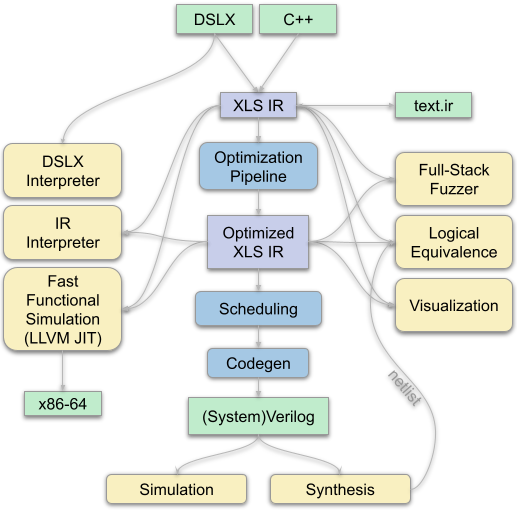
浏览一个新的代码库可能会让人望而生畏;以下描述提供了重要目录及其预期组织/目的的高级视图,并与该 XLS 架构图中的组件相对应:
- [`dependency_support`](https://github.com/google/xls/tree/main/dependency_support):用于加载、构建并为 XLS 的*外部*依赖项暴露 Bazel target 的配置文件。
- [`docs_src`](https://github.com/google/xls/tree/main/docs_src):Markdown 文件源码,通过 [mkdocs](https://google.github.io/xls/contributing/#rendering-documentation) 渲染到 `docs` 目录。
- [`xls`](https://github.com/google/xls/tree/main/xls):仓库中以项目名称命名的子目录,遵循常见的 Bazel 项目风格。
- [`build`](https://github.com/google/xls/tree/main/xls/BUILD):用于创建 XLS 产出物的构建宏;例如,将 DSL 转换为 IR,为 DSL 代码创建测试 target 等。
- [`codegen`](https://github.com/google/xls/tree/main/xls/codegen):Verilog AST (VAST) 支持,用于生成 Verilog/SystemVerilog 操作和 FSM。在从 XLS IR 转换的过程中,VAST 由我们称之为*生成器*(例如用于 FSM 的 PipelineGenerator、SequentialGenerator)的组件构建而成。
- [`common`](https://github.com/google/xls/tree/main/xls/common):建立在标准库使用基础上的“基础”功能。通常,我们尽可能使用 [Abseil](https://abseil.io) 版本的基础构造。
- [`contrib/xlscc`](https://github.com/google/xls/tree/main/xls/contrib/xlscc):以 XLS IR 为目标的实验性 C++ 语法支持(DSLX 的替代路径),由 Google 的一个兄弟团队开发,与 XLS 项目的其余部分共享相同的开源/测试流程。对于拥有现成 C++ HLS 代码库的团队可能特别有用。
- [`data_structures`](https://github.com/google/xls/tree/main/xls/data_structures):XLS 中使用的、补充了标准库的通用数据结构;例如 BDD、并查集、最小割等。
- [`delay_model`](https://github.com/google/xls/tree/main/xls/estimators/delay_model):用于表征、描述和插值目标后端工艺上 XLS IR 操作的数据延迟的功能。已经表征的描述放置在 `xls/estimators/delay_model/models` 中,可以通过命令行标志进行引用。
- [`dslx`](https://github.com/google/xls/tree/main/xls/dslx):一种模仿 Rust 的 DSL(称为“DSLX”),它是一种不可变的、面向表达式的数据流 DSL,具有硬件导向的特性;例如,任意位宽、完全固定大小的对象、完全可分析的调用图。XLS 团队发现,与那些假定冯·诺依曼计算风格的语言相比,数据流 DSL 更适合描述硬件。
- [`fuzzer`](https://github.com/google/xls/tree/main/xls/fuzzer):一个全栈多进程模糊测试器,在 DSL 级别生成程序,并对不同的执行引擎(DSL 解释器、IR 解释器、IR JIT、生成的代码 Verilog 模拟器)进行交叉比较。其设计使得它可以轻松地在集群中的不同节点上运行并累积共享的发现。
- [`examples`](https://github.com/google/xls/tree/main/xls/examples):通过 XLS 技术栈进行测试且可执行的示例计算。
- [`experimental`](https://github.com/google/xls/tree/main/xls/experimental):从实验性探索中捕获的产出物。
- [`interpreter`](https://github.com/google/xls/tree/main/xls/interpreter):XLS IR 的解释器——适用于调试和探索。对于需要吞吐量的情况,请考虑使用 JIT(见下文)。
- [`ir`](https://github.com/google/xls/tree/main/xls/ir):XLS IR 定义、文本解析器/格式化器,以及用于抽象评估的设施。
- [`jit`](https://github.com/google/xls/tree/main/xls/jit):基于 LLVM 的 XLS IR JIT。支持以原生速度执行 DSLX 和 XLS IR 程序。
- [`modules`](https://github.com/google/xls/tree/main/xls/modules):硬件构建块 DSLX“库”(在 DSLX 标准库之外),可以在更广泛的设计中轻松重用或实例化。
- [`netlist`](https://github.com/google/xls/tree/main/xls/netlist):解析/分析/解释网表级描述的库,通常以简单的结构化 Verilog 和相关的单元库给出。
- [`passes`](https://github.com/google/xls/tree/main/xls/passes):作为优化的一部分,在调度/代码生成之前在 XLS IR 上运行的 Pass。
- [`scheduling`](https://github.com/google/xls/tree/main/xls/scheduling):调度算法,在时钟设计中确定操作何时执行(例如,在哪个流水线阶段)。
- [`simulation`](https://github.com/google/xls/tree/main/xls/simulation):包装 Verilog 模拟器并为 XLS 计算生成 Verilog testbench 的代码。目前使用 [iverilog](https://github.com/steveicarus/iverilog) 进行模拟,因为它支持不可综合的 testbench 构造。
- [`solvers`](https://github.com/google/xls/tree/main/xls/solvers):将 XLS IR 转换为 SMT 求解器输入,以便可以对 XLS 计算运行形式化证明;例如,XLS IR 和网表描述之间的逻辑等价性检查。[Z3](https://github.com/Z3Prover/z3) 被用作求解器引擎。
- [`synthesis`](https://github.com/google/xls/tree/main/xls/synthesis):包装后端综合流程的接口,使得工具可以在例如 ASIC 和 FPGA 流程之间重新定向。
- [`tests`](https://github.com/google/xls/tree/main/xls/tests):跨越 XLS 项目各种顶级组件的集成测试。
- [`tools`](https://github.com/google/xls/tree/main/xls/tools):[许多工具](https://google.github.io/xls/tools/),通过命令行接口以解耦的方式与 XLS 系统及其库协同工作。
- [`visualization`](https://github.com/google/xls/tree/main/xls/visualization):以交互方式检查 XLS 编译器/系统的可视化工具。参见 [IR 可视化](https://google.github.io/xls/ir_visualization/)。
## 贡献者
以下是 XLS 项目的[贡献者](https://github.com/google/xls/graphs/contributors);如果您有兴趣贡献,请参阅我们的[贡献文档](https://google.github.io/xls/contributing/)和[适合新手的 issue](https://github.com/google/xls/issues?q=is%3Aissue+is%3Aopen+label%3A%22good+first+issue%22),或者通过 [GitHub discussions](https://github.com/google/xls/discussions) 与我们联系!
- [Aidan Kirk](https://github.com/aidankirk12)
- [Albert Magyar](https://github.com/albert-magyar)
- [Alex Light](https://github.com/allight)
- [Amin Kalantar](https://github.com/aminiok1)
- [Angelo Matni](https://github.com/angelomatni1)
- [Balint Christian](https://github.com/cbalint13)
- [Blaok](https://github.com/Blaok)
- [Brandon Jiang](https://github.com/brajiang)
- [Brian Searls](https://github.com/briansrls)
- [Chen-hao Chang](https://github.com/cchao)
- [Chris Drake](https://github.com/cjdrake)
- [Chris Leary](https://github.com/cdleary)
- [Conor McCullough](https://github.com/crmymh)
- [David Plass](_URL_68/>)
- [Dan Killebrew](https://github.com/dkillebrew-g)
- [Derek Lockhart](https://github.com/dmlockhart)
- [Eric Astor](https://github.com/ericastor)
- [Ethan Mahintorabi](https://github.com/QuantamHD)
- [Felix Zhu](https://github.com/felixzhuologist)
- [Georges Rotival](https://github.com/grotival)
- [Hanchen Ye](https://github.com/hanchenye)
- [Hans Montero](https://github.com/hmontero1205)
- [Henner Zeller](https://github.com/hzeller)
- [Iliyan Malchev](https://github.com/malchev)
- [Johan Euphrosine](https://github.com/proppy)
- [Jonathan Bailey](https://github.com/jbaileyhandle)
- [Josh Varga](https://github.com/JoshVarga)
- [Julian Viera](https://github.com/julianviera99)
- [Kevin Harlley](https://github.com/kevineharlley)
- [Leonardo Romor](https://github.com/lromor)
- [Manav Kohli](https://github.com/manav-kohli)
- [Mark Heffernan](https://github.com/meheff)
- [Paul Rigge](https://github.com/grebe)
- [Per Grön](https://github.com/per-gron)
- [Philipp Schilk](https://github.com/schilkp)
- [Ravi Nanavati](https://github.com/nanavati)
- [Rebecca Chen (Pytype)](https://github.com/rchen152)
- [Remy Goldschmidt](https://github.com/taktoa)
- [Robert Hundt](https://github.com/rhundt)
- [Rob Springer](https://github.com/RobSpringer)
- [Sameer Agarwal](https://github.com/sandwichmaker)
- [Sean Purser-Haskell](https://github.com/spurserh)
- [Simone Campanoni](https://github.com/scampanoni)
- [Ted Hong](https://github.com/hongted)
- [Ted Xie](https://github.com/ted-xie)
- [Tim Callahan](https://github.com/tcal-x)
- [Vincent Mirian](https://github.com/vincent-mirian-google)
标签:EDA工具, HLS, SystemVerilog, Verilog, 硬件开发, 硬件综合, 请求拦截, 软硬件协同设计, 逆向工具, 高级综合