SAP/credential-digger
GitHub: SAP/credential-digger
基于机器学习的代码仓库硬编码凭证扫描工具,通过智能过滤误报来高效识别密码、API密钥等敏感信息泄露。
Stars: 364 | Forks: 54
[](https://api.reuse.software/info/github.com/SAP/credential-digger)



[](https://hub.docker.com/r/saposs/credentialdigger)
[](https://marketplace.visualstudio.com/items?itemName=SAPOSS.vs-code-extension-for-project-credential-digger)

# Credential Digger
Credential Digger 是一款 GitHub 扫描工具,用于识别硬编码凭证(密码、API Key、密钥、Token、个人信息等),并通过机器学习模型过滤误报数据。
简而言之,请观看视频 ⬇️
[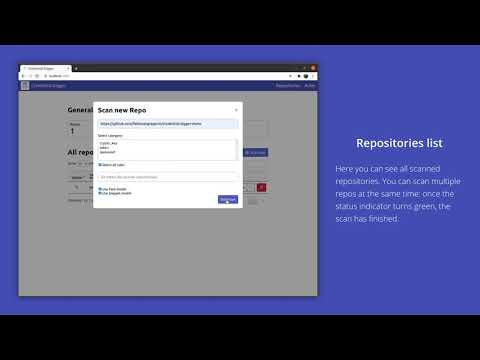](https://www.youtube.com/watch?v=1qz8lYPrtMo)
- [Credential Digger](#credential-digger)
- [为什么开发此工具](#why)
- [系统要求](#requirements)
- [下载与安装](#download-and-installation)
- [如何运行](#how-to-run)
- [添加规则](#add-rules)
- [扫描仓库](#scan-a-repository)
- [Docker 容器](#docker-container)
- [高级安装](#advanced-installation)
- [从源码构建](#build-from-source)
- [外部 Postgres 数据库](#external-postgres-database)
- [如何更新项目](#how-to-update-the-project)
- [Python 库用法](#python-library-usage)
- [添加规则](#add-rules-1)
- [扫描仓库](#scan-a-repository-1)
- [CLI - 命令行界面](#cli---command-line-interface)
- [Microsoft Visual Studio 插件](#Micosoft-Visual-Studio-Plugin)
- [pre-commit hook](#pre-commit-hook)
- [Piper 上的 CI/CD 流水线集成](#cicd-pipeline-intergation-on-piper)
- [Wiki](#wiki)
- [贡献](#contributing)
- [如何获取支持](#how-to-obtain-support)
- [新闻](#news)
## 为什么开发此工具
在数据保护领域,最关键的威胁之一是开源项目中的硬编码(或明文)凭证。已有多种工具可用于检测开源平台中的泄露,但由于凭证的多样性(取决于编程语言、代码开发约定或开发人员个人习惯等多种因素),这些工具的有效性遇到了瓶颈。缺乏精确性导致大量代码被错误地检测为泄露的秘密。被错误检测为泄露的数据被称为*误报*(false positive)数据,占据了现有工具检测到的数据的绝大部分。
Credential Digger 的目标是通过利用机器学习模型来减少扫描阶段输出中的误报数据量。
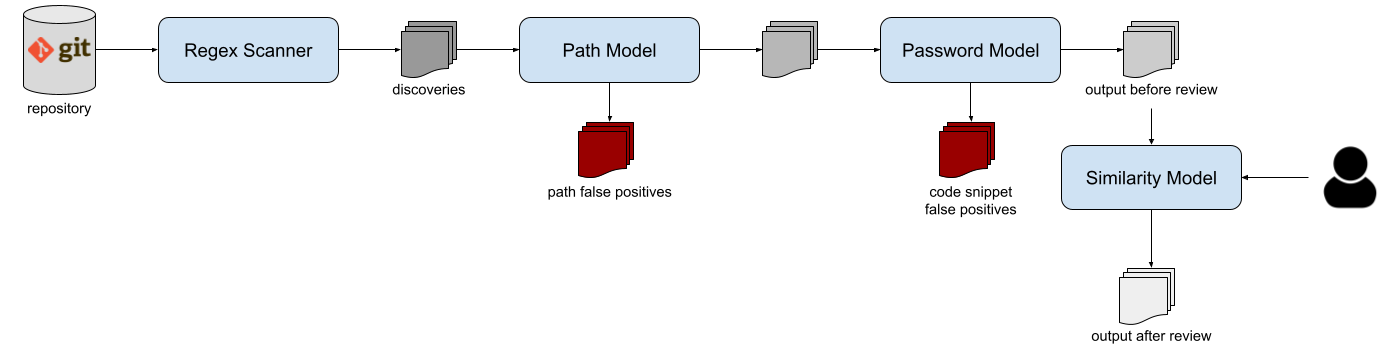
该工具支持多种扫描类型:GitHub 和 GitLab 上的公开及私有仓库、Pull Request、Wiki 页面、GitHub 组织、本地 Git 仓库、本地文件和文件夹。
请参阅 [Wiki](https://github.com/SAP/credential-digger/wiki) 获取完整文档。
有关 Credential Digger(版本 <4.4)方法的完整描述,[您可以阅读此出版物](https://www.scitepress.org/Papers/2021/102381/102381.pdf)。
```
@InProceedings {lrnto-icissp21,
author = {S. Lounici and M. Rosa and C. M. Negri and S. Trabelsi and M. Önen},
booktitle = {Proc. of the 8th The International Conference on Information Systems Security and Privacy (ICISSP)},
title = {Optimizing Leak Detection in Open-Source Platforms with Machine Learning Techniques},
month = {February},
day = {11-13},
year = {2021}
}
```
## 系统要求
Credential Digger 支持 Python >= 3.8 且 < 3.13,并且仅在 Linux 和 MacOS 系统上工作。
如果您不满足这些要求,可以考虑运行 [Docker 容器](#docker)(其中也包含用户界面)。
## 下载与安装
首先,您需要安装一些依赖项(即 `build-essential` 和 `python3-dev`)。不再需要显式安装 hyperscan。
```
sudo apt install -y build-essential python3-dev
```
然后,您可以使用 `pip` 安装 Credential Digger 模块。
```
pip install credentialdigger
```
## 如何运行
### 添加规则
Credential Digger 的核心组件之一是正则表达式扫描器。您可以选择所需的正则表达式规则(只需遵循[此处](https://github.com/SAP/credential-digger/blob/main/ui/backend/rules.yml)的模板)。我们在 `rules.yml` 文件中提供了一系列模式,这些模式已包含在 UI 中。扫描器支持 4 种不同类别的规则:`password`、`token`、`crypto_key` 和 `other`。
**在进行首次扫描之前,您需要添加扫描器将使用的规则。** 此步骤只需执行一次。
```
credentialdigger add_rules --sqlite /path/to/data.db /path/to/rules.yaml
```
### 扫描仓库
添加规则后,您可以扫描仓库:
```
credentialdigger scan https://github.com/user/repo --sqlite /path/to/data.db
```
机器学习模型不是强制性的,但强烈建议使用,以减少审查扫描结果所需的手动工作:
```
credentialdigger scan https://github.com/user/repo --sqlite /path/to/data.db --models PathModel PasswordModel
```
与模型一样,相似性功能也不是强制性的,但强烈建议使用,以减少在扫描后评估发现结果时的手动工作:
```
credentialdigger scan https://github.com/user/repo --sqlite /path/to/data.db --similarity --models PathModel PasswordModel
```
## Docker 容器
要获得一个带有用户界面的、开箱即用的 Credential Digger 实例,您可以使用 Docker 容器。
此选项需要安装 [Docker](https://docs.docker.com/engine/install/) 和 [Docker Compose](https://docs.docker.com/compose/install/)。
Credential Digger 发布在 [Docker Hub](https://hub.docker.com/r/saposs/credentialdigger) 上。您可以拉取最新版本:
```
sudo docker pull saposs/credentialdigger
```
或者使用 Docker Compose 构建并运行容器:
```
git clone https://github.com/SAP/credential-digger.git
cd credential-digger
cp .env.sample .env
docker compose up --build
```
UI 访问地址为 [http://localhost:5000/](http://localhost:5000/)
## 高级安装
Credential Digger 是模块化的,提供了丰富的组件和适配选择。
### 从源码构建
安装上述列出的[依赖项](#install-dependencies)后,您可以按如下方式安装 Credential Digger。
为 Python 3 配置虚拟环境(可选)并克隆项目的主分支:
```
virtualenv -p python3 ./venv
source ./venv/bin/activate
git clone https://github.com/SAP/credential-digger.git
cd credential-digger
```
从源码安装该工具:
```
pip install .
```
然后,您可以按照上述说明添加规则并扫描仓库。
### 外部 Postgres 数据库
另一种带有 UI 的、即用型 Credential Digger 实例,但使用 Docker 化的 Postgres 数据库而不是本地 SQLite 数据库:
```
git clone https://github.com/SAP/credential-digger.git
cd credential-digger
cp .env.sample .env
vim .env # set credentials for postgres
docker compose -f docker-compose.postgres.yml up --build
```
高级用户可能也希望使用外部 Postgres 数据库,而不是我们在 `docker-compose.postgres.yml` 中提供的 Docker 化数据库。
## 如何更新项目
如果您已经在运行 Credential Digger 并希望将其更新到较新版本,您可以[参考 Wiki 了解所需步骤](https://github.com/SAP/credential-digger/wiki/How-to-update-Credential-Digger)。
## Python 库用法
当通过 pip(或从源码)安装 _credentialdigger_ 后,您可以实例化客户端并扫描仓库。
实例化适合所选数据库的客户端:
```
# 使用 Sqlite 数据库
from credentialdigger import SqliteClient
c = SqliteClient(path='/path/to/data.db')
# 使用 postgres 数据库
from credentialdigger import PgClient
c = PgClient(dbname='my_db_name',
dbuser='my_user',
dbpassword='my_password',
dbhost='localhost_or_ip',
dbport=5432)
```
### 添加规则
在启动第一次扫描之前添加规则。
```
c.add_rules_from_file('/path/to/rules.yml')
```
### 扫描仓库
```
new_discoveries = c.scan(repo_url='https://github.com/user/repo',
models=['PathModel', 'PasswordModel'],
debug=True)
```
有关参数的更多信息,请参阅 [Wiki](https://github.com/SAP/credential-digger/wiki)。
## CLI - 命令行界面
Credential Digger 还提供了一个简单的 CLI 来扫描仓库。CLI 支持 SQLite 和 Postgres 数据库。如果是 Postgres,您需要将连接数据库所需的凭证导出为环境变量,或者设置 `.env` 文件。如果是 SQLite,数据库的路径必须作为参数传递。
有关所有支持的命令及其用法,请参阅 [Wiki](https://github.com/SAP/credential-digger/wiki)。
## Microsoft Visual Studio 插件
项目 “Credential Digger” 的 VS Code 扩展是一个免费的 IDE 扩展,可让您在代码泄露之前检测其中的秘密和凭证!就像拼写检查器一样,该扩展使用 Credential Digger 扫描您的文件,并在您编写代码时高亮显示秘密,以便您甚至可以在代码提交之前修复它们。
VS Code 扩展可以从 [Microsoft VS Code Marketplace](https://marketplace.visualstudio.com/items?itemName=SAPOSS.vs-code-extension-for-project-credential-digger) 下载。

## pre-commit hook
Credential Digger 可以与 [pre-commit](https://pre-commit.com/) 框架一起使用,以便在每次提交之前扫描暂存文件。
请参阅 [pre-commit hook 的 Wiki 页面](https://github.com/SAP/credential-digger/wiki/pre-commit-hook) 以获取有关其安装和执行的更多信息。
## Piper 上的 CI/CD 流水线集成 (SAP Jenkins Library)

Credential Digger 已与持续交付 CI/CD 流水线 [Piper](https://www.project-piper.io/) 集成,以便为您的 Github 项目和仓库自动执行秘密扫描。
为了激活 Credential Digger 步骤,请参阅此 [Piper 的 Credential Digger 步骤文档](https://www.project-piper.io/steps/credentialdiggerScan/)
## Wiki
了解更多信息,请参阅 [Wiki](https://github.com/SAP/credential-digger/wiki)
## 如何获取支持
作为第一步,我们建议[阅读 Wiki](https://github.com/SAP/credential-digger/wiki)。
如果您找不到所需的答案,可以提出 [Issue](https://github.com/SAP/credential-digger/issues) 或联系 [维护者](https://github.com/SAP/credential-digger/blob/main/setup.py#L19)。
## 新闻
- [Credential Digger 公告](https://blogs.sap.com/2020/06/23/credential-digger-using-machine-learning-to-identify-hardcoded-credentials-in-github)
- [Credential Digger 现已支持 Keras 机器学习模型](https://github.com/SAP/credential-digger/tree/keras_models)
- [Credential Digger 方法已在 ICISSP 2021 会议上发表](https://www.scitepress.org/Papers/2021/102381/102381.pdf)
标签:Apex, API密钥检测, CI/CD安全, DevSecOps, Docker容器, GitHub扫描, Llama, PostgreSQL数据库, SAP开源项目, Visual Studio插件, 上游代理, 凭据检测, 凭证清理, 安全助手, 密钥安全, 密钥轮换, 微调策略, 攻击面发现, 机器学习, 测试用例, 硬编码密码, 秘密扫描, 误报过滤, 请求拦截, 输入验证, 逆向工具, 错误基检测, 静态代码分析