ventoy/Ventoy
GitHub: ventoy/Ventoy
Ventoy 是一款开源的 USB 启动盘制作工具,无需反复格式化即可直接从多个 ISO/WIM/IMG/VHD 镜像文件启动。
Stars: 77232 | Forks: 4826
Ventoy





Ventoy 是一个用于 ISO/WIM/IMG/VHD(x)/EFI 文件制作可启动 USB 驱动器的开源工具。
使用 Ventoy,你无需反复格式化磁盘,只需将镜像文件复制到 USB 驱动器并启动它们即可。
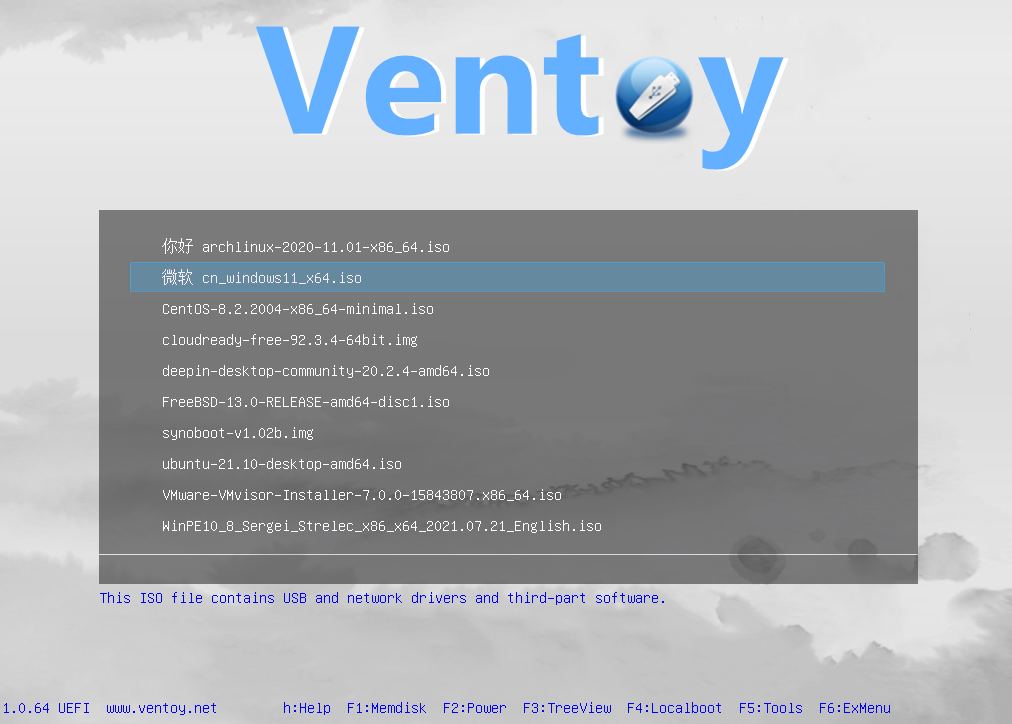
你可以一次复制多个镜像文件,Ventoy 会提供一个启动菜单供你选择。
你也可以浏览本地磁盘中的 ISO/WIM/IMG/VHD(x)/EFI 文件并启动它们。
x86 Legacy BIOS, IA32 UEFI, x86_64 UEFI, ARM64 UEFI 和 MIPS64EL UEFI 均以同样的方式被支持。
MBR 和 GPT 分区样式均以同样的方式被支持。
支持大部分类型的操作系统 (Windows/WinPE/Linux/Unix/ChromeOS/Vmware/Xen...)
1300+ 个 ISO 文件已被测试 (列表)。distrowatch.com 上 90%+ 的发行版都被支持 (详情)。
官方网站: https://www.ventoy.net
# 已测试的操作系统
**Windows**
Windows 7, Windows 8, Windows 8.1, Windows 10, Windows 11, Windows Server 2012, Windows Server 2012 R2, Windows Server 2016, Windows Server 2019, Windows Server 2022, Windows Server 2025, WinPE
**Linux**
Debian, Ubuntu, CentOS(6/7/8/9/10), RHEL(6/7/8/9/10), Deepin, Fedora, Rocky Linux, AlmaLinux, EuroLinux(6/7/8/9), openEuler, OpenAnolis, SLES, openSUSE, MX Linux, Manjaro, Linux Mint, Endless OS, Elementary OS, Solus, Linx, Zorin, antiX, PClinuxOS, Arch, ArcoLinux, ArchLabs, BlackArch, Obarun, Artix Linux, Puppy Linux, Tails, Slax, Kali, Mageia, Slackware, Q4OS, Archman, Gentoo, Pentoo, NixOS, Kylin, openKylin, Ubuntu Kylin, KylinSec, Lubuntu, Xubuntu, Kubuntu, Ubuntu MATE, Ubuntu Budgie, Ubuntu Studio, Bluestar, OpenMandriva, ExTiX, Netrunner, ALT Linux, Nitrux, Peppermint, KDE neon, Linux Lite, Parrot OS, Qubes, Pop OS, ROSA, Void Linux, Star Linux, EndeavourOS, MakuluLinux, Voyager, Feren, ArchBang, LXLE, Knoppix, Calculate Linux, Clear Linux, Pure OS, Oracle Linux, Trident, Septor, Porteus, Devuan, GoboLinux, 4MLinux, Simplicity Linux, Zeroshell, Android-x86, netboot.xyz, Slitaz, SuperGrub2Disk, Proxmox VE, Kaspersky Rescue, SystemRescueCD, MemTest86, MemTest86+, MiniTool Partition Wizard, Parted Magic, veket, Sabayon, Scientific, alpine, ClearOS, CloneZilla, Berry Linux, Trisquel, Ataraxia Linux, Minimal Linux Live, BackBox Linux, Emmabuntüs, ESET SysRescue Live,Nova Linux, AV Linux, RoboLinux, NuTyX, IPFire, SELKS, ZStack, Enso Linux, Security Onion, Network Security Toolkit, Absolute Linux, TinyCore, Springdale Linux, Frost Linux, Shark Linux, LinuxFX, Snail Linux, Astra Linux, Namib Linux, Resilient Linux, Virage Linux, Blackweb Security OS, R-DriveImage, O-O.DiskImage, Macrium, ToOpPy LINUX, GNU Guix, YunoHost, foxclone, siduction, Adelie Linux, Elive, Pardus, CDlinux, AcademiX, Austrumi, Zenwalk, Anarchy, DuZeru, BigLinux, OpenMediaVault, Ubuntu DP, Exe GNU/Linux, 3CX Phone System, KANOTIX, Grml, Karoshi, PrimTux, ArchStrike, CAELinux, Cucumber, Fatdog, ForLEx, Hanthana, Kwort, MiniNo, Redcore, Runtu, Asianux, Clu Linux Live, Uruk, OB2D, BlueOnyx, Finnix, HamoniKR, Parabola, LinHES, LinuxConsole, BEE free, Untangle, Pearl, Thinstation, TurnKey, tuxtrans, Neptune, HefftorLinux, GeckoLinux, Mabox Linux, Zentyal, Maui, Reborn OS, SereneLinux , SkyWave Linux, Kaisen Linux, Regata OS, TROM-Jaro, DRBL Linux, Chalet OS, Chapeau, Desa OS, BlankOn, OpenMamba, Frugalware, Kibojoe Linux, Revenge OS, Tsurugi Linux, Drauger OS, Hash Linux, gNewSense, Ikki Boot, SteamOS, Hyperbola, VyOS, EasyNAS, SuperGamer, Live Raizo, Swift Linux, RebeccaBlackOS, Daphile, CRUX, Univention, Ufficio Zero, Rescuezilla, Phoenix OS, Garuda Linux, Mll, NethServer, OSGeoLive, Easy OS, Volumio, FreedomBox, paldo, UBOS, Recalbox, batocera, Lakka, LibreELEC, Pardus Topluluk, Pinguy, KolibriOS, Elastix, Arya, Omoikane, Omarine, Endian Firewall, Hamara, Rocks Cluster, MorpheusArch, Redo, Slackel, SME Server, APODIO, Smoothwall, Dragora, Linspire, Secure-K OS, Peach OSI, Photon, Plamo, SuperX, Bicom, Ploplinux, HP SPP, LliureX, Freespire, DietPi, BOSS, Webconverger, Lunar, TENS, Source Mage, RancherOS, T2, Vine, Pisi, blackPanther, mAid, Acronis, Active.Boot, AOMEI, Boot.Repair, CAINE, DaRT, EasyUEFI, R-Drive, PrimeOS, Avira Rescue System, bitdefender, Checkra1n Linux, Lenovo Diagnostics, Clover, Bliss-OS, Lenovo BIOS Update, Arcabit Rescue Disk, MiyoLinux, TeLOS, Kerio Control, RED OS, OpenWrt, MocaccinoOS, EasyStartup, Pyabr, Refracta, Eset SysRescue, Linpack Xtreme, Archcraft, NHVBOOT, pearOS, SeaTools, Easy Recovery Essentional, iKuai, StorageCraft SCRE, ZFSBootMenu, TROMjaro, BunsenLabs, Todo en Uno, ChallengerOS, Nobara, Holo, CachyOS, Peux OS, Vanilla OS, ShredOS, paladin, Palen1x, dban, ReviOS, HelenOS, XeroLinux, Tiny 11, chimera linux, CuteFish, DragonOs, Rhino Linux, vanilladpup, crystal, IGELOS, MiniOS, gnoppix, PikaOS, UwUntu, Noble, PocketHandyBox, DiskGenius, Commodore, Talos, Shebang Linux, hrmpf, Bazzite, ManualLinux, nyarchlinux, ultramarine, TempleOS, bluefin, Damn Small Linux, Kicksecure, SerentiyOS, AerynOS, ......
**Unix**
DragonFly, FreeBSD, pfSense, OPNsense, GhostBSD, FreeNAS, TrueNAS, XigmaNAS, FuryBSD, HardenedBSD, MidnightBSD, ClonOS, EmergencyBootKit, helloSystem
**ChromeOS**
FydeOS, CloudReady, ChromeOS Flex, ThoriumOS
**其他**
VMware ESXi, Citrix XenServer, Xen XCP-ng
# 已测试镜像报告
[【如何报告已成功测试的镜像文件】](https://github.com/ventoy/Ventoy/issues/1195)
# Ventoy 浏览器
使用 Ventoy,你也可以浏览本地磁盘中的 ISO/WIM/IMG/VHD(x)/EFI 文件并启动它们。[说明](https://www.ventoy.net/en/doc_browser.html)
# VentoyPlugson
一个 GUI Ventoy 插件配置器。[VentoyPlugson](https://www.ventoy.net/en/plugin_plugson.html)
# 功能特性
* 100% 开源
* 使用简单
* 速度快(仅受限于复制 iso 文件的速度)
* 可安装在 USB/本地磁盘/SSD/NVMe/SD 卡
* 直接从 ISO/WIM/IMG/VHD(x)/EFI 文件启动,无需解压
* 支持浏览和启动本地磁盘中的 ISO/WIM/IMG/VHD(x)/EFI 文件
* ISO/WIM/IMG/VHD(x)/EFI 文件在磁盘上无需连续存放
* 支持 MBR 和 GPT 分区样式 (1.0.15+)
* 支持 x86 Legacy BIOS, IA32 UEFI, x86_64 UEFI, ARM64 UEFI, MIPS64EL UEFI
* 支持 IA32/x86_64 UEFI Secure Boot (1.0.07+)
* 支持 Linux Persistence (1.0.11+)
* 支持 Windows 自动安装 (1.0.09+)
* 支持 Linux 自动安装 (1.0.09+)
* 支持 Windows/Linux 自动安装脚本的变量扩展
* 主分区支持 FAT32/exFAT/NTFS/UDF/XFS/Btrfs/Ext2(3)(4)
* 支持大于 4GB 的 ISO 文件
* 支持菜单别名、菜单提示信息
* 支持密码保护
* Legacy & UEFI 原生启动菜单风格
* 支持大多数类型的操作系统,已测试 1300+ 个 iso 文件
* 支持 Linux vDisk 启动
* 不仅是启动,而且能完成安装过程
* 菜单可在列表/树视图模式间动态切换
* "Ventoy 兼容" 概念
* 插件框架和 GUI 插件配置器
* 注入文件到运行环境
* 动态替换启动配置文件
* 高度可定制的主题和菜单
* 支持 USB 驱动器写保护
* 不影响 USB 的正常使用
* 版本升级时数据无损
* 新发行版发布时无需更新 Ventoy
# 安装说明
查看 [https://www.ventoy.net/en/doc_start.html](https://www.ventoy.net/en/doc_start.html) 获取详细说明。
# 编译说明
请参考 [BuildVentoyFromSource.txt](DOC/BuildVentoyFromSource.txt)
# 文档
标题 | 链接
-|-
**安装 & 更新** | [https://www.ventoy.net/en/doc_start.html](https://www.ventoy.net/en/doc_start.html)
**浏览/启动本地磁盘中的文件** | [https://www.ventoy.net/en/doc_browser.html](https://www.ventoy.net/en/doc_browser.html)
**Secure Boot** | [https://www.ventoy.net/en/doc_secure.html](https://www.ventoy.net/en/doc_secure.html)
**自定义主题** | [https://www.ventoy.net/en/plugin_theme.html](https://www.ventoy.net/en/plugin_theme.html)
**全局控制** | [https://www.ventoy.net/en/plugin_control.html](https://www.ventoy.net/en/plugin_control.html)
**镜像列表** | [https://www.ventoy.net/en/plugin_imagelist.html](https://www.ventoy.net/en/plugin_imagelist.html)
**自动安装** | [https://www.ventoy.net/en/plugin_autoinstall.html](https://www.ventoy.net/en/plugin_autoinstall.html)
**注入插件** | [https://www.ventoy.net/en/plugin_injection.html](https://www.ventoy.net/en/plugin_injection.html)
**Persistence 支持** | [https://www.ventoy.net/en/plugin_persistence.html](https://www.ventoy.net/en/plugin_persistence.html)
**启动 WIM 文件** | [https://www.ventoy.net/en/plugin_wimboot.html](https://www.ventoy.net/en/plugin_wimboot.html)
**Windows VHD 启动** | [https://www.ventoy.net/en/plugin_vhdboot.html](https://www.ventoy.net/en/plugin_vhdboot.html)
**Linux vDisk 启动** | [https://www.ventoy.net/en/plugin_vtoyboot.html](https://www.ventoy.net/en/plugin_vtoyboot.html)
**DUD 插件** | [https://www.ventoy.net/en/plugin_dud.html](https://www.ventoy.net/en/plugin_dud.html)
**密码插件** | [https://www.ventoy.net/en/plugin_password.html](https://www.ventoy.net/en/plugin_password.html)
**Conf 替换插件** | [https://www.ventoy.net/en/plugin_bootconf_replace.html](https://www.ventoy.net/en/plugin_bootconf_replace.html)
**菜单类** | [https://www.ventoy.net/en/plugin_menuclass.html](https://www.ventoy.net/en/plugin_menuclass.html)
**菜单别名** | [https://www.ventoy.net/en/plugin_menualias.html](https://www.ventoy.net/en/plugin_menualias.html)
**菜单扩展** | [https://www.ventoy.net/en/plugin_grubmenu.html](https://www.ventoy.net/en/plugin_grubmenu.html)
**Memdisk 模式** | [https://www.ventoy.net/en/doc_mem.html](https://www.ventoy.net/en/doc_memdisk.html)
**TreeView 模式** | [https://www.ventoy.net/en/doc_treeview.html](https://www.ventoy.net/en/doc_treeview.html)
**磁盘布局 MBR** | [https://www.ventoy.net/en/doc_disk_layout.html](https://www.ventoy.net/en/doc_disk_layout.html)
**磁盘布局 GPT** | [https://www.ventoy.net/en/doc_disk_layout_gpt.html](https://www.ventoy.net/en/doc_disk_layout_gpt.html)
**搜索配置** | [https://www.ventoy.net/en/doc_search_path.html](https://www.ventoy.net/en/doc_search_path.html)
# 常见问题
查看 [https://www.ventoy.net/en/faq.html](https://www.ventoy.net/en/faq.html) 了解详情
# 论坛
[https://forums.ventoy.net](https://forums.ventoy.net)
# 捐赠
如果您想捐赠以支持我的工作,我们将不胜感激!
支持 Alipay, WeChat Pay, PayPal 和 Bitcoin 捐赠。您可以任选其一。
Alipay | WeChat Pay
-|-
 |
| **PayPal**
你可以转账到我的 paypal 账户 `admin@ventoy.net` 或者直接点击 [https://www.paypal.me/ventoy](https://www.paypal.me/ventoy)
**Bitcoin**
Bitcoin 地址 `19mZDWzZgzkHCi9YX9H3fYCUuCHq3W6wfT`
**PayPal**
你可以转账到我的 paypal 账户 `admin@ventoy.net` 或者直接点击 [https://www.paypal.me/ventoy](https://www.paypal.me/ventoy)
**Bitcoin**
Bitcoin 地址 `19mZDWzZgzkHCi9YX9H3fYCUuCHq3W6wfT`标签:Cutter, EFI, GPT, Grub, ISO镜像, IT管理, Legacy BIOS, MBR, UEFI, USB启动, U盘工具, Ventoy, VHD, Web报告查看器, WIM, Windows安装, 启动盘制作, 多系统启动, 存储管理, 客户端加密, 客户端加密, 引导加载, 数据恢复, 无格式化, 漏洞管理, 系统安装, 系统部署, 计算机维护, 身份验证强制, 运维工具