
支持处理泛解析的 massDNS 包装器,用于暴力破解和解析子域名





功能 •
安装 •
运行 •
泛解析 •
许可证 •
Discord
`shuffleDNS` 是一个使用 go 语言编写的 `massdns` 包装器,允许你通过主动暴力破解来枚举有效的子域名,并支持处理泛解析以及便捷的输入输出功能。
基于 [@blechschmidt](https://github.com/blechschmidt) 在 `massdns` 项目上的工作。
# 功能
- 简洁且模块化的代码库,易于贡献。
- 快速且简单的主动子域名扫描。
- 以智能的方式处理泛解析子域名。
- 优化了**易用性**
- 支持 **Stdin** 和 **stdout**,便于集成到工作流中
# 用法
```
shuffledns -h
```
这将显示该工具的帮助信息。以下是它支持的所有参数。
```
shuffleDNS is a wrapper around massdns written in go that allows you to enumerate valid subdomains using active bruteforce as well as resolve subdomains with wildcard handling and easy input-output support.
Usage:
./shuffledns [flags]
Flags:
Flags:
INPUT:
-d, -domain string[] Domain to find or resolve subdomains for
-ad, -auto-domain Automatically extract root domains
-l, -list string File containing list of subdomains to resolve
-w, -wordlist string File containing words to bruteforce for domain
-r, -resolver string File containing list of resolvers for enumeration
-tr, -trusted-resolver string File containing list of trusted resolvers
-ri, -raw-input string Validate raw full massdns output
-mode string Execution mode (bruteforce, resolve, filter)
RATE-LIMIT:
-t int Number of concurrent massdns resolves (default 10000)
UPDATE:
-up, -update update shuffledns to latest version
-duc, -disable-update-check disable automatic shuffledns update check
OUTPUT:
-o, -output string File to write output to (optional)
-j, -json Make output format as ndjson
-wo, -wildcard-output string Dump wildcard ips to output file
CONFIGURATIONS:
-m, -massdns string Path to the massdns binary
-mcmd, -massdns-cmd string Optional massdns commands to run (example '-i 10')
-directory string Temporary directory for enumeration
OPTIMIZATIONS:
-retries int Number of retries for dns enumeration (default 5)
-sw, -strict-wildcard Perform wildcard check on all found subdomains
-wt int Number of concurrent wildcard checks (default 250)
DEBUG:
-silent Show only subdomains in output
-version Show version of shuffledns
-v Show Verbose output
-nc, -no-color Don't Use colors in output
```
|
## 前置条件
`shuffledns` 需要安装 `massdns` 才能执行其操作。你可以在 [massdns 项目](https://github.com/blechschmidt/massdns#compilation)中查看安装说明。如果你将二进制文件放置在 `/usr/bin/massdns` 或 `/usr/local/bin/massdns`,该工具会自动检测并使用它。在 Windows 上,你需要提供该二进制文件的路径才能使工具正常工作。
该工具还需要一个有效的解析器列表。可以使用 [dnsvalidator](https://github.com/vortexau/dnsvalidator) 项目来生成这些列表。你还需要提供字典,可以使用自定义字典或使用 [commonspeak2-wordlist](https://wordlists-cdn.assetnote.io/data/manual/best-dns-wordlist.txt)。
|
## 安装说明
`shuffledns` 需要 `go1.24+` 才能成功安装。运行以下命令以安装最新版本:
```
go install -v github.com/projectdiscovery/shuffledns/cmd/shuffledns@latest
```
## 运行 shuffledns
`shuffledns` 支持两种类型的操作:
**子域名解析**
要解析一个子域名列表,你可以通过 `-list` 选项传入该列表。
```
shuffledns -d example.com -list example-subdomains.txt -r resolvers.txt -mode resolve
```
这将对 `example-subdomains.txt` 中的子域名运行该工具并返回结果。该工具使用 `-r` 标志指定的解析器进行解析。
你也可以在标准输入 (STDIN) 中传入子域名列表。这使得在自动化 pipeline 中的集成变得非常容易。
```
subfinder -d example.com | shuffledns -d example.com -r resolvers.txt -mode resolve
```
这会使用 `subfinder` 被动发现的子域名,并使用 `shuffledns` 对其进行解析,仅返回唯一且有效的子域名。
**子域名暴力破解**
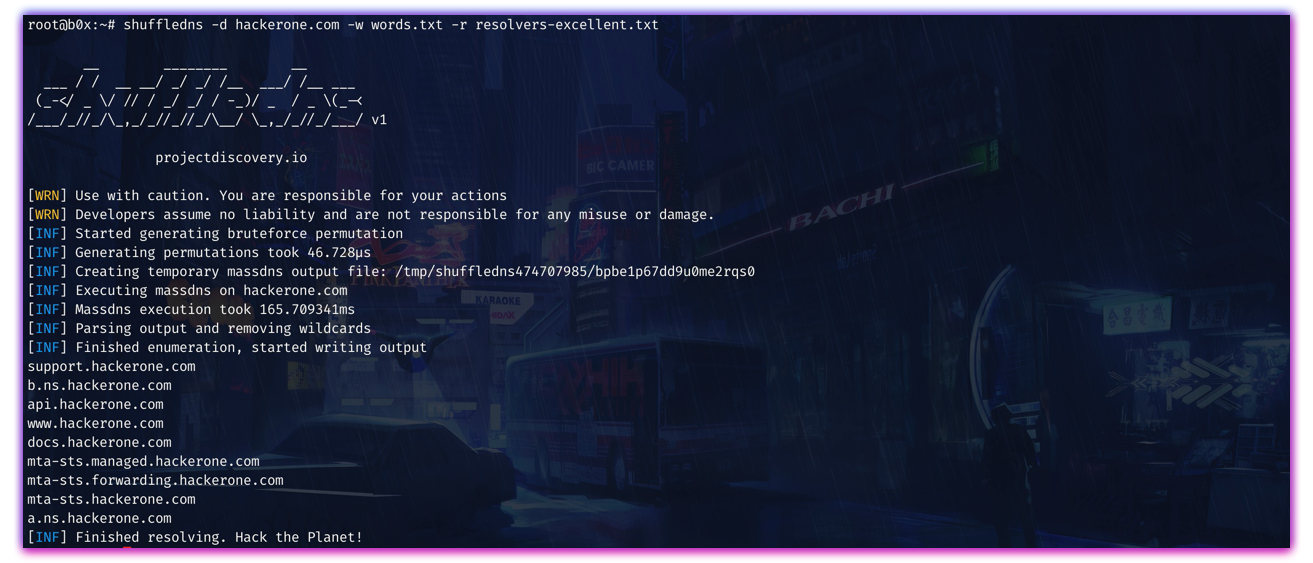
`shuffledns` 还支持使用给定字典对目标进行暴力破解。你可以使用 `w` 标志传入一个字典,该字典将用于生成排列组合,然后使用 massdns 进行解析。
```
shuffledns -d hackerone.com -w wordlist.txt -r resolvers.txt -mode bruteforce
```
这将使用字典 `wordlist.txt` 对 `hackerone.com` 运行该工具。与前面解析子域名的示例一样,域名暴力破解也可以通过标准输入来完成。
```
echo hackerone.com | shuffledns -w wordlist.txt -r resolvers.txt -mode bruteforce
```
|
## 处理泛解析
`shuffleDNS` 的一个特殊功能是它能够处理多层级基于 DNS 的泛解析,并且只需极少量的 DNS 请求即可完成。有时所有的子域名都会被解析,导致结果中出现大量垃圾数据。`shuffleDNS` 处理此问题的方式是跟踪有多少子域名指向同一个 IP,如果子域名的数量超过某个较小的阈值,它就会迭代地检查该 IP 对应主机在所有层级上的泛解析情况。
|
### 注意事项
- 泛解析过滤功能仅适用于域名 (`-d`) 输入。
- 解析或暴力破解一次只能执行其中一种操作。
### 许可证
`shuffledns` 基于 [GPL v3 许可证](https://github.com/projectdiscovery/shuffledns/blob/main/LICENSE.md) 发布