juice-shop/juice-shop
GitHub: juice-shop/juice-shop
OWASP 官方维护的现代化不安全 Web 应用,涵盖 OWASP Top Ten 等百余漏洞,专为安全培训、CTF 和漏洞演示设计。
Stars: 13344 | Forks: 18333
#  OWASP Juice Shop
[](https://owasp.org/projects/#sec-flagships)
[](https://github.com/juice-shop/juice-shop/releases/latest)
[](https://twitter.com/owasp_juiceshop)
[](https://reddit.com/r/owasp_juiceshop)
[](https://github.com/juice-shop/juice-shop/actions/workflows/ci.yml)
[](https://github.com/juice-shop/juice-shop/actions/workflows/release.yml)
[](https://coveralls.io/github/juice-shop/juice-shop?branch=develop)
[](https://dashboard.cypress.io/projects/3hrkhu/runs)
[](https://www.bestpractices.dev/projects/223)

[](CODE_OF_CONDUCT.md)
OWASP Juice Shop 可能是目前最现代、最先进的不安全 Web 应用程序!它可用于安全培训、意识演示、CTF 以及作为安全工具的实验对象!Juice Shop 包含了
[OWASP Top Ten](https://owasp.org/www-project-top-ten) 中的漏洞以及许多在现实世界应用程序中发现的其他安全缺陷!
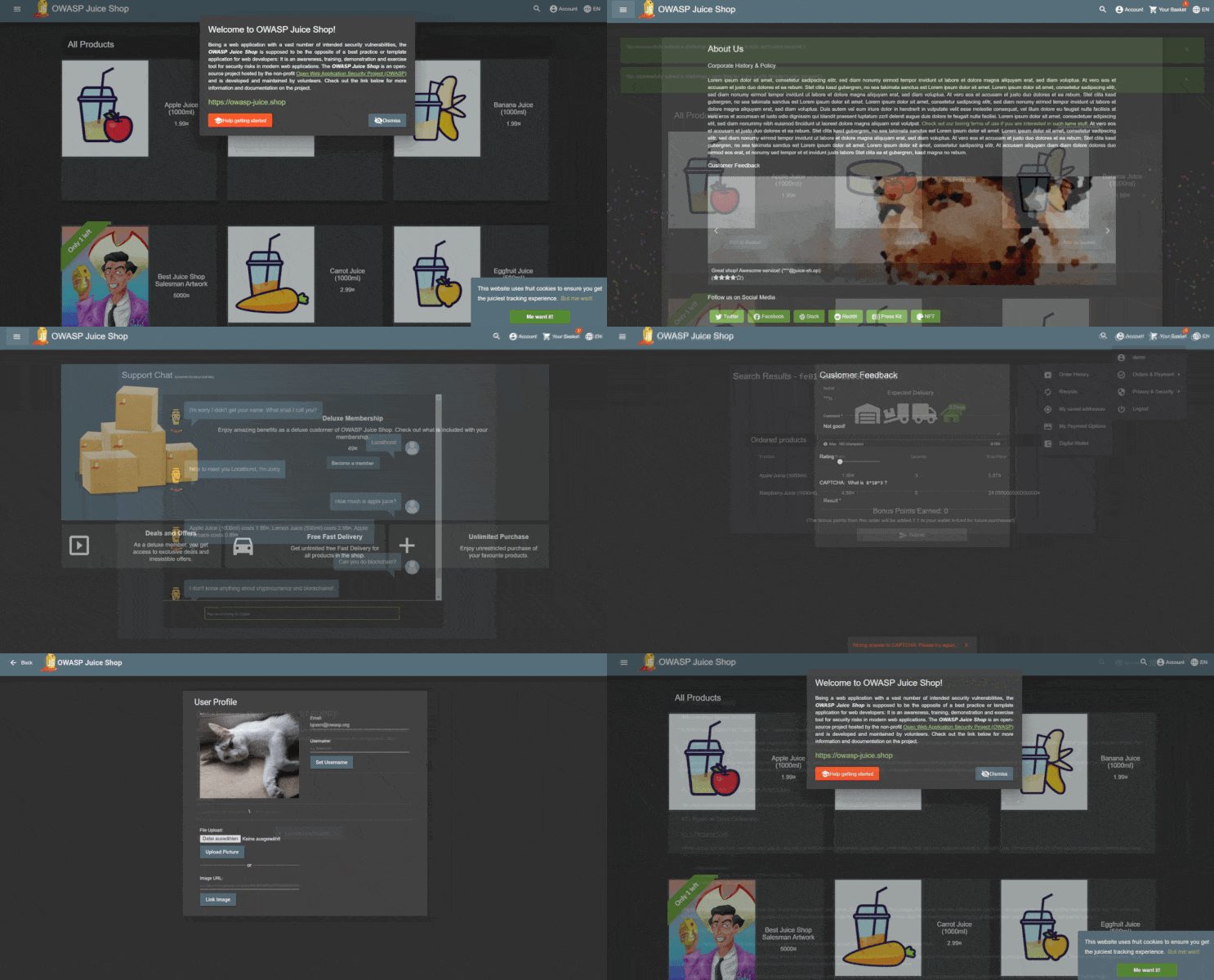
如需详细介绍、完整功能列表和架构概览,请访问官方项目页面:
## 目录
- [设置](#setup)
- [从源代码](#from-sources)
- [打包分发版](#packaged-distributions)
- [Docker 容器](#docker-container)
- [Vagrant](#vagrant)
- [演示](#demo)
- [文档](#documentation)
- [Node.js 版本兼容性](#nodejs-version-compatibility)
- [故障排除](#troubleshooting)
- [官方 companion guide](#official-companion-guide)
- [贡献](#contributing)
- [参考](#references)
- [周边商品](#merchandise)
- [捐赠](#donations)
- [贡献者](#contributors)
- [许可](#licensing)
## 设置
### 从源代码

1. 安装 [node.js](#nodejs-version-compatibility)
2. 运行 `git clone https://github.com/juice-shop/juice-shop.git --depth 1` (或者
clone [你自己的 fork](https://github.com/juice-shop/juice-shop/fork)
仓库)
3. 使用 `cd juice-shop` 进入克隆的文件夹
4. 运行 `npm install` (只需在首次启动前或更改源代码时执行)
5. 运行 `npm start`
6. 浏览至
### 打包分发版
[](https://github.com/juice-shop/juice-shop/releases/latest)
[](https://sourceforge.net/projects/juice-shop/)
[](https://sourceforge.net/projects/juice-shop/)
1. 在您的 Windows、MacOS 或 Linux 机器上安装 64 位 [node.js](#nodejs-version-compatibility)
2. 下载 `juice-shop-___x64.zip` (或
`.tgz`) 附件位于
[最新发布版](https://github.com/juice-shop/juice-shop/releases/latest)
3. 解压并使用 `cd` 进入解压后的文件夹
4. 运行 `npm start`
5. 浏览至
### Docker 容器
[](https://hub.docker.com/r/bkimminich/juice-shop)

[](https://microbadger.com/images/bkimminich/juice-shop
"Get your own image badge on microbadger.com")
[](https://microbadger.com/images/bkimminich/juice-shop
"Get your own version badge on microbadger.com")
1. 安装 [Docker](https://www.docker.com)
2. 运行 `docker pull bkimminich/juice-shop`
3. 运行 `docker run --rm -p 127.0.0.1:3000:3000 bkimminich/juice-shop`
4. 浏览至 (在 macOS 和 Windows 上,如果您使用的是 docker-machine 而不是原生 docker 安装,请浏览至
)
### Vagrant
1. 安装 [Vagrant](https://www.vagrantup.com/downloads.html) 和
[Virtualbox](https://www.virtualbox.org/wiki/Downloads)
2. 运行 `git clone https://github.com/juice-shop/juice-shop.git` (或者
clone [你自己的 fork](https://github.com/juice-shop/juice-shop/fork)
仓库)
3. 运行 `cd vagrant && vagrant up`
4. 浏览至 [192.168.56.110](http://192.168.56.110)
## 演示
欢迎查看最新版本的 OWASP Juice Shop:
## 文档
### Node.js 版本兼容性


OWASP Juice Shop 尽可能接近官方 [node.js LTS 日程](https://github.com/nodejs/LTS),正式支持以下版本的
[node.js](http://nodejs.org)。Docker 镜像和打包分发版会相应提供。
| node.js | 支持 | 已测试 | [打包分发版](#packaged-distributions) | [Docker 镜像](#docker-container) (来自 `master`) | [Docker 镜像](#docker-container) (来自 `develop`) |
|:--------|:-----------------------|:-------------------|:--------------------------------------------------|:-------------------------------------------------|:--------------------------------------------------|
| 25.x | :x: | :x: | | | |
| 24.x | :heavy_check_mark: | :heavy_check_mark: | Windows (`x64`), MacOS (`x64`), Linux (`x64`) | | `snapshot` (`linux/amd64`, `linux/arm64`) |
| 23.x | ( :heavy_check_mark: ) | :x: | | | |
| 22.x | :heavy_check_mark: | :heavy_check_mark: | Windows (`x64`), MacOS (`x64`), Linux (`x64`) | `latest` (`linux/amd64`, `linux/arm64`) | |
| 21.x | ( :heavy_check_mark: ) | :x: | | | |
| 20.x | :heavy_check_mark: | :heavy_check_mark: | Windows (`x64`), MacOS (`x64`), Linux (`x64`) | | |
| <20.x | :x: | :x: | | | |
Juice Shop 仅在上述每个 node.js 版本的_最新 `.x` 次版本_上进行自动测试!
无法保证较旧的 node.js 次版本发布版始终能与 Juice Shop 一起正常工作!
请确保您选择的版本保持最新。
### 故障排除
[](https://gitter.im/bkimminich/juice-shop)
如果您在应用程序设置方面需要帮助,请查看
[我们现有的_故障排除_](https://pwning.owasp-juice.shop/companion-guide/latest/part4/troubleshooting.html)
指南。如果这不能解决您的问题,请在
[Gitter Chat](https://gitter.im/bkimminich/juice-shop) 中发布您的具体问题或疑问,社区成员会尽力为您提供帮助。
:stop_sign: **请避免为支持请求或问题开启 GitHub issues!**
### 官方 companion guide
[](https://www.goodreads.com/review/edit/49557240)
OWASP Juice Shop 附带一本官方配套指南电子书。它将为您全面概述应用程序中发现的所有
漏洞,包括如何发现和利用它们的提示。在附录中,您甚至
可以找到每个挑战的完整分步解决方案。其中还包含
[自定义品牌重塑](https://pwning.owasp-juice.shop/companion-guide/latest/part4/customization.html)、
[CTF 支持](https://pwning.owasp-juice.shop/companion-guide/latest/part4/ctf.html)、
[培训师指南](https://pwning.owasp-juice.shop/companion-guide/latest/part4/trainers.html)
以及更多内容的详尽文档。
[Pwning OWASP Juice Shop](https://leanpub.com/juice-shop) 根据
[CC BY-NC-ND 4.0](https://creativecommons.org/licenses/by-nc-nd/4.0/)
发布,并在 LeanPub 上以 PDF、Kindle 和 ePub 格式**免费**提供。您也可以
[在线浏览完整内容](https://pwning.owasp-juice.shop)!
[ ](https://leanpub.com/juice-shop)
[
](https://leanpub.com/juice-shop)
[ ](https://leanpub.com/juice-shop)
## 贡献
[](https://github.com/juice-shop/juice-shop/graphs/contributors)
[](http://standardjs.com/)
[](https://crowdin.com/project/owasp-juice-shop)


我们非常乐意接纳新的贡献者!请查看
[CONTRIBUTING.md](CONTRIBUTING.md) 以了解如何
[为我们的代码库做贡献](CONTRIBUTING.md#code-contributions) 或
[翻译成不同语言](CONTRIBUTING.md#i18n-contributions)!
## 参考
您是否撰写过有关或提及 OWASP Juice Shop 的博客文章、杂志文章或播客?或者您是否举办或
参加过提及此项目的会议演讲、聚会、黑客研讨会或公开培训?
通过 Fork 并打开 Pull Request,将其添加到我们不断增长的 [REFERENCES.md](REFERENCES.md) 列表中!
## 周边商品
* 在 [Spreadshirt.com](http://shop.spreadshirt.com/juiceshop) 和
[Spreadshirt.de](http://shop.spreadshirt.de/juiceshop) 上,您可以买到带有官方
OWASP Juice Shop logo 的一些周边(T 恤、连帽衫、马克杯)
* 在
[StickerYou.com](https://www.stickeryou.com/products/owasp-juice-shop/794)
上,您可以获得 OWASP Juice Shop logo 的变体作为单个贴纸来装饰您的笔记本电脑。他们还可以打印
磁铁、烫画、贴纸页和临时纹身。
## 许可
[](LICENSE)
本程序是自由软件:您可以根据 [MIT 许可证](LICENSE) 的条款重新分发和/或修改它。
OWASP Juice Shop 及其所有贡献版权归 Bjoern Kimminich 和 OWASP Juice Shop 贡献者所有
2014-2026。

](https://leanpub.com/juice-shop)
## 贡献
[](https://github.com/juice-shop/juice-shop/graphs/contributors)
[](http://standardjs.com/)
[](https://crowdin.com/project/owasp-juice-shop)


我们非常乐意接纳新的贡献者!请查看
[CONTRIBUTING.md](CONTRIBUTING.md) 以了解如何
[为我们的代码库做贡献](CONTRIBUTING.md#code-contributions) 或
[翻译成不同语言](CONTRIBUTING.md#i18n-contributions)!
## 参考
您是否撰写过有关或提及 OWASP Juice Shop 的博客文章、杂志文章或播客?或者您是否举办或
参加过提及此项目的会议演讲、聚会、黑客研讨会或公开培训?
通过 Fork 并打开 Pull Request,将其添加到我们不断增长的 [REFERENCES.md](REFERENCES.md) 列表中!
## 周边商品
* 在 [Spreadshirt.com](http://shop.spreadshirt.com/juiceshop) 和
[Spreadshirt.de](http://shop.spreadshirt.de/juiceshop) 上,您可以买到带有官方
OWASP Juice Shop logo 的一些周边(T 恤、连帽衫、马克杯)
* 在
[StickerYou.com](https://www.stickeryou.com/products/owasp-juice-shop/794)
上,您可以获得 OWASP Juice Shop logo 的变体作为单个贴纸来装饰您的笔记本电脑。他们还可以打印
磁铁、烫画、贴纸页和临时纹身。
## 许可
[](LICENSE)
本程序是自由软件:您可以根据 [MIT 许可证](LICENSE) 的条款重新分发和/或修改它。
OWASP Juice Shop 及其所有贡献版权归 Bjoern Kimminich 和 OWASP Juice Shop 贡献者所有
2014-2026。

](https://leanpub.com/juice-shop)
[](https://leanpub.com/juice-shop)
## 贡献
[](https://github.com/juice-shop/juice-shop/graphs/contributors)
[](http://standardjs.com/)
[](https://crowdin.com/project/owasp-juice-shop)


我们非常乐意接纳新的贡献者!请查看
[CONTRIBUTING.md](CONTRIBUTING.md) 以了解如何
[为我们的代码库做贡献](CONTRIBUTING.md#code-contributions) 或
[翻译成不同语言](CONTRIBUTING.md#i18n-contributions)!
## 参考
您是否撰写过有关或提及 OWASP Juice Shop 的博客文章、杂志文章或播客?或者您是否举办或
参加过提及此项目的会议演讲、聚会、黑客研讨会或公开培训?
通过 Fork 并打开 Pull Request,将其添加到我们不断增长的 [REFERENCES.md](REFERENCES.md) 列表中!
## 周边商品
* 在 [Spreadshirt.com](http://shop.spreadshirt.com/juiceshop) 和
[Spreadshirt.de](http://shop.spreadshirt.de/juiceshop) 上,您可以买到带有官方
OWASP Juice Shop logo 的一些周边(T 恤、连帽衫、马克杯)
* 在
[StickerYou.com](https://www.stickeryou.com/products/owasp-juice-shop/794)
上,您可以获得 OWASP Juice Shop logo 的变体作为单个贴纸来装饰您的笔记本电脑。他们还可以打印
磁铁、烫画、贴纸页和临时纹身。
## 许可
[](LICENSE)
本程序是自由软件:您可以根据 [MIT 许可证](LICENSE) 的条款重新分发和/或修改它。
OWASP Juice Shop 及其所有贡献版权归 Bjoern Kimminich 和 OWASP Juice Shop 贡献者所有
2014-2026。
标签:Angular, CISA项目, CMS安全, DNS解析, GNU通用公共许可证, Grype, HTTP工具, JavaScript, MITM代理, Node.js, OPA, OWASP Top 10, SQLite, Web安全, 安全意识, 安全教育, 开源项目, 故意漏洞, 暗色界面, 漏洞修复, 漏洞演练, 网络安全培训, 网络安全审计, 自动化攻击, 蓝队分析, 请求拦截, 靶场, 黑客技术