claabs/epicgames-freegames-node
GitHub: claabs/epicgames-freegames-node
自动监控并领取Epic Games Store每周免费游戏的Node.js自动化工具
Stars: 1907 | Forks: 112
# Epic Games Store 每周免费游戏
自动登录并查找 Epic Games Store 上可用的免费游戏。
为您发送一个预填充的结账链接,以便您在登录后完成结账。
支持多账户、登录会话和计划运行。
## 设置
### JSON 配置
该工具可以通过 JSON 和环境变量的组合进行配置。配置文件支持 [JSON5](https://json5.org/) 语法(注释、尾随逗号等)。对于每个属性,JSON 配置值的优先级高于相应的环境变量值。
有关每个选项的详细信息、默认值和环境变量键,请参阅 [配置文档站点](https://claabs.github.io/epicgames-freegames-node/classes/AppConfig.html)。
配置文件存储在挂载的 `/usr/app/config` 卷中,可以命名为 `config.json` 或 `config.json5`。
#### `config.json` 或 `config.json5`
```
{
"runOnStartup": true,
"cronSchedule": "0 0,6,12,18 * * *",
"logLevel": "info",
"webPortalConfig": {
"baseUrl": "https://epic.example.com",
},
"accounts": [
{
"email": "example@gmail.com",
},
],
"notifiers": [
// You may configure as many of any notifier as needed
// Here are some examples of each type
{
"type": "email",
"smtpHost": "smtp.gmail.com",
"smtpPort": 587,
"emailSenderAddress": "hello@gmail.com",
"emailSenderName": "Epic Games Captchas",
"emailRecipientAddress": "hello@gmail.com",
"secure": false,
"auth": {
"user": "hello@gmail.com",
"pass": "abc123",
},
},
{
"type": "discord",
"webhookUrl": "https://discord.com/api/webhooks/123456789123456789/A-abcdefghijklmn-abcdefghijklmnopqrst12345678-abcdefghijklmnop123456",
// Optional list of users or roles to mention
"mentionedUsers": ["914360712086843432"],
"mentionedRoles": ["734548250895319070"],
},
{
"type": "telegram",
// Optional Custom TELEGRAM server URL
"apiUrl": "https://api.telegram.org",
"token": "644739147:AAGMPo-Jz3mKRnHRTnrPEDi7jUF1vqNOD5k",
"chatId": "-987654321",
"topic": 5,
},
{
"type": "apprise",
"apiUrl": "http://192.168.1.2:8000",
"urls": "mailto://user:pass@gmail.com",
},
{
"type": "pushover",
"token": "a172fyyl9gw99p2xi16tq8hnib48p2",
"userKey": "uvgidym7l5ggpwu2r8i1oy6diaapll",
},
{
"type": "gotify",
"apiUrl": "https://gotify.net",
"token": "SnL-wAvmfo_QT",
},
{
"type": "homeassistant",
"instance": "https://homeassistant.example.com",
"token": "eyJhbGciOiJIUzI1NiIsInR5cCI6IkpXVCJ9.eyJzdWIiOiIxMjM0NTY3ODkwIiwibmFtZSI6IkpvaG4gRG9lIiwiaWF0IjoxNTE2MjM5MDIyfQ.SflKxwRJSMeKKF2QT4fwpMeJf36POk6yJV_adQssw5c",
"notifyservice": "mobile_app_smartphone_name",
},
{
"type": "bark",
// your bark key
"key": "xxxxxxxxxxxxxxxxxxxxxx",
// bark title, optional, default: 'epicgames-freegames'
"title": "epicgames-freegames",
// bark group, optional, default: 'epicgames-freegames'
"group": "epicgames-freegames",
// bark private service address, optional, default: 'https://api.day.app'
"apiUrl": "https://api.day.app"
},
{
"type": "ntfy",
"webhookUrl": "https://ntfy.example.com/mytopic",
"priority": "urgent",
"token": "tk_mytoken"
},
{
"type":"webhook",
//url of your webhook server
"url":"https://webhook.site/my_uuid",
//Optional headers
"headers": {
"Authentication": "Bearer 123456"
}
},
],
}
```
### Web 服务器
该项目偶尔会要求您通过 [设备代码认证](https://github.com/MixV2/EpicResearch/blob/master/docs/auth/grant_types/device_code.md) 登录。Epic Games 的设备代码会话在 10 分钟后过期,因此该项目使用 Web 服务器和重定向来避免每 10 分钟向您发送一个新链接。运行 Web 服务器有两种选择:
#### Web 服务器配置
如果您熟悉托管 Web 服务器和/或反向代理,请按照以下步骤操作:
1. 在您的 Docker 运行配置中暴露端口 3000(例如 `-p 81:3000` 将主机的端口 81 映射到容器的端口 3000)
2. 如果您想从网络外部访问验证码求解页面,请设置任何端口转发/反向代理/DNS
3. 在配置中设置 `webPortalConfig.baseUrl`
#### Localtunnel 设置
如果您在网络上无法进行端口转发/反向代理,您仍然可以通过设置以下内容远程访问 Web 服务器:
```
{
"webPortalConfig": {
"localtunnel": true,
},
}
```
在您的 `config.json` 中。
### 通知
每种通知方法都有独特的设置说明。请阅读配置站点上的其文档([通知方法](https://claabs.github.io/epicgames-freegames-node/classes/AppConfig.html#notifiers))以获取确切详细信息和说明。[示例配置](https://claabs.github.io/epicgames-freegames-node/classes/AppConfig.html) 也可以作为示例参考。
### 测试通知和 Web 服务器
由于可能并不总是需要用户操作,因此可以手动测试通知方法和 Web 服务器。基本上,您只需要添加:
```
"testNotifiers": true,
```
到您的 `config.json` 的根目录。有关更多详细信息,请查看 [配置文档](https://claabs.github.io/epicgames-freegames-node/classes/AppConfig.html#testNotifiers)。
注意:为了优化待机内存使用,当进程未运行时,Web 服务器不会运行。Web 服务器仅在计划运行期间可用。
### Docker 配置
此镜像可从 [GitHub Container Registry](https://github.com/claabs/epicgames-freegames-node/pkgs/container/epicgames-freegames-node) 和 [Docker Hub](https://hub.docker.com/repository/docker/charlocharlie/epicgames-freegames) 获取:
* `ghcr.io/claabs/epicgames-freegames-node:latest`
* `charlocharlie/epicgames-freegames:latest`
如果您[遇到 Chromium 启动问题](https://github.com/claabs/epicgames-freegames-node/issues/164)(卡在登录/通知环节),可以尝试 Debian 镜像:
* `ghcr.io/claabs/epicgames-freegames-node:debian`
* `charlocharlie/epicgames-freegames:debian`
如果您使用完整的 JSON 配置,剩下的 Docker 可配置项只有 [端口](#ports) 和 [卷](#volumes)。
#### 环境变量
大多数配置选项可以通过环境变量设置。请在 [配置文档](https://claabs.github.io/epicgames-freegames-node/classes/AppConfig.html) 中查找每个选项键的 `env` 标签。
如果出于某种原因您想更改默认配置目录或配置文件名,可以使用 `CONFIG_DIR` 和 `CONFIG_FILE_NAME` 作为环境变量。
#### 端口
| 主机端口 | 容器端口 | 描述 |
|-----------|----------------|-------------------------------------------------------------------------------|
| `3000` | `3000` | 托管验证码求解页面的 Web 服务器的端口映射 |
#### 卷
| 主机位置 | 容器位置 | 模式 | 描述 |
|-----------------|--------------------|------|-------------------------------------------|
| `/my/host/dir/` | `/usr/app/config` | `rw` | 配置和 cookie 文件的位置 |
#### 内存限制
建议添加 `-m 2g` 作为 `docker run` 参数,以将最大内存使用量设置为 2GB。Chromium 进程有时可能会失控,如果没有限制,您的系统最终可能会死机。
### Docker 运行
#### 使用 JSON 配置
`$ docker run -d -v /my/host/dir/:/usr/app/config:rw -p 3000:3000 -m 2g ghcr.io/claabs/epicgames-freegames-node:latest`
#### 不使用 JSON 配置
如果不使用 JSON 配置,您只能配置一个账户。
`$ docker run -d -e TZ=America/Chicago -e EMAIL=example@gmail.com -e RUN_ON_STARTUP=true -e BASE_URL=https://example.com -e SMTP_HOST=smtp.gmail.com -e SMTP_PORT=587 -e EMAIL_SENDER_ADDRESS=hello@gmail.com -e EMAIL_SENDER_NAME="Epic Games Captchas" -e EMAIL_RECIPIENT_ADDRESS=hello@gmail.com -e SMTP_SECURE=true -e SMTP_USERNAME=hello@gmail.com -e SMTP_PASSWORD=abc123 -v /my/host/dir/:/usr/app/config:rw -p 3000:3000 -m 2g ghcr.io/claabs/epicgames-freegames-node:latest`
### Cookie 导入
如果您在使用设备代码认证登录时遇到问题,可以导入 Cookie 以进行临时会话。
1. 按照以下说明设置容器
2. 在您的 Web 浏览器中,勾选“记住我”登录 Epic Games Store。
3. 安装 [EditThisCookie](http://www.editthiscookie.com/) 浏览器扩展。
4. 在查看 Epic Games Store 页面时,打开 EditThisCookie 扩展窗口,将 URL 更改为 `https://www.epicgames.com/id`,然后点击导出按钮:
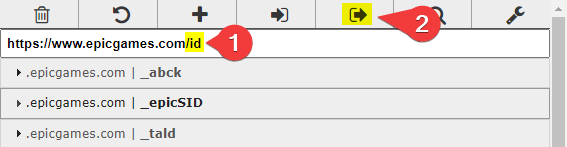
5. 在您挂载的 `./config` 文件夹中,创建 `-cookies.json`(例如 `me@example.com-cookies.json`),并将您的 Cookie 粘贴进去。
6. 启动容器,Cookie 将自动转换为新格式。
#### Cookie 导入注意事项
* 如果您点击复制了 Cookie 的浏览器会话上的“注销”,容器可能会中断。
* 如果您定期运行容器,它应该会自动刷新 Cookie 并让您保持登录状态一段时间。
## 不使用 Docker 运行
如果出于某种原因您不想使用 Docker 运行此工具,可以通过克隆此仓库并安装 Node.js 从源代码运行。
1. 从 Github 获取此仓库
* 使用 git 克隆(推荐):`git clone https://github.com/claabs/epicgames-freegames-node.git`
* 或下载并解压 ZIP 压缩包:[epicgames-freegames-node](https://github.com/claabs/epicgames-freegames-node/archive/master.zip)
2. 在克隆/解压的目录中创建 `config` 文件夹
3. 创建 [JSON 配置](#json-configuration)
4. [安装 Node.js 22](https://nodejs.org/) 或更高版本
5. 安装 Node.js 依赖
* 启动终端并导航到克隆/解压的目录
* 运行 `npm i`
6. 启动应用程序:`npm run start`
7. 使用 Git 时更新:
* `git pull`
* `npm i`
## 其他
### v4 到 v5 迁移
在 v5 中,添加或删除了几个选项。添加/删除的选项不应影响现有的 v4 配置,但可能需要更改您的 `config.json` 以获得稳定的解决方案。
#### 已更改
* `cronSchedule`:默认值更改为每六小时一次。您应该将 cron 计划更改为比每 8 小时更频繁地运行,因为设备代码认证刷新令牌在 8 小时后过期。
#### 已移除
* `account.password`:不再使用登录凭据
* `account.totp`:不再使用登录凭据
* `noHumanErrorHelp`:购买不再自动化
* `hcaptchaAccessibilityUrl`:在 v4 中已弃用
* `email`:在 v4 中已弃用,请使用带有 `"type": "email"` 的 `notifiers`
* `baseUrl`:在 v4 中已弃用,请使用 `webPortalConfig.baseUrl`
* `onlyWeekly`:在 v4 中已弃用,请使用 `searchStrategy`
### 致谢
感谢 [epicgames-weekly-freegames](https://github.com/Ricardo-Osorio/epicgames-weekly-freegames) 提供的灵感。
感谢 [EpicResearch](https://github.com/MixV2/EpicResearch) 提供的文档,使得设备代码认证成为可能。
标签:BeEF, Discord, DNS解析, Docker, Epic Games, GNU通用公共许可证, JSON5, MITM代理, Node.js, PE 加载器, Webhook, 会话管理, 免费游戏, 力导向图, 多账户管理, 安全防御评估, 定时任务, 开源项目, 游戏, 爬虫, 自动化攻击, 自动领取, 请求拦截, 购物车, 通知推送, 邮件通知