martin-ger/esp32_nat_router
GitHub: martin-ger/esp32_nat_router
将 ESP32 变身为支持 WireGuard VPN、防火墙、流量抓取和 AI 控制的便携式 NAT 路由器固件。
Stars: 2008 | Forks: 449
# ESP32 NAT 路由器
这是一个将 ESP32 用作 WiFi NAT 路由器的固件。它在 AP 接口的网络和作为上行链路网络的 STA 或 ETH 接口之间进行路由。它还可以作为使用 WireGuard 作为上行链路的 VPN 路由器工作。
**应用场景:**
- 现有 WiFi 网络的简单范围扩展器
- 为访客或 IoT 设备提供具有不同 SSID/密码和访问限制的附加 WiFi 网络
- 使用 WireGuard 的 VPN 路由器
- 将企业 (WPA2-Enterprise) 网络转换为适用于简单设备的常规 (WPA-PSK) 网络的转换器
- 具有以太网上行链路的经典 WiFi 路由器
- 用于通过 Agentic AI 控制网络的 MCP 服务器
- Home Assistant IoT 网络中的在线检测和网络监控
- WiFi 设备的调试和监控
## 主要特性
- **NAT 路由**:具有 IP 转发功能的完整 WiFi NAT 路由器(吞吐量 15+ Mbps)
- **WireGuard VPN**:用于上游流量的可选 VPN 隧道,支持自动 MSS 钳制和 Path MTU
- **DHCP 预留**:为特定 MAC 地址分配固定 IP
- **端口转发**:将外部端口映射到内部设备
- **防火墙**:定义 ACL 以限制或监控流量
- **PCAP 捕获**:实时数据包捕获可流式传输到 Wireshark 或其他网络工具
- **WPA2-Enterprise 支持**:连接到企业网络 (PEAP, TTLS, TLS) 并将其转换为 WPA2-PSK
- **以太网支持**:使用带有 LAN8720 PHY 的 W32-ET01 板获取以太网上行链路
- **Web 界面**:带有密码保护的 Web UI,便于配置
- **串行控制台**:用于高级配置的完整 CLI
- **远程控制台**:通过 TCP 访问的网络 CLI(受密码保护,支持按接口绑定)
- **LED 状态指示灯**:连接和流量状态的可视化反馈
- **OLED 显示屏**:在 72x40 I2C SSD1306 OLED 上的状态显示(见于部分 ESP32-C3 mini 开发板)
- **MQTT Home Assistant**:通过 HA 自动发现将遥测数据和每个客户端的统计信息发布到 MQTT
- **MCP 网桥 (AI-Ready)**:BETA - 通过 Model Context Protocol 从 AI 助手 (Claude 等) 控制路由器
由于 RAM 限制(每个客户端约占 5KB),同时连接的 WiFi 客户端最大数量为 8 个(ESP32c3 上为 5 个)。Web 界面、PCAP 捕获、WireGuard VPN、远程控制台、WPA Enterprise 和 MQTT Home Assistant 等功能每项都需要数 KB 的额外 RAM。因此同时使用所有功能可能会导致 ESP32 资源耗尽。如有疑问,请查看剩余堆大小。
该代码最初基于 [Console Component](https://docs.espressif.com/projects/esp-idf/en/latest/api-guides/console.html#console) 和 [esp-idf-nat-example](https://github.com/jonask1337/esp-idf-nat-example)。
## 首次启动
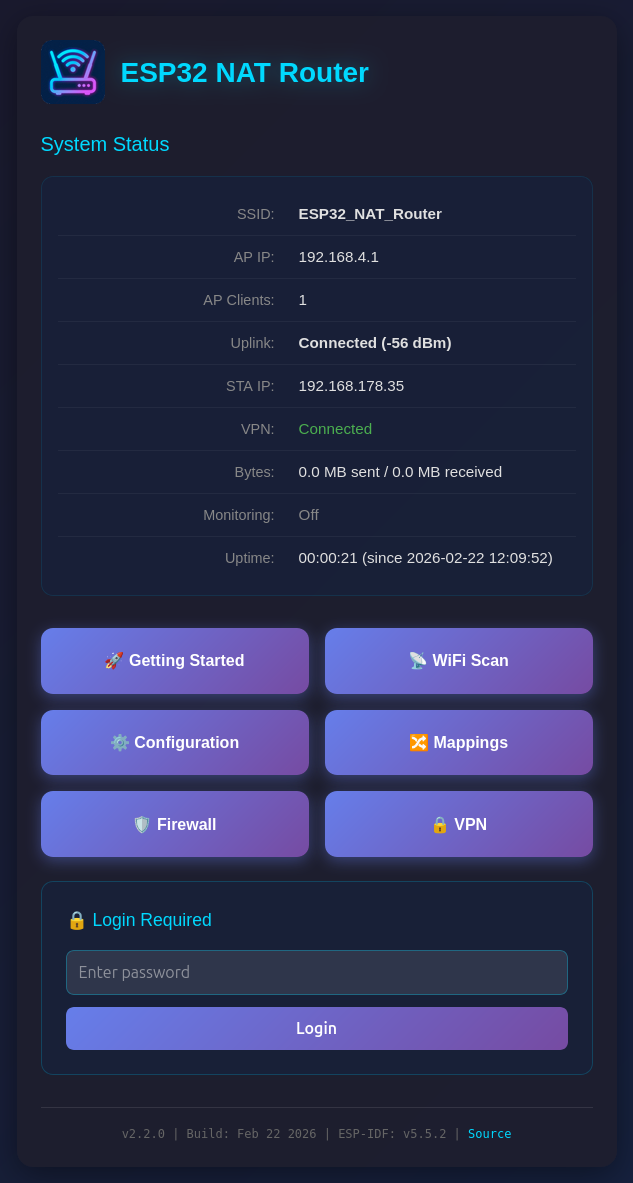
首次启动后,ESP32 NAT Router 将提供一个开放 AP 且 SSID 为 "ESP32_NAT_Router" 的 WiFi 网络。配置可以通过 Web 界面或串行控制台完成。
1. 连接到 **ESP32_NAT_Router** WiFi 网络
2. 在浏览器中打开 **http://192.168.4.1**
3. 在入门页面上配置上行 WiFi 和 AP 设置
4. 点击 **Save & Reboot**
 ## 烧录预构建二进制文件
安装 [esptool](https://github.com/espressif/esptool) 并使用 `firmware_*` 目录中的预构建二进制文件进行烧录。以 ESP32 为例:
```
esptool.py --chip esp32 \
--before default_reset --after hard_reset write_flash \
-z --flash_mode dio --flash_freq 40m --flash_size detect \
0x1000 firmware_esp32/bootloader.bin \
0x8000 firmware_esp32/partition-table.bin \
0x10000 firmware_esp32/esp32_nat_router.bin
```
预构建二进制文件适用于:**ESP32**、**ESP32-C3**、**ESP32-C6**、**ESP32-S3** 和 **WT32-ETH01**(以太网)。
有关特定芯片的命令和 Flash Download Tool GUI,请参阅 [Installation](https://github.com/martin-ger/esp32_nat_router/wiki/Installation) Wiki 页面。
## 文档
完整文档可在 [Wiki](https://github.com/martin-ger/esp32_nat_router/wiki) 中找到:
| 页面 | 描述 |
|------|-------------|
| [Web Interface](https://github.com/martin-ger/esp32_nat_router/wiki/Web-Interface) | Web UI 页面、安全、备份/恢复 |
| [WiFi and Network](https://github.com/martin-ger/esp32_nat_router/wiki/WiFi-and-Network) | DHCP 预留、端口转发、WPA2-Enterprise、TTL、DNS |
| [Firewall](https://github.com/martin-ger/esp32_nat_router/wiki/Firewall) | ACL 数据包过滤规则和配置 |
| [Packet Capture](https://github.com/martin-ger/esp32_nat_router/wiki/Packet-Capture) | PCAP 流式传输到 Wireshark |
| [WireGuard VPN](https://github.com/martin-ger/esp32_nat_router/wiki/WireGuard-VPN) | VPN 隧道配置和服务器设置 |
| [Remote Console](https://github.com/martin-ger/esp32_nat_router/wiki/Remote-Console) | 通过 TCP 访问的网络 CLI |
| [MQTT Home Assistant](https://github.com/martin-ger/esp32_nat_router/wiki/MQTT-Home-Assistant) | 具有 HA 自动发现功能的 MQTT 遥测 |
| [MCP Bridge](https://github.com/martin-ger/esp32_nat_router/wiki/MCP-Bridge) | 通过 Model Context Protocol 集成 AI 助手 |
| [CLI Reference](https://github.com/martin-ger/esp32_nat_router/wiki/CLI-Reference) | 串行/远程控制台的完整命令列表 |
| [Hardware](https://github.com/martin-ger/esp32_nat_router/wiki/Hardware) | LED 状态、OLED 显示屏、天线开关、恢复出厂设置 |
| [WT32-ETH01](https://github.com/martin-ger/esp32_nat_router/wiki/WT32-ETH01) | 以太网上行链路变体 (LAN8720 PHY) |
| [Installation](https://github.com/martin-ger/esp32_nat_router/wiki/Installation) | 烧录预构建二进制文件 |
| [Building](https://github.com/martin-ger/esp32_nat_router/wiki/Building) | 使用 ESP-IDF 或 PlatformIO 从源代码编译 |
## 从源代码构建
```
idf.py menuconfig # Enable LWIP IP forwarding, NAT, and L2-to-L3 copy
idf.py build
idf.py flash monitor
```
有关 PlatformIO、WT32-ETH01 和多目标构建说明,请参阅 [Building](https://github.com/martin-ger/esp32_nat_router/wiki/Building) Wiki 页面。
## 许可证
WireGuard 子模块具有以下许可证:
```
Copyright (c) 2021 Kenta Ida (fuga@fugafuga.org)
The original license is below:
Copyright (c) 2021 Daniel Hope (www.floorsense.nz)
All rights reserved.
Redistribution and use in source and binary forms, with or without modification,
are permitted provided that the following conditions are met:
* Redistributions of source code must retain the above copyright notice, this
list of conditions and the following disclaimer.
* Redistributions in binary form must reproduce the above copyright notice, this
list of conditions and the following disclaimer in the documentation and/or
other materials provided with the distribution.
* Neither the name of "Floorsense Ltd", "Agile Workspace Ltd" nor the names of
its contributors may be used to endorse or promote products derived from this
software without specific prior written permission.
THIS SOFTWARE IS PROVIDED BY THE COPYRIGHT HOLDERS AND CONTRIBUTORS "AS IS" AND
ANY EXPRESS OR IMPLIED WARRANTIES, INCLUDING, BUT NOT LIMITED TO, THE IMPLIED
WARRANTIES OF MERCHANTABILITY AND FITNESS FOR A PARTICULAR PURPOSE ARE
DISCLAIMED. IN NO EVENT SHALL THE COPYRIGHT OWNER OR CONTRIBUTORS BE LIABLE FOR
ANY DIRECT, INDIRECT, INCIDENTAL, SPECIAL, EXEMPLARY, OR CONSEQUENTIAL DAMAGES
(INCLUDING, BUT NOT LIMITED TO, PROCUREMENT OF SUBSTITUTE GOODS OR SERVICES;
LOSS OF USE, DATA, OR PROFITS; OR BUSINESS INTERRUPTION) HOWEVER CAUSED AND ON
ANY THEORY OF LIABILITY, WHETHER IN CONTRACT, STRICT LIABILITY, OR TORT
(INCLUDING NEGLIGENCE OR OTHERWISE) ARISING IN ANY WAY OUT OF THE USE OF THIS
SOFTWARE, EVEN IF ADVISED OF THE POSSIBILITY OF SUCH DAMAGE.
Author: Daniel Hope
## 烧录预构建二进制文件
安装 [esptool](https://github.com/espressif/esptool) 并使用 `firmware_*` 目录中的预构建二进制文件进行烧录。以 ESP32 为例:
```
esptool.py --chip esp32 \
--before default_reset --after hard_reset write_flash \
-z --flash_mode dio --flash_freq 40m --flash_size detect \
0x1000 firmware_esp32/bootloader.bin \
0x8000 firmware_esp32/partition-table.bin \
0x10000 firmware_esp32/esp32_nat_router.bin
```
预构建二进制文件适用于:**ESP32**、**ESP32-C3**、**ESP32-C6**、**ESP32-S3** 和 **WT32-ETH01**(以太网)。
有关特定芯片的命令和 Flash Download Tool GUI,请参阅 [Installation](https://github.com/martin-ger/esp32_nat_router/wiki/Installation) Wiki 页面。
## 文档
完整文档可在 [Wiki](https://github.com/martin-ger/esp32_nat_router/wiki) 中找到:
| 页面 | 描述 |
|------|-------------|
| [Web Interface](https://github.com/martin-ger/esp32_nat_router/wiki/Web-Interface) | Web UI 页面、安全、备份/恢复 |
| [WiFi and Network](https://github.com/martin-ger/esp32_nat_router/wiki/WiFi-and-Network) | DHCP 预留、端口转发、WPA2-Enterprise、TTL、DNS |
| [Firewall](https://github.com/martin-ger/esp32_nat_router/wiki/Firewall) | ACL 数据包过滤规则和配置 |
| [Packet Capture](https://github.com/martin-ger/esp32_nat_router/wiki/Packet-Capture) | PCAP 流式传输到 Wireshark |
| [WireGuard VPN](https://github.com/martin-ger/esp32_nat_router/wiki/WireGuard-VPN) | VPN 隧道配置和服务器设置 |
| [Remote Console](https://github.com/martin-ger/esp32_nat_router/wiki/Remote-Console) | 通过 TCP 访问的网络 CLI |
| [MQTT Home Assistant](https://github.com/martin-ger/esp32_nat_router/wiki/MQTT-Home-Assistant) | 具有 HA 自动发现功能的 MQTT 遥测 |
| [MCP Bridge](https://github.com/martin-ger/esp32_nat_router/wiki/MCP-Bridge) | 通过 Model Context Protocol 集成 AI 助手 |
| [CLI Reference](https://github.com/martin-ger/esp32_nat_router/wiki/CLI-Reference) | 串行/远程控制台的完整命令列表 |
| [Hardware](https://github.com/martin-ger/esp32_nat_router/wiki/Hardware) | LED 状态、OLED 显示屏、天线开关、恢复出厂设置 |
| [WT32-ETH01](https://github.com/martin-ger/esp32_nat_router/wiki/WT32-ETH01) | 以太网上行链路变体 (LAN8720 PHY) |
| [Installation](https://github.com/martin-ger/esp32_nat_router/wiki/Installation) | 烧录预构建二进制文件 |
| [Building](https://github.com/martin-ger/esp32_nat_router/wiki/Building) | 使用 ESP-IDF 或 PlatformIO 从源代码编译 |
## 从源代码构建
```
idf.py menuconfig # Enable LWIP IP forwarding, NAT, and L2-to-L3 copy
idf.py build
idf.py flash monitor
```
有关 PlatformIO、WT32-ETH01 和多目标构建说明,请参阅 [Building](https://github.com/martin-ger/esp32_nat_router/wiki/Building) Wiki 页面。
## 许可证
WireGuard 子模块具有以下许可证:
```
Copyright (c) 2021 Kenta Ida (fuga@fugafuga.org)
The original license is below:
Copyright (c) 2021 Daniel Hope (www.floorsense.nz)
All rights reserved.
Redistribution and use in source and binary forms, with or without modification,
are permitted provided that the following conditions are met:
* Redistributions of source code must retain the above copyright notice, this
list of conditions and the following disclaimer.
* Redistributions in binary form must reproduce the above copyright notice, this
list of conditions and the following disclaimer in the documentation and/or
other materials provided with the distribution.
* Neither the name of "Floorsense Ltd", "Agile Workspace Ltd" nor the names of
its contributors may be used to endorse or promote products derived from this
software without specific prior written permission.
THIS SOFTWARE IS PROVIDED BY THE COPYRIGHT HOLDERS AND CONTRIBUTORS "AS IS" AND
ANY EXPRESS OR IMPLIED WARRANTIES, INCLUDING, BUT NOT LIMITED TO, THE IMPLIED
WARRANTIES OF MERCHANTABILITY AND FITNESS FOR A PARTICULAR PURPOSE ARE
DISCLAIMED. IN NO EVENT SHALL THE COPYRIGHT OWNER OR CONTRIBUTORS BE LIABLE FOR
ANY DIRECT, INDIRECT, INCIDENTAL, SPECIAL, EXEMPLARY, OR CONSEQUENTIAL DAMAGES
(INCLUDING, BUT NOT LIMITED TO, PROCUREMENT OF SUBSTITUTE GOODS OR SERVICES;
LOSS OF USE, DATA, OR PROFITS; OR BUSINESS INTERRUPTION) HOWEVER CAUSED AND ON
ANY THEORY OF LIABILITY, WHETHER IN CONTRACT, STRICT LIABILITY, OR TORT
(INCLUDING NEGLIGENCE OR OTHERWISE) ARISING IN ANY WAY OUT OF THE USE OF THIS
SOFTWARE, EVEN IF ADVISED OF THE POSSIBILITY OF SUCH DAMAGE.
Author: Daniel Hope
```
## 烧录预构建二进制文件
安装 [esptool](https://github.com/espressif/esptool) 并使用 `firmware_*` 目录中的预构建二进制文件进行烧录。以 ESP32 为例:
```
esptool.py --chip esp32 \
--before default_reset --after hard_reset write_flash \
-z --flash_mode dio --flash_freq 40m --flash_size detect \
0x1000 firmware_esp32/bootloader.bin \
0x8000 firmware_esp32/partition-table.bin \
0x10000 firmware_esp32/esp32_nat_router.bin
```
预构建二进制文件适用于:**ESP32**、**ESP32-C3**、**ESP32-C6**、**ESP32-S3** 和 **WT32-ETH01**(以太网)。
有关特定芯片的命令和 Flash Download Tool GUI,请参阅 [Installation](https://github.com/martin-ger/esp32_nat_router/wiki/Installation) Wiki 页面。
## 文档
完整文档可在 [Wiki](https://github.com/martin-ger/esp32_nat_router/wiki) 中找到:
| 页面 | 描述 |
|------|-------------|
| [Web Interface](https://github.com/martin-ger/esp32_nat_router/wiki/Web-Interface) | Web UI 页面、安全、备份/恢复 |
| [WiFi and Network](https://github.com/martin-ger/esp32_nat_router/wiki/WiFi-and-Network) | DHCP 预留、端口转发、WPA2-Enterprise、TTL、DNS |
| [Firewall](https://github.com/martin-ger/esp32_nat_router/wiki/Firewall) | ACL 数据包过滤规则和配置 |
| [Packet Capture](https://github.com/martin-ger/esp32_nat_router/wiki/Packet-Capture) | PCAP 流式传输到 Wireshark |
| [WireGuard VPN](https://github.com/martin-ger/esp32_nat_router/wiki/WireGuard-VPN) | VPN 隧道配置和服务器设置 |
| [Remote Console](https://github.com/martin-ger/esp32_nat_router/wiki/Remote-Console) | 通过 TCP 访问的网络 CLI |
| [MQTT Home Assistant](https://github.com/martin-ger/esp32_nat_router/wiki/MQTT-Home-Assistant) | 具有 HA 自动发现功能的 MQTT 遥测 |
| [MCP Bridge](https://github.com/martin-ger/esp32_nat_router/wiki/MCP-Bridge) | 通过 Model Context Protocol 集成 AI 助手 |
| [CLI Reference](https://github.com/martin-ger/esp32_nat_router/wiki/CLI-Reference) | 串行/远程控制台的完整命令列表 |
| [Hardware](https://github.com/martin-ger/esp32_nat_router/wiki/Hardware) | LED 状态、OLED 显示屏、天线开关、恢复出厂设置 |
| [WT32-ETH01](https://github.com/martin-ger/esp32_nat_router/wiki/WT32-ETH01) | 以太网上行链路变体 (LAN8720 PHY) |
| [Installation](https://github.com/martin-ger/esp32_nat_router/wiki/Installation) | 烧录预构建二进制文件 |
| [Building](https://github.com/martin-ger/esp32_nat_router/wiki/Building) | 使用 ESP-IDF 或 PlatformIO 从源代码编译 |
## 从源代码构建
```
idf.py menuconfig # Enable LWIP IP forwarding, NAT, and L2-to-L3 copy
idf.py build
idf.py flash monitor
```
有关 PlatformIO、WT32-ETH01 和多目标构建说明,请参阅 [Building](https://github.com/martin-ger/esp32_nat_router/wiki/Building) Wiki 页面。
## 许可证
WireGuard 子模块具有以下许可证:
```
Copyright (c) 2021 Kenta Ida (fuga@fugafuga.org)
The original license is below:
Copyright (c) 2021 Daniel Hope (www.floorsense.nz)
All rights reserved.
Redistribution and use in source and binary forms, with or without modification,
are permitted provided that the following conditions are met:
* Redistributions of source code must retain the above copyright notice, this
list of conditions and the following disclaimer.
* Redistributions in binary form must reproduce the above copyright notice, this
list of conditions and the following disclaimer in the documentation and/or
other materials provided with the distribution.
* Neither the name of "Floorsense Ltd", "Agile Workspace Ltd" nor the names of
its contributors may be used to endorse or promote products derived from this
software without specific prior written permission.
THIS SOFTWARE IS PROVIDED BY THE COPYRIGHT HOLDERS AND CONTRIBUTORS "AS IS" AND
ANY EXPRESS OR IMPLIED WARRANTIES, INCLUDING, BUT NOT LIMITED TO, THE IMPLIED
WARRANTIES OF MERCHANTABILITY AND FITNESS FOR A PARTICULAR PURPOSE ARE
DISCLAIMED. IN NO EVENT SHALL THE COPYRIGHT OWNER OR CONTRIBUTORS BE LIABLE FOR
ANY DIRECT, INDIRECT, INCIDENTAL, SPECIAL, EXEMPLARY, OR CONSEQUENTIAL DAMAGES
(INCLUDING, BUT NOT LIMITED TO, PROCUREMENT OF SUBSTITUTE GOODS OR SERVICES;
LOSS OF USE, DATA, OR PROFITS; OR BUSINESS INTERRUPTION) HOWEVER CAUSED AND ON
ANY THEORY OF LIABILITY, WHETHER IN CONTRACT, STRICT LIABILITY, OR TORT
(INCLUDING NEGLIGENCE OR OTHERWISE) ARISING IN ANY WAY OUT OF THE USE OF THIS
SOFTWARE, EVEN IF ADVISED OF THE POSSIBILITY OF SUCH DAMAGE.
Author: Daniel Hope 标签:AI代理, C++, DHCP, ESP32, GitHub, Home Assistant, IoT网关, IP 地址批量处理, MCP服务器, MicroPython, NAT路由器, OpenWrt替代, UML, VPN路由器, WiFi中继, WireGuard, WPA2-Enterprise, 以太网支持, 信号扩展, 固件, 客户端加密, 嵌入式开发, 嵌入式网络, 数据擦除, 智能家居, 流量捕获, 端口转发, 网络地址转换, 网络安全, 网络拓扑, 网络调试, 自动化, 访客网络, 防御绕过, 防火墙, 隐私保护